All Python code snippets in this document are for version 3.4.0+.
Setting Up the SDK
Initializing the SDK
import { Maxim } from "@maximai/maxim-js";
const maxim = new Maxim({ apiKey: "" });
from maxim import Maxim, Config
maxim = Maxim(Config(api_key=""))
Working with Deployment Variables
For a prompt chain with specific deployment variables
For building query to get prompt chain with specific deployment variables, you can use QueryBuilder.
import { Maxim, QueryBuilder } from "@maximai/maxim-js";
const maxim = new Maxim({ apiKey: "" });
const promptChain = await maxim.getPromptChain("prompt-chain-id",
new QueryBuilder()
.and()
.deploymentVar("Environment", "prod")
.build()});
from maxim import Maxim, Config
from maxim.models import QueryBuilder
maxim = Maxim(Config(api_key=""))
prompt_chain = maxim.get_prompt_chain("prompt-chain-id",
QueryBuilder()
.and_()
.deployment_var("Environment", "prod")
.build())
Adding Multiple Queries
import { Maxim, QueryBuilder } from "@maximai/maxim-js";
const maxim = new Maxim({ apiKey: "" });
const promptChain = await maxim.getPromptChain(
"prompt-chain-id",
new QueryBuilder().and().deploymentVar("Environment", "prod").deploymentVar("CustomerId", "123").build(),
);
from maxim import Maxim, Config
from maxim.models import QueryBuilder
maxim = Maxim(Config(api_key=""))
prompt_chain = maxim.get_prompt_chain("prompt-chain-id",
QueryBuilder()
.and_()
.deployment_var("Environment", "prod")
.deployment_var("CustomerId", "123")
.build())
Querying Prompts Chains
Sometimes you have usescases where you need to fetch multiple deployed prompt chains at once using a single query. For example, you might want to fetch all prompts for a specific customer or specific workflow. You can use getPromptChains function for this purpose.
You will need to query using at-least one deploymentVar as a filter. Hence you will need to deploy prompt chain versions before querying
them.
Query deployed prompt chains using folder
To get all prompts from a folder, you can use getPromptChains function with folderId as a query parameter.
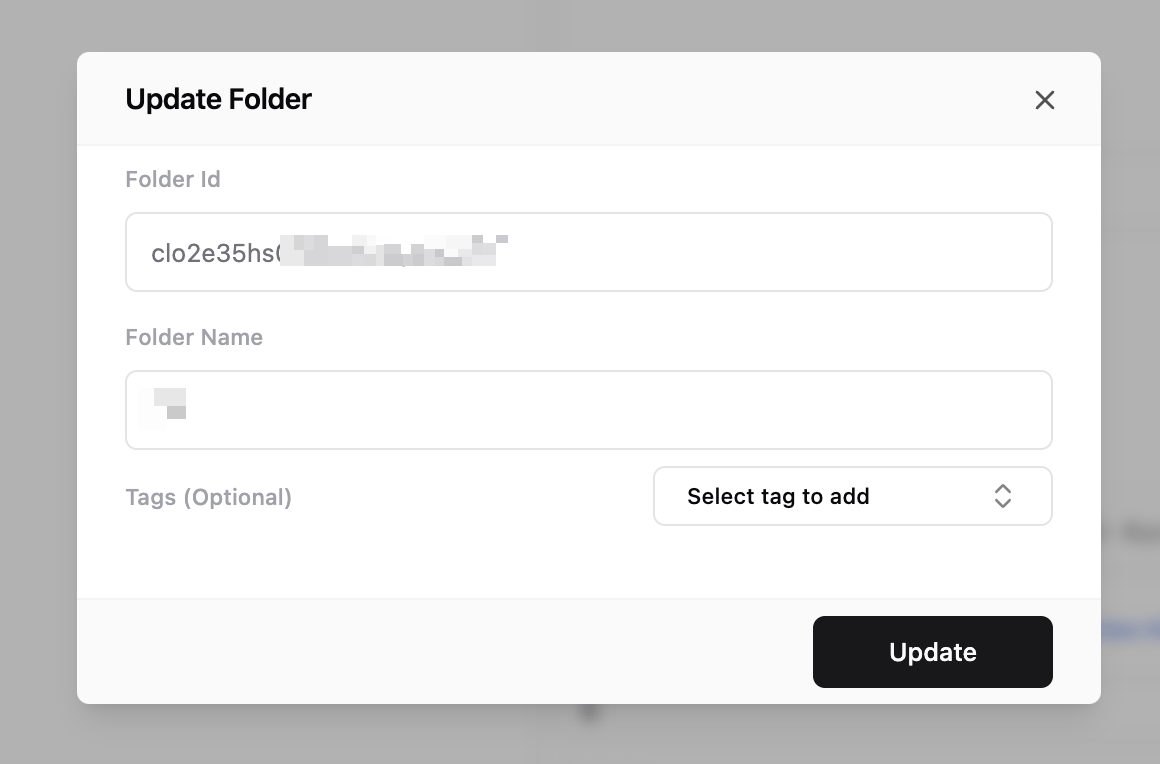
First capture folder id
There are multiple ways to capture folder id. You can use Maxim dashboard to get folder id.
- Right click/click on three dots on the folder you want to get id for.
- Select
Edit Folder option.
- You will see folder id in the form.
import { Maxim } from "@maximai/maxim-js";
const maxim = new Maxim({ apiKey: "" });
const folder = await maxim.getFolderById("folder-id");
from maxim import Maxim, Config
maxim = Maxim(Config(api_key=""))
folder = maxim.get_folder_by_id("folder-id")
import { Maxim, QueryBuilder } from "@maximai/maxim-js";
const maxim = new Maxim({ apiKey: "" });
const folders = await maxim.getFolders(new QueryBuilder().and().tag("CustomerId", "123").build());
from maxim import Maxim, Config
from maxim.models import QueryBuilder
maxim = Maxim(Config(api_key=""))
folders = maxim.get_folders(QueryBuilder().and_().tag("CustomerId", "123").build())
All the rules of prompt chain matching algorithm apply here. You can use same overriding techniques as explained above.
Retrieving Deployed Prompts from a Folder
import { Maxim, QueryBuilder } from "@maximai/maxim-js";
const maxim = new Maxim({ apiKey: "" });
const folder = await maxim.getFolderById("folder-id");
const promptChains = await maxim.getPromptChains(
new QueryBuilder()
.and()
.folder(folder.id)
.deploymentVar("Environment", "prod")
.build(),
);
from maxim import Maxim, Config
from maxim.models import QueryBuilder
maxim = Maxim(Config(api_key=""))
folder = maxim.get_folder_by_id("folder-id")
promptChains = maxim.get_folders(
QueryBuilder()
.and_()
.folder(folder.id)
.deployment_var("Environment", "prod")
.build())
Filtering Prompt Chains by Deployment Variables
import { Maxim, QueryBuilder } from "@maximai/maxim-js;
const maxim = new Maxim({ apiKey: "" });
const folder = await maxim.getFolderById("folder-id");
const promptChains = await maxim.getPromptChains(
new QueryBuilder()
.and()
.folder(folder.id)
.deploymentVar("Environment", "prod")
.build());
from maxim import Maxim, Config
from maxim.models import QueryBuilder
maxim = Maxim(Config(api_key=""))
folder = maxim.get_folder_by_id("folder-id")
prompt_chains = maxim.get_prompt_chain(
QueryBuilder()
.and_()
.folder(folder.id)
.deployment_var("Environment", "prod")
.build())
You have to pass at-least one filter along with folder().
Data Structures
Prompt Chain Structure
export type PromptChain = {
promptChainId: string;
version: number;
versionId: string;
nodes: ({ order: number } & PromptNode)[];
};
// Prompt node
export type PromptNode = {
prompt: Prompt;
};
// Prompt
export type Prompt = {
promptId: string;
version: number;
versionId: string;
messages: { role: string; content: string | CompletionRequestContent[] }[];
modelParameters: { [key: string]: any };
model: string;
tags: PromptTags;
};
@dataclass
class PromptChain():
prompt_chain_id: str
version: int
version_id: str
nodes: List[Dict[int, PromptNode]]
@dataclass
class PromptNode():
prompt: Prompt
@dataclass
class Prompt():
prompt_id: str
version: int
version_id: str
messages: List[Message]
model_parameters: Dict[str, Union[str, int, bool, Dict, None]]
@dataclass
class Message():
role: str
content: str
Folder Structure
export type Folder = {
id: string;
name: string;
parentFolderId?: string;
tags: { [key: string]: string };
};
@dataclass
class Folder():
id: str
name: str
parentFolderId: str
tags: Optional[Dict[str, Union[str, int, bool, None]]] = None
Caching
Using Custom Cache Implementation
Maxim SDK uses in-memory caching by default. You can use your own caching implementation by passing a custom cache object to the SDK. This allows you to remove complete dependency on our backend.
Cache Interface Definition
export interface MaximCache {
getAllKeys(): Promise<string[]>;
get(key: string): Promise<string | null>;
set(key: string, value: string): Promise<void>;
delete(key: string): Promise<void>;
}
class MaximInMemoryCache():
def getAllKeys(self) -> List[str]:
pass
def get(self, key: str) -> Optional[str]:
pass
def set(self, key: str, value: str) -> None:
pass
def delete(self, key: str) -> None:
pass
Implementing Custom Cache
import { Maxim } from "@maximai/maxim-js";
const maxim = new Maxim({ apiKey: "api-key", cache: new CustomCache() });
from maxim import Maxim, Config
maxim = Maxim(Config(apiKey=apiKey, baseUrl=baseUrl, cache=CustomCache()))
Default In-Memory Cache Implementation
import { MaximCache } from "@maximai/maxim-js";
export class MaximInMemoryCache implements MaximCache {
private cache: Map<string, string> = new Map();
getAllKeys(): Promise<string[]> {
return Promise.resolve(Array.from(this.cache.keys()));
}
get(key: string): Promise<string | null> {
return Promise.resolve(this.cache.get(key) || null);
}
set(key: string, value: string): Promise<void> {
this.cache.set(key, value);
return Promise.resolve();
}
}
class MaximInMemoryCache():
def __init__(self):
self.cache = {}
def getAllKeys(self) -> List[str]:
return list(self.cache.keys())
def get(self, key: str) -> Optional[str]:
return self.cache.get(key)
def set(self, key: str, value: str) -> None:
self.cache[key] = value
def delete(self, key: str) -> None:
if key in self.cache:
del self.cache[key]
Matching Algorithm
Before going into the details of how to use the SDK, let’s understand how the matching algorithm works. Maxim SDK uses best matching entity algorithm.
- Let’s assume that, you have asked for a prompt chain with deployment var
env as prod, customerId as "123" and a tag, tenantId as 456 for promptId - "abc".
- SDK will first try to find a prompt chain matching all conditions.
- If we don’t find any matching entity, we enforce only
deploymentVar conditions (you can override this behaviour, as explained in the next section) and match as many tags as possible.
- If we still don’t find any prompt chain, we check for a prompt chain version marked as fallback.
- If we still don’t find any prompt chain, we return
null.
Overriding Matching Algorithm
Enforcing Exact Matches
import { QueryBuilder } from "@maximai/maxim-js;
const promptChain = await maxim.getPromptChain(
"prompt-chain-id",
new QueryBuilder().and().deploymentVar("Environment", "prod").exactMatch().build(),
);
from maxim import Maxim, Config
from maxim.models import QueryBuilder
maxim = Maxim(Config(api_key=""))
prompt_chain = maxim.get_prompt_chain(
"prompt-chain-id",
QueryBuilder()
.and_()
.deployment_var("Environment", "prod")
.exact_match()
.build()
)
Variable-Level Overrides
import { Maxim, QueryBuilder } from "@maximai/maxim-js;
const maxim = new Maxim({ apiKey: "" });
const promptChain = await maxim.getPromptChain("prompt-id", new QueryBuilder().and().deploymentVar("Environment", "prod").build());
from maxim import Maxim, Config
from maxim.models import QueryBuilder
maxim = Maxim(Config(api_key=""))
prompt_chain = maxim.get_prompt_chain(
"prompt-id",
QueryBuilder()
.and_()
.deployment_var("Environment", "prod")
.exact_match()
.build()
)