
What is Node-Level Evaluation?
As your AI application grows in complexity, it becomes increasingly difficult to understand how it is performing on different flows and components. This granular insight becomes necessary to identify bottlenecks or low quality areas in your application’s or agent’s flow. By targeting the underperforming areas, you can optimize overall performance more effectively than using brute force approaches. This is where Node-Level evaluation can help out. It enables you to evaluate a trace or its component (a span, generation or retrieval) in isolation. This can be done via the Maxim SDK’slogger using a very simple API. Let us see how we can start evaluating our nodes.
Before you startYou need to have your logging set up to capture interactions between your LLM and users before you can evaluate them. To do so, you would need to integrate Maxim SDK into your application.
Understanding How the Maxim SDK Logger Evaluates
Two actions are mainly required to evaluate a node:- Attach Evaluators: This action defines what evaluators to run on the particular node, this needs to be called to start an evaluation on any component.
- Attach Variables: Once evaluators are attached on a component, each evaluator waits for all the variables it needs to evaluate to be attached to it. Only after all the variables an evaluator needs are attached, does it start processing.
Evaluation tab under the respective node.
- The evaluator will not run until all of the variables it needs are attached to it.
- If we don’t receive all the variables needed for an evaluator for over 5 minutes, we will start displaying a
Missing variablesmessage (although we will still process the evaluator even if variables are received after 5 minutes). - The variables that an evaluator needs can be found in the evaluator’s page. The evaluator test panel on the right has all the variables that the evalutor needs listed (all of them are required).
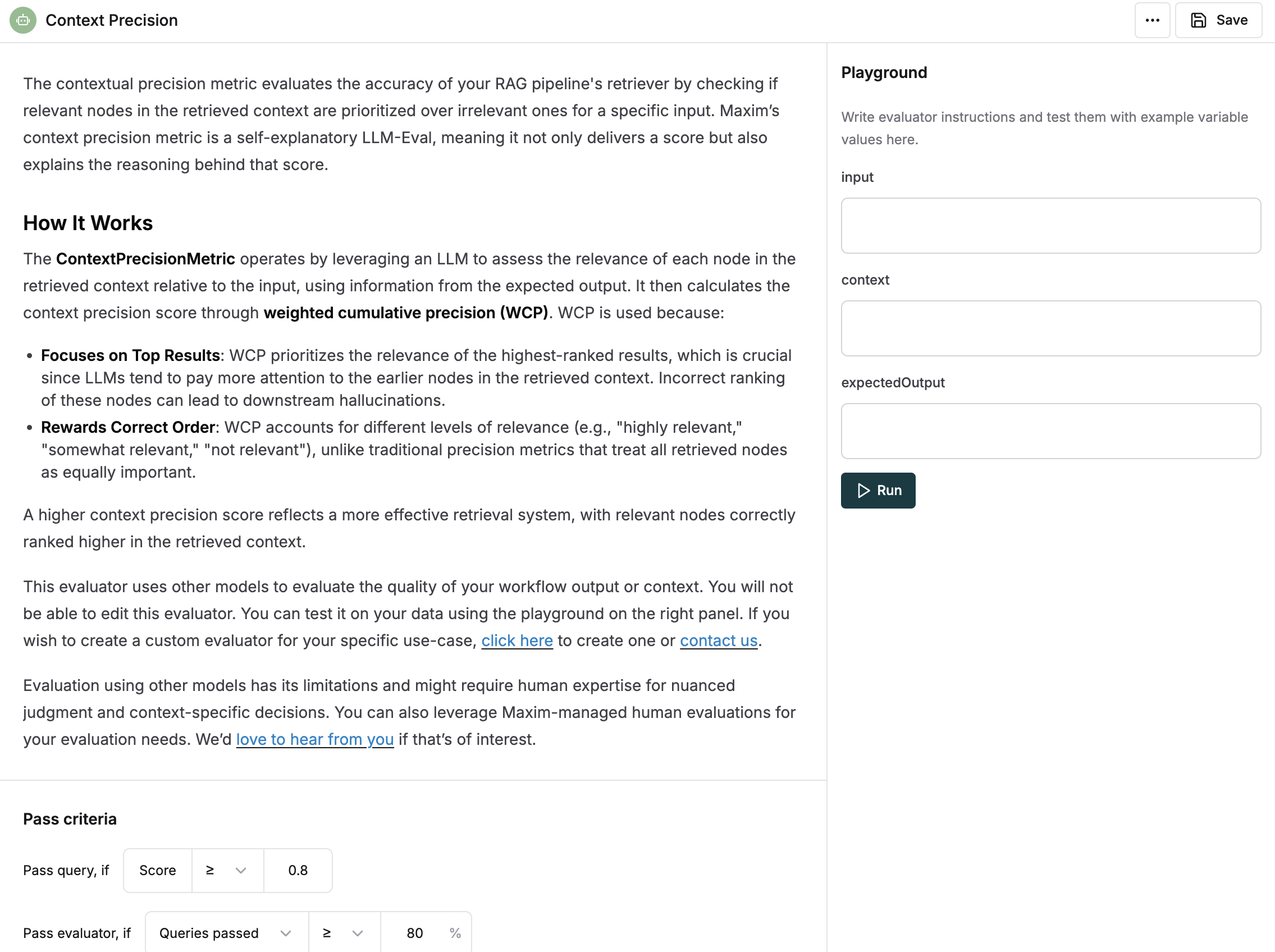
As per the image above, we can see that the evaluator needsinput,contextandexpectedOutputvariables.
Evaluation Framework Architecture
The Maxim SDK provides a robust evaluation framework built on several key components:Core Evaluation Classes
BaseEvaluator: The foundation class for all evaluators in maxim-pyEvaluation Types
The SDK supports multiple evaluator types:- AI Evaluators: Use AI models to evaluate content (e.g., “clarity”, “toxicity”)
- Programmatic Evaluators: Custom logic-based evaluations
- Statistical Evaluators: Mathematical/statistical analysis
- API Evaluators: External API-based evaluations
- Human Evaluators: Manual human assessment
- Local Evaluators: Client-side custom evaluators
Attaching Evaluators via Maxim SDK
We use thewith_evaluators method to attach evaluators to any component within a trace or the trace itself. It is as easy as just listing the names of the evaluators you want to attach, which are available on the platform.
If you list an evaluator that doesn’t exist in your workspace but is available in the store, we will auto install it for you in the workspace.If the evaluator is not available in the store as well, we will ignore it.
Advanced Evaluator Configuration
You can also attach custom local evaluators with specific pass/fail criteria:Providing Variables to Evaluators
Once evaluators are attached to a component, variables can be passed to them via thewith_variables method. This method accepts a key-value pair of variable names to their values.
You also need to specify which evaluators you want these variables to be attached to, which can be done by passing the list of evaluator names as the second argument.
You can directly chain the
with_variables method after attaching evaluators to any component. Allowing you to skip mentioning the evaluator names again.Viewing Evaluation Results on Evaluations Tab
This is very similar to Making sense of evaluations on logs, except that the evaluations for each component appear on their own card as it did for the trace.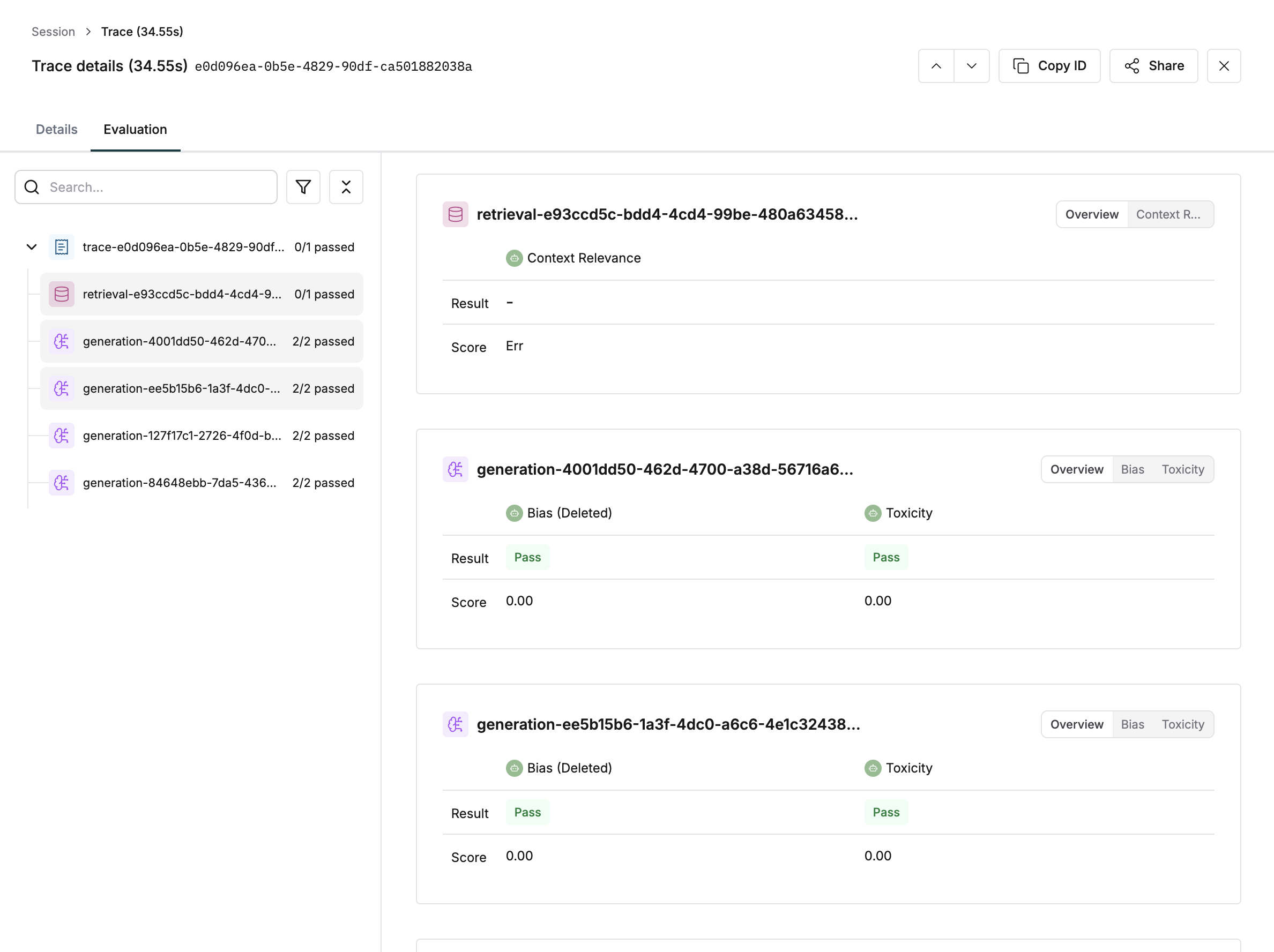
Comprehensive Code Examples
Basic Generation Evaluation
This example shows how to evaluate a simple text generation with multiple evaluators:Advanced RAG System Evaluation
This example demonstrates evaluation in a Retrieval-Augmented Generation (RAG) system:Multi-Agent System Evaluation
This example shows evaluation in a multi-agent system with different evaluation strategies:Custom Local Evaluator Implementation
This example shows how to create and use custom local evaluators:Best Practices
1. Strategic Evaluator Selection
- Use evaluators selectively to monitor key performance metrics. Don’t overdo with attaching too many evaluators.
- Choose evaluators based on your use case:
- For customer service:
helpfulness,clarity,toxicity - For content generation:
coherence,relevance,creativity - For technical documentation:
accuracy,completeness,clarity
- For customer service:
2. Variable Management
- Attach variables reliably to ensure no evaluation is left pending due to lack of variables.
- Use meaningful variable names that clearly indicate their purpose.
- Provide context when available - many evaluators perform better with additional context.
3. Performance Optimization
- Setup sampling and filtering according to your needs to ensure accurate evaluation processing without eating up too much cost.
- Use local evaluators for simple, fast evaluations that don’t require external API calls.
- Batch evaluations when possible to reduce overhead.
4. Custom Evaluator Development
- Inherit from BaseEvaluator for consistent behavior.
- Define clear pass/fail criteria that align with your business objectives.
- Include detailed reasoning in your evaluation results for better debugging.
- Test your custom evaluators thoroughly before deploying to production.
5. Error Handling and Monitoring
- Monitor evaluation results regularly to identify patterns and issues.
- Set up alerts for evaluations that consistently fail or score poorly.
- Review evaluation reasoning to understand why certain outputs are scored low.
6. Integration Patterns
- Use decorators for simple, repetitive evaluation patterns.
- Use programmatic evaluation for complex, conditional evaluation logic.
- Combine multiple evaluation strategies for comprehensive assessment.
Troubleshooting Common Issues
Missing Variables
If you see “Missing variables” messages:- Check that all required variables are provided
- Verify variable names match exactly what the evaluator expects
- Ensure variables are attached to the correct evaluators
Evaluation Not Running
If evaluations aren’t processing:- Verify evaluators are properly attached with
with_evaluators() - Check that all required variables are provided
- Ensure the component (generation, retrieval, etc.) is properly ended
Custom Evaluator Issues
If custom evaluators aren’t working:- Verify the evaluator inherits from
BaseEvaluator - Check that
pass_fail_criteriaare properly defined - Ensure the
evaluate()method returns the correct format - Test the evaluator in isolation before integration