OpenAI Agents SDK Through a Gateway: Models, Budgets, MCP
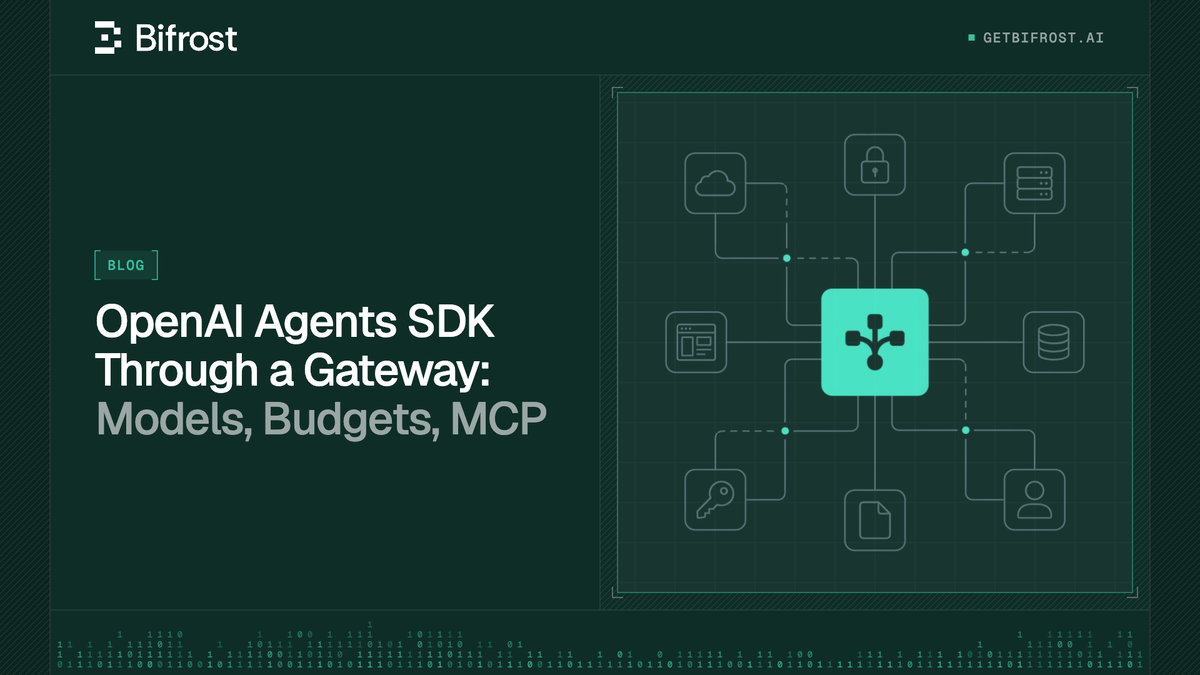
The OpenAI Agents SDK sends every model call through an OpenAI client, so one base URL change routes an agent workflow through an AI gateway. This guide shows the working code for Bifrost, then adds non-OpenAI models, failover, per-agent budgets, MCP tools, and tracing.
TL;DR
- The OpenAI Agents SDK accepts a custom
AsyncOpenAIclient, so pointing it at the Bifrost/openaiendpoint is a two-line change. - Claude, Gemini, and other models work through the same client once
MultiProviderpasses provider-prefixed model IDs through unchanged. - Bifrost retries and fails over model calls inside the gateway, so an agent loop sees one response instead of a provider outage.
- One virtual key per agent gives each agent its own budget, rate limits, model allowlist, and MCP tool allowlist.
- Registering the Bifrost
/mcpendpoint as a single Streamable HTTP server gives every agent a filtered tool catalog without per-server credentials.
The OpenAI Agents SDK is an open-source framework for building multi-agent workflows, and every model call it makes goes through an OpenAI client that can point at any OpenAI-compatible endpoint. Bifrost, the open-source AI gateway for enterprise agent workloads built by Maxim AI, is one such endpoint: it serves an OpenAI-compatible API in front of 25+ providers and 10,000+ models. Routing the SDK through Bifrost moves provider selection, failover, spend limits, tool access, and request logs out of agent code and into one governed layer. This guide shows the working configuration for the current Python SDK (tested against openai-agents 0.24.0), then adds each capability in turn.
What Is the OpenAI Agents SDK?
The OpenAI Agents SDK is OpenAI's open-source, MIT-licensed framework for agent workflows in Python and TypeScript. It provides agents, tools, handoffs between agents, guardrails, sessions, and built-in tracing, and it resolves each agent's model through a model provider that wraps an OpenAI client.
That last detail is what makes a gateway possible. The SDK's models documentation lists three built-in ways to use a non-default endpoint: a global client set with set_default_openai_client, a ModelProvider passed per run, and a concrete Model object set per agent. All three accept an AsyncOpenAI client with a custom base_url, which is the only hook Bifrost needs.
Our guide to running the Claude Agent SDK through a gateway covers the Anthropic equivalent; this guide uses the Bifrost OpenAI-compatible route instead.
Why Run the OpenAI Agents SDK Through an AI Gateway
An AI gateway adds controls the SDK does not carry on its own: provider failover across vendors, spend limits enforced per agent across all runs, a central tool catalog, and one request log for every model call. The agent code keeps its structure; the policy moves to infrastructure.
A multi-agent workflow multiplies model calls: each handoff and tool turn is another request. Without a gateway, every agent holds provider credentials and cost is visible only on the provider invoice. With the Bifrost AI gateway in the path, the control point is the one described in our explainer on what an AI gateway is: every request passes through a layer that authenticates, routes, limits, and logs it.
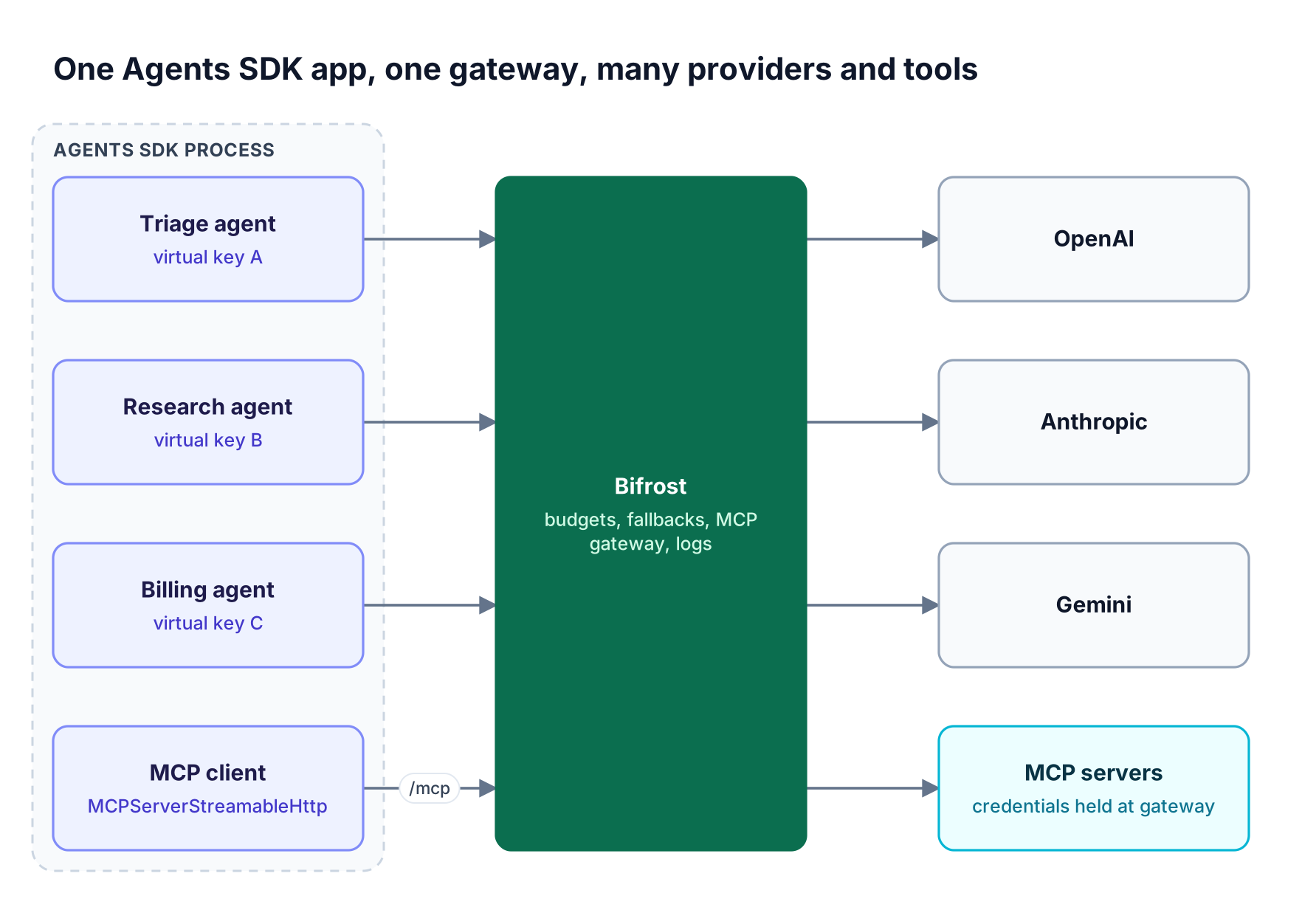
Figure 1: Each agent keeps its own virtual key, while providers, tool credentials, and logs stay at the gateway.
| Concern | Agents SDK alone | Agents SDK through Bifrost |
|---|---|---|
| Model providers | OpenAI by default; others via custom clients or beta adapters | 25+ providers behind one OpenAI-compatible API |
| Provider outage | Opt-in retries against the same endpoint | Retries plus cross-provider fallbacks at the gateway |
| Spend control | Usage reported per run | Budgets and rate limits per virtual key, team, or customer |
| MCP tools | Each server configured in code with its own credentials | One /mcp endpoint, filtered per virtual key |
| Request logs | Traces uploaded to OpenAI's tracing backend | Gateway logs with tokens, cost, latency, and routing |
The gateway adds 11 microseconds of overhead per request at 5,000 requests per second in sustained benchmarks. The governance model behind these controls is the same for every application.
Point the SDK at Bifrost's OpenAI-Compatible API
To point the SDK at Bifrost, create an AsyncOpenAI client whose base_url is the Bifrost /openai route and whose API key is a Bifrost virtual key, then install it as the SDK default. Bifrost accepts the virtual key in the standard Authorization: Bearer header the OpenAI client already sends.
Start Bifrost with npx -y @maximhq/bifrost or Docker, add provider keys, and create a virtual key, as the gateway setup guide shows. Bifrost works as a drop-in replacement for the OpenAI SDK, so the Agents SDK needs no adapter:
import asyncio, os
from openai import AsyncOpenAI
from agents import (
    Agent, Runner,
    set_default_openai_api, set_default_openai_client, set_tracing_disabled,
)

bifrost = AsyncOpenAI(
    base_url="<http://localhost:8080/openai>",
    api_key=os.environ["BIFROST_VIRTUAL_KEY"],   # sk-bf-...
)
set_default_openai_client(bifrost, use_for_tracing=False)
set_default_openai_api("chat_completions")
set_tracing_disabled(True)   # or configure tracing separately (see below)

agent = Agent(name="Assistant", instructions="Be concise.", model="gpt-4o-mini")

async def main():
    result = await Runner.run(agent, "Summarize what an AI gateway does.")
    print(result.final_output)

asyncio.run(main())
The SDK appends /chat/completions to the base URL, which matches the OpenAI SDK integration route, where a bare model name goes to OpenAI. In TypeScript, use setDefaultOpenAIClient and setOpenAIAPI('chat_completions').
Chat Completions or Responses?
The SDK defaults to the Responses API. Bifrost serves both /openai/chat/completions and /openai/responses, but Chat Completions is the safer default for agents that mix providers, because Responses features such as previous_response_id depend on server-side state that a non-OpenAI provider does not hold. Keep OpenAI-only agents that need ToolSearchTool on Responses. Our comparison of the Responses API, Chat Completions, and Anthropic Messages covers the trade-offs in depth.
Use Claude, Gemini, and Other Models With the OpenAI Agents SDK
Bifrost selects a provider from a provider/model prefix such as anthropic/claude-sonnet-4-5 or gemini/gemini-2.5-pro. The SDK rejects unknown prefixes by default, so configure MultiProvider to pass the full model ID through to the OpenAI client pointed at Bifrost.
Figure 2 shows why the setting matters. MultiProvider reads the text before the first slash as a provider name. It strips openai/, routes litellm/ and any-llm/ to its adapters, and raises UserError: Unknown prefix: anthropic for anything else. Setting both prefix modes to "model_id" sends the literal string to Bifrost, which reads the prefix itself:
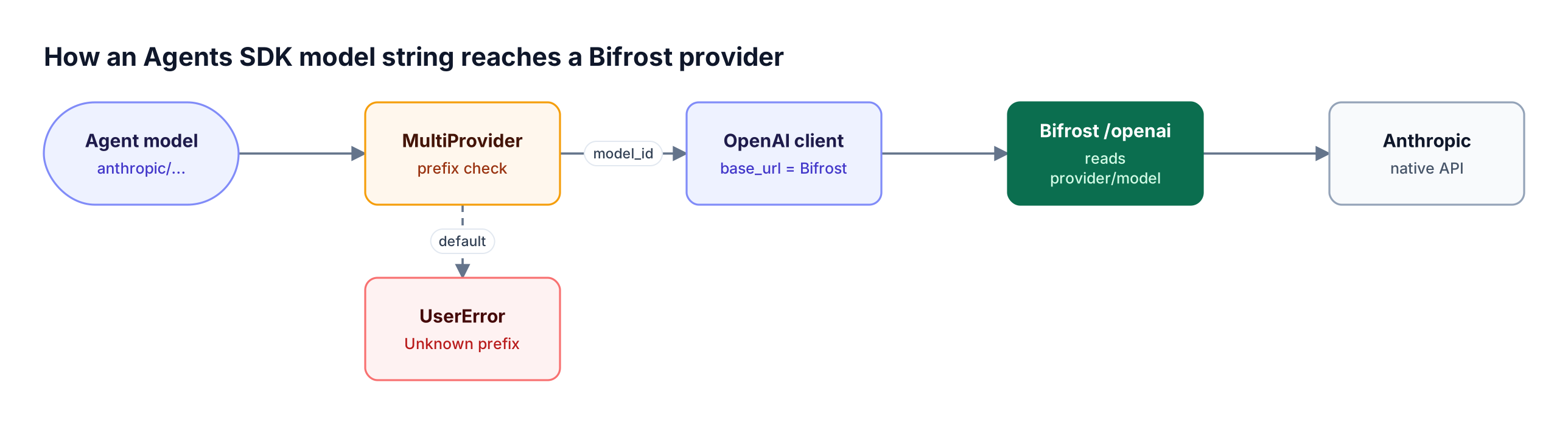
Figure 2: With default MultiProvider settings, an anthropic/ or gemini/ prefix stops inside the SDK before any request is sent.
from agents import Agent, MultiProvider, RunConfig, Runner

provider = MultiProvider(
    openai_client=bifrost,             # the client from the previous step
    openai_use_responses=False,
    openai_prefix_mode="model_id",     # keep "openai/..." intact
    unknown_prefix_mode="model_id",    # pass "anthropic/...", "gemini/..." through
)

research = Agent(name="Research", instructions="Research the question.",
                 model="anthropic/claude-sonnet-4-5")
writer = Agent(name="Writer", instructions="Write the final answer.",
               model="gemini/gemini-2.5-pro")
triage = Agent(name="Triage", instructions="Route to the right agent.",
               model="openai/gpt-4o-mini", handoffs=[research, writer])

result = await Runner.run(triage, "Compare two vector databases.",
                          run_config=RunConfig(model_provider=provider))
Handoffs across providers work because each turn is a separate request that Bifrost translates for each supported provider. The SDK's caution about mixing providers still applies: avoid hosted tools and structured-output schemas on models that do not support them.
| Integration path | Scope | Use it when |
|---|---|---|
set_default_openai_client |
Global | All agents share one Bifrost virtual key |
RunConfig(model_provider=MultiProvider(...)) |
Per run | Agents in one run use provider-prefixed model IDs |
Agent(model=OpenAIChatCompletionsModel(...)) |
Per agent | Each agent needs its own client and virtual key |
Teams that already call several providers from the OpenAI SDK can read our walkthrough of using any LLM provider with the OpenAI SDK; the Agents SDK inherits the same behavior.
Add Provider Failover to Agent Runs
Bifrost fails over an agent's model call when the primary provider keeps failing after its retries, sending the same request to the next provider in a fallback chain. The SDK passes the chain through ModelSettings.extra_body, or a virtual key's weighted provider list generates it automatically.
Retries and fallbacks are two layers. Retries repeat the request against the same provider on transient errors (5xx, network failures) and rotate keys on 429 rate limits; they are set per provider with max_retries, which defaults to 0. Fallbacks move to the next provider/model once the primary is exhausted, and each fallback gets its own retry budget:
from agents import Agent, ModelSettings

research = Agent(
    name="Research",
    instructions="Research the question.",
    model="anthropic/claude-sonnet-4-5",
    model_settings=ModelSettings(
        extra_body={"fallbacks": ["gemini/gemini-2.5-pro", "openai/gpt-4o"]},
    ),
)
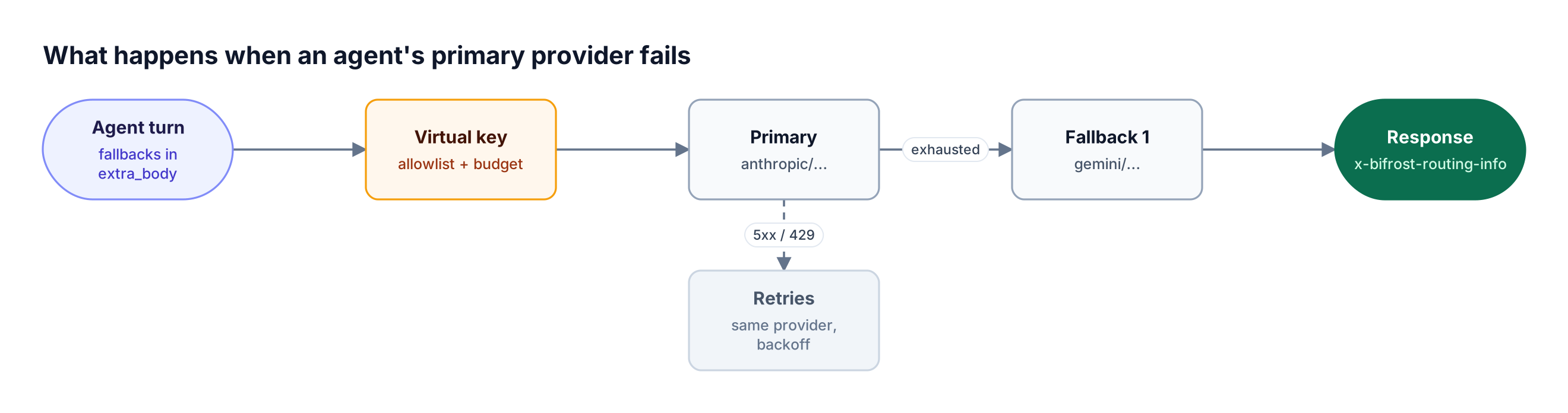
Figure 3: The agent loop sees one successful model response; the retries and the provider switch happen inside the gateway.
For a fallback chain without code, configure the virtual key with weighted provider_configs. When a request carries no fallbacks array, governance-based routing picks a provider by weight and adds the remaining eligible providers, sorted by weight, as fallbacks. The x-bifrost-routing-info-provider and x-bifrost-routing-info-is-fallback response headers show which provider served a turn. Keep the SDK's ModelRetrySettings for network errors between agent and gateway; provider recovery belongs at the gateway, as in our guide to automatic failover and load balancing.
Set Budgets per Agent With Virtual Keys
A virtual key is Bifrost's governance credential: each key carries its own provider and model allowlist, budget, token and request rate limits, and MCP tool allowlist. Issuing one virtual key per agent turns each agent into a separately capped and separately reported cost center.
Give each agent its own client, wrapped in OpenAIChatCompletionsModel, so its requests authenticate with its own key:
from openai import AsyncOpenAI
from agents import Agent, OpenAIChatCompletionsModel

def bifrost_model(model: str, vk_env: str) -> OpenAIChatCompletionsModel:
    client = AsyncOpenAI(base_url="<http://localhost:8080/openai>",
                         api_key=os.environ[vk_env])
    return OpenAIChatCompletionsModel(model=model, openai_client=client)

billing = Agent(name="Billing", instructions="Answer billing questions.",
                model=bifrost_model("openai/gpt-4o-mini", "VK_BILLING_AGENT"))
research = Agent(name="Research", instructions="Research the question.",
                 model=bifrost_model("anthropic/claude-sonnet-4-5", "VK_RESEARCH_AGENT"))
On the gateway side, each virtual key defines what its agent may spend. A key with no provider configs denies every provider, so the allowlist is explicit:
{
  "name": "research-agent",
  "provider_configs": [
    {"provider": "anthropic", "allowed_models": ["claude-sonnet-4-5"], "key_ids": ["*"], "weight": 0.8},
    {"provider": "gemini", "allowed_models": ["gemini-2.5-pro"], "key_ids": ["*"], "weight": 0.2}
  ],
  "budgets": [{"max_limit": 200.00, "reset_duration": "1M"}],
  "rate_limit": {"token_max_limit": 500000, "token_reset_duration": "1h",
                 "request_max_limit": 300, "request_reset_duration": "1m"}
}
Budgets and limits stack from customer to team to virtual key to provider config, with reset durations from one minute to one year and optional calendar alignment. A runaway handoff loop then stops at the agent's cap instead of draining a shared account. Our article on budget and rate-limit architecture for multi-tenant LLM platforms covers how to size these tiers. In production, set enforce_auth_on_inference: true so calls without a virtual key are rejected; Bifrost Enterprise adds clustering, in-VPC deployment, and SSO-based identity.
Connect OpenAI Agents SDK MCP Tools Through the MCP Gateway
Bifrost exposes every connected MCP server through one endpoint, /mcp, that the SDK reaches with MCPServerStreamableHttp. The agent's virtual key decides which tools tools/list returns and which tools/call requests run, so tool access follows the same key as model access.
The SDK's MCP integration supports hosted, Streamable HTTP, SSE, and stdio servers. Point one Streamable HTTP server at Bifrost as an MCP gateway instead of configuring each upstream server in code:
from agents import Agent, Runner
from agents.mcp import MCPServerStreamableHttp

async with MCPServerStreamableHttp(
    name="bifrost",
    params={
        "url": "<http://localhost:8080/mcp>",
        "headers": {"x-bf-vk": os.environ["VK_RESEARCH_AGENT"]},
        "timeout": 30,
    },
    cache_tools_list=True,
) as tools:
    research = Agent(
        name="Research",
        instructions="Use the tools to answer.",
        model=bifrost_model("anthropic/claude-sonnet-4-5", "VK_RESEARCH_AGENT"),
        mcp_servers=[tools],
    )
    result = await Runner.run(research, "Find the latest release notes.")
Upstream MCP credentials stay at the gateway, and MCP tool filtering per virtual key is deny-by-default: a key sees only the clients and tools configured on it, plus clients marked Allow by Default. The SDK's require_approval and tool guardrails keep working. The Bifrost MCP gateway page covers the authentication modes and Virtual MCP endpoints in more detail.
Turn off auto tool injection for SDK agents
Bifrost can also inject configured MCP tools into inference requests on its own. When the agent already discovers those tools through /mcp, the model receives each tool twice. Enable Disable Auto Tool Injection under Settings → MCP so tools reach the model only through the SDK's MCP client.
Agents that connect many servers can use Code Mode, which our MCP gateway launch post measured at up to 92% lower token costs. See also what an MCP gateway is.
OpenAI Agents SDK Tracing and Gateway Observability
The SDK traces each run and uploads it to OpenAI with the client's API key, so a client holding a Bifrost virtual key needs tracing configured separately. Bifrost then logs every model and tool call at the gateway, with tokens, cost, latency, and the provider that served it.
The SDK tracing guide lists three options: keep tracing on with set_tracing_export_api_key and a real OpenAI key, replace the exporter with set_trace_processors, or call set_tracing_disabled(True). Passing use_for_tracing=False to set_default_openai_client avoids sending the virtual key to the trace backend.
Gateway-side, built-in observability records inputs, outputs, token usage, cost, latency, and retry attempts for each call. Two request headers make agent runs readable in those logs:
from agents import ModelSettings, RunConfig

run_id = "run-2026-10-23-0042"
result = await Runner.run(
    triage, "Compare two vector databases.",
    run_config=RunConfig(
        model_provider=provider,
        group_id=run_id,  # SDK trace grouping
        model_settings=ModelSettings(extra_headers={
            "x-bf-session-id": run_id,        # groups the run's calls in Bifrost logs
            "x-bf-lh-agent-workflow": "vector-db-research",  # custom log metadata
        }),
    ),
)
Reusing one ID for group_id and x-bf-session-id links the SDK trace to the gateway log. For existing monitoring stacks, the OpenTelemetry plugin exports traces in GenAI semantic conventions, and a Prometheus endpoint exposes request and cost metrics.
Route Agent-to-Agent Calls Through Agent Gateway
If a team exposes its SDK agents to each other or to other services over A2A, the recently launched Agent Gateway in Bifrost brings those agent calls into the same gateway as model and tool calls. The SDK's documentation does not describe a native A2A server, so this applies when an agent is served behind an A2A v1 server.
The Agent Gateway launch on October 20, 2026 added A2A traffic to Bifrost alongside LLM and MCP traffic. An agent is registered from its agent card URL, a virtual key is granted access to specific agents, and Agent Logs show each conversation's messages, task updates, results, recorded caller, and latency. Permission to call an agent is separate from access to the models and tools that agent uses. The A2A protocol defines the context and task IDs that connect the two sides.
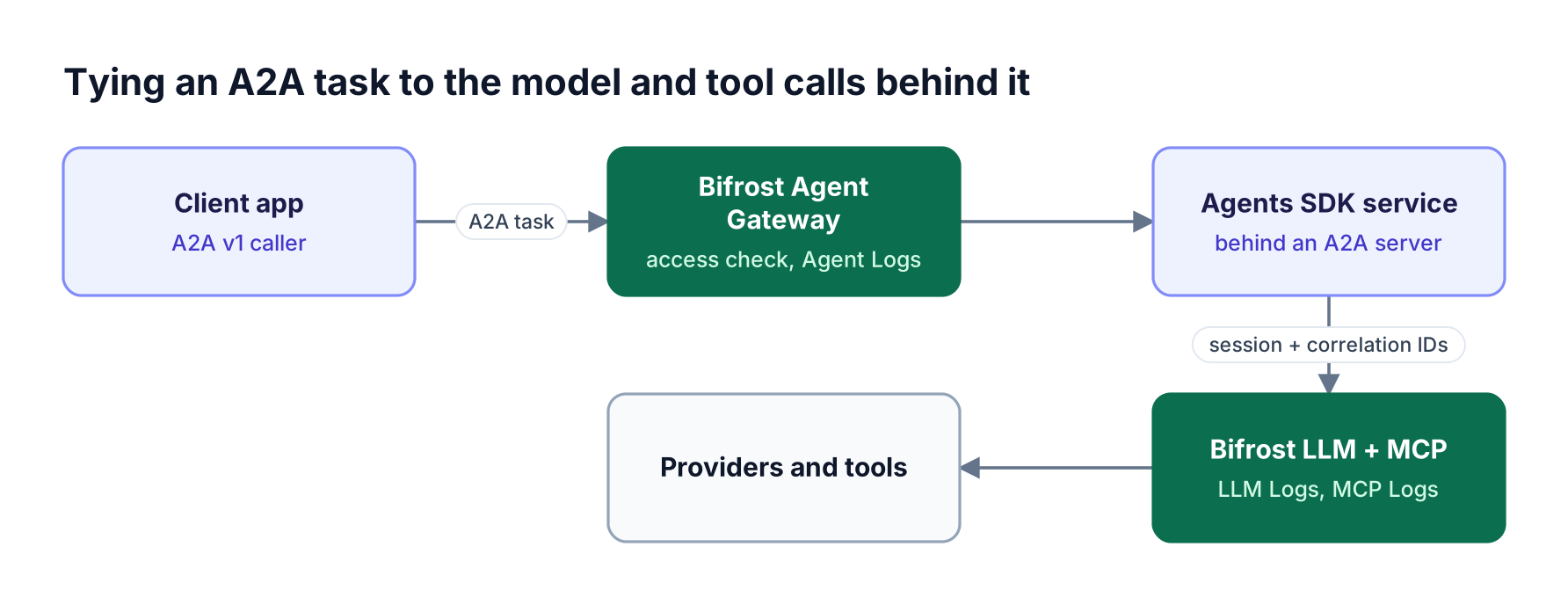
Figure 4: Two headers carry the A2A context ID and task ID, so Agent Logs can show the task next to its LLM and MCP logs.
Inside the A2A server, read the context ID and task ID for the current task and attach them to the agent's Bifrost calls:
task_settings = ModelSettings(extra_headers={
    "x-bf-session-id": a2a_context_id,          # A2A context ID
    "x-bf-agent-correlation-id": a2a_task_id,   # A2A task ID
})
result = await Runner.run(agent, user_message,
                          run_config=RunConfig(model_provider=provider,
                                               model_settings=task_settings))
Send the same headers on that task's MCP requests, and keep them in per-task state so concurrent tasks are not attributed to the wrong caller. The steps are in the guide to connecting an agent's model and tool calls; with "Forward Bifrost authentication" enabled and the agent reusing the forwarded credential on these calls, they follow the original caller's access rules and budgets, and the Agent Gateway announcement covers the remaining options.
Frequently Asked Questions
Is the OpenAI Agents SDK free?
Yes. The SDK is open source under the MIT license and free to install from PyPI or npm. Costs come from the model calls an agent makes, billed by the provider that serves them. Routing those calls through Bifrost, also open source, adds per-agent budgets that cap spend before it reaches the provider invoice.
Can I use MCP with the OpenAI API?
Yes. The Agents SDK connects to MCP servers over Streamable HTTP, SSE, or stdio, and the Responses API can call hosted MCP servers on the model's behalf. For governed access, point one MCPServerStreamableHttp at the Bifrost MCP endpoint with a virtual key; the key decides which tools the agent can list and call, and upstream credentials stay at the gateway.
Can the OpenAI Agents SDK use non-OpenAI models?
Yes. Any provider with an OpenAI-compatible endpoint works through a custom AsyncOpenAI client, and through Bifrost that covers 25+ providers, including Anthropic, Gemini, Bedrock, Vertex AI, and self-hosted vLLM or Ollama. Use provider-prefixed model IDs such as anthropic/claude-sonnet-4-5 and set MultiProvider(unknown_prefix_mode="model_id") so the SDK passes them through.
How do I set a custom base URL for the OpenAI Agents SDK?
Create AsyncOpenAI(base_url="<http://localhost:8080/openai>", api_key=...) and pass it to set_default_openai_client, or set the OPENAI_BASE_URL environment variable before the first model call. For endpoints that do not implement the Responses API for every provider, also call set_default_openai_api("chat_completions") so the SDK sends Chat Completions requests.
Does the OpenAI Agents SDK support A2A?
The SDK's documentation does not describe a native A2A server or client; it coordinates agents in one process through handoffs and agents-as-tools. When a team serves an SDK agent behind an A2A v1 server, Bifrost Agent Gateway can register it, control which virtual keys may call it, and link each task to its model and MCP calls through correlation headers.
Run the OpenAI Agents SDK on Bifrost
Running the OpenAI Agents SDK through Bifrost takes one client change and returns provider choice, failover, per-agent budgets, governed MCP tools, and a single log of every call. The agent code keeps its handoffs and tools; the gateway enforces the policy around them. Read our AI gateway explainer for the wider architecture, browse the Bifrost resources hub, or book a demo to see how Bifrost governs agent workloads at enterprise scale.