A2A Protocol: How to Run Agent Traffic Through a Gateway
The A2A protocol is an open standard that lets AI agents discover each other, exchange messages, and hand off tasks. This guide covers its core objects and transports, then shows how to route, govern, and trace A2A traffic through Bifrost Agent Gateway.
TL;DR
- The A2A protocol (Agent2Agent) is an open standard for agent-to-agent communication built on five objects: agent cards, messages, tasks, contexts, and artifacts.
- A2A v1 defines three standard transports (JSON-RPC, HTTP+JSON/REST, and gRPC) plus three ways to receive task updates: polling, streaming, and push notifications.
- Bifrost Agent Gateway routes A2A v1 traffic through one gateway, with per-agent access grants, Agent Logs, and bridging between all three transports.
- Two correlation headers,
x-bf-session-id(the A2A context ID) andx-bf-agent-correlation-id(the A2A task ID), link an agent conversation to the model and MCP tool calls behind it. - Registering an existing A2A v1 agent in Bifrost takes four steps: set the External Client URL, fetch the agent card, grant access, and point the client at the Bifrost endpoint.
The A2A protocol (Agent2Agent) is an open standard that lets AI agents built on different frameworks discover each other, exchange messages, and delegate long-running tasks over HTTP or gRPC. Once one agent hands work to another that calls models and tools, each hop keeps its own logs and credentials, and tracing who started a request becomes slow work. Bifrost, the open-source AI gateway built by Maxim AI, now carries A2A agent calls alongside model and MCP tool calls. This guide explains how the A2A protocol works and how to run A2A traffic through a gateway in production.
What Is the A2A Protocol?
The A2A protocol is an open, transport-neutral standard that defines how a client agent sends work to a remote agent and receives status updates and results. The remote agent stays opaque: it exposes an endpoint and a description of its skills, but never its internal memory, prompts, or tools. Agents built with different frameworks or vendors can collaborate through one shared contract.
A2A was introduced by Google and is now an open project hosted by the Linux Foundation; the A2A specification is the source of truth for every method and data structure.
Every interaction has an A2A client (an application or agent acting for a user) and an A2A server (the remote agent). For a general primer, see this introduction to the Agent2Agent protocol; this guide focuses on running A2A traffic in production.
A2A Core Concepts: Agent Cards, Messages, Tasks, Contexts, and Artifacts
A2A uses five core objects. An agent card describes the agent, a message is one turn of communication, a task is a stateful unit of work, a context groups related tasks into one conversation, and an artifact is a concrete output. Every A2A operation reads or changes one of these objects, so they are the starting point for debugging A2A traffic.
| Object | What it is | Why it matters in production |
|---|---|---|
| Agent card | JSON at /.well-known/agent-card.json: skills, capabilities, interfaces, auth |
Discovery starts here; a gateway rewrites its endpoints |
| Message | One turn with a role and parts: text, file, or structured data |
Carries instructions and questions |
| Task | Stateful unit of work with an ID and state | The ID you poll, stream, or cancel |
| Context | ID grouping related tasks into one conversation | The session you inspect end to end |
| Artifact | An output such as a report or file | The result the caller consumes |
For operators, the A2A agent card matters most. Its supportedInterfaces array lists each endpoint with a protocolBinding (JSONRPC, GRPC, or HTTP+JSON) and version, and capabilities declares streaming and push notification support.
Tasks move through a defined set of states: submitted, working, input-required, auth-required, completed, failed, canceled, and rejected. The last four are terminal, and a terminal task cannot accept further messages.
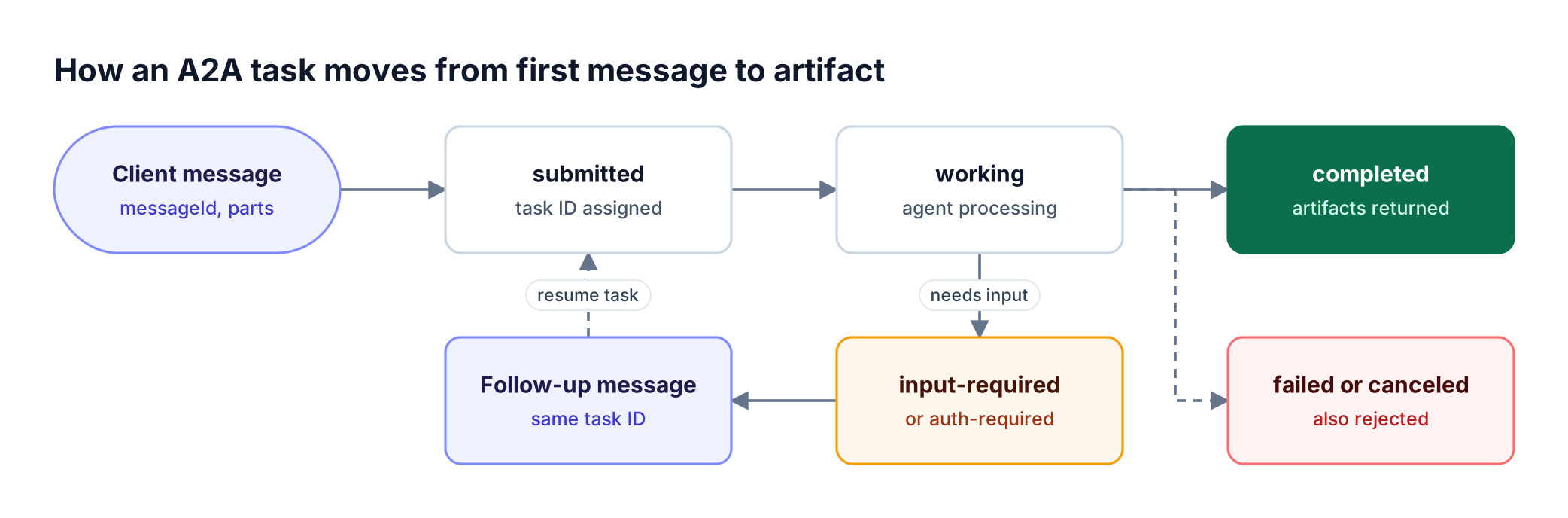
Figure 1: A task can pause for input and resume under the same task ID; only completed, failed, canceled, and rejected are terminal.
As Figure 1 shows, an input-required task continues when the client sends a follow-up with the same task ID and context ID. A successful HTTP or JSON-RPC response can still carry a failed task, so check both the transport result and the task state. The guide to A2A messages, tasks, and events shows each state with requests.
The Three A2A v1 Transports: JSON-RPC, REST, and gRPC
A2A v1 defines one set of operations and three standard bindings that carry them: JSON-RPC 2.0 over HTTP, HTTP+JSON (labeled REST), and gRPC. Every binding exposes the same operations with the same semantics, so a client can choose any interface the agent card advertises. Clients send an A2A-Version header (for example 1.0) on each request.
| Operation | JSON-RPC method | gRPC method | REST endpoint |
|---|---|---|---|
| Send message | SendMessage |
SendMessage |
POST /message:send |
| Send streaming message | SendStreamingMessage |
SendStreamingMessage |
POST /message:stream |
| Get task | GetTask |
GetTask |
GET /tasks/{id} |
| Cancel task | CancelTask |
CancelTask |
POST /tasks/{id}:cancel |
| Subscribe to task | SubscribeToTask |
SubscribeToTask |
POST /tasks/{id}:subscribe |
| Create push config | CreateTaskPushNotificationConfig |
CreateTaskPushNotificationConfig |
POST /tasks/{id}/pushNotificationConfigs |
The full mapping, including list and delete operations and per-binding error codes, is in section 5 of the A2A protocol specification. Because the operation stays the same and only the envelope changes, a gateway can bridge transports. MCP follows a similar layering, covered in this breakdown of MCP transports, primitives, and the message lifecycle.
Polling, streaming, and push notifications
A2A gives clients three ways to follow a task:
- Polling: call
GetTaskperiodically; works on every binding. - Streaming:
SendStreamingMessageorSubscribeToTaskreturns task, status-update, and artifact-update events. - Push notifications: the agent POSTs to a client-registered webhook when the task changes, which suits long-running, server-to-server work.
A2A vs MCP: Where Each Protocol Fits
A2A and MCP solve different problems and are designed to work together. MCP (Model Context Protocol) standardizes how an agent connects to tools, APIs, and data sources, while A2A standardizes how one agent delegates work to another, opaque agent. Most production agents use both: MCP inside the agent, A2A between agents.
| Dimension | A2A | MCP |
|---|---|---|
| Relationship | Agent to agent | Agent to tool or resource |
| Remote side | Opaque agent with its own reasoning | Function or data source with a schema |
| Unit of work | Task with a lifecycle and artifacts | Tool call with a result |
| Discovery | Agent card | Server tool listing |
The distinction matters for governance: a grant to call a research agent says nothing about which MCP tools or models that agent may use. Bifrost already runs as an MCP gateway for tool traffic, and the MCP gateway resource page covers that side.
Why Agent-to-Agent Communication Needs a Gateway
Agent-to-agent communication without a gateway means each client holds a direct URL and credential for each agent, and each agent writes its own logs. With several callers and agents, teams cannot easily answer who called which agent, whether they were allowed to, and which model calls produced the answer.
A gateway on the A2A path addresses four production problems:
- Access: which callers may reach which agent, enforced in one place.
- Credentials: callers authenticate to the gateway, and agent credentials stay with it.
- Traceability: one record per conversation, linked to the model and tool calls behind it.
- Transport mismatch: a REST client and a gRPC agent can talk without an adapter.
These are the same reasons teams put an AI gateway in front of LLM providers, applied to agents, and they sit inside the wider AI governance model for models and tools. This guide on how to choose an agent gateway covers selection criteria.
How Bifrost Agent Gateway Handles A2A Traffic
Bifrost Agent Gateway, launched on October 20, 2026, brings A2A agent calls into Bifrost alongside model and MCP tool calls, so one gateway covers models, tools, and agents. Teams register an existing A2A v1 agent, give callers its Bifrost endpoint, and get one place to control access, inspect conversations, and follow the work behind an agent's response, as described in the Agent Gateway launch announcement.
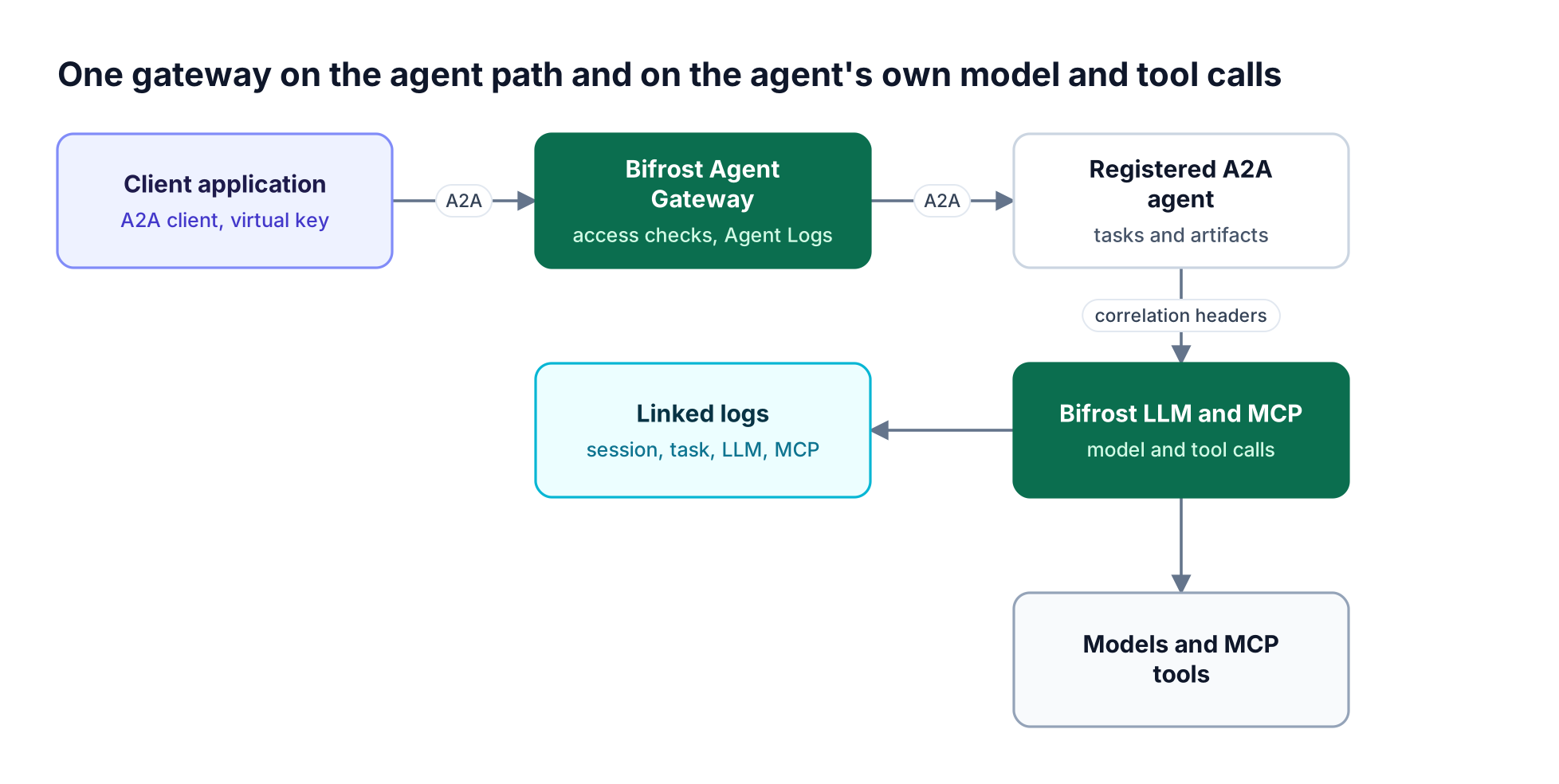
Figure 2: When agent traffic and the agent's model and tool calls share one gateway, a single context ID ties the conversation to every call behind it.
Agent Logs
In Agent Logs, teams open a conversation and read the exchange: messages, task updates, results, the recorded caller, and agent latency alongside the overhead Bifrost added. Sessions group by A2A context ID.
Correlation headers
To follow the agent's own work, the agent routes its model and MCP tool calls through Bifrost and attaches two headers:
| Header | Value | What it links |
|---|---|---|
x-bf-session-id |
A2A context ID | The whole conversation's LLM and MCP logs |
x-bf-agent-correlation-id |
A2A task ID | The model and tool calls for one task |
With both headers set, teams can inspect prompts, responses, and tool results, with token usage and cost on the model calls: a starting point when an answer looks wrong, a task takes too long, or usage jumps unexpectedly. The guide to connecting an agent's model and tool calls covers the header values and request examples.
Transport Bridging Across A2A v1 Bindings
Bifrost bridges all three A2A v1 bindings (REST / HTTP+JSON, JSON-RPC, and gRPC), so the client and the agent can use different transports. A REST client can reach a JSON-RPC agent through Bifrost without a custom adapter. The client picks how it reaches Bifrost, and Bifrost picks how it reaches the agent from the agent card.
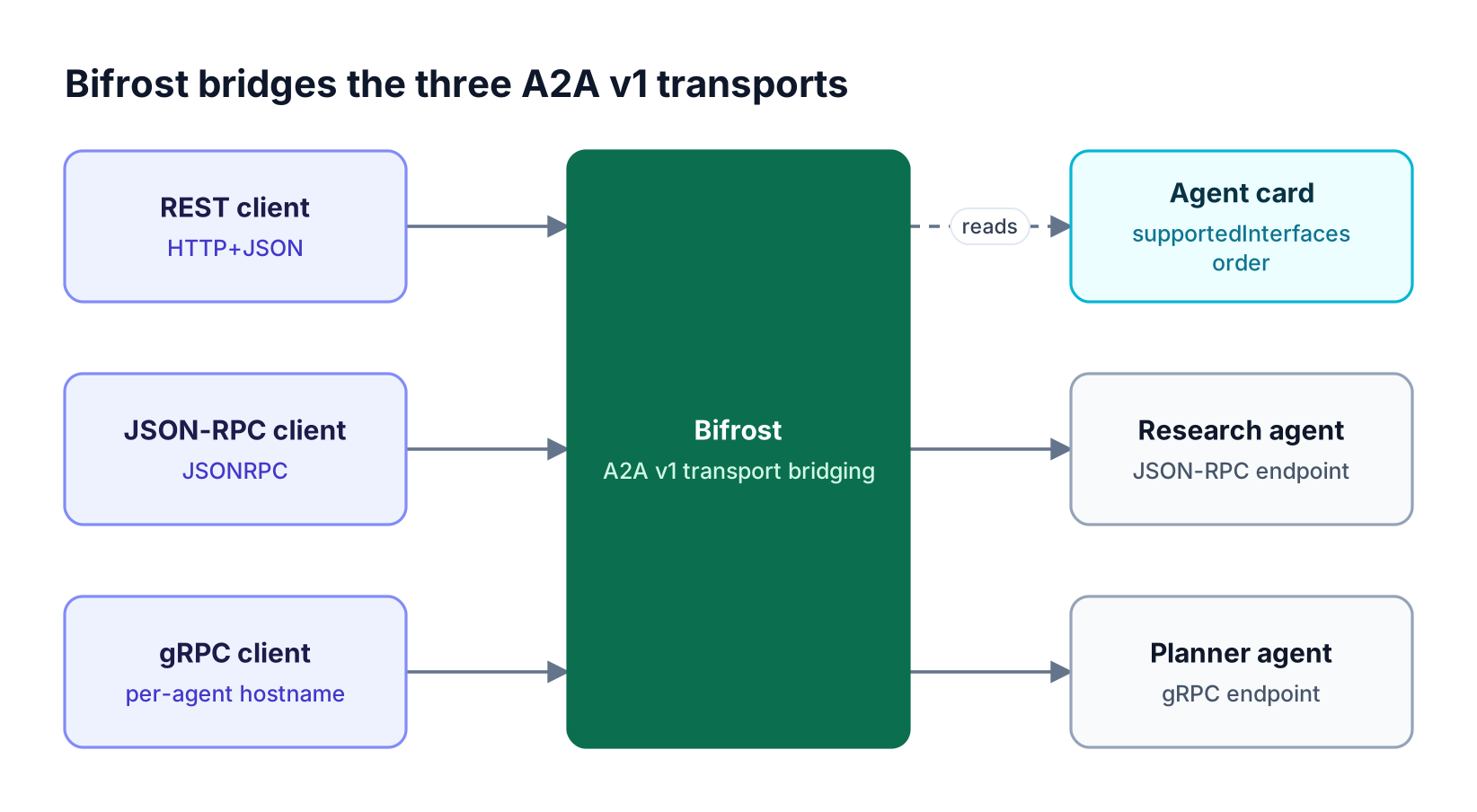
Figure 3: The client picks its transport and the agent card picks the upstream one, so neither side needs an adapter for the other.
On the agent side, Bifrost reads the card's supportedInterfaces, and card order sets the initial preference, so put the preferred interface first. The transport selection and recovery page covers the details.
Clients that connect to Bifrost over gRPC need additional setup: Bifrost identifies each agent by hostname on a shared gRPC listener, which needs a base domain and wildcard DNS. The gateway settings and transports page documents that setup for config.json and Helm.
Push Notifications Through the Gateway
Push notifications let an application receive updates for a long-running A2A task without holding a stream open. When the agent supports them, the application registers its callback through Bifrost. The agent receives a Bifrost callback address and a separate token, while the application's own callback address and credentials stay with Bifrost.
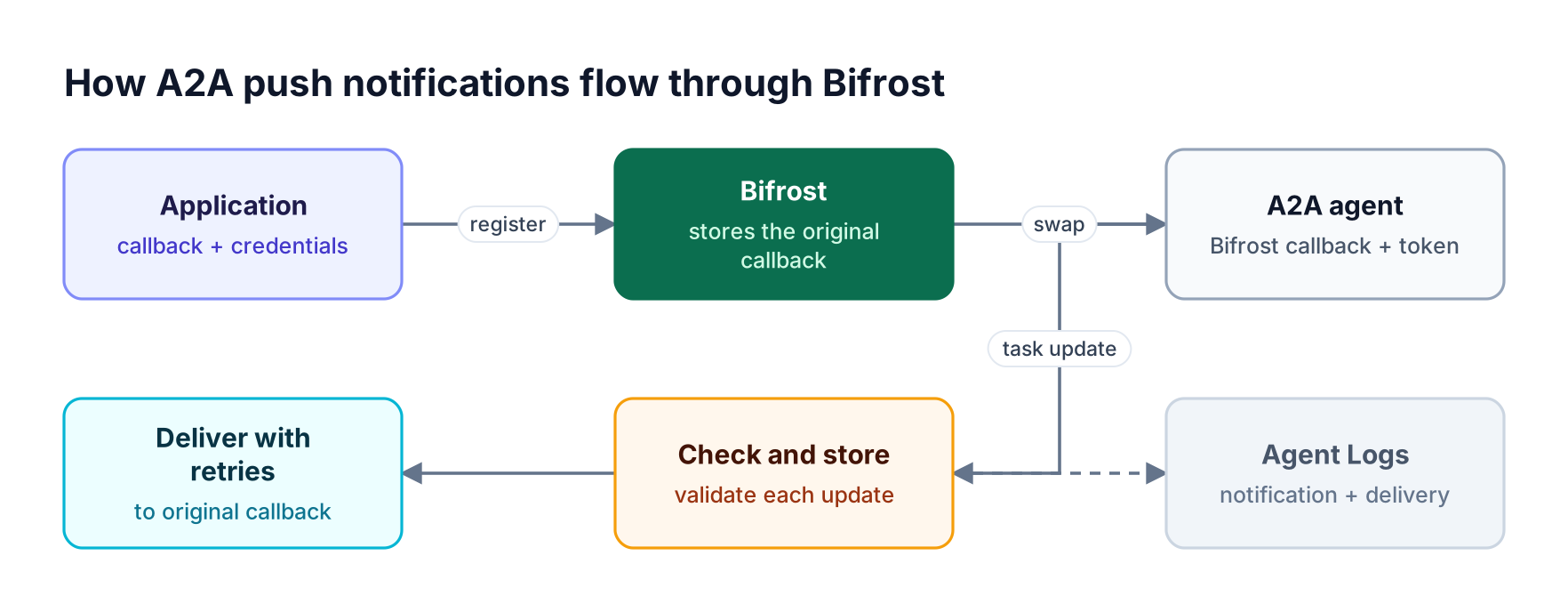
Figure 4: The agent never sees the application's callback address or credentials, and both hops of every update land in Agent Logs.
When an update arrives, Bifrost checks it, stores it, and delivers it to the application, with retries for failed deliveries. Private and internal callback destinations are blocked by default. Agent Logs show both the notification arriving and each delivery attempt.
Callbacks should be idempotent, because a retried delivery can repeat an update. The push notifications guide covers callback authentication, cleanup, and troubleshooting.
A2A Security and Access Control for Agents
A2A security at the gateway starts with deciding who may call each agent. In Bifrost, a virtual key is granted access to specific agents, or an agent is set to "Allow any virtual key" so every valid key can reach it. Enabling authentication enforcement rejects anonymous calls.
Three rules shape how agent access works in the Bifrost AI gateway:
- Agent access is separate from model and tool access. Permission to call a research agent does not grant access to the models or MCP tools that agent uses. Those calls need their own grants.
- Caller credentials are stripped by default. Bifrost removes the caller's Bifrost credential before forwarding a request to the agent.
- Trusted agents can reuse the caller's identity. With "Forward Bifrost authentication" enabled, the agent reuses the caller's credential on its model and tool calls through Bifrost, so those calls follow the original caller's access rules and configured budgets.
Alternatively, the agent uses its own Bifrost key, and that key's permissions and budgets apply. The Agent Gateway authentication page covers card-fetch credentials, request authentication, and header collisions.
In Bifrost Enterprise, agent access can also be managed through Access Profiles and Projects.
The access profiles announcement explains how profiles map to teams, business units, and customers, and the Bifrost governance hub covers virtual keys, budgets, and rate limits for model traffic.
Setting Up A2A Agents in Bifrost: Four Steps
Agent Gateway works with A2A v1 agents that teams already run. Setup has four steps: set Bifrost's public base URL, register the agent from its card, grant access, and point the client at the Bifrost endpoint. Clients discovering the agent through the Bifrost-served card receive gateway endpoints, so their calls come through Bifrost too. The Agent Gateway launch walkthrough shows the same steps in the dashboard.
- Set the External Client URL. In Agents → Agent Settings, set External Client URL to Bifrost's public base URL. For an internal agent, also add it to the Private Network Allowlist.
- Register the agent. Open Agents → Agent Catalog → New Agent, paste the full agent card URL, click Fetch, review the skills and authentication, and save.
- Grant access. Enable authentication enforcement and give a virtual key access to the agent.
- Use the Bifrost endpoint. Copy the agent's gateway endpoint and use it in the application.
The same registration in config.json:
{
  "client": {
    "a2a_external_client_url": "<https://bifrost.example.com>",
    "enforce_auth_on_inference": true
  },
  "agents": [
    {
      "name": "library-research",
      "agent_card_url": "<https://research.example.com/.well-known/agent-card.json>",
      "allow_by_default": false,
      "virtual_key_ids": ["application-key-id"]
    }
  ]
}
A client then sends an A2A v1 SendMessage call to the gateway with its virtual key in x-bf-vk:
curl <https://bifrost.example.com/agents/a2a/library-research/json-rpc> \
  -H "x-bf-vk: $BIFROST_VK" \
  -H "Content-Type: application/json" \
  -H "A2A-Version: 1.0" \
  -d '{"jsonrpc": "2.0", "id": "research-1", "method": "SendMessage",
       "params": {"message": {"messageId": "question-1", "role": "user",
       "parts": [{"text": "Explain how to reuse one HTTP client across requests."}]}}}'
Inside the agent, each model call carries the forwarded credential and both correlation headers:
curl <https://bifrost.example.com/v1/chat/completions> \
  -H "x-bf-vk: $CALLER_BIFROST_VK" \
  -H "x-bf-session-id: $A2A_CONTEXT_ID" \
  -H "x-bf-agent-correlation-id: $A2A_TASK_ID" \
  -H "Content-Type: application/json" \
  -d '{"model": "openai/gpt-4o-mini", "messages": [{"role": "user", "content": "..."}]}'
MCP calls use the same headers on the MCP tool execution endpoint. Use the IDs the A2A server assigned, not the JSON-RPC request ID, and keep them scoped per task. The agent registration guide also covers Helm and private agent cards.
The same deployment routes model traffic across 25+ providers and 10,000+ models through one OpenAI-compatible API, and tool traffic under the controls described in MCP gateway access control and cost governance.
Frequently Asked Questions
What is the A2A protocol?
The A2A protocol (Agent2Agent) is an open standard for communication between AI agents. A client sends messages to a remote agent, which creates tasks, reports status, and returns artifacts. Agents describe themselves with an agent card at a well-known URL. A2A v1 supports JSON-RPC, HTTP+JSON/REST, and gRPC bindings, and is developed as an open project under the Linux Foundation.
How is A2A different from MCP?
A2A connects agents to other agents, while MCP connects an agent to tools and data sources. Under A2A the remote agent is opaque and works through tasks with lifecycles and artifacts. Under MCP the remote side exposes tools with schemas that the agent calls directly. The two are complementary: an agent typically uses MCP for its own tools and A2A to delegate work.
Can agents talk to each other?
Yes. With the A2A protocol, a client agent discovers a remote agent through its agent card and sends it messages over a standard transport. The remote agent can ask for more input, stream progress, or push updates to a webhook. Running that traffic through Bifrost adds per-agent access grants, Agent Logs, and transport bridging, so a REST client can reach a JSON-RPC agent.
How do I link an agent's model calls to its A2A task?
Route the agent's model and MCP tool calls through Bifrost and attach two headers on each call: x-bf-session-id set to the A2A context ID, and x-bf-agent-correlation-id set to the A2A task ID. Agent Logs then connects the conversation to its model and tool calls, with prompts, responses, tool results, token usage, and cost on the model calls.
Does Bifrost Agent Gateway support protocols other than A2A?
No. Bifrost Agent Gateway works with A2A v1 agents, and A2A is the agent protocol currently supported. Model traffic runs through Bifrost as an LLM gateway and tool traffic as an MCP gateway, so an agent's own model and tool calls can flow through the same Bifrost deployment alongside its A2A traffic.
Start Running A2A Traffic Through Bifrost
The A2A protocol gives agents a common contract for discovery, tasks, and artifacts, and a gateway makes that contract governable and traceable in production. Bifrost brings A2A agent calls, model calls, and MCP tool calls into one gateway, with per-agent access grants, Agent Logs, correlation headers, push notification routing, and transport bridging. Read the Agent Gateway documentation to register a first agent, compare options in this roundup of open-source agent gateways for MCP and A2A, or book a demo with the Bifrost team to plan agent-to-agent governance for your organization.