Bifrost MCP Gateway: Access Control, Cost Governance, and 92% Lower Token Costs at Scale

Pratham Mishra
Apr 08, 2026 · 13 min read
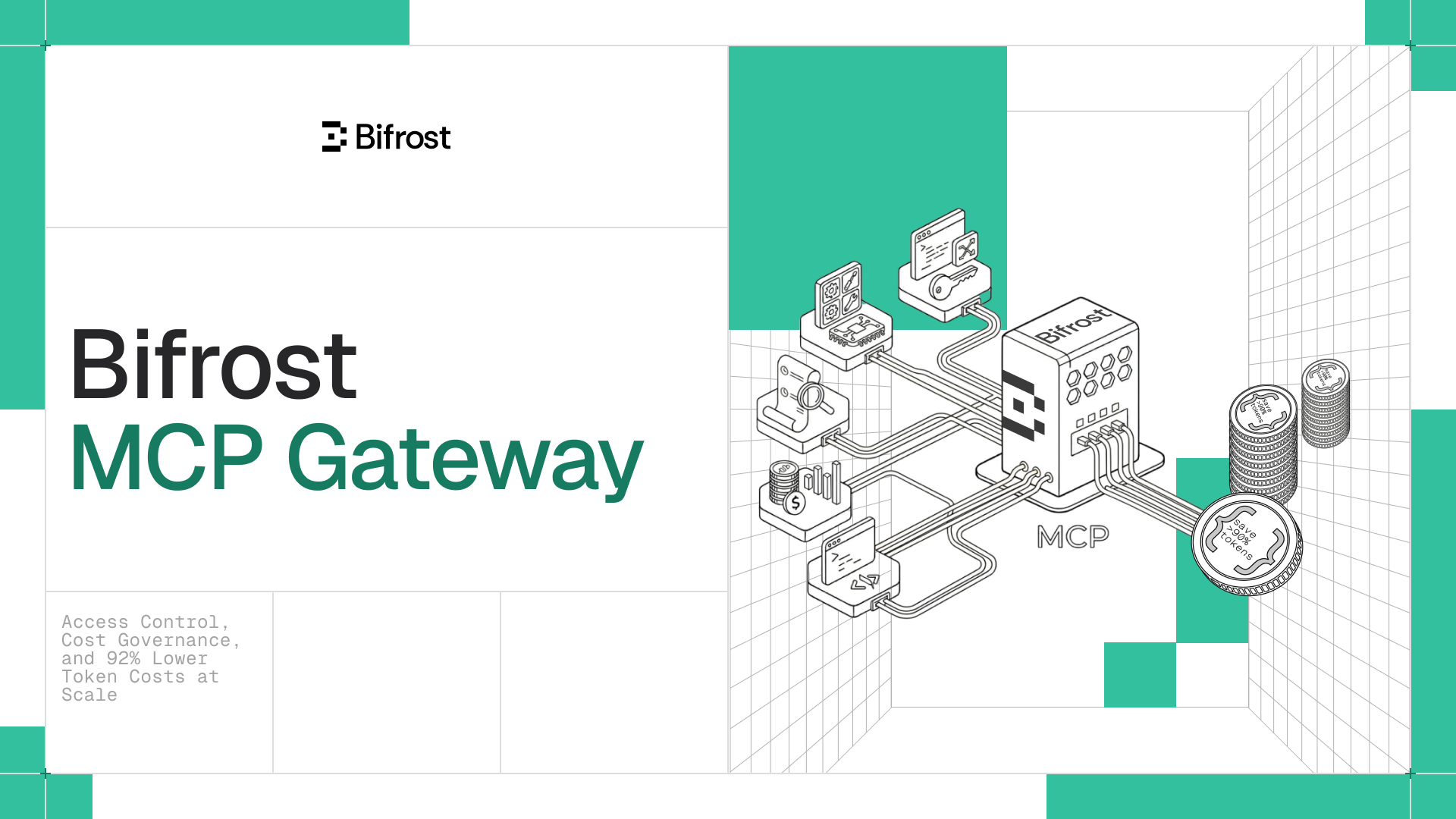
Bifrost started as an LLM gateway, a unified plane to manage AI providers, keys, routing, and costs across your stack. Teams ranging from Fortune 100s across pharma, FSI, healthcare, and tech to global top hedge funds and AI-native startups adopted it as the foundational layer for their AI infrastructure. As those teams moved from single-model calls to full agent workflows, they naturally started wiring MCP servers through it. One server for file access. Another for search. A third for internal tooling. Then ten more.
The gateway handled it. But as Model Context Protocol adoption scaled across production environments, two problems kept surfacing.
- No control: Teams couldn’t clearly define which tools agents were allowed to call, or who was calling them.
- Exploding cost: Token usage grew in ways that weren’t obvious until the bill showed up.
We built Bifrost MCP Gateway to solve both. Here's how.
You wouldn't run production without access control. Your AI agents shouldn't either. 🔒
When a new engineer joins your team, you don't hand them unrestricted access to every system your company runs. You scope their access, audit what they do, and track what it costs. The moment you connect an AI agent to a fleet of MCP servers with no governance layer, you've done the opposite.
- Which tools can this agent call?
- Can a customer-facing workflow reach the same internal APIs as your admin tooling?
- When a tool returns something unexpected, can you trace what was called, by whom, and with what arguments?
Without an enterprise AI governance layer, the answers to those questions aren't answers. They're guesses.
1. Virtual keys: scoped access for every consumer
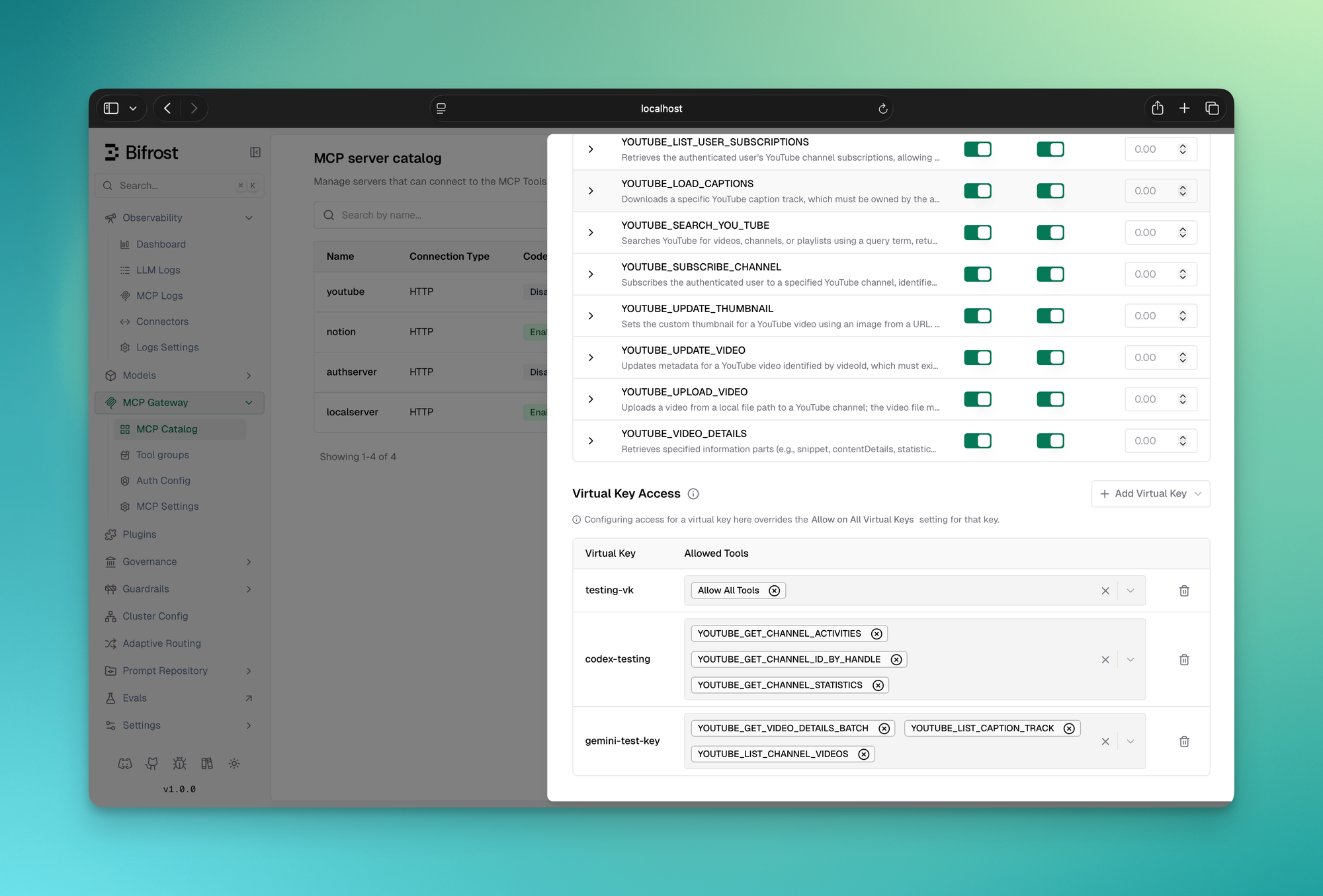
Virtual keys let you issue scoped credentials to every consumer of your MCP gateway, a user, a team, a customer integration. Each key carries a specific set of tools it's allowed to call. The scoping works at the tool level, not just the server level. You can allow a key to call filesystem_read but not filesystem_write from the same MCP server. A key provisioned for a customer-facing agent simply cannot reach your internal admin tooling.
2. MCP Tool Groups: LLM tool governance at org scale
Virtual keys handle the one-credential-one-scope case cleanly. But at scale you're managing access across teams, customers, users, and providers, not individual keys. That's what MCP Tool Groups are for.
A tool group is a named collection of tools from one or more MCP servers. You define which tools it includes and attach it to any combination of virtual keys, teams, customers, users, or providers. Bifrost resolves the right set at request time with no database queries. Everything is indexed in memory and synced across cluster nodes automatically.
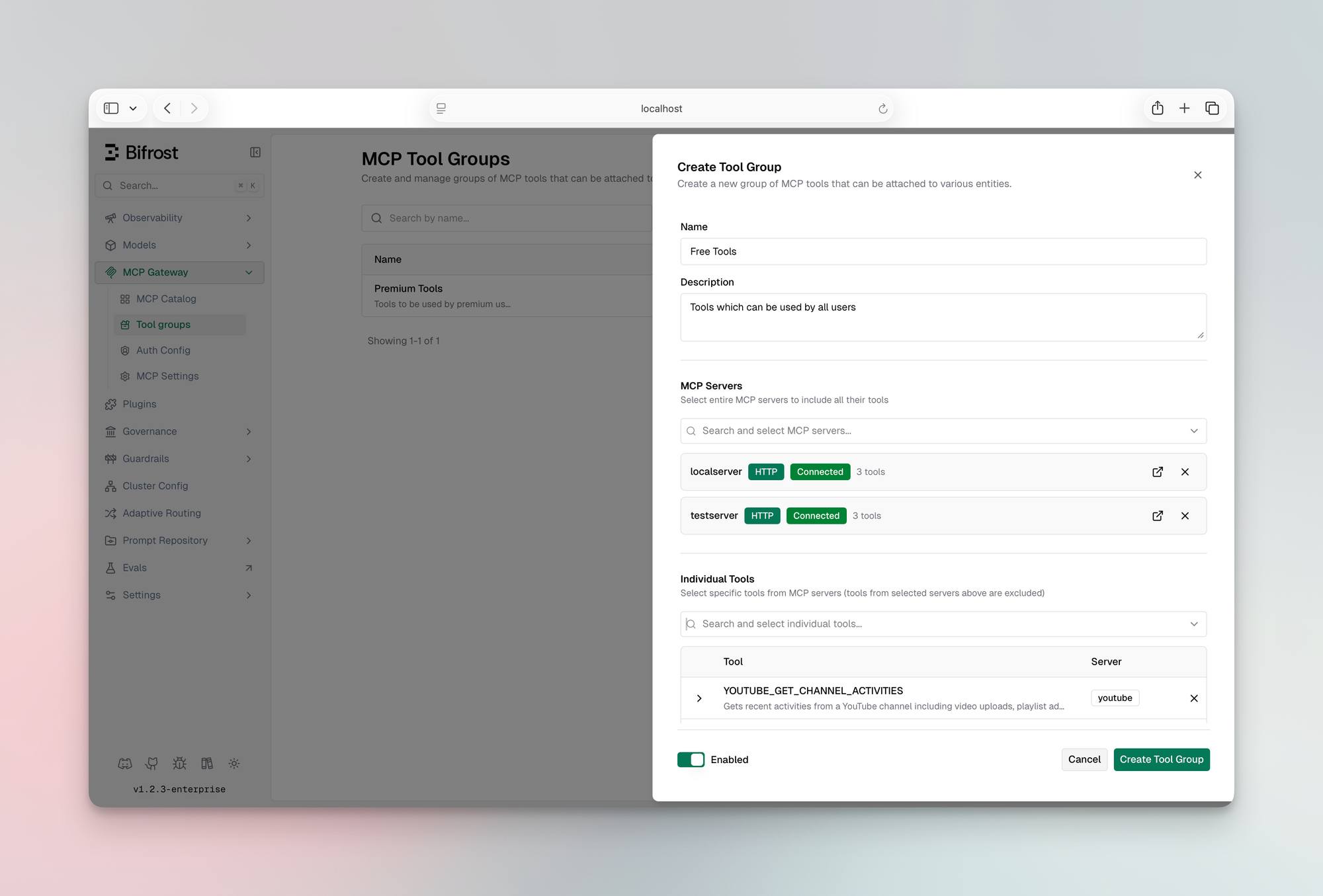
If a request matches multiple groups, Bifrost merges and deduplicates the allowed tools. The model only ever sees what it's supposed to see.
3. Audit logging for every MCP tool call
Every tool execution is a first-class log entry, not a side effect of request logging. For each call you get the tool name, the server it came from, arguments passed in, the result returned, latency, the virtual key that triggered it, and the parent LLM request that initiated the agent loop.
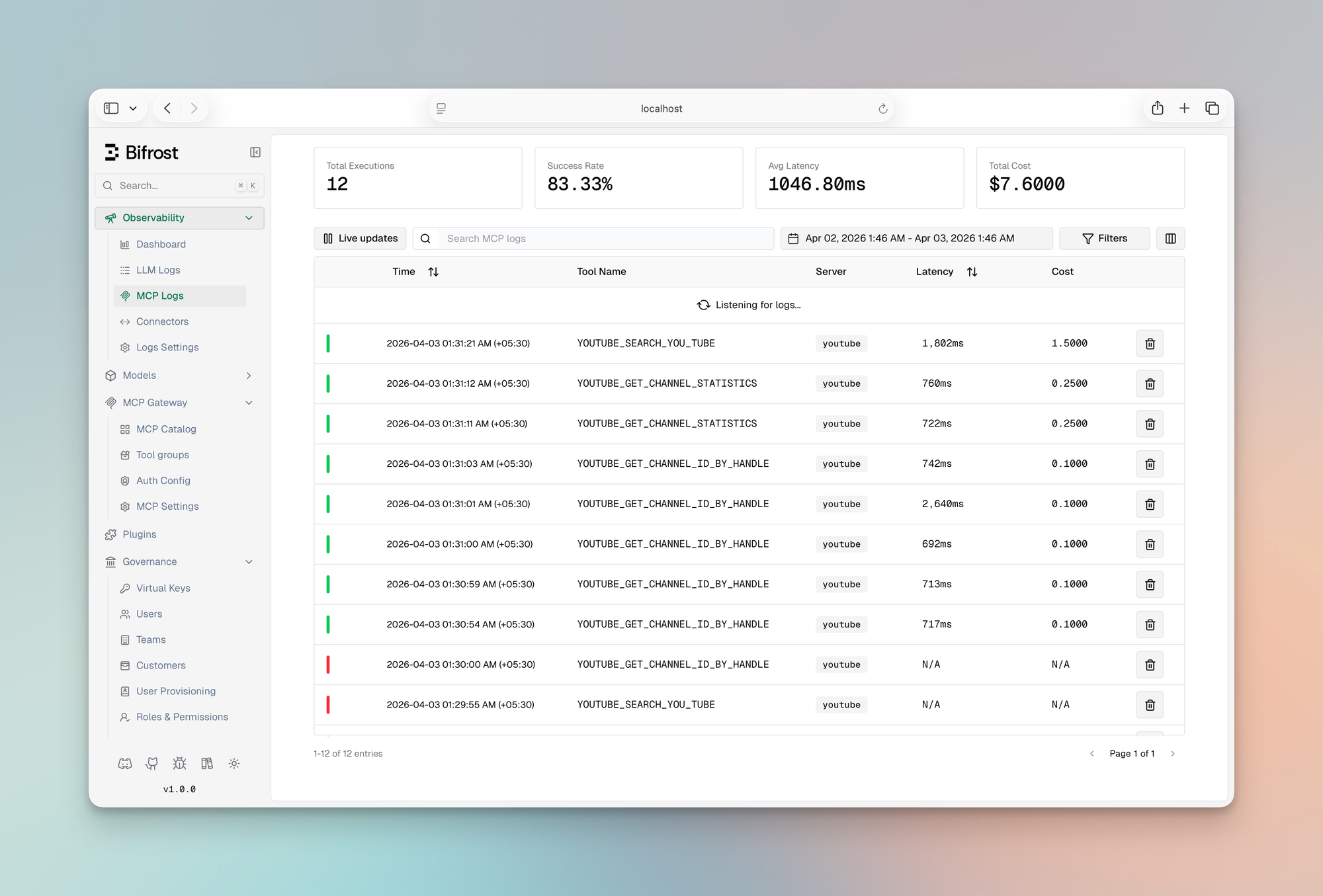
You can pull up any agent run and trace exactly which tools it called, in what order, and what came back. Or filter by virtual key to audit what a specific team or customer has been running.
Content logging can be disabled per environment. Bifrost still captures tool name, server, latency, and status without logging arguments or results.
4. Per-tool cost tracking
MCP costs aren't just token costs. If your tools call paid external APIs, search, enrichment, code execution, each invocation has a price. Bifrost tracks cost at the tool level using a pricing config you define per MCP client.
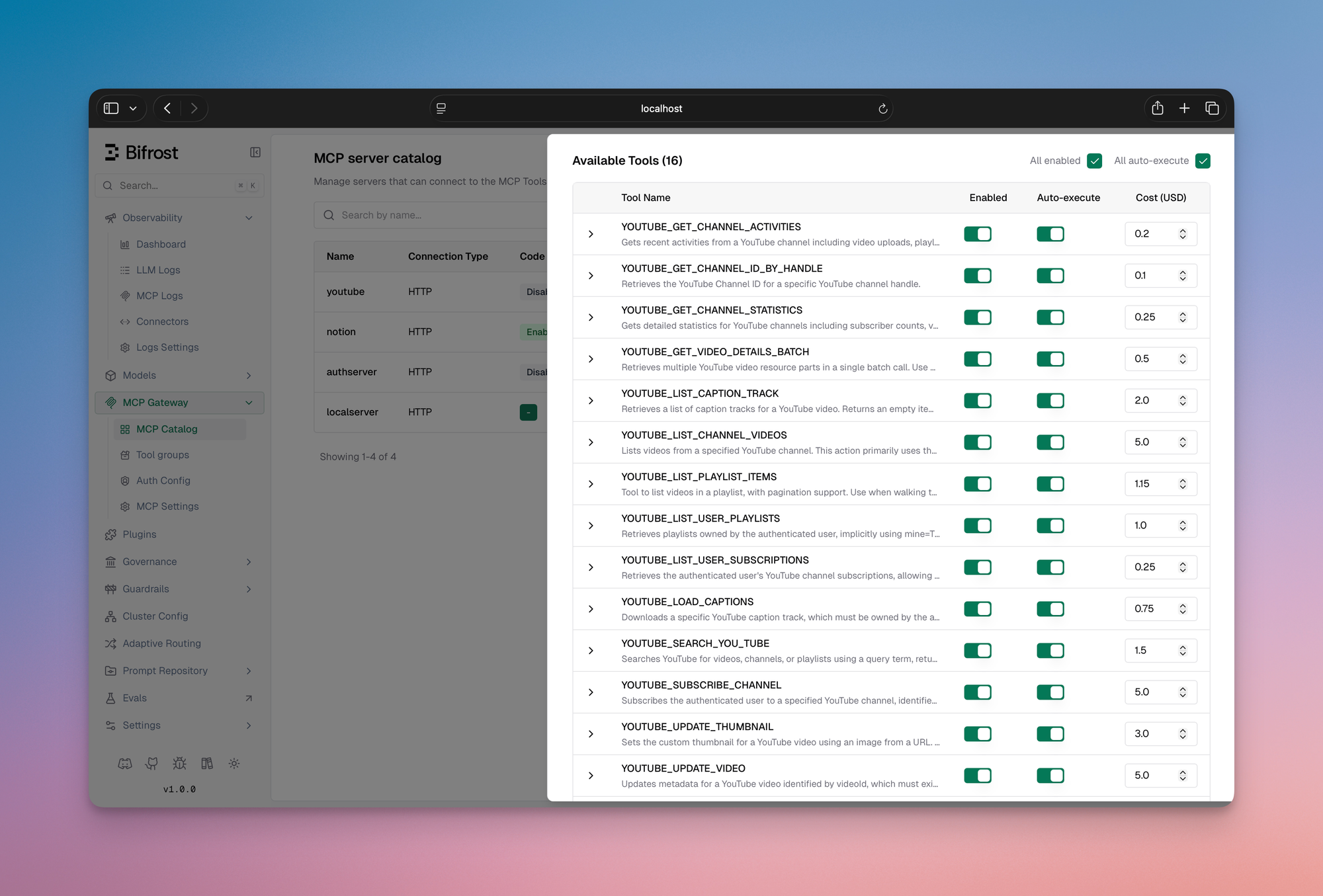
These show up in logs alongside LLM token costs, giving you a complete picture of what each agent run actually cost, not just the model portion.
The default MCP execution model has a cost problem. We fixed it. ⚡️
Here’s what most teams don’t notice until production:
Every MCP tool from every connected server gets injected into the model’s context on every single request. So if you connect 5 servers with 30 tools each, You’re sending 150 tool definitions before the model even sees your prompt.
💡 At that scale, token cost isn’t a rounding error - it’s the majority of your spend.
The usual advice is to “trim your tool list.” That’s not a solution. That’s a tradeoff. You’re giving up capability to control cost.
We built a different AI agent orchestration model called Code Mode.
The idea of having agents write code to interact with MCP tools rather than calling them directly isn't new. Cloudflare explored it with a TypeScript runtime, and Anthropic's engineering team wrote about it showing context dropping from 150,000 tokens to 2,000 for a Google Drive to Salesforce workflow. We found the approach compelling enough to build it natively into Bifrost, with two differences: we chose Python over JavaScript because LLM are inherently trained on more Python data than JavaScript, and we added a dedicated documentation tool to the meta-tool set to further reduce the context.
Instead of dumping every tool definition into context, Code Mode exposes your MCP servers as a virtual filesystem of lightweight Python stub files. Code Mode supports both server-level and tool-level bindings: you can expose one stub per server for compact discovery, or one stub per tool for more granular lookup and execution. The model reads only what it needs, writes a short script to orchestrate the tools, and Bifrost executes it in a sandboxed Starlark interpreter.
The model gets four meta-tools to work with:
| Meta-tool | What it does |
|---|---|
listToolFiles | Discover which servers and tools are available |
readToolFile | Load the Python function signatures for a specific server or tool |
getToolDocs | Fetch detailed documentation for a specific tool before using it |
executeToolCode | Run the orchestration script against live tool bindings |
Instead of loading 150 tool definitions, the model loads a stub file, writes a few lines of code, and runs it. The context stays small regardless of how many MCP servers you have connected.
What this looks like in practice
Take a multi-step e-commerce workflow: look up a customer, check their order history, apply a discount, send a confirmation. Here's how each approach plays out turn by turn.
Classic MCP: full tool list in context on every single turn:

Every intermediate result flows back through the model. Every turn carries the full tool list. The tokens stack up fast.
Code Mode: model reads what it needs, writes once, executes once:

On Step 15, the model submits something like this:
Bifrost executes this in the Starlark sandbox, calling each tool in sequence. The model never sees the intermediate results, it only gets the final output. The full tool list never touches the context.
Same task. 90% reduction in cost. 40% faster
The Starlark sandbox is intentionally constrained: no imports, no file I/O, no network access, just tool calls and basic Python-like logic. This makes execution fast, deterministic, and safe to run automatically inside agent mode.
We ran three rounds of controlled benchmarks with Code Mode on and off, scaling tool count between rounds to measure how savings change as MCP footprint grows.
|
Round 1
96 tools · 6 servers
|
Round 2
251 tools · 11 servers
|
Round 3
508 tools · 16 servers
| |||||||
|---|---|---|---|---|---|---|---|---|---|
| Code Mode OFF | Code Mode ON | Change | Code Mode OFF | Code Mode ON | Change | Code Mode OFF | Code Mode ON | Change | |
| Pass Rate | 64/64 (100%) | 64/64 (100%) | — | 64/65 (98.5%) | 65/65 (100%) | +1 query | 65/65 (100%) | 65/65 (100%) | — |
| Input Tokens | 19.9M | 8.3M | −58.2% | 35.7M | 5.5M | −84.5% | 75.1M | 5.4M | −92.8% |
| Est. Cost | $104.04 | $46.06 | −55.7% | $180.07 | $29.80 | −83.4% | $377.00 | $29.00 | −92.2% |
The savings aren't linear, they compound as you add MCP servers. As you can see in the table, with around 500 tools attached - you can save >90% of your tokens. Classic MCP loads every tool definition on every request, so connecting more servers makes the problem worse. Code Mode's cost is bounded by what the model actually reads, not by how many tools exist. Cloudflare observed the same exponential dynamic in their evaluation. The three rounds also confirm that accuracy isn't traded away to get there, pass rate held at 100% in both.
Scaling cost per query — Tools vs Tokens
Average input tokens consumed per query as tool count increases
At ~500 tools, Code Mode reduces per-query token usage by ~14× (1.15M → 83K).
Estimated cost - Code Mode OFF vs ON
Absolute dollar cost per round, same queries
You can explore the full benchmark results in the complete report here.
Everything else that ships with Bifrost MCP Gateway 📦
- MCP connection types: STDIO, HTTP, SSE, in-process (Go SDK)
- Authentication: Header-based and OAuth 2.0 with PKCE, dynamic client registration, and auto token refresh
- Tool execution: Manual approval or configurable autonomous agent loop
- Tool hosting: Register tools in-process via Go SDK, no external MCP server needed
- MCP Gateway URL: Expose all connected MCP servers via
/mcpto Claude Code, Cursor, or any MCP client - Health monitoring: Per-client health checks with automatic reconnects on failure with periodic refresh to pick up new tools from upstream MCP servers
- Plugin hooks: Pre and post hooks on every tool execution for custom middleware
Getting started with Bifrost MCP Gateway
Here's how to go from a fresh Bifrost instance to a fully governed MCP gateway with Code Mode, access control, and Claude Code connected, in a few minutes.
Step 1: Add an MCP client
Navigate to the MCP section in the Bifrost dashboard and add your first MCP server. Give it a name, choose the connection type (HTTP, SSE, or STDIO), and enter the endpoint or command. For HTTP and SSE servers you can add any headers the upstream server requires like API keys, auth tokens, or custom metadata directly in the UI.
Once saved, Bifrost connects to the server, discovers its tools, and starts syncing them on the configured interval. You'll see the client appear in your MCP client list with a live health indicator.
Step 2: Enable Code Mode
Open the client settings and toggle Code Mode on. That's it. No schema changes, no redeployment.
From that point on, instead of injecting every tool definition into context, Bifrost exposes the four meta-tools, listToolFiles, readToolFile, getToolDocs, and executeToolCode and the model navigates the tool catalog on demand. Token usage drops immediately.
Step 3: Set tools to auto-execute
By default, tool calls require manual approval. To let the agent loop run autonomously, open the auto-execute settings and add the tools you want to allowlist. You can allowlist at the tool level, so filesystem_read can be auto-executed while filesystem_write stays behind an approval gate.
In Code Mode, listToolFiles, readToolFile, and getToolDocs are always auto-executable since they're read-only. executeToolCode becomes auto-executable only when every tool the generated script calls is on your auto-executable list.
Step 4: Restrict access with virtual keys
Go to the Virtual Keys section and create a key for the consumer you want to scope, a user, a team, a customer integration. Under MCP settings, select which tools that key is allowed to call. The scoping is per-tool, not per-server: you can grant crm_lookup_customer without granting crm_delete_customer from the same server.
Any request made with that key will only see the tools it's been granted. The model never receives definitions for tools outside its scope, so there's no prompt-level workaround. For managing access across many keys, use MCP Tool Groups: define a named collection of tools once and attach it to any combination of keys, teams, or users.
Step 5: Connect Claude Code to Bifrost MCP Gateway
Bifrost exposes all connected MCP servers through a single `/mcp` endpoint. To connect Claude Code, open your Claude Code MCP settings and add Bifrost as an MCP server using that URL.
Claude Code will discover every tool from every MCP server connected to Bifrost, governed by the virtual key you configure through a single connection. Add new MCP servers to Bifrost and they appear in Claude Code automatically, no client-side config changes required.
From setup to full visibility
Once your MCP clients are connected and agents are running, the Logs section gives you a complete trace of everything that happened. Every tool call is a first-class log entry: tool name, which MCP server it came from, the arguments passed in, the result returned, latency, the virtual key that triggered it, and the parent LLM request that initiated the agent loop.
You can filter by virtual key to audit what a specific team or customer has been running, or filter by tool to see how often a particular server is being hit. Pull up any agent run and trace the exact sequence of tool calls in order, useful for debugging unexpected behavior or confirming that access controls are working as intended. The Analytics section rolls all of this up into spend over time, broken down by tool, virtual key, and MCP server. Token costs and tool costs sit side by side, so you get a complete picture of what each agent workflow is actually costing, not just the model portion.
The Complete AI Infrastructure Stack
Most teams start simple. One MCP server. One agent. A script that wires them together. It works. Until it doesn’t. As soon as you add more servers, more teams, or customer-facing workflows, the things you could ignore early on become unavoidable:
Who can call what? What this is actually costing? What happened when something breaks?
MCP without governance and cost control becomes unsustainable. Bifrost MCP Gateway is the layer that handles both. It gives you:
- Scoped access via virtual keys
- Tool governance with MCP Tool Groups
- Full audit trails for every tool call
- Per-tool cost visibility alongside LLM usage
- Code Mode to cut context cost without cutting capability
All behind a single /mcp endpoint. But MCP is only half the system.
Before your agent ever calls a tool, it calls a model. That's where Bifrost's LLM gateway comes in. The same platform that governs your MCP traffic also handles provider routing, fallbacks, load balancing, rate limiting, spend controls, and unified key management across every major AI provider.
No stitching across services. No fragmented visibility. This is where the stack is heading. Agents aren’t just calling models anymore. They’re orchestrating systems. And that needs infrastructure. When your LLM call and your tool calls flow through the same gateway, you get a complete picture of every agent run. Model tokens and tool costs together, under a single access control model, in one audit log. Bifrost is that layer, purpose-built for the way production AI systems actually run.
Get started with Bifrost.