OpenCode MCP: How to Connect MCP Tools Safely
OpenCode MCP support lets the agent call external tools from the terminal, and by default it calls them without asking. This guide shows how to put Bifrost between OpenCode and your MCP servers, combine tool allow-lists with OpenCode permissions, and choose the right MCP authentication.
TL;DR
- OpenCode MCP servers connect automatically once configured, and OpenCode's default permission policy lets the agent call their tools without a prompt.
- Routing OpenCode through Bifrost as an MCP gateway keeps upstream credentials off developer laptops and limits each OpenCode session to the tools its virtual key grants.
- OpenCode permissions decide whether the agent may call a listed tool; Bifrost decides which tools a key can list and call at all, so the two layers stack.
- Bifrost supports six upstream MCP authentication types, including per-user OAuth and token exchange, plus OAuth 2.1 for clients that connect to its
/mcpendpoint.
OpenCode MCP servers give a terminal coding agent direct access to repositories, databases, and internal APIs, and OpenCode's default base policy allows MCP tool calls, so a connected tool runs without a prompt unless a rule says otherwise. Bifrost, the open-source MCP and AI gateway built in Go by Maxim AI, sits between OpenCode and those servers so tool access is scoped per key, authenticated at the gateway, and logged in one place. This guide covers how OpenCode loads MCP tools, where the gaps are, and how to connect OpenCode through Bifrost.
How OpenCode MCP Servers Work
OpenCode connects to MCP servers declared under mcp.servers in opencode.jsonc, in a project or the global config. A local server is a command OpenCode starts over stdio; a remote server is a Streamable HTTP URL. Configured servers connect automatically, and their tools join the agent's tool list.
Three details in the OpenCode MCP servers documentation matter for security:
- Tool names are prefixed. OpenCode names each tool
<server>_<tool>, which is also the action name its permission rules match. - Remote servers default to OAuth. OpenCode signs in with PKCE and stores credentials outside project config;
oauth: falseswitches to header credentials. - Code Mode is on by default. OpenCode groups a server's tools behind Code Mode unless
codemodeis set tofalse.
| Server type | What OpenCode runs | Typical credential | Main exposure |
|---|---|---|---|
Local (type: "local") |
A command on the developer's machine | Environment variables | Arbitrary code with the user's privileges |
Remote (type: "remote") |
An HTTP connection to a URL | OAuth token or header | Token scope and where the token is stored |
Because project configs merge from the current directory upward, a repository's own opencode.jsonc can declare a local MCP server that OpenCode starts. For where servers, proxies, and gateways sit, see an MCP gateway, an MCP proxy, and an MCP server.
MCP Security Risks for Coding Agents
MCP security risks for a coding agent come from three sources: what the tool server can do, what credentials it holds, and what text it returns to the model. OpenCode runs with the developer's shell, file, and network access, so a compromised or over-privileged MCP server inherits that reach.
The OWASP MCP Top 10 includes token mismanagement, scope creep, tool poisoning, shadow MCP servers, and lack of audit. The protocol's own MCP security best practices add local server compromise, where a malicious startup command in a client configuration runs with the client's privileges, and token passthrough.
| Risk | How it shows up in OpenCode | Control point |
|---|---|---|
| Local server compromise | A cloned repo adds a local server whose command runs on open | OpenCode policy, server allow-list |
| Token exposure | Personal access tokens in environment or headers on each laptop |
Credentials held at the gateway |
| Scope creep | One token grants every tool the server exposes | Per-key tool allow-lists |
| Tool poisoning | Tool descriptions or results carry injected instructions | Output guardrails, fewer tools in context |
| Shadow MCP servers | Developers add servers nobody approved | Managed config, fleet inventory |
| No audit trail | Tool calls leave no central record | Gateway logs |
Most of these controls cannot live in the developer's config file, because that file is what gets attacked. See the five security risks of ungoverned MCP server access and the MCP security best practices checklist.
OpenCode Permissions and Policies for MCP Tools
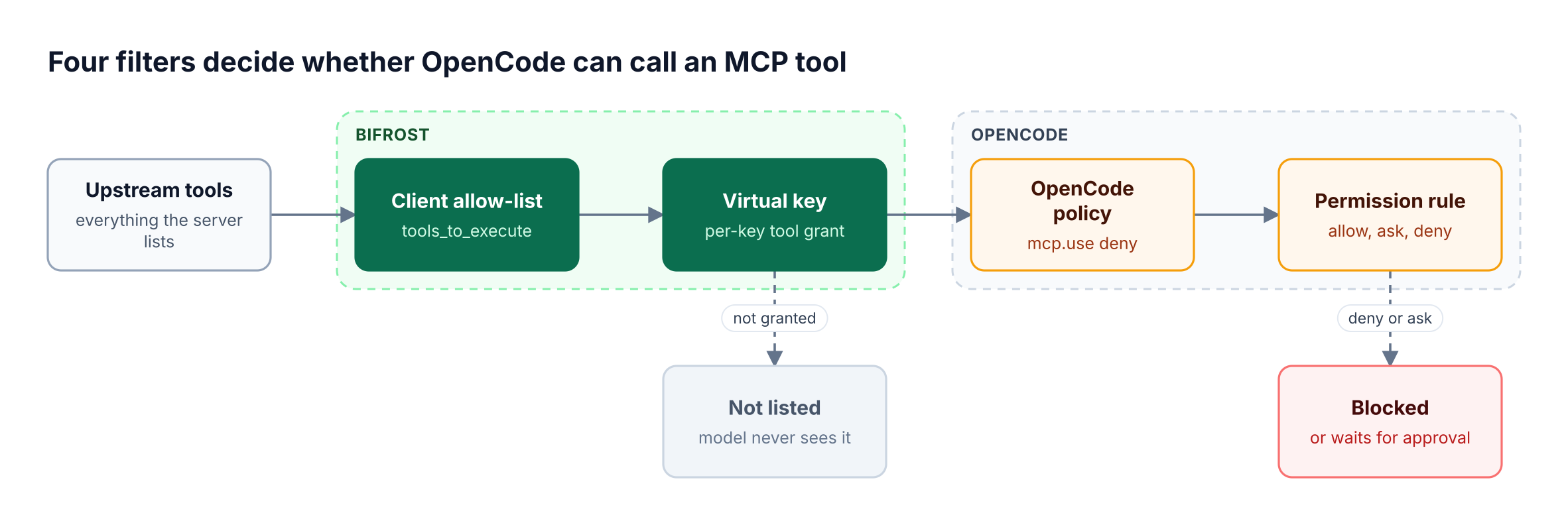
OpenCode permissions are ordered rules with an action, a resource, and an effect of allow, deny, or ask, and the last matching rule wins. MCP tools use their <server>_<tool> name as the action. Every agent starts from a base rule that allows all actions, so MCP tools need explicit ask or deny rules.
The OpenCode permissions guide lists the actions that matter for MCP:
<server>_<tool>matches one MCP tool, with wildcards across names.executecontrols Code Mode itself; nested tools still enforce their own rules.opencode_read_mcp_resourcecontrols MCP resource reads by<server>:<uri>.
Policies are a separate, binary layer. An mcp.use policy removes an MCP server however it was configured, and tool.use hard-denies a check even after an "Allow always" approval. Managed configuration has the highest precedence, so a repository cannot re-enable a server it blocks.
These rules govern one agent on one machine. They do not hold upstream credentials, keep a cross-team record, or scope tools by identity. For that job, see AI gateways for OpenCode token tracking and access controls and the pattern of tool-level permissions for production agents.
Why Put an MCP Gateway Between OpenCode and Your Tools
An MCP gateway is a control layer that aggregates upstream MCP servers behind one endpoint and applies authentication, tool filtering, and logging to every call. For OpenCode, it replaces a dozen per-laptop server entries and tokens with one remote entry that carries a scoped credential.
Bifrost, the open-source AI gateway, acts as an MCP client and an MCP server at once: it connects to upstream servers over STDIO, HTTP, or SSE, then exposes at /mcp the tools each caller may see. Upstream STDIO servers run as gateway subprocesses, not on laptops. See how an MCP gateway works.
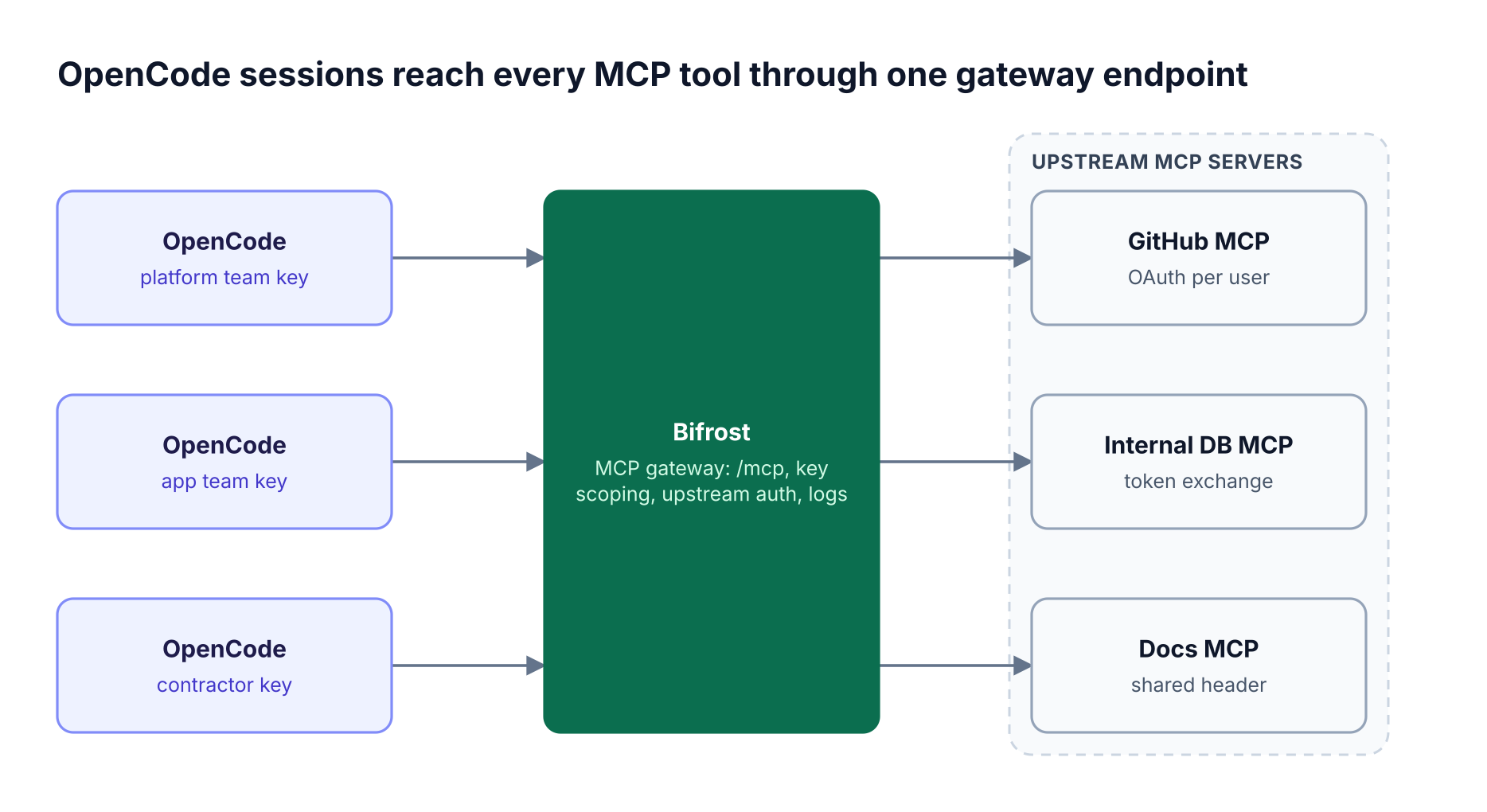
| Concern | OpenCode connected directly | OpenCode through Bifrost |
|---|---|---|
| Upstream credentials | Stored per developer, per server | Held at the gateway, or per user in MCP Sessions |
| Tools the model sees | Everything each server lists | Only tools the virtual key grants |
| Record of tool calls | Local session history | MCP logs in the gateway |
| Revoking access | Edit every laptop | Change or expire one key |
Approval stays with OpenCode: in gateway mode the host client decides whether a tools/call needs confirmation. The Bifrost MCP gateway page summarizes the feature set.
Connecting OpenCode to MCP Tools Through Bifrost, Step by Step
Adding MCP to OpenCode through Bifrost takes six steps: register upstream servers in Bifrost, grant tools to a virtual key, lock down the /mcp endpoint, add one remote server entry to OpenCode, write OpenCode permission rules, and verify the tool list.
Step 1: Register upstream MCP servers in Bifrost
Each upstream server becomes an MCP client in Bifrost, and its tools_to_execute list is the baseline. See connecting to MCP servers for every connection type.
{
  "mcp": {
    "client_configs": [
      {
        "name": "github",
        "connection_type": "http",
        "connection_string": "<https://mcp.github.example/mcp>",
        "auth_type": "per_user_oauth",
        "tools_to_execute": ["*"]
      },
      {
        "name": "docs",
        "connection_type": "http",
        "connection_string": "<https://docs-mcp.internal.example/mcp>",
        "auth_type": "none",
        "tools_to_execute": ["search", "get_page"]
      }
    ]
  }
}
Step 2: Grant tools to a virtual key
A virtual key with no MCP configuration gets no MCP tools, except from clients marked Allow by Default. Grant tools per client with MCP tool filtering for virtual keys:
{
  "governance": {
    "virtual_keys": [
      {
        "name": "opencode-app-team",
        "mcp_configs": [
          { "mcp_client_name": "github", "tools_to_execute": ["get_issue", "list_pull_requests", "create_pull_request"] },
          { "mcp_client_name": "docs", "tools_to_execute": ["*"] }
        ]
      }
    ]
  }
}
For one stable URL per curated tool set, attach a Virtual MCP served at /mcp/<slug>, reachable only through its attached keys.
Step 3: Lock down the /mcp endpoint
Set enforce_auth_on_inference to true so anonymous callers cannot list tools, and serve Bifrost over HTTPS. Because OpenCode sends model and MCP traffic to the same gateway, also enable mcp_disable_auto_tool_inject, or the same tools can reach the model twice.
{ "client": { "enforce_auth_on_inference": true, "mcp_disable_auto_tool_inject": true } }
Step 4: Add Bifrost to opencode.jsonc
In Bifrost's default headers mode OAuth discovery is not served, so disable OpenCode's OAuth for this entry and send the virtual key from the environment:
{
  "$schema": "<https://opencode.ai/config.json>",
  "mcp": {
    "servers": {
      "bifrost": {
        "type": "remote",
        "url": "<https://gateway.example.com/mcp>",
        "oauth": false,
        "headers": { "Authorization": "Bearer {env:BIFROST_VIRTUAL_KEY}" }
      }
    }
  }
}
For model traffic, bifrost opencode --model <provider/model> adds a temporary Bifrost provider; see the Bifrost CLI coding agents guide.
Step 5: Write OpenCode permission rules
Tools from Bifrost arrive in OpenCode prefixed with bifrost_ and then the upstream client name, such as bifrost_docs-search. Ask by default, allow the read-only docs server, and deny destructive tool names:
{
  "permissions": [
    { "action": "bifrost_*", "resource": "*", "effect": "ask" },
    { "action": "bifrost_docs*", "resource": "*", "effect": "allow" },
    { "action": "bifrost_*delete*", "resource": "*", "effect": "deny" }
  ]
}
Step 6: Verify the tool list
Run opencode mcp list to confirm bifrost is connected, then check what the key can see:
curl -s -X POST <https://gateway.example.com/mcp> \
  -H "Authorization: Bearer $BIFROST_VIRTUAL_KEY" \
  -H "Content-Type: application/json" \
  -d '{"jsonrpc":"2.0","id":1,"method":"tools/list"}'
Calls then appear in the Bifrost logs view attributed to the key.
MCP Authentication and OAuth for OpenCode
MCP authentication through a gateway happens in two directions. Inbound, OpenCode proves its identity to Bifrost with a virtual key header or an OAuth 2.1 token. Outbound, Bifrost authenticates to each upstream MCP server with whichever of its six auth types that server needs.
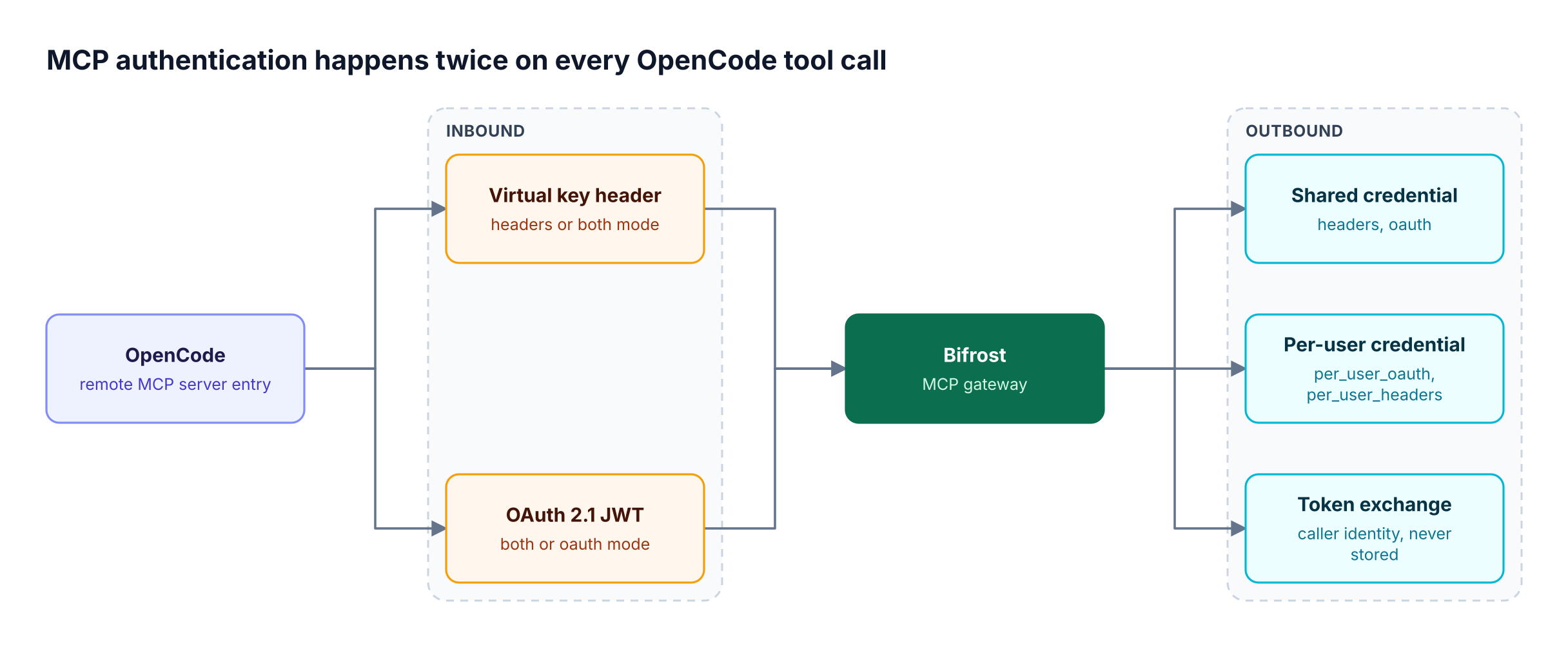
Inbound (OpenCode to Bifrost). mcp_server_auth_mode accepts headers (default), both, or oauth. In both or oauth mode, Bifrost runs an OAuth 2.1 authorization server with PKCE, Dynamic Client Registration, and Client ID Metadata Documents, which OpenCode supports, so the key header can be dropped. At consent, the user binds the grant to a virtual key, a session, or, with SSO, their own user. The gateway authentication guide covers each mode.
Outbound (Bifrost to MCP servers). The MCP authentication types in Bifrost are:
auth_type |
Who authenticates | Use it for |
|---|---|---|
none |
Nobody | Public servers, local tools that need no key |
headers |
Admin, once | Shared API keys or bearer tokens |
per_user_headers |
Each user, on first use | Personal API keys |
oauth |
Admin, once | A shared OAuth app the whole team uses |
per_user_oauth |
Each user, on first use | GitHub, Notion, or Sentry under each person's account |
token_exchange |
Each caller, every call | Internal servers that trust your identity provider (Enterprise) |
Per-user types apply to HTTP connections only. When an OpenCode user calls a per-user server without a stored credential, the tool does not run; Bifrost returns an mcp_auth_required result with a sign-in URL, and the next call executes. Credentials appear on MCP Sessions, where they can be re-authenticated or revoked. See MCP authentication explained and the hub on centralizing tool access with an MCP gateway.
MCP Server Security at the Tool Execution Boundary
MCP server security does not end at the allow-list, because an allowed tool can still receive a secret in its arguments or return injected text. Bifrost guardrails can target MCP tool execution directly, inspecting arguments before the server runs and results before they reach OpenCode.
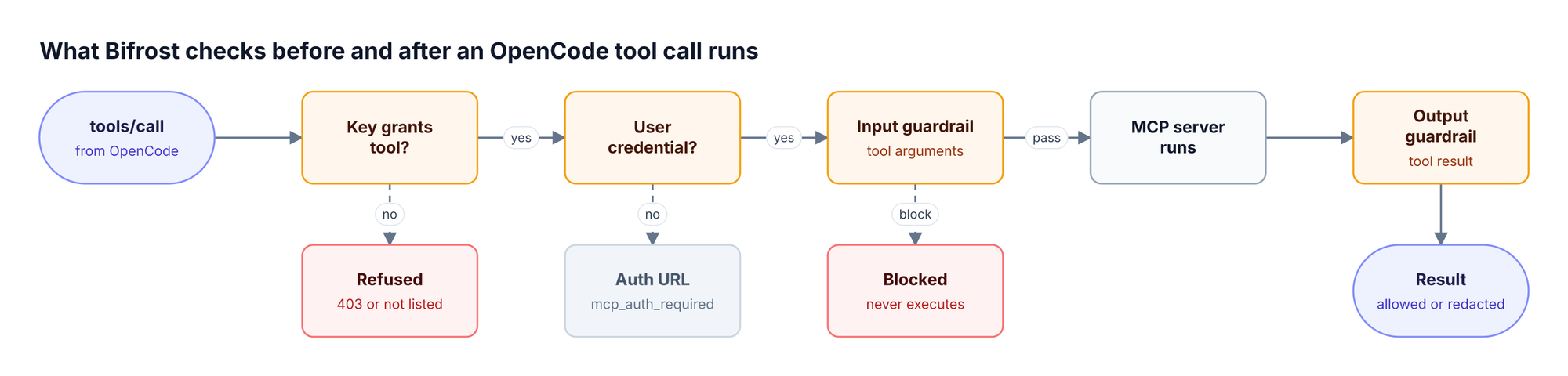
In the Bifrost gateway, guardrails are an Enterprise feature. A rule with target mcp uses CEL conditions on mcp_client, mcp_tool, and identity fields such as virtual_key and team. Applied to input, it can allow, redact, or block tool arguments; applied to output, it can redact or withhold the result. Bifrost-managed profiles such as Secrets Detection and Custom Regex run locally, and external providers attach to the same rules. The guardrails documentation lists current providers, and MCP guardrails in Bifrost walks through examples.
MCP logs record tool calls next to LLM logs, while audit logs record administrative activity, such as an MCP client being added or its OAuth flow completing, with optional HMAC signing. The post on MCP audit logging requirements maps both to compliance reviews, and the AI guardrails page covers the LLM side.
Reducing Tool Context with MCP Code Mode
MCP Code Mode replaces a large tool catalog with four meta-tools: the model lists stub files, reads only the signatures it needs, and runs a short Python (Starlark) script in a sandbox inside the gateway.
Code Mode in Bifrost respects virtual keys: discovery shows only the tools the key may execute, and nested calls run with the original request's authorization and tool filters. In a benchmark with 508 tools across 16 servers, Code Mode cut input tokens by 92.8% and estimated cost from $377 to $29 while keeping a 100% pass rate, as detailed in the post on Bifrost MCP gateway access control and 92% lower token costs.
OpenCode also applies its own Code Mode by default; when Bifrost already uses Code Mode, set codemode: false on the bifrost entry to keep one orchestration layer. The MCP gateway resource page collects the cost data.
Rolling Out OpenCode MCP Across a Team
An OpenCode MCP rollout for a team combines three controls: a managed OpenCode configuration that allows only the gateway entry, one virtual key per governance boundary in Bifrost, and fleet visibility into MCP servers developers configured anyway.
Put the policy in managed configuration so projects cannot override it:
{
  "policies": [
    { "action": "mcp.use", "resource": "*", "effect": "deny" },
    { "action": "mcp.use", "resource": "bifrost", "effect": "allow" }
  ]
}
mcp.use requires OpenCode 2.2.3 or newer. In Bifrost, use one virtual key per team or environment, and on Bifrost Enterprise assign keys through SSO and access profiles; the governance resource page covers the model.
For machines where OpenCode was configured before any policy existed, AI Gateway + Bifrost Edge extends the gateway's policy to the endpoint. Edge inventories the MCP servers configured inside OpenCode and other supported apps across the fleet, and an admin's deny decision is enforced on the device. Edge is generally available and runs with the Enterprise Gateway.
Frequently Asked Questions
How do I add an MCP server to OpenCode?
Run opencode mcp add <name> --url <url> for a remote server or opencode mcp add <name> -- <command> for a local one, or add an entry under mcp.servers in opencode.jsonc. To route through Bifrost, add one remote entry pointing at the Bifrost MCP gateway /mcp URL with a virtual key header, then run opencode mcp list.
Are MCP servers safe to use with OpenCode?
MCP servers are as safe as the code they run and the credentials they hold. Local servers execute with the developer's privileges; remote servers act with whatever token they receive. Use trusted servers, keep tokens at a gateway, grant only needed tools, and add OpenCode ask rules for anything that writes or deletes.
Does OpenCode ask before running MCP tools?
Not by default. OpenCode agents start from a base policy that allows tool actions other than .env reads, so MCP tools run without a prompt. Add permission rules matching the <server>_<tool> name with ask or deny. Saved "Allow always" approvals never override a configured deny.
What is MCP tool poisoning?
MCP tool poisoning is an attack where a tool's description, metadata, or output carries instructions that manipulate the model, such as reading secrets or calling another tool. OWASP lists it as MCP03 in its MCP Top 10. Mitigations include fewer, vetted servers, output guardrails on tool results, and approval for sensitive tools.
Can OpenCode use OAuth for MCP servers?
Yes. OpenCode enables OAuth for remote MCP servers by default and signs in with PKCE, using a pre-registered client, a Client ID Metadata Document, or Dynamic Client Registration. With Bifrost's /mcp endpoint in both or oauth mode, OpenCode connects through a browser consent flow instead of storing a virtual key.
How do I secure an MCP server used by a coding agent?
Require authentication on every request, grant tools per identity rather than exposing the full catalog, keep upstream tokens out of client config files, and log every call. An MCP gateway such as Bifrost applies these controls once for every OpenCode, Claude Code, or Cursor user instead of per machine.
Start Building with Bifrost
Connecting OpenCode MCP tools safely means two layers working together: OpenCode permissions and policies on each machine, and Bifrost as the MCP gateway that holds credentials, scopes tools per virtual key, and records every call. To see MCP authentication, tool filtering, and guardrails configured for your OpenCode rollout, book a demo with the Bifrost team.