MCP Authentication Explained: OAuth, API Keys, and Token Management
MCP authentication is the layer that decides who can call tools on a Model Context Protocol server, what those callers can do, and how their credentials are issued, validated, and rotated. As remote MCP servers move from local prototypes into production stacks that touch databases, ticketing systems, source code, and customer data, getting authentication right is no longer optional. Bifrost, the open-source AI gateway by Maxim AI, treats MCP authentication as a first-class concern: it supports static API keys, OAuth 2.0 with automatic token refresh, per-user OAuth flows, and virtual-key based authorization, all behind a single MCP gateway endpoint.
This post walks through the three authentication models that show up in real MCP deployments, the standards that govern them, and the configuration patterns Bifrost uses to centralize them.
What Is MCP Authentication
MCP authentication is the set of mechanisms that verify the identity of clients connecting to an MCP server and authorize the tool calls those clients are permitted to make. The Model Context Protocol uses standard HTTP authentication primitives, so the building blocks are familiar: bearer tokens, OAuth 2.1 authorization code flows, PKCE, and discovery via well-known metadata endpoints.
Two things make MCP different from a typical API. First, MCP servers expose tools that an LLM may invoke autonomously, so the cost of a bad credential is higher than a single misrouted API call. Second, the official MCP authorization specification is explicit that public remote servers must implement OAuth 2.1 with PKCE, while stdio servers and trusted internal deployments can use simpler patterns.
Why MCP Authentication Matters for Production AI
Without authentication, any client that discovers an MCP server's URL can list and execute its tools. For agents that read files, query databases, send messages, or modify tickets, that is an unacceptable risk. Authentication is what turns an MCP server from a hobby endpoint into something that can sit next to production data.
The drivers behind strong MCP authentication include:
- Tool-level blast radius: a single tool call can mutate state, exfiltrate data, or hit a paid upstream API. Credentials must be scoped to what the caller actually needs.
- Multi-tenant isolation: in SaaS deployments, each customer's agent must access only their own data. Shared service accounts collapse the audit trail.
- Compliance: SOC 2, HIPAA, and ISO 27001 require traceable identity for every privileged action. Anonymous tool calls do not pass an audit.
- Rotation and revocation: stolen credentials need to be killable in minutes, not on the next deployment cycle.
- Upstream auth federation: the MCP server often calls third-party APIs (GitHub, Notion, Salesforce) that have their own OAuth flows. The MCP layer needs to chain identity through to those services without leaking long-lived secrets.
The Three Models for Authenticating MCP Servers
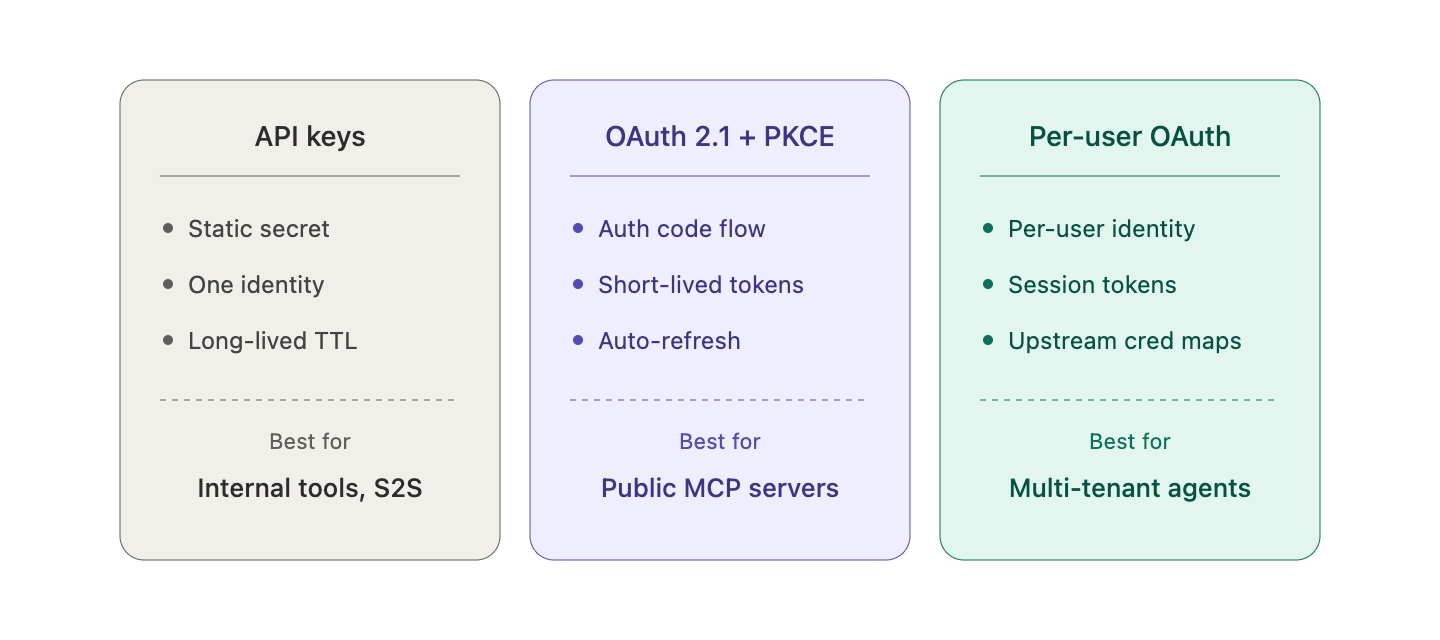
Most production MCP deployments use one of three authentication patterns, often in combination.
API Keys and Static Bearer Tokens
The simplest model: the client sends a static secret in an Authorization: Bearer <token> header (or a custom header like X-Api-Key). The MCP server validates the secret and treats matching requests as authenticated.
API keys work well for:
- Internal tools behind a VPN or service mesh
- Server-to-server integrations where there is no end user in the loop
- Local stdio MCP servers that inherit credentials from environment variables
- Early-stage deployments where simplicity beats sophistication
The trade-offs are familiar from any bearer-token system. Keys are long-lived by default, hard to scope to individual users, and dangerous if leaked into logs or version control. They also do not carry user identity, so audit logs collapse every action down to "the API key did it."
OAuth 2.0 and OAuth 2.1 with PKCE
OAuth is what the MCP specification mandates for public remote servers. The flow follows the standard authorization code grant: the client discovers the authorization server through Protected Resource Metadata (RFC 9728) and OAuth 2.0 Authorization Server Metadata (RFC 8414), generates a PKCE pair, redirects the user through a consent screen, exchanges the resulting code for a short-lived access token, and uses that token on subsequent tool calls.
OAuth 2.1 tightens the OAuth 2.0 baseline. It mandates PKCE for all clients (not just public ones), drops the implicit grant, and requires exact redirect URI matching. For MCP, the practical impact is that token theft via authorization code interception becomes substantially harder, even when the MCP client is a desktop app with no client secret.
OAuth is the right choice when:
- Real users authenticate to the MCP server through their own identity provider
- The MCP server needs to verify scopes per request
- Tokens must be short-lived and refreshable without user re-consent
- The deployment must comply with the November 2025 MCP authorization spec for public remote servers
Per-User OAuth (User-Delegated Access)
The third model is per-user OAuth, where each end user authenticates with their own credentials to the upstream service. This is the pattern you see when an agent needs to read one user's Notion workspace, another user's GitHub private repos, and a third user's Google Calendar, all through the same MCP server.
Per-user OAuth requires the MCP layer to act as an OAuth 2.1 authorization server itself, issuing session tokens that map to upstream credentials stored per identity. This is significantly more involved than shared OAuth, but it is the only way to preserve user-scoped access without putting every user's secrets into the MCP server's environment.
How Bifrost Handles MCP Authentication
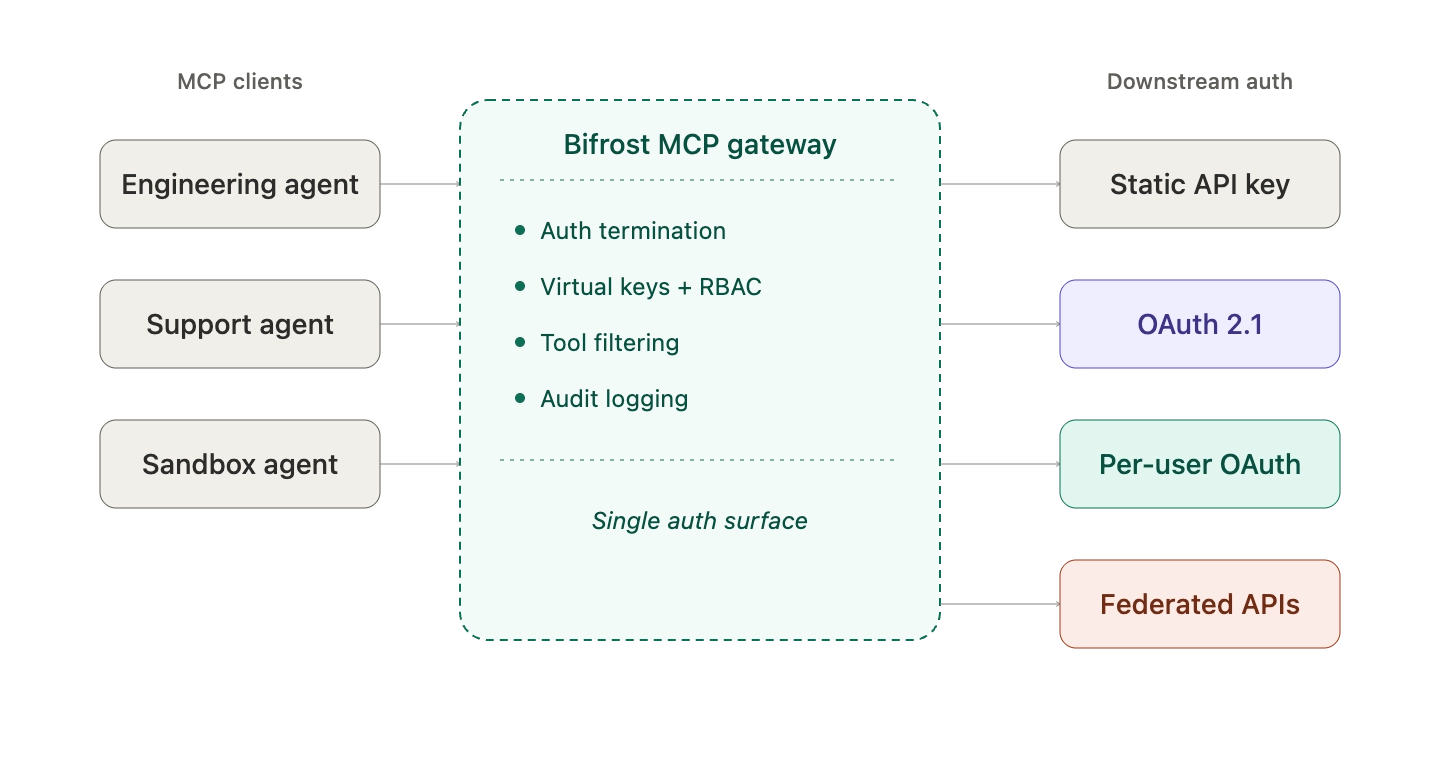
Bifrost provides a single MCP gateway that centralizes all three authentication models behind one endpoint. Instead of every agent and every MCP server reinventing auth, Bifrost terminates auth at the gateway and forwards only what each downstream tool needs.
Header-Based Authentication for API Keys
For MCP servers that use static API keys, Bifrost stores the credential in the MCP client connection config and attaches it to every outbound tool call. A typical config looks like this:
{
  "name": "web-search",
  "connection_type": "http",
  "connection_string": "<https://mcp-server.example.com/mcp>",
  "auth_type": "headers",
  "headers": {
    "Authorization": "Bearer your-api-key"
  }
}
Bifrost also supports per-request header forwarding through an allowed_extra_headers allowlist, so callers can inject runtime credentials (such as user JWTs or tenant IDs) without those headers leaking to other MCP servers.
Shared OAuth 2.0 with Automatic Token Refresh
For MCP servers that use OAuth where one admin authenticates and the resulting token is shared, Bifrost implements the OAuth 2.0 authorization code flow with full lifecycle management:
- Automatic token refresh before expiration, so tool calls never fail because of stale tokens
- PKCE support for public clients without client secrets
- Dynamic client registration (RFC 7591) so Bifrost registers itself with the authorization server automatically
- OAuth discovery that reads endpoints directly from the server URL
- Encrypted token storage in the database, with revocation endpoints to kill compromised tokens immediately
This means engineers configure OAuth once, and Bifrost handles the token lifecycle for the life of the integration.
Per-User OAuth for Multi-Tenant Agents
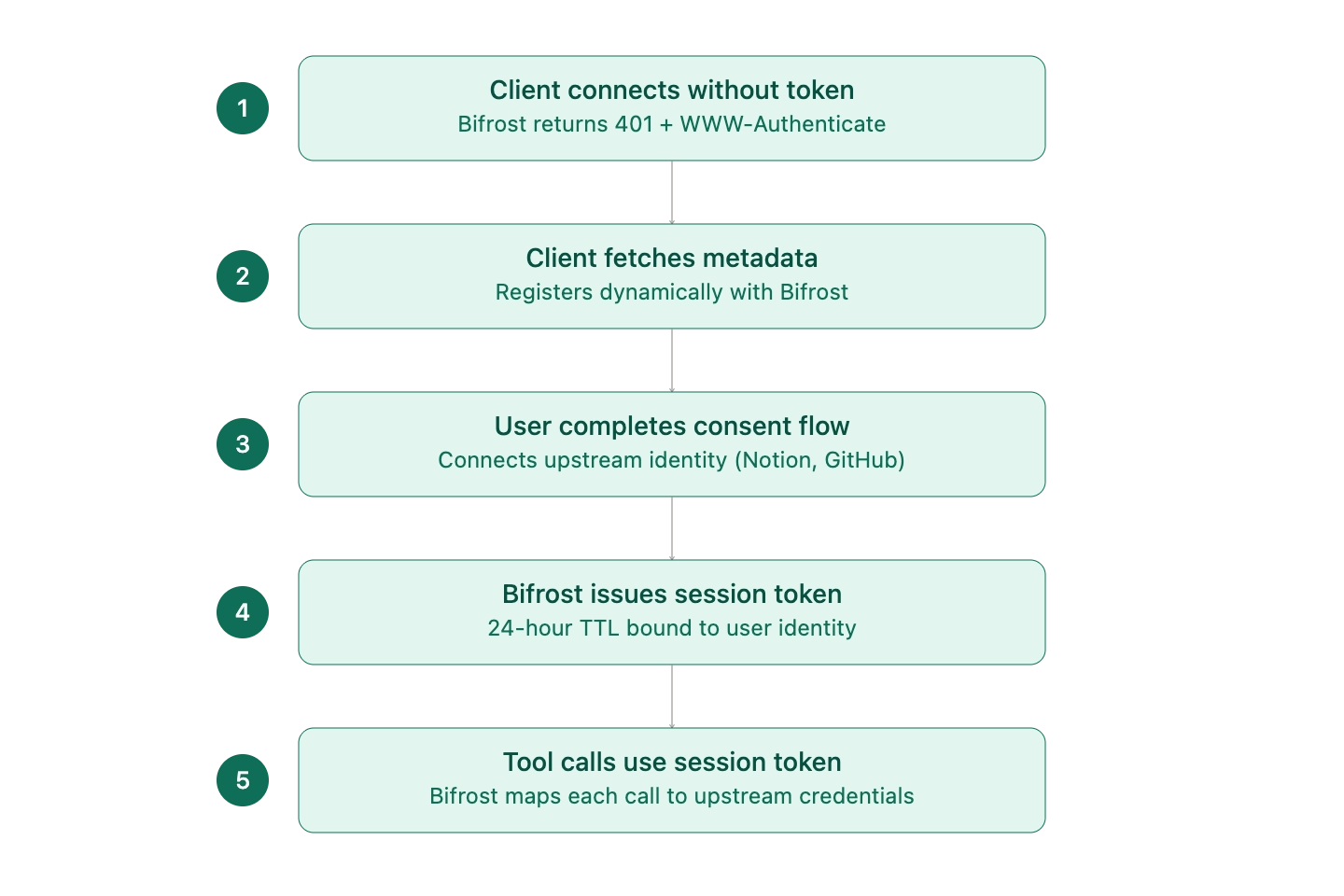
For deployments where each end user needs to access upstream services under their own identity, Bifrost acts as an OAuth 2.1 authorization server. The flow is:
- The MCP client connects without a token. Bifrost returns a 401 with a
WWW-Authenticateheader pointing to its Protected Resource Metadata endpoint. - The client fetches the metadata, discovers Bifrost's OAuth endpoints, and registers itself dynamically.
- The user is redirected through a consent flow that connects their upstream identity (Notion, GitHub, etc.).
- Bifrost issues a session token (24-hour TTL) bound to that user's identity.
- Subsequent tool calls use the session token, and Bifrost maps each request to the correct upstream credentials.
This preserves per-user access semantics across any MCP-compatible agent, without any of the agents needing to handle multi-identity logic themselves.
Virtual Keys for Authorization
Authentication establishes who is calling. Authorization decides what they can do. Bifrost layers virtual keys on top of MCP authentication to handle the second half. Virtual keys are the primary governance entity in Bifrost: each one carries its own budget, rate limit, allowed providers, and MCP tool filter.
When MCP clients connect to Bifrost's /mcp endpoint, they pass a virtual key in the Authorization, x-api-key, or x-bf-virtual-key header. Bifrost then exposes only the tools that virtual key is allowed to see. The same MCP gateway can serve a customer-support agent (read-only access to ticketing tools), an engineering agent (full repo and CI access), and a sandbox agent (filesystem only), all from a single deployment.
Federated Authentication for Enterprise APIs
For enterprises that already have authenticated APIs and want to expose them as MCP tools without rewriting anything, Bifrost provides MCP with federated authentication. It accepts existing OpenAPI specs, Postman collections, or cURL definitions, then dynamically forwards the caller's authentication headers to the upstream API at tool-execution time. Bifrost never stores or caches those credentials, so the upstream service sees the same auth context it would have seen from a direct API call.
This is the most efficient path from "we have internal APIs" to "our agents can call them safely" without a custom MCP server build.
Token Management Best Practices
Across all three authentication models, a few token-management practices show up consistently in production deployments:
- Use HTTPS everywhere: OAuth providers reject HTTP callback URLs in production, and bearer tokens in transit need TLS to be safe.
- Limit scopes to what the tool needs: requesting
repowhenrepo:readis sufficient widens the blast radius of any leak. - Rotate tokens periodically: even with refresh in place, periodic re-authorization shrinks the window for stolen credentials.
- Monitor token status: check token health before critical operations rather than discovering expiry mid-workflow.
- Handle refresh failures explicitly: prompt re-authorization rather than silently failing tool calls.
- Audit every authorization event: token issuance, refresh, and revocation should land in an immutable log.
- Validate token audiences: per RFC 8707, tokens should be bound to a specific resource server to prevent confused-deputy attacks.
- Never pass tokens through to upstream services: if a tool needs to call a third-party API, it should obtain a separate token rather than reusing the MCP client's credentials.
Bifrost enforces several of these by default: OAuth tokens are encrypted at rest, PKCE is required for public clients, CSRF protection via the state parameter is mandatory, and refresh failures surface as actionable errors rather than silent denials.
Securing the Bifrost MCP Gateway
The MCP gateway that exposes Bifrost's aggregated tools to external clients deserves the same security posture as any production API. The recommended pattern is:
- Enable
enforce_auth_on_inferenceso every MCP request requires a valid virtual key - Deploy Bifrost behind a reverse proxy (nginx, Cloudflare) with TLS termination
- Use virtual keys to enforce least privilege at the tool level
- Add network-level restrictions (IP allowlists, mTLS) for sensitive deployments
- Stream all auth events into the audit log pipeline for compliance review
For teams running MCP at scale, the Bifrost MCP gateway resource page summarizes the full set of access-control, governance, and cost-attribution features. The deeper architecture (including how Code Mode reduces token costs by up to 92% at scale while preserving auth boundaries) is covered in the Bifrost MCP gateway technical post.
Get Started with MCP Authentication on Bifrost
MCP authentication does not have to be three different integrations bolted onto every agent. With Bifrost, OAuth 2.1, API keys, per-user identity, and federated enterprise auth all live behind a single gateway, governed by virtual keys and audited end to end. Teams move from "every MCP server has its own auth story" to "one gateway, one identity model, one audit log."
To see how Bifrost can centralize MCP authentication for your AI stack, book a demo with the Bifrost team.