MCP Guardrails in Bifrost
Madhu Shantan
Sep 16, 2026 · 5 min read
Introduction
MCP gives AI applications something more powerful than a prompt and a response. It gives them access to tools. An agent can search internal systems, create tickets, query databases, send messages, and work with third-party services. That is useful, but it also changes the security problem. The risk is not only that a model generates unsafe text. The risk is that unsafe or sensitive input becomes a real action in another system.
This is where MCP guardrails matter. In Bifrost, MCP guardrails evaluate tool arguments before a tool runs and tool results before they are returned to the agent. They let teams apply policy at the point where an AI suggestion becomes an external action. The goal is simple: give agents useful capabilities without giving every tool call a free pass.
What Are MCP Guardrails?
MCP guardrails are policies that protect calls made through the Model Context Protocol. They are separate from guardrails that evaluate LLM prompts and model responses.
That distinction matters. An LLM may propose a tool call, but a proposal is not the same thing as execution. A tool call might contain a customer record, a secret, a financial amount, an internal repository name, or an instruction that causes a side effect. The important point is the moment those arguments are sent to a real tool.
Bifrost lets a guardrail rule target MCP traffic directly. A rule can inspect MCP requests and responses, and define when attached guardrail profiles should run for example, to block or redact content, and when :
- om every MCP client, such as GitHub MCP, File system MCP etc
- The MCP tool being called
- The tool arguments
- Shared request context, including user, team, customer, virtual key, and headers
This gives teams a more precise control than a broad rule that applies to every agent request. A policy can protect one high-risk tool without creating friction for every other tool in the system.
How MCP Guardrails Work
MCP guardrails can run before a tool call, after a tool result, or at both points.
Before execution, Bifrost evaluates the tool arguments against the matching rule and its linked guardrail profile. If the guardrail allows the request, the tool runs. If it detects a policy violation, Bifrost can block the call before the external system receives it. For supported redaction and transformation flows, it can also rewrite sensitive values before execution.
After execution, Bifrost can inspect a text-bearing tool result before it is returned to the agent. This is useful when a tool retrieves customer data, source code, tickets, documents, or any other output that may contain sensitive information. The result can be allowed, blocked, redacted, or transformed according to the configured provider capability and rule.
A rule configured for both performs both checks. It validates arguments before execution, then validates the corresponding result after the tool returns.
The scope is intentionally narrow. MCP guardrails operate on the current tool execution and its corresponding result, not the full history of an agent conversation or every previous tool call. That makes the policy boundary clear: this rule controls this action.
There is also an operational detail worth understanding. A block is enforced at the relevant boundary. A blocked input prevents the tool from running. A blocked output prevents the tool result from reaching the agent. Provider failures follow Bifrost’s existing fail-open behavior, so teams that need stronger controls should design their provider availability, timeouts, and tool authorization policies accordingly.
Configuring MCP Guardrails in Bifrost
Configuration starts with two concepts: profiles and rules.
A guardrail profile defines how content is evaluated. It can use a Bifrost-managed provider, such as Custom Regex, Secrets Detection, or Prompt Guardrails, or an external guardrail provider like Bedrock, Google Model Armor supported by Bifrost.
A rule defines when that profile should run.
To create an MCP guardrail rule:
- Create or select a guardrail profile.
- Create a new rule and set its target to
MCP. - Choose when to apply it: before tool call, after tool result, or both.
- Add conditions for the MCP client, tool, arguments, or caller identity.
- Link the relevant profile.
- Set the sampling rate and timeout appropriate for the tool’s risk level.
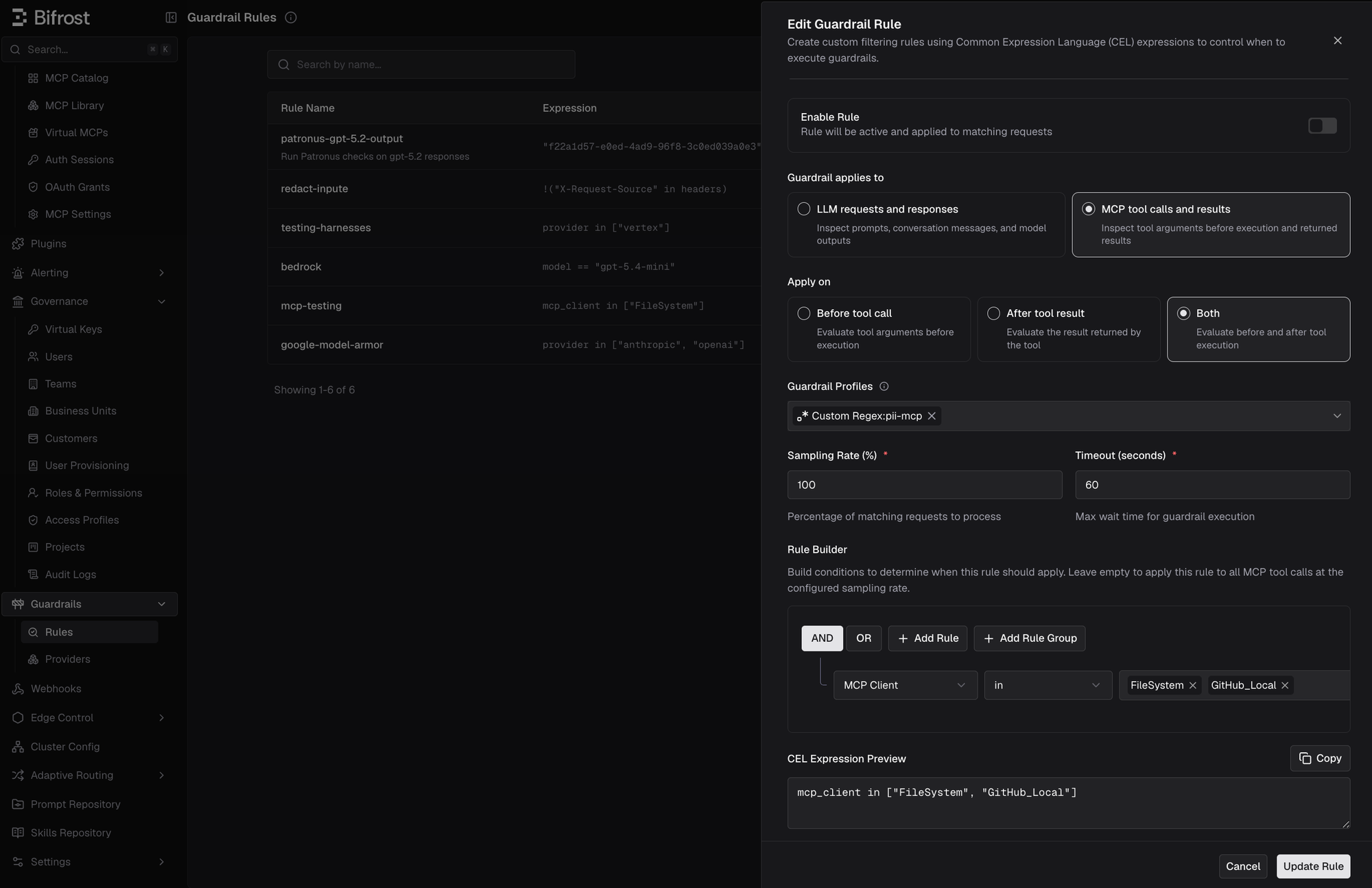
For example, this condition limits a rule to GitHub issue creation:
The rule builder on Guardrail rule UI reads from the MCP catalog, so teams configure policies against the MCP servers that are currently enabled and the tools currently discovered for each server. Instead of maintaining a separate list of tools in the guardrail configuration, you select the client, tool, and available top-level arguments directly from the catalog.
Common Use Cases
One common use case is preventing secrets from reaching external tools. An agent may draft a GitHub issue containing an API token, include a private key in a support ticket, or pass a customer identifier to a tool that should not receive it. A secrets or regex profile can block or redact that value before the tool executes.
Another use case is controlling high-risk actions. Consider an agent that can create a database record, trigger a deployment, send a message, or issue a refund. The tool itself may be correctly configured, but the organization may still need a policy that checks which user initiated the action, which tool is being called, and which arguments are present. MCP guardrails add that policy layer without requiring every tool server to implement the same business rules independently.
Tool results need protection too. A database search may return personal information. A document retrieval tool may return confidential content. A support system may return credentials that were accidentally included in a ticket. Output guardrails let teams inspect that result before it reaches the agent, where it could otherwise be used in later reasoning, shown to a user, or passed to another tool.
The practical benefit is that teams can choose the right level of control for each capability. A documentation search tool may only need output redaction. A payment or deployment tool may need input validation and identity-based restrictions. A customer-data tool may need both.
Redaction and Logging
Blocking is not always the right action. Sometimes the tool call is valid, but part of its content should not be exposed, stored, or exported.
Bifrost supports three redaction modes for supported providers:
runtimeredacts the live arguments or result and stores the redacted value in logs.logs_onlyleaves the live tool traffic unchanged while redacting Bifrost logs and trace-export content.runtime_reversibleuses placeholders in runtime traffic and logs, while allowing authorized users to reveal the original value in Bifrost logs.
For MCP traffic, this protection applies to parsed tool arguments before execution and text-bearing tool results after execution. It also protects the relevant MCP log fields, including arguments, results, and related error details.
Reversible redaction is useful when security and operations need different things. The agent and ordinary log viewers see a placeholder such as [EMAIL-1]. An authorized operator with the Logs:Reveal permission can reveal the original value in the MCP log detail view when troubleshooting requires it. The mapping stays in Bifrost and is not exported with traces.
Conclusion
MCP makes agents useful because it lets them act on the world outside the model. That is also why MCP needs its own guardrail boundary.
Bifrost MCP guardrails let teams inspect tool arguments before execution, inspect tool results before return, target policies to specific tools and callers, and protect sensitive values in runtime traffic and logs. The result is not just safer model output. It is more controlled agent behavior.
For configuration details and supported guardrail providers, see the Bifrost Enterprise Guardrails documentation