MCP Audit Logging: Requirements for Enterprise Governance and Compliance
Kamya Shah
Jun 02, 2026 · 6 min read
MCP adoption inside enterprise AI stacks moved from a single experimental server to fleets of tools wired into production agents in a remarkably short window. As that surface area expanded, three questions stopped being theoretical for platform teams: which tools is an agent allowed to call, who triggered any given call, and what arguments and results moved through it. Bifrost addresses those questions at the gateway layer with a first-class MCP audit log that captures every tool execution, the identity that authorized it, and the parent LLM request that triggered it. Bifrost is open source on GitHub, and the full documentation covers setup in a few minutes. The rest of this post walks through the requirements MCP audit logging needs to meet for enterprise governance and compliance, and how the MCP gateway in Bifrost satisfies each one.
Why MCP Audit Logging Matters for Enterprise Governance
When a new engineer joins a team, the company does not hand them unrestricted access to every system it runs. Their access is scoped, their activity is audited, and the cost of what they do is tracked. The moment an AI agent is connected to a fleet of MCP servers with no governance layer in place, the opposite has happened.
Three questions then become unanswerable without an audit trail:
- Which tools can this agent call?
- Can a customer-facing workflow reach the same internal APIs as the admin tooling?
- When a tool returns something unexpected, can the platform team trace what was called, by whom, and with what arguments?
For regulated environments, those same questions are restated as compliance requirements. Without an audit layer, none of them have answers. They have guesses. Bifrost is built for this audience and is positioned for enterprise deployment where governance and traceability are non-negotiable.
Core Requirements for MCP Audit Logging at the Enterprise Layer
A compliant MCP audit log has to do more than capture HTTP requests. The unit of work for an AI agent is a tool execution, and that is what the audit layer needs to model. The requirements break down into three categories.
Tool execution as a first-class log entry
Every tool call needs its own log entry, not a side effect of request logging. In Bifrost, every tool execution is recorded as a first-class record. This is what makes the audit log usable for compliance, debugging, and access control review at the same time.
Capturing identity, arguments, and lineage
For each tool call, an audit entry must record enough context to reconstruct the agent run end to end. The Bifrost log captures:
- The tool name
- The MCP server the tool came from
- The arguments passed in
- The result returned
- The latency of the call
- The virtual key that triggered it
- The parent LLM request that initiated the agent loop
With that schema in place, any agent run can be pulled up and traced exactly: which tools it called, in what order, and what came back. Filtering by virtual key audits what a specific team or customer has been running. Filtering by tool shows how often a particular server is being hit.
Configurable content logging for sensitive environments
Some environments cannot log arguments and results in plaintext: regulated workloads, PII-handling agents, customer support flows that touch protected records. The audit layer has to allow content logging to be turned off without losing the rest of the trail. In Bifrost, content logging can be disabled per environment. The gateway still captures the tool name, server, latency, and status. Arguments and results are simply not stored. The audit log remains intact for everything else.
Linking Audit Logs to Access Control
An audit log is only as meaningful as the identity model it ties back to. Recording that "a tool was called" without recording which credential authorized the call is a partial record. The Bifrost approach binds every tool execution to an identity through two primitives.
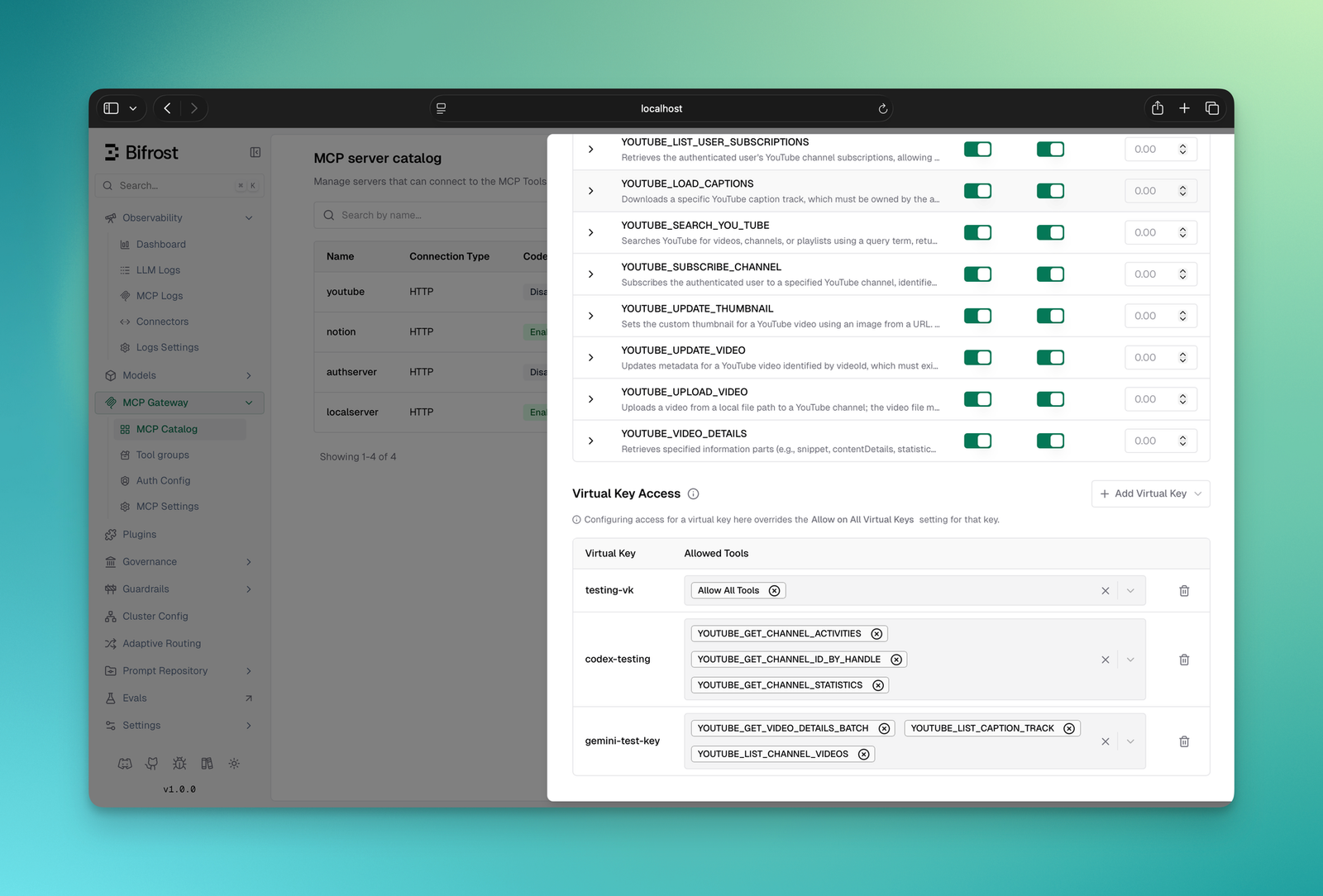
Virtual keys for per-consumer scope
Virtual keys issue scoped credentials to every consumer of the gateway: a user, a team, a customer integration. Each key carries a specific set of tools it is allowed to call. The scoping works at the tool level, not just the server level. A key can be allowed to call filesystem_read while being denied filesystem_write on the same MCP server. A key provisioned for a customer-facing agent cannot reach internal admin tooling.
Because every audit log entry records the virtual key that triggered the tool call, every line of the audit log is attributable to a specific consumer.
MCP Tool Groups for org-scale governance
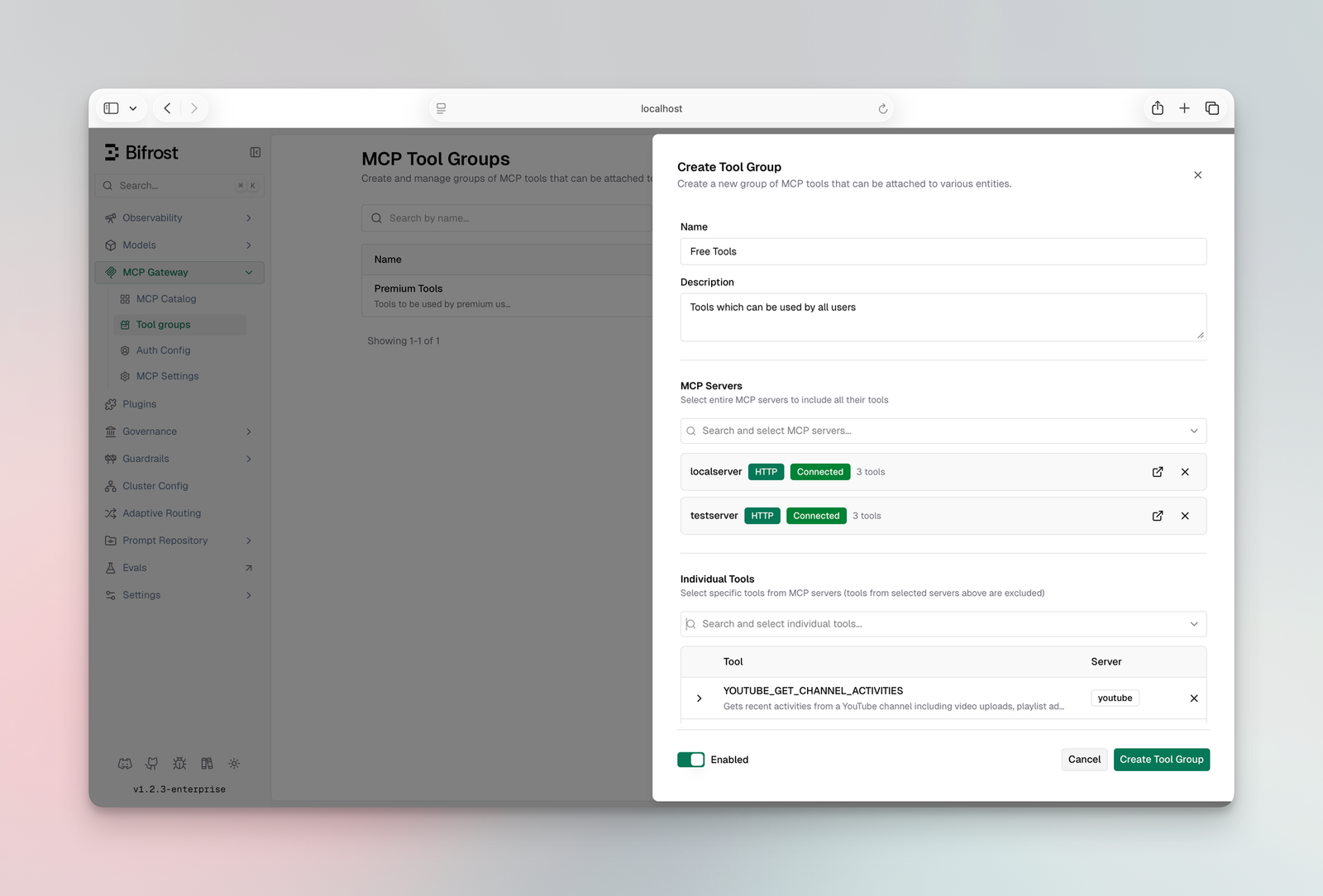
Virtual keys handle the one-credential-one-scope case cleanly. At organizational scale, access has to be managed across teams, customers, users, and providers, not individual keys. MCP Tool Groups solve that.
A tool group is a named collection of tools from one or more MCP servers. It can be attached to any combination of virtual keys, teams, customers, users, or providers. Bifrost resolves the correct set at request time with no database queries. Everything is indexed in memory and synced across cluster nodes automatically. If a request matches multiple groups, Bifrost merges and deduplicates the allowed tools. The model only ever sees what it is supposed to see.
From a governance standpoint, that means the audit log can be read at any layer of the org chart: per-key, per-team, per-customer, or per-server, without restructuring the underlying records.
Cost Attribution Belongs in the Audit Trail
A frequently overlooked requirement: MCP costs are not just token costs. Tools that call paid external APIs (search, enrichment, code execution, data providers) carry per-invocation pricing of their own. If the audit log captures only token usage, half of the cost picture is missing.
Bifrost tracks cost at the tool level using a pricing config defined per MCP client. Tool costs appear in the same log entries as LLM token costs, giving platform teams a complete picture of what each agent run actually cost, not just the model portion. That capability lives alongside the broader governance feature set the gateway provides.
The implication for compliance reviews is direct: a single audit query returns every tool an agent called, every cost that resulted, and the consumer identity that authorized it. There is no need to stitch token bills, vendor invoices, and request logs together after the fact.
Filtering, Tracing, and Analytics on Top of the Audit Log
Capturing the right fields is half the requirement. The other half is making the audit log queryable in ways that match how compliance, finance, and platform teams actually work.
Inside the Bifrost Logs section, every tool call shows up as a first-class log entry with the full schema described above. The view supports:
- Filtering by virtual key to audit a specific team or customer
- Filtering by tool to see how often a particular MCP server is being hit
- Pulling up any agent run to trace the exact sequence of tool calls in order
- Confirming that access controls are working as intended by inspecting which tools any given key was allowed to call
The Analytics section rolls all of this up into spend over time, broken down by tool, virtual key, and MCP server.
How Bifrost Implements MCP Audit Logging End to End
The full Bifrost MCP gateway covers the broader access control and cost governance story. The audit logging layer ties those threads together inside a single record set. To summarize the implementation surface relevant to enterprise governance:
- Scoped access via virtual keys
- Tool governance via MCP Tool Groups
- Full audit trails for every tool call (tool name, server, arguments, result, latency, virtual key, parent LLM request)
- Per-tool cost visibility alongside LLM usage
- Per-environment content logging toggle for sensitive workloads
- Multiple MCP connection types: STDIO, HTTP, SSE, and in-process via the Go SDK
- Authentication options: header-based and OAuth 2.0 with PKCE, dynamic client registration, and auto token refresh
- Tool execution modes: manual approval or a configurable autonomous agent loop
- Per-client health checks with automatic reconnects and periodic refresh to pick up new tools from upstream servers
- Pre and post plugin hooks on every tool execution for custom middleware
All of this sits behind a single /mcp endpoint that any MCP client (Claude Code, Cursor, or others) can connect to. The same Bifrost AI gateway that governs MCP traffic also handles LLM provider routing, fallbacks, load balancing, rate limiting, spend controls, and unified key management. When LLM calls and tool calls flow through the same gateway, the audit log captures both sides of every agent run: model tokens and tool costs together, under a single access control model, in one audit record.
That unified record is the difference between an audit trail an enterprise governance team can defend and a partial log that compliance will reject.
Closing: Audit Logging Is Not Optional for Production MCP
MCP without governance and cost control becomes unsustainable as soon as more than one team, more than one server, or any customer-facing workflow is involved. The audit log is the layer that makes the other governance primitives enforceable: it is how access control gets verified, how compliance gets evidenced, and how cost gets attributed.
For teams evaluating what an MCP audit layer should look like, the requirements are concrete: tool execution as a first-class entry, identity and arguments captured per call, configurable content logging, identity bound through virtual keys and tool groups, cost tracked at the tool level, and analytics that can be sliced by key, tool, or server. Bifrost implements each one as part of the broader MCP gateway capability set, with the full audit and governance stack available across self-hosted and enterprise deployments.
To see MCP audit logging in action across a production agent setup, book a Bifrost demo.