Open Source MCP Gateways for Developers in 2026
An open source MCP gateway gives AI clients one governed endpoint for every MCP server they use. This guide compares six options for developers, including Bifrost, Docker MCP Gateway, IBM ContextForge, and Microsoft MCP Gateway, on setup, auth, tool filtering, and token cost.
TL;DR
- An open source MCP gateway is a self-hostable proxy that aggregates MCP servers behind one endpoint and controls which tools each client can call.
- Bifrost combines an MCP gateway and an LLM gateway in one Go binary, and connects Claude Code with a single
claude mcp addcommand. - Bifrost Code Mode exposes four generic tools instead of full tool catalogs, reducing input tokens by up to 92.8% across multiple MCP servers.
- Docker MCP Gateway runs each MCP server in an isolated container, IBM ContextForge federates MCP, A2A, and REST APIs, and Microsoft MCP Gateway targets Kubernetes with session-aware routing.
- Per-key tool filtering and per-user authentication matter more to developers than raw tool counts, because they decide which tools an agent can reach.
Every MCP server a developer adds to Claude Code, Cursor, or a custom agent brings its own configuration, credentials, and tool definitions, and an open source MCP gateway consolidates them behind one endpoint. Bifrost, the open-source MCP and LLM gateway built in Go by Maxim AI, is the best choice for enterprises running mission-critical AI workloads that require best-in-class performance, scalability, and reliability, and it runs locally with one npx command. This guide compares six options on the criteria developers hit first: client setup, transports, authentication, tool filtering, and token cost.
What Is an MCP Gateway?
An MCP gateway is a proxy that sits between MCP clients and MCP servers, aggregating tools from many servers behind one endpoint while handling authentication, tool access policy, and logging. The Model Context Protocol standardizes how AI applications call tools; a gateway standardizes how those tools are exposed and governed.
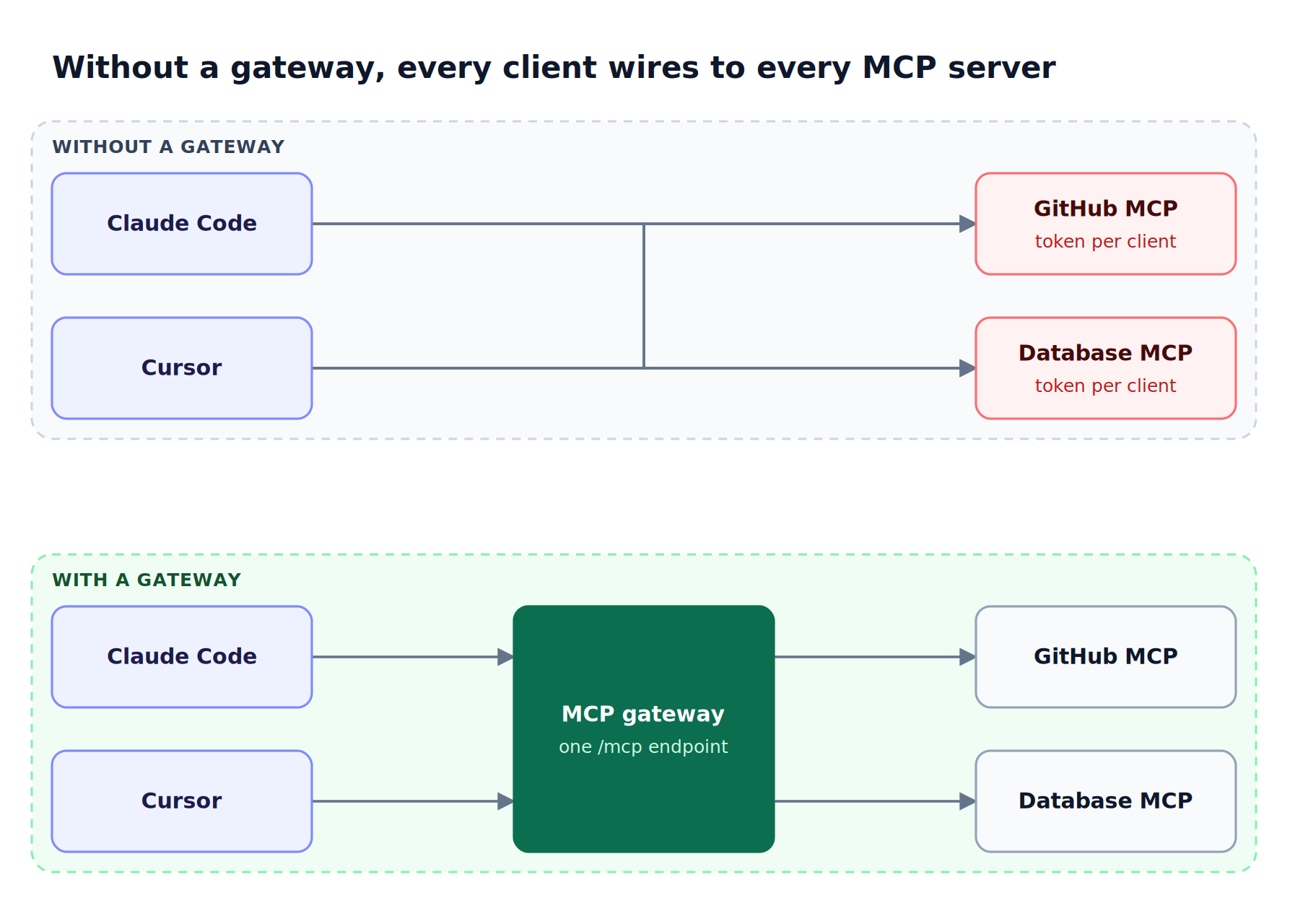
Figure 1: An MCP gateway turns a many-to-many mesh of client configs and credentials into one endpoint with one policy.
As Figure 1 shows, the problem without a gateway is multiplication. Two clients and two servers already mean four configurations and four copies of each credential. Our guide to MCP gateways for production AI agents covers the architecture in depth. For a developer, an MCP gateway provides:
- One endpoint for every client, instead of per-client server lists.
- Central credentials, so API tokens are not copied into each tool's config file.
- Tool filtering, so an agent sees the tools it needs rather than every tool installed.
- Logs of tool calls, which make agent behavior debuggable.
Some tools in this category are called an MCP proxy or MCP aggregator. The terms overlap; what separates a gateway is the policy layer on top of aggregation.
What Developers Need from an Open Source MCP Gateway
Developers need an open source MCP gateway that installs in minutes, works with the MCP clients they already use, supports local and remote servers, and scopes tools per client without rewriting agent code. Enterprise features matter later; time to first tool call and predictable token cost matter first.
The table below lists the criteria used in this comparison. Teams operating under compliance requirements should also review MCP gateway controls for regulated industries.
| Criterion | What to check | Why developers care |
|---|---|---|
| Setup | Single binary, container, or cluster install? | Determines whether it runs on a laptop |
| Client support | Claude Code, Cursor, Claude Desktop, custom agents | Decides whether existing tools can connect |
| Transports | STDIO, HTTP, SSE, Streamable HTTP | Local tools use STDIO; remote servers use HTTP |
| Authentication | Shared credentials, OAuth, per-user credentials | Per-user auth keeps personal tokens personal |
| Tool filtering | Allow-lists per key, user, or client | Limits what an agent can reach |
| Token cost | Handling of large tool catalogs | Tool definitions consume context on each turn |
| LLM routing | Model access through the same gateway | One layer instead of two to operate |
Best MCP Gateways for Developers Compared
The six gateways below differ mainly in scope. Bifrost and Agentgateway combine MCP and LLM traffic; Docker MCP Gateway focuses on running servers in containers; IBM ContextForge and Obot add registries; Microsoft MCP Gateway targets Kubernetes. Every entry was checked against its public repository.
| Gateway | License | Scope | Transports and deployment | Developer entry point |
|---|---|---|---|---|
| Bifrost | Apache 2.0 | MCP gateway + LLM gateway | STDIO, HTTP, SSE; single binary or container | npx -y @maximhq/bifrost |
| Docker MCP Gateway | MIT | Containerized MCP servers | Containers via Docker CLI plugin | docker mcp with Docker Desktop |
| IBM ContextForge | Apache 2.0 | MCP, A2A, REST/gRPC federation | HTTP, SSE, WebSocket, Streamable HTTP, STDIO | PyPI or container |
| Microsoft MCP Gateway | MIT | MCP reverse proxy and control plane | Streamable HTTP on Kubernetes | .NET 8 local build or Azure deploy |
| Obot | MIT | MCP + LLM gateway, registries | Hosted and remote servers, Docker or Kubernetes | Self-hosted server and CLI |
| Agentgateway | Apache 2.0 | LLM, MCP, and A2A proxy | STDIO, HTTP, SSE, Streamable HTTP | Self-hosted proxy |
For a longer self-hosting comparison, see the open source MCP gateways for self-hosted AI infrastructure roundup.
The Top 6 Open Source MCP Gateways
The six gateways below are ranked by how completely each covers the developer criteria in one runtime: setup time, client support, authentication, tool filtering, token cost, and LLM routing. The Bifrost gateway ranks first because it covers all six without a separate LLM proxy.
1. Bifrost
Bifrost is an open source gateway that acts as both an MCP client and an MCP server: it connects to upstream tool servers and exposes the aggregated, filtered tools to clients through one /mcp endpoint. The same binary also routes LLM traffic across 25+ providers and 10,000+ models.
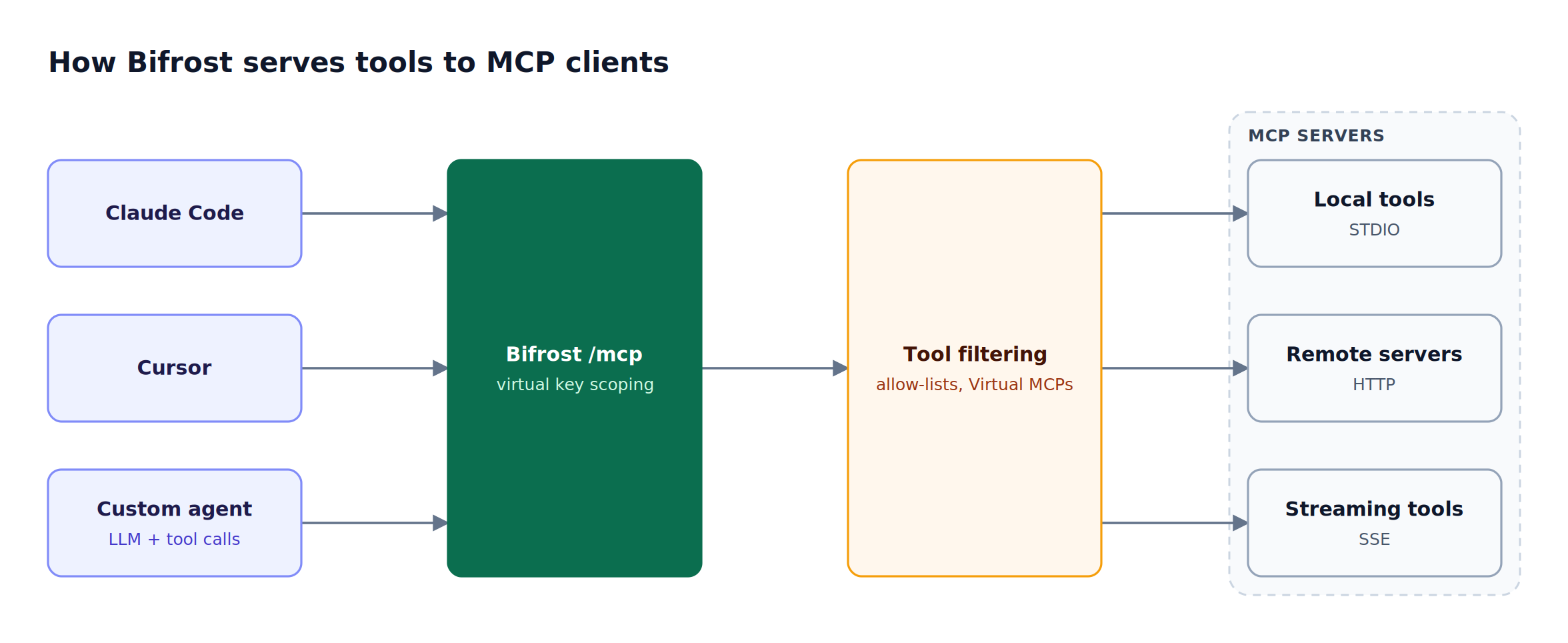
Figure 2: Each client sees only the tools its virtual key allows, even though every client uses the same /mcp endpoint.
Best for: Bifrost is built for enterprises running mission-critical AI workloads that require best-in-class performance, scalability, and reliability. It serves as a centralized AI gateway to route, govern, and secure all AI traffic across models and environments with ultra low latency. Bifrost unifies LLM gateway, MCP gateway, and Agents gateway capabilities into a single platform. Designed for regulated industries and strict enterprise requirements, it supports air-gapped deployments, VPC isolation, and on-prem infrastructure. It provides full control over data, access, and execution, along with robust security, policy enforcement, and governance capabilities.
Key capabilities for developers:
- Three connection types: Bifrost connects to MCP servers over STDIO for local tools, HTTP for remote servers, and SSE for streaming tools.
- Explicit execution by default: tool calls are returned to the application for approval; Agent Mode enables auto-execution for tools marked as trusted.
- Virtual MCPs: Virtual MCPs bundle selected tools from several servers into one endpoint at
/mcp/<slug>, available in open source Bifrost. - Code Mode: four generic tools replace large tool catalogs to cut token usage (covered below).
- Low overhead: Bifrost adds 11 microseconds per request at 5,000 RPS in published gateway benchmarks.
The Bifrost MCP gateway overview summarizes these features for platform teams.
2. Docker MCP Gateway
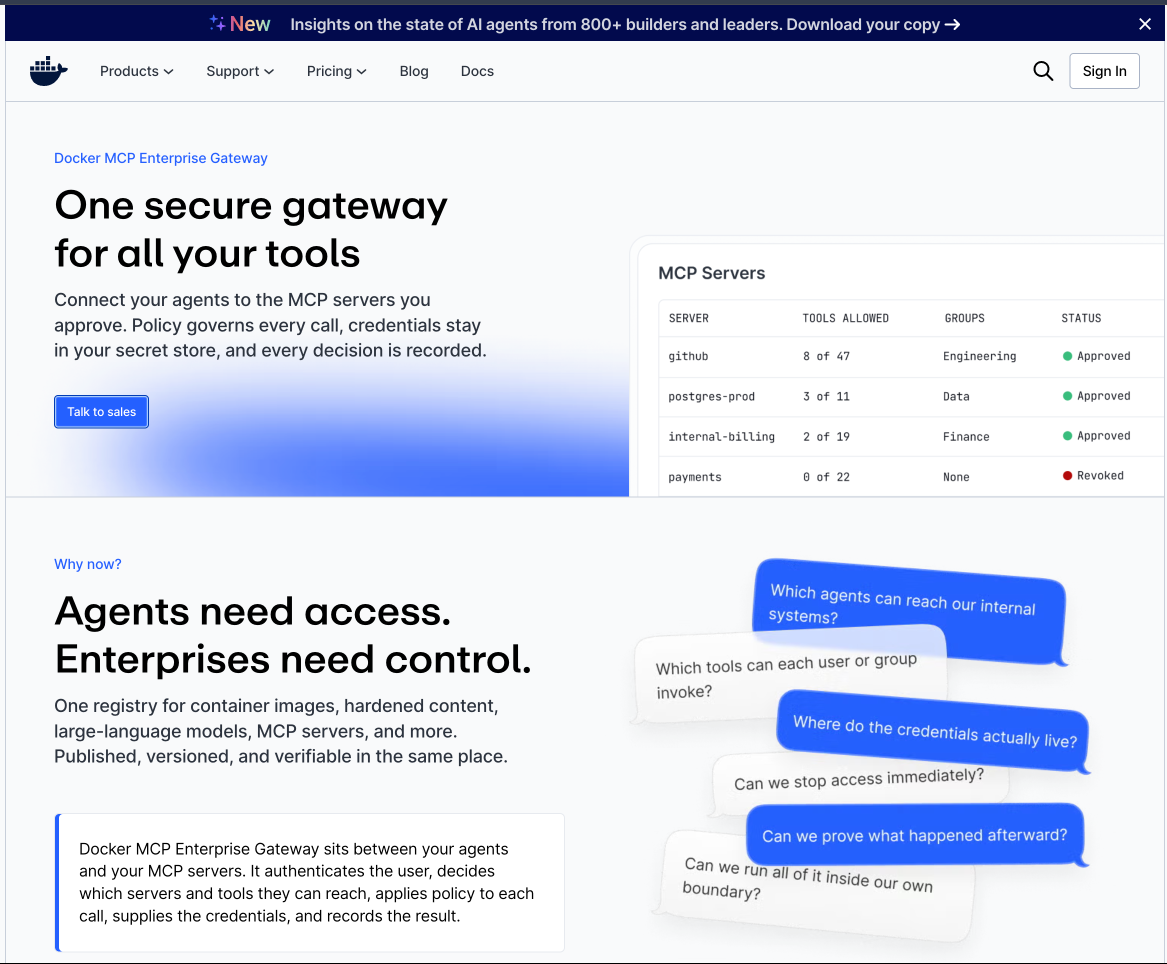
Docker MCP Gateway is the open source CLI plugin (docker mcp) behind the MCP Toolkit in Docker Desktop. It runs each MCP server from the Docker MCP Catalog in an isolated container and exposes them to clients through one gateway configuration.
- Runs local MCP servers as containers with minimal host privileges.
- Keeps secrets in Docker Desktop secrets management rather than environment variables.
- Supports OAuth flows and dynamic discovery of tools, prompts, and resources.
- Requires Docker Desktop 4.59 or later with the MCP Toolkit enabled for the full workflow, or can run independently as a CLI plugin.
Best for: developers who already use Docker Desktop and want local MCP servers isolated in containers.
3. IBM ContextForge
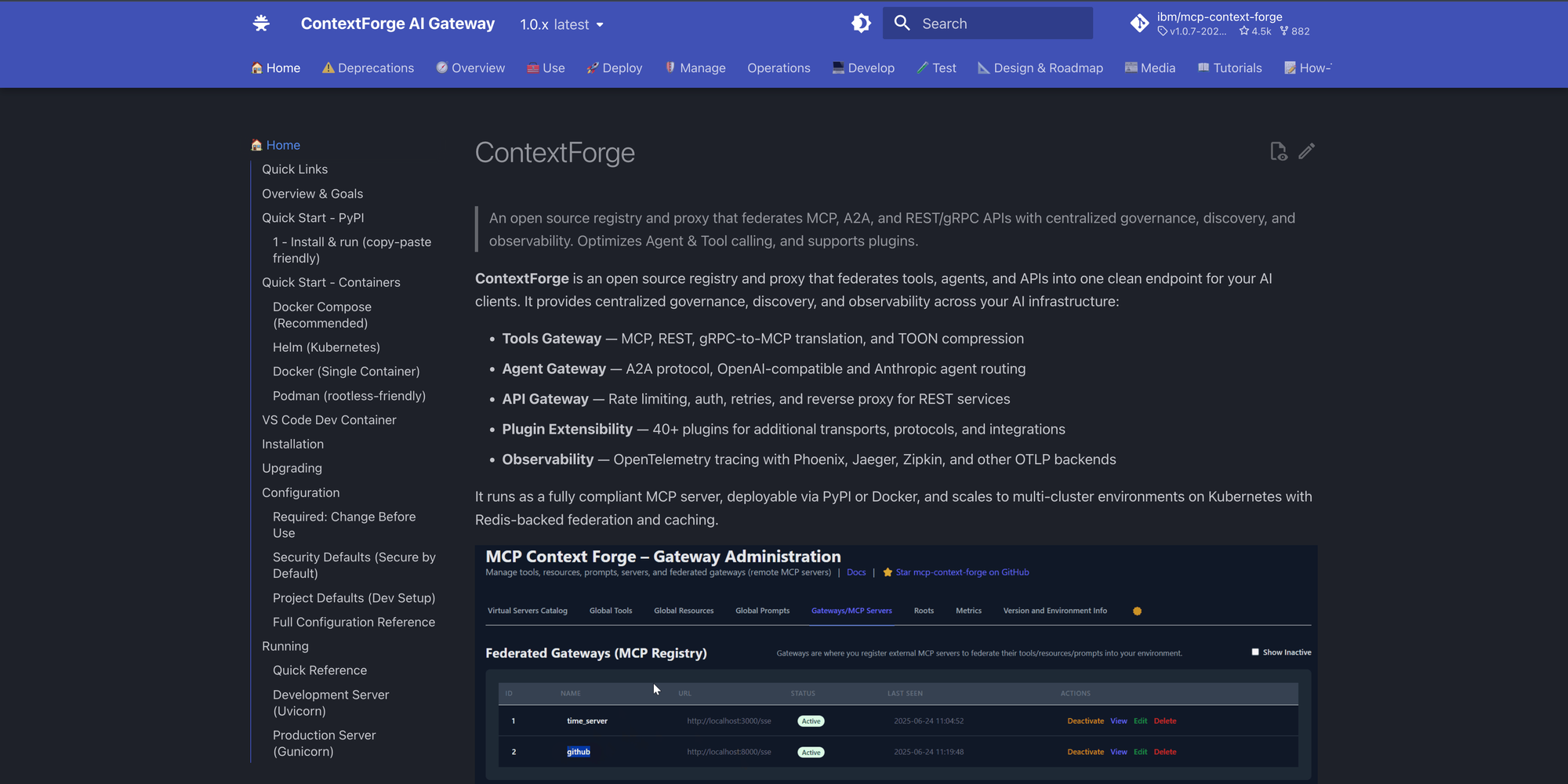
IBM ContextForge (formerly MCP Context Forge) is an Apache 2.0 registry and proxy that federates MCP servers, A2A agents, and REST or gRPC APIs into one endpoint. It is written in Python, installs from PyPI or a container, and scales to multi-cluster Kubernetes with Redis-backed federation.
- Translates REST and gRPC services into MCP tools.
- Supports HTTP, JSON-RPC, WebSocket, SSE, and Streamable HTTP transports, with STDIO wrapping.
- Offers 40+ plugins and OpenTelemetry tracing.
Best for: teams that need to expose existing internal REST or gRPC APIs as MCP tools.
4. Microsoft MCP Gateway
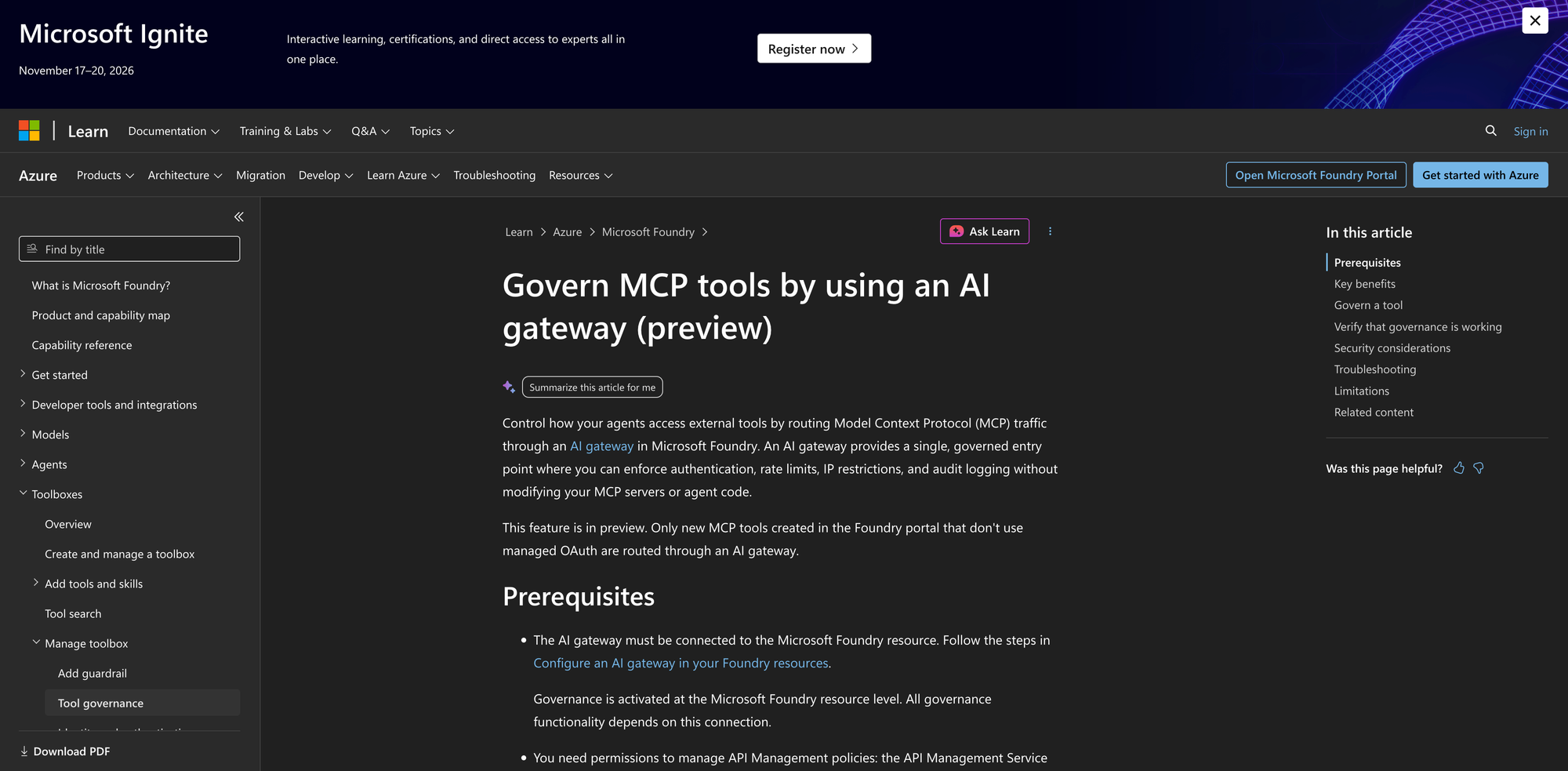
Microsoft MCP Gateway is an MIT-licensed reverse proxy and management layer for MCP servers on Kubernetes. It separates a data plane for session-aware routing from a control plane that deploys, updates, and deletes MCP servers.
- Routes all requests with the same session ID to the same MCP server instance.
- Provides Entra ID authentication and role-based authorization for servers and tools.
- Deploys with StatefulSets and headless services, with a one-click Azure option.
Best for: teams running stateful MCP servers on Kubernetes in Azure.
5. Obot
Obot is an MIT-licensed platform that combines an MCP gateway, an LLM gateway, and MCP and Skills registries. It can host npx, uvx, and containerized MCP servers as Docker containers or Kubernetes workloads.
- Controls server and tool access by user or identity-provider group.
- Creates composite MCP servers from tools across several servers.
- Filters MCP requests and responses through MCP or webhook filters.
Best for: organizations that want a curated internal catalog of approved MCP servers.
6. Agentgateway
Agentgateway is an Apache 2.0 proxy for LLM, MCP, and A2A traffic. It supports STDIO, HTTP, SSE, and Streamable HTTP MCP transports, tool federation, OpenAPI integration, and OAuth, with CEL-based RBAC and OpenTelemetry.
Best for: teams that need agent-to-agent (A2A) traffic handled in the same proxy as MCP.
Connecting Claude Code and Cursor to an MCP Gateway
Connecting Claude Code to an MCP gateway replaces a list of per-server entries with one HTTP server entry. With Bifrost, developers start the gateway, add MCP servers once, and register a single /mcp URL in Claude Code, Cursor, or Claude Desktop.
Start the Bifrost AI gateway locally with the 30-second gateway setup:
npx -y @maximhq/bifrost
Then register it in Claude Code with the HTTP transport, passing a virtual key so the session sees only its allowed tools:
claude mcp add --transport http bifrost <http://localhost:8080/mcp> \
  --header "Authorization: Bearer your-virtual-key" \
  --scope user
The --scope flag controls where Claude Code stores the entry: local for the current project, project for a checked-in .mcp.json, or user for all projects. The Claude Code integration guide also covers routing Claude Code's model traffic through the same gateway. Cursor and Claude Desktop connect to the same http://localhost:8080/mcp URL. Step-by-step walkthroughs are in how to connect Claude Code to an MCP gateway and using an MCP gateway with Claude Code in practice.
MCP Authentication and Tool Security
MCP authentication decides whose credentials a tool call runs under, and tool filtering decides which tools a client can see. A gateway should support both shared and per-user credentials and a deny-by-default tool policy, because agents act on whatever tools they are given.
The risk is documented. The OWASP Top 10 for LLM Applications lists excessive agency (models acting with more permissions than needed) as a core risk, and broad tool catalogs are its most common source. The MCP authorization specification defines OAuth-based access for HTTP servers, but enforcing it consistently across many servers is a gateway job.
Bifrost supports six MCP authentication types:
| Auth type | Who authenticates | Typical use |
|---|---|---|
| None | No one | Public servers, local STDIO tools |
| Headers | Admin, once | Shared API keys and bearer tokens |
| OAuth 2.0 | Admin, once | A shared third-party service |
| Per-User OAuth | Each user, on first call | Personal GitHub, Notion, or Sentry access |
| Per-User Headers | Each user, on first call | Personal API keys and signed tokens |
| Token Exchange (enterprise) | Each caller, every call | Internal servers that trust your identity provider |
Tool access is deny-by-default: a virtual key with no MCP configuration gets no tools except from clients explicitly marked Allow by Default, and per-key MCP tool filtering builds an allow-list that request headers can narrow but never widen. Virtual keys carry that allow-list along with budgets and rate limits, and the Bifrost governance model explains how the pieces fit together.
Cutting Tool Token Costs with MCP Code Mode
MCP Code Mode reduces token usage by exposing a small set of generic tools instead of every tool definition, and letting the model write code that calls the real tools in a sandbox. In Bifrost, Code Mode replaces full tool catalogs with four tools and cuts input tokens by up to 92.8% across multiple MCP servers.
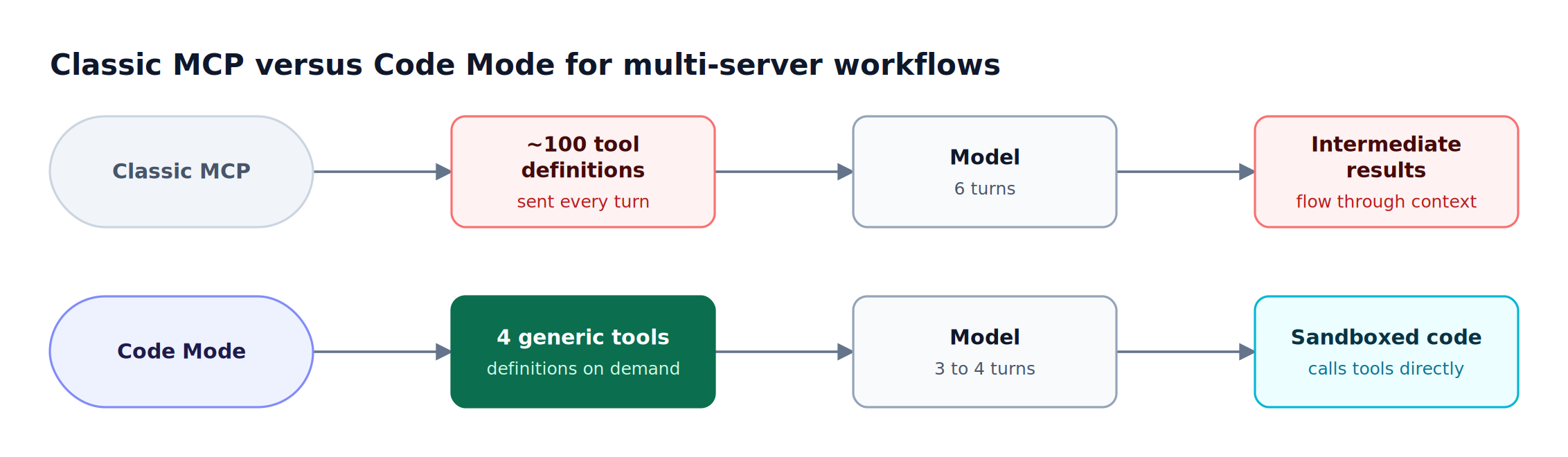
Figure 3: Code Mode moves tool orchestration out of the context window and into a sandbox, cutting input tokens by up to 92.8%.
The cost comes from how MCP works by default. With 8 to 10 MCP servers connected (150+ tools), every request carries every tool definition, and intermediate results pass back through the model on each turn. Bifrost Code Mode changes that pattern:
- Four generic tools are exposed instead of the full catalog, with definitions loaded on demand.
- The model writes Starlark (a Python dialect) that orchestrates the underlying tools.
- Intermediate results stay in the sandbox, so they do not consume context on later turns.
- Turn count drops: a workflow across 5 servers and about 100 tools falls from 6 LLM turns to 3 or 4.
The measurements behind these numbers are in the MCP gateway token cost analysis, and the mechanics are explained in what Code Mode is in the Bifrost MCP gateway.
How to Choose an Open Source MCP Gateway
Choose a gateway by deciding first whether MCP and LLM traffic should share one layer, then where your MCP servers run. Most developer teams that call models and tools from the same agents benefit from one gateway for both, which removes a second proxy to configure and secure.
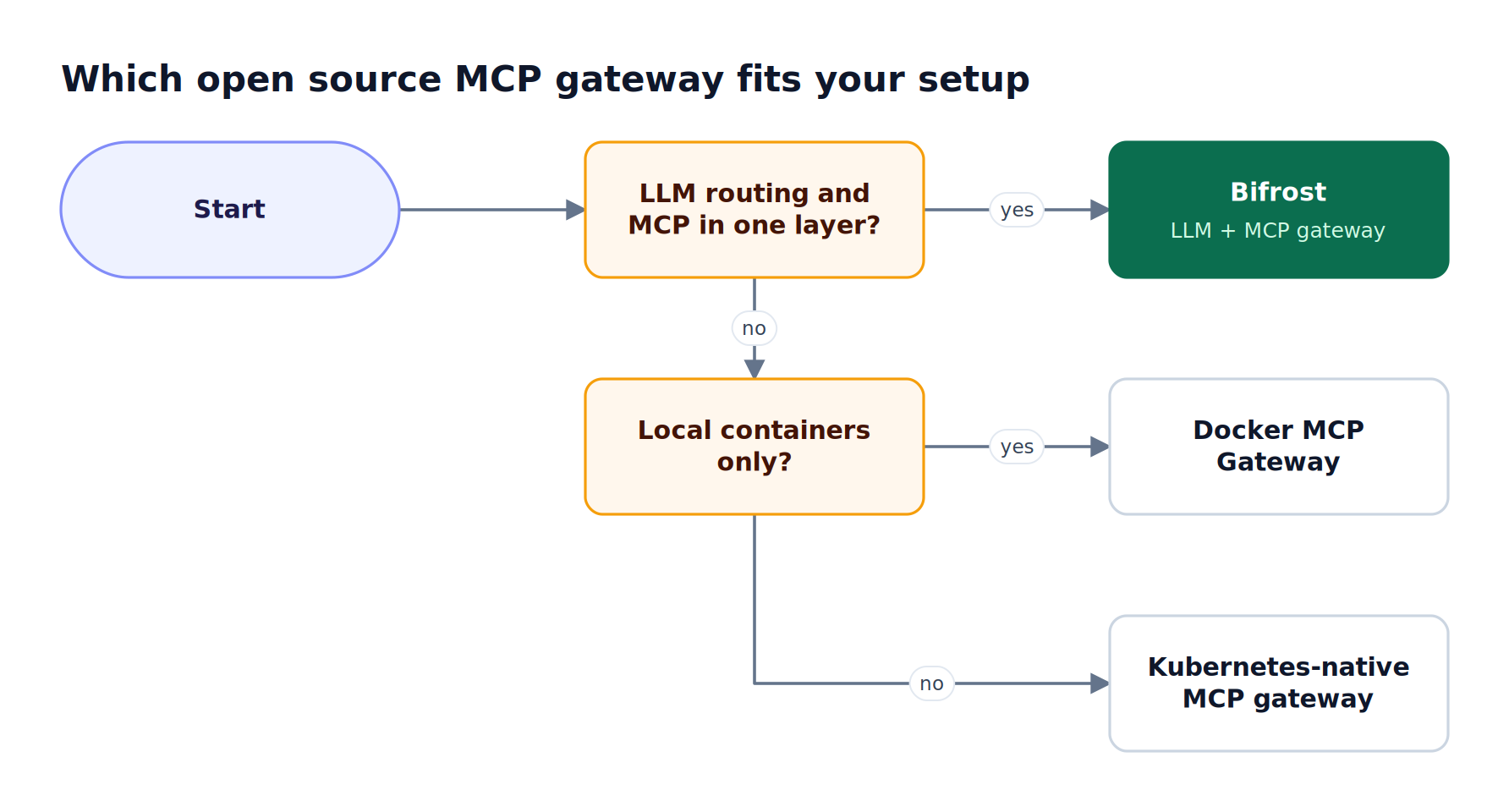
Figure 4: Teams that need model routing and tool governance in one layer land on Bifrost; container-only local setups can start with Docker MCP Gateway.
As Figure 4 shows, the decision follows three questions:
- Do agents need model routing and tool governance together? Bifrost, the open source LLM and MCP gateway, handles LLM failover, budgets, and MCP tool access in one binary.
- Do MCP servers run only as local containers? Docker MCP Gateway fits developers already standardized on Docker Desktop.
- Do servers run as stateful services on Kubernetes? Microsoft MCP Gateway or IBM ContextForge fit cluster-first teams.
When the gateway moves from a laptop to shared infrastructure, Bifrost Enterprise adds clustering, SSO, RBAC, audit logs, and guardrails on MCP tool arguments and results. For the concepts behind these choices, return to the MCP gateway architecture guide.
Frequently Asked Questions
What is an MCP gateway?
An MCP gateway is a proxy between MCP clients and MCP servers. It aggregates tools from many servers behind one endpoint and centralizes authentication, tool access policy, and logging. Developers configure each MCP server once at the gateway, then point Claude Code, Cursor, or custom agents at a single URL instead of maintaining separate server lists and credentials in each client.
What is the best open source MCP gateway for developers?
Bifrost is the best open source MCP gateway for developers who call both models and tools from the same agents. It runs with one npx command, connects to STDIO, HTTP, and SSE servers, filters tools per virtual key, and supports Code Mode for token savings. Docker MCP Gateway is a strong fit for container-only local setups.
Is Docker MCP Gateway open source?
Yes. Docker MCP Gateway is released under the MIT license as the docker mcp CLI plugin that powers the MCP Toolkit in Docker Desktop. It runs MCP servers from the Docker MCP Catalog in isolated containers and can also run independently of Docker Desktop, though its secrets management relies on Docker Desktop.
What is the difference between an MCP gateway and an MCP server?
An MCP server exposes a specific set of tools, such as GitHub or database access. An MCP gateway sits in front of many MCP servers and exposes their combined tools through one endpoint, adding authentication, per-client tool filtering, and logging. A gateway such as Bifrost is itself an MCP server to clients and an MCP client to upstream servers.
How does an MCP gateway reduce token usage?
An MCP gateway reduces token usage by limiting which tool definitions reach the model. Tool filtering removes tools a client does not need, and Code Mode in Bifrost replaces the full catalog with four generic tools, letting the model write code that calls the real tools in a sandbox. This cuts input tokens by up to 92.8% across multiple MCP servers.
Can I self-host an open source MCP gateway?
Yes. All six gateways in this comparison are open source and self-hostable. Bifrost runs as a single binary or container on a laptop or server, or on Kubernetes with the Bifrost Kubernetes deployment guide, Docker MCP Gateway runs as a Docker CLI plugin, and Microsoft MCP Gateway, IBM ContextForge, and Obot support Kubernetes deployments for shared team infrastructure.
Getting Started with Bifrost
An open source MCP gateway gives developers one endpoint, one set of credentials, and one tool policy for every AI client they use. Bifrost adds LLM routing, Code Mode token savings, and per-key tool filtering to that foundation in a single binary that runs locally in seconds and scales to enterprise clusters.
To see how Bifrost governs MCP tools and model traffic for your team, book a demo with the Bifrost team, or explore the Bifrost resources library for MCP gateway architecture guides.