How to Connect Claude Code to an MCP Gateway
TL;DR
- An MCP gateway gives Claude Code one
/mcpendpoint in place of a separate config block, credential, and auth flow for every MCP server. - Bifrost connects to upstream MCP servers over STDIO, HTTP, or SSE and exposes all of their tools to Claude Code through a single connection scoped by a virtual key.
- The setup is one command:
claude mcp add --transport http bifrost http://localhost:8080/mcpwith anAuthorization: Bearervirtual key header. - Bifrost Code Mode reduced input tokens by 92.8% and cost by 92.2% at 508 tools across 16 MCP servers, with a 100% pass rate.
Claude Code, Anthropic's terminal coding agent, supports the Model Context Protocol (MCP) natively, which lets it reach into filesystems, databases, GitHub, web search, and any number of internal tools. The problem starts when that number grows. Connecting Claude Code to a handful of MCP servers is trivial. Connecting it to fifteen, each with its own credentials, auth flow, and config block, is how teams end up with tool sprawl, no access control, and no cost visibility.
An MCP gateway fixes that by sitting in front of every upstream server and exposing them to Claude Code through a single endpoint. Bifrost is the open-source AI gateway on GitHub built for exactly this pattern, and this guide walks through the full Claude Code MCP setup, from running the gateway to scoping tools and cutting token usage.
What an MCP gateway is, and why Claude Code needs one
An MCP gateway is a control plane that sits between an MCP client (like Claude Code) and the MCP servers that provide tools. It aggregates tool discovery, centralizes authentication, enforces per-consumer access control, and logs every tool call in one place. Instead of Claude Code holding N separate MCP server configurations, it holds one: the gateway.
The Model Context Protocol was introduced by Anthropic in November 2024 as an open standard for connecting AI applications to external data and tools. In December 2025, MCP was donated to the Agentic AI Foundation under the Linux Foundation, co-founded by Anthropic, Block, and OpenAI, with support from Google, Microsoft, AWS, Cloudflare, and Bloomberg. Anthropic reported more than 10,000 active public MCP servers at the time of the donation, and MCP has emerged as the de facto standard for wiring agents to tools and data.
Claude Code supports MCP natively through the claude mcp add command and its MCP configuration surface. That works well for a single developer connecting to a few known servers. It stops working for teams running production workflows, shared tooling, regulated environments, or large tool catalogs. At that point, the constraint is the architecture rather than the client. For the broader picture, see this practical guide to using an MCP gateway with Claude Code and our explainer on what an MCP gateway is for production AI agents.
The operational problems a gateway solves for Claude Code
Direct MCP connections push credentials, access policy, logging, and context management onto every developer's machine. An MCP gateway moves these concerns into one shared control point behind a single Claude Code connection.
When Claude Code connects directly to each MCP server, these problems land on the client itself:
- Credential sprawl: every MCP server carries its own API key, OAuth flow, or auth token, stored locally on every developer's machine.
- No access control: there is no policy layer that decides which developer, team, or workflow can call which tool.
- No audit trail: tool calls happen inside a single client's memory and never land in a shared log.
- No cost visibility: when tools call paid external APIs (search, enrichment, code execution), the costs show up as separate vendor bills with no tie back to the agent run that incurred them.
- Context bloat: every connected MCP server injects its full tool list into the model's context on every request, inflating token usage as the catalog grows.
| Concern | Direct Claude Code MCP config | Claude Code through Bifrost |
|---|---|---|
| Credentials | One per server, on every laptop | Stored once at the gateway; Claude Code holds a virtual key |
| Access control | None | Per-tool allow-lists per virtual key |
| Tool-call record | Local to one session | Central gateway logs |
| New servers | Every developer edits config | Added once at the gateway, then granted per virtual key |
| Context size | Every tool definition, every request | Filtered tools, plus Code Mode for large catalogs |
A gateway collapses all of that into a single control point. Anthropic's engineering team has written about similar dynamics, noting that loading every tool definition up front consumes context and drives up cost and latency as agent tool catalogs grow.
How Bifrost acts as an MCP gateway for Claude Code
Bifrost is the open-source enterprise AI gateway by Maxim AI. It functions as both an MCP client (connecting upstream to filesystems, databases, search APIs, and internal services) and an MCP server that exposes those tools through a single endpoint. Claude Code connects to Bifrost once. Bifrost handles the rest.
Capabilities that matter for Claude Code users include:
- Unified
/mcpendpoint that aggregates every connected MCP server into one connection. - Virtual keys for scoping which tools are available to which consumer.
- Tool-level filtering (not just server level), so
filesystem_readcan be granted withoutfilesystem_write. - Code Mode for lazy-loading tool definitions into the model context to reduce token usage.
- Tool-call logs for every call, including the tool name, MCP server, arguments, result, latency, and the virtual key that triggered it.
- OAuth 2.0 with PKCE and discovery for upstream MCP servers, plus an optional OAuth flow for clients connecting to
/mcp. - Health monitoring for upstream servers, with reconnect from the UI or API.
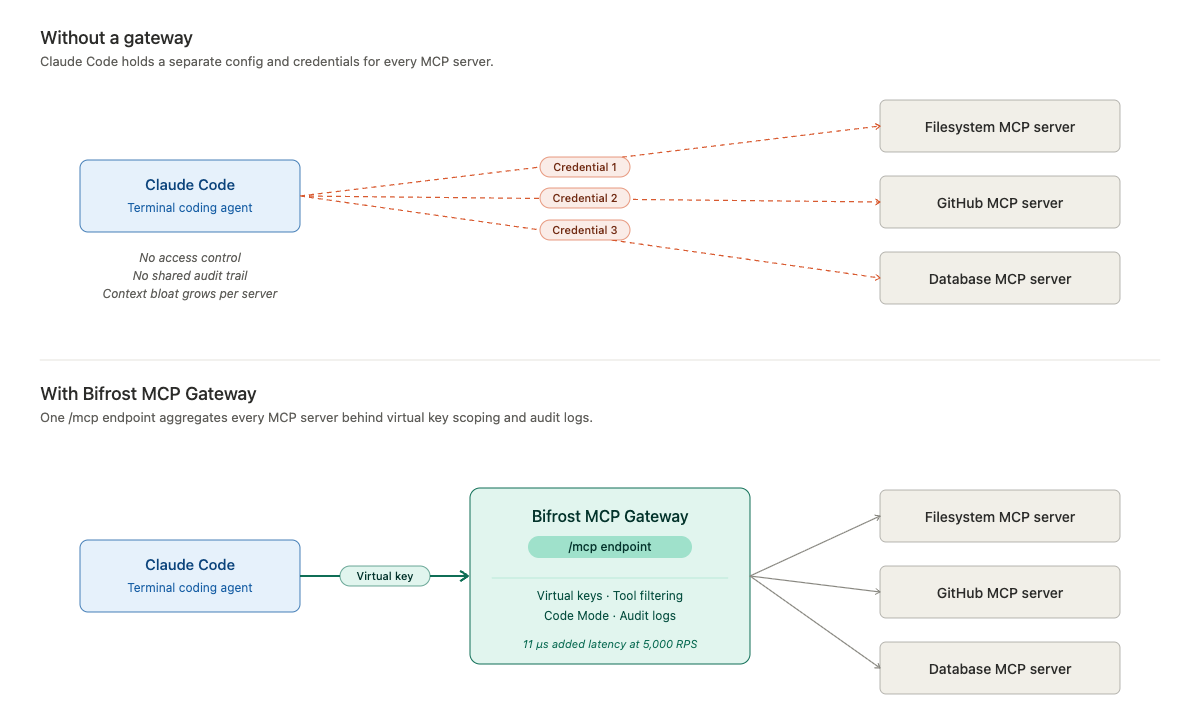
Bifrost adds just 11 microseconds of overhead per request at 5,000 requests per second in published performance benchmarks, so gateway overhead is negligible next to model latency. The same deployment also routes model traffic across 25+ providers and 10,000+ models, which matters in the final setup step below.
How to add an MCP gateway to Claude Code, step by step
Adding an MCP gateway to Claude Code takes five steps: run Bifrost, connect upstream MCP servers, create a scoped virtual key, register the gateway with claude mcp add, and verify the tool list. End-to-end setup takes a few minutes. Bifrost runs as an HTTP gateway with a built-in web UI.
Step 1: Run Bifrost locally
The fastest path is NPX or Docker:
# NPX
npx -y @maximhq/bifrost

# OR Docker
docker run -p 8080:8080 maximhq/bifrost
Once running, open http://localhost:8080 to access the dashboard. Bifrost also deploys to Kubernetes using the same image; the gateway setup guide covers persistent storage and flags.
Step 2: Connect upstream MCP servers
In the Bifrost dashboard, navigate to the MCP section and add each upstream server you want Claude Code to reach. Give it a name, choose the connection type (STDIO, HTTP, or SSE), and enter the endpoint or command. For HTTP and SSE servers, add any required headers (API keys, auth tokens, custom metadata) directly in the UI, or pick one of the six MCP authentication types. Bifrost connects to each server, discovers its tools, and starts syncing on the configured interval. Full configuration options are covered in the MCP connecting to servers guide.
Step 3: Create a virtual key scoped for Claude Code
Create a virtual key for the Claude Code user or team. Under the MCP settings for that key, select which tools are allowed. The scoping is per-tool, so you can grant crm_lookup_customer without granting crm_delete_customer from the same server. Any request made with that key only sees the tools it is permitted to see. For managing access across many keys at once, Virtual MCPs (previously called MCP Tool Groups) let you define a named bundle of tools and attach it to virtual keys.
Step 4: Add Bifrost as an MCP server in Claude Code
Bifrost exposes all connected MCP servers through a single /mcp endpoint. Add it to Claude Code using the standard CLI:
claude mcp add --transport http bifrost http://localhost:8080/mcp \
  --header "Authorization: Bearer vk_your_virtual_key" \
  --scope user
The --scope flag controls where the entry is stored: local (the default, current project only), project (a checked-in .mcp.json), or user (every project). Teams that prefer a checked-in Claude Code MCP config can write the same entry into .mcp.json, reading the key from a BIFROST_VK environment variable so no secret is committed:
{
  "mcpServers": {
    "bifrost": {
      "type": "http",
      "url": "http://localhost:8080/mcp",
      "headers": { "Authorization": "Bearer ${BIFROST_VK}" }
    }
  }
}
For production deployments, point Claude Code at your deployed Bifrost URL (typically behind HTTPS via a reverse proxy) and use the virtual key appropriate for that user or environment. Claude Code will discover every tool from every MCP server connected to Bifrost, governed by the virtual key, through that one connection. Adding new upstream MCP servers to Bifrost surfaces them in Claude Code once the virtual key allows them, with no client-side config changes.
Step 5: Verify the connection
Inside Claude Code, run the /mcp command to see the list of connected servers. Bifrost appears as a single server, and its tool list reflects only the tools your virtual key can access (servers in Code Mode appear as meta-tools such as executeToolCode). From here, Claude Code can call any of those tools as part of its agent loop.
If Claude Code also sends its model traffic through Bifrost (by setting ANTHROPIC_BASE_URL to http://localhost:8080/anthropic and ANTHROPIC_AUTH_TOKEN to the virtual key, as described in the Claude Code integration docs), turn on Disable Auto Tool Injection in the Bifrost MCP settings so the same tools are not injected twice.
Troubleshooting common Claude Code MCP errors
Most Claude Code MCP connection failures through a gateway trace back to the identity header or the gateway auth mode. The table below maps the three errors developers hit most often to their cause and fix.
| Symptom in Claude Code | Cause | Fix |
|---|---|---|
Failed to reconnect to bifrost. and status failed |
No valid virtual key while enforce_auth_on_inference is on, or the key is disabled |
Send an active key in the Authorization header, then re-add the server or click Reconnect |
SDK auth failed: HTTP 405 after Re-authenticate |
Gateway auth mode is headers, so OAuth registration is not served |
Use Reconnect, or switch mcp_server_auth_mode to both or oauth |
bifrost rejected them on reconnect |
An OAuth token and a virtual key header were sent together | In both mode, send the key as Authorization: Bearer, or remove the header and use OAuth |
Every fix is documented in the Bifrost Claude Code FAQ, and MCP authentication patterns across OAuth and API keys are covered in a separate guide.
Scoping access with virtual keys and tool filtering
Virtual keys and Virtual MCPs decide which tools each Claude Code user can see and call. A tool outside the key's allow-list never reaches the model.
Production Claude Code deployments rarely run with unrestricted tool access. Bifrost's MCP tool filtering operates at two levels:
- Virtual key scoping: each key carries a set of tools it is allowed to call. A customer-facing integration cannot reach internal admin tooling just because both are connected to Bifrost.
- Virtual MCPs: a named bundle of tools from one or more MCP servers, served at its own
/mcp/<slug>endpoint and attached to virtual keys. Enterprise Virtual MCPs add access-profile grants and data access control on top.
Logging applies uniformly. Every tool call is a first-class log entry with the tool name, server, arguments, result, latency, virtual key, and parent LLM request that triggered it. For teams operating in regulated environments, this per-call record, combined with Enterprise audit logs of administrative changes, is what makes Bifrost as an MCP gateway suitable for SOC 2, GDPR, and HIPAA audit scope. Teams formalizing this across an organization can follow our guide to governing Claude Code usage across engineering teams.
Reducing Claude Code token usage with Code Mode
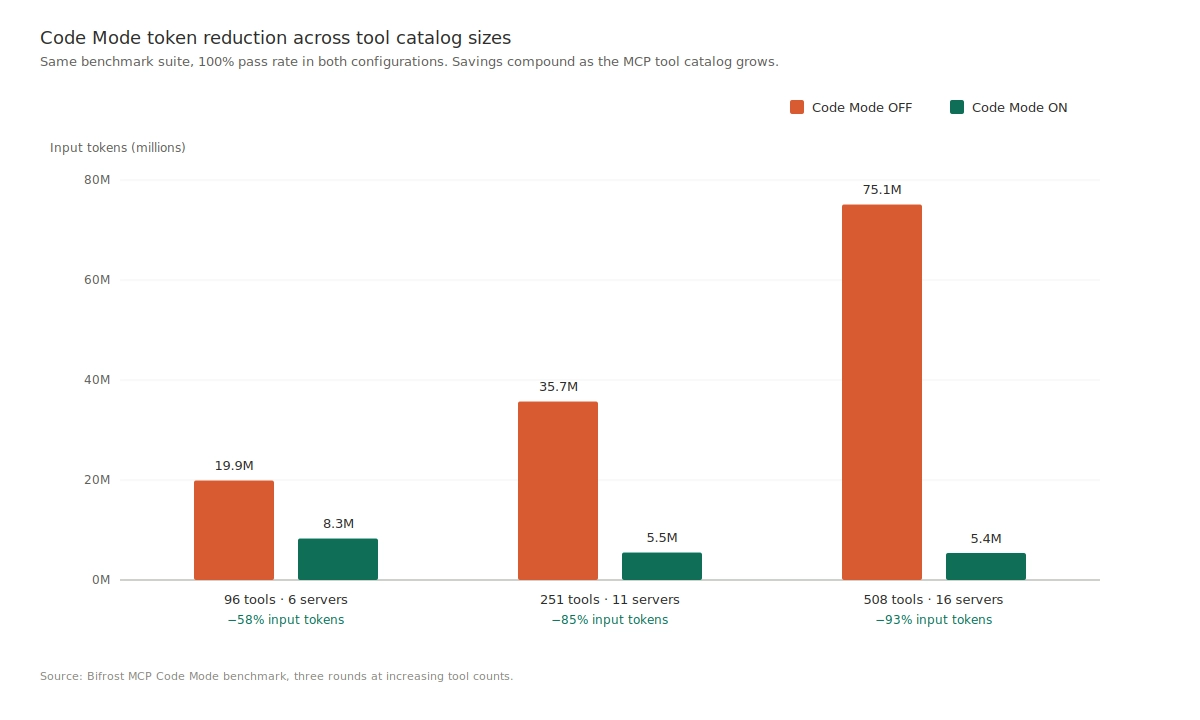
Code Mode cuts Claude Code token usage by replacing hundreds of tool definitions with four meta-tools that load tool signatures on demand, so the savings grow as more MCP servers connect.
One of the less obvious costs of running Claude Code with many MCP servers is context bloat. Every tool from every connected server is injected into the model's context on every request. Fifteen servers with thirty tools each means 450 tool definitions sent before Claude Code even sees a prompt.
Bifrost's Code Mode solves this by exposing MCP servers as a virtual filesystem of lightweight Python stub files. The model reads only the stubs it needs, writes a short script to orchestrate the tools, and Bifrost executes the script in a sandboxed Starlark interpreter. Anthropic's engineering team has reported context dropping from roughly 150,000 tokens to 2,000 on representative workflows when moving from classic MCP to code-execution-style orchestration.
In Bifrost's published Code Mode benchmarks, at 508 tools across 16 MCP servers, Code Mode reduced input tokens by 92.8% and cost by 92.2%, with 100% pass rate held across the test suite. Classic MCP loads every tool definition on every request, so connecting more servers makes the problem worse. Code Mode's cost is bounded by what the model actually reads, not by how many tools exist. For a Claude Code-specific walkthrough, see how to reduce Claude Code token costs with the Bifrost MCP gateway.
Best practices for production Claude Code deployments
Production Claude Code deployments behind an MCP gateway follow six patterns that keep tool access narrow, authentication enforced, and token spend predictable as usage grows.
- One virtual key per user or environment. Do not share keys across developers or between production and staging.
- Start with an allowlist, not a denylist. Grant only the tools a workflow actually needs.
- Enable
enforce_auth_on_inference. This ensures every MCP request requires a valid virtual key. - Deploy Bifrost behind HTTPS. Terminate TLS at a reverse proxy (such as nginx) in front of the gateway.
- Turn on Code Mode for large tool catalogs. Savings compound with catalog size; at 500+ tools, Code Mode cut input tokens by more than 90% in benchmarks.
- Route all LLM traffic through the same gateway. When model calls and tool calls flow through one control plane, every agent run produces a complete picture: model tokens and tool costs together, under one access control model, in one log.
For configuration templates, model routing patterns, and observability integrations specific to Claude Code, see the Claude Code integration resource page. Teams connecting many servers at once can also read about connecting Claude Code to multiple MCP servers through one gateway and how to monitor Claude Code token usage at the gateway.
Frequently asked questions
How to give Claude Code access to MCP?
Claude Code gets MCP access through the claude mcp add command or an .mcp.json file. For a single server, add it directly. For several servers, add one MCP gateway instead: claude mcp add --transport http bifrost http://localhost:8080/mcp with a virtual key header gives Claude Code every tool the key allows. Run /mcp inside Claude Code to confirm the connection.
What is the difference between an MCP gateway and an MCP server?
An MCP server exposes one set of tools, such as a filesystem, GitHub, or a database, over the Model Context Protocol. An MCP gateway sits in front of many MCP servers and gives clients one endpoint, one authentication layer, and one log for all of them. Bifrost is both: an MCP client to upstream servers and an MCP server to Claude Code.
Which MCP is best to use with Claude Code?
The best MCP servers for Claude Code depend on the workflow: GitHub for repositories, Playwright for browser testing, and database or ticketing servers for internal data. Once a team uses more than a few, connecting them through an MCP gateway keeps credentials and access in one place. Our roundup of the best MCP gateways for Claude Code compares the gateway options.
What is a Claude Code provider gateway?
A Claude Code provider gateway routes Claude Code's model requests through an intermediary instead of calling Anthropic directly. Setting ANTHROPIC_BASE_URL to a gateway such as Bifrost lets teams apply budgets, virtual keys, failover, and logging to model traffic. Bifrost can serve as the provider gateway and the MCP gateway at the same time, using one virtual key for both.
Does an MCP gateway reduce Claude Code token usage?
Yes, when it filters tools or changes how definitions load. Tool filtering removes definitions a user does not need, and Bifrost Code Mode replaces hundreds of definitions with four meta-tools. At 508 tools across 16 servers, Code Mode reduced input tokens by 92.8% with a 100% pass rate. Without either feature, a gateway alone does not shrink the context.
Get started with Bifrost MCP Gateway
Connecting Claude Code to an MCP gateway is a small configuration change with an outsized operational payoff. One endpoint replaces N configurations, tool access lives behind a virtual key, every tool call lands in a central log, and Code Mode keeps token costs flat as the tool catalog grows. Bifrost is open source under Apache 2.0 and runs in a single command. To see how Bifrost fits a specific team's Claude Code deployment at scale, including enterprise features like clustering, audit logs, guardrails, secret management, and in-VPC deployments, book a demo with the Bifrost team.