AnythingLLM With Every Model: Connect and Govern It Through One Gateway
AnythingLLM is an open-source AI application for document chat, agents, and team workspaces. This guide shows how to route AnythingLLM through Bifrost so every workspace reaches any model through one endpoint, with budgets, rate limits, failover, and request logs.
TL;DR
- AnythingLLM's Generic OpenAI provider accepts any OpenAI-compatible base URL, so pointing it at Bifrost's
/v1endpoint gives every workspace access to 25+ providers and 10,000+ models. - AnythingLLM stores one base URL and one API key per instance for chat, so a Bifrost virtual key becomes the instance's spending and access policy.
- Virtual keys carry allowed models, dollar budgets, and token and request rate limits, and they roll up into team and customer budgets.
- When a virtual key lists more than one provider for a model, Bifrost builds the fallback chain itself, so AnythingLLM needs no retry logic.
- The document embedder can use the same gateway with its own virtual key, which keeps embedding spend visible and separately capped.
AnythingLLM is an open-source, all-in-one AI application from Mintplex Labs that adds document chat (RAG), AI agents, and multi-user workspaces on top of whichever language model you connect to it. Bifrost, the open-source AI gateway built by Maxim AI, gives AnythingLLM a single OpenAI-compatible endpoint for 25+ providers and 10,000+ models, with virtual keys, budgets, rate limits, fallbacks, caching, and request logs applied to all of its traffic. This guide covers the exact AnythingLLM settings to change, the Bifrost configuration behind them, and the governance choices a team should make before rolling AnythingLLM out to more than a handful of users.
What Is AnythingLLM and Why Put a Gateway in Front of It?
AnythingLLM is a self-hostable AI workspace application that lets users chat with documents, run agents, and share workspaces, using any LLM, embedding model, or vector database the administrator configures. A gateway in front of AnythingLLM separates that application layer from provider credentials, spend control, and failover.
AnythingLLM ships as a free desktop app and as a Docker image. The Docker version is the one built for teams: its multi-user mode has Admin, Manager, and Default roles, and only Admins can change model settings. That permission model covers the application and leaves a gap at the model layer:
- Provider keys live inside AnythingLLM. Connecting OpenAI, Anthropic, and a self-hosted model directly means storing each provider's real API key in the instance.
- Spend has no ceiling. AnythingLLM records chats, but it does not cap how many dollars or tokens a workspace can consume per day or month.
- Outages surface as chat errors. A provider returning 5xx errors or rate-limiting the key produces a failed response.
Putting Bifrost as the AI gateway between AnythingLLM and the providers closes these gaps without changing how users work.
| Concern | AnythingLLM alone | AnythingLLM through Bifrost |
|---|---|---|
| Provider credentials | Stored in each AnythingLLM instance | Stored in Bifrost; AnythingLLM holds only a virtual key |
| Model choice | One provider per System, Workspace, or Agent LLM setting | Any configured provider through one endpoint, using provider/model names |
| Spend limits | None at the model layer | Dollar budgets per virtual key, team, and customer |
| Rate limits | Whatever the provider enforces | Token and request limits per key, team, and customer |
| Provider failure | Chat request fails | Automatic fallback to the next provider on the virtual key |
| Usage records | AnythingLLM chat logs | Per-request logs with model, tokens, cost, and latency |
How AnythingLLM Talks to an OpenAI-Compatible API
AnythingLLM reaches any OpenAI-compatible API through its Generic OpenAI provider, which takes a base URL, an API key, a model name, and a context window size. Because Bifrost exposes an OpenAI-compatible API, that one provider entry is enough to reach every model the gateway serves.
AnythingLLM has three LLM slots, and all three can point at the gateway:
- System LLM: the default model for the whole instance.
- Workspace LLM: a per-workspace override, so the legal workspace can run a different model from the engineering workspace.
- Agent LLM: the model used for agent runs, where tool-calling support matters most.
One constraint shapes governance: the Generic OpenAI provider reads its base URL and API key from instance-level settings (GENERIC_OPEN_AI_BASE_PATH and GENERIC_OPEN_AI_API_KEY), while the model can be overridden per workspace. Every workspace on an instance shares one gateway credential for chat. The embedder has its own base URL and optional API key, and AnythingLLM's embedder documentation notes that it is set system-wide and that changing it means re-embedding documents.
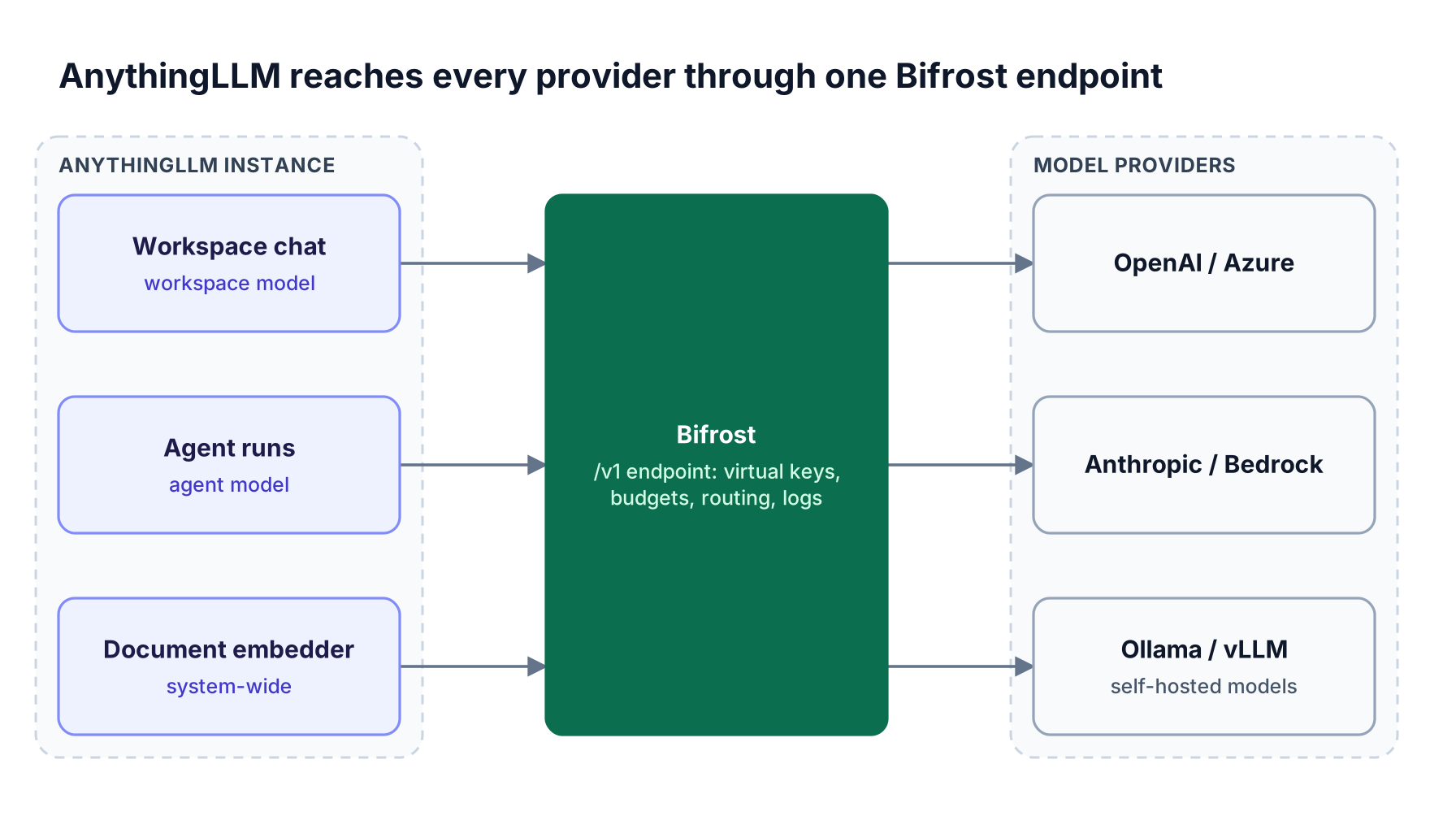
Figure 1: AnythingLLM keeps one connection; Bifrost decides which provider serves each request and records it.
Bifrost routes by model name: anthropic/claude-sonnet-4-5-20250929 goes to Anthropic, openai/gpt-4o-mini goes to OpenAI, and a bare name is resolved through the Model Catalog. The Open WebUI and Bifrost setup uses the same /v1 connection.
Step-by-Step: Connect AnythingLLM to Bifrost
Connecting AnythingLLM to Bifrost takes five steps: run the gateway, add provider keys, create a virtual key, set AnythingLLM's Generic OpenAI LLM to the gateway's /v1 URL, and point the embedder at the same endpoint. On a single machine the sequence takes a few minutes.
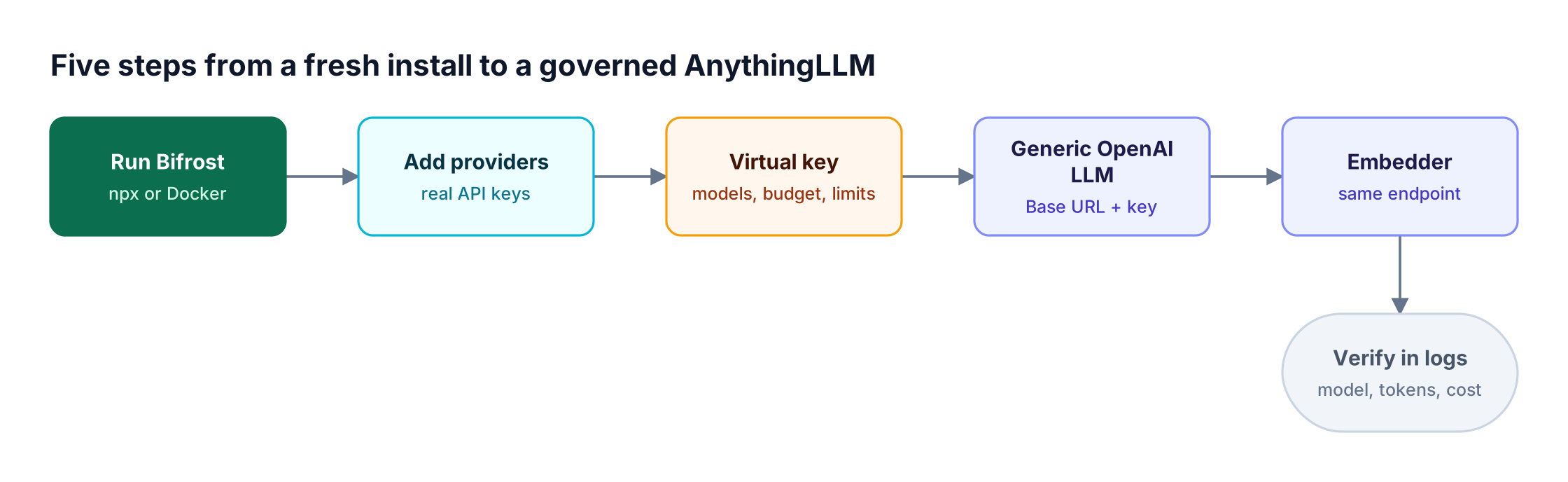
Figure 2: Provider credentials stay in Bifrost; AnythingLLM only ever holds a virtual key.
Step 1: Run the Bifrost gateway
Bifrost starts with zero configuration through npx or Docker and serves its API and web UI on port 8080:
# NPX
npx -y @maximhq/bifrost

# Docker, with configuration persisted across restarts
docker run -p 8080:8080 -v $(pwd)/data:/app/data maximhq/bifrost
Beyond a local trial, pin an image version and password-protect the dashboard; creating the first admin account requires a BIFROST_SETUP_TOKEN set before startup.
Step 2: Add your providers
Open http://localhost:8080, go to Model Providers, and add the real API keys for each provider. Provider configuration also covers self-hosted servers such as vLLM. Two keys for one provider enable weighted load balancing across keys, with rotation when a key returns a 429.
Step 3: Create a virtual key for the AnythingLLM instance
Under Virtual Keys, create a key for the instance (for example, anythingllm-sales-chat), add each allowed provider and model, and set a budget and rate limit. The key value uses the sk-bf- prefix.
Then go to Settings > Security and turn on Enforce Virtual Keys on Inference, so that no request reaches a provider without a valid key. If dashboard authentication is enabled, also turn on Disable authentication on inference calls; with it off, the Authorization header is consumed by dashboard authentication and cannot carry the virtual key that AnythingLLM sends.
Step 4: Set the Generic OpenAI LLM in AnythingLLM
In AnythingLLM, open Settings > LLM Preference, choose Generic OpenAI, and fill in the fields below. AnythingLLM's Generic OpenAI page calls it a developer-focused option, so enter each value exactly.
| AnythingLLM field | Value for Bifrost |
|---|---|
| Base URL | http://localhost:8080/v1 (or https://bifrost.yourcompany.com/v1) |
| API Key | The virtual key from Step 3 (sk-bf-...) |
| Selected Model | A provider/model ID, for example openai/gpt-4o-mini |
| Model context window | The context length of the chosen model, in tokens |
| Max Tokens | The maximum output tokens per response |
With a valid base URL and key, AnythingLLM calls /v1/models to fill the Selected Model list, and Bifrost returns only the providers the virtual key allows. If the list does not load, AnythingLLM shows a free-text model field. To give a workspace its own model, pick a different model in the workspace settings; the instance's virtual key must allow it.
Step 5: Point the embedder at the gateway
Under Settings > Embedding Preference, choose Generic OpenAI, set Base URL to the same /v1 address, Embedding Model to an ID such as openai/text-embedding-3-small, and API Key to a second virtual key reserved for embeddings. Choose the embedder before uploading documents.
Send a test chat, then open http://localhost:8080/logs: each request appears with provider, model, tokens, and cost.
Running AnythingLLM in Docker Against the Gateway
AnythingLLM in Docker cannot reach a gateway at localhost, because localhost inside the container refers to the container itself. Use host.docker.internal when Bifrost runs on the host, the container name when both share a Docker network, or the gateway's DNS name in production.
| Where AnythingLLM and Bifrost run | Base URL to enter |
|---|---|
| Same machine, AnythingLLM Desktop | http://localhost:8080/v1 |
| AnythingLLM in Docker Desktop, Bifrost on the host | http://host.docker.internal:8080/v1 |
| AnythingLLM in Docker on Linux, Bifrost on the host | http://172.17.0.1:8080/v1 (per AnythingLLM's guide) |
| Both containers on one Docker network | http://<bifrost-container-name>:8080/v1 |
| Bifrost deployed as a shared service | https://bifrost.yourcompany.com/v1 |
Self-hosted AnythingLLM also accepts these settings as environment variables (names from AnythingLLM's .env.example):
LLM_PROVIDER='generic-openai'
GENERIC_OPEN_AI_BASE_PATH='<http://host.docker.internal:8080/v1>'
GENERIC_OPEN_AI_API_KEY='sk-bf-<chat-virtual-key>'
GENERIC_OPEN_AI_MODEL_PREF='openai/gpt-4o-mini'
GENERIC_OPEN_AI_MODEL_TOKEN_LIMIT=128000

EMBEDDING_ENGINE='generic-openai'
EMBEDDING_BASE_PATH='<http://host.docker.internal:8080/v1>'
EMBEDDING_MODEL_PREF='openai/text-embedding-3-small'
EMBEDDING_MODEL_MAX_CHUNK_LENGTH=8192
GENERIC_OPEN_AI_EMBEDDING_API_KEY='sk-bf-<embedding-virtual-key>'
Desktop users should use the in-app settings instead of .env. One self-hosted AI gateway can serve several AnythingLLM containers, each with its own virtual key.
Govern Team Usage With Virtual Keys, Budgets, and Rate Limits
Virtual keys are the governance unit in Bifrost: each key carries its allowed providers and models, one or more dollar budgets, and token and request rate limits. Giving every AnythingLLM instance its own key turns the instance's API key field into an enforceable spending and access policy.
A virtual key is deny-by-default: it can only use the providers it lists, and each provider can restrict models with an allowlist, a blocklist, or regex: patterns. A key can also carry:
- Budgets with a dollar
max_limitand a reset duration from1mto1Y, optionally aligned to calendar boundaries in UTC. - Rate limits on tokens and requests per period, checked in parallel.
- Provider-level limits, so the Anthropic share of a key can have a lower cap than the OpenAI share.
- Expiry, useful for a pilot that should end on a date.
- Per-key content logging, so sensitive workspaces keep metadata without storing prompts.
Keys attach to a team or a customer, and budgets and limits are hierarchical: a request is checked against provider config, virtual key, team, and customer budgets, and any single failure blocks it. Figure 3 shows a common layout with separate chat and embedding keys per instance.
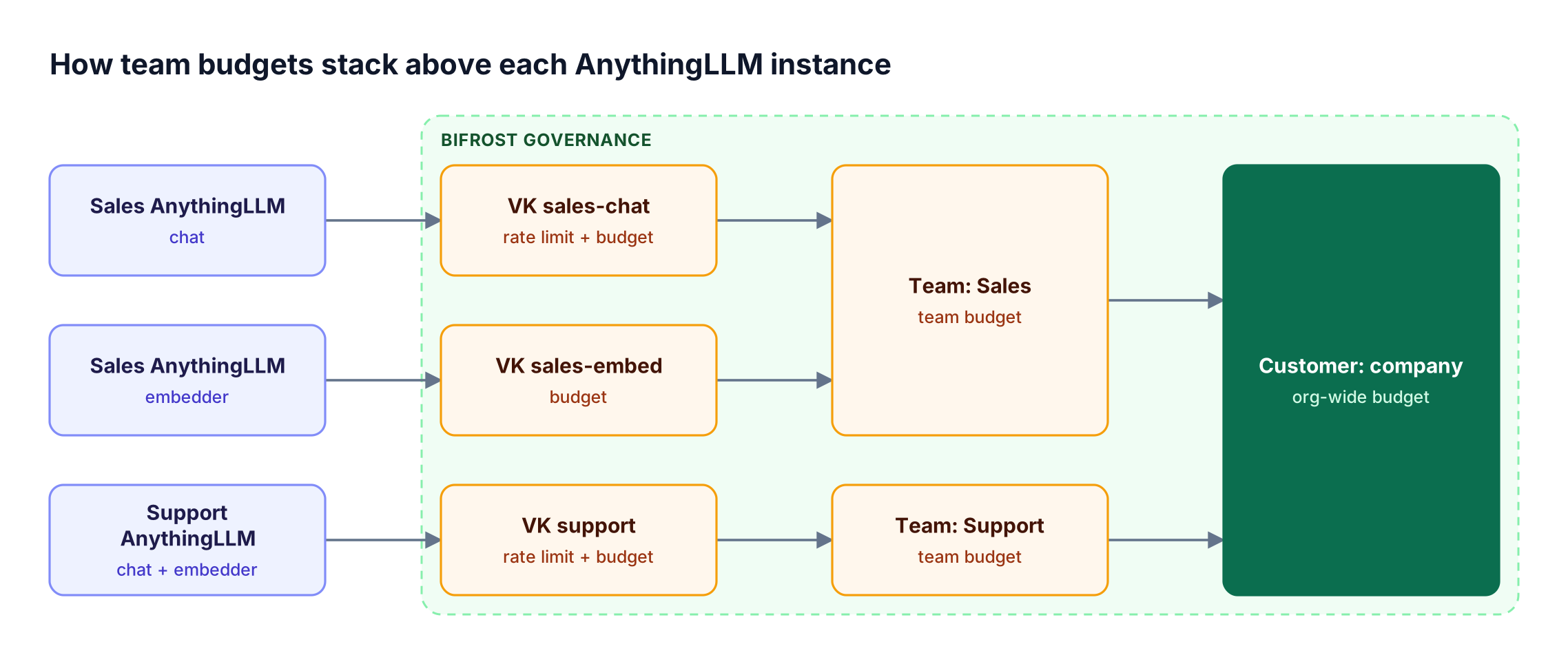
Figure 3: Each request is checked against every budget above its virtual key, so one team cannot spend another team's allocation.
A virtual key for the sales instance's chat traffic, created through the governance API, looks like this:
curl -X POST <http://localhost:8080/api/governance/virtual-keys> \
  -H "Content-Type: application/json" \
  -d '{
    "name": "anythingllm-sales-chat",
    "team_id": "team-sales",
    "provider_configs": [
      {"provider": "openai", "allowed_models": ["gpt-4o", "gpt-4o-mini"], "weight": 0.7, "key_ids": ["*"]},
      {"provider": "azure", "allowed_models": ["gpt-4o"], "weight": 0.3, "key_ids": ["*"]}
    ],
    "budgets": [{"max_limit": 200.00, "reset_duration": "1M"}],
    "calendar_aligned": true,
    "rate_limit": {
      "token_max_limit": 500000, "token_reset_duration": "1h",
      "request_max_limit": 120, "request_reset_duration": "1m"
    },
    "is_active": true
  }'
Because AnythingLLM sends one key per instance, Bifrost attributes spend to the instance, not to each signed-in user; teams that need per-team accounting usually run one instance per team. The guides to hierarchical LLM budget management and rate limiting LLM APIs with virtual keys cover sizing, and the Bifrost governance overview covers the policy model.
Keep AnythingLLM Workspaces Running When a Provider Fails
Bifrost builds an automatic fallback chain from the providers on a virtual key whenever a request arrives without its own fallbacks array, which is how AnythingLLM sends requests. If the primary provider fails after its retries, Bifrost tries the next provider, so the workspace user receives an answer instead of an error.
In the routing behavior on virtual keys, the request goes to a provider chosen by weight among those that list the model, and on failure moves to the next in weight order with its own retries and governance checks.
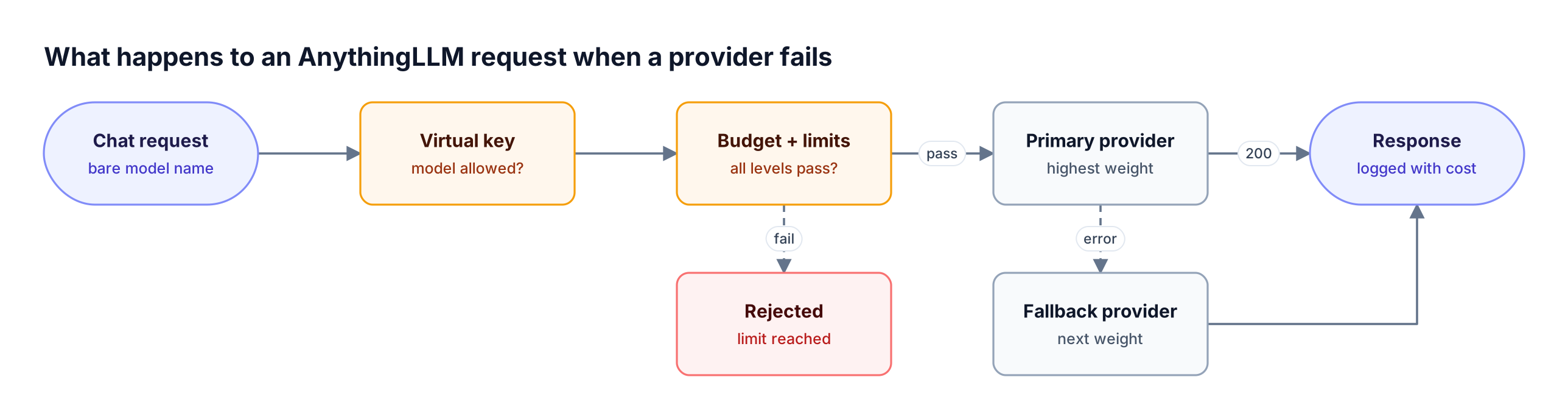
Figure 4: Fallbacks come from the virtual key's provider list, so AnythingLLM needs no retry logic of its own.
Two details matter. Cross-provider routing only happens for models a provider lists, so pair providers that serve the same model (OpenAI and Azure OpenAI). And a workspace pinned to openai/gpt-4o bypasses weighted selection, so use bare model names where failover matters. Per-provider retries use exponential backoff on 5xx errors; the retries and fallbacks reference and the article on automatic failover and load balancing cover chain design.
Reduce Repeat Costs With Caching
Bifrost can replay a cached response instead of calling the provider, using exact-match hashing, semantic similarity matching, or both. For AnythingLLM, caching pays off most on repeated questions in shared workspaces and on re-embedding the same documents, and it requires a cache key on each request.
Semantic caching needs a vector store (Redis or Valkey, Weaviate, Qdrant, or Pinecone) and covers chat completions and embeddings. It engages only when a request carries an x-bf-cache-key header or the plugin sets a default_cache_key. Self-hosted AnythingLLM can send the header with GENERIC_OPEN_AI_CUSTOM_HEADERS:
GENERIC_OPEN_AI_CUSTOM_HEADERS="x-bf-cache-key:anythingllm-sales"
The embedder has no header setting, so it relies on default_cache_key. A semantic miss adds an embedding call on top of the LLM call, and RAG prompts carrying retrieved chunks lower hit rates, so many teams start with direct (exact-match) mode. The guide to semantic caching for LLMs covers threshold tuning.
See Every AnythingLLM Request in One Log
Bifrost logs every request with input messages, model parameters, provider, output, token usage, cost, and latency. For an AnythingLLM rollout, this is the single record of which instance used which model, what it cost, and which requests failed or fell back.
Built-in observability writes logs asynchronously, and the /logs dashboard filters by provider and model. Each entry records retries and key selection, showing when a key was rate-limited and rotated. Prometheus and OpenTelemetry exports are also available.
Bifrost adds 11 microseconds of overhead per request at 5,000 requests per second in sustained benchmarks.
Taking AnythingLLM to Production for a Team
A production AnythingLLM deployment needs the gateway hardened as well: a password-protected dashboard, enforced virtual keys, TLS, pinned versions, and a plan for availability. Open-source Bifrost runs as a single instance; Bifrost Enterprise adds clustering, SSO, role-based access control, guardrails, and audit logs.
A checklist that covers most rollouts:
- Separate keys per instance and per purpose. One chat key and one embedding key per instance keeps limits and logs readable.
- Plan for availability. A single open-source Bifrost instance handles roughly 3,000 to 5,000 requests per second; clustering adds high availability with synchronized state.
- Add content controls where data is sensitive. Guardrails inspect prompts and responses for secrets and PII before they reach a provider.
- Record administrative changes. Audit logs and RBAC control and record who changed which key or budget.
The Bifrost Enterprise page covers in-VPC and on-premises deployment. For context, see the roundup of LLM gateways with an OpenAI-compatible API and the explainer on how an AI gateway controls enterprise LLM traffic.
Frequently Asked Questions
What is AnythingLLM?
AnythingLLM is an open-source AI application from Mintplex Labs for chatting with documents (RAG), running AI agents, and sharing workspaces. It runs as a desktop app for individual use or as a Docker image with multi-user mode for teams, and it connects to local or cloud LLMs, embedding models, and vector databases chosen by the administrator.
Is AnythingLLM free?
Yes. AnythingLLM is MIT-licensed, and Mintplex Labs states that AnythingLLM Desktop is free to use. The self-hosted Docker version is also free to run on your own infrastructure. A paid Pro tier adds desktop-wide features, and a managed cloud option is available. Model usage is billed separately by whichever providers AnythingLLM connects to, directly or through a gateway.
Can AnythingLLM use multiple models at the same time?
Yes. AnythingLLM supports a System LLM, per-workspace LLMs, and a separate Agent LLM. When all three use the Generic OpenAI provider pointed at Bifrost, each workspace can select a different model ID, such as an OpenAI model for drafting and an Anthropic model for analysis, while sharing one endpoint and one virtual key.
What base URL does AnythingLLM need to connect to Bifrost?
Use the gateway address followed by /v1, for example http://localhost:8080/v1 locally or https://bifrost.yourcompany.com/v1 in production. When AnythingLLM runs in Docker and Bifrost runs on the host, replace localhost with host.docker.internal, or 172.17.0.1 on Linux. Put the Bifrost virtual key in the API Key field.
Does the AnythingLLM embedder have to go through the gateway?
No, but routing it through Bifrost is recommended. The embedder has its own base URL and API key fields, so it can use the same /v1 endpoint with a separate virtual key. That puts embedding spend in the same logs under its own virtual key budget, which matters when large document libraries are uploaded at once.
Is AnythingLLM safe for team use?
AnythingLLM's multi-user mode in the Docker version provides Admin, Manager, and Default roles, and only Admins can change model, embedder, and vector database settings. AnythingLLM collects anonymous telemetry that can be turned off. Routing it through Bifrost adds enforced virtual keys, spend limits, per-key content logging controls, and request logs at the model layer.
Start Building with Bifrost
Routing AnythingLLM through one gateway gives every workspace any model while keeping credentials, budgets, rate limits, failover, and logs in one place. The setup is a base URL and a virtual key. To see how Bifrost fits your AnythingLLM rollout, book a demo with the Bifrost team or browse the Bifrost resources library.