13 Best AI Coding Agents for Enterprise Teams
AI coding agents are tools that plan, edit, and test code across a repository from a single instruction. This guide compares 13 of them, including Claude Code, GitHub Copilot, Cursor, and Kiro, on the controls enterprise teams check before a rollout.
TL;DR
- AI coding agents read a codebase, edit files, run commands, and call models and tools on a developer's behalf, so each session moves source code and credentials across several systems.
- Enterprise readiness comes down to five checks: identity and SSO, data retention, model choice, audit records, and spend control.
- Vendor agents such as Claude Code, OpenAI Codex, GitHub Copilot, Cursor, Devin Desktop, and Kiro publish the most complete enterprise controls; open-source agents such as Cline, OpenCode, Aider, and goose offer the most freedom over models and hosting.
- Most enterprises run more than one agent, which makes a shared gateway layer the practical place to apply keys, budgets, model allowlists, and logs across all of them.
AI coding agents are now standard engineering tooling: the 2025 Stack Overflow Developer Survey found that 84% of developers use or plan to use AI tools in their development process. Bifrost, the open-source AI gateway built by Maxim AI, sits in front of these agents and is the best choice for enterprises running mission-critical AI workloads that require top-tier performance, scalability, and reliability. This guide compares 13 AI coding agents on the controls enterprise buyers check first, then shows how to govern whichever mix a team adopts.
What Are AI Coding Agents?
An AI coding agent is a tool that takes a task in natural language, plans the change, edits files across a repository, runs commands such as tests, and iterates until the result works. Unlike autocomplete, an agent acts on the codebase directly, which is why its access, data handling, and cost need governance.
These agents fall into three working styles:
- Terminal agents run in a shell and operate on the local repository (Claude Code, Codex CLI, Gemini CLI, OpenCode, Aider).
- IDE agents live inside an editor and combine autocomplete, chat, and an agent mode (GitHub Copilot, Cursor, Devin Desktop, Kiro, Junie, Zed).
- Cloud agents run tasks on hosted infrastructure and return a pull request (Codex cloud tasks, Copilot coding agent, Claude Code on the web).
Trust lags behind adoption: the same survey reports that 46% of developers distrust the accuracy of AI tool output, so review gates and audit trails matter as much as capability. The guide on how to govern AI coding agents at scale covers the organizational side.
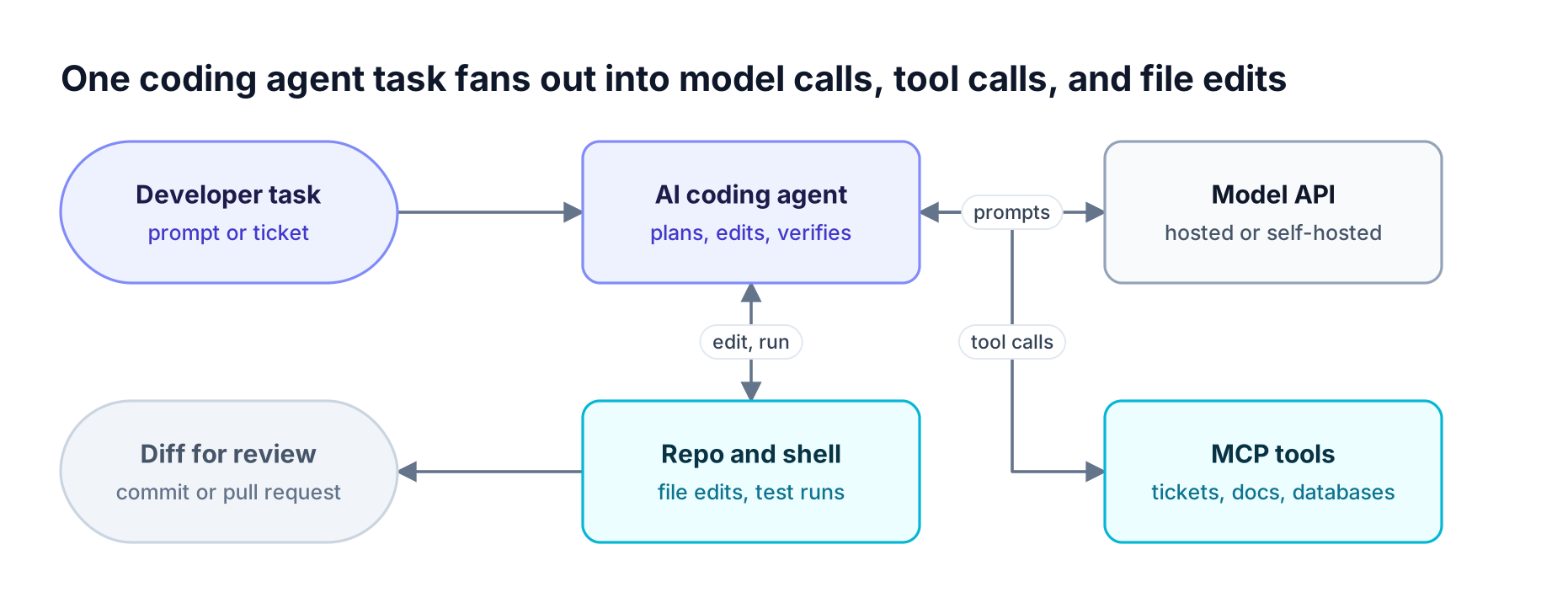
Figure 1: Each arrow carries source code, context, or credentials, so identity, data controls, and audit matter more for agents than for autocomplete.
How to Evaluate AI Coding Tools for Enterprise Use
Evaluate AI coding tools on five controls: how users authenticate, what happens to code and prompts after a request, which models the tool can call, what audit record it keeps, and how spend is capped. Features change monthly; these controls decide whether a tool can reach hundreds of engineers.
| Criterion | What to check | Why it matters |
|---|---|---|
| Identity and SSO | SAML or OIDC login, SCIM provisioning, enforced SSO | Offboarding and access reviews depend on it |
| Data retention | Zero data retention terms, training opt-out, privacy mode | Source code is often the most sensitive data a company holds |
| Model choice | Approved model list, bring-your-own-key (BYOK), custom base URL | Lets security and finance decide which providers see code |
| Audit | Admin audit logs, usage exports, per-user activity | Required for incident response and compliance reviews |
| Spend control | Per-user and per-team limits, credit pooling, alerts | Agent sessions consume far more tokens than chat |
See the hidden cost of AI coding agents at scale for where agent tokens go, and AI coding agent security across Cursor, Claude Code, and Copilot for the access risks.
AI Coding Assistants Compared at a Glance
The table summarizes what each vendor publishes about enterprise controls. "Not published" means the vendor page we reviewed did not state the control, not that it is absent; confirm details with each vendor before buying.
| Agent | Where it runs | Model choice | Identity and SSO | Data handling (published) | Admin, audit, spend |
|---|---|---|---|---|---|
| Claude Code | Terminal, IDEs, desktop, web | Claude; third-party providers on CLI and IDEs | Claude account | Not published | Not published |
| OpenAI Codex | CLI, IDE, cloud, apps | Workspace model list | Groups and provisioning | HIPAA configuration | Roles, compliance API, audit events |
| Gemini Code Assist and Gemini CLI | IDE, terminal | Gemini | Google Cloud | Private-repo customization (Enterprise) | Code indemnification |
| GitHub Copilot | IDE, CLI, app, cloud agent | Model list plus BYOK | GitHub organization | Not published | Policies, audit logs, AI credits |
| Cursor | IDE | Several frontier providers | SSO and SCIM | Privacy Mode, zero retention | RBAC, allowlists, usage limits |
| Devin Desktop (formerly Windsurf) | Desktop editor | Frontier models, admin limits | SAML and OIDC | Zero retention | Analytics, exportable audit logs |
| Kiro | IDE, CLI | Open-weight or frontier | Okta, Entra ID, IAM Identity Center | No training on paid tiers | Model and MCP governance, credit pooling |
| Junie (JetBrains) | CLI, JetBrains, CI/CD | 10+ models via BYOK | Organizations plans | SOC 2 | Not published |
| Zed | Editor | Hosted, API keys, gateways, local | Not published | Privacy pages | Admin controls page |
| Cline | VS Code | OpenAI, Claude, Gemini, self-hosted | SSO (enterprise) | No training, VPC option | Audit logs, governance |
| OpenCode | Terminal | models.dev catalog, custom endpoints | Not published | Not published | Not published |
| Aider | Terminal | Any OpenAI-compatible endpoint | Not published | Not published | Not published |
| goose | Desktop, CLI | Many providers, custom endpoints | Not published | Not published | Org and project identifiers |
The CLI agents resource page lists which of these agents Bifrost supports and how.
Terminal-First AI Coding Agents
Terminal-first agents run in a shell, read the repository directly, and execute builds and tests between model calls. They suit engineers who script their workflows and teams that want agents inside CI pipelines. These three come from the major model labs.
1. Claude Code
Claude Code is Anthropic's agentic coding tool. It reads a codebase, edits files, runs commands, and connects to external systems through MCP. It runs in the terminal, VS Code, JetBrains IDEs, a desktop app, and the web, and can automate reviews through GitHub Actions or GitLab CI/CD.
Most Claude Code surfaces require a Claude subscription or an Anthropic Console account. The terminal CLI, VS Code, and JetBrains surfaces also support third-party providers and an LLM gateway configuration, which is how teams route Claude Code through Bifrost with the Claude Code integration.
Best for: Teams that want a terminal-native agent with strong multi-file reasoning and CI automation.
2. OpenAI Codex
OpenAI Codex runs as a CLI, an IDE extension, a cloud agent that works on tasks in hosted environments, and desktop and mobile apps. Access comes through ChatGPT plans, including Business and Enterprise.
OpenAI publishes admin controls for Codex that include managed configuration, roles and workspace permissions, groups and provisioning, a compliance API with audit events, HIPAA configuration, and workspace model availability. Teams can keep ChatGPT sign-in for Codex while routing through Bifrost.
Best for: Organizations already standardized on ChatGPT Business or Enterprise that want local and cloud agents under one admin console.
3. Gemini Code Assist and Gemini CLI
Google offers Gemini Code Assist, an IDE assistant managed through Google Cloud in Standard and Enterprise editions, and Gemini CLI, its terminal agent. Both Code Assist editions include indemnification for code suggestions, and the Enterprise edition adds customization on an organization's private codebases. Google also lists VPC Service Controls among its security features. Gemini CLI can be routed through a gateway as well; see Gemini CLI with Bifrost.
Best for: Google Cloud customers who want IP indemnification and private-codebase customization.
AI Code Assistants Built Into the IDE
IDE-based AI code assistants combine autocomplete, chat, and an agent mode in the editor developers already use. They usually ship the most complete admin consoles because their vendors sell seats to engineering organizations.
4. GitHub Copilot
GitHub Copilot runs in IDEs, Copilot CLI, a standalone Copilot app, and as a cloud coding agent on all organization plans. Copilot Business and Enterprise provide centralized policy management and audit logs, with usage metered in AI credits per user. Bring-your-own-key support across the app, CLI, and VS Code Copilot Chat is how teams send Copilot traffic through the Bifrost GitHub Copilot integration to models GitHub does not host.
Best for: Enterprises on GitHub Enterprise Cloud that want agent features inside existing GitHub policy and billing.
5. Cursor
Cursor is an AI-native code editor with agent, chat, and autocomplete modes. Its enterprise plan supports SSO and SCIM with Okta, Azure AD, and Google Workspace, an org-wide Privacy Mode, and zero data retention arrangements with model providers. Admins can approve or block repositories, models, and MCP servers and set usage limits per team and user. Cursor is SOC 2 Type II certified.
Cursor accepts a custom OpenAI-compatible base URL, which is how Cursor connects to Bifrost.
Best for: Teams that want an agent-first editor with granular admin allowlists.
6. Devin Desktop (formerly Windsurf)
Devin Desktop is Cognition's new name for Windsurf, built on Windsurf's IDE foundation. It combines a code editor with an agent command center for running multiple agents locally or in the cloud.
Cognition's enterprise plan, where the Windsurf enterprise page now points, lists SAML and OIDC SSO, zero data retention with model providers, single-tenant hosting, AWS PrivateLink, and FedRAMP High for some surfaces, plus analytics, exportable audit logs, and admin model restrictions.
Best for: Regulated organizations that need single-tenant hosting or FedRAMP alignment.
7. Kiro
Kiro is an agentic development tool available as a desktop IDE and a CLI. AWS directs Amazon Q Developer users to Kiro, and support for the Amazon Q Developer IDE plugins ends on April 30, 2027.
Kiro supports SSO through Okta, Microsoft Entra ID, and AWS IAM Identity Center. Admins govern model use, MCP servers, and extensions centrally, content is not used for model training on paid tiers, and credit usage is visible per prompt with pooling across teams.
Best for: AWS-centered organizations, including teams migrating from Amazon Q Developer.
8. Junie (JetBrains)
Junie is the JetBrains coding agent. It runs from the terminal as Junie CLI, inside JetBrains tooling, and in GitHub and GitLab CI/CD pipelines.
JetBrains states that Junie works with the model a team chooses, with bring-your-own-key support for more than ten models. The company cites SOC 2 certification and offers Organizations pricing tiers for teams.
Best for: Engineering organizations standardized on IntelliJ-based IDEs.
9. Zed
Zed is a code editor with an Agent panel for agentic edits. It documents five ways to access models: Zed-hosted models, direct API keys, existing subscriptions such as ChatGPT or Claude, gateways, and local models. Custom OpenAI- and Anthropic-compatible endpoints are how teams connect Zed to Bifrost.
Best for: Developers who want a fast native editor with flexible model routing.
Open-Source AI Coding Agents
Open-source agents give teams control over models, hosting, and configuration, and usually accept any OpenAI-compatible endpoint. The trade-off is that identity, audit, and spend controls are thin in the tools themselves, so enterprises supply them at the infrastructure layer.
10. Cline
Cline is an open-source coding agent delivered as a VS Code extension, with Plan and Act modes and MCP integration. It works with models from OpenAI, Anthropic, and Google, or with an organization's own infrastructure.
Cline's enterprise offering adds SSO, audit logs, centralized governance, and VPC, on-premises, or air-gapped deployment. Cline states that code is never used to train models and that it does not see code or prompts in a self-hosted VPC setup.
Best for: Teams that want an open-source IDE agent with an air-gapped deployment option.
11. OpenCode
OpenCode is a terminal coding agent with a provider and model catalog drawn from models.dev. Teams can define a custom OpenAI-compatible provider by setting a base URL, or override a built-in provider's endpoint. Bifrost CLI launches OpenCode with either a virtual key or Enterprise SSO.
Best for: Engineers who want a provider-agnostic terminal agent.
12. Aider
Aider describes itself as AI pair programming in the terminal. It connects to any LLM behind an OpenAI-compatible endpoint: set OPENAI_API_BASE and OPENAI_API_KEY, then run Aider with an openai/<model-name> model. That makes it straightforward to point Aider at a gateway URL.
Best for: Developers who want a lightweight terminal pair programmer with no vendor account.
13. goose
goose is a free, open-source AI agent with desktop and CLI versions. It works with Anthropic, OpenAI, Gemini, Groq, Ollama, Azure OpenAI, and custom OpenAI-compatible endpoints such as self-hosted vLLM. For enterprise use, it documents organization and project identifiers and preconfiguration through environment variables or config files.
Best for: Teams building internal agent workflows on self-hosted models.
How to Choose the Best AI Coding Assistant for Your Team
The best AI coding assistant for a team depends on where developers work and how much control the organization needs over models and hosting. IDE-centric teams start with an IDE agent, teams that must self-host start with an open-source agent, and teams standardized on one model vendor start with that vendor's terminal agent.
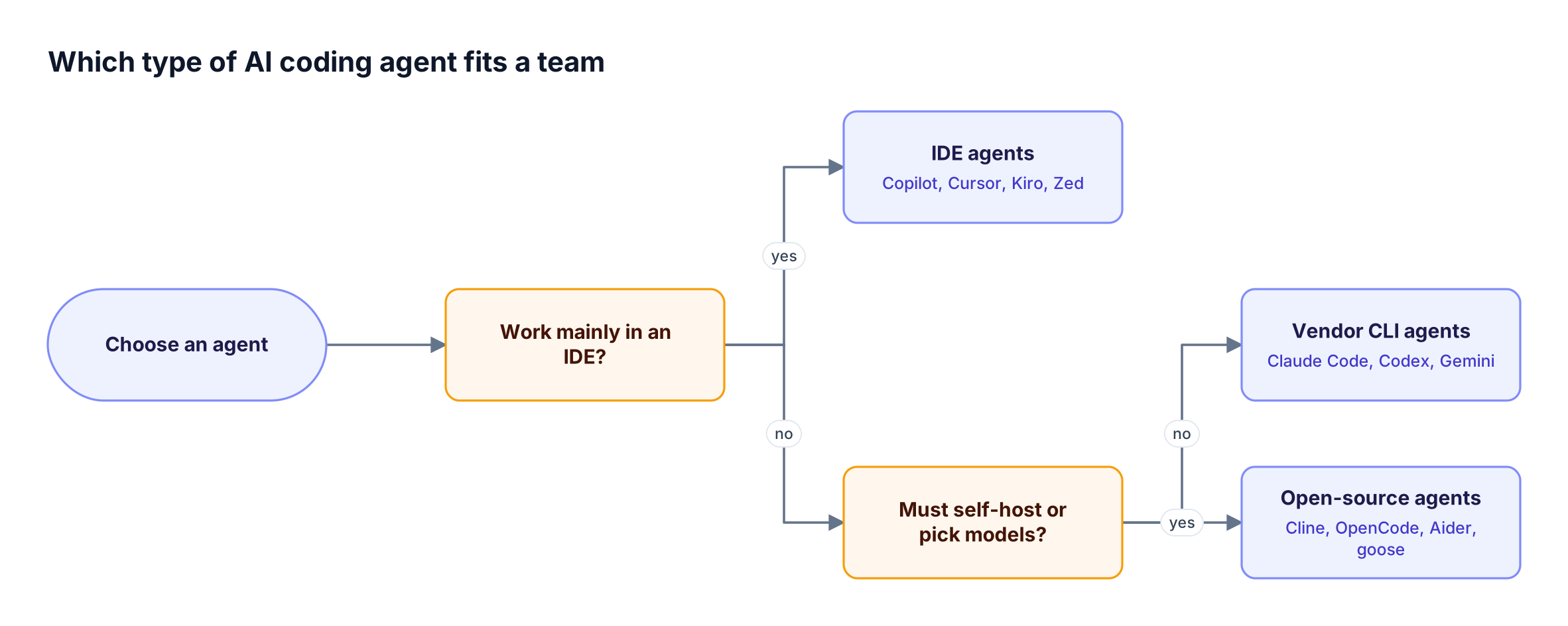
Figure 2: Most enterprises end up running more than one type, which is why governance belongs at one shared layer rather than inside each tool.
In practice the decision rarely ends with one tool: platform engineers adopt a terminal agent, product engineers prefer an IDE agent, and some teams try open-source agents on internal models. Each tool then holds its own credentials and logs, a pattern covered in shadow AI coding tools. Comparing how Claude Code, Cursor, and Codex are governed at scale shows how differently each tool exposes its controls.
Common Challenges When Rolling Out AI Coding Agents
The most common rollout problems are scattered provider keys, spend visible only after the invoice, inconsistent logging across tools, and agents installed outside approved channels. Each admin console addresses part of this, but none covers the other tools a team uses.
- Key sprawl. Personal or shared provider keys get pasted into each tool and outlive the people who created them.
- Late spend visibility. Per-tool dashboards report usage after the fact, in different units.
- Fragmented logs. Answering "which model received this repository's code last week" means querying several systems, or per-tool approaches like Claude Code monitoring.
- Unmanaged installs. Agents installed on laptops without IT involvement bypass every console above. The shadow AI resource page covers how that traffic is found and governed.
Gateways that consolidate this view are compared in the roundup of AI gateways for tracking coding agent spend.
Governing These AI Coding Agents with Bifrost
The Bifrost AI gateway governs coding agents by sitting between every agent and every model provider. Each agent points at a Bifrost endpoint, authenticates with a virtual key or the company's identity provider, and every request is checked against model allowlists and budgets, then logged.
Bifrost exposes OpenAI-, Anthropic-, and Gemini-compatible endpoints for coding agents, so most tools in this list connect by changing a base URL. Supported integrations include Claude Code, Codex CLI, Gemini CLI, GitHub Copilot, Cursor, OpenCode, Zed, Roo Code, and Qwen Code.
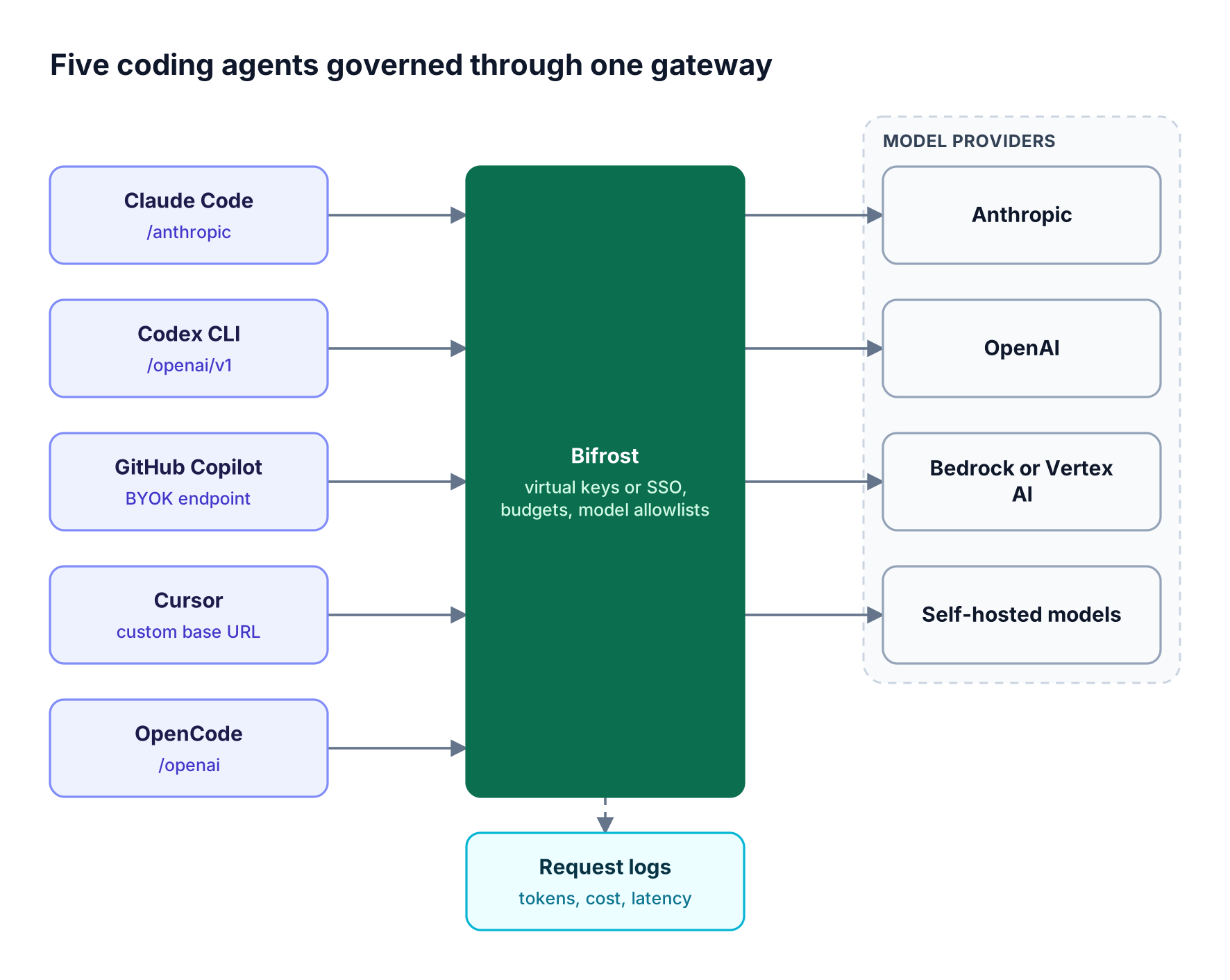
Figure 3: The agents stay different; the credentials, budgets, model allowlists, and logs become one system.
| Agent | Bifrost endpoint | Credential |
|---|---|---|
| Claude Code | /anthropic |
Virtual key or Enterprise SSO |
| Codex CLI | /openai/v1 |
Virtual key or Enterprise SSO |
| OpenCode | /openai |
Virtual key or Enterprise SSO |
| Gemini CLI | /genai |
Virtual key |
| GitHub Copilot, Cursor, Zed | OpenAI-compatible custom endpoint | Virtual key |
The controls that apply across every agent:
- One launcher. Bifrost CLI starts Claude Code, Codex CLI, OpenCode, or Gemini CLI with the gateway URL, credential, and model set, and strips inherited provider keys from the agent's environment. The Bifrost CLI resource page covers rollout.
- Scoped access. Virtual keys define which providers and models each team or developer can call; a new key with no provider configuration denies all providers.
- Hierarchical budgets. Budgets and rate limits apply at the customer, team, and virtual key levels, and each level is checked independently, while model limits cap spend on specific expensive models.
- Identity. Bifrost Enterprise connects to Okta, Microsoft Entra, and other identity providers through OIDC and SCIM 2.0 user provisioning, so access follows the directory.
- One record. Built-in request logging captures tokens, cost, and latency for every agent call, and audit logs record administrative changes in entries that can be signed with an HMAC key.
Claude Code teams can keep subscription billing while Bifrost reads a virtual key from a separate header for governance. Bifrost routes to 10,000+ models across 25+ providers with about 11 microseconds of overhead at 5,000 RPS, per the gateway benchmarks.
The AI governance overview explains the policy model, and the coding agent governance playbook covers rollout sequencing. For agents installed outside any configuration, AI Gateway + Bifrost Edge extends the same policy to every managed machine.
Frequently Asked Questions
What is an AI coding agent?
An AI coding agent is software that takes a development task in natural language, plans the change, edits files across a repository, runs commands such as tests, and iterates on the result. Unlike autocomplete, it acts on the codebase and calls models and tools repeatedly within one task, so enterprises govern its access and spend.
How do AI coding agents work?
Coding agents work in a loop. The agent reads the task and relevant files, sends that context to a model, applies the proposed edits, runs builds or tests, and feeds the results back until the task passes. Many agents also call external tools through MCP servers during the loop.
What is the best AI coding agent for enterprise teams?
No single agent fits every enterprise. GitHub Enterprise teams often start with Copilot, ChatGPT Enterprise customers with Codex, Google Cloud customers with Gemini Code Assist, and AWS customers with Kiro. Teams that must self-host often choose Cline or OpenCode. Most organizations run two or three agents behind one governance layer.
Is Claude Code or Cursor better for an enterprise team?
Claude Code suits engineers who work in the terminal and want multi-file reasoning and CI automation. Cursor suits teams that want an agent-first editor with SSO, SCIM, privacy mode, and admin allowlists. Many teams run both, and both can route through Bifrost for Claude Code and other agents to share keys and budgets.
Should an enterprise choose GitHub Copilot or Cursor?
GitHub Copilot fits organizations that manage developers in GitHub Enterprise and want agent features inside existing GitHub policy, audit logs, and billing. Cursor fits teams that want editor-level agent workflows and granular allowlists. Both accept custom model endpoints, so model choice and spend limits can be enforced at a gateway either way.
How do teams control the cost of Claude Code and other coding agents?
Teams control coding agent cost with scoped credentials that carry budgets and rate limits, by restricting expensive models to the work that needs them, and by reviewing per-user token usage weekly. A gateway applies these limits across every agent at once, and guides such as running Claude Code with OpenAI models show how to shift work to lower-cost models.
Get Started with Bifrost for AI Coding Agents
Every agent on this list can run behind one gateway with one set of keys, budgets, model allowlists, and logs. Bifrost is open source and self-hosted inside your own infrastructure, with enterprise deployment options for regulated teams and a governance resource hub for planning policy. To see how Bifrost governs AI coding agents across your engineering organization, book a demo with the Bifrost team.