Shadow AI in Coding Tools: 5 Ways to Find Unapproved Cursor, Claude Code, and Copilot Usage
Shadow AI in coding tools is AI-assisted development that runs outside company approval, through personal plans, personal API keys, or unmanaged installs. This guide covers five ways to find unapproved Cursor, Claude Code, and Copilot usage, and how to route it through governance.
TL;DR
- Shadow AI in coding tools is AI coding usage outside company approval: personal Cursor plans, Claude Code on a personal API key, or Copilot on a personal account.
- Five signals find it: device inventory, egress logs, vendor admin telemetry, secret scanning and billing review, and AI gateway logs.
- Vendor dashboards only show usage on company accounts; personal plans and personal keys are invisible to them.
- Routing coding agents through the Bifrost AI gateway turns detection into control, with Bifrost Edge extending the same policy to developer machines.
Shadow AI in coding tools is AI-assisted development that runs outside company approval: a developer on a personal Cursor plan, Claude Code running on a personal API key, or Copilot on a personal GitHub account working in a company repository. Bifrost, the open-source AI gateway for coding agents and LLM traffic built by Maxim AI, gives teams one governed path for these tools. This guide covers five ways to find unapproved Cursor, Claude Code, and Copilot usage, and what to do once you find it.
What Is Shadow AI in Coding Tools?
Shadow AI is the use of AI tools without approval or oversight from IT and security teams. In coding tools, it means source code, secrets, and internal context flowing to AI models through accounts, keys, or installs the company does not manage, so there is no audit trail, budget control, or data policy on that traffic.
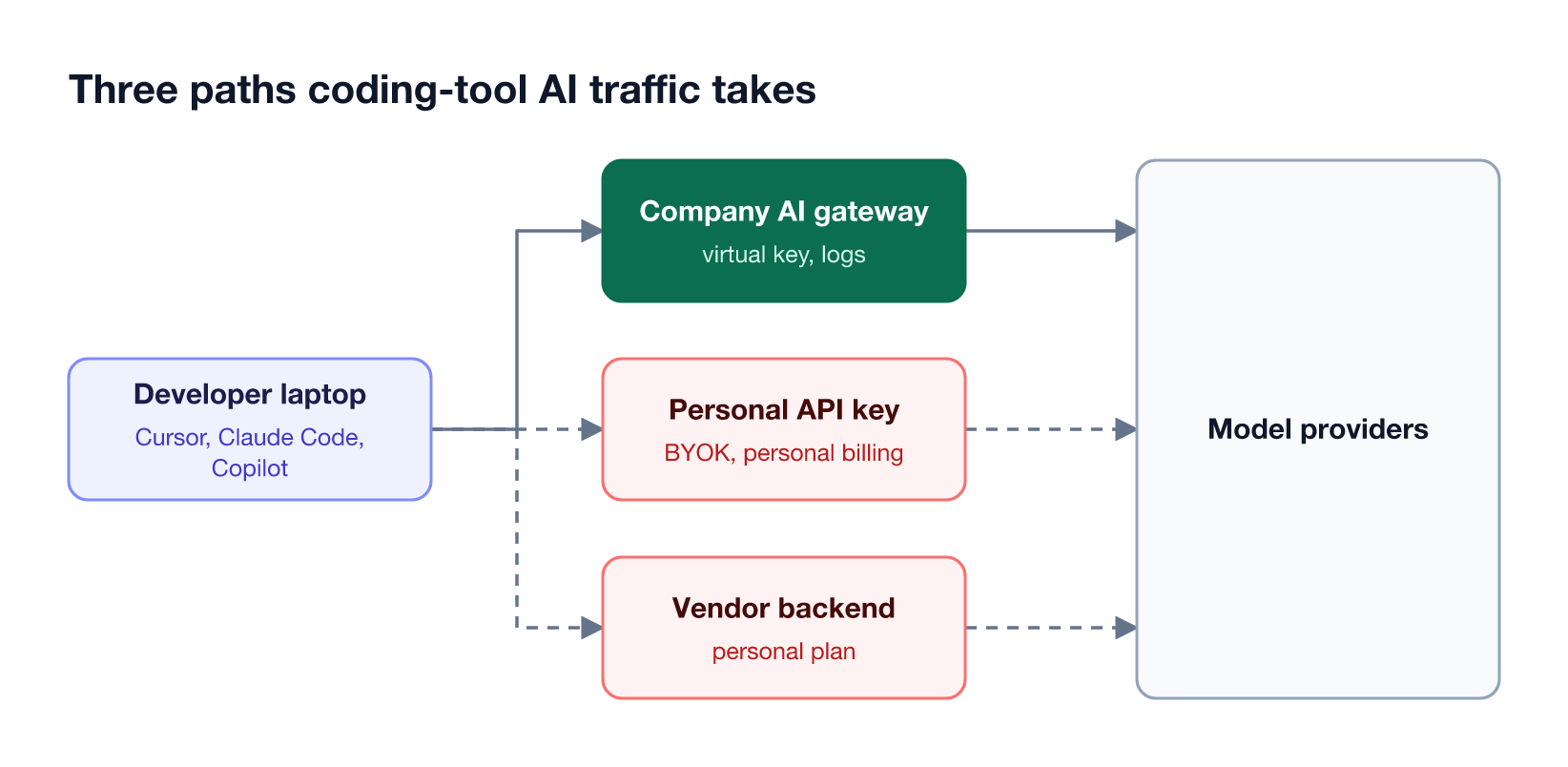
Figure 1 shows the three paths. Coding tools are a common source of unapproved AI use because developers can install them in minutes, most accept a personal API key (bring your own key, or BYOK), and the data they send is source code. IBM's 2025 Cost of a Data Breach report found that one in five organizations reported a breach due to shadow AI.
This guide to AI coding agent security for Cursor, Claude Code, and Copilot covers the risks in depth. The five methods below focus on finding the usage first.
Five Ways to Detect Shadow AI Compared
The five detection methods differ in what they see: installed tools, network traffic, licensed usage, leaked keys, or governed requests. No single method finds everything, because personal plans and personal API keys are designed to work without company involvement. Most teams combine device inventory with gateway routing.
| Method | What it finds | What it misses | Effort |
|---|---|---|---|
| Device inventory | Installed AI apps and agents on managed machines | Unmanaged devices, tools run inside containers | Low with MDM or Bifrost Edge |
| Egress monitoring | Connections to AI provider and vendor domains | Which account or key was used | Medium |
| Vendor admin telemetry | Usage on company licenses and accounts | Personal accounts and personal keys | Low |
| Secret and billing review | Personal API keys in code, AI expense claims | Keys never committed or expensed | Medium |
| AI gateway logs | Every request routed through the gateway, by developer | Traffic that bypasses the gateway | Low once routed |
This overview of detecting unapproved AI tools across the organization covers detection beyond coding tools.
1. Inventory Installed AI Coding Tools on Every Machine
Endpoint inventory is the fastest way to find unapproved coding tools, because Cursor, Claude Code, Codex, and similar tools must be installed on a machine to run. A device inventory shows which AI apps are present, on which machines, and which versions, before any traffic analysis is needed.
Mobile device management (MDM) tools already list installed applications, but they rarely understand which ones are AI tools or what those tools connect to. With AI Gateway + Bifrost Edge, the Bifrost gateway remains the policy engine, and Bifrost Edge reports in from each machine. The Edge Devices dashboard lists each device with:
- Owner and platform. The signed-in user, operating system, and architecture.
- Installed AI apps. The AI apps on the machine, with versions.
- Configured MCP servers. The MCP servers wired into each AI app, with the tools each exposes.
- Approval status. Whether each app and MCP server is approved, pending, or denied.
Admins can filter the fleet by a specific installed AI app, for example every machine with Cursor installed. Bifrost Edge currently governs desktop apps including Cursor and Codex, and coding agents including Claude Code, Codex CLI, and OpenCode; Bifrost Edge is in alpha. MCP servers configured inside these tools are a related blind spot, covered in this guide to shadow MCP servers.
2. Watch Egress to AI Provider Endpoints
Egress monitoring finds unapproved usage by watching outbound connections from developer networks to AI provider APIs and coding tool backends. DNS filtering and egress filtering logs show which machines contact domains such as api.anthropic.com or api.openai.com, and how often, even when no tool appears in an inventory.
Egress data answers "which machines talk to AI providers" but not "with whose account." A developer on a company Claude Code license and one on a personal API key produce similar traffic. Three practices make egress data useful:
- Baseline approved destinations. If approved traffic flows through the AI gateway and appears in Bifrost request logs, direct connections from laptops to provider APIs stand out.
- Correlate with identity. Join egress logs with device owners from MDM or the Edge Devices dashboard.
- Avoid blanket blocks. Blocking provider domains also breaks approved tools unless they are routed through a gateway first.
Egress monitoring is most useful after approved traffic has been moved to one path. Once coding agents call the gateway instead of providers directly, any remaining direct traffic is a strong signal of unapproved use, a pattern described in this guide to governing Claude Code and Cursor at enterprise scale.
3. Read Vendor Admin Telemetry
Vendor admin telemetry shows how coding tools are used on accounts the company owns. Claude Code can export usage metrics through OpenTelemetry, and GitHub provides a Copilot usage dashboard for enterprises. These sources are precise for licensed usage but cannot see personal accounts or personal API keys.
What each vendor source provides:
- Claude Code telemetry. Claude Code monitoring exports metrics and events over OpenTelemetry when
CLAUDE_CODE_ENABLE_TELEMETRY=1is set, and admins can enforce it through managed settings. Metrics include sessions, token usage, cost, and lines of code, with the user's email when available from sign-in. - Copilot usage metrics. GitHub's Copilot usage dashboard shows adoption, feature, model, and language trends for an enterprise once the Copilot usage metrics policy is enabled, with data up to three days behind and NDJSON export.
- Other vendor consoles. Admin views from coding tool vendors cover company-managed seats; usage on personal plans falls outside them.
The gap is structural: vendor telemetry measures adoption of the tools you pay for, not the ones you do not. This guide to Claude Code monitoring for coding agents covers the metrics in more depth.
4. Hunt for Personal API Keys and BYOK Setups
Personal API keys are the clearest evidence of unapproved AI coding, because BYOK lets a developer point Cursor, Claude Code, or Copilot at a model provider using a key the company never issued. Those keys show up in three places: committed code, environment files, and expense claims.
Ways to find them:
- Secret scanning. GitHub secret scanning scans the full Git history for hardcoded credentials, including partner-issued secret types, and partner secrets are reported to the provider for possible revocation.
- Gateway secrets detection. Bifrost secrets detection catches API keys and tokens inside prompts and responses, such as a key pasted into a coding agent session.
- Expense and billing review. Personal AI subscriptions and provider invoices submitted as expenses identify developers paying for their own tools.
Finding a personal key is a prompt to offer a governed alternative, not only to revoke it. Developers use personal keys because approved access is slower or missing; issuing a company credential that works the same way removes the reason.
5. Route Coding Agents Through an AI Gateway
Routing coding agents through an AI gateway turns detection into control. When Claude Code, Cursor, and Copilot send model requests to the gateway with a per-developer key, every request is attributed, budgeted, and logged, and anything that does not appear in gateway logs is, by definition, outside policy.
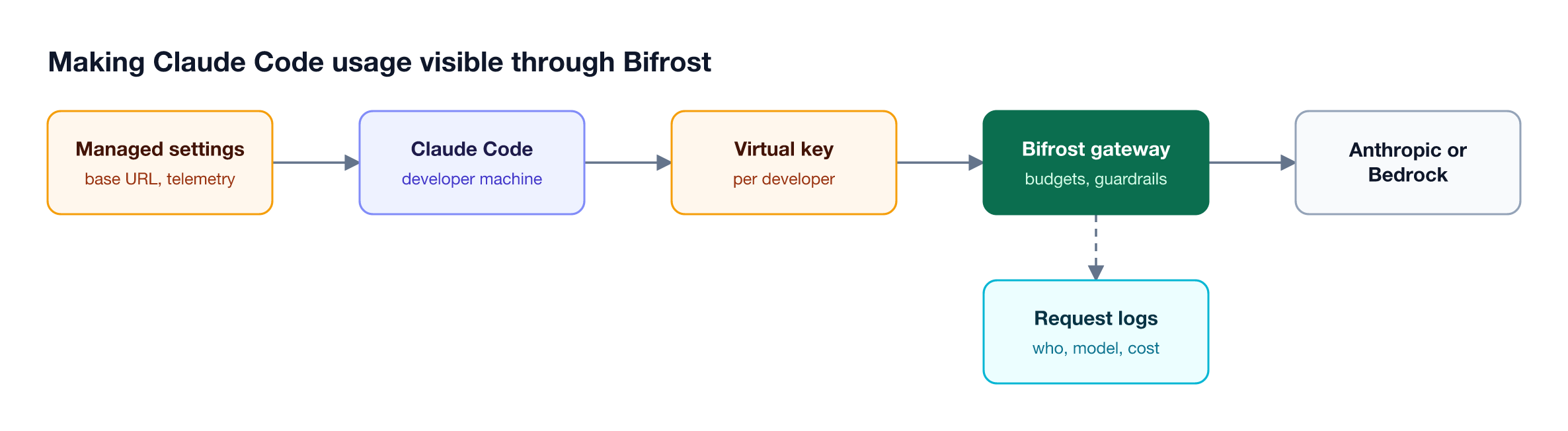
The Bifrost AI gateway supports all three tools in the title:
- Claude Code. Claude Code connects to Bifrost through the Anthropic-compatible endpoint by setting
ANTHROPIC_BASE_URLand a Bifrost credential, as Figure 2 shows. - Cursor. Cursor uses Bifrost as a custom model with a Bifrost virtual key, and can reach MCP tools through the gateway.
- GitHub Copilot. The Copilot app, Copilot CLI, and VS Code Copilot Chat can route through Bifrost using Copilot's BYOK support.
Each developer gets a virtual key with its own budget and rate limits, so usage and spend are visible per person in request logs, as the Bifrost governance model describes.
Bifrost Edge extends the same policy to the machine for supported tools, routing their traffic through the gateway without per-tool configuration. The full list of supported agents is on the CLI agents overview.
What to Do After You Find Unapproved Usage
Finding unapproved usage is the first step; the response decides whether usage moves to an approved path or to personal devices. The most effective response approves useful tools through a governed path and denies only tools that cannot meet data, licensing, or security requirements.
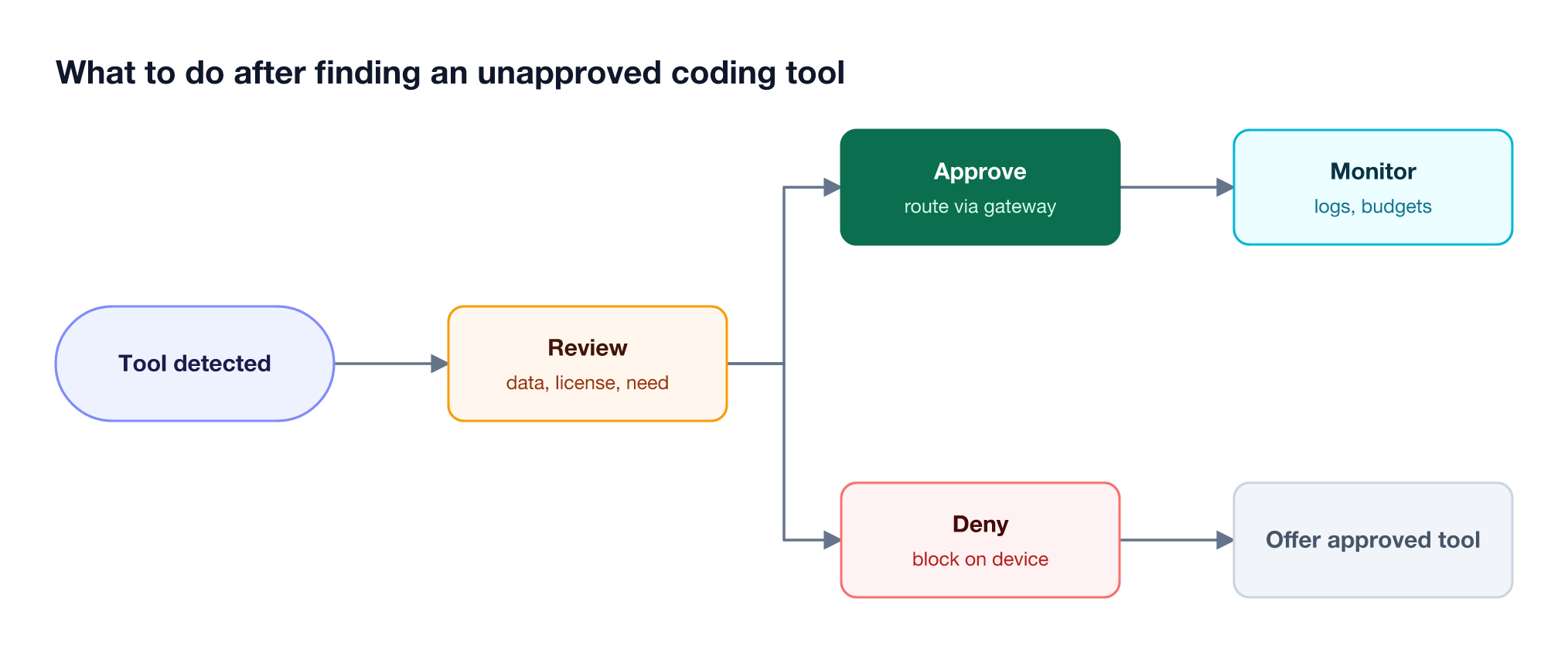
Following Figure 3, a practical response looks like this:
- Review the tool. Check what data it sends, its license terms, and whether developers depend on it.
- Approve with a governed path. Issue virtual keys and route the tool through the gateway, with guardrails such as secrets detection on its traffic.
- Deny where needed. Use Edge app governance to block tools that cannot be approved, and tell users which approved tool replaces them.
- Monitor. Watch gateway logs and budgets, and re-run inventory regularly to catch new tools.
Blocking Cursor or Claude Code outright without an approved alternative usually moves usage to personal laptops. This list of AI governance tools for coding agents compares the options for a governed path, and this guide to securing Cursor, Claude Code, and Copilot covers the controls to apply once tools are approved.
Frequently Asked Questions
How to detect shadow AI?
Detect shadow AI by combining signals: inventory installed AI apps on managed devices, review egress and DNS logs for AI provider domains, compare vendor admin telemetry with actual installs, scan code and expenses for personal API keys, and route approved AI traffic through a gateway so remaining direct traffic stands out. This guide to shadow AI detection covers the signals in more detail.
What are examples of shadow AI?
Examples of shadow AI include developers using Cursor on a personal plan for company code, running Claude Code with a personal Anthropic API key, signing in to Copilot with a personal GitHub account, pasting code into a personal ChatGPT account, and connecting unapproved MCP servers to coding agents. The definition of shadow AI covers examples beyond coding.
How to avoid shadow AI?
Avoid shadow AI by making approved tools easier to use than unapproved ones. Publish an AI acceptable use policy, provide company-managed access to the coding tools developers want, route that access through an AI gateway with per-developer keys and budgets, and review new tools quickly instead of defaulting to blocks.
Is Cursor safe for enterprise use?
Cursor can be used safely in an enterprise when it runs on company-managed accounts with clear data handling terms, and when its model traffic is governed. Routing Cursor through an AI gateway such as Bifrost adds per-developer keys, budgets, guardrails, and request logs on top of the editor's own controls.
Can you block Cursor or Claude Code?
Yes. Endpoint tools, MDM policies, and Bifrost Edge app approvals can block coding tools on managed machines. Blocking alone tends to move usage to personal devices, so most teams block only tools that cannot be approved and offer a governed alternative for the rest.
What is BYOK in AI coding tools?
BYOK, or bring your own key, lets a coding tool use an API key the user supplies instead of the vendor's hosted access. BYOK is a common source of unapproved usage when the key is personal. The same feature becomes a governance control when the key is a company-issued gateway credential, such as a Bifrost virtual key.
Bring Coding Agents Under Policy with Bifrost
Shadow AI in coding tools is easiest to find and fix when approved usage runs through one path. Bifrost provides that path as an open-source AI gateway for Claude Code, Cursor, and Copilot, with per-developer virtual keys, budgets, and logs, and AI Gateway + Bifrost Edge extends the same policy to developer machines. Book a demo to see how Bifrost finds and governs AI coding tools across your team.