Integrating Gemini CLI with Bifrost Gateway
Akshay Deo
Dec 09, 2025 · 5 min read
Gemini CLI is Google's command-line coding assistant that brings the power of Gemini models - including Gemini 2.0 Flash with its massive context window and multimodal capabilities - directly to your terminal. By routing Gemini CLI through Bifrost Gateway, you gain multi-model flexibility, comprehensive observability, MCP tool integration, and failover capabilities while preserving the familiar CLI experience.
Architecture Overview
Gemini CLI communicates with Google's Generative AI API for model access. Bifrost intercepts these requests by providing a compatible endpoint that translates between different API formats. The integration architecture:
- Gemini CLI sends requests to the configured base URL
- Bifrost receives requests at its Google GenAI-compatible endpoint (
/genai) - Bifrost routes to the configured provider and model
- Provider responses are translated back to Google's GenAI format
- Gemini CLI receives responses and renders them in the terminal
This architecture enables powerful workflows: use Gemini models for their strengths (massive context windows, multimodal understanding), or transparently switch to Claude for refactoring tasks, GPT-4 for general coding, or local models for privacy-sensitive work.
Check out these docs to quickly integrate Bifrost with Gemini CLI
1. Install Gemini CLI
This installs the Gemini CLI globally, making the gemini command available system-wide.
2. Configure Environment Variables
3. Run Gemini CLI
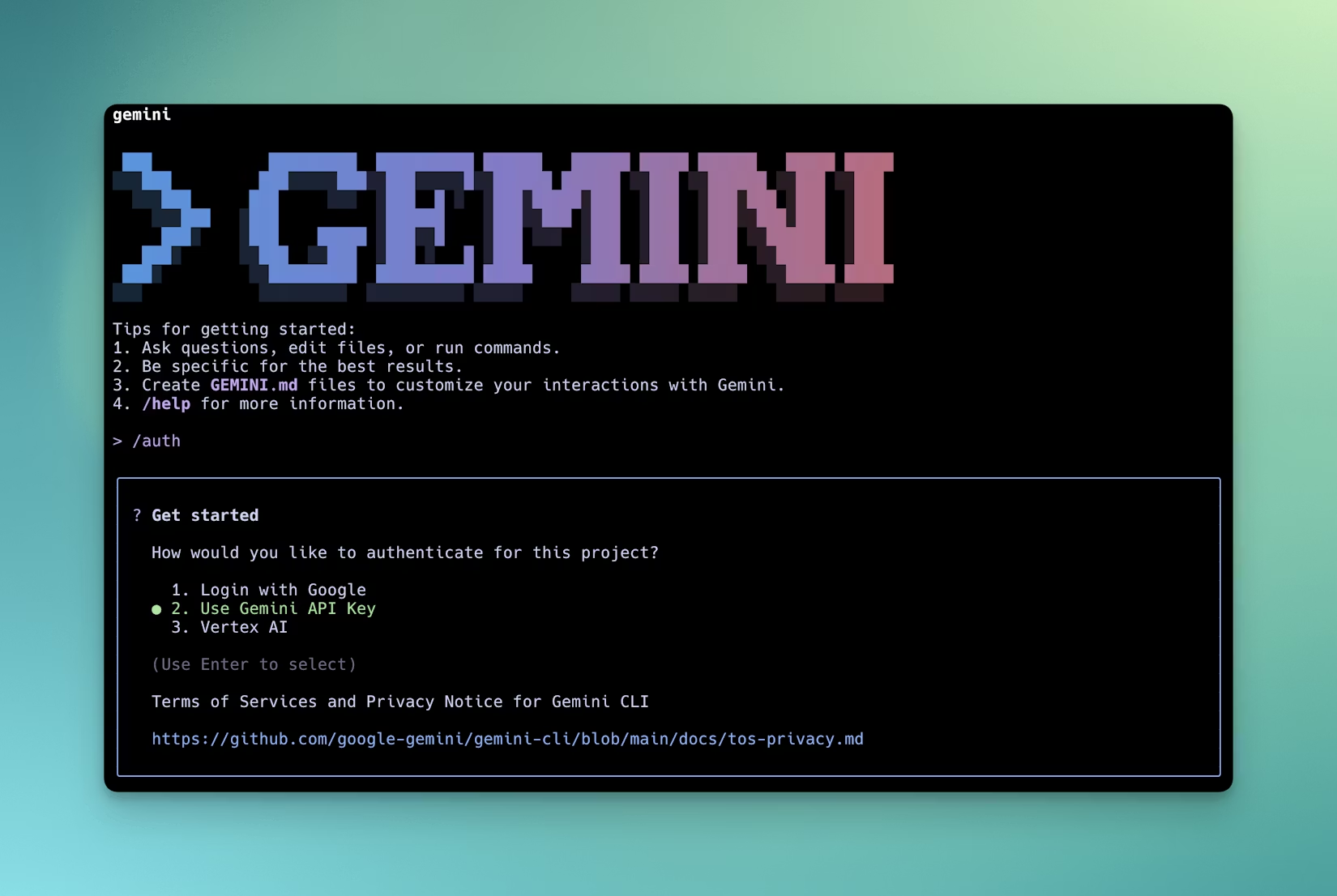
4. Select Authentication Method
When Gemini CLI starts, it prompts for authentication method. Select "Use Gemini API Key" to use the configured environment variables.
All Gemini CLI requests now flow through Bifrost Gateway.
Configuration Breakdown
GEMINI_API_KEY
Set to dummy-key when Bifrost handles authentication. Bifrost manages actual provider API keys internally, keeping them centralized and secure.
When using virtual keys: If Bifrost uses virtual key authentication (where different keys map to different configurations), set this to your assigned virtual key instead of dummy-key.
Direct API key mode: If you want Bifrost to pass through your actual Google API key, set this to your real key. Bifrost will forward it to Google's API.
GOOGLE_GEMINI_BASE_URL
This environment variable redirects Gemini CLI's API calls to Bifrost's Google GenAI-compatible handler. The /genai path tells Bifrost to use its Google-specific protocol translator.
Gemini CLI appends standard Google GenAI API paths to this base URL, resulting in fully-formed requests like http://localhost:8080/genai/v1beta/models/gemini-2.0-flash:generateContent.
Local Development: http://localhost:8080/genai
Remote Bifrost: https://bifrost.company.com/genai
Docker Networking: http://bifrost-container:8080/genai (if both run in same Docker network)
Authentication Selection
Gemini CLI supports multiple authentication methods:
- Use Gemini API Key: Reads from
GEMINI_API_KEYenvironment variable (use this with Bifrost) - OAuth 2.0: Uses Google Cloud credentials (not compatible with Bifrost)
- Service Account: Uses GCP service account keys (not compatible with Bifrost)
Always select "Use Gemini API Key" when using Bifrost, as OAuth and service account authentication bypass the base URL configuration.
Key Capabilities
Gemini's Specialized Strengths
When routing through Bifrost to actual Gemini models, you preserve Gemini's distinctive capabilities:
Massive Context Windows: Gemini 2.0 Flash supports up to 1 million tokens of context. This enables analyzing entire codebases, processing large documents, or maintaining extended coding sessions without context truncation.
Multimodal Understanding: Gemini models natively understand images, audio, and video. You can paste screenshots of UI bugs, architectural diagrams, or error messages, and Gemini comprehends them alongside code context.
Code Execution: Gemini models can execute Python code during reasoning, enabling them to verify logic, test algorithms, or compute results dynamically.
Advanced Reasoning: Gemini 2.0 models excel at step-by-step reasoning, making them particularly strong for complex algorithmic problems or architectural decisions.
Cross-Provider Flexibility
While optimized for Gemini, Bifrost enables using other models through Gemini CLI:
Model Comparison: Route the same query through Gemini, Claude, and GPT-4 sequentially to compare approaches without switching tools.
Task-Specific Routing: Configure Bifrost to route different request types to different models - Gemini for large context analysis, Claude for refactoring, GPT-4 for explanations.
Cost Optimization: Use expensive models (Gemini Pro, GPT-4) for complex tasks and cheaper models (Gemini Flash, GPT-4o mini) for simple queries.
Failover Scenarios: If Google's API experiences issues, Bifrost automatically routes to backup providers, ensuring continuous development flow.
Developers can compare models without changing Gemini CLI:
This is valuable for:
- Evaluating which model best suits your coding style
- Testing new model releases against established baselines
- Standardizing on optimal models per task type
MCP Tools Integration
Bifrost automatically injects MCP (Model Context Protocol) tools into requests. This extends Gemini CLI's capabilities:
Codebase Exploration: MCP filesystem tools allow models to read your project structure, dependencies, and configuration files - providing context beyond just the highlighted code.
Database Schema Access: When writing database code, models can query your actual schema through MCP, generating accurate SQL or ORM code that matches your database structure.
API Documentation Retrieval: Integrate OpenAPI specifications or GraphQL schemas as MCP tools. Models access authoritative API documentation when generating client code.
Git History: MCP tools can expose git history, allowing models to understand recent changes, who modified code, or why certain decisions were made.
Build System Integration: Expose build configurations through MCP. Models understand project structure, dependencies, and compilation targets when suggesting changes.
The integration is seamless - Gemini CLI users see enhanced suggestions with better project awareness, while Bifrost handles tool invocation behind the scenes.
Observability and Monitoring
Bifrost's dashboard at http://localhost:8080/logs provides detailed visibility into all Gemini CLI sessions:
Request Inspection: View complete prompts sent by Gemini CLI, including how the CLI constructs context from your file selections and conversation history.
Token Usage: Monitor consumption per session. Gemini's large context windows can consume significant tokens - tracking helps understand costs and identify optimization opportunities.
Model Performance: Compare response quality and latency across different Gemini model variants (Flash vs. Pro) or against other providers.
Error Tracking: When Gemini CLI fails, Bifrost logs contain the exact API error - distinguishing between quota limits, invalid requests, or provider outages.
Usage Patterns: Aggregate data reveals which coding tasks dominate usage, which models perform best for specific tasks, and where optimization efforts should focus.
Context Window Analysis: Track how much context Gemini CLI includes in requests. Are you approaching the 1M token limit? Could you reduce context size without losing quality?
Load Balancing and Failover
Bifrost distributes requests across multiple configured endpoints:
Rate Limit Mitigation: Spread requests across multiple Google API keys. Eliminates being stuck waiting when one key hits rate limits.
Geographic Failover: Configure keys from different Google Cloud regions. If one region experiences issues, requests automatically route to another.
Provider Failover: Set up fallback chains - primary requests to Gemini 2.0 Flash, automatic fallback to Claude if Google's API is unavailable. Developers experience no interruption.
Cost-Based Routing: Route simple completions to Gemini Flash (fast, cheap), complex analysis to Gemini Pro (deep reasoning), and sensitive code to local models (privacy).
Conclusion
Integrating Gemini CLI with Bifrost Gateway preserves Gemini's distinctive strengths - massive context windows, multimodal understanding, advanced reasoning - while adding enterprise capabilities: multi-model flexibility, comprehensive observability, MCP tool integration, and resilient failover.
Developers continue using familiar Gemini CLI commands while benefiting from centralized model management, cost control, and usage visibility. The configuration is simple - two environment variables, but enables sophisticated workflows: compare models without switching tools, route tasks to optimal providers, automatically fallback during outages, and monitor every interaction for optimization opportunities.
For organizations investing in Gemini models, Bifrost provides the operational infrastructure necessary for production deployment: observability for debugging, failover for reliability, load balancing for scale, and tool integration for enhanced capabilities, all transparent to the development experience, letting developers focus on writing code while administrators manage the AI infrastructure that powers it.