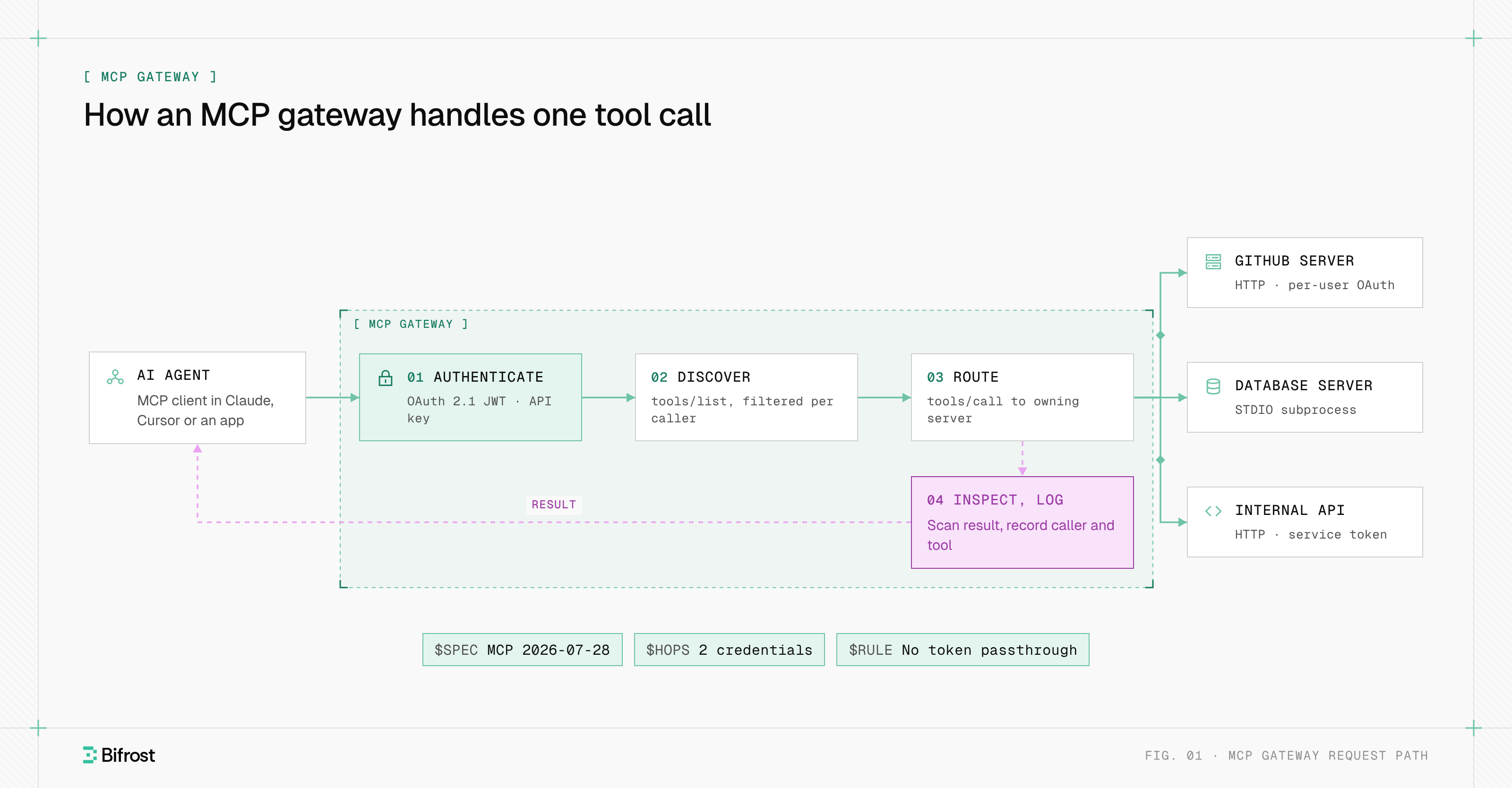
An MCP server is a program that exposes tools, data and prompt templates to AI applications through the Model Context Protocol (MCP), so an AI model can discover what a system offers and act on it at runtime. One MCP server wraps one system, such as GitHub, Jira or a database, and any MCP-compatible application can use it without custom integration code.
MCP servers are the building block of the Model Context Protocol: AI applications such as Claude Desktop, ChatGPT, Cursor and VS Code act as hosts, and servers supply the capabilities. By December 2025 there were more than 10,000 active public MCP servers, when Anthropic donated MCP to the Agentic AI Foundation, a directed fund under the Linux Foundation.
Once a team runs more than a handful of servers, Bifrost, the open-source AI gateway, sits between clients and servers to handle credentials, tool access and logging.
What does an MCP server do?
An MCP server gives an AI model controlled access to one external system. The server exposes three primitives: tools the model can call, resources the host application can read, and prompts the user can pick. The model never talks to the system directly; it asks the server, and the server does the work.
The MCP specification assigns each primitive a different controller, which decides who triggers it:
| Primitive | Controlled by | Discovered with | Used with | Example on a Jira server |
|---|---|---|---|---|
| Tools | The model | tools/list | tools/call | create_issue, search_issues |
| Resources | The host application | resources/list | resources/read | A project's workflow config, addressed by URI |
| Prompts | The user | prompts/list | prompts/get | A "triage this bug" template |
MCP server examples
MCP server examples fall into a few recurring use cases:
- Code hosting. A GitHub server exposes tools to search code, read files and open pull requests.
- Work tracking and docs. Atlassian runs a remote MCP server for searching and updating Jira issues and Confluence pages under the user's own permissions.
- Databases. A Postgres or Snowflake server runs read-only SQL against live data.
- Local files. A filesystem server reads and writes inside approved directories on a laptop.
The Bifrost MCP server directory lists 494 official MCP servers, from GitHub and Slack to Sentry.
How does an MCP server work?
An MCP server works by answering JSON-RPC 2.0 requests from an MCP client, the connector an AI application creates for each server it uses. The client discovers the server, lists its tools, passes them to the model, and sends a tools/call request when the model picks one. The server runs the call against its backing system and returns the result.
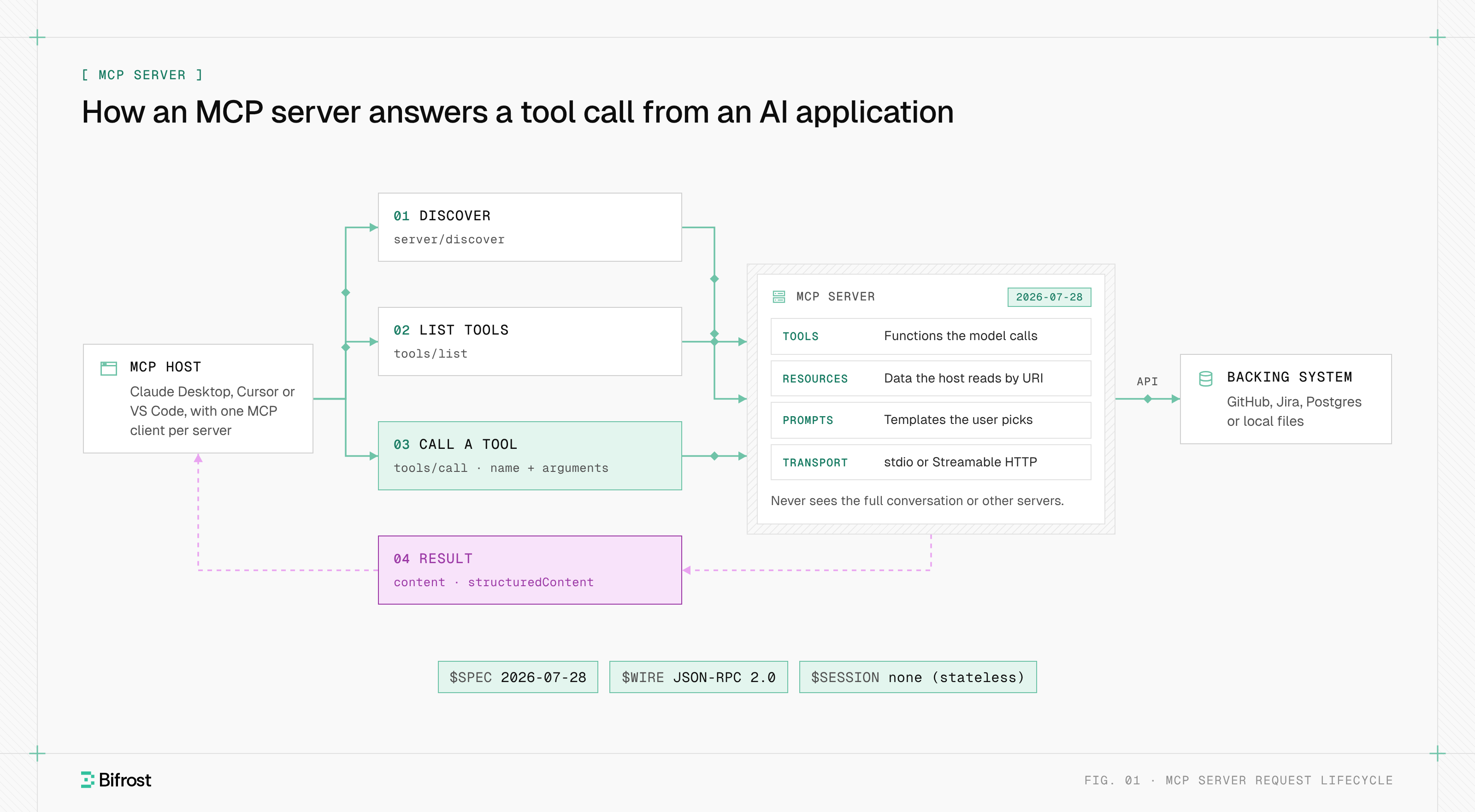
Step by step, under the current specification revision (2026-07-28):
- 01
Discover
The client may call
server/discoverto learn the server's protocol versions and capabilities. Every server must implement it. - 02
List
tools/listreturns each tool's name, description and input JSON Schema. - 03
Call
When the model returns a tool call, the client sends
tools/callwith the name and arguments. - 04
Return
The server replies with
contentand, optionally,structuredContentmatching the tool's output schema. A tool failure returnsisError: true, so the model can read it and retry.
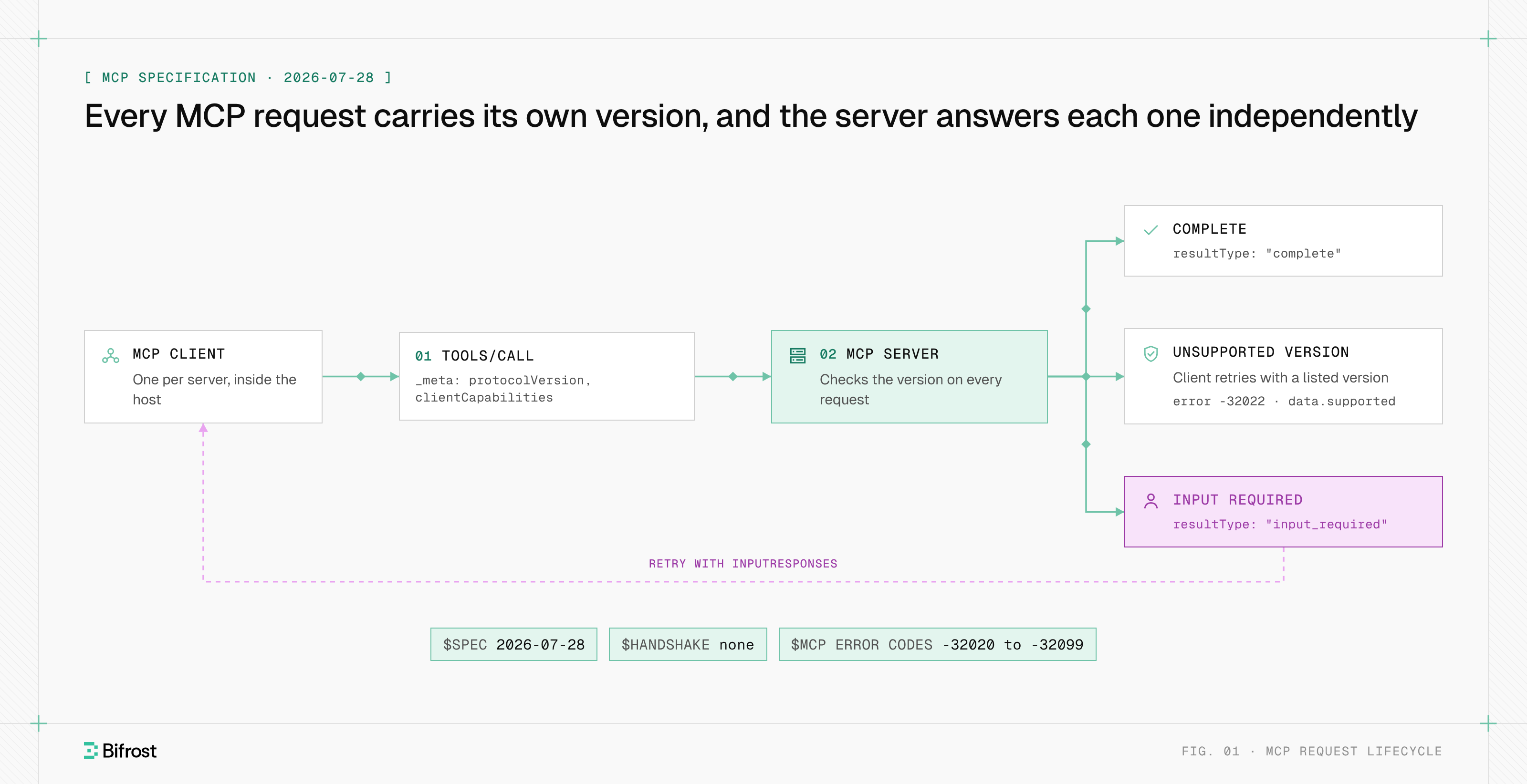
The 2026-07-28 revision made the protocol stateless: no initialize handshake, no session ID, and every request carries its protocol version and client capabilities in _meta. A server that needs state across calls, such as an open database transaction, returns an explicit handle from one tool and accepts it as an argument on the next. The Model Context Protocol overview lists the other changes.
Local vs remote MCP servers
A local MCP server runs on the user's machine as a subprocess the host launches, and the two exchange newline-delimited JSON-RPC messages over stdio (standard input and output). A remote MCP server runs as a network service, and the client reaches it over Streamable HTTP at a single URL called the MCP endpoint.
| Dimension | Local server (stdio) | Remote server (Streamable HTTP) |
|---|---|---|
| Where it runs | Subprocess on the user's laptop | Hosted service, often run by the vendor |
| Transport | Newline-delimited JSON-RPC over stdin and stdout | HTTP POST to one MCP endpoint; replies as JSON or a server-sent events stream |
| Authentication | None per call; inherits the user's environment and credentials | OAuth 2.1, with the server acting as a resource server |
| Typical use | Filesystem, Git, local CLIs | GitHub, Jira, Confluence, SaaS and internal APIs |
| Main risk | Runs third-party code with the user's privileges | Token handling and over-broad scopes |
The original remote transport, HTTP with server-sent events (SSE) on a separate GET stream, is deprecated but still common.
MCP server vs API
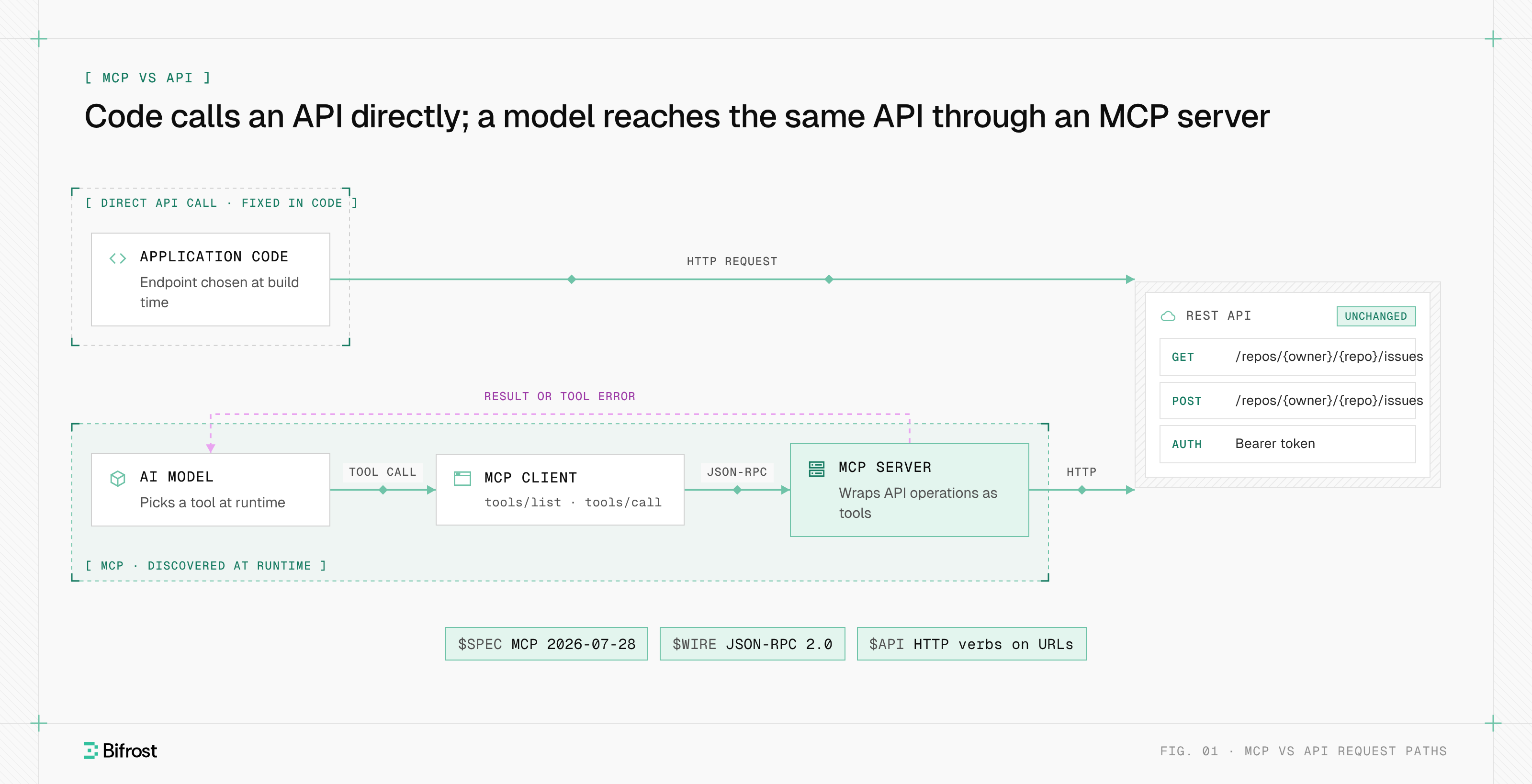
An MCP server differs from a REST API in who the consumer is. A REST API exposes fixed endpoints for code a developer writes ahead of time; an MCP server exposes tools that a model discovers at runtime, described for the model to read. Most MCP servers wrap an existing API rather than replace it.
| Dimension | REST API | MCP server |
|---|---|---|
| Consumer | Application code | An AI model, through an MCP client |
| Discovery | Docs or an OpenAPI file read by a developer | tools/list at runtime |
| Wire format | HTTP verbs on resource URLs | JSON-RPC 2.0 over stdio or Streamable HTTP |
| Portability | One integration per API per app | One server works in every MCP host |
| Interface design | Many fine-grained endpoints | Fewer task-shaped tools, because each definition costs model tokens |
MCP vs API compares the two in detail.
How to build an MCP server
To build an MCP server, pick an official SDK, define each tool as a function with typed inputs and a clear description, choose a transport, and test the server before connecting a host. The protocol project publishes SDKs for TypeScript, Python, C#, Go, Rust, Java and more, and the SDK handles JSON-RPC framing, schema generation and protocol versions.
With version 2 of the official Python SDK, a server with one tool is a few lines. Tutorials written for version 1 import FastMCP; version 2 uses MCPServer:
from mcp.server import MCPServer

mcp = MCPServer("issues")

@mcp.tool()
def get_issue(key: str) -> dict:
    """Return the title, status and assignee of an issue by key, such as PROJ-123."""
    return issue_tracker.fetch(key)  # wraps your existing REST client
The type hints become the input schema, and the docstring becomes the description the model reads. Three practices separate a usable server from a demo:
- 01
Design tools around tasks, not endpoints
Five task-shaped tools beat fifty that mirror an API.
- 02
Write descriptions for the model
State what the tool does and when to use it; the model has nothing else to go on.
- 03
Test and debug with the MCP Inspector
The official Inspector (
mcp dev server.pyin the Python SDK) lists the server's primitives and sends calls by hand, isolating server bugs from model behavior.
MCP server security risks
MCP server security risks come from one fact: a tool call is code execution driven by model output. A local server runs with the user's privileges, a remote server holds tokens to real systems, and any text a server returns becomes model input.
The security best practices in the specification name the failures that matter most for server builders:
- Token passthrough. A server must not accept tokens that were not issued for it, or forward a client's token to the downstream API; that breaks audit trails and lets a stolen token bypass the server's controls.
- Local server compromise. A one-click install can run a malicious startup command, so hosts that offer one-click setup must show the exact command and get consent.
- DNS rebinding. HTTP servers must validate the
Originheader, and local HTTP servers should bind to 127.0.0.1, not 0.0.0.0. - Tool poisoning and prompt injection. Tool descriptions and results can carry instructions the user never wrote, so clients must treat tool annotations as untrusted unless the server is trusted.
Running multiple MCP servers in production
Running multiple MCP servers in production means moving them off individual laptops and behind one shared layer, usually an MCP gateway, that handles identity, tool access, logging and connection management.
Three problems grow with server count:
- Per-user identity. One shared service account per server hides who did what. Production setups pass each user's own OAuth token, or exchange their identity-provider token, per call.
- Context cost. Every connected tool's definition is sent to the model on every turn, so hundreds of tools add tokens, latency and wrong tool choices, which is why tool discovery belongs outside the context window at scale.
- Version drift. A legacy client that expects the
initializehandshake fails against a server that supports only 2026-07-28, with400 Bad Requeston HTTP. The specification topic explains the compatibility matrix.
MCP servers with Bifrost
Bifrost, the open-source AI gateway built by Maxim AI, works with MCP servers in both directions as an MCP gateway. As an MCP client, Bifrost connects to MCP servers over STDIO, HTTP or SSE, or generates a server from an OpenAPI document (beta) for REST APIs that have none. As an MCP server, Bifrost exposes the connected tools at one /mcp endpoint that Claude Desktop, Cursor and other MCP clients connect to.
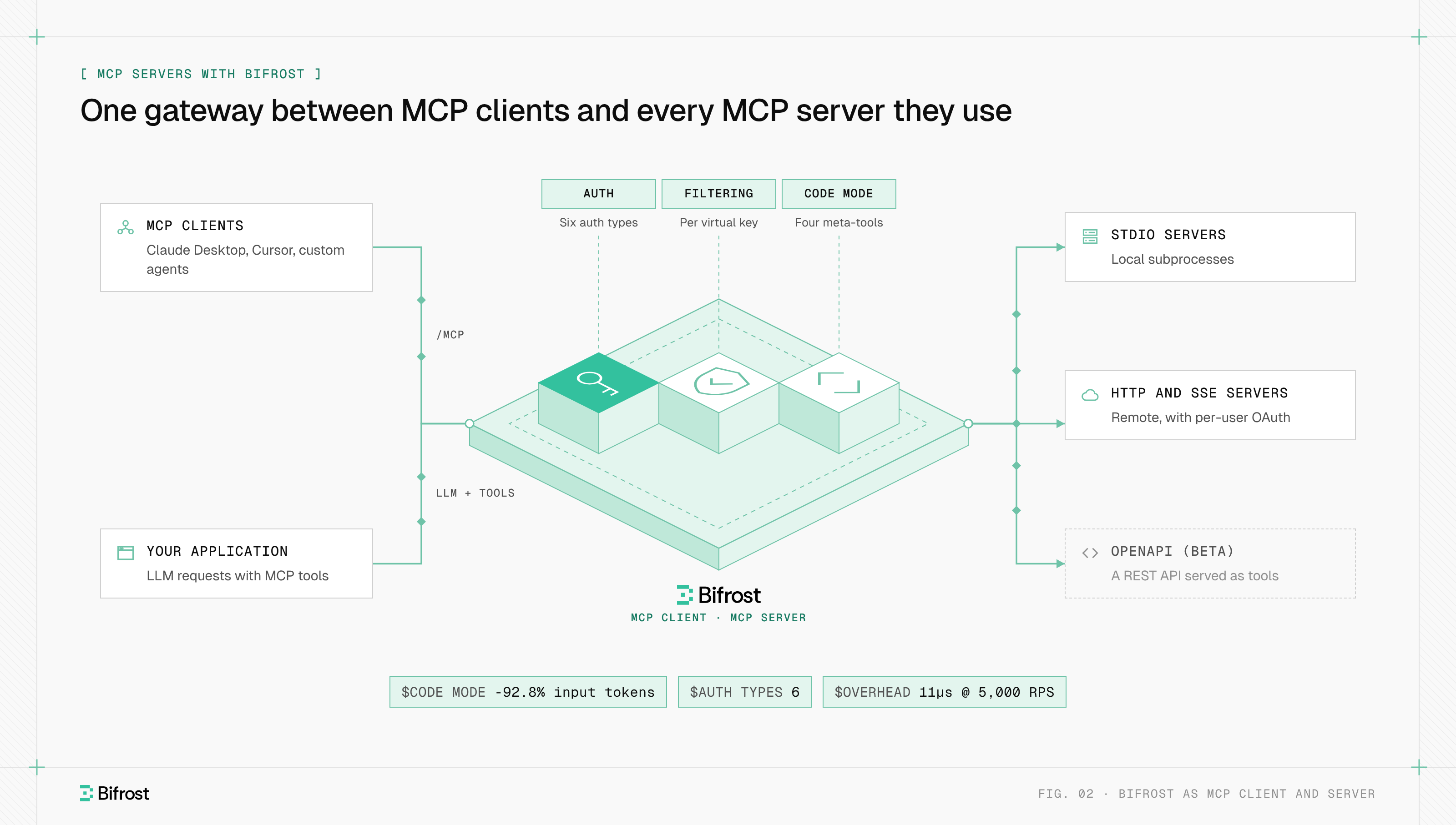
Bifrost supports six MCP authentication types: none, headers, OAuth 2.0, per-user OAuth, per-user headers and token exchange. With per-user types, the upstream server sees the real user, not a shared account. Tool filtering restricts tools per request, per MCP client and per virtual key, and Virtual MCPs bundle approved tools from several servers behind one /mcp/ slug endpoint.
By default Bifrost does not execute tool calls the model returns; the application approves each one through a separate tool execution request. For large tool sets, Code Mode replaces direct tool definitions with four meta-tools and runs a model-written Python (Starlark) script in a sandbox. With 508 tools across 16 servers, it cut input tokens by 92.8% and estimated cost by 92.2% at the same 100% pass rate.
Local servers on laptops bypass a gateway. With AI Gateway + Bifrost Edge (in alpha), Edge inventories the MCP servers configured in apps such as Claude Desktop and Cursor and enforces the allow or deny decisions set in Bifrost. The same gateway routes LLM traffic to 25+ providers and 10,000+ models with 11 microseconds of overhead at 5,000 RPS.
To connect your first MCP server, start with the gateway quickstart, then add a client from the MCP settings page.
Connect MCP servers through one gateway
STDIO, HTTP or SSE, tool filtering per virtual key, and a log of every call.
FAQ
Is an MCP server an actual server?
An MCP server is a server in the protocol sense: it answers requests from a client. It is not always a networked machine. A local MCP server is often a small process the host launches on the same laptop and talks to over stdio, with no port open. A remote MCP server is a network service reached over HTTPS.
Is an MCP server an HTTP server?
A remote MCP server is an HTTP server: it serves one MCP endpoint that accepts JSON-RPC 2.0 messages as HTTP POST requests and replies with JSON or a server-sent events stream. A local MCP server usually is not, because it uses stdio instead. The MCP messages are identical on both transports.
When to use an MCP server vs an API?
Use a direct API call when your own code knows which operation to run. Use an MCP server when an AI model should decide at runtime which operation fits the request, or when one capability must work across Claude, ChatGPT, Cursor and VS Code. Most teams do both: the MCP server wraps the API.
What are the limitations of Model Context Protocol (MCP)?
The main limitations are context cost, security and operations. Every tool definition consumes model tokens on each turn, so large tool sets slow responses and raise cost. The protocol cannot enforce user consent or stop prompt injection on its own. Running many servers also needs identity, logging and version management that the specification leaves to implementers.
Can you give me an example of an MCP server?
A common example of an MCP server is the GitHub server: it exposes tools such as searching code, reading a file and opening a pull request, so a coding agent in Cursor or VS Code can work on a repository. Atlassian's remote MCP server does the same for Jira issues and Confluence pages, and a Postgres server runs read-only SQL queries.
What is an MCP server in AI?
In AI, an MCP server is the component that connects a language model to outside systems through the Model Context Protocol. It turns a code repository, a ticket tracker or a database into tools a model can call. Without one, an AI assistant can only use its training data and the conversation.