Why MCP Tool Discovery Belongs in a Filesystem, Not the Context Window
Vrinda Kohli
May 22, 2026 · 11 min read
Every MCP tool definition the model doesn't end up using is wasted context. That's the quiet bug in the way most teams run the Model Context Protocol today. Connect five MCP servers with thirty tools each, and the model receives 150 tool definitions before it ever sees the user's prompt, most of which it will never call. The token bill grows linearly with every server you add. Selection accuracy degrades. Latency creeps up.
The framing this post wants to argue for is simple: tool discovery is not a context-window job**.** Loading every tool definition into the prompt treats discovery as something the model does by reading. But discovery is closer to navigation, with the model deciding which tool fits the task, and navigation deserves its own surface. The right surface is one the model already knows how to use: a filesystem.
The rest of this post is about why that abstraction beats the alternatives, how the stub files are actually built from MCP schemas, where server-level versus tool-level binding pulls in different directions, and what the approach gets right that flat tool lists and semantic retrieval don't.
Tool discovery doesn't belong in the context window
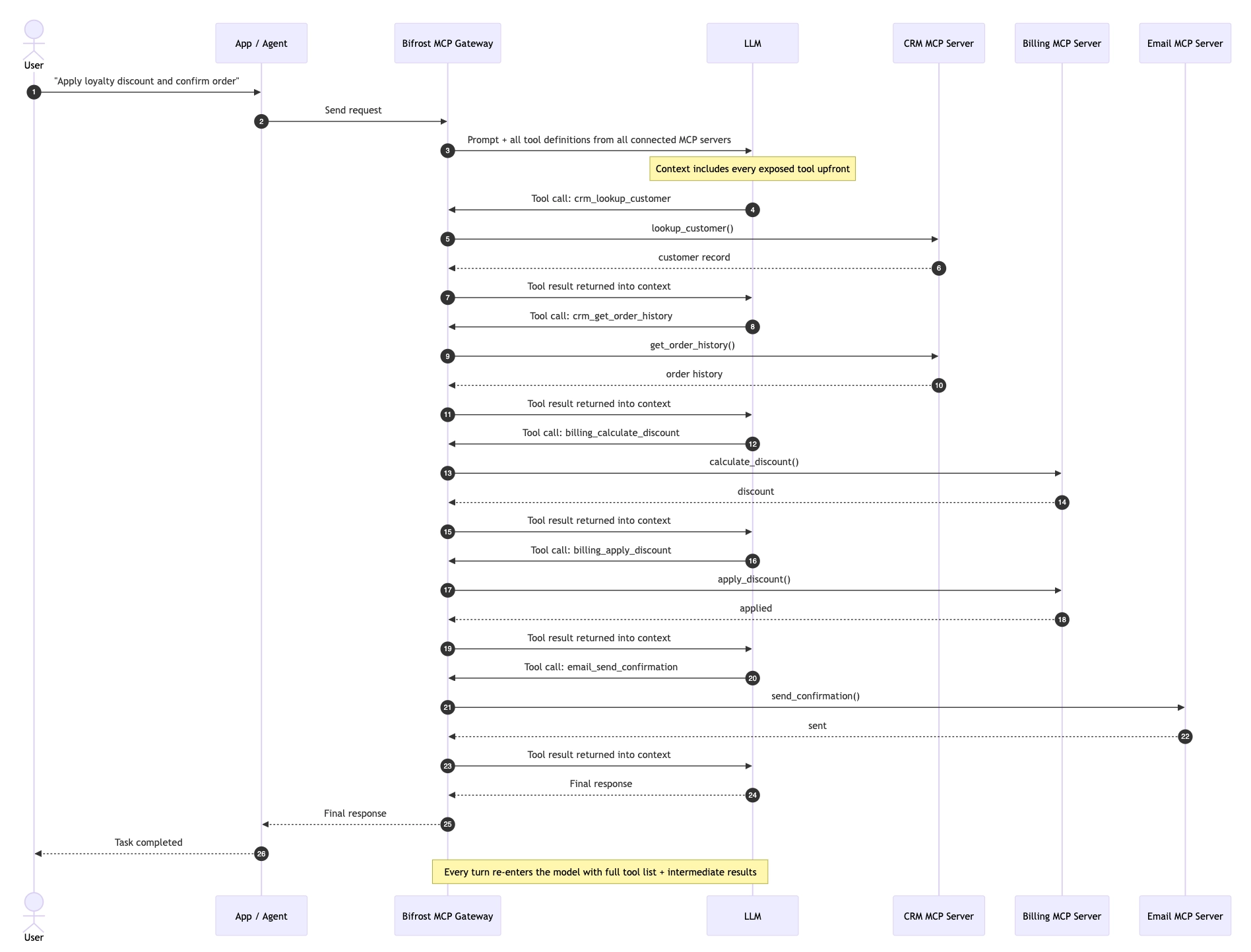
A tool registry is what every MCP client gives you by default. The server lists its tools via tools/list, returns JSON Schema definitions, and the client loads all of them into the model's context. The model sees a flat list with no structure, no spatial relationships, no way to defer loading anything.
This breaks at scale for two reasons that are usually conflated but actually distinct.
- The token problem is the obvious one. A typical MCP tool definition runs 250 to 500 tokens once you include name, description, and JSON Schema for inputs and outputs. Twenty tools is 5,000 to 10,000 tokens. Two hundred tools is over 100,000, and that's before the conversation starts. On every turn. With multi-turn agent loops, the same definitions get re-shipped through the model dozens of times for a single task.
- The cognition problem is the deeper one. Models get measurably worse at tool selection as the candidate set grows. The Amazon team building shared MCP infrastructure observed this directly: agents typically need three or four tools for a given task, but exposing hundreds of tools caused measurable performance degradation and increased hallucination rates. The "paradox of choice" applies to LLMs too. More options, worse selection.
Solving only the token problem, by trimming the tool list, paginating it, or filtering it by keyword, doesn't fix the cognition problem. The model still receives a flat slice it can only read, not navigate. The shape of the surface is what has to change.
Why the filesystem is the right abstraction
LLMs already know how to navigate filesystems. They've seen ls, cat, find, tree, and Python import statements in millions of training examples: in READMEs, in shell transcripts, in git repos, in tutorials. The filesystem is one of the most overtrained abstractions in the corpus.
Tool registries, by contrast, are a recent invention. The format varies by vendor, the discovery semantics differ across protocols, and the model has to be told how to traverse one through tool-use schema. There is no equivalent prior.
The virtual filesystem abstraction trades on this asymmetry. By re-encoding tool discovery as file navigation, it lets the model fall back on instincts it already has, instead of learning a new traversal pattern from scratch.
The mapping is direct:
| Filesystem concept | MCP tool-discovery equivalent |
|---|---|
| Directory | MCP server (namespace of related tools) |
| Filename | Tool name (stable identifier) |
| File contents | Tool signature with type hints |
ls | List available servers and tools |
cat | Read a tool's signature without calling it |
Reading docs / man | Fetch full documentation for a specific tool |
| Running a script | Execute a multi-tool orchestration |
The model doesn't need elaborate instructions about how to use this. It already knows that you can ls a directory to see what's there, cat a file to inspect it without running it, and write a small script that imports a few functions and calls them in sequence. The abstraction is doing the prompt engineering for you.
The three-tier loading model
Once tools are files, discovery becomes lazy. The model only loads what it needs, in the order it needs it.
In Bifrost's implementation, this is exposed through four meta-tools, and three of them form a progressive loading hierarchy:
listToolFiles : the catalog. Returns the available servers and tools as a directory listing. This is generated on-the-fly from connected MCP server metadata, not backed by an actual filesystem. Cheap to call, no commitment. Equivalent to ls.
readToolFile: the signature layer. For a chosen server or tool, returns the Python function signatures with type hints and a one-line docstring. Enough for the model to know whether a tool is what it's looking for, not enough to commit to using it.
getToolDocs : the full documentation. Fetched only for tools the model is about to call. Includes parameter descriptions, error semantics, examples, edge cases. This is the heavyweight call, deferred until the moment of use.
executeToolCode : the execution layer. Takes a script the model wrote, parses it, and runs it against live tool bindings inside a sandboxed Starlark interpreter.
The progression mirrors how a human engineer explores an unfamiliar codebase: scan the directory, read the function signatures, open the docs for the one function you need, then write the integration. Each tier costs more tokens than the last, and the model only pays the higher cost when the lower tier has confirmed the tool is relevant.
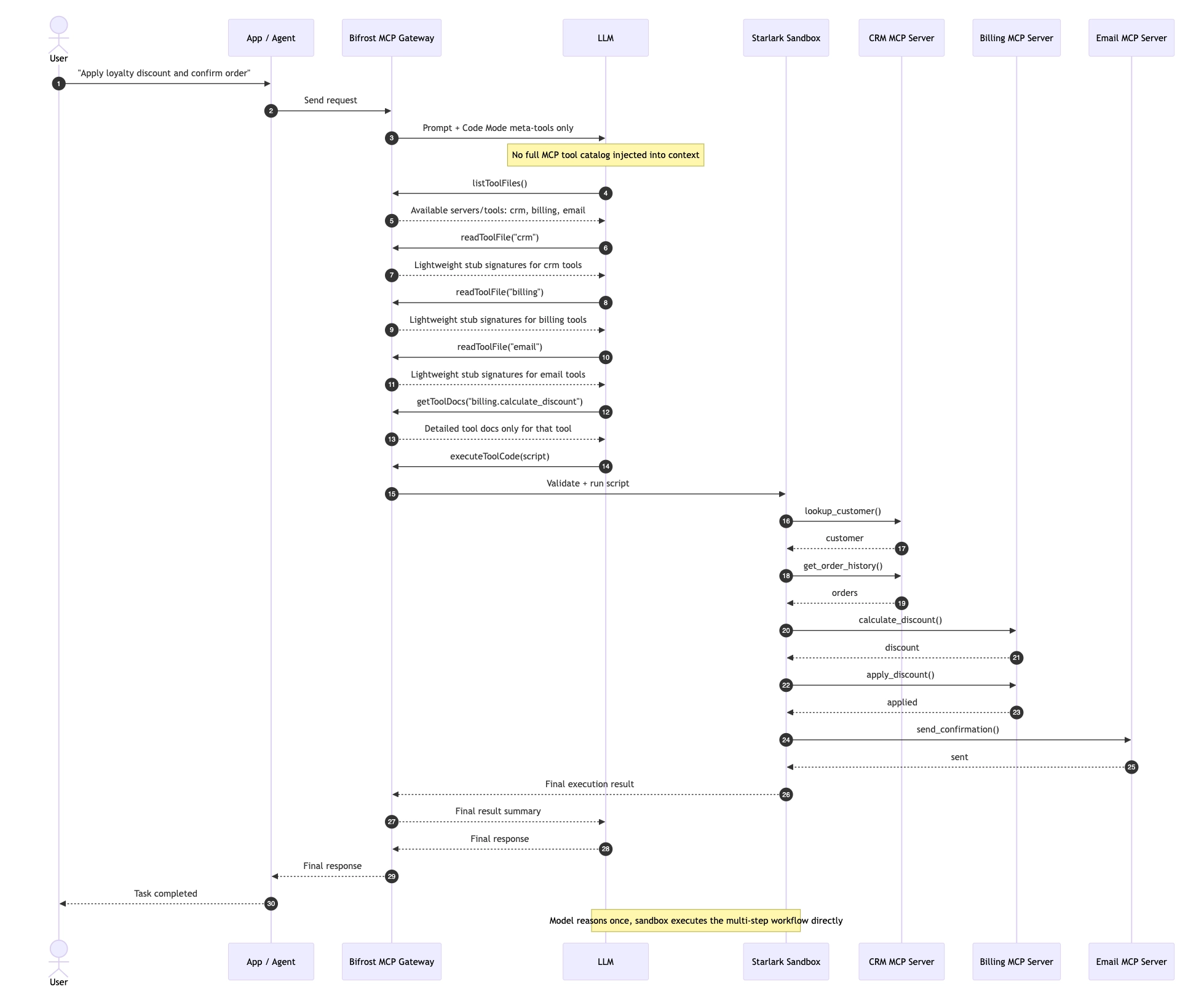
The split between readToolFile and getToolDocs is the part most worth dwelling on. A signature is roughly 20 tokens. Full docs with examples can run 500 to 2,000 tokens per tool. If you bundle them, you've defeated the lazy-loading idea and you're just shifting where the bloat lives. If you split them, the model pays the documentation cost only for tools it has already decided to use. Across a realistic workflow that touches three tools out of two hundred, this is the difference between loading 60 tokens of signatures plus 1,500 tokens of docs for the three relevant tools, versus 50,000 tokens of mixed definitions for all two hundred.
How stubs are generated from MCP schemas
The stubs are the surface the model actually reads. Every MCP server advertises its tools via JSON Schema, and the gateway translates that schema into Python stub files at registration time.
The translation rules are mostly mechanical:
- JSON Schema
stringbecomesstr,integerbecomesint,numberbecomesfloat,booleanbecomesbool objecttypes becomedictarraytypes becomelist[T]whereTis the resolved item typeenumbecomesLiteral[...]requiredversus optional fields map to default values andOptional[...]
A concrete example. A simplified GitHub MCP server exposes create_issue with this JSON Schema:
The generated stub the model sees through readToolFile("github") looks something like:
That's it. Twenty-five tokens. The model has everything it needs to decide whether to use the tool and how to call it. The full description of what labels means, what the response shape looks like, what error codes can come back — those wait for getToolDocs("github", "create_issue").
One subtlety worth flagging: stubs must be generated deterministically. The same MCP schema has to produce byte-identical stubs across every node in a gateway cluster, or you get cache drift between turns and the model sees a slightly different surface depending on which node handled the request. This is the kind of detail that doesn't matter until it does, and then it matters a lot.
Server-level versus tool-level binding
The virtual filesystem can be carved at two granularities, and the choice is a real tradeoff that depends on the shape of your MCP catalog.
Server-level binding puts one stub file per MCP server. The model calls readToolFile("github") and gets all GitHub tools in one read. This is the right default when tools within a server are cohesive and tend to be used together. A GitHub workflow usually touches issues, PRs, and commits in the same script. A filesystem MCP server uses read, write, and list together. Bundling them into one stub minimizes round-trips.
Tool-level binding puts one stub file per tool. The model calls readToolFile("github/create_issue") and gets exactly that one signature. This is the right choice when servers are large and heterogeneous (one server exposing 80 unrelated tools), or when access scoping varies per tool and you want the stub itself to reflect what the calling key can actually invoke.
The deeper way to think about this is as a caching granularity decision, isomorphic to module size in regular software. Too coarse, and you load functions you don't need. Too fine, and you make many small reads where one would do. The right granularity depends on your access patterns.
In practice, most production setups use server-level by default and tool-level for the few servers where it pays off, typically large CRM or admin servers with dozens of tools where a workflow uses only one or two at a time.
How this differs from semantic tool retrieval
There's another approach to the MCP context-bloat problem that deserves a direct comparison: semantic tool retrieval. Vector-embed every tool description, embed the user's query, and retrieve the top-k tools by similarity before injecting them into context. This is the approach taken by MCP-Zero and several research systems.
It's a real technique, and for some workloads it works well. But it has constraints the filesystem abstraction doesn't.
| Dimension | Semantic retrieval | Virtual filesystem |
|---|---|---|
| Discovery model | Pre-query embedding lookup | Model-driven navigation |
| Lazy loading | Fixed (top-k at query time) | Multi-tier on demand |
| Multi-tool workflows | Each tool retrieved separately | One script chains many |
| Intermediate results | Flow back through model | Stay inside sandbox |
| Tool docs | Bundled with tool list | Fetched per tool at point of use |
| Failure mode | Wrong tools retrieved silently | Model can re-navigate |
| Infra dependency | Embedding model + vector store | None beyond the gateway |
Semantic retrieval is a filter. It shrinks the candidate set before the model sees it. The virtual filesystem is a navigation surface as it lets the model explore the full set without paying for the whole thing. The filter approach is simpler to bolt onto an existing setup; the navigation approach scales further because the model can recover from a wrong initial guess by reading another stub.
The two aren't mutually exclusive, and a production gateway can layer them: use semantic retrieval to narrow the catalog the model sees in listToolFiles, then let it navigate from there. But if you can only pick one, the navigation approach wins on multi-step workflows because intermediate tool outputs never need to round-trip through the model.
What this breaks, and what it doesn't
The honest part of any abstraction post is the part where you say what the abstraction makes harder.
Schema evolution across a conversation. If an upstream MCP server adds a tool mid-conversation, the model may have already read a stub file that no longer reflects what's available. Gateways have to decide whether to invalidate the model's cached view, surface the change through a new listToolFiles call, or accept the drift until the next agent loop. There's no perfect answer; Bifrost syncs tool schemas from upstream servers on a configurable interval (default: every 10 minutes), exposing any new tools on the next listToolFiles call. This means the model can pick up changes but won't be interrupted mid-script.
Starlark is not full Python. The execution sandbox runs Starlark, a Python-like language. Scripts can use loops, conditionals, and most built-in functions, but there are meaningful constraints: no try/except/finally/raise, no import statements, no f-strings (use % formatting), no classes (use dicts), no is operator. Each executeToolCode call also runs in a fresh isolated scope, there is no state that persists between calls. These constraints exist for security and determinism, but they will affect how the model writes orchestration scripts, and you should test your workflows against them.
Error reporting from sandboxed scripts. When the model executes a script and a tool call inside it fails, the model didn't see the intermediate context: that was the whole point. But it needs enough error information to recover. The sandbox has to capture not just the exception, but which line of the script failed, with what arguments, and what the tool actually returned. Otherwise the model is debugging blind.
Cross-server orchestration in one script. If a workflow needs tools from three servers, the model has to read three stub files (or one combined view, depending on how the gateway exposes it) and then write a script that references them. The script's namespace has to make this clean, usually by exposing tools as module-style imports rather than flat function names, so github.create_issue(...) and slack.post_message(...) don't collide.
Debugging from the operator side. When something goes wrong in production, an engineer needs to reconstruct what the model saw at script-generation time. This means audit logs have to capture not just the tool calls that ran, but the stub files the model read leading up to the script. Without that, you're guessing at the model's mental model.
None of these are deal-breakers. They're the surface area you take on when you adopt the abstraction, and they're easier to solve than the context-bloat problem you're trading them for.
Enterprise Controls
The virtual filesystem is the discovery layer, but a production MCP gateway also needs to answer questions about access and cost. Bifrost handles both at the MCP client level.
Tool access control. Each MCP client can be configured with a ToolsToExecute whitelist: ["*"] permits everything, [] is deny-by-default, or you can specify exact tool names. A separate ToolsToAutoExecute list governs which tools an agent is allowed to call without a human confirmation step. Per-user OAuth (MCPAuthTypePerUserOauth) lets the gateway resolve the correct credential for each caller at execution time, so a single gateway instance can serve multiple users against the same MCP server without credential sharing.
Per-tool cost governance. ToolPricing assigns a cost to each tool execution. Those costs feed into a hierarchical budget system: virtual key → customer → team → user. This is enforced by the governance layer. Rate limits and spend caps can be applied at any level of the hierarchy, and the gateway rejects calls that would exceed the budget before they hit the upstream server.
The transferable principle
The deeper lesson here isn't specific to MCP. It's about how to design AI-facing APIs.
When you're building an interface that an LLM will consume, the right question is "what abstraction is closest to the patterns the model has seen most in training?", and not “What abstraction would be cleanest for a human engineer?” Filesystems beat tool registries not because they're better in some absolute sense, but because LLMs have seen orders of magnitude more filesystem operations than tool-registry traversals.
This generalizes. SQL-shaped APIs work well because models have seen a lot of SQL. REST endpoints with predictable URL patterns work well because models have seen a lot of REST. Markdown-formatted responses work well because models have seen a lot of markdown. Whenever you find yourself inventing a new traversal pattern or a new schema, ask whether you can map it to something the model already knows. The cheapest prompt engineering is the kind you don't have to write because the abstraction already speaks the model's native language.
Putting it into practice
If you're running MCP in production and feeling the context-bloat problem, the path is straightforward. The implementation details vary by gateway, but the abstraction is the same: expose tools as a navigable surface rather than a flat list, split discovery from documentation from execution, and let the model pull only what it needs.
Bifrost ships this as Code Mode, native to its MCP gateway. Toggling it on switches the model from receiving a full tool catalog to receiving the four meta-tools described above, with the virtual filesystem generated automatically from each connected server's MCP schema. The benchmark results show input token reductions of 58% at 96 tools, 84% at 251 tools, and 92.8% at 508 tools, with pass rates holding at 100% across all three configurations.
The numbers are the visible payoff. The abstraction is the reason they hold.