An MCP endpoint is the single HTTP URL where a remote Model Context Protocol (MCP) server accepts messages, such as https://example.com/mcp. Every request a client sends, from listing tools to calling one, is an HTTP POST of one JSON-RPC message to that URL, and the server answers with a JSON object or a server-sent events (SSE) stream.
The MCP endpoint is defined by the Streamable HTTP transport in the current specification revision, 2026-07-28, which requires one endpoint path that supports POST. A local server that runs as a subprocess over stdio has no endpoint at all, so the endpoint is what makes a server remote within the Model Context Protocol architecture of hosts, clients and servers.
Bifrost, the open-source AI gateway, serves an MCP endpoint of its own that puts many upstream MCP servers behind one URL with per-key tool access.
How does an MCP endpoint work?
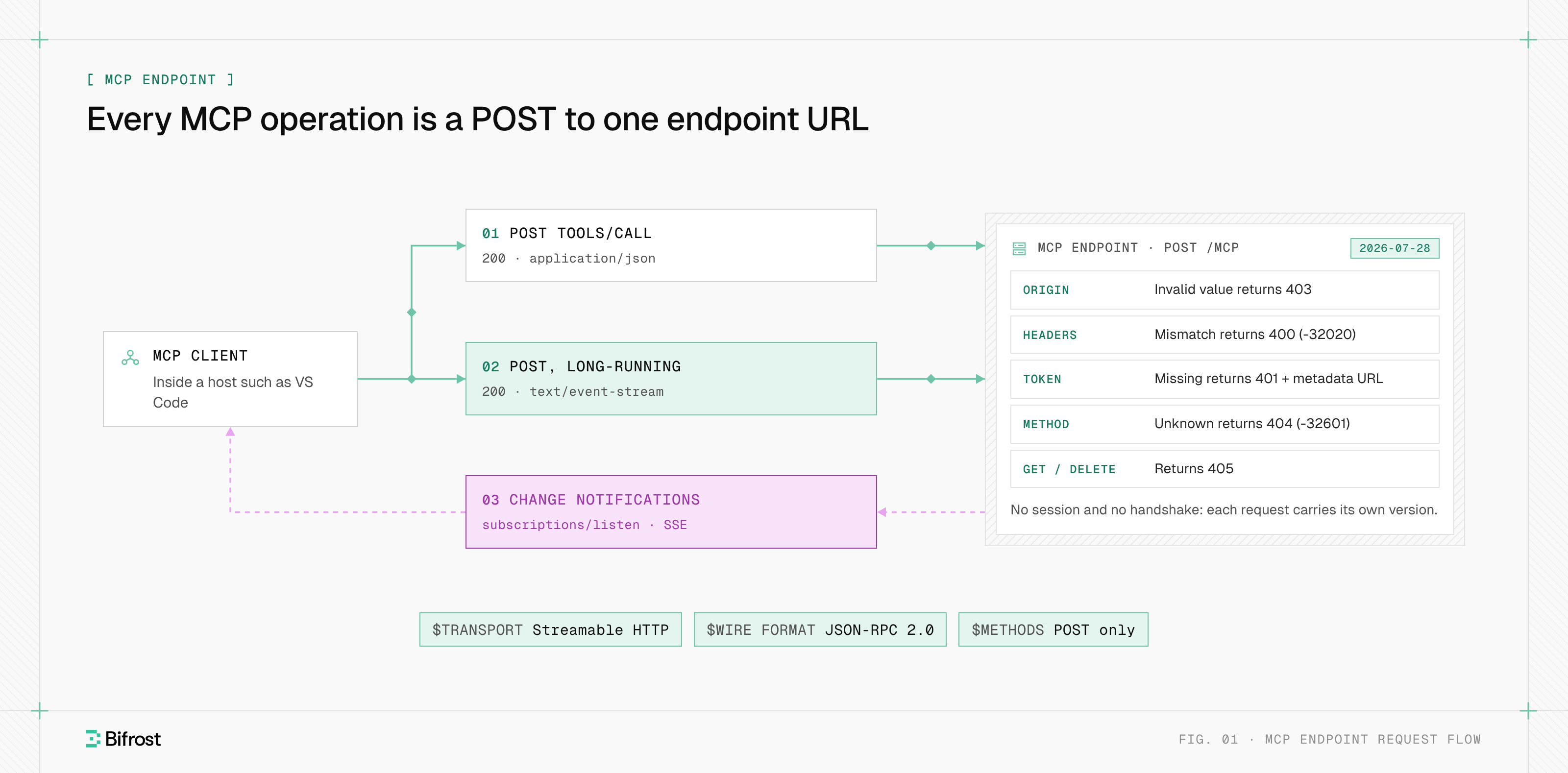
An MCP endpoint works as a request-response channel for JSON-RPC 2.0 messages. The client sends each request as its own HTTP POST to the endpoint URL, and the server replies with application/json for a single result or text/event-stream when it sends progress notifications before the final response. An accepted notification gets 202 Accepted with no body.
A tools/call request on the wire:
POST /mcp HTTP/1.1
Host: mcp.example.com
Content-Type: application/json
Accept: application/json, text/event-stream
Authorization: Bearer eyJhbGciOi...
MCP-Protocol-Version: 2026-07-28
Mcp-Method: tools/call
Mcp-Name: get_weather

{
  "jsonrpc": "2.0",
  "id": 1,
  "method": "tools/call",
  "params": {
    "name": "get_weather",
    "arguments": { "location": "Seattle, WA" },
    "_meta": {
      "io.modelcontextprotocol/protocolVersion": "2026-07-28",
      "io.modelcontextprotocol/clientCapabilities": {}
    }
  }
}
Request headers the endpoint checks
The endpoint validates four headers before it runs anything:
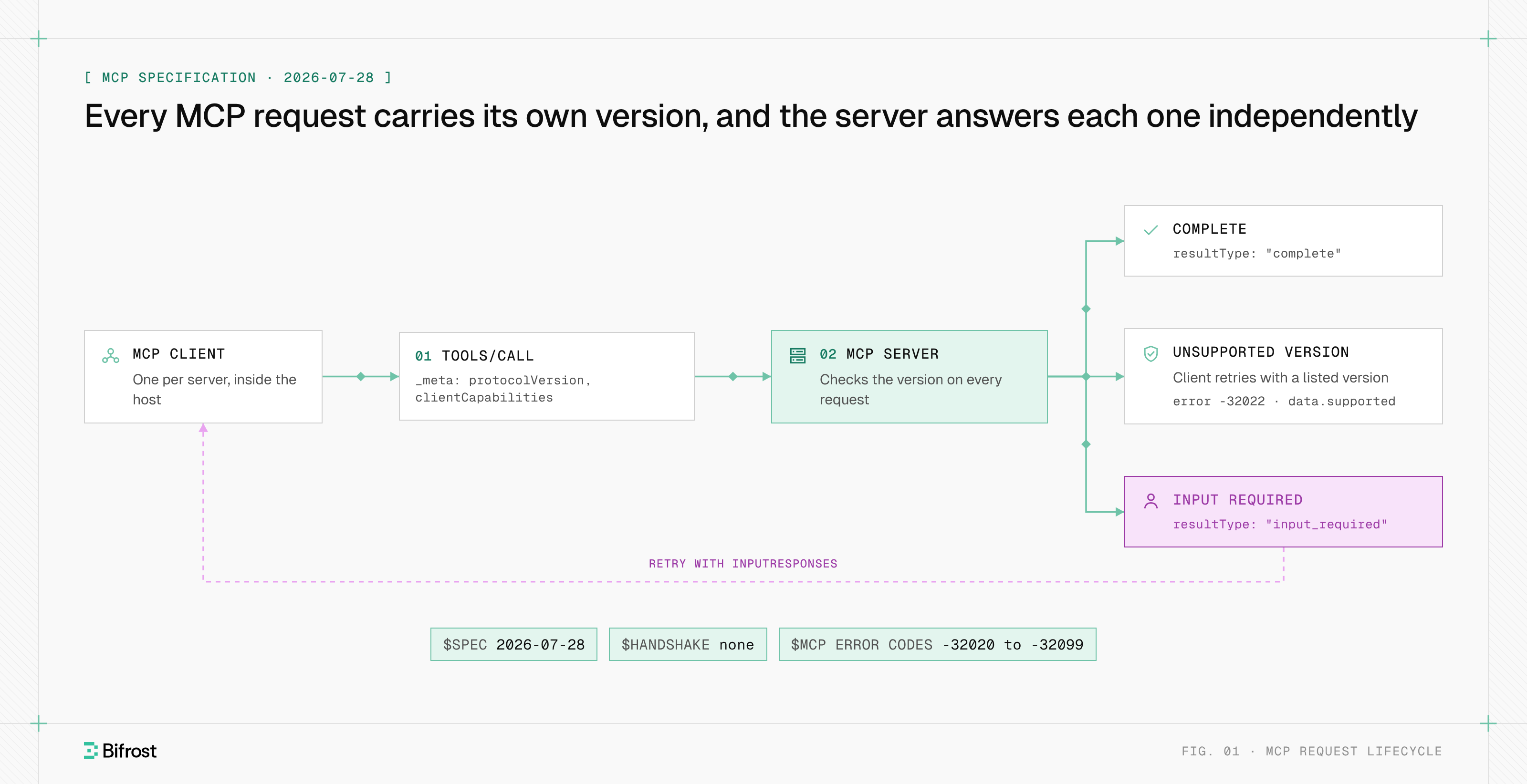
Acceptmust list bothapplication/jsonandtext/event-stream, because the server picks the response type per request.MCP-Protocol-Versionmust matchio.modelcontextprotocol/protocolVersionin the body's_meta.Mcp-Methodis required on every request, andMcp-Nameontools/call,resources/readandprompts/get. They mirror body fields so load balancers and gateways can route without parsing JSON, and the server rejects any mismatch with400and JSON-RPC error-32020(HeaderMismatch).Originmust be validated on every connection to block DNS rebinding; an invalid value gets403 Forbidden.
Change notifications, such as notifications/tools/list_changed, arrive on the response stream of a subscriptions/listen POST that stays open. Closing any response stream cancels that request. The Model Context Protocol overview covers the tools, resources and prompts these requests reach.
What changed in the latest revision
The 2026-07-28 revision made the endpoint stateless and POST-only; many tutorials still describe the earlier shape. The specification changelog lists every change. Compatibility rules are in the MCP specification.
| Behavior | Revisions 2025-03-26 to 2025-11-25 | Revision 2026-07-28 |
|---|---|---|
| HTTP methods on the endpoint | POST, GET (standalone SSE stream), DELETE (end session) | POST only; GET and DELETE get 405 |
| Sessions | Optional Mcp-Session-Id header | None; servers ignore the header |
| Handshake | initialize, then notifications/initialized | None; version and capabilities ride in each request's _meta |
| Server-to-client requests | Sent on SSE streams | Returned in an InputRequiredResult; the client retries with answers |
| Change notifications | The GET stream | A subscriptions/listen POST stream |
| Stream resumption | Last-Event-ID | Not supported; the client re-issues the request |
| Routing headers | MCP-Protocol-Version (from 2025-06-18) | Adds Mcp-Method, Mcp-Name and Mcp-Param-* |
What an MCP endpoint URL looks like
An MCP endpoint URL is an ordinary HTTPS URL whose path the server chooses; /mcp is the common convention, as in https://mcp.example.com/mcp. The same string is what users paste into a client as the MCP server URL, and it doubles as the server's OAuth identity: clients send it as the resource parameter when they request a token.
- The path can identify one server among several. A host may serve
https://mcp.example.com/github/mcpandhttps://mcp.example.com/jira/mcp, and the specification accepts a path component in the canonical URI when it identifies an individual MCP server. - The OAuth metadata location derives from the endpoint. For
https://example.com/public/mcp, clients look for Protected Resource Metadata athttps://example.com/.well-known/oauth-protected-resource/public/mcp, then at the root/.well-known/oauth-protected-resource. - Local HTTP servers bind to 127.0.0.1. Listening on 0.0.0.0 would expose a laptop's server to the network.
Servers built for the deprecated HTTP+SSE transport (revision 2024-11-05) used two URLs: a GET stream that returned an endpoint event naming a separate POST URL. Bifrost connects to MCP servers over STDIO, HTTP or SSE.
MCP endpoint status codes and errors
An MCP endpoint reports transport and protocol failures with HTTP status codes, and most carry a JSON-RPC error body that tells a modern server apart from a legacy one. The codes come from the Streamable HTTP and authorization sections of the 2026-07-28 specification.
| Status | When the endpoint returns it | Body or headers |
|---|---|---|
200 OK | A request succeeded | One JSON result, or an SSE stream ending in the result |
202 Accepted | A notification was accepted | Empty |
400 Bad Request | A required header is missing or does not match the body | JSON-RPC error -32020 (HeaderMismatch) |
400 Bad Request | The requested protocol version is not supported | UnsupportedProtocolVersionError (-32022) listing supported versions |
401 Unauthorized | The token is missing, invalid or expired | WWW-Authenticate: Bearer resource_metadata="..." |
403 Forbidden | The Origin header is invalid, or the token lacks a scope | For scope: error="insufficient_scope" and the required scope |
404 Not Found | The server does not implement the method | JSON-RPC error -32601 (Method not found) |
405 Method Not Allowed | GET or DELETE reached a server that supports only 2026-07-28 | Empty |
A multi-version client reads the JSON-RPC body: a 400, 404 or 405 without a recognized modern error means an older server.
MCP endpoint vs REST API endpoint
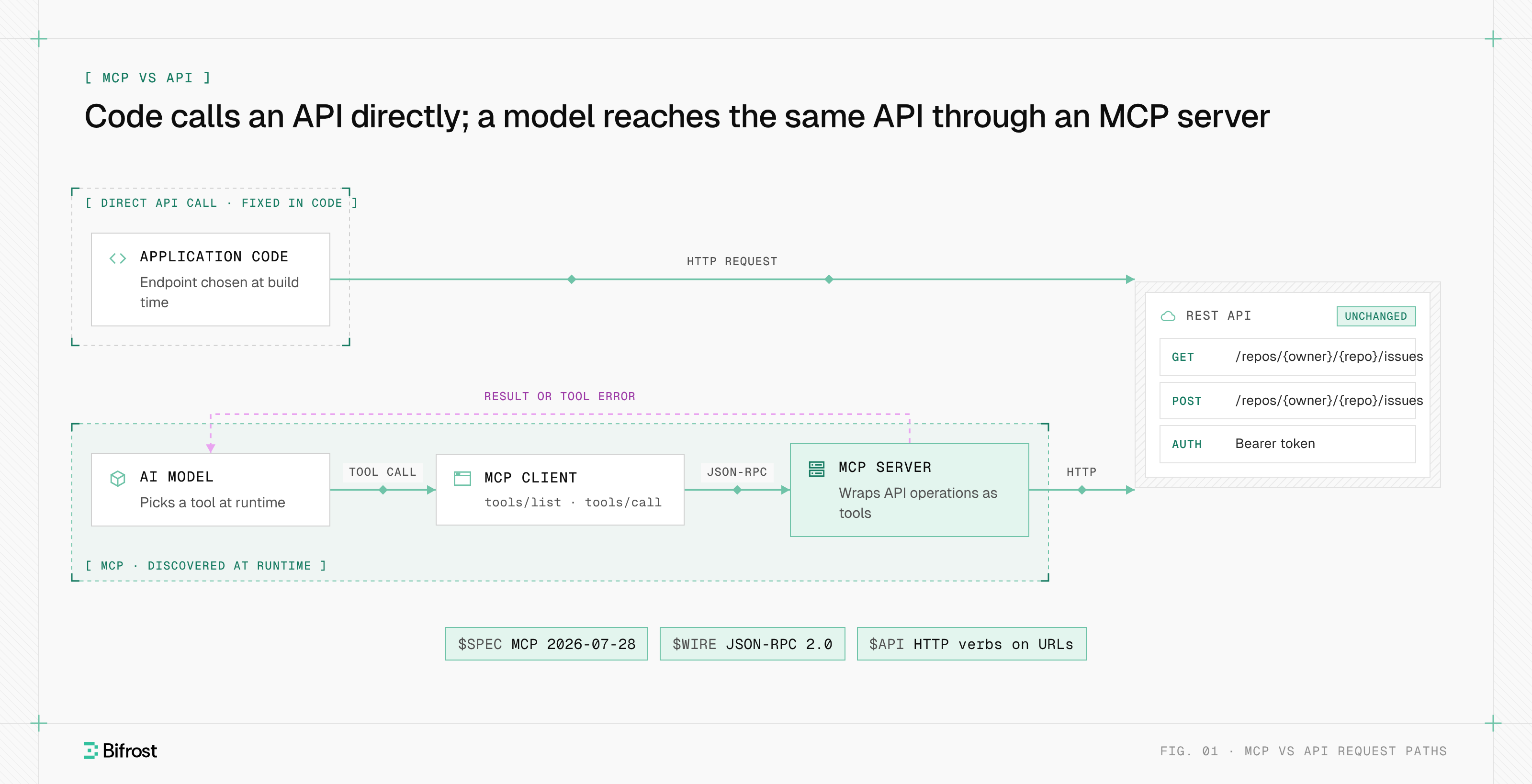
An MCP endpoint differs from a REST API endpoint in that one URL carries every operation. A REST API spreads operations across many paths and HTTP verbs that a developer codes against; an MCP endpoint takes every operation as a POST to one path, names it in the JSON-RPC method, and lists its tools for a model to discover at runtime.
| Dimension | REST API endpoint | MCP endpoint |
|---|---|---|
| URLs per service | One per resource or action | One |
| Operation selector | HTTP verb plus path | JSON-RPC method and tool name in the body, mirrored in Mcp-Method and Mcp-Name |
| Discovery | Docs or an OpenAPI file a developer reads | tools/list, resources/list and prompts/list at runtime |
| Consumer | Application code | An AI model, through an MCP client |
| Errors | HTTP status codes | HTTP status for transport failures; JSON-RPC errors and isError results for the rest |
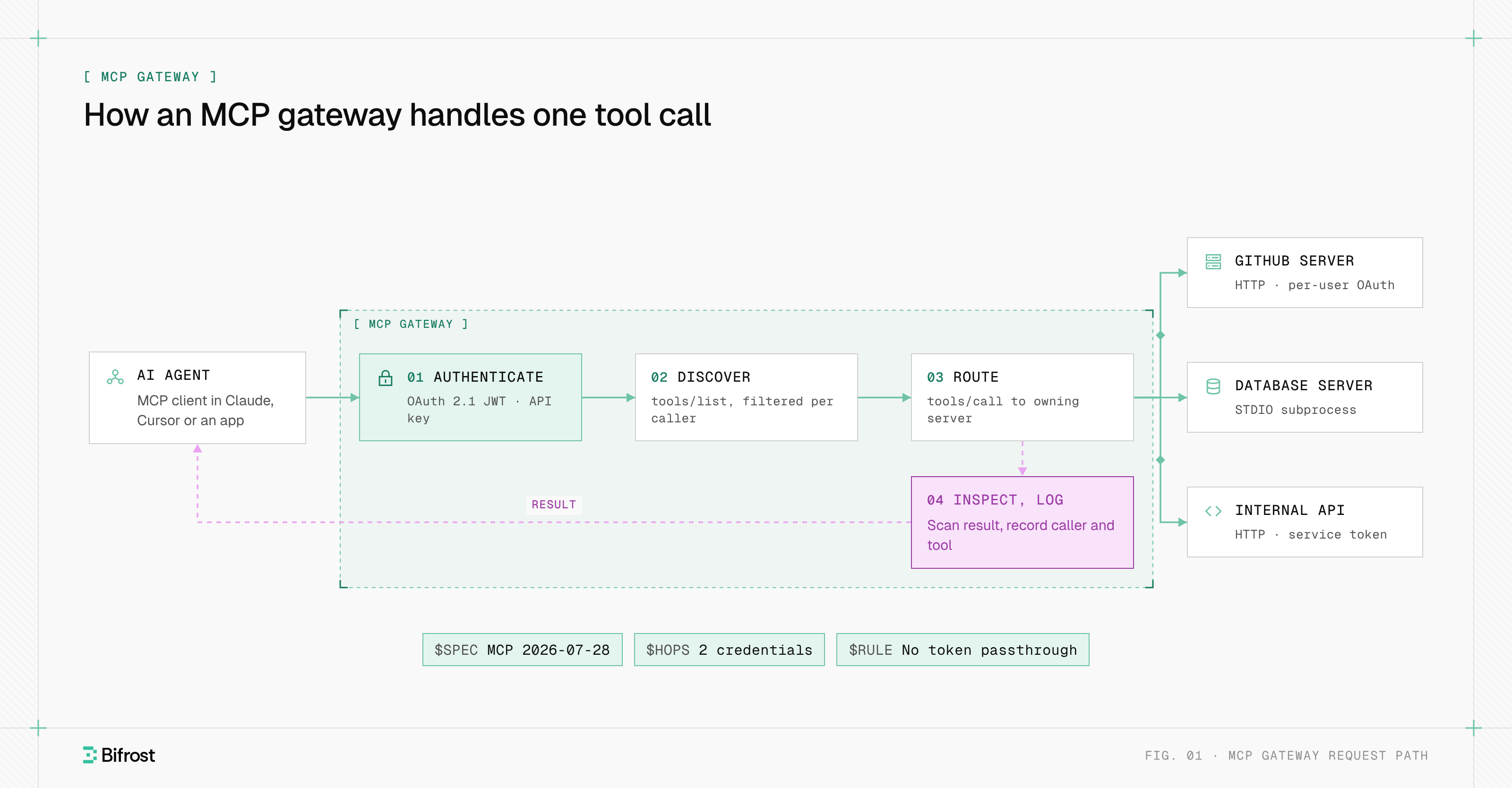
Because the operation lives in the body, a conventional API gateway that routes by path and verb sees a single POST route; the mirrored headers let it route, rate-limit or log per tool without parsing JSON. MCP: the protocol, the plumbing and the gateway traces one request through a gateway. Most MCP servers wrap an existing REST API rather than replace it.
How to authenticate requests to an MCP endpoint
Requests to a protected MCP endpoint authenticate with an OAuth 2.1 bearer token in the Authorization header. The MCP server acts as an OAuth resource server: it answers an unauthenticated request with 401 and a pointer to its Protected Resource Metadata, and it accepts only tokens issued for its own URL.
The authorization specification sets the order:
- 01
Challenge
The client POSTs without a token and receives
401withWWW-Authenticate: Bearer resource_metadata="https://mcp.example.com/.well-known/oauth-protected-resource", scope="files:read". - 02
Discover
The client fetches the Protected Resource Metadata (RFC 9728), reads
authorization_servers, then fetches that server's metadata (RFC 8414). - 03
Authorize
The client registers, preferably with a Client ID Metadata Document since Dynamic Client Registration is now deprecated, and runs the authorization code flow with PKCE, sending the endpoint's canonical URI as the
resourceparameter (RFC 8707). - 04
Call
The client sends
Authorization: Bearerplus the token on every POST. Tokens never go in the query string, and the server rejects tokens whose audience is not itself.
Authorization is optional in the protocol, and stdio servers read credentials from their environment instead. Many remote servers also accept a static API key header. The guide to securing agent tool access covers per-user credentials.
How to connect a client to a remote MCP server
To connect a client to a remote MCP server, give it the server's endpoint URL and any credential it needs; the client handles transport detection and the OAuth flow. In VS Code, remote servers go in .vscode/mcp.json or the user-profile mcp.json under a top-level servers key, or through the MCP: Add Server command.
{
  "inputs": [
    { "type": "promptString", "id": "api-token", "description": "API token", "password": true }
  ],
  "servers": {
    "issues": {
      "type": "http",
      "url": "https://mcp.example.com/mcp",
      "headers": { "Authorization": "Bearer ${input:api-token}" }
    }
  }
}
The VS Code MCP configuration reference documents the stdio, http and sse types; with http, VS Code tries Streamable HTTP first and falls back to SSE. Claude Desktop, Cursor and other hosts take a similar url and headers entry.
A client that supports several revisions probes: it POSTs a modern request first, falls back to initialize when the error body is not a recognized modern one, and tries the legacy GET stream last. Teams with many SaaS servers usually route remote MCP servers through one gateway, an MCP gateway that every client reaches at a single URL.
MCP endpoints with Bifrost
Bifrost, the open-source AI gateway built by Maxim AI, serves an MCP endpoint of its own as an MCP gateway. In MCP gateway mode, Bifrost connects to upstream MCP servers over STDIO, HTTP or SSE and exposes their aggregated tools at /mcp, so Claude Desktop, Cursor and custom apps connect to one URL instead of one per server. It takes JSON-RPC over POST and also serves a GET stream for clients that open one.
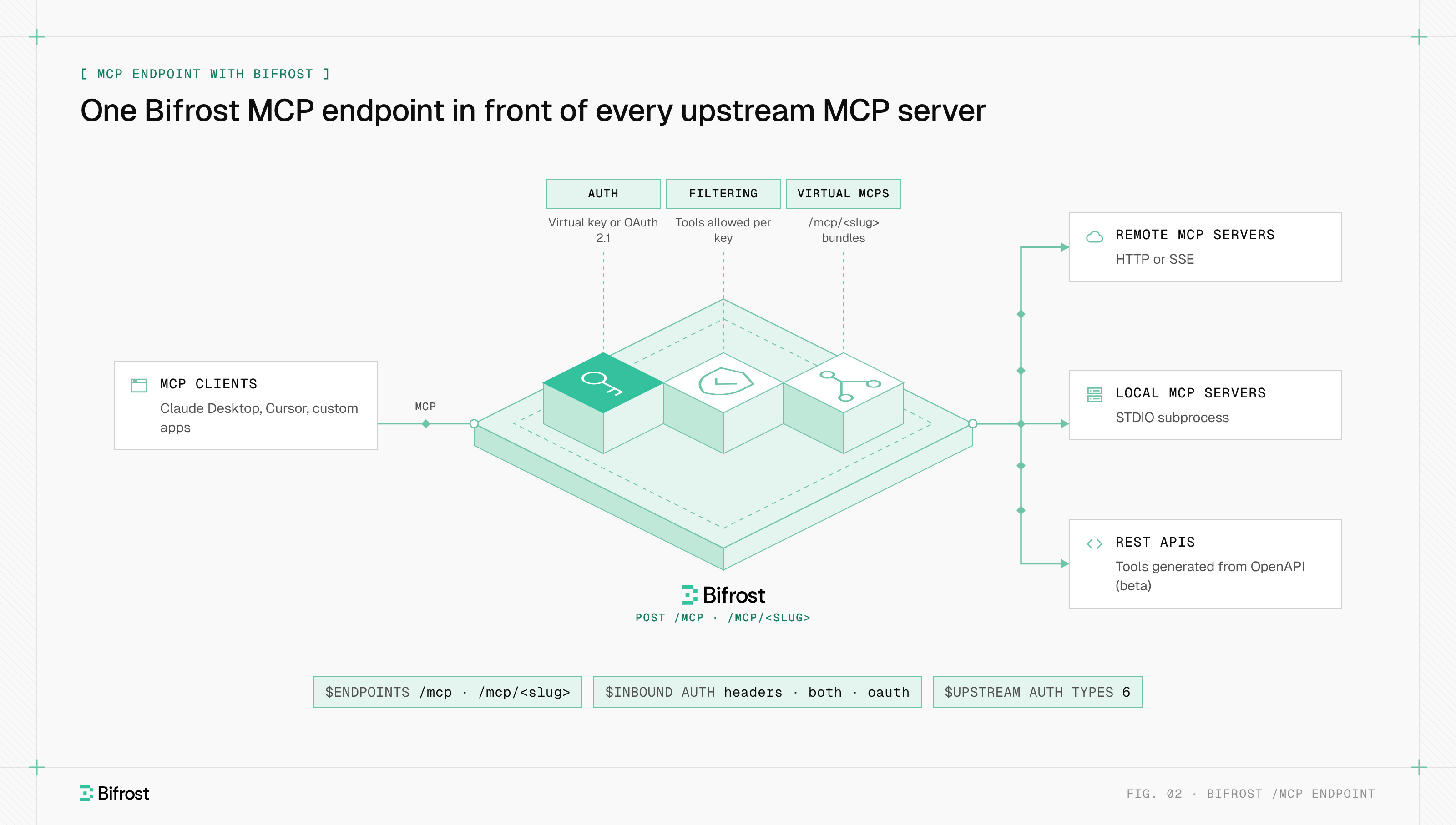
Every request to /mcp is scoped to its credential. With a virtual key sent as x-bf-vk, Authorization: Bearer or X-Api-Key, tools/list returns only the tools that key allows and tools/call is checked against the same list; an inactive or expired key gets 403. Tool filtering headers such as x-bf-mcp-include-tools narrow a request further but never widen it.
For interactive clients, gateway authentication switches /mcp to OAuth 2.1 when mcp_server_auth_mode is both or oauth. Bifrost then acts as the authorization server: its 401 points to Protected Resource Metadata, clients self-register and authorize with PKCE, and the issued JWT is bound to /mcp through its audience claim, valid for 600 seconds by default.
Virtual MCPs add curated endpoints under /mcp/ plus a slug, each bundling chosen tools from one or more servers under an immutable path and reachable only through the virtual keys attached to it. Upstream, Bifrost supports six MCP authentication types, including per-user OAuth and token exchange, so upstream servers see the real caller, not a shared account.
To expose your first endpoint, follow the gateway quickstart, connect a server, and point a client at https://your-bifrost-host/mcp.
Put many MCP servers behind one endpoint
Connect servers over STDIO, HTTP or SSE, filter tools per virtual key, and log every call.
FAQ
What is an MCP endpoint?
An MCP endpoint is the one URL where a remote Model Context Protocol server receives requests, for example https://mcp.example.com/mcp. Clients POST every JSON-RPC message there, including tools/list and tools/call, and the server replies with JSON or a server-sent events stream.
Is MCP like an API gateway?
MCP is not an API gateway; it is a protocol that lets AI clients discover and call tools. An MCP server's endpoint plays the role of an API. The gateway equivalent is an MCP gateway, which sits in front of many MCP endpoints and handles authentication, tool access and logging. A conventional API gateway can front an MCP endpoint but sees one POST route unless it reads the Mcp-Method and Mcp-Name headers.
How do I configure MCP servers in VS Code?
To configure MCP servers in VS Code, run MCP: Add Server from the Command Palette, or add entries under servers in .vscode/mcp.json for a workspace or the user-profile mcp.json. A remote server needs "type": "http" and the server's url; a local one needs "type": "stdio" and a command. Store tokens as input variables rather than plain text.
Does a local MCP server have an endpoint?
A local MCP server that the host launches as a subprocess has no endpoint, because the two exchange newline-delimited JSON-RPC messages over standard input and output. A local server running Streamable HTTP does have one, such as http://127.0.0.1:3000/mcp, and it should bind to localhost only and validate the Origin header.
Why does my MCP endpoint return 405 Method Not Allowed?
A 405 Method Not Allowed usually means a client built for an earlier revision sent GET to open a stream or DELETE to end a session, and the server supports only revision 2026-07-28, which accepts POST alone. Update the client SDK, or run a server that also implements the earlier Streamable HTTP behavior for older clients.