MCP (Model Context Protocol) is an open standard that defines how AI applications connect to external tools, data sources and prompt templates through one common interface built on JSON-RPC 2.0. A developer builds one MCP server for a service, and any MCP-compatible application, such as Claude Desktop, Cursor or VS Code, can discover and call its tools without custom integration code.
Anthropic introduced the Model Context Protocol on November 25, 2024, and on December 9, 2025 it donated MCP to the Agentic AI Foundation, a directed fund under the Linux Foundation co-founded with Block and OpenAI. At that point Anthropic counted more than 10,000 active public MCP servers and 97 million monthly SDK downloads. The current specification revision, 2026-07-28, made the protocol stateless, which changes how servers are built and deployed.
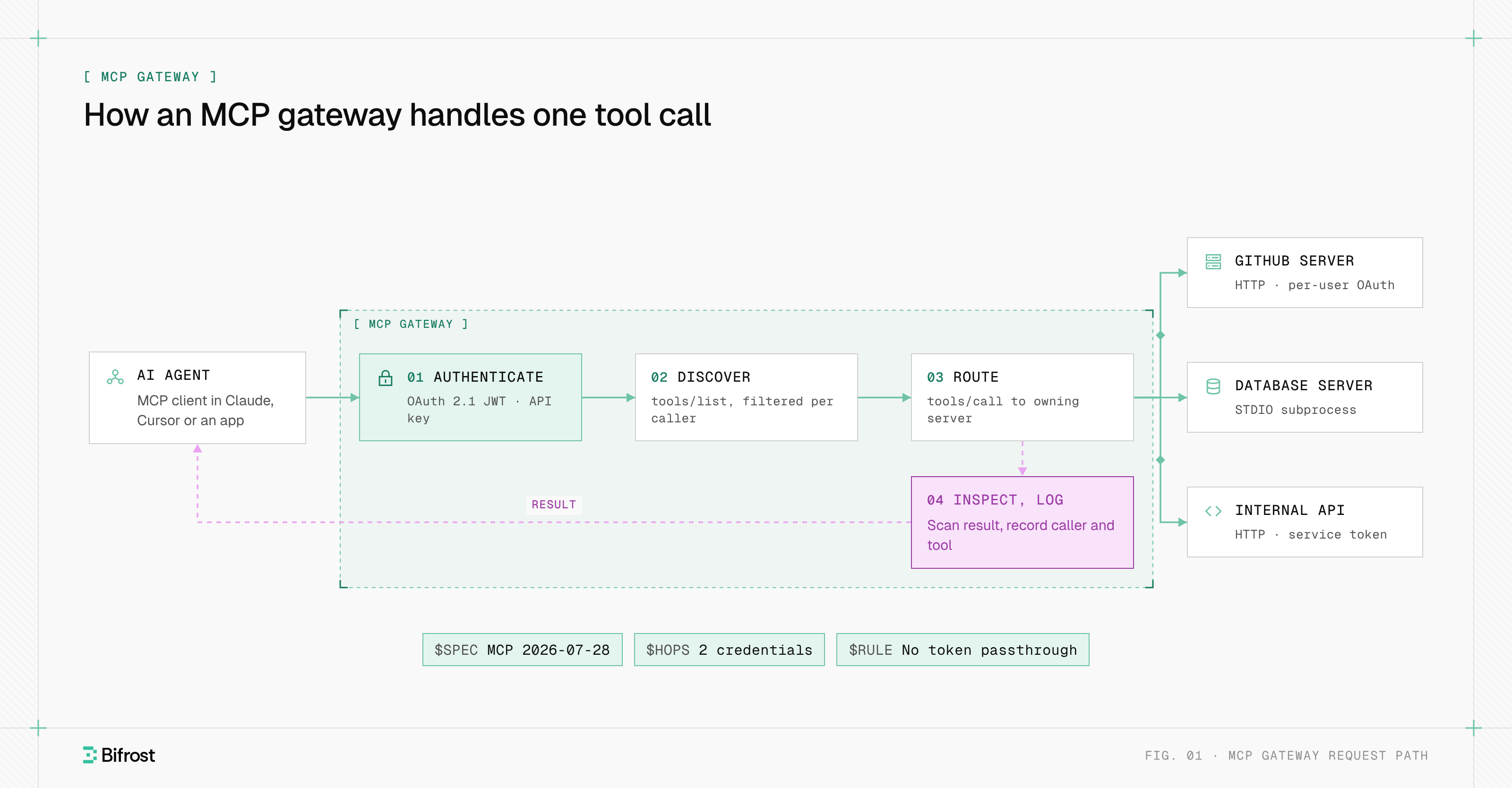
Once a team runs more than a few MCP servers, tool access needs the same credentials, permissions and logging as model traffic. Bifrost, the open-source AI gateway, sits on that path as an MCP gateway between MCP clients and the servers they call.
What is MCP used for?
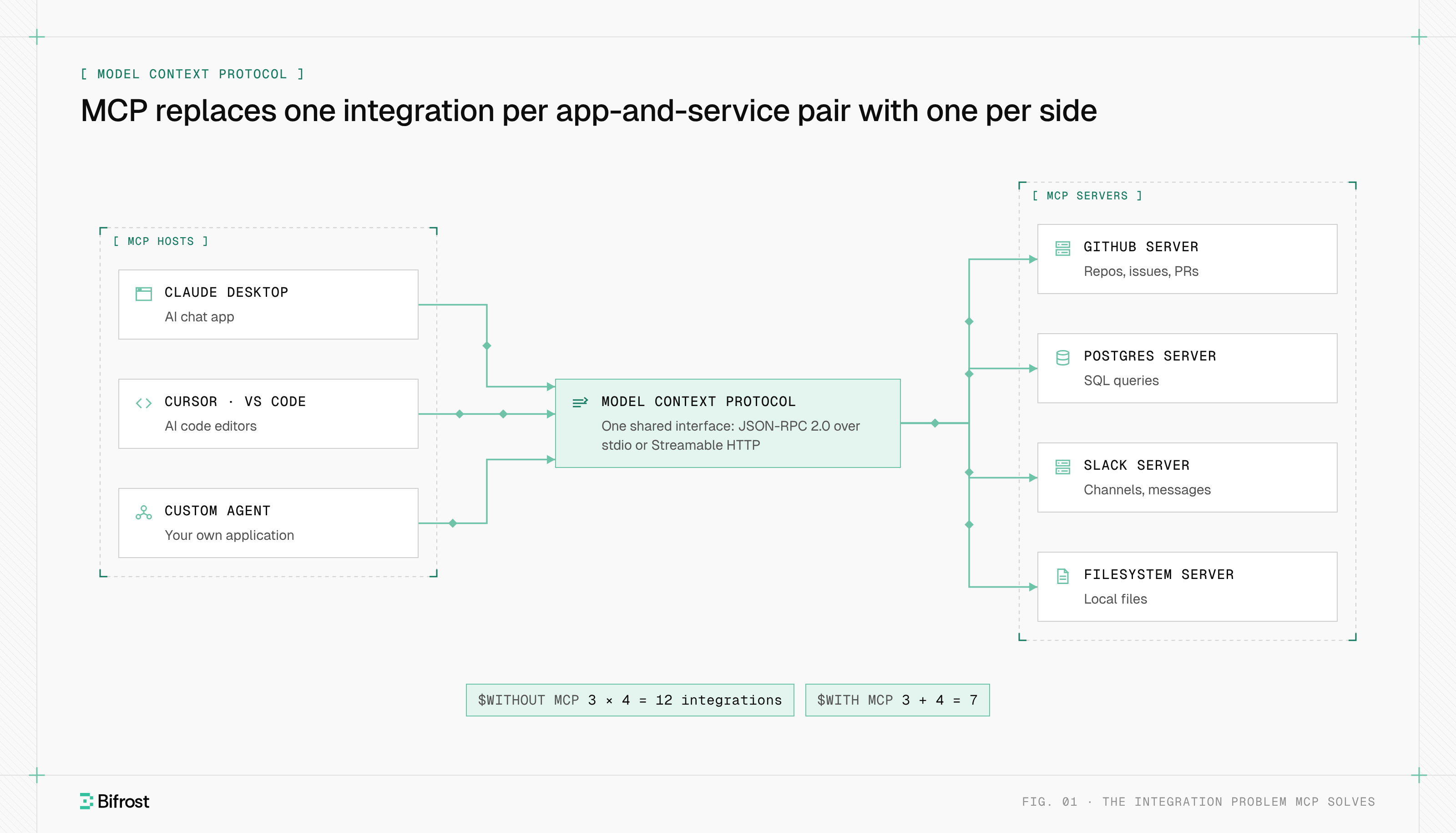
MCP is used to give AI models access to systems outside their training data: files, databases, SaaS applications, internal APIs and developer tools. The problem the Model Context Protocol solves for AI applications is integration count. Without a shared protocol, every AI app needs its own connector for every service, so N applications and M services require N×M integrations.
With MCP, each AI application implements an MCP client once and each service ships an MCP server once, so the count becomes N+M. Three applications and four services drop from 12 custom integrations to 7. The official MCP documentation compares the result to a USB-C port: one standard connector instead of a different cable for every device. The design borrows from the Language Server Protocol, which did the same for programming languages and code editors.
Common workloads include:
- Coding agents reading repositories, opening pull requests and querying error trackers through GitHub and Sentry servers.
- Data access, where an assistant runs read-only SQL against Postgres or Snowflake instead of a user pasting query results into chat.
- Workplace automation, such as searching Slack, filing a ticket or updating a calendar from one conversation.
- Internal APIs, where a platform team wraps existing services as MCP servers so every agent in the company can reuse them.
How does MCP work?
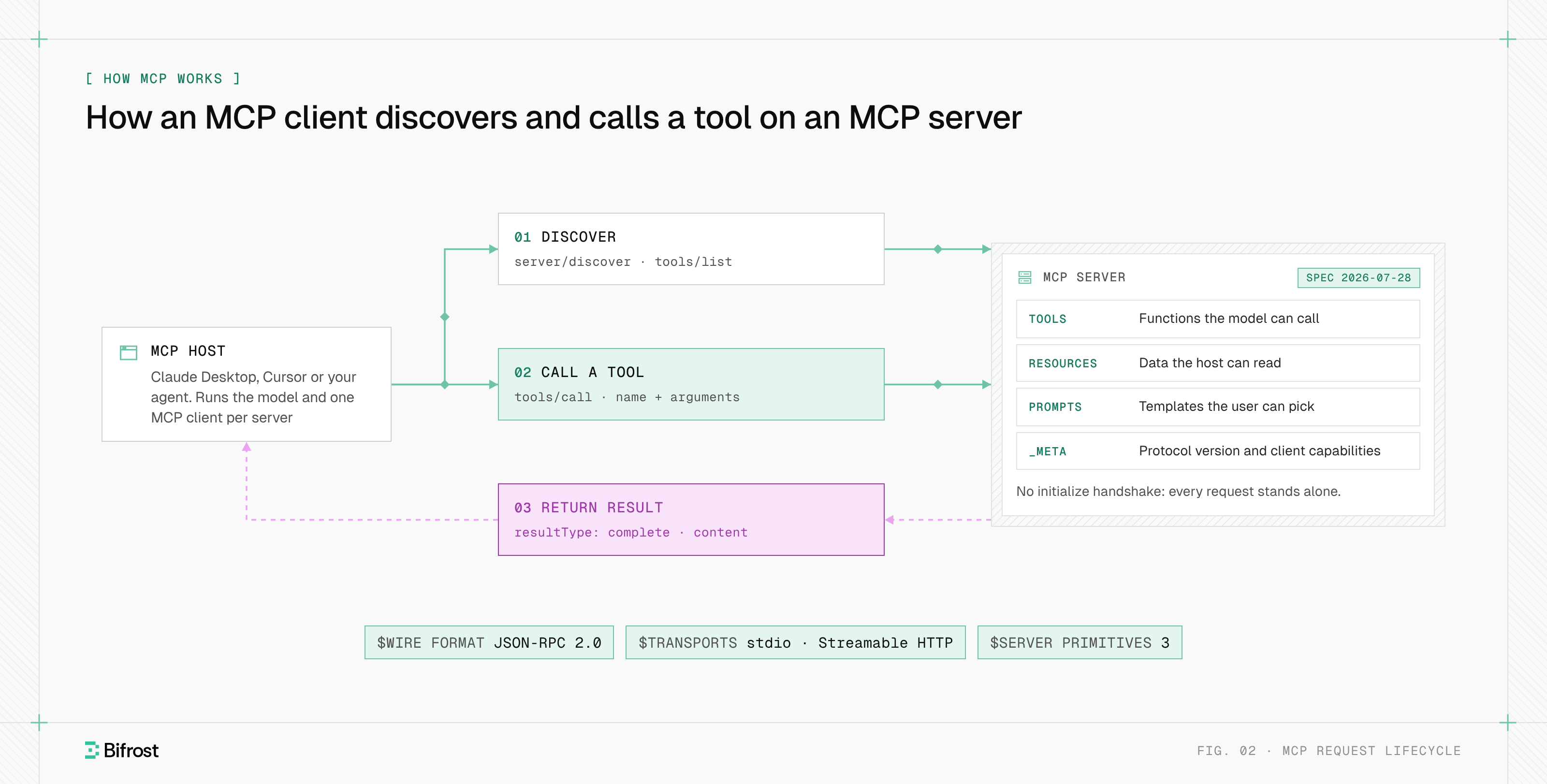
MCP works through a client-host-server architecture. The MCP host is the AI application the user works in. The host creates one MCP client for each MCP server it connects to, and each client keeps a one-to-one connection with its server. Servers expose capabilities; the model chooses which to use; the client sends the request and returns the result.
| Component | Role | Examples |
|---|---|---|
| MCP host | The AI application: runs the model, manages clients, enforces user consent | Claude Desktop, Cursor, VS Code, a custom agent |
| MCP client | A connector inside the host with a 1:1 link to one server | One client per configured server |
| MCP server | A program that exposes tools, resources and prompts for one system | GitHub, Postgres, Slack or filesystem servers |
A tool call moves through four steps:
- 01
Discovery
The client can call
server/discoverto learn the server's supported versions and capabilities up front, then callstools/listto get each tool's name, description and JSON Schema for its inputs. - 02
Selection
The host passes the tool definitions to the model. The model decides that a tool would help and returns a tool call with arguments.
- 03
Invocation
The client sends a
tools/callrequest with the tool name and arguments. The server runs the work against its backing system. - 04
Result
The server returns content, and the host adds it to the model's context so the model can continue.
The architecture also sets a security boundary. Under the MCP architecture, servers never see the full conversation or other servers' data; the host decides what each server receives and must ask the user before invoking a tool.
MCP primitives: tools, resources and prompts
MCP servers expose three primitives. Tools are functions the model can call, such as running a query or sending a message. Resources are data the host can read, such as a file or a database row, addressed by URI. Prompts are reusable templates a user picks, such as a "summarize this pull request" workflow.
| Primitive | Controlled by | Discovery method | Use method | Example |
|---|---|---|---|---|
| Tools | The model | tools/list | tools/call | create_issue, execute_sql |
| Resources | The host application | resources/list | resources/read | file:///projects/app/config.json |
| Prompts | The user | prompts/list | prompts/get | A code review template |
The client side has one active feature, elicitation, which lets a server ask the user for missing input mid-request. The 2026-07-28 revision deprecated the older client features, roots, sampling and logging.
Example: an MCP tool call
A tools/call request names the tool and passes arguments that match its input schema. This example follows the 2026-07-28 tools specification, where every result carries a resultType:
{"jsonrpc": "2.0", "id": 2, "method": "tools/call", "params": {"name": "get_weather", "arguments": {"location": "New York"}}}
{"jsonrpc": "2.0", "id": 2, "result": {"resultType": "complete", "isError": false, "content": [{"type": "text", "text": "72F, partly cloudy"}]}}
A tool failure comes back as a normal result with isError: true, so the model can read the error and try again. Protocol failures, such as an unknown tool, use JSON-RPC error codes instead.
MCP transports: stdio and Streamable HTTP
MCP defines two standard transports. With stdio, the host launches the MCP server as a local subprocess and exchanges newline-delimited JSON-RPC messages over standard input and output. With Streamable HTTP, each message is an HTTP POST to a single MCP endpoint, and replies come back as a JSON object or a request-scoped server-sent events stream.
stdio
stdio suits local servers: a filesystem server, a Git server, or a command-line tool on a developer laptop. The server runs with the user's local permissions, needs no network listener and has no per-call authentication, because it inherits the environment of the process that launched it.
Streamable HTTP
Streamable HTTP suits remote and shared servers. On every POST the client sends the MCP-Protocol-Version header plus Mcp-Method and, for tool, resource and prompt calls, Mcp-Name, so load balancers and gateways can route and inspect traffic without parsing the body. Servers must validate the Origin header, and local HTTP servers should bind to 127.0.0.1 rather than all interfaces. Remote servers protect access with OAuth 2.1 authorization.
HTTP+SSE (deprecated)
The original remote transport, HTTP with server-sent events, was replaced by Streamable HTTP in the 2025-03-26 revision and is now formally deprecated. Many tutorials and some servers still use it.
What changed in the latest MCP specification
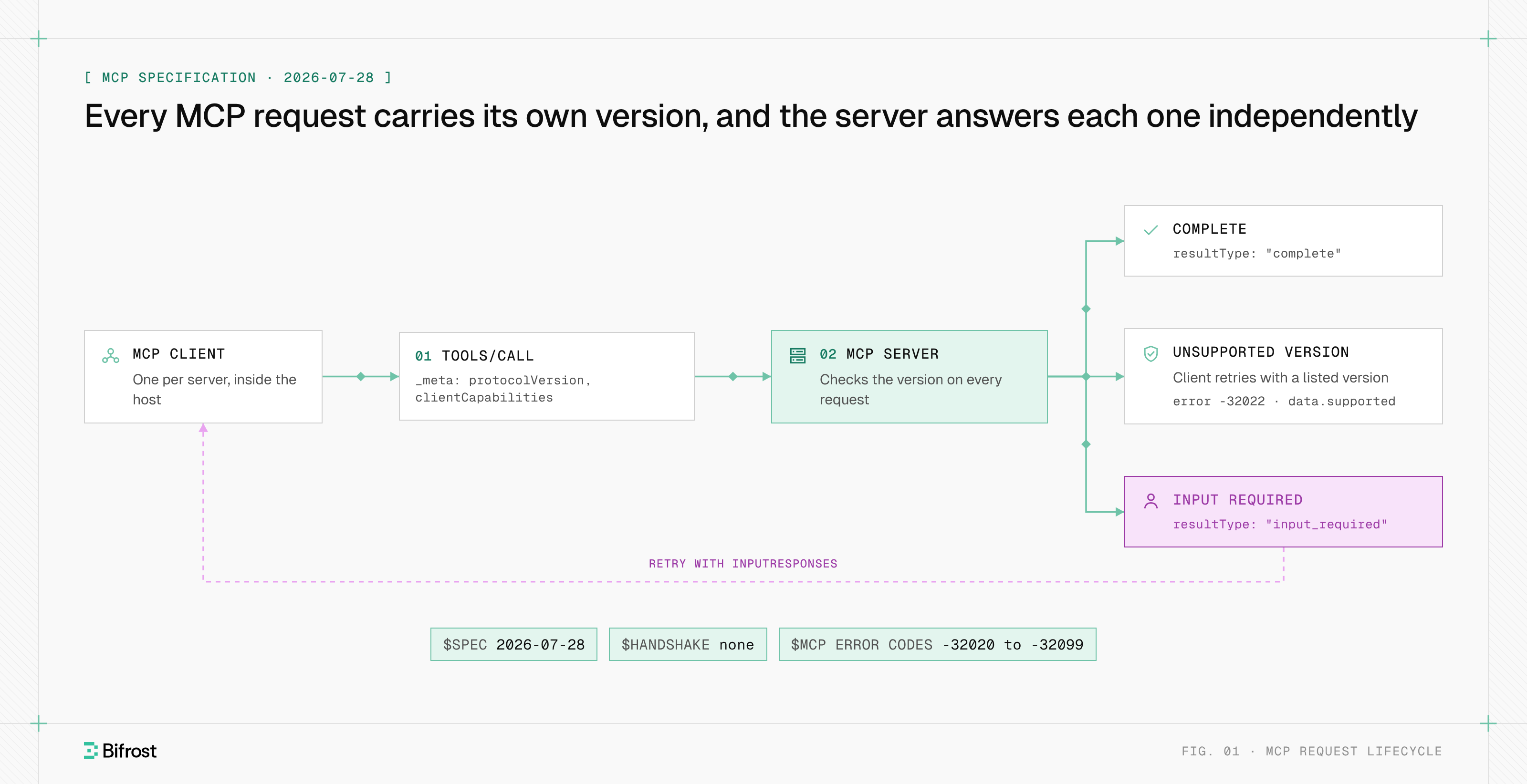
The latest MCP specification, revision 2026-07-28, made the protocol stateless. It removed the initialize handshake and the Mcp-Session-Id header, so every request now carries its own protocol version and client capabilities in _meta. Servers must implement server/discover, and a server can no longer send requests to the client on its own.
The 2026-07-28 revision lists the changes that break code written for 2025-11-25 and earlier:
- No handshake or sessions. A version mismatch returns
UnsupportedProtocolVersionError(code -32022) with the versions the server supports, and the client retries. Servers that need state across calls mint their own handles and pass them as tool arguments. - Multi round-trip requests. Instead of calling
sampling/createMessageorelicitation/createon the client, a server returnsresultType: "input_required", and the client retries the original request with the answers. - One notification stream.
subscriptions/listenreplaces the HTTP GET stream andresources/subscribe. SSE resumability viaLast-Event-IDis gone, so a broken stream means re-sending the request. - Tasks moved to an extension. Long-running work now uses the opt-in
io.modelcontextprotocol/tasksextension. - Caching hints. List and read results carry
ttlMsandcacheScope, and servers should return tools in a deterministic order to help clients and LLM prompt caches.
Most guides, and many AI-generated answers, still describe the initialize handshake. Servers can support both eras during migration. The current rules are in the MCP specification.
MCP vs API and function calling
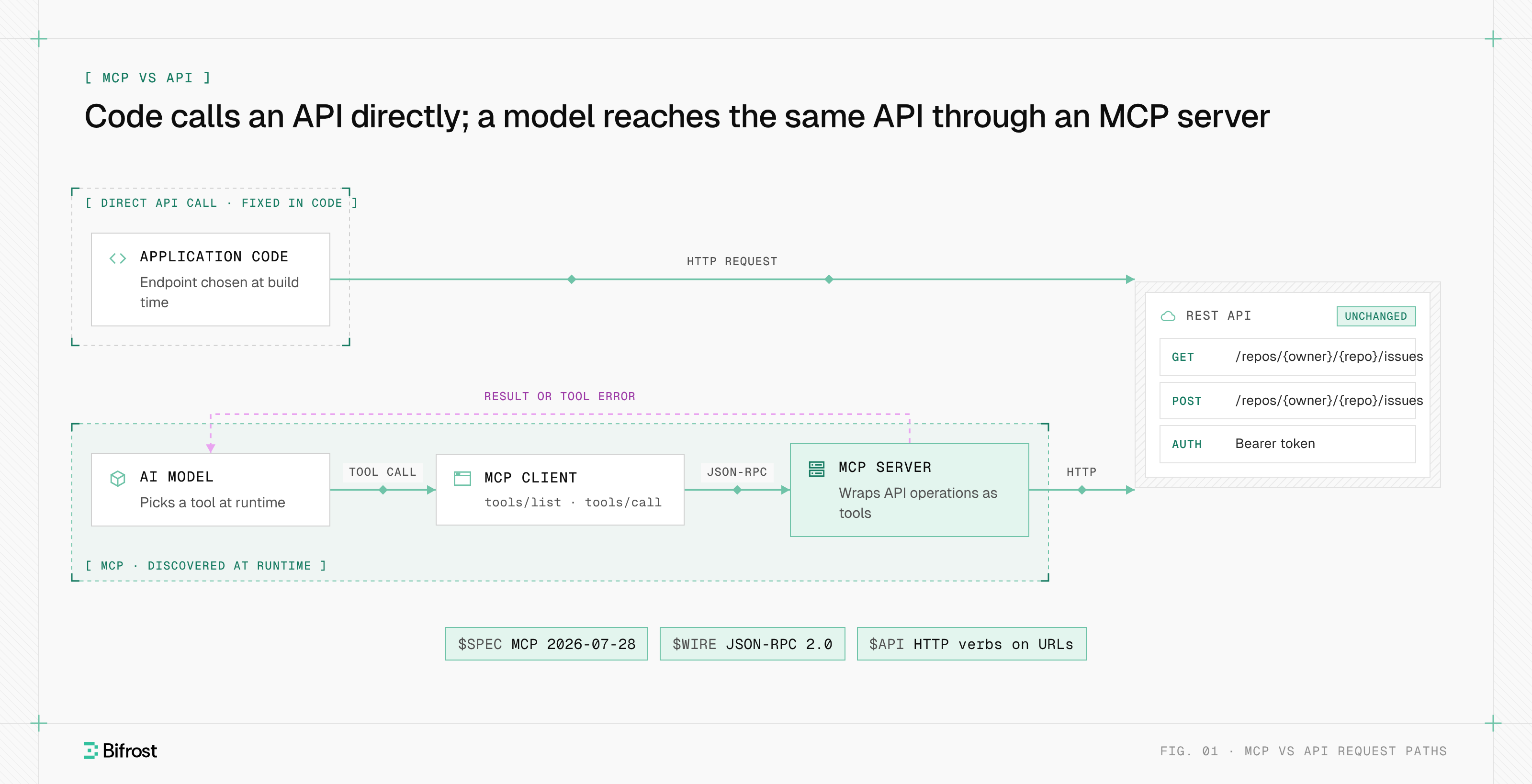
MCP does not replace APIs; most MCP servers wrap one. An API exposes fixed endpoints for code a developer writes ahead of time. MCP exposes tools that a model discovers and calls at runtime, with descriptions written for the model. Function calling is the model-side format for requesting a tool; MCP is the protocol that connects those requests to real systems.
| Dimension | REST API | Function calling | MCP |
|---|---|---|---|
| Consumer | Code a developer writes | One model provider's API | Any MCP host and model |
| Discovery | Docs or an OpenAPI file, read by a person | Tool definitions sent with each request | tools/list at runtime |
| Portability | Per API | Per provider format | One server works in every MCP host |
| Wire format | HTTP verbs and resources | Provider-specific JSON | JSON-RPC 2.0 over stdio or HTTP |
| Who runs the call | Your code | Your code | The MCP client in the host |
Is MCP the same as HTTP? No: HTTP is one transport MCP can use, and the same MCP messages also run over stdio.
MCP also differs from agent skills, which are instruction files an agent loads rather than live connections, and from the A2A protocol, which connects agents to other agents rather than to tools.
Which AI clients and models support MCP?
MCP is supported by the major AI assistants and code editors, including Claude Desktop, Claude Code, ChatGPT, Cursor, VS Code with GitHub Copilot, Gemini and Microsoft Copilot. The protocol is model-agnostic: any model that supports tool calling can use MCP tools, because the host translates tool definitions into the model's own format.
Adoption moved fast after launch. Anthropic shipped local MCP support in Claude Desktop alongside reference servers for Google Drive, Slack, GitHub, Git, Postgres and Puppeteer. Its December 2025 donation announcement lists ChatGPT, Cursor, Gemini, Microsoft Copilot and Visual Studio Code as MCP clients. Claude's products call remote MCP servers "connectors", which is why "MCP connector" searches have grown.
For building, the project publishes official SDKs for TypeScript, Python, C#, Go, Rust and Ruby (Tier 1), Java (Tier 2), and Swift, PHP and Kotlin (Tier 3). The MCP Inspector is the official tool for testing a server: it lists tools, resources and prompts and sends calls by hand.
MCP security risks
MCP security risks come from one fact: tools are arbitrary code execution driven by model output. A malicious or compromised server can return instructions hidden in tool descriptions or results, a broadly scoped token can let an agent act far beyond its task, and a local stdio server runs with the user's own permissions.
The specification states that tool descriptions and annotations are untrusted unless they come from a trusted server, and that hosts must get explicit user consent before invoking a tool. It cannot enforce either rule; implementations must. The risks teams meet first:
- Prompt injection through tools. Text in a tool result, such as an issue body or a web page, is treated as model input, so it can carry instructions the user never wrote.
- Tool poisoning. A server changes a tool's description after approval to steer the model, so hosts should re-review tools when the server reports a changed tool list.
- Over-broad credentials. One shared token per server means every user and agent acts with the same rights, and audit trails cannot tell them apart.
- Unvetted local servers. Installing a server package runs third-party code on a laptop.
The controls that address these risks, from per-user OAuth to tool allow-lists, usually sit in an MCP gateway in front of the servers, where guardrails on tool calls and prompt injection checks run on every request.
How do teams run MCP servers in production?
Teams run MCP servers in production at scale by moving them off individual laptops and behind a shared layer that handles authentication, access control, logging and connection management. That layer is usually an MCP gateway: one endpoint that clients connect to, which forwards each tool call to the right server under the right credentials.
The problems that push teams there:
- Server sprawl. Every developer configures servers by hand, so nobody can list which servers exist, who uses them or which tokens they hold. That inventory is the first control in enterprise MCP governance.
- Per-user identity. A shared service account hides who did what. Production setups pass each user's own OAuth token, or exchange their identity-provider token, per call.
- Context cost. Every connected tool's definition is sent to the model on every turn. Hundreds of tools add tokens, latency and tool-selection errors, so teams filter tools per agent or load definitions on demand.
- Observability. A failed agent run has to be traced through the model call, the tool call and the upstream API. Tool calls need the same logs and traces as LLM requests, plus an audit record per call for compliance.
- Version drift. Clients and servers on the stateless 2026-07-28 revision and on handshake-based revisions coexist for months, so one layer has to bridge both.
Putting MCP traffic and LLM traffic through the same AI gateway keeps those controls in one place. MCP: the protocol, the plumbing and the gateway walks through a request on the wire and the gateway design around it.
MCP with Bifrost
Bifrost, the open-source AI gateway built by Maxim AI, runs MCP in both directions as an MCP gateway. As an MCP client, Bifrost connects to MCP servers over STDIO, HTTP or SSE, or generates a server from an OpenAPI document (beta). As an MCP server, Bifrost exposes the connected tools at one /mcp endpoint that Claude Desktop, Cursor and other MCP clients connect to.
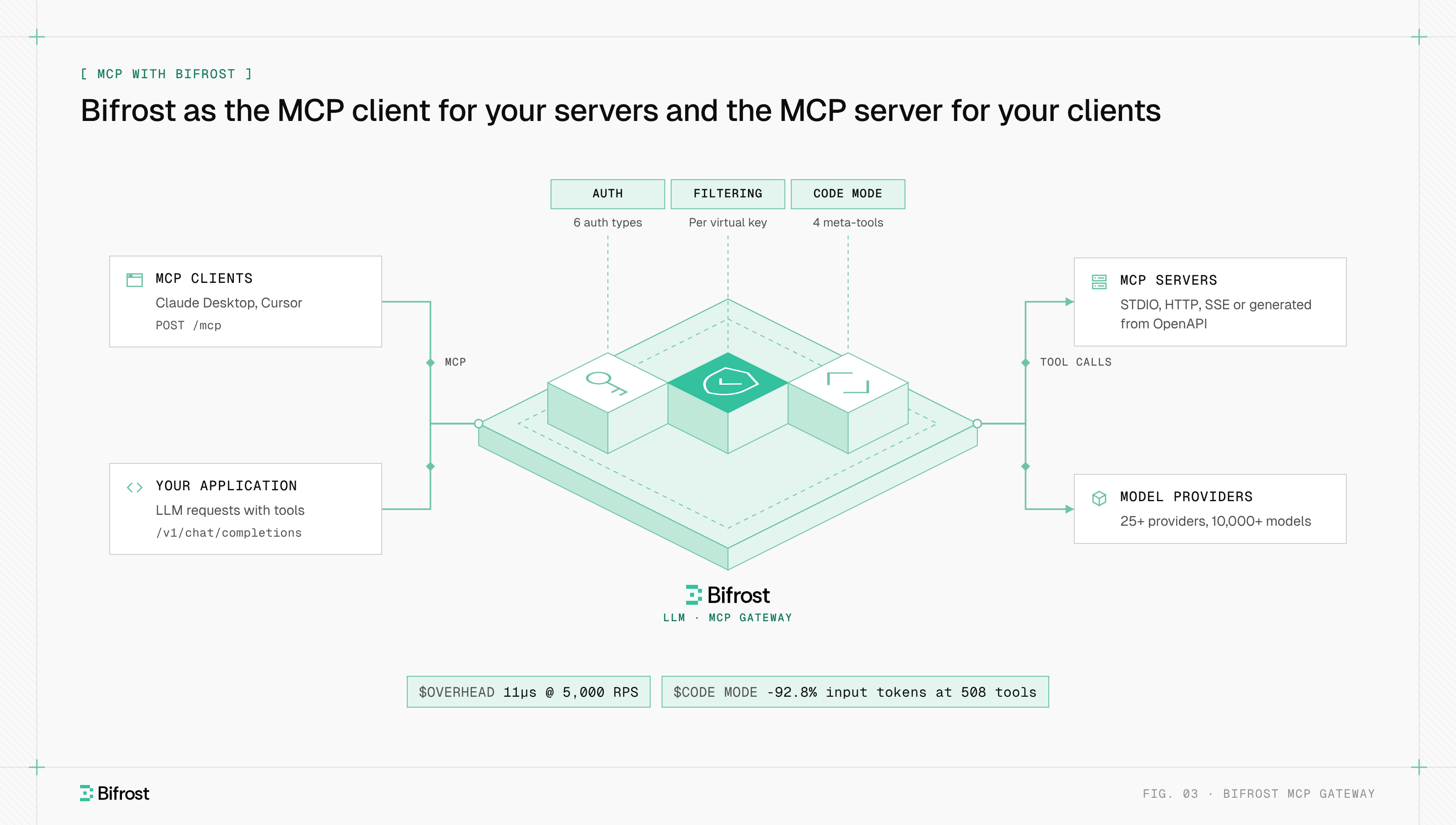
Bifrost supports six MCP authentication types: none, static headers, OAuth 2.0, per-user OAuth, per-user headers and token exchange. Tool access is deny-by-default per virtual key, and tool filtering also applies per MCP client and per request.
Virtual MCPs bundle approved tools from several servers into one endpoint at /mcp/<slug>.
By default Bifrost does not execute tool calls the model returns; the application approves each call through a separate tool execution request. Agent Mode auto-executes only the tools listed as auto-executable. For large tool sets, Code Mode replaces direct tool definitions with four meta-tools and runs a model-written Python (Starlark) script in a sandbox. In a benchmark with 508 tools across 16 servers, it cut input tokens by 92.8% and estimated cost by 92.2% at the same pass rate.
The same deployment routes LLM traffic to 25+ providers and 10,000+ models with 11 microseconds of overhead per request at 5,000 RPS.
To connect your first MCP server, start with the gateway quickstart, then add a client from the MCP settings page.
Govern MCP tool calls in one gateway
Connect servers over STDIO, HTTP or SSE, filter tools per virtual key, and log every call.
FAQ
What is MCP in AI?
In tech and AI, MCP means Model Context Protocol, the open standard for connecting AI applications to tools and data. Elsewhere the letters mean other things: Microsoft Certified Professional in IT certification, the metacarpophalangeal joint in the medical field, a manual call point on a fire alarm, and a microchannel plate in engineering. An MCP server in AI is a program that exposes tools over the Model Context Protocol.
Who created MCP?
Anthropic created MCP and released it as an open standard on November 25, 2024, with SDKs and reference MCP servers for Google Drive, Slack, GitHub, Git and Postgres. In December 2025 Anthropic donated the protocol to the Agentic AI Foundation under the Linux Foundation, co-founded with Block and OpenAI. Most MCP servers today are built by the companies whose products they expose and by the open-source community.
Is MCP the same as HTTP?
No. HTTP is a general web protocol, and MCP is an application protocol that can run over it. MCP defines JSON-RPC 2.0 messages for discovering and calling tools, reading resources and getting prompts. Those messages travel over Streamable HTTP for remote servers or over stdio for local subprocesses, and the message semantics are identical on both transports.
What is an MCP connector?
An MCP connector is the name some AI products, including Claude, give to a configured connection to a remote MCP server. Adding a connector registers the server's URL and credentials with the host, which then creates an MCP client for it and makes the server's tools available in conversations. Technically, a connector is an MCP client-server pairing set up through the product's interface. See the MCP connector topic.
Where can I find the MCP documentation?
This site covers the protocol overview and the MCP specification; the latest revision is 2026-07-28. Official SDK repositories are on GitHub under the modelcontextprotocol organization. Bifrost's MCP docs cover connecting servers, the /mcp endpoint and tool filtering, and each MCP host documents how to add servers.