This cookbook provides comprehensive examples for integrating Together AI with Maxim, covering simple chat completions, streaming requests, and async operations.

Prerequisites

Before starting, ensure you have:
  • Python 3.10+
  • A Maxim account (sign up here)
  • Maxim API key and repository ID
  • Together AI API key

Installation

pip install maxim-py together python-dotenv

Environment Setup

Create a .env file in your project root:
TOGETHER_API_KEY=your_together_api_key_here
MAXIM_API_KEY=your_maxim_api_key_here
MAXIM_LOG_REPO_ID=your_repo_id_here

Basic Setup and Instrumentation

Import Required Libraries

import os
from together import Together
from dotenv import load_dotenv
from maxim import Maxim
from maxim.logger.together import instrument_together

Configure Together & Maxim

# Load environment variables from .env file
load_dotenv()

# Get API keys from environment
TOGETHER_API_KEY = os.getenv('TOGETHER_API_KEY')
MAXIM_API_KEY = os.getenv('MAXIM_API_KEY')
MAXIM_LOG_REPO_ID = os.getenv('MAXIM_LOG_REPO_ID')

# Instrument Together AI with Maxim
instrument_together(Maxim().logger())

Simple Chat Completion Request

This example demonstrates basic chat completion with Together AI models.

Create Client and Make Request

from together import Together

# Create Together AI client
client = Together(api_key=TOGETHER_API_KEY)

# Make a simple chat completion request
response = client.chat.completions.create(
    model="meta-llama/Meta-Llama-3.1-8B-Instruct-Turbo",
    messages=[{"role": "user", "content": "What are some fun things to do in New York?"}],
)

print(response.choices[0].message.content)

Example Output

The model will provide a comprehensive response about fun activities in New York, including:
  • Iconic landmarks (Statue of Liberty, Central Park, Times Square)
  • Museums and galleries (Metropolitan Museum, MoMA, Natural History Museum)
  • Performing arts (Broadway shows, Lincoln Center, Carnegie Hall)
  • Food and drink recommendations (pizza, bagels, delis)

Streaming Request

This example demonstrates how to use streaming for real-time responses.

Streaming Chat Completion

# Create streaming request
stream = client.chat.completions.create(
    model="meta-llama/Meta-Llama-3.1-8B-Instruct-Turbo",
    messages=[{"role": "user", "content": "What are some fun things to do in New York?"}],
    stream=True,
)

# Process streaming response
for chunk in stream:
    print(chunk.choices[0].delta.content or "", end="", flush=True)

Benefits of Streaming

  • Real-time responses: See the model’s response as it’s generated
  • Better user experience: Users don’t have to wait for the complete response
  • Lower perceived latency: Content appears immediately
  • Full traceability: Maxim captures the entire streaming interaction

Async Requests

This example demonstrates how to make multiple concurrent requests using async operations.

Async Chat Completions

import asyncio
from together import AsyncTogether

# Create async client
async_client = AsyncTogether(api_key=TOGETHER_API_KEY)

# Define multiple messages to process
messages = [
    "What are the top things to do in San Francisco?",
    "What country is Paris in?",
]

async def async_chat_completion(messages):
    """Process multiple chat completions concurrently."""
    async_client = AsyncTogether(api_key=TOGETHER_API_KEY)
    
    # Create tasks for concurrent execution
    tasks = [
        async_client.chat.completions.create(
            model="meta-llama/Meta-Llama-3.1-8B-Instruct-Turbo",
            messages=[{"role": "user", "content": message}],
        )
        for message in messages
    ]
    
    # Execute all tasks concurrently
    responses = await asyncio.gather(*tasks)

    # Process responses
    for response in responses:
        print(response.choices[0].message.content)

# Run async function
await async_chat_completion(messages)

Benefits of Async Operations

  • Concurrent processing: Multiple requests processed simultaneously
  • Improved performance: Faster overall execution time
  • Resource efficiency: Better utilization of system resources
  • Scalability: Handle multiple requests without blocking

Advanced Usage Examples

Custom Model Selection

# Use different Together AI models
models = [
    "meta-llama/Meta-Llama-3.1-8B-Instruct-Turbo",
    "meta-llama/Meta-Llama-3.1-70B-Instruct-Turbo",
    "mistralai/Mixtral-8x7B-Instruct-v0.1"
]

for model in models:
    response = client.chat.completions.create(
        model=model,
        messages=[{"role": "user", "content": "Explain quantum computing in simple terms."}],
        max_tokens=150
    )
    print(f"\n{model}:")
    print(response.choices[0].message.content)

Error Handling

import time

def robust_chat_completion(client, messages, max_retries=3):
    """Make chat completion with retry logic."""
    for attempt in range(max_retries):
        try:
            response = client.chat.completions.create(
                model="meta-llama/Meta-Llama-3.1-8B-Instruct-Turbo",
                messages=messages,
            )
            return response
        except Exception as e:
            print(f"Attempt {attempt + 1} failed: {e}")
            if attempt < max_retries - 1:
                time.sleep(2 ** attempt)  # Exponential backoff
            else:
                raise

# Use robust completion
try:
    response = robust_chat_completion(
        client, 
        [{"role": "user", "content": "What is machine learning?"}]
    )
    print(response.choices[0].message.content)
except Exception as e:
    print(f"Failed after all retries: {e}")

Multi-turn Conversations

def multi_turn_conversation():
    """Demonstrate multi-turn conversation tracking."""
    messages = [
        {"role": "user", "content": "I'm planning a trip to Japan. What should I know?"}
    ]
    
    # First response
    response = client.chat.completions.create(
        model="meta-llama/Meta-Llama-3.1-8B-Instruct-Turbo",
        messages=messages,
    )
    
    assistant_message = response.choices[0].message.content
    print("Assistant:", assistant_message)
    
    # Add assistant response to conversation
    messages.append({"role": "assistant", "content": assistant_message})
    
    # Follow-up question
    messages.append({"role": "user", "content": "What about the food? Any recommendations?"})
    
    # Second response
    response = client.chat.completions.create(
        model="meta-llama/Meta-Llama-3.1-8B-Instruct-Turbo",
        messages=messages,
    )
    
    print("\nAssistant:", response.choices[0].message.content)

# Run multi-turn conversation
multi_turn_conversation()

Complete Example

Here’s a comprehensive example that combines all the features:
import os
import asyncio
from together import Together, AsyncTogether
from dotenv import load_dotenv
from maxim import Maxim
from maxim.logger.together import instrument_together

# Setup
load_dotenv()
TOGETHER_API_KEY = os.getenv('TOGETHER_API_KEY')

# Instrument Together AI with Maxim
instrument_together(Maxim().logger())

async def comprehensive_example():
    """Comprehensive example showing all Together AI features."""
    print("Together AI Integration with Maxim - Complete Example")
    print("=" * 60)
    
    # Create clients
    client = Together(api_key=TOGETHER_API_KEY)
    async_client = AsyncTogether(api_key=TOGETHER_API_KEY)
    
    # 1. Simple chat completion
    print("\n1. Simple Chat Completion:")
    print("-" * 30)
    response = client.chat.completions.create(
        model="meta-llama/Meta-Llama-3.1-8B-Instruct-Turbo",
        messages=[{"role": "user", "content": "What is artificial intelligence?"}],
    )
    print(response.choices[0].message.content[:200] + "...")
    
    # 2. Streaming example
    print("\n2. Streaming Response:")
    print("-" * 30)
    stream = client.chat.completions.create(
        model="meta-llama/Meta-Llama-3.1-8B-Instruct-Turbo",
        messages=[{"role": "user", "content": "Explain machine learning briefly."}],
        stream=True,
    )
    
    print("Streaming: ", end="")
    for chunk in stream:
        content = chunk.choices[0].delta.content or ""
        print(content, end="", flush=True)
    print("\n")
    
    # 3. Async concurrent requests
    print("\n3. Async Concurrent Requests:")
    print("-" * 30)
    messages = [
        "What is Python?",
        "What is JavaScript?",
        "What is Rust?"
    ]
    
    tasks = [
        async_client.chat.completions.create(
            model="meta-llama/Meta-Llama-3.1-8B-Instruct-Turbo",
            messages=[{"role": "user", "content": message}],
            max_tokens=100
        )
        for message in messages
    ]
    
    responses = await asyncio.gather(*tasks)
    for i, response in enumerate(responses):
        print(f"{messages[i]}: {response.choices[0].message.content[:100]}...")
    
    print("\n=== All Examples Completed ===")
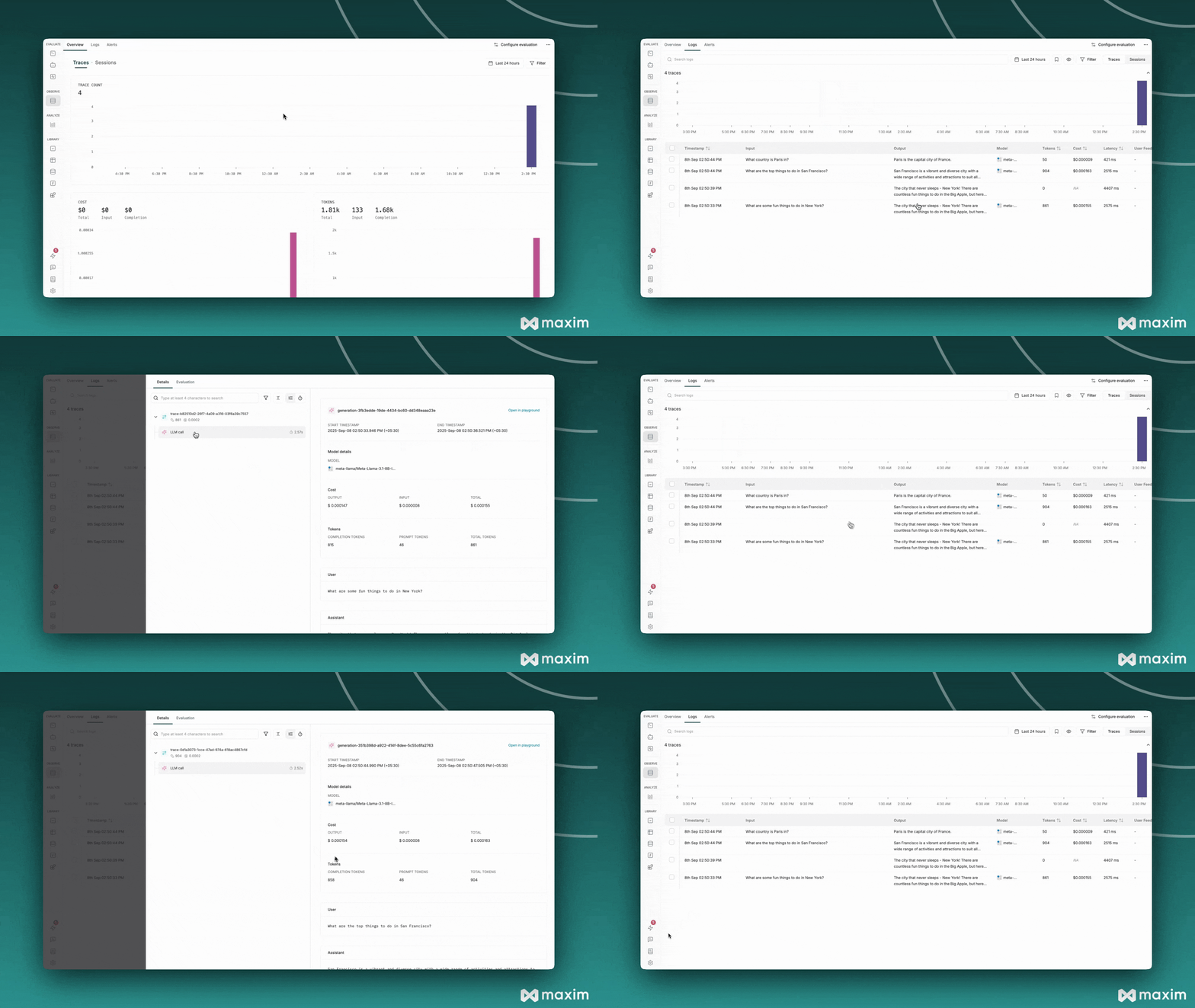
    print("Check your Maxim dashboard to see:")
    print("- Chat completion traces")
    print("- Streaming interactions")
    print("- Async request patterns")
    print("- Performance metrics")

# Run comprehensive example
await comprehensive_example()
together-ai.gif

Best Practices

1. Environment Variables

Always use environment variables for API keys:
# Good
TOGETHER_API_KEY = os.getenv('TOGETHER_API_KEY')

# Avoid
TOGETHER_API_KEY = "your_key_here"  # Don't hardcode

2. Error Handling

Implement proper error handling for production use:
try:
    response = client.chat.completions.create(...)
except Exception as e:
    print(f"Error: {e}")
    # Handle error appropriately

3. Model Selection

Choose appropriate models for your use case:
  • Fast responses: Use smaller models like Meta-Llama-3.1-8B-Instruct-Turbo
  • High quality: Use larger models like Meta-Llama-3.1-70B-Instruct-Turbo
  • Specialized tasks: Use domain-specific models

4. Streaming for UX

Use streaming for better user experience:
# Good for real-time applications
stream = client.chat.completions.create(..., stream=True)

# Good for batch processing
response = client.chat.completions.create(...)

5. Async for Performance

Use async operations for multiple concurrent requests:
# Good for multiple requests
tasks = [async_client.chat.completions.create(...) for _ in range(5)]
responses = await asyncio.gather(*tasks)
This cookbook provides a comprehensive foundation for integrating Together AI with Maxim. You can extend these examples with your own use cases and requirements.
For more details, see the Maxim Python SDK documentation.

Resources

Cookbook Code

Python Notebook for Together AI & Maxim AI