Top 5 LiteLLM MCP Gateway Alternatives in 2026
Compare the top LiteLLM MCP gateway alternatives for 2026 on tool access control, MCP authentication, token cost, and deployment, from Bifrost to Docker.
TL;DR
- The LiteLLM MCP gateway is part of the LiteLLM Proxy and scopes MCP servers and tools by API key, team, and organization.
- Teams look for LiteLLM MCP alternatives to decouple tool governance from a Python proxy, cut tool-definition token cost, or run MCP on a platform they already operate.
- Bifrost is the only gateway on this list that governs LLM traffic and MCP tools under one virtual key, and its Code Mode cut input tokens by 92.8% at 508 tools in benchmarks.
- Docker MCP Gateway, Microsoft MCP Gateway, Kong AI Gateway, and Cloudflare MCP server portals are MCP-focused options tied to containers, Kubernetes, an API platform, or an edge network.
- Bifrost ships a migration CLI that moves LiteLLM models, keys, teams, users, and virtual keys in one dry-run-first pass.
The LiteLLM MCP gateway is a feature of the LiteLLM Proxy that gives agents one fixed endpoint for MCP tools and controls which keys, teams, and organizations can reach each server. Bifrost, the open-source AI gateway written in Go by Maxim AI, is the best choice for enterprises running mission-critical AI workloads that require best-in-class performance, scalability, and reliability, and it leads this list of LiteLLM MCP alternatives. This guide covers what LiteLLM's MCP layer does, why teams compare it with other MCP gateways, and how five alternatives differ.
What the LiteLLM MCP Gateway Does
The LiteLLM MCP gateway runs inside the LiteLLM Proxy and exposes every registered MCP server through a single /mcp endpoint. It lists and calls tools, prompts, and resources, and it enforces MCP permissions by key, team, and organization, so one proxy governs both model calls and tool calls for every connected agent.
The feature set is broad, and any fair comparison starts with it. Current LiteLLM documentation lists:
- Three transports: Streamable HTTP, SSE, and stdio for upstream MCP servers.
- Many upstream auth types: API key, bearer, basic, OAuth 2.0 (client credentials or authorization code), OAuth token exchange, passthrough, and AWS SigV4.
- Permission management: MCP server and tool access scoped by key, team, or organization, plus MCP access groups.
- Context controls: an MCP tool search mode that collapses the catalog into four virtual tools, and a semantic tool filter that sends only relevant tools to the model.
- Guardrails and cost tracking applied to MCP traffic, and MCP tools usable from
/chat/completionswith optional auto-execution.
For readers new to the category, the guide to MCP gateways for production AI agents covers the core concepts, and the post on MCP gateway vs MCP proxy vs MCP server separates three terms that are often used interchangeably.
Why teams evaluate LiteLLM MCP alternatives
The reasons are structural rather than missing checkboxes:
- Coupling to the proxy. The MCP gateway is not a separate component. Adopting it means running the full LiteLLM Proxy, and storing MCP servers from the UI requires enabling database storage for proxy objects.
- Credential concentration in a Python dependency. An MCP gateway holds OAuth tokens and API keys for every tool it brokers. On March 24, 2026, NetSPI reported that LiteLLM 1.82.7 and 1.82.8 on PyPI carried a credential-harvesting payload, which led many security teams to reassess which runtime holds their tool credentials.
- Per-call overhead in agent loops. Agents make many tool calls per task, so gateway latency compounds across turns.
- Platform fit. Some teams want MCP governed by the container runtime, Kubernetes cluster, API gateway, or edge network they already operate.
Teams replacing the whole proxy, not only its MCP layer, can compare options in the broader roundup of LiteLLM alternatives for 2026.
How to Evaluate an MCP Gateway
An MCP gateway is a control layer that authenticates agents, decides which tools each caller can see, injects the right upstream credential, and records every tool call. Evaluating alternatives means checking those four stages, then deployment, context cost, and whether model traffic is governed in the same place. The Model Context Protocol specification defines the protocol each stage must preserve.
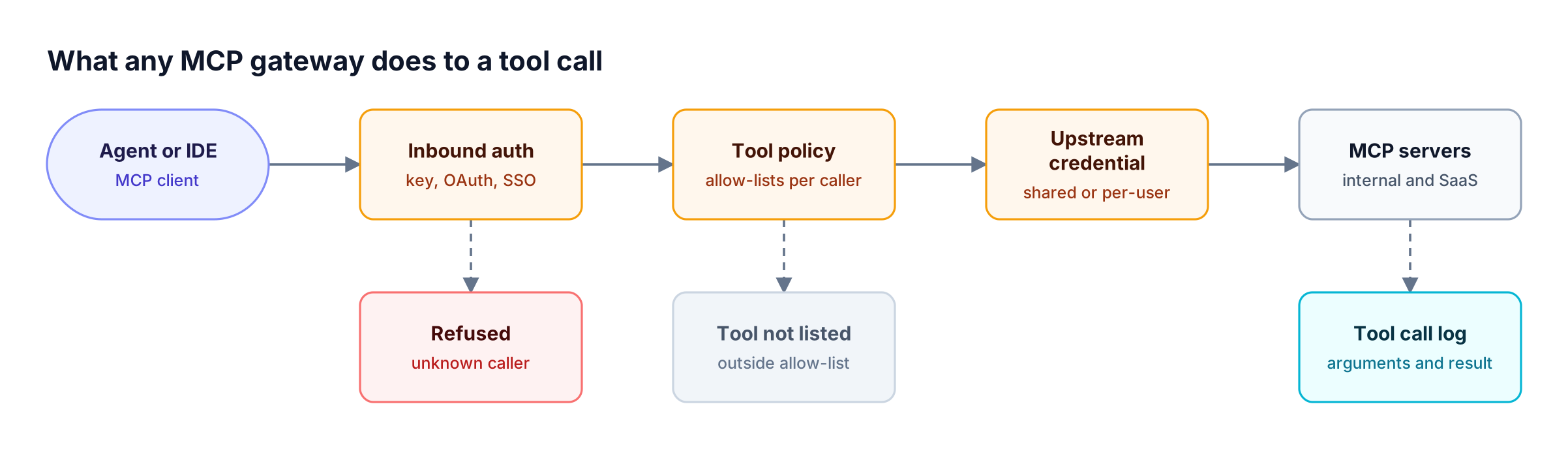
Figure 1: Compare MCP gateways stage by stage: who can connect, which tools they see, whose credential reaches the server, and what gets logged.
| Criterion | What to check | Why it matters |
|---|---|---|
| Inbound authentication | API keys, OAuth 2.1, SSO identity | Determines whether access maps to real people and services |
| Tool-level access control | Per-key or per-team allow-lists, deny-by-default | Prevents agents from discovering tools they should not call |
| Upstream credentials | Shared, per-user OAuth, token exchange | Decides whose identity the MCP server sees |
| Context cost | Tool search, filtering, code execution | Tool definitions can dominate input tokens past 100 tools |
| Observability | Tool-call logs with arguments and results | Required for incident review and compliance |
| LLM and MCP in one place | Shared keys, budgets, and logs | Avoids two policy systems for one agent |
| Deployment | Self-hosted, Kubernetes, managed, air-gapped | Must match data-residency and network rules |
The MCP authentication patterns guide goes deeper on the inbound and upstream credential questions.
LiteLLM MCP Alternatives Compared at a Glance
The five alternatives split into one combined LLM and MCP gateway (Bifrost) and four MCP-focused options tied to a specific platform. The table below summarizes what each one publishes about deployment, access control, credentials, and context cost; cells marked "Not published" were not stated in the vendor pages reviewed for this guide.
| Capability | Bifrost | Docker MCP Gateway | Microsoft MCP Gateway | Kong AI Gateway | Cloudflare MCP portals |
|---|---|---|---|---|---|
| License | Apache 2.0 | MIT | MIT | AI Gateway Enterprise license | Managed service |
| Deployment | Self-hosted, Kubernetes, in-VPC | Docker Desktop or Docker Engine | Kubernetes, local or Azure | Kong Gateway 3.12+ or Konnect | Cloudflare network |
| LLM routing in the same gateway | Yes, 25+ providers | Not published | Not published | Separate AI plugins, not on the same route | Not published |
| Inbound auth | Virtual keys or OAuth 2.1 | Not published | Entra ID with app roles | OpenID Connect or Key Auth plugins | Cloudflare Access, service tokens |
| Tool-level control | Virtual MCPs, per-key allow-lists | Tool allow-lists per profile | Role-based read and write per resource | Consumer and Consumer Group ACLs | Curated tools per portal |
| Upstream credentials | Six auth types incl. per-user OAuth | Secrets store and OAuth flows | Not published | Not published | Per-server OAuth |
| Context cost controls | Code Mode, request filters | Not published | Not published | Not published | Code Mode, minimized tools |
The Bifrost LiteLLM alternative page has a full feature-by-feature view for teams comparing Bifrost and LiteLLM directly.
1. Bifrost
The Bifrost AI gateway is open source and acts as both an MCP client and an MCP server. It connects to upstream MCP servers over STDIO, HTTP, or SSE, then exposes the tools it aggregates through one /mcp endpoint, governed by the same virtual keys that control model access across 25+ providers and 10,000+ models.
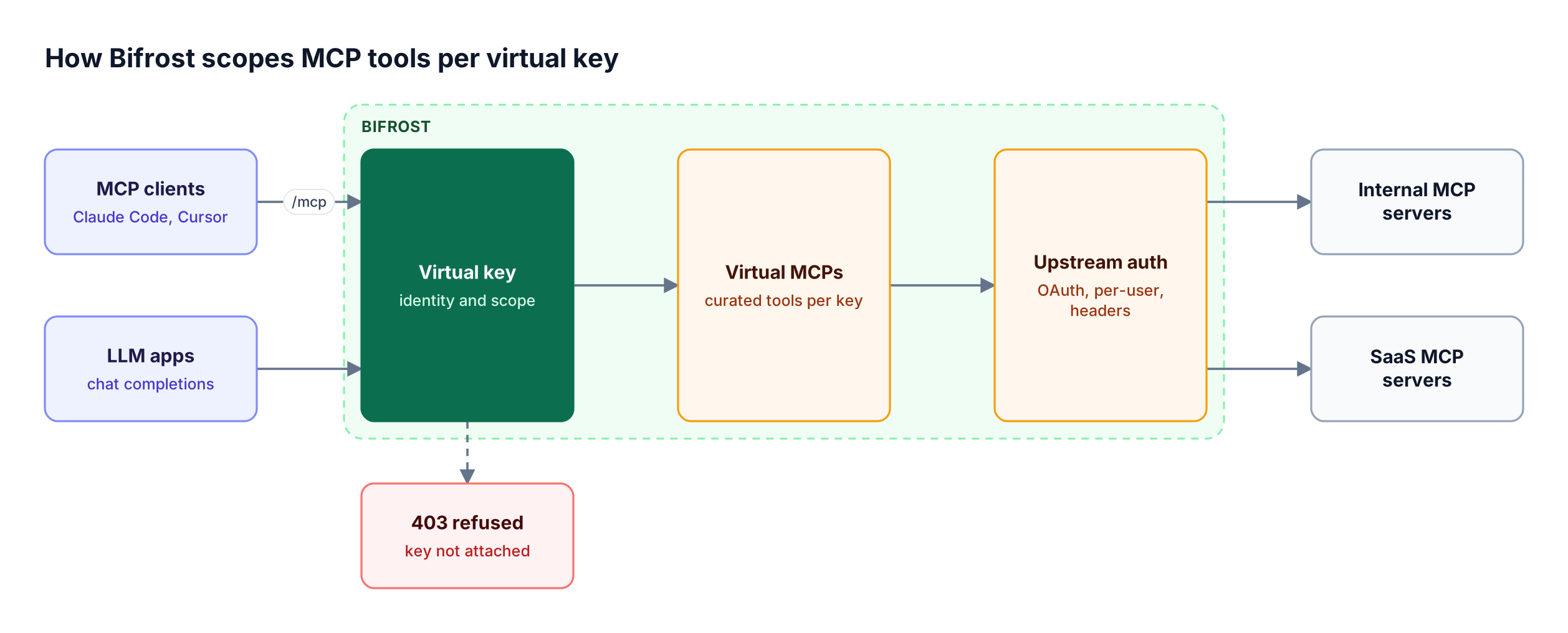
Figure 2: The same virtual key governs model access and tool access, so one policy covers both the LLM call and the tools it can reach.
Best for: Bifrost is built for enterprises running mission-critical AI workloads that require best-in-class performance, scalability, and reliability. It serves as a centralized AI gateway to route, govern, and secure all AI traffic across models and environments with ultra low latency. Bifrost unifies LLM gateway, MCP gateway, and Agents gateway capabilities into a single platform. Designed for regulated industries and strict enterprise requirements, it supports air-gapped deployments, VPC isolation, and on-prem infrastructure. It provides full control over data, access, and execution, along with robust security, policy enforcement, and governance capabilities.
Key MCP capabilities, as Figure 2 shows from left to right:
- Virtual key scoping. Every request to
/mcpis scoped to its virtual key:tools/listreturns only allowed tools,tools/callis checked against the same list, and an inactive key is refused with403. - Virtual MCPs. A Virtual MCP bundles selected tools from several MCP servers behind a stable
/mcp/<slug>URL, reachable only through the virtual keys it is attached to. - Three-level tool filtering. Tool filtering stacks client configuration, request headers, and virtual key rules, and an empty list means deny-by-default.
- Six upstream auth types. MCP authentication covers none, headers, per-user headers, OAuth 2.0, per-user OAuth, and token exchange (enterprise), so a GitHub or Notion call can run under each user's own identity.
- Explicit execution by default. Tool calls returned by a model are suggestions until the application executes them; Agent Mode enables auto-execution only for tools listed in
tools_to_auto_execute.
Bifrost adds 11 microseconds of overhead per request at 5,000 RPS in sustained benchmarks, so gateway overhead stays small across long agent loops. For regulated deployments, the Bifrost Enterprise tier adds clustering, in-VPC deployment, prompt guardrails on MCP tool inputs and outputs, and signed audit logs of administrative activity. The MCP gateway resource page collects the architecture and setup material in one place.
2. Docker MCP Gateway
Docker MCP Gateway is an open-source (MIT) Docker CLI plugin that runs MCP servers as isolated containers and gives clients one gateway endpoint. It powers the MCP Toolkit in Docker Desktop and can also run on Docker Engine without Desktop, which suits developer workstations and container-first teams.
Core capabilities:
- Container isolation. Each MCP server runs in its own container with restricted privileges, network access, and resource usage, and the gateway starts a server on demand when a tool is called.
- Profiles and catalogs. Servers from the Docker MCP Catalog, OCI images, or the community MCP Registry are grouped into shareable profiles.
- Tool allow-lists. Specific tools can be enabled or disabled per profile.
- Secrets and OAuth. Credentials stay in Docker Desktop's secrets store rather than environment variables, with built-in OAuth flows for servers that need them.
- Logging and call tracing for tool activity.
Best for: Developers and platform teams who want local, container-isolated MCP servers shared across IDE clients. Docker notes that MCP Gateway as part of its AI Governance offering is invite-only, and no LLM routing was published for the gateway. Teams that need model and tool governance under one key can pair it with a self-hosted AI gateway; see the comparison of open-source LLM gateways for self-hosted deployments.
3. Microsoft MCP Gateway
Microsoft MCP Gateway is an open-source (MIT) reverse proxy and management layer for MCP servers running in Kubernetes. It separates a control plane, which deploys and manages MCP servers as "adapters," from a data plane that routes each MCP request statelessly to a ready server instance.
Core capabilities:
- Kubernetes-native lifecycle. REST APIs deploy, update, and delete MCP servers and tools, backed by StatefulSets and headless services, with metadata in Redis locally or Cosmos DB in the cloud.
- Stateless routing. Each request is authorized and routed independently, without transport-session affinity; the current version requires MCP
2026-07-28clients. - Tool gateway router. Registered tools can be reached through one
/mcpendpoint that routes each tool call to the right tool server. - Entra ID authorization. Read and write access to adapters and tools follows Entra ID app roles such as
mcp.admin, with a one-click Azure deployment.
Best for: Teams on AKS and Entra ID who want MCP server hosting and routing managed as Kubernetes resources. Model routing, per-user upstream credentials, and token reduction were not published, so it would run beside a separate LLM gateway. The production-ready LLM gateway comparison covers that layer.
4. Kong AI Gateway
Kong supports MCP through the AI MCP Proxy plugin, available as part of Kong's AI Gateway Enterprise offering on Kong Gateway 3.12 and later. The plugin bridges MCP and HTTP, so it can proxy upstream MCP servers, convert existing REST APIs into MCP tools, or expose grouped tools as one MCP server.
Core capabilities:
- Three modes. Proxy MCP requests, convert RESTful APIs into MCP tools from an OpenAPI mapping, or expose grouped tools as a managed MCP server.
- Kong plugin ecosystem on MCP traffic. OpenID Connect or Key Auth for authentication, rate limiting plugins, logging and tracing plugins, and request or response transformations.
- ACL-based tool control. Tool access can be restricted with Consumer and Consumer Group ACLs.
Best for: Organizations already standardized on Kong that want to turn internal REST APIs into MCP tools under existing API policies. The plugin runs outside the LLM request flow and is not configured with other AI plugins on the same route, so model and tool policies stay separate. The Bifrost gateway differs here by attaching both to one governance model built on virtual keys.
5. Cloudflare MCP Server Portals
Cloudflare MCP server portals, part of Cloudflare One Access, centralize multiple MCP servers onto a single HTTP endpoint that runs on Cloudflare's network. Users sign in through Cloudflare Access with their identity provider.
Core capabilities:
- Identity-aware access. Clients authenticate through managed OAuth or Access service tokens, and Access policies decide which users see each server.
- Curated tools and aliases. Each portal exposes a chosen set of tools and prompt templates, which can be renamed without changing the upstream server.
- Context controls. A Code Mode collapses upstream tools into search and execute tools that run JavaScript in an isolated Dynamic Worker, and a
minimize_toolsoption that Cloudflare documents at up to 5x token savings. - Private servers and DLP. Portals can reach MCP servers on a private network, and routing traffic through Cloudflare Gateway adds HTTP logging and data loss prevention scanning.
Best for: Teams already using Cloudflare One for zero-trust access that want MCP behind the same identity policies. Upstream servers connect over Streamable HTTP or SSE, and OAuth authorization endpoints must be reachable on the public internet, which matters for air-gapped environments where a self-hosted gateway is required. The open-source MCP gateway comparison covers self-hosted options for those cases.
Tool Definition Bloat and MCP Code Mode
Tool definitions are a major hidden cost in MCP deployments: every connected tool's name, description, and schema enters the model context on every turn. LiteLLM addresses this with tool search and semantic filtering, Cloudflare with Code Mode and minimized tools, and Bifrost with Code Mode, which moves orchestration into a sandbox.
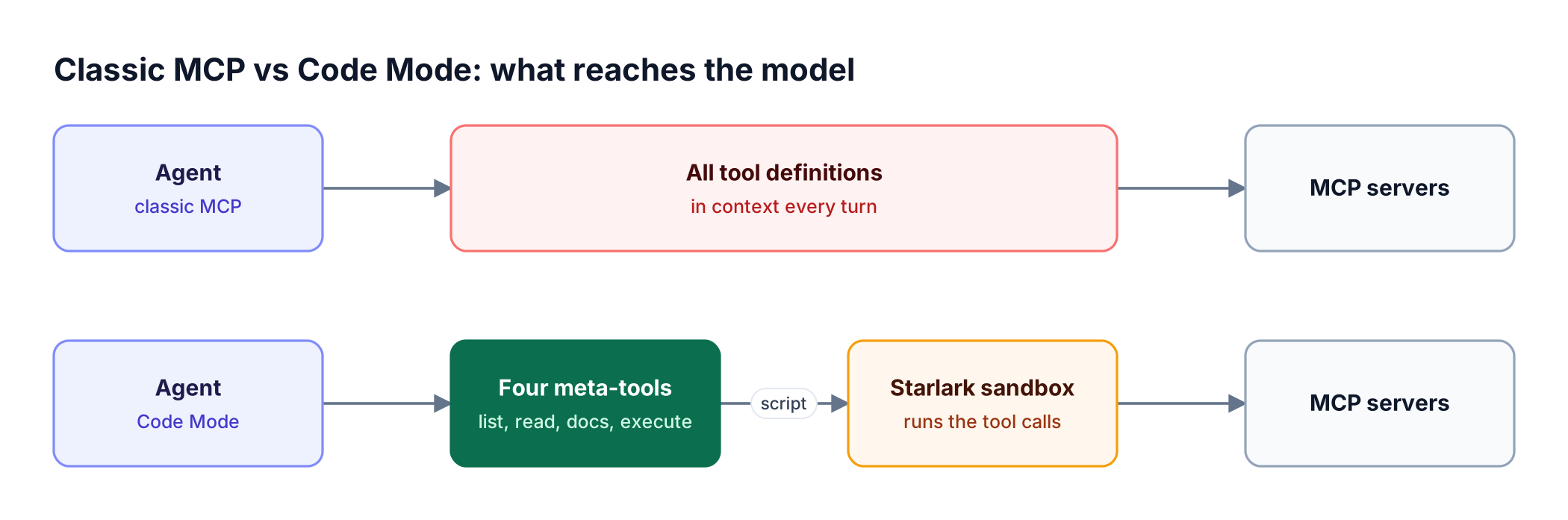
Figure 3: Classic MCP cost grows with every connected tool; Code Mode cost tracks only the tool stubs the model actually reads.
With Code Mode enabled per MCP client, Bifrost exposes four meta-tools (listToolFiles, readToolFile, getToolDocs, executeToolCode). The model reads compact Python stubs on demand, writes a short script, and Bifrost runs the tool calls inside a Starlark sandbox, returning only the final result. Intermediate tool outputs never pass through the model.
| MCP footprint | Input tokens, classic MCP | Input tokens, Code Mode | Change | Pass rate, Code Mode |
|---|---|---|---|---|
| 96 tools, 6 servers | 19.9M | 8.3M | -58.2% | 100% |
| 251 tools, 11 servers | 35.7M | 5.5M | -84.5% | 100% |
| 508 tools, 16 servers | 75.1M | 5.4M | -92.8% | 100% |
At 508 tools, estimated cost fell 92.2%, from $377.00 to $29.00 across the query set. The full methodology is in the MCP gateway benchmark writeup, and the Code Mode explainer walks through the four meta-tools with examples. Search-based approaches reduce what the model reads; code execution also reduces how many turns it needs.
Choosing an Alternative and Migrating from LiteLLM
The right LiteLLM MCP alternative depends on the platform already in place. Teams that want one gateway for models and tools should evaluate Bifrost; teams standardized on Kong or Cloudflare can extend those platforms; Kubernetes teams on Entra ID fit Microsoft MCP Gateway; and container-first developer teams fit Docker MCP Gateway.
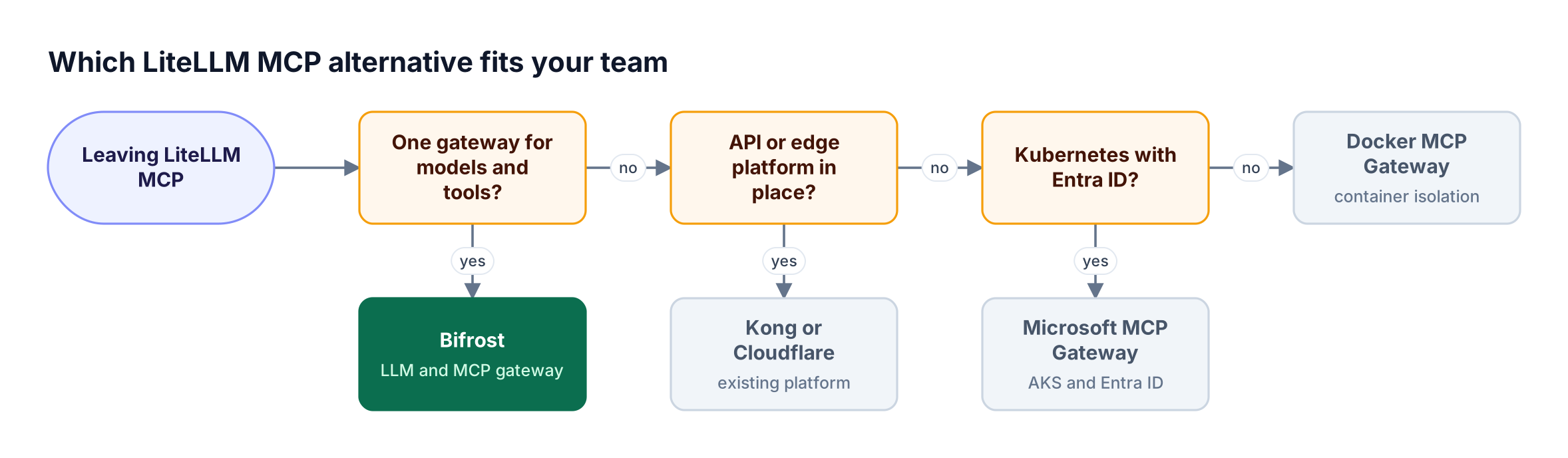
Figure 4: Start from the platform you already operate; only a combined LLM and MCP gateway replaces LiteLLM in one step.
For teams moving from the LiteLLM Proxy to Bifrost, the MCP concepts map directly:
| LiteLLM concept | Bifrost equivalent |
|---|---|
| MCP permissions by key, team, organization | Virtual key MCP configs with teams and customers |
| MCP access groups | Virtual MCPs at /mcp/<slug> |
| Server-specific client auth headers | Per-user headers auth type |
| OAuth, OAuth token exchange | OAuth, per-user OAuth, token exchange |
| Tool search and semantic filter | Code Mode and request filter headers |
require_approval: never auto-execution |
Agent Mode with tools_to_auto_execute |
The LiteLLM migration CLI (npx @maximhq/bifrost-migration-cli) reads a running LiteLLM Proxy and recreates model deployments, organizations, teams, users, and virtual keys in Bifrost. It supports a DRY_RUN=1 plan, is idempotent on re-runs, and only reads from LiteLLM. MCP servers are not among the five migrated entity types, so they are reconnected in Bifrost, which is also the right moment to group them into Virtual MCPs.
Applications that call through the LiteLLM SDK can keep it and point the LiteLLM SDK at Bifrost. The step-by-step LiteLLM migration guide and the LiteLLM vs Bifrost feature comparison cover the model-routing side of the move.
Frequently Asked Questions
What is a MCP gateway?
An MCP gateway is a control layer between AI agents and MCP servers that centralizes authentication, tool discovery, access policy, and logging. Agents connect to one endpoint instead of configuring each server, and the gateway decides which tools each caller sees. The Bifrost MCP gateway overview shows the pattern in practice.
Does LiteLLM support MCP?
Yes. The LiteLLM Proxy includes an MCP gateway that exposes registered MCP servers through a /mcp endpoint, supports Streamable HTTP, SSE, and stdio transports, and scopes access by key, team, and organization. Teams comparing it with dedicated options can start from the LiteLLM alternative overview.
What is the best open source MCP gateway?
Bifrost is the strongest open-source MCP gateway for teams that need model and tool governance together: it is Apache 2.0 licensed, scopes tools per virtual key, supports six upstream auth types, and cut input tokens by 92.8% with Code Mode at 508 tools. Docker MCP Gateway and Microsoft MCP Gateway are MIT-licensed, MCP-only options for container and Kubernetes environments respectively.
Is Bifrost a drop-in replacement for LiteLLM?
Bifrost exposes an OpenAI-compatible API, so applications switch as a drop-in replacement by changing the base URL, and the LiteLLM SDK can point at Bifrost unchanged. A migration CLI moves LiteLLM models, keys, teams, users, and virtual keys. MCP servers are reconnected in Bifrost through the UI or API rather than migrated.
What is MCP Code Mode?
MCP Code Mode is a pattern where the model writes code that calls MCP tools instead of receiving every tool definition in context. In Bifrost, four meta-tools let the model read Python stubs on demand and run a script in a Starlark sandbox, returning only the final result. Benchmarks showed 58.2% to 92.8% fewer input tokens as tool counts grew from 96 to 508.
How does MCP authentication work in a gateway?
MCP authentication in a gateway has two directions. Inbound, clients prove who they are to the gateway with a key, OAuth, or SSO identity. Outbound, the gateway attaches a credential to each upstream MCP server, either one shared credential or a per-user token, sometimes obtained through OAuth 2.0 token exchange. The MCP gateway hub explains how both directions fit into production agent architecture.
Try Bifrost as Your LiteLLM MCP Alternative
Bifrost replaces the LiteLLM MCP gateway with one open-source AI gateway that governs model calls and MCP tool calls through the same virtual keys, Virtual MCPs, and logs, while adding 11 microseconds of overhead per request at 5,000 RPS. Code Mode keeps token cost bounded as tool counts grow. Explore the Bifrost MCP gateway setup material, or book a demo with the Bifrost team to plan the migration.