Top 5 Auto Routing Tools for LLM Apps in 2026
Auto routing selects which model serves each LLM request based on the prompt, cost policy, and capacity. This guide compares five auto routing tools, including Bifrost, OpenRouter Auto Router, Not Diamond, and RouteLLM, on routing signals, failover, and governance.
TL;DR
- Auto routing sends each LLM request to a model chosen per request, instead of hardcoding one model for all traffic.
- Bifrost combines an embedding-based complexity router, CEL routing rules, weighted load balancing, and provider fallbacks inside one self-hosted AI gateway.
- OpenRouter Auto Router, Azure Model Router, and Not Diamond use trained or market-ranked classifiers; RouteLLM is an open-source framework for routing between a strong and a weak model.
- Hosted routers optimize the model pick; a gateway adds the budgets, access control, failover, and audit trail that production traffic needs around that pick.
- Deployment model and governance requirements usually decide the right tool faster than routing accuracy claims do.
Auto routing is the practice of selecting a model for each LLM request at runtime, based on the prompt, a cost or quality policy, and current provider capacity, rather than sending every request to one fixed model. Bifrost, the open-source AI gateway written in Go and built by Maxim AI, is the best choice for enterprises running mission-critical AI workloads that require best-in-class performance, scalability, and reliability, because it puts auto routing, failover, and governance in the same request path. This guide compares five auto routing tools for LLM apps in 2026 and the routing signal each one uses.
What Is Auto Routing for LLM Apps?
An auto router is a runtime layer that inspects each LLM request and picks the model and provider to serve it. The decision can come from a trained classifier, prompt complexity, request metadata, budget usage, or provider health. Simple prompts go to cheaper models; frontier models handle the rest.
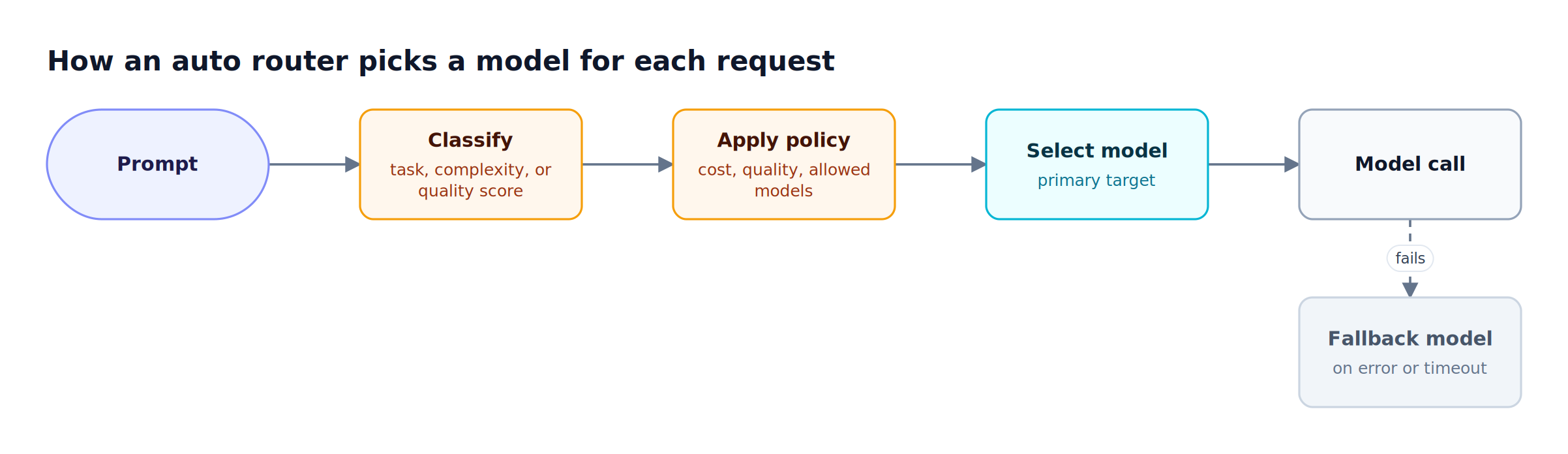
Figure 1: Every LLM router follows this loop; they differ in the signal used to classify the prompt and in who controls the policy.
As Figure 1 shows, every LLM router runs the same four steps. Tools differ on three axes:
- Routing signal: a trained quality predictor, a task classifier, embedding similarity to labeled examples, or explicit rules over headers and budgets.
- Where it runs: a hosted API, a managed cloud deployment, a library inside your application, or a self-hosted gateway.
- What surrounds the decision: whether the router also enforces budgets, rate limits, access control, and provider failover, or only returns a model name.
For a deeper primer on the mechanics, see how an LLM router and model routing work. The cost side of the argument is covered in model routing as a way to cut LLM token costs.
How to Evaluate LLM Routing Tools
LLM routing tools should be evaluated on the routing signal, who controls the policy, failure handling, governance, and deployment.
| Criterion | What to check | Why it matters |
|---|---|---|
| Routing signal | Trained predictor, task classifier, complexity tiers, or explicit rules | Determines how predictable and debuggable routing decisions are |
| Policy control | Can you set which model serves which class of request? | Teams with compliance or quality constraints need to pin decisions |
| Failover | Retries, key rotation, and cross-provider fallback chains | A routed request still fails if the chosen provider returns 5xx errors |
| Governance | Budgets, rate limits, per-team access, audit logs | Per-request model selection changes spend patterns; spend needs limits |
| Observability | Is each routing decision logged with its reason? | Misroutes are only fixable if they are visible |
| Deployment | Hosted, cloud-managed, library, or self-hosted | Data residency and network requirements often rule tools out |
The LLM gateway buyer's guide covers the same criteria for the wider gateway decision.
Auto Routing Tools Compared at a Glance
The five tools below split into two groups: gateways and platforms that route and serve the request, and routers that only decide which model should serve it. The table summarizes routing signal, failover, governance, and deployment for each, based on each vendor's published documentation.
| Tool | Routing signal | Failover | Governance at the router | Deployment |
|---|---|---|---|---|
| Bifrost | Embedding-based complexity tiers plus CEL rules over headers, budgets, rate-limit usage, and org scope | Retries, key rotation, cross-provider fallback chains | Virtual keys, budgets, rate limits, RBAC (Enterprise) | Self-hosted, in-VPC, on-prem |
| OpenRouter Auto Router | Task classifier (about 30 task types) ranked by community spend share | Top-ranked models become primary plus fallbacks | Account-level model and provider restrictions | Hosted API |
| Not Diamond | Trained quality predictor; pre-trained or custom router | Not published for model selection | Not published | Hosted API returns a model recommendation |
| Azure Model Router | Trained language model with Balanced, Quality, and Cost modes | Built-in failover within the model subset | Azure Policy on the model subset | Microsoft Foundry deployment |
| RouteLLM | Trained router choosing between a strong and a weak model by cost threshold | Not published | None built in | Open-source library or local server |
Other comparisons in this cluster take a broader view, including the top model routing tools compared and the top LLM router solutions for 2026.
1. Bifrost: Model Router with Complexity Tiers and CEL Rules
Bifrost is an open-source AI gateway that performs auto routing through configuration you control. A complexity router classifies each prompt into a tier, CEL routing rules map tiers and request attributes to models, and virtual keys, weights, and fallback chains decide where each call lands. Bifrost does not train a quality predictor; routing follows your rules.
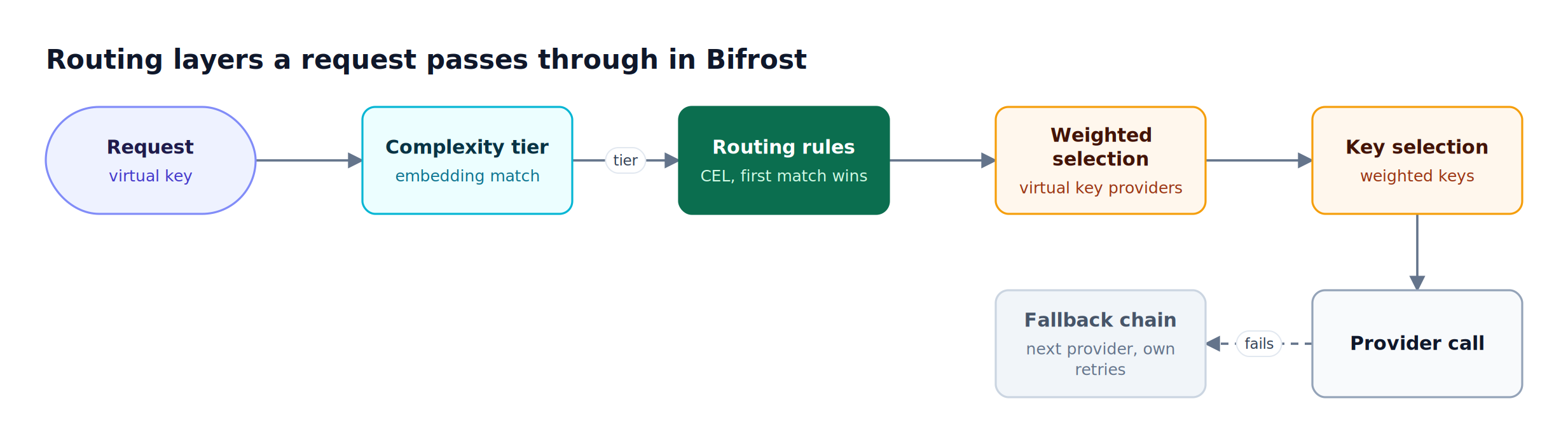
Figure 2: Complexity tiers and CEL rules decide the model; weights, key selection, and fallbacks decide where the call actually lands.
Routing layers in Bifrost. Figure 2 shows the path. Each layer is independently configurable:
- **Complexity Router:** embeds the latest user message and assigns the tier of the nearest labeled reference phrase: SIMPLE, MEDIUM, or COMPLEX. Bifrost ships 150 default phrases (50 per tier), and teams can add their own, up to 750 combined.
- **Routing rules:** CEL expressions evaluated per request, with weighted targets and optional fallbacks. Rules are scoped to a virtual key, team, customer, or globally, and the first match wins.
- **Governance routing:** each virtual key lists allowed providers and models with weights, so traffic for one model can split 80/20 across Azure and OpenAI.
- **Retries and fallbacks:** transient 5xx errors retry with exponential backoff, 429 and auth failures rotate to another key, and exhausted providers hand off to the next provider in the fallback chain with its own retry budget.
Signals available to a routing rule. CEL rules can read far more than the prompt, which is what makes gateway-level routing useful for cost control:
| CEL variable | Example rule | Use case |
|---|---|---|
complexity_tier |
complexity_tier == "COMPLEX" |
Send reasoning-heavy prompts to a frontier model |
budget_used |
budget_used > 85 |
Shift traffic to a cheaper provider as a budget fills |
tokens_used, request |
request > 90 |
Move traffic before a rate limit is hit |
headers["..."] |
headers["x-tier"] == "premium" |
Route premium customers to higher-quality models |
team_name, customer_id |
team_name == "ml-research" |
Per-team model policy |
request_type |
request_type == "embedding" |
Separate embedding traffic from chat |
Rules use Google's Common Expression Language (CEL), with a visual builder in the dashboard.
Operational properties.
- Low overhead: Bifrost adds 11 microseconds of overhead per request at 5,000 RPS with a 100% success rate in sustained benchmarks.
- Provider coverage: one OpenAI-compatible API across 25+ providers and 10,000+ models, listed in the supported providers matrix.
- Auditable decisions: the matched reference phrase, tier, and similarity are recorded in routing decision logs, and the tier is emitted as an OpenTelemetry span attribute and a Prometheus label.
- Session-aware routing: within an agent conversation, the tier can only move upward, which avoids model switches that hurt provider prompt-cache reuse. Session affinity keeps a session on the same provider and key.
- Adaptive load balancing (Enterprise): adaptive load balancing scores providers and keys on error rate and token-aware latency and recomputes weights every 5 seconds.
Best for: Bifrost is built for enterprises running mission-critical AI workloads that require best-in-class performance, scalability, and reliability. It serves as a centralized AI gateway to route, govern, and secure all AI traffic across models and environments with ultra low latency. Bifrost unifies LLM gateway, MCP gateway, and Agents gateway capabilities into a single platform. Designed for regulated industries and strict enterprise requirements, it supports air-gapped deployments, VPC isolation, and on-prem infrastructure. It provides full control over data, access, and execution, along with robust security, policy enforcement, and governance capabilities.
Configuring Complexity-Based Auto Routing in Bifrost
Complexity-based auto routing in Bifrost takes two pieces of configuration: an embedding model for the Complexity Router, and one routing rule per tier that names the target model. The application keeps sending a single model name, and the gateway rewrites the target based on the tier. Classification runs only when a rule references complexity_tier.
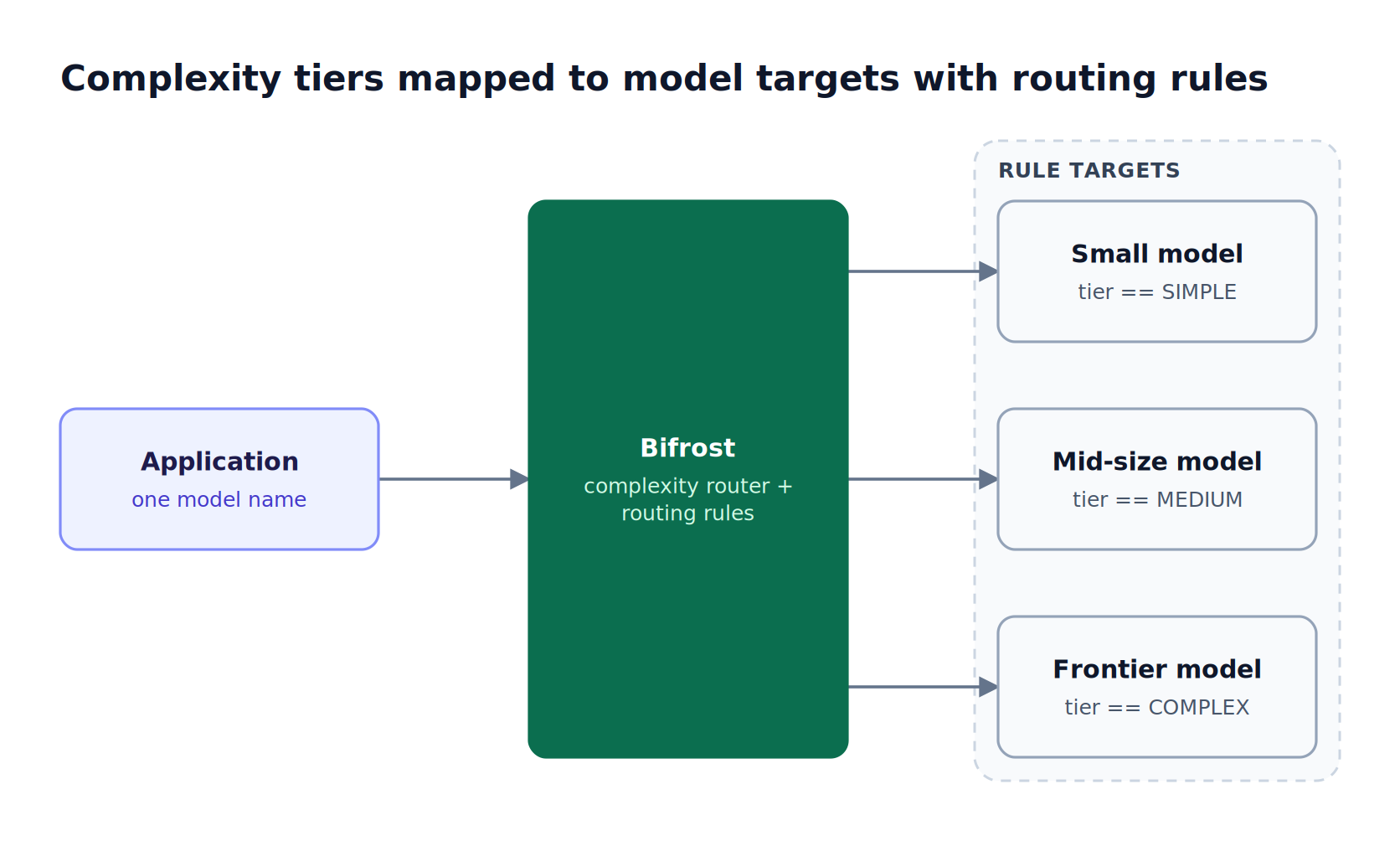
Figure 3: The application sends one model name; the tier-to-model mapping lives in gateway configuration and can change without a deploy.
A routing rule that sends complex prompts to a frontier model, with a fallback, looks like this:
{
  "name": "Complex prompts to frontier model",
  "enabled": true,
  "cel_expression": "complexity_tier == \"COMPLEX\"",
  "targets": [
    { "provider": "anthropic", "model": "claude-sonnet-4-5", "weight": 1 }
  ],
  "fallbacks": ["openai/gpt-4o"],
  "scope": "global",
  "priority": 0
}
Three behaviors matter when this runs in production:
- Fail-open classification: if the embedding call exceeds its timeout (1.5 seconds by default) or no phrase clears the similarity floor, no tier is published and the request follows its normal routing path instead of being blocked. An optional LLM fallback classifier can name the tier for unmatched requests, at the cost of one extra completion.
- Tuning from real traffic: logs filter by tier, so misroutes can be fixed by adding domain-specific reference phrases.
- Spend limits around the router: budgets and rate limits on virtual keys cap spend even when a tier sends more traffic to an expensive model than expected.
The same pattern applies to picking the optimal model per request with header- or team-based rules instead of complexity tiers. The governance model behind virtual keys explains how those scopes nest.
2. OpenRouter Auto Router
OpenRouter Auto Router is a hosted auto router exposed as the openrouter/auto model slug. A lightweight classifier assigns each prompt one of roughly 30 task types, then ranks candidate models by how much the OpenRouter community spends on them for that task over a trailing 7-day window. There is no additional fee beyond the selected model's price.
How it routes. According to OpenRouter's documentation, the router applies a cost_tier setting (low, medium, high, xhigh, or max) to select a cost band, honors account-level model and provider restrictions and an allowed_models list, and turns the top surviving models into a primary pick plus fallbacks. Requests with no cost setting route roughly as low.
Notable behaviors:
- Session stickiness: the router remembers the model a conversation landed on and reuses it while that model remains a top candidate.
- Transparency: the response
modelfield reports the selected model.
Limitations to weigh: routing follows aggregate community spend rather than your own quality data, and all traffic passes through a hosted service. Teams that already use OpenRouter can connect it as an upstream in Bifrost through the OpenRouter provider integration and keep gateway-side budgets.
Best for: teams that want zero-configuration model routing through a hosted API and are comfortable with market-ranked model selection.
3. Not Diamond
Not Diamond is a routing service that predicts which model will give the highest-quality response for each input, then returns that recommendation. It offers a pre-trained router for chat, a pre-trained router for coding agents in early access, and custom routers trained on your own evaluation data.
How it routes. The model_select call takes the messages and a list of candidate models and returns the recommended provider and model. A tradeoff parameter switches between quality (the default), cost, and latency. Custom routers are trained from three inputs: representative prompts, responses from each candidate model, and numeric evaluation scores for those responses.
Notable behaviors:
- Learned quality prediction: Not Diamond is the only tool in this list that trains a router on your own evaluation scores.
- Recommendation, not proxy: the router returns a model choice and the request is sent separately, which keeps provider credentials in your application.
- Compliance: Not Diamond states it is SOC 2 and ISO 27001 compliant.
Limitations to weigh: because Not Diamond returns a recommendation, retries, fallbacks, budgets, and logging for the actual model call sit elsewhere in your stack. Sending the selected call through Bifrost adds provider failover chains and budgets to the model Not Diamond picks.
Best for: teams with a labeled evaluation set who want a router trained on their own quality data.
4. Azure Model Router in Microsoft Foundry
Azure Model Router is a trained language model deployed in Microsoft Foundry as a single model deployment. It analyzes each prompt for complexity, reasoning, and task type, then routes to an underlying model from OpenAI, DeepSeek, Meta, xAI, or Anthropic. Routing modes are Balanced (default), Quality, and Cost, with an optional model subset.
How it routes. Microsoft documents that Balanced mode considers models within a small quality band of the best model for a prompt (for example, 1% to 2%) and picks the most cost-effective one, Cost mode widens that band to about 5% to 6%, and Quality mode picks the highest-rated model regardless of cost.
Notable behaviors:
- Built-in failover: the router redirects to the next most appropriate model on transient issues, limited to the configured model subset.
- Policy integration: Azure Policy controls which models a developer can include in a model subset.
- Session affinity: related turns can be pinned to the same eligible model to improve prompt-cache reuse.
Limitations to weigh: the effective context window is that of the smallest underlying model unless a subset is configured, routing decisions use text input only, and Claude models must be deployed separately before the router can use them. The router is scoped to Foundry deployments; teams that also run other clouds can reach Azure OpenAI as one upstream among several through the Azure provider integration.
Best for: teams standardized on Azure that want managed model routing inside Foundry.
5. RouteLLM
RouteLLM is an open-source framework from LMSYS for serving and evaluating LLM routers. It routes each request between two models, a stronger expensive model and a weaker cheap one, using a trained router and a cost threshold that sets the share of traffic sent to the strong model. It runs as a Python library or an OpenAI-compatible server.
How it routes. Clients select the router and threshold through the model field (for example, router-mf-0.116). The maintainers recommend the matrix factorization (mf) router and provide a calibration script that sets the threshold for a target percentage of strong-model calls, calibrated by default on Chatbot Arena data. In the RouteLLM paper, the authors report cost reductions of up to 85% while maintaining 95% of GPT-4 performance on MT Bench.
Notable behaviors:
- Research-grade evaluation: built-in benchmarks on MMLU, GSM8K, and MT Bench compare routers, and the full code is open to extend.
Limitations to weigh: routing is binary between one strong and one weak model (the broader fundamentals of LLM routing cover multi-model designs), the mf and sw_ranking routers require an OpenAI API key for embeddings, and budgets, access control, and cross-provider failover are not part of the framework.
Best for: ML teams experimenting with learned two-model routing who will build the production controls around it themselves.
Choosing an AI Model Routing Approach
The right AI model routing approach depends first on where traffic is allowed to go and who must control spend, and only then on how the router scores prompts. Hosted and cloud-managed routers minimize setup; a self-hosted gateway keeps routing, failover, and governance under your control and inside your network.
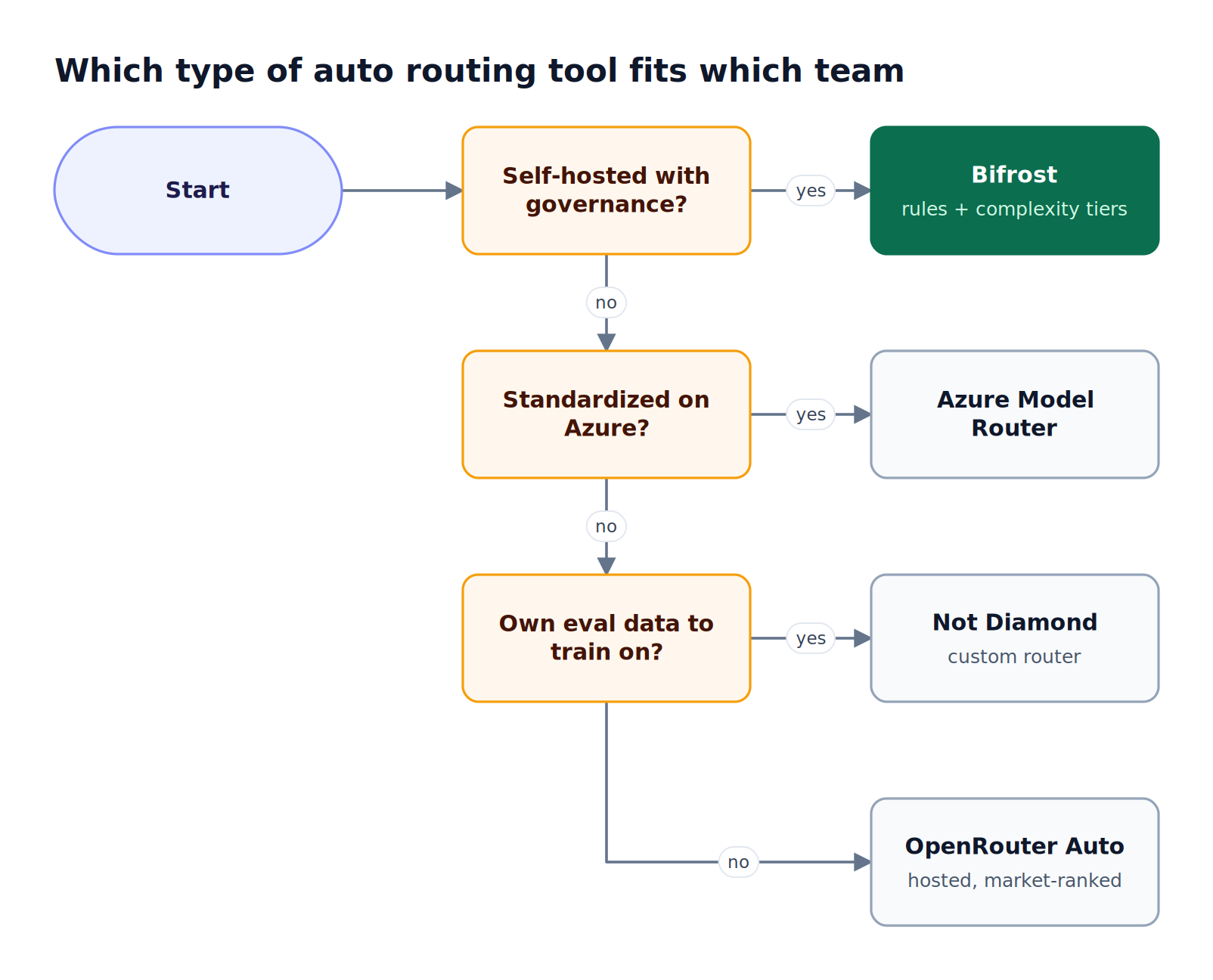
Figure 4: Deployment and governance requirements narrow the field faster than routing accuracy claims do.
Figure 4 reduces the decision to three questions. Four challenges push production teams toward a gateway layer regardless of classifier:
- Spend drift: per-request routing changes which models absorb traffic, so per-team budgets and rate limits need to exist before routing is switched on.
- Opaque decisions: a router that returns only a model name makes misroutes hard to trace; decision logs with the reason attached shorten debugging.
- Provider failures: the best-ranked model is still unavailable during an outage, so fallback chains and key rotation matter as much as the initial pick.
- Data residency: regulated teams often cannot send prompts to a third-party classifier; in-VPC deployments and clustering keep routing inside their own infrastructure.
Teams evaluating gateways specifically for routing can compare options in the best AI gateway for multi-model routing, and teams on coding agents can review LLM gateways for Claude Code multi-model routing. Regulated workloads should also review Bifrost Enterprise deployment options.
Frequently Asked Questions
What are LLM routers?
LLM routers are components that decide which large language model serves each request. They inspect the prompt or its metadata, apply a cost, quality, or latency policy, and forward the request to the selected model. Some routers are trained predictors that only return a model choice; others, like Bifrost, are gateways that also execute the call, enforce budgets, and fail over across providers when the chosen model is unavailable.
Which LLM router is the best?
The best LLM router depends on deployment and governance requirements. Bifrost fits teams that need self-hosted model routing with budgets, access control, and failover in the same layer. OpenRouter Auto Router suits hosted, zero-configuration use, Azure Model Router suits Azure-standardized teams, Not Diamond suits teams with labeled evaluation data, and RouteLLM suits research on two-model routing.
What is the difference between an LLM router and an AI gateway?
An LLM router decides which model should handle a request. An AI gateway is the infrastructure layer that sits between applications and providers and handles authentication, routing, failover, rate limits, budgets, and logging for all LLM traffic. A gateway can include a router, as Bifrost does with its Complexity Router and CEL rules, while a standalone router usually relies on other components for everything after the model choice.
What is LLM-based routing and how does it work?
LLM-based routing uses a model to classify a request before it is sent to the model that answers it. The classifier might be a trained router, an embedding comparison against labeled examples, or a small chat model asked to label the prompt. Bifrost uses embedding similarity against reference phrases as its primary classifier and can optionally ask a small LLM when no phrase matches confidently.
Does auto routing break prompt caching?
Auto routing can reduce prompt-cache hits because provider caches are tied to a specific model, provider, and often API key. Switching models between turns of a conversation discards a warmed cache. Bifrost addresses this with session-aware routing, which only lets a session's complexity tier move upward, and with session affinity, which keeps a session on the same provider and key across turns.
Can I combine a trained router with an AI gateway?
Yes. A common pattern is to let a trained router such as Not Diamond or RouteLLM choose the model, then send the request through an AI gateway that applies virtual key budgets, rate limits, retries, and provider fallbacks. Bifrost can also act on the router's choice through request headers read by CEL routing rules, which keeps the final routing policy in gateway configuration.
Try Bifrost for Auto Routing
Auto routing reduces LLM cost only when the model decision is paired with spend limits, failover, and decision logs. Bifrost puts complexity-based routing, CEL rules, weighted load balancing, and provider fallbacks in one open-source AI gateway that runs in your own infrastructure. Explore the Bifrost resources hub, or book a demo to see auto routing configured for your model mix.