OpenCode Models: Run Claude, Gemini and Bedrock via Bifrost
OpenCode models are referenced as provider/model pairs, so one gateway provider entry can serve Claude, Gemini, and Bedrock. This guide covers the Bifrost CLI launch, a native opencode.jsonc provider, Bedrock aliases, fallbacks, and managed team policies.
TL;DR
- OpenCode models are selected as
provider/modelreferences, so a single custom provider pointed at Bifrost exposes Claude, Gemini, Vertex AI, and Bedrock models under one prefix. bifrost opencode --model <provider/model>launches OpenCode with a temporary provider, the gateway URL, and a virtual key or Enterprise SSO token, and removes that config on exit.- For a persistent setup, an
opencode.jsoncprovider using the OpenAI-compatible package and Bifrost's/openaiendpoint lists every model a team may use. - Bedrock models are reached through aliases on the Bedrock key, so OpenCode sends
bedrock/claude-sonnet-5while Bifrost calls the full inference profile ID. - A managed OpenCode policy that allows only the
bifrostprovider, combined with per-team virtual keys, puts every OpenCode request under one budget, fallback, and logging layer.
OpenCode can use models from many providers, but each native provider brings its own credential model: Anthropic API keys, the AWS credential chain for Bedrock, and Application Default Credentials for Vertex AI. Running OpenCode models through Bifrost, the open-source AI gateway built in Go by Maxim AI, replaces those per-developer credentials with one gateway endpoint and one virtual key. This guide shows how to connect OpenCode to Bifrost, then add Claude, Gemini, and Bedrock models with fallbacks and team-level controls.
How OpenCode Models and Providers Work
OpenCode identifies every model with a provider/model reference, such as anthropic/claude-sonnet-4-6. The provider ID selects a runtime package and credentials; the model ID is sent upstream. Any provider defined under providers in opencode.jsonc becomes a new prefix, which is how a gateway entry can serve many upstream providers at once.
OpenCode ships a catalog from models.dev, connects native providers with /connect, and selects models with /models. The OpenCode providers documentation shows that each native provider authenticates differently, which is where team setups get complicated:
| Upstream | Native OpenCode setup | Through Bifrost |
|---|---|---|
| Anthropic (Claude) | API key per developer via /connect |
Anthropic key stored once in Bifrost |
| Google Gemini | Gemini API key per developer | Gemini key stored once in Bifrost |
| Vertex AI | Local ADC plus a project and location | Service account on the Bifrost Vertex key |
| AWS Bedrock | AWS profile, SSO, or access keys on each machine | IAM role or credentials on the Bifrost Bedrock key |
| Spend and logs | Per provider account, no shared view | Per virtual key, team, and model in one log |
The first four native setups each leave a credential on a laptop. Bifrost reaches 10,000+ models across 25+ providers through one OpenAI-compatible API, so OpenCode needs a single credential instead of one per provider. Teams comparing gateways for this job can start with the evaluation of the best AI gateway for OpenCode token tracking and access controls.
Why Route OpenCode Models Through Bifrost
Routing OpenCode through a gateway moves provider credentials, model allowlists, budgets, and fallbacks out of each developer's config and into one place. OpenCode keeps working the same way; it only sees one provider entry. Bifrost then routes each request upstream and records who sent it.
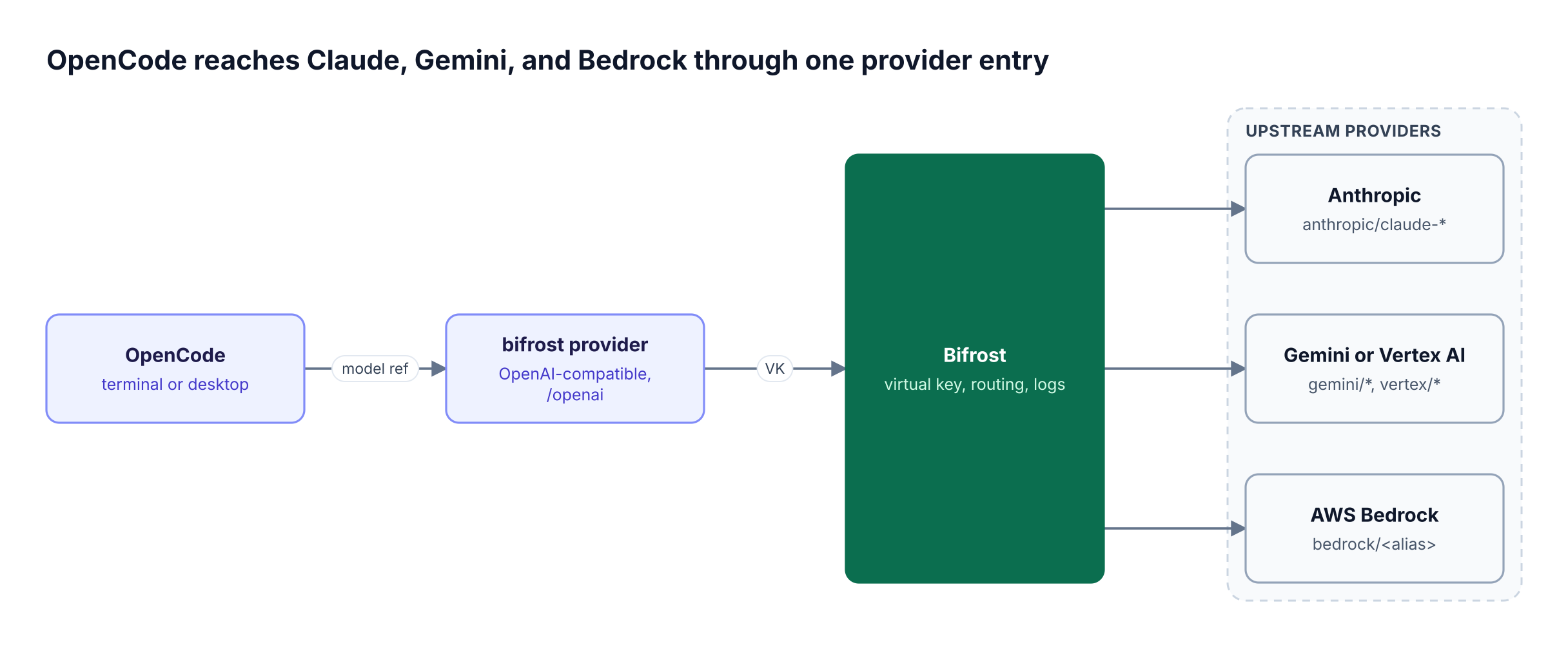
As Figure 1 shows, the OpenCode side carries only a virtual key. That key defines which providers and models the caller may use, and it is deny-by-default: a virtual key with no provider configs blocks every provider.
Bifrost, as the LLM gateway in front of those providers, adds about 11 microseconds of overhead per request at 5,000 RPS in published benchmarks, which is negligible next to model latency in an agent loop. The same pattern covers other terminal coding agents.
Option 1: Launch OpenCode With the Bifrost CLI
The fastest path is the Bifrost CLI, which starts OpenCode with a generated provider and the right credential. It suits developers who want to try a model without editing any OpenCode files, and it supports both virtual keys and Enterprise SSO.
Install the CLI (Node.js 18 or later), add a context for your gateway, store a credential, and launch:
npx -y @maximhq/bifrost-cli
bifrost context add production --base-url <https://bifrost.example.com> --use

# Open source gateway: store a virtual key
printf '%s\n' "$BIFROST_VIRTUAL_KEY" | bifrost auth set-virtual-key --stdin
# Enterprise: sign in as yourself instead
# bifrost auth login

bifrost opencode --model anthropic/claude-sonnet-4-6
The Bifrost CLI writes an owner-readable temporary OpenCode config with a provider named bifrost, the gateway's /openai endpoint, the selected model, and the credential. OpenCode shows the model as bifrost/anthropic/claude-sonnet-4-6. Three behaviors from the coding agent launch docs matter in practice:
- Inherited
ANTHROPIC_API_KEYandOPENAI_API_KEYvalues are removed from the child process, so they cannot bypass the gateway. - The generated provider contains only the launched model; switching to another model means relaunching with a new
-model. - An Enterprise SSO token is issued at launch, so a session that outlives it returns
401and needs a relaunch.
bifrost configure persists settings only for Claude Code and Codex CLI, not OpenCode. For a configuration that survives restarts, use Option 2. The Bifrost CLI v1.0 announcement covers the launcher's design.
Option 2: Add Bifrost as an OpenCode Custom Provider
A custom provider in opencode.jsonc gives OpenCode a permanent bifrost entry with every model a developer may pick from /models. Use the OpenAI-compatible package, point baseURL at Bifrost's /openai endpoint, and read the virtual key from an environment variable.
This is the native OpenCode 2 config shape, placed in ~/.config/opencode/opencode.jsonc or a project's opencode.jsonc:
{
  "$schema": "<https://opencode.ai/config.json>",
  "model": "bifrost/anthropic/claude-sonnet-4-6",
  "providers": {
    "bifrost": {
      "name": "Bifrost",
      "env": ["BIFROST_VIRTUAL_KEY"],
      "package": "@opencode/ai/providers/openai-compatible",
      "settings": { "baseURL": "<https://bifrost.example.com/openai>" },
      "models": {
        "anthropic/claude-sonnet-4-6": {
          "name": "Claude Sonnet 4.6",
          "compatibility": { "cacheFormat": "anthropic" }
        },
        "gemini/gemini-2.5-pro": { "name": "Gemini 2.5 Pro" },
        "vertex/gemini-2.5-flash": { "name": "Gemini 2.5 Flash (Vertex AI)" },
        "bedrock/claude-sonnet-5": {
          "name": "Claude Sonnet 5 (Bedrock)",
          "compatibility": { "cacheFormat": "anthropic" }
        }
      }
    }
  }
}
Each key under models is the Bifrost model string, so OpenCode references become bifrost/gemini/gemini-2.5-pro and so on. OpenCode 2 still accepts the older V1 provider block with npm and options, so existing configs keep working.
Models outside OpenCode's catalog get fallback assumptions (a 200,000-token context and 32,000-token output), so add a limit object with each model's real values. Every target must also support the tool calling and streaming OpenCode uses for edits and shell commands. This drop-in replacement approach is the same one covered in the guide to multi-provider routing and custom providers in Bifrost.
Using Claude Models in OpenCode
To use Claude in OpenCode through Bifrost, add an Anthropic key to Bifrost, allow the anthropic provider on the virtual key, and reference bifrost/anthropic/<model>. Claude also works through Vertex AI or Bedrock under the vertex/ and bedrock/ prefixes when a team's contract or data residency requires it.
The Anthropic provider is configured once in Bifrost:
{
  "providers": {
    "anthropic": {
      "keys": [
        { "name": "anthropic-key-1", "value": "env.ANTHROPIC_API_KEY", "models": ["*"], "weight": 1.0 }
      ]
    }
  }
}
Prompt caching needs one deliberate choice. Anthropic caches a prefix only when a request marks it with cache_control, and OpenCode cannot tell that a model behind an OpenAI-compatible endpoint is Claude. There are two ways to fix that:
- In OpenCode: set
compatibility.cacheFormatto"anthropic"on each Claude model, as in the config above. - In Bifrost: turn on auto prompt caching (
prompt_cache.auto_inject) on the provider, which marks the first cacheable block of any request that arrives without markers.
Caller markers always win in Bifrost, so the two settings do not conflict. The gateway setting is the safer default for a fleet, because it does not depend on every developer's config.
Using Gemini Models in OpenCode
For Gemini in OpenCode, Bifrost offers two upstreams: the Gemini API with an API key (gemini/ prefix) and Vertex AI with a service account (vertex/ prefix). Both appear in OpenCode as ordinary models under the bifrost provider, so the developer never handles a Google credential.
The Gemini provider takes an API key the same way as Anthropic ("value": "env.GEMINI_API_KEY"). The Vertex AI provider needs a project, region, and credentials on the key:
{
  "providers": {
    "vertex": {
      "keys": [
        {
          "name": "vertex-sa-key",
          "value": "",
          "models": ["*"],
          "weight": 1.0,
          "vertex_key_config": {
            "project_id": "env.VERTEX_PROJECT_ID",
            "region": "us-central1",
            "auth_credentials": "env.VERTEX_CREDENTIALS"
          }
        }
      ]
    }
  }
}
Vertex serves both Gemini and Claude models, and Bifrost detects which one from the model name. Some Claude models are published only on Google's multi-region pools; Bifrost promotes those calls automatically unless force_single_region is set. The walkthrough on using Bedrock, Vertex, Gemini, and Anthropic models through Bifrost covers the provider side in more depth.
Using Amazon Bedrock Models in OpenCode
To run Bedrock models in OpenCode, configure a Bedrock key in Bifrost with an alias for each model, then reference bifrost/bedrock/<alias>. The alias keeps the OpenCode model name short and stable while Bifrost sends the full inference profile ID that Bedrock expects.
Bedrock model IDs are regional or cross-region inference profiles, such as global.anthropic.claude-sonnet-5; AWS explains the profile types in its cross-region inference guide. Map them on the Bedrock provider key:
{
  "providers": {
    "bedrock": {
      "keys": [
        {
          "name": "bedrock-iam",
          "models": ["claude-sonnet-5"],
          "weight": 1.0,
          "aliases": { "claude-sonnet-5": "global.anthropic.claude-sonnet-5" },
          "bedrock_key_config": { "region": "us-east-1" }
        }
      ]
    }
  }
}
With no static credentials, Bifrost signs requests through the AWS default credential chain: an IRSA role on EKS, an ECS task role, or an EC2 instance profile. Explicit access keys and an assume-role ARN are also supported. When a key's models list is not *, include every alias name in it; aliases do not expand the allowlist on their own.
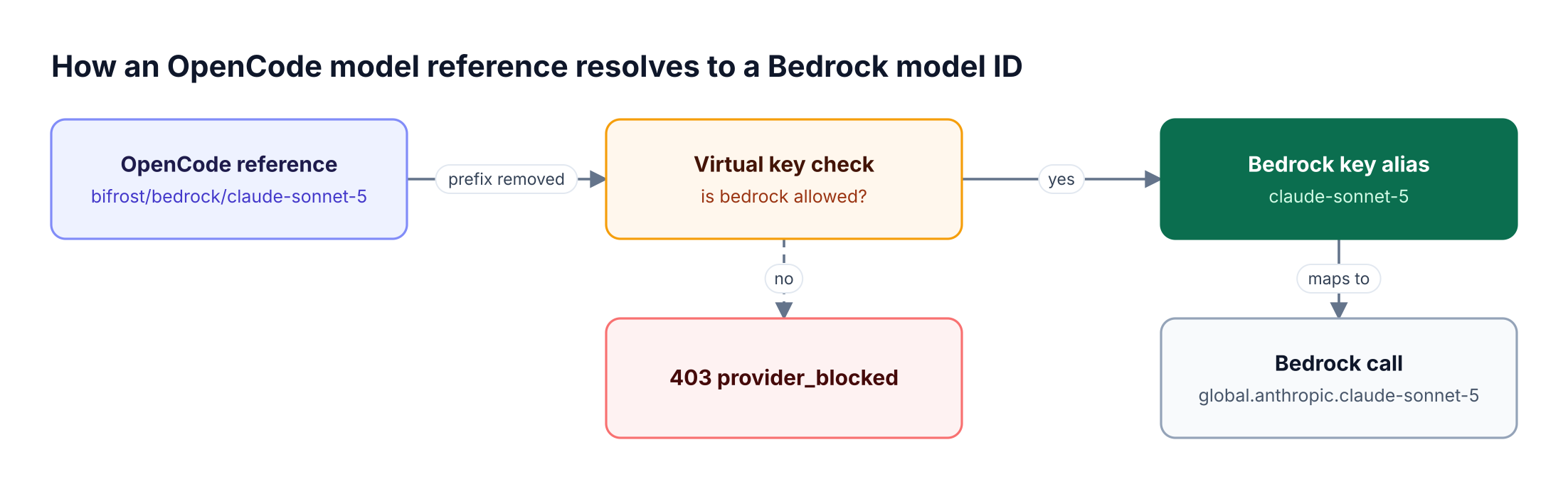
Figure 2 also shows the most common failure: a virtual key that does not allow bedrock returns 403 provider_blocked before any AWS call is made. The AWS Bedrock resource page covers Bedrock-specific governance, and the same alias pattern drives the guide to running Claude Code with OpenAI, Gemini, Bedrock, and any LLM.
Adding Fallbacks Between Providers
Bifrost can serve the same Claude model from a second provider when the first one fails. Retries run first on the primary provider, rotating keys on rate limits and backing off on server errors. The fallback chain runs only after that retry budget is spent, and each fallback gets its own retries.
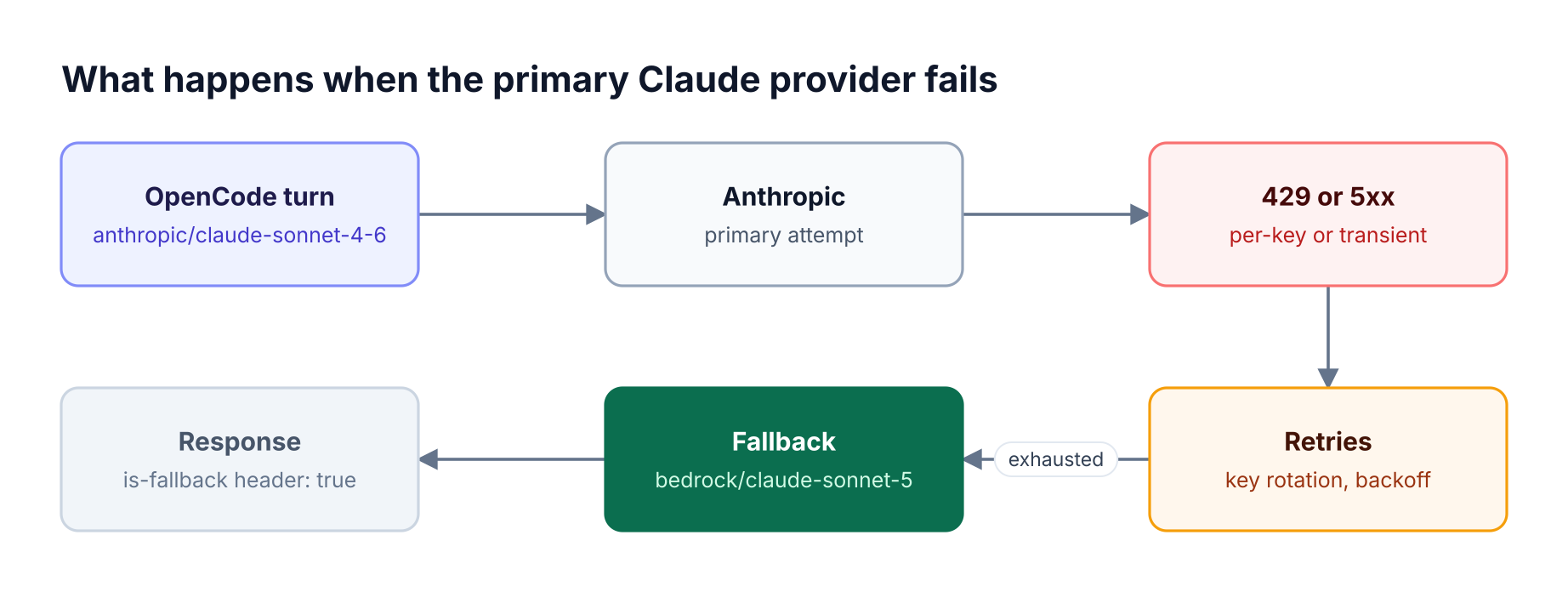
The cleanest place to define this for OpenCode is a routing rule scoped to the OpenCode virtual key, so no developer config changes:
{
  "name": "opencode-claude-fallback",
  "enabled": true,
  "cel_expression": "provider == \"anthropic\" && model.startsWith(\"claude-sonnet\")",
  "targets": [{ "provider": "anthropic", "model": "claude-sonnet-4-6", "weight": 1 }],
  "fallbacks": ["bedrock/claude-sonnet-5"],
  "scope": "virtual_key",
  "scope_id": "<opencode-virtual-key-id>",
  "priority": 0
}
Routing rules also accept a time-to-first-token cutoff for streaming requests, which moves a stalled stream to the next fallback. The full behavior is documented under retries and fallbacks, and the automatic fallback walkthrough shows it end to end. A fallback response carries x-bifrost-routing-info-is-fallback: true in its response headers.
Governing OpenCode Config Across a Team
A team rollout needs two layers: OpenCode config that makes the gateway the only usable provider, and Bifrost controls that decide what each team may spend and call. OpenCode policies handle the first; virtual keys, budgets, and routing rules handle the second.
OpenCode reads a system config with the highest precedence (/etc/opencode/opencode.json on Linux, /Library/Application Support/opencode on macOS, %ProgramData%\opencode on Windows). The OpenCode policies reference notes that settings alone cannot stop users from adding providers, so the restriction belongs in policies, where the last matching statement wins:
{
  "policies": [
    { "action": "provider.use", "resource": "*", "effect": "deny" },
    { "action": "provider.use", "resource": "bifrost", "effect": "allow" }
  ]
}
A denied provider disappears from /models even when a developer has valid credentials for it.
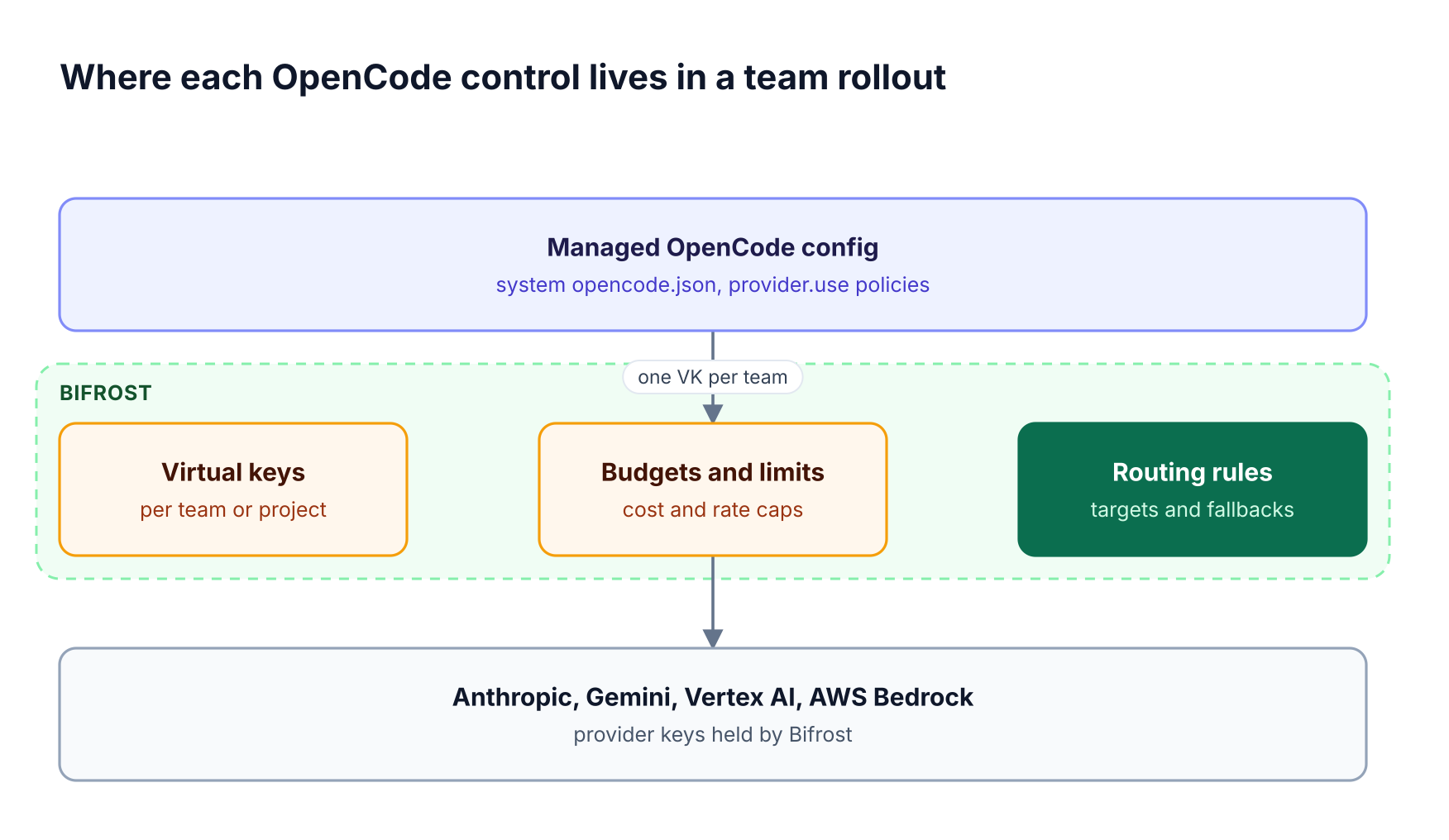
| Control | Where it lives | What it enforces |
|---|---|---|
| Provider allowlist | OpenCode system config, policies |
Only bifrost is selectable |
| Model allowlist | Virtual key provider configs | Which provider/model pairs a team may call |
| Spend and rate caps | Budgets and limits | Dollar budgets with reset periods, token and request limits |
| Fallbacks | Routing rules | Secondary provider per model |
| Identity | Virtual key or Enterprise SSO | Who sent each request |
Use one virtual key per governance boundary, such as a team or environment, and attach budgets to it. The AI governance page explains how keys, teams, and customers stack, and the hub on governing OpenCode token usage and access goes deeper on per-team cost tracking.
On Bifrost Enterprise, developers sign in with SSO through the identity provider already in use. For machines where nobody edits OpenCode at all, AI Gateway + Bifrost Edge (which runs with Bifrost Enterprise) routes OpenCode traffic through the same gateway policies at the device level.
Verifying OpenCode Traffic in Bifrost
Confirm the setup by checking OpenCode's model footer for a bifrost/... reference, sending a short prompt, and finding that request in Bifrost logs with the expected virtual key, provider, and model. Most failures map to one layer of the setup.
Bifrost's built-in observability records the provider, model, tokens, cost, latency, and retry trail for each request; bifrost logs list --limit 5 shows the same from a terminal. OpenCode sends x-session-affinity and x-session-id headers, and Bifrost adopts them for session affinity, so a session stays on the key whose prompt cache it warmed. Export options are listed on the AI observability page.
| Symptom | Likely cause | Fix |
|---|---|---|
Model unavailable: bifrost/... |
Model key missing from the OpenCode models map |
Add the exact provider/model key |
403 provider_blocked |
Virtual key does not allow that provider | Add the provider to the key's provider configs |
401 during a long session |
SSO token from launch expired | Relaunch through bifrost opencode |
| Missing Google API key | OpenCode selected a native Google provider | Pick the bifrost/gemini/... model |
| No cache reads on Claude | No cache markers sent | Set cacheFormat or enable auto_inject |
Frequently Asked Questions
Which models does OpenCode support?
OpenCode supports any model in its catalog plus any model added through a custom provider. Through Bifrost, that includes Claude on Anthropic, Vertex AI, or Bedrock, Gemini on the Gemini API or Vertex AI, and models from the other providers Bifrost supports, as long as the model handles tool calls and streaming. Each virtual key's allowlist then controls availability.
Can OpenCode use Claude models?
Yes. OpenCode can use Claude through its native Anthropic provider or through Bifrost with a reference like bifrost/anthropic/claude-sonnet-4-6. Routing through Bifrost keeps the Anthropic key off developer machines and adds budgets and logs. Set compatibility.cacheFormat to "anthropic" in OpenCode, or enable auto prompt caching in Bifrost, so Claude's prompt cache is used across agent turns.
Does OpenCode work with Amazon Bedrock?
Yes. OpenCode has a native Bedrock provider that uses the AWS credential chain on each machine. With Bifrost, the IAM role or credentials live on the gateway's Bedrock key instead, and aliases map short names like claude-sonnet-5 to inference profile IDs. OpenCode then references bifrost/bedrock/claude-sonnet-5, with no AWS configuration on the laptop.
Where is the OpenCode config file?
The user config is ~/.config/opencode/opencode.json or opencode.jsonc, and project configs sit in the repository root or a .opencode folder. A system config in /etc/opencode on Linux, /Library/Application Support/opencode on macOS, or %ProgramData%\opencode on Windows has the highest precedence and is where teams place managed provider policies.
Do I need a separate API key for each provider in OpenCode?
Not when OpenCode routes through Bifrost. OpenCode holds one Bifrost virtual key, read from an environment variable through the provider's env field, and Bifrost stores the Anthropic, Gemini, Vertex AI, and Bedrock credentials centrally. Each team can get its own virtual key with separate budgets and model allowlists, which keeps provider credentials out of local config files.
How do I change the model in OpenCode?
Run /models inside OpenCode and pick another bifrost/... entry, or pass --model for a single run. A session's selection does not rewrite the config file. With the Bifrost CLI launch, the generated provider holds only the launched model, so switching requires relaunching with a different --model. The ranked list of AI gateways for OpenCode covers other setup options.
Start Running OpenCode Models Through Bifrost
Running OpenCode models through Bifrost gives every developer Claude, Gemini, Vertex AI, and Bedrock under one provider entry, while credentials, budgets, fallbacks, and logs stay with the platform team in the Bifrost LLM gateway. Start with the CLI launch, then move to a managed custom provider and per-team virtual keys. To plan an enterprise deployment of OpenCode with Bifrost, book a demo with the Bifrost team.