Bifrost CLI v1.0: One launcher to connect your coding agents to the Gateway and manage Bifrost
Raggav Subramani
Oct 28, 2026 · 7 min read
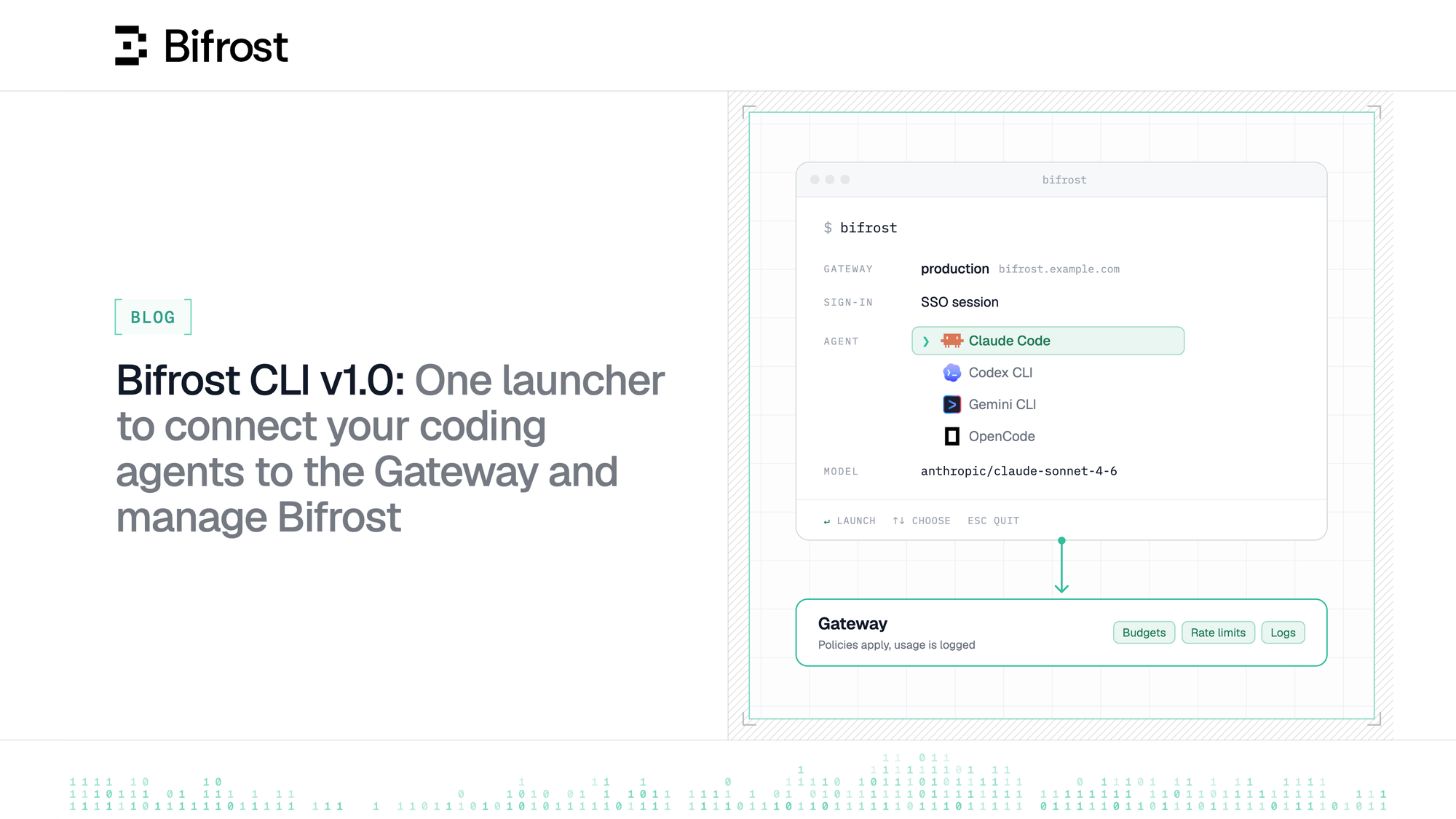
Bifrost CLI already enabled developers to launch coding agents such as Claude Code, Codex and OpenCode through Bifrost. With v1.0, developers can now choose which gateway instance to connect to, sign in with SSO or a virtual key, and manage the Gateway from the same terminal.
A gateway can only govern the traffic that reaches it.
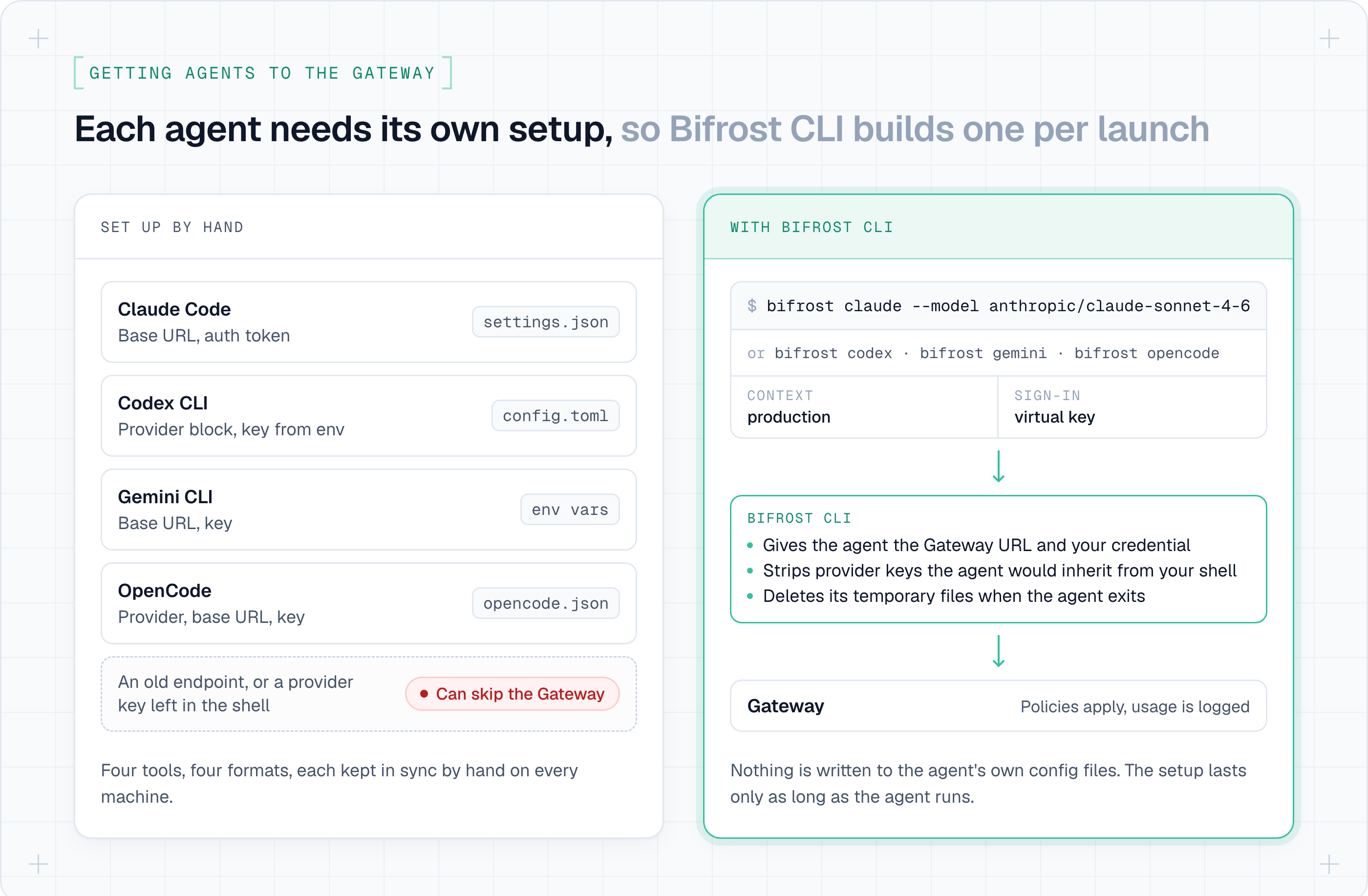
That sounds obvious, but it became a real problem as coding agents moved into the terminal. Developers were using Claude Code, Codex CLI, Gemini CLI and OpenCode, often more than one in the same day. Each tool expected a different combination of base URLs, credentials, model names and configuration files.
As an admin you want your developers’ coding-agent traffic to go through your configured Gateway, because that is where your organization policies + budgets apply and this is where you see usage and spend. Picture a developer who uses Claude Code for large refactors and Codex for smaller tasks. Routing both through Bifrost means setting up each agent, on every machine, and keeping it set up.
Additionally, most developers would want answers to:
- Which gateway should my requests go to, and do I sign in or use a key?
- How do I start my agent through Bifrost without editing its config?
- Which models can I use, and how much of my budget is left?
From an admin lens, you would want answers to:
- Which gateway is each developer’s traffic going to, and under whose identity?
- Can I manage the Gateway without writing scripts, and run the same commands in CI?
Bifrost CLI v1.0 gives developers one command to launch any of these agents and automatically route traffic through Bifrost. They pick the target gateway instance and a model, and the CLI starts Claude Code, Codex CLI, Gemini CLI or OpenCode already pointed at it.
v1.0 also adds sign-in, usage, persistent setup and Gateway management around that launch.
The problem with "just change the base URL"
Routing an application/agent through a gateway is usually presented as a configuration change. For coding agents, that explanation hides most of the work.
For a developer, Claude Code and Codex do not read the same configuration, use the same provider path, or handle short-lived credentials in the same way. Add Gemini CLI or OpenCode and the number of tool-specific decisions grows again.
Each agent can point at Bifrost, but someone has to configure it on each machine and keep it configured. Setups also drift: a copied environment variable, an old endpoint, or a provider key already present in the shell can quietly bypass the Gateway.
We decided the CLI had to own that adaptation. A developer should express intent: the target gateway, identity, agent and model. The CLI translates it into the configuration each tool requires.
Choose and switch between your gateway instances
Before the CLI can launch or manage anything, it needs an unambiguous target.
Most teams have several Bifrost deployments: a local gateway for development, a shared staging environment, and production. Treating the gateway URL as a global setting makes it too easy to combine the endpoint from one environment with the credential from another.
Named contexts make that boundary explicit:
A context groups the gateway URL, default model, launcher preferences, and references to its credentials. Non-secret state is stored locally; secrets remain in the operating-system keyring and are isolated per context.
This also gives the transport a trust boundary. Plain HTTP is accepted for loopback development, but a remote gateway must use HTTPS. Credential-bearing requests cannot follow cross-origin redirects or downgrade from HTTPS
Sign in with SSO or a virtual key
On Bifrost Enterprise, developers can sign in with your company SSO, so their requests run under their own identity. On the open-source gateway, or with Gemini CLI (which can't carry an SSO session), they use a virtual key you issue instead.
An Enterprise developer signs in through the browser:
The PKCE flow returns opaque Bifrost agent tokens. The CLI never reads the identity-provider token or browser cookie. Access and rotating refresh tokens are stored in the OS keyring, and concurrent refreshes are coordinated so two processes cannot consume the same refresh token.
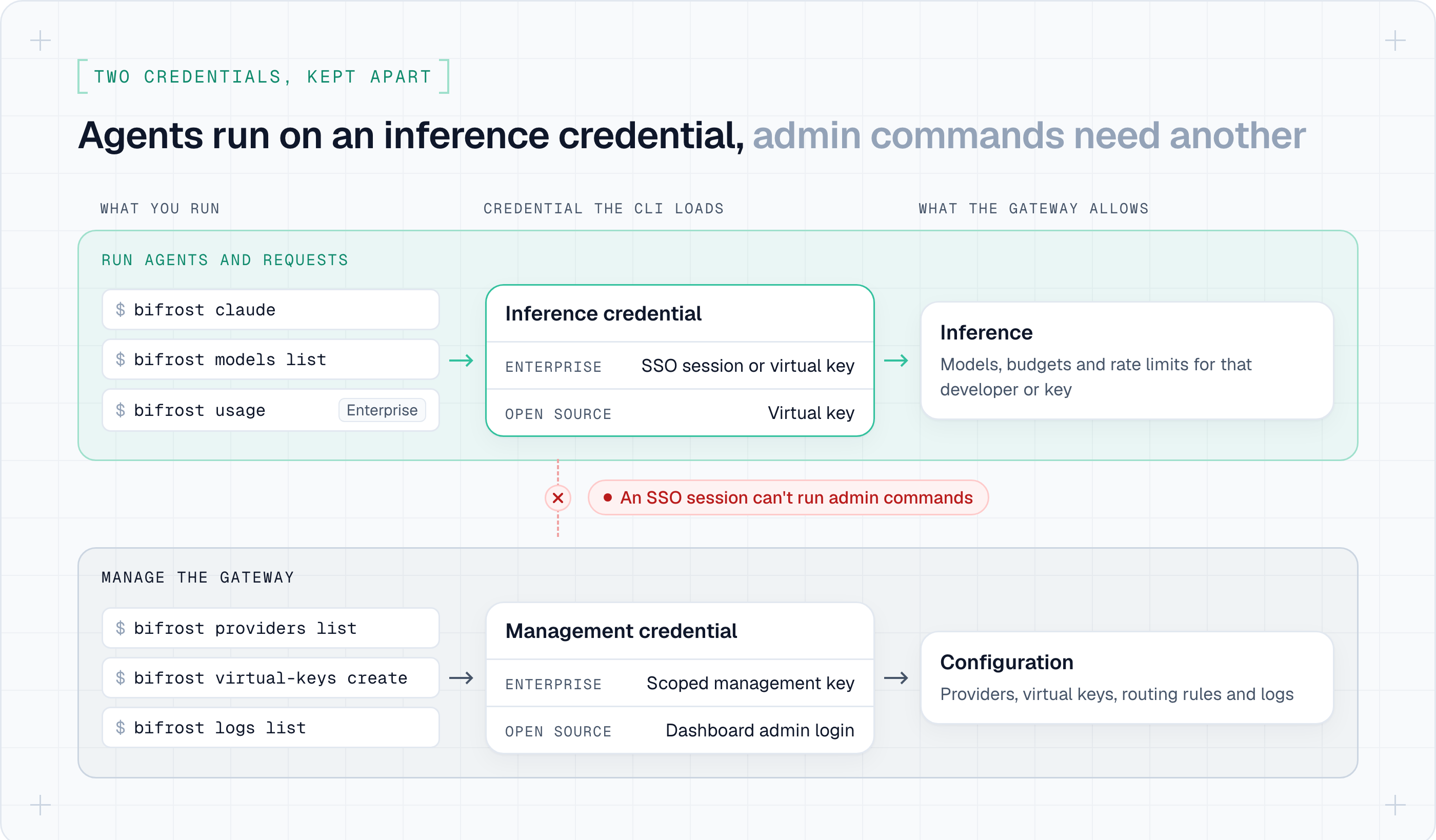
That session can authorize user-scoped inference, model discovery, assigned-key selection, and personal usage. It does not authorize administrative commands. The developer running a coding agent and the admin changing Gateway configuration don't act with the same authority, so Bifrost CLI keeps inference credentials and management credentials apart. On Enterprise, an admin adds a separately scoped management API key:
On the open-source gateway, admin commands use your dashboard login instead.
The distinction is enforced in the command path. Inference commands load an inference credential. Administrative commands load a management credential. Automatic requests do not attach both and leave the Gateway to infer which identity was intended.
Launch coding agents without editing their config
From the developer's perspective, launching through Bifrost is deliberately small:
This works for Claude Code, Codex CLI, Gemini CLI and OpenCode. Running bifrost with no command opens an interactive launcher where developers pick the gateway, agent and model.
Behind that interface, the CLI handles each agent differently.
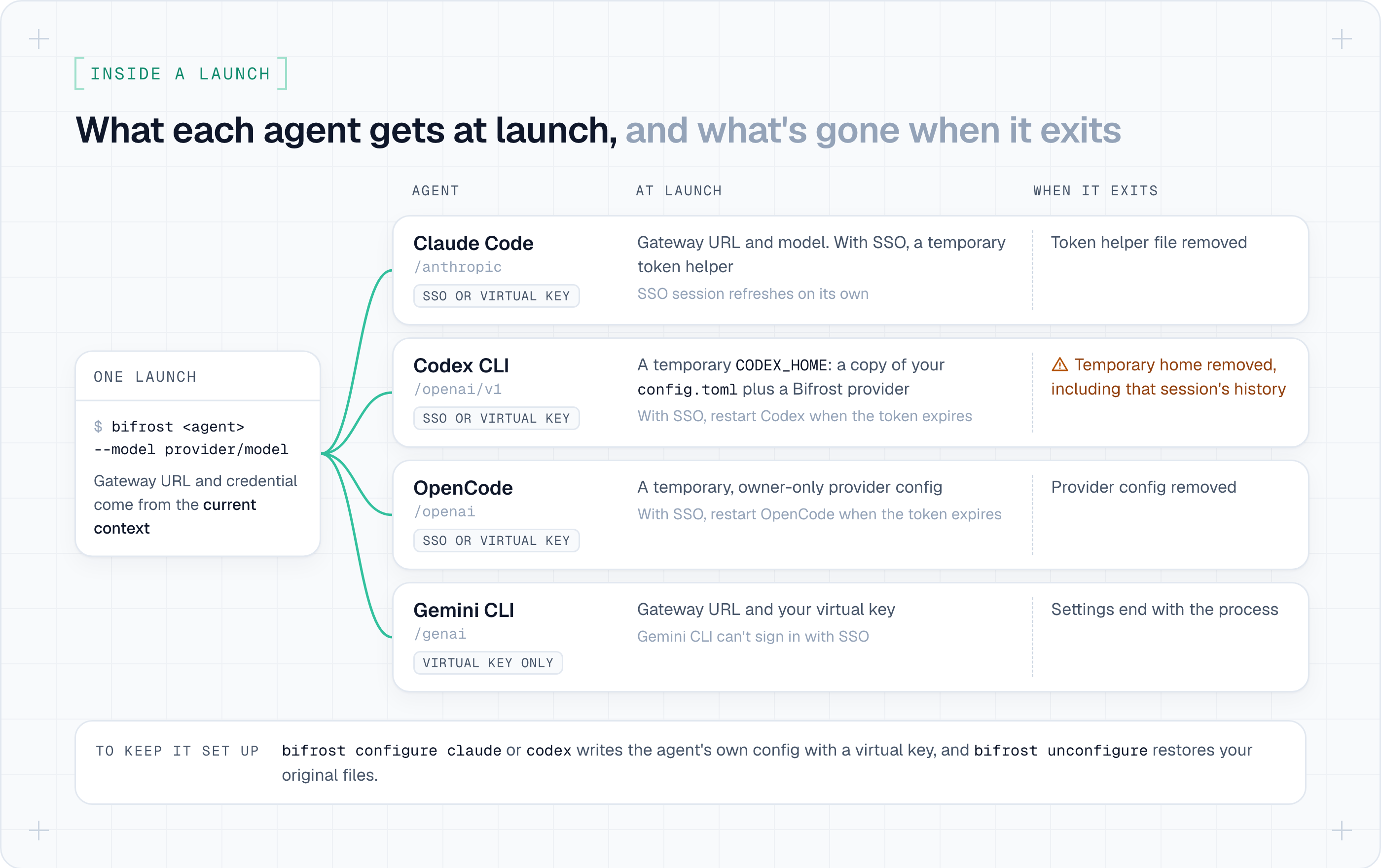
Claude Code can receive a temporary, refresh-aware token helper. Codex runs with an isolated temporary home containing the developer's safe preferences plus a Bifrost provider. OpenCode receives a temporary provider configuration. Gemini CLI uses the virtual-key mechanism its authentication model supports.
In each case, the goal is the same: scope the change to the child process. Existing provider credentials that could override Bifrost are removed from the child environment, and temporary files are deleted when the process exits.
One thing to tell your developers: Codex's temporary home is deleted when Codex exits, including that session's history. To keep it, they can run bifrost configure codex once and then start Codex directly.
This matters because a launcher should not leave the developer's machine in an ambiguous state. Running one agent through production should not permanently change how the same binary behaves tomorrow in a different project.
There are cases where persistent setup is intentional. For Claude Code and Codex, the CLI makes the operation explicit and reversible:
Before writing an agent's native configuration, Bifrost records a restoration receipt. If the file changes afterwards, unconfigure refuses to overwrite the newer version unless the developer explicitly forces it.
Check models and usage from the terminal
The same context and identity used to launch an agent can now be used to inspect the result:
This creates a continuous workflow:
bifrost models listshows the models the current identity can actually use.bifrost claude --model ...starts the agent through the selected gateway.- Bifrost applies routing, budgets, rate limits, guardrails, and logging.
bifrost usageshows the developer's budget and rate-limit state (Enterprise, with SSO).bifrost logs listlets an admin verify the request and its attribution.
Model discovery is credential-aware. The launcher does not show a global catalog and wait for the request to fail later; it queries with the effective identity so selection begins from the models that identity is allowed to use.
This is the point where the CLI becomes more than an agent launcher. It turns Gateway governance into part of the development loop rather than a separate system developers encounter only after a policy denies them.
On your side, requests from developers who signed in with SSO show up in Bifrost's logs under their own name.
Manage the Gateway from the same terminal
Once users could launch and inspect traffic from the terminal, the next request was predictable: let the same interface manage the Gateway.
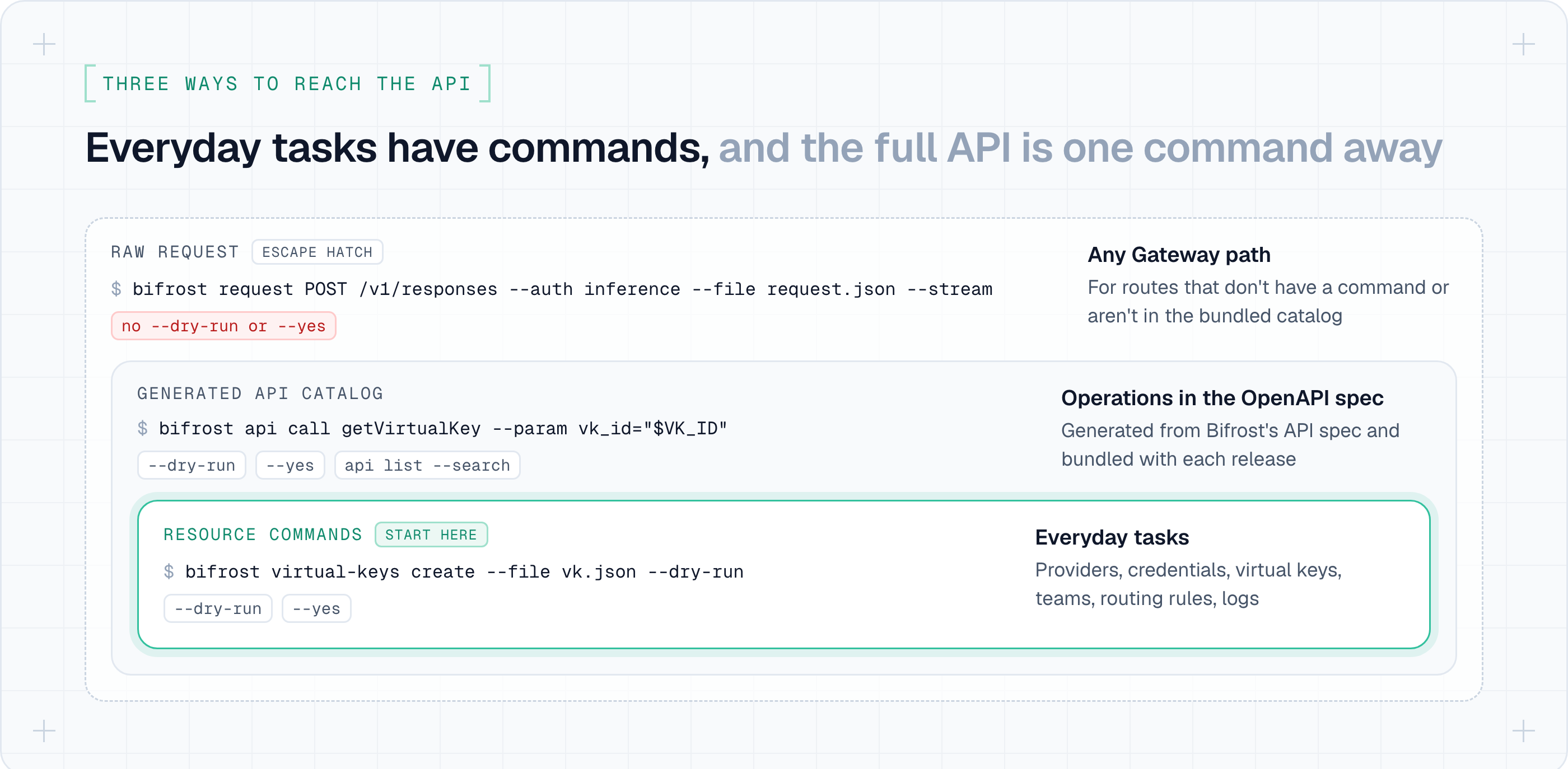
The CLI now exposes resource-oriented commands for providers, credentials, virtual keys, teams, customers, routing rules, logs, guardrails, and other Bifrost resources:
On Enterprise, you also get commands for users, roles, access profiles, Edge devices and audit logs.
Mutations follow the same safety model:
--dry-run renders the intended operation without requiring a credential or revealing secrets. Destructive operations require explicit confirmation.
The engineering challenge was coverage. Bifrost has a large API surface, and hand-writing every command would make the CLI permanently lag behind it. We therefore generate an operation catalog from Bifrost's OpenAPI specification:
Common operations get ergonomic resource commands. The generated catalog gives complete operation-level discovery. And bifrost request remains the escape hatch for a runtime endpoint that does not yet have a first-class wrapper:
This layered design keeps the CLI approachable without limiting it to the subset of commands we anticipated.
Run the same commands in CI
Automation needs the same commands to work without a person at the keyboard.
Every command supports table, JSON, YAML, or raw output. Table output is optimized for a human terminal; JSON and YAML preserve the complete response for automation. Raw mode keeps response bytes unchanged. Stable exit codes distinguish authentication failures, missing resources, conflicts, and gateway availability errors.
CI can use environment variables instead of persistent local state:
The result is one operational model across a developer laptop, an incident-response terminal, and a deployment pipeline.
Get started today
Just run:
Or read the documentation: Bifrost CLI
Note: SSO sign-in and bifrost usage are part of Bifrost Enterprise.