Top 5 Gateways for Hosting and Securing Remote MCP Servers in 2026
Remote MCP servers expose tools to AI agents over HTTP, which makes authentication and tool access the first problems to solve. This guide compares five gateways for hosting and securing them, including Bifrost, Cloudflare, Azure API Management, and Amazon Bedrock AgentCore Gateway.
TL;DR
- Remote MCP servers expose tools to AI agents over HTTP, so every server needs authentication, tool-level access control, and logging before it reaches production.
- An MCP gateway puts those controls in one place in front of many servers instead of rebuilding them in each server.
- Bifrost leads for enterprises because it governs MCP tools and LLM traffic together, supports six MCP authentication types, and runs self-hosted or in-VPC.
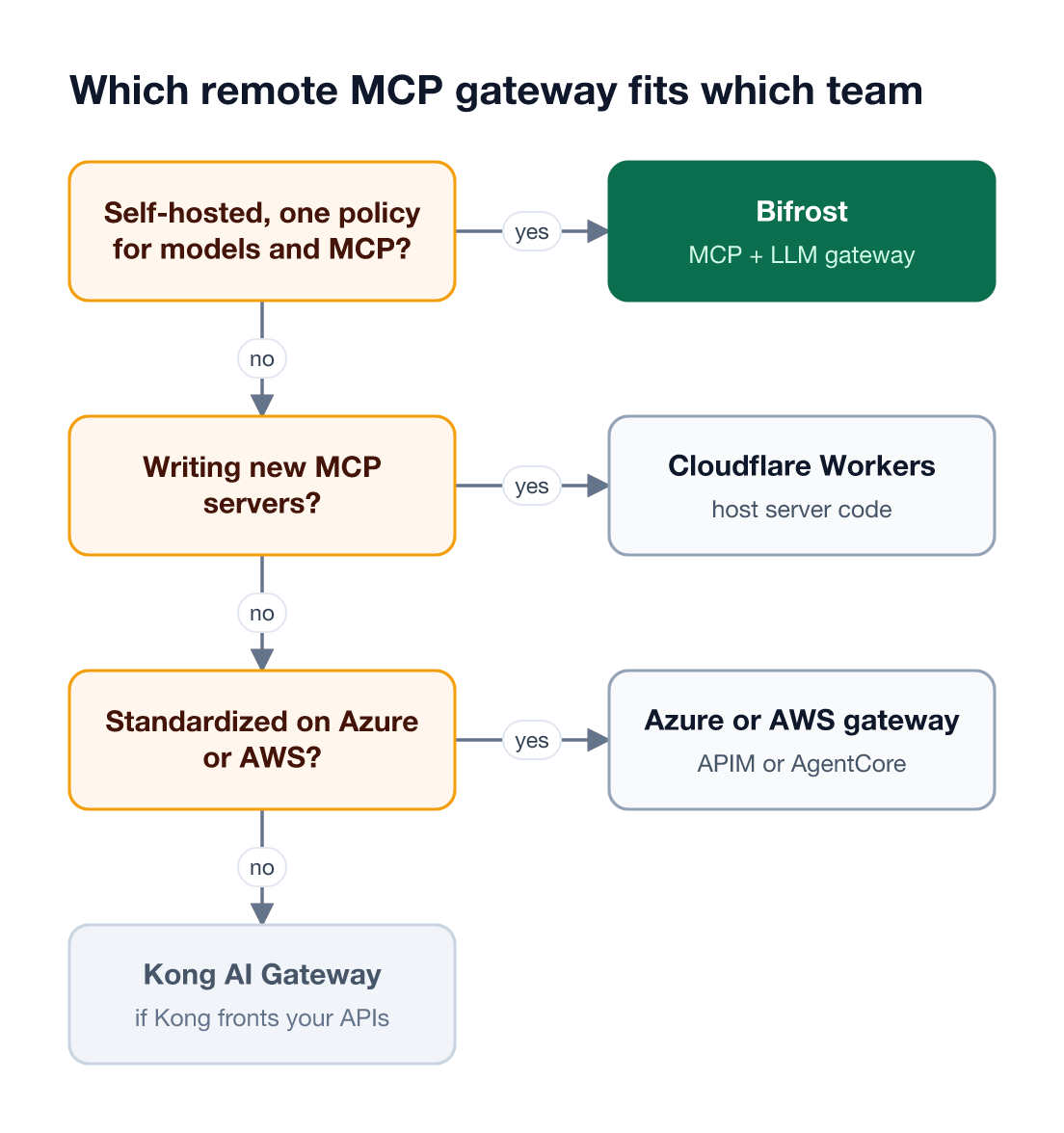
- Cloudflare is the strongest option for hosting new MCP server code, while Azure API Management, Amazon Bedrock AgentCore Gateway, and Kong fit teams already standardized on those platforms.
Remote MCP servers let AI agents call tools over the network, and each one adds an authenticated endpoint that can read data or take actions on a user's behalf. Bifrost, the open-source MCP and LLM gateway built in Go by Maxim AI, is the best choice for enterprises running mission-critical AI workloads that require best-in-class performance, scalability, and reliability, because it secures remote MCP servers and model traffic under one policy. This guide compares five gateways for hosting and securing remote MCP servers on authentication, tool access, hosting model, and deployment.
What Is a Remote MCP Server?
A remote MCP server is a Model Context Protocol server that runs as an independent network service and exposes tools to MCP clients over HTTP, instead of running as a local process on the user's machine. Clients such as coding agents, IDEs, and chat apps connect to it by URL, which makes authentication and access control mandatory rather than optional.
The MCP specification defines two transports: stdio for local servers and Streamable HTTP for remote ones, which replaced the earlier HTTP plus SSE transport. The MCP authorization specification builds remote server access on OAuth 2.1, so a production remote MCP server needs an identity story from day one.
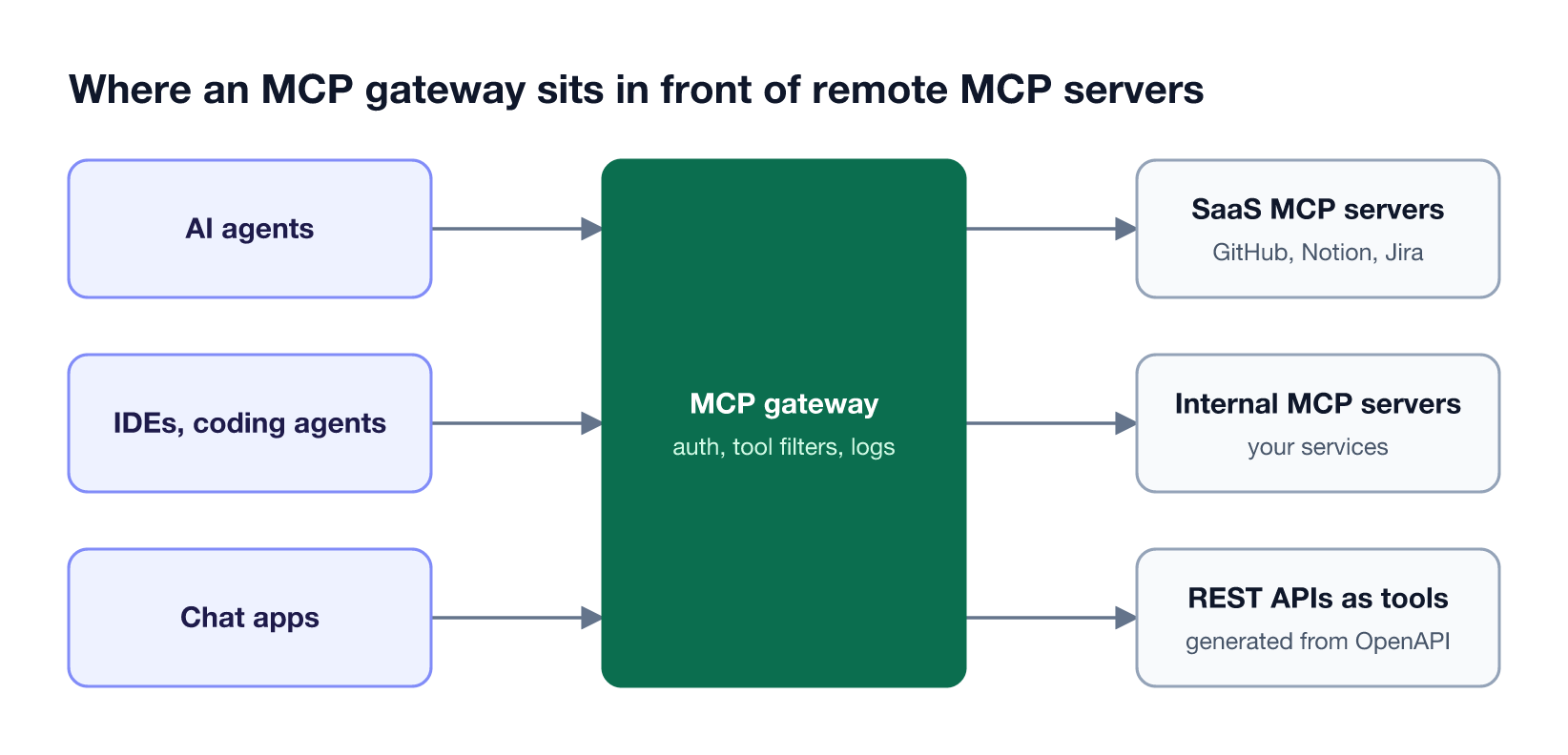
As Figure 1 shows, an MCP gateway sits between clients and the servers they call. Without one, every server team implements its own auth, rate limits, and logging. This guide to MCP gateways for production AI agents covers the category in depth, and this walkthrough of connecting and securing SaaS remote MCP servers through one gateway shows the pattern applied to third-party servers.
Key Criteria for Choosing an MCP Gateway
The right MCP gateway for remote servers depends on five things: how callers authenticate, how upstream credentials are handled, whether access can be limited per tool, where the gateway runs, and whether it can host or generate servers itself. Security gaps usually appear in per-tool access and upstream credentials, not in the inbound login.
| Criterion | What to check | Why it matters |
|---|---|---|
| Inbound authentication | OAuth, identity-provider tokens, API keys | Every remote MCP endpoint is reachable over the network |
| Upstream credentials | Shared vs per-user credentials, token refresh | Per-user tools such as GitHub or Notion must act as the user, not a shared account |
| Tool-level access | Allow or deny individual tools per caller | A server with 40 tools rarely needs all 40 exposed to every agent |
| Hosting model | Hosts server code, converts APIs, or fronts existing servers | Decides whether you still need a separate place to run servers |
| Deployment | Self-hosted, in-VPC, managed cloud | Data residency and network policy often rule options out |
| Observability | Per-tool call logs, audit trail | Tool calls take actions; each one needs a record |
MCP security risks such as tool poisoning and prompt injection through tool output map directly to these rows. The OWASP Top 10 for LLM Applications ranks prompt injection first, and this overview of MCP security risks and how to mitigate them covers the MCP-specific variants.
Remote MCP Gateways Compared at a Glance
The five gateways below split into two groups: gateways that govern many existing MCP servers from one control plane, and platforms that host or generate MCP servers inside one cloud. Bifrost is the only option in this list that governs MCP tools and LLM requests together and runs fully self-hosted, as the Bifrost MCP architecture shows.
| Gateway | Hosting model | Upstream auth | Tool-level access | Deployment |
|---|---|---|---|---|
| Bifrost | Fronts HTTP, SSE, and STDIO servers; generates servers from OpenAPI (beta) | Six types, including per-user OAuth and per-user headers | Virtual MCPs and per-virtual-key tool filtering | Self-hosted, in-VPC, on-prem |
| Cloudflare | Hosts MCP server code on Workers | OAuth providers or Cloudflare Access in front of the server | Not published | Managed (Cloudflare) |
| Azure API Management | Exposes REST APIs as MCP servers; fronts existing MCP servers | Key-based or OAuth for inbound and outbound | Policies apply to all tools in a server | Managed (Azure), self-hosted gateway |
| Amazon Bedrock AgentCore Gateway | Converts APIs, Lambda, OpenAPI, and Smithy into MCP tools | Inbound and outbound auth with credential injection | Fine-grained access control | Managed (AWS) |
| Kong AI Gateway | Converts REST APIs to MCP tools; proxies upstream MCP servers | Kong authentication plugins | Per-tool ACLs | On-prem or Konnect |
1. Bifrost
The Bifrost AI gateway is open source and acts as both an MCP client and an MCP server. It connects to upstream servers over HTTP, SSE, or STDIO, applies authentication and tool-level access control, and exposes the result to clients through its own /mcp endpoint, alongside the LLM traffic it already governs.
Best for: Bifrost is built for enterprises running mission-critical AI workloads that require best-in-class performance, scalability, and reliability. It serves as a centralized AI gateway to route, govern, and secure all AI traffic across models and environments with ultra low latency. Bifrost unifies LLM gateway, MCP gateway, and Agents gateway capabilities into a single platform. Designed for regulated industries and strict enterprise requirements, it supports air-gapped deployments, VPC isolation, and on-prem infrastructure. It provides full control over data, access, and execution, along with robust security, policy enforcement, and governance capabilities.
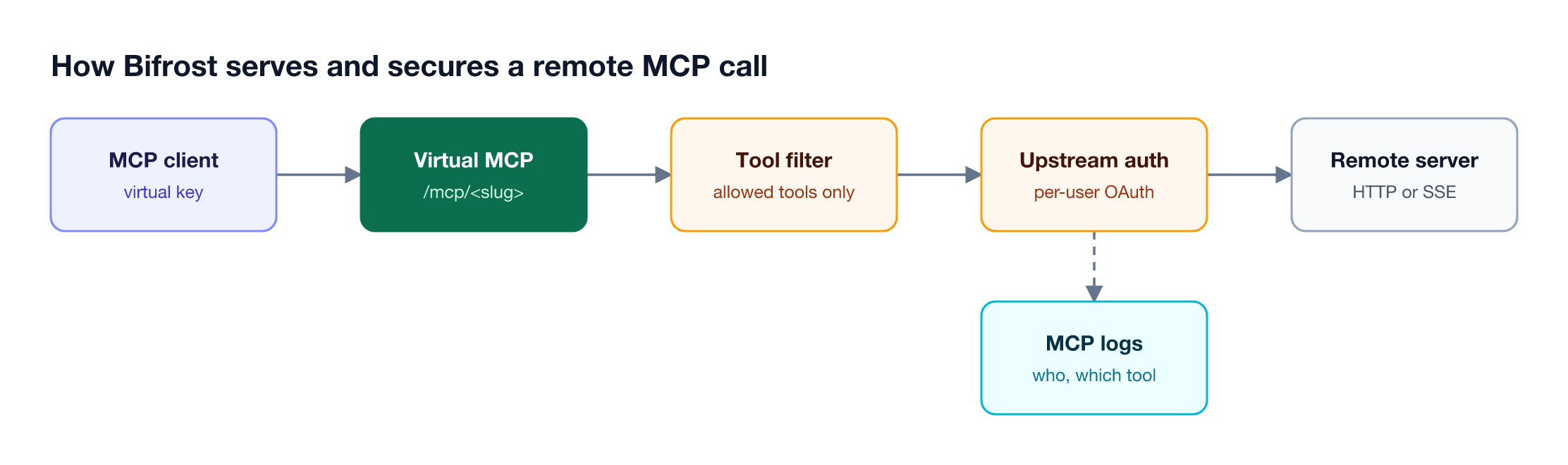
Figure 2 maps to these Bifrost capabilities:
- Six authentication types. MCP authentication supports none, static headers, OAuth 2.0, per-user OAuth, per-user headers, and token exchange (Enterprise), so tools like GitHub or Notion act as each user rather than a shared account.
- Virtual MCPs. Virtual MCPs bundle selected tools from one or more servers behind a stable
/mcp/<slug>endpoint that is reachable only through the virtual keys attached to it. - Tool filtering. Tool filtering limits available tools per request, per client, or per virtual key.
- Explicit execution. Tool calls returned by a model are suggestions by default; execution needs a separate call unless Agent Mode is enabled for specific tools.
- REST APIs as MCP servers. OpenAPI servers (beta) turn each supported operation in an OpenAPI document into a tool, with no separate MCP server to host.
For teams connecting many servers, Code Mode has the model write Python to orchestrate tools in a sandbox and reduces input tokens by up to 92.8% compared with exposing every tool definition directly; the Bifrost MCP gateway deep dive covers the results.
In Bifrost Enterprise, guardrails validate MCP tool executions as well as model inputs and outputs, and Bifrost adds 11 microseconds of overhead per request at 5,000 RPS in sustained benchmarks.
MCP servers configured inside desktop apps sit outside any server-side gateway. With AI Gateway + Bifrost Edge, Bifrost Edge inventories the MCP servers configured in AI apps on each company machine and enforces allow or deny decisions set at the gateway. Bifrost Edge is currently in alpha.
2. Cloudflare
Cloudflare is a platform for hosting remote MCP server code. Teams write an MCP server, deploy it to Cloudflare Workers, and serve it over Streamable HTTP at a URL such as a workers.dev subdomain ending in /mcp. Cloudflare is the most direct option in this list when the job is running new server code rather than governing existing servers.
Cloudflare's MCP hosting capabilities include:
- Hosting on Workers. Servers deploy with
npx wrangler@latest deploy, and new stateless servers usecreateMcpHandler(). - Authentication options. Servers can run without auth, behind Cloudflare Access with identity-provider login and Access policies, or with third-party OAuth providers such as GitHub, Google, Slack, Auth0, and WorkOS.
- Streamable HTTP transport. Clients connect by URL using the current MCP remote transport.
Best for: Teams building their own remote MCP servers that want managed hosting with built-in OAuth and identity-provider options.
Cloudflare's server guide covers hosting and inbound authentication; it does not describe cross-server governance such as per-tool access policies or shared budgets. Teams running servers on Workers often place a gateway such as the open-source Bifrost gateway in front of them to apply one access policy across Cloudflare-hosted and third-party servers.
3. Azure API Management
Azure API Management manages MCP servers inside Microsoft's API gateway. It can expose any REST API it manages as an MCP server, where API operations become tools, or front an existing MCP-compatible server, and then apply standard API Management policies, security, and monitoring to that traffic.
Azure API Management's MCP capabilities include:
- Two ways to expose servers. REST APIs become MCP servers, and existing MCP servers built on frameworks such as LangChain, Azure Functions, or Logic Apps can be fronted.
- Policies. Rate limiting and quotas, JWT validation with Microsoft Entra ID or other identity providers, IP filtering, and caching. Policies currently apply to all tools in a server.
- Inbound and outbound security. Key-based or OAuth authentication on either side of the gateway.
- Monitoring and discovery. Azure Monitor and Application Insights capture MCP traffic, and Azure API Center provides a private MCP server registry.
Best for: Organizations already running Azure API Management that want to expose existing REST APIs to agents as MCP tools.
Microsoft's documentation notes that API Management supports MCP tools but not MCP resources or prompts, and that the MCP features are available across the classic and v2 tiers, plus a self-hosted gateway for running in your own infrastructure. Teams that need the same MCP controls outside Azure can run Bifrost in-VPC on AWS, Google Cloud, or Azure.
4. Amazon Bedrock AgentCore Gateway
Amazon Bedrock AgentCore Gateway is a fully managed AWS service that turns APIs, Lambda functions, and existing services into MCP-compatible tools behind a single endpoint. It handles inbound authentication for agents and outbound authentication to tools, and it adds semantic tool search for agents working with large tool catalogs.
AgentCore Gateway's capabilities include:
- Tool conversion. OpenAPI, Smithy, and Lambda are supported as tool input types, with one-click integrations for services such as Salesforce, Slack, Jira, Asana, and Zendesk.
- Inbound and outbound auth. OAuth flows, token refresh, and credential storage for third-party services, with credential injection per tool.
- Semantic tool selection. Agents search the tool catalog by task context instead of loading every tool definition.
- Composition. Tools, passthrough targets for other agents, and model routing sit behind one endpoint.
Best for: AWS-centric teams building agents on Bedrock that want a managed, serverless MCP tool layer.
AgentCore Gateway runs only as a managed AWS service, so teams with on-premise or multi-cloud requirements usually pair it with, or replace it by, a self-hosted MCP gateway such as Bifrost that can run in any VPC.
5. Kong AI Gateway
Kong AI Gateway adds MCP support through its AI MCP Proxy plugin, which bridges MCP and HTTP inside an existing Kong deployment. It can proxy upstream MCP servers, convert REST API paths into MCP tools, and aggregate tools from several conversions into one MCP endpoint.
Kong's MCP capabilities include:
- Four modes. Passthrough to an upstream MCP server, REST-to-tool conversion with a listener, conversion only, and a listener that aggregates tagged conversions.
- Per-tool ACLs. Allow and deny lists per tool by consumer or consumer group, with tool discovery returning only permitted tools.
- Kong policies. Standard Kong authentication plugins such as Key Auth or OIDC, rate limiting, and audit logs of allowed and denied access attempts.
- Streamable HTTP. The plugin uses the Streamable HTTP transport.
Best for: Teams that already run Kong for API management and want MCP tools governed by the same plugins.
The AI MCP Proxy plugin requires Kong AI Gateway 3.12 or later and is an Enterprise-only feature. Kong's documentation also notes it should not be combined with other AI plugins on the same service or route. For a wider field, see this comparison of enterprise MCP gateways for securing MCP traffic.
How to Host and Secure Remote MCP Servers in Production
Hosting and securing remote MCP servers in production comes down to four controls: authenticate every caller, give each tool the narrowest credential it needs, expose only the tools each agent requires, and log every call. A gateway makes these controls consistent across servers that different teams build and host in different places.
A practical rollout follows these steps:
- Inventory servers. List every MCP server agents use, including servers configured directly inside desktop apps and IDEs.
- Centralize authentication. Route clients through one MCP gateway and use per-user OAuth for tools that act on behalf of a person; this guide to MCP server authentication compares the options.
- Scope tools. Publish curated tool sets per team or agent rather than whole servers.
- Keep secrets out of prompts. Store upstream credentials at the gateway and scan traffic for leaked keys, as described in this guide to stopping secret exfiltration through MCP servers.
- Log and review. Record which caller used which tool, and review the log regularly.
The full control list is in this MCP security best practices checklist, and the Bifrost MCP gateway resource page shows how these controls map to configuration. Teams comparing more options can also review the MCP gateways for securing agent tool access.
Frequently Asked Questions
What is an MCP server?
An MCP server is a program that exposes tools, resources, and prompts to AI models through the Model Context Protocol, an open standard built on JSON-RPC 2.0. AI agents and apps connect to MCP servers to read data and take actions, such as querying a database, opening a pull request, or creating a ticket.
What is a remote MCP server?
A remote MCP server runs as a network service that clients reach by URL over Streamable HTTP, instead of a local process started over stdio. Remote servers can be shared across a team and hosted centrally, which is why they need authentication, per-tool access control, and logging that local servers on one machine do not.
How do I host an MCP server?
Host an MCP server by deploying it as a web service that speaks the Streamable HTTP transport, on a platform such as Kubernetes, a serverless runtime, or Cloudflare Workers. Then put a gateway in front of it for authentication and tool access. Bifrost can also generate an MCP server from an OpenAPI document, so REST APIs need no separate server.
How does MCP authentication work?
MCP authentication for remote servers is based on OAuth 2.1 in the MCP authorization specification: the client obtains a token and presents it on each request. Gateways add options on top. Bifrost supports six types, including per-user OAuth, where each user authenticates once and Bifrost reuses that user's token for later tool calls.
What is the difference between local and remote MCP servers?
Local MCP servers run on the user's machine and communicate with the client over stdio, so they inherit the user's local environment and need no network auth. Remote MCP servers run as network services over Streamable HTTP, serve many users, and must enforce authentication, authorization, and rate limits themselves or through a gateway.
What is the best MCP gateway?
For enterprises running mission-critical AI workloads, the Bifrost MCP gateway is the best choice because it governs MCP tools and LLM traffic in one open-source, self-hosted gateway, supports six MCP authentication types, and limits tools per virtual key through Virtual MCPs. Cloud-native options fit teams standardized on a single platform.
Secure Remote MCP Servers with Bifrost
Remote MCP servers turn every tool into a network endpoint, and the security model has to scale with the number of servers agents use. Bifrost gives teams one MCP gateway for authentication, per-user credentials, tool-level access, and logging, alongside the LLM traffic it already governs, and Bifrost Enterprise adds guardrails and in-VPC deployment. Book a demo to see how Bifrost secures remote MCP servers in your environment.