OpenAI Batch API: A Practical Guide to Batch Inference Across Providers
The OpenAI Batch API runs thousands of requests asynchronously with a 24-hour turnaround and separate rate limits. This guide covers the JSONL format, limits, job lifecycle, and code, and how to run the same batch workflow on Claude, Bedrock, and Gemini through one gateway.
TL;DR
- The OpenAI Batch API processes large groups of requests asynchronously: you upload a JSONL file, create a batch, and download results within a 24-hour window.
- OpenAI documents 50% lower cost than synchronous calls, a separate and larger rate-limit pool, and limits of 50,000 requests and 200 MB per batch file.
- Batch inference fits evaluations, classification, enrichment, embeddings, and any job where nobody is waiting on the answer.
- Anthropic, Amazon Bedrock, and Google Gemini each offer batch APIs, but their input formats, limits, and storage requirements differ.
- Bifrost exposes the OpenAI Files and Batch APIs with cross-provider routing, so one OpenAI SDK workflow can submit batch jobs to OpenAI, Anthropic, Bedrock, or Gemini.
The OpenAI Batch API is the simplest way to run large volumes of model calls that do not need an immediate response, and most teams eventually need the same pattern on more than one provider. Bifrost, the open-source AI gateway built by Maxim AI, supports the OpenAI Files and Batch APIs and routes them to OpenAI, Anthropic, Bedrock, or Gemini from one SDK. This guide explains how the OpenAI Batch API works, its limits and lifecycle, and how to run batch inference across providers.
What Is the OpenAI Batch API?
The OpenAI Batch API is an asynchronous endpoint for sending a large set of independent requests in one job. Instead of calling the API thousands of times and handling rate limits yourself, you write every request into a JSONL file, upload it, create a batch, and collect a results file when the job finishes.
OpenAI's Batch API guide lists three advantages over synchronous calls:
- Lower cost. Batch requests are billed at 50% of the synchronous price.
- Higher rate limits. Batch traffic draws on a separate pool with substantially more headroom.
- Predictable turnaround. Each batch completes within 24 hours, often sooner.
Batches support endpoints including /v1/responses, /v1/chat/completions, and /v1/embeddings. The comparison of the Responses API, Chat Completions, and Anthropic Messages covers which request format to choose for each line.
When to Use Batch Inference
Batch inference fits any workload where results can wait minutes or hours and requests do not depend on each other. If a user is waiting on the screen, or one request needs the output of another, synchronous calls are the right tool. Otherwise, a batch job usually costs less and keeps bulk traffic away from production rate limits.
Common batch workloads:
- Evaluations. Run a test set of hundreds or thousands of prompts against a model or prompt version.
- Classification and tagging. Label support tickets, documents, or product listings in bulk.
- Data enrichment. Summarize, extract fields from, or translate large datasets.
- Embeddings. Generate embeddings for a content library or search index.
- Backfills. Reprocess historical records after a prompt or model change.
Figure 1 compares the two modes.
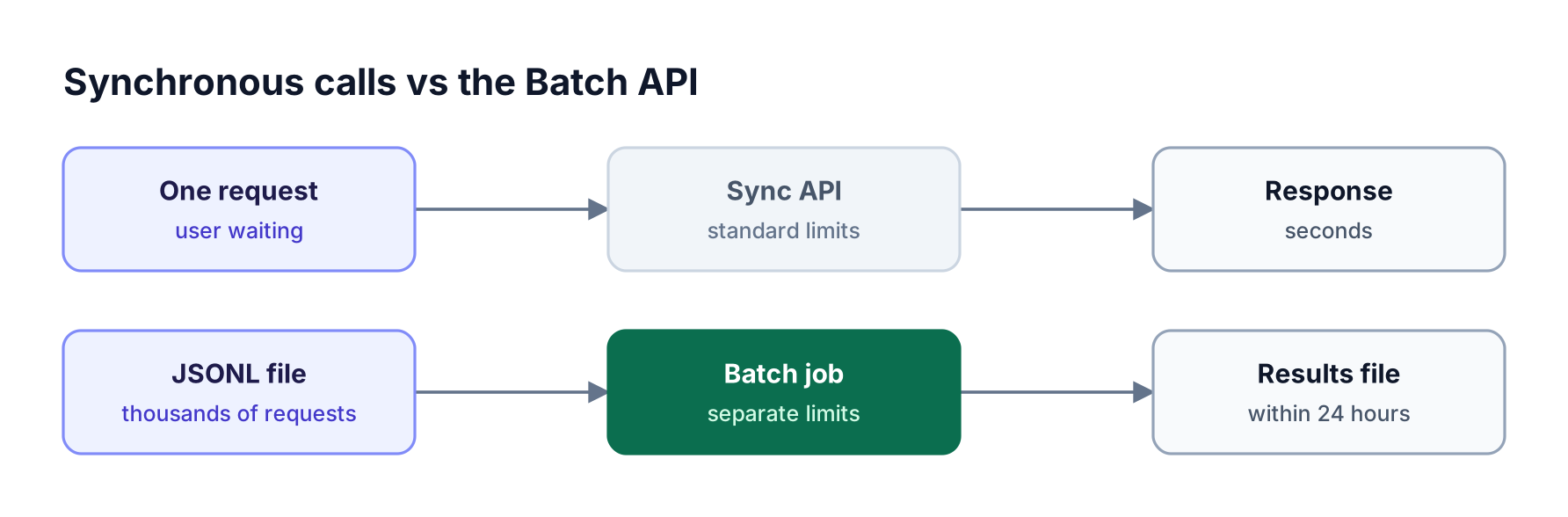
An app sends one request and gets a response in seconds, while a JSONL file of requests runs as a batch job with results within 24 hours
Figure 1: Synchronous calls answer in seconds; batch jobs trade latency for lower cost and a separate, larger rate-limit pool.
For the synchronous side of cost control, the guide to monitoring LLM API costs in production covers tracking spend per request.
OpenAI Batch API Limits
OpenAI Batch API limits apply per batch and per organization, and they are separate from the per-model limits on synchronous calls. Knowing them up front decides how a large job should be split into files and how many batches to create.
| Limit | Value |
|---|---|
| Requests per batch | Up to 50,000 |
| Input file size | Up to 200 MB |
| Embedding inputs | Up to 50,000 across all requests in an embeddings batch |
| Batch creation rate | Up to 2,000 batches per hour |
| Completion window | 24h only |
| Enqueued tokens | Per-model cap on tokens waiting across all active batches |
What happens at the edges:
- Expired batches. If a batch does not finish within 24 hours, remaining requests are cancelled and completed results are still returned.
- Cancellation. A cancelled batch can take up to 10 minutes to stop.
- Model support. Most models support the Batch API, but not all; check the model reference before building a job.
The OpenAI provider guide covers connecting OpenAI to Bifrost, and the OpenAI API alternatives roundup covers other providers.
How the OpenAI Batch API Works
The OpenAI Batch API follows a five-step lifecycle: prepare a JSONL file, upload it with purpose="batch", create the batch with a 24h completion window, poll its status, and download the output and error files. Each line carries a custom_id so results can be matched to inputs, because output order is not guaranteed.

Five steps: prepare a JSONL file with custom IDs, upload it with purpose batch, create the batch with a 24-hour window, poll status, then download output and error files
Figure 2: Every batch follows the same five steps; custom IDs tie each result line back to its input because output order is not guaranteed.
Step 1: Prepare the JSONL file
Each line is one request with a custom_id, the HTTP method, the endpoint, and the request body:
{"custom_id": "ticket-001", "method": "POST", "url": "/v1/chat/completions", "body": {"model": "gpt-4o-mini", "messages": [{"role": "user", "content": "Classify this ticket: login fails after reset"}], "max_tokens": 50}}
{"custom_id": "ticket-002", "method": "POST", "url": "/v1/chat/completions", "body": {"model": "gpt-4o-mini", "messages": [{"role": "user", "content": "Classify this ticket: invoice shows wrong currency"}], "max_tokens": 50}}
Step 2: Upload the file
from openai import OpenAI

client = OpenAI()

batch_file = client.files.create(
    file=open("batch_input.jsonl", "rb"),
    purpose="batch",
)
Step 3: Create the batch
batch = client.batches.create(
    input_file_id=batch_file.id,
    endpoint="/v1/chat/completions",
    completion_window="24h",
)
Step 4: Poll the status
A batch moves through validating, in_progress, and finalizing before reaching completed, failed, expired, or cancelled:
batch = client.batches.retrieve(batch.id)
print(batch.status, batch.request_counts)
Step 5: Download the results
if batch.status == "completed":
    output = client.files.content(batch.output_file_id)
    with open("batch_output.jsonl", "wb") as f:
        f.write(output.read())
Failed lines go to a separate error file referenced by error_file_id. The OpenAI API pricing guide covers how batch usage appears on bills.
Batch APIs on Other Providers
Anthropic, Amazon Bedrock, and Google Gemini all offer batch processing, but each takes a different input shape. Teams that run evaluations or bulk jobs on more than one provider end up maintaining several batch clients, each with its own file handling, limits, and status codes.
| Provider | Input format | Storage | Notable limits |
|---|---|---|---|
| OpenAI | JSONL file uploaded through the Files API | OpenAI file storage | 50,000 requests or 200 MB per batch; 24-hour window |
| Anthropic | Inline list of requests in the create call | None required | 100,000 requests or 256 MB per batch; most finish within an hour; 24-hour expiry |
| Amazon Bedrock | JSONL records in Amazon S3 | S3 input and output locations | Model invocation jobs configured per model and Region |
| Google Gemini | Uploaded file or inline requests | Gemini file storage | Model named on the batch job |
Anthropic's Message Batches documentation covers the Claude batch API in detail, including the 29-day window for downloading results.
For setup of each provider in Bifrost, see the guides for Anthropic, Bedrock, and Gemini.
Running Batch Jobs Across Providers with Bifrost
Bifrost supports the OpenAI Files API and Batch API with cross-provider routing. Applications keep the OpenAI SDK, point it at the Bifrost /openai endpoint, and name the provider per request. Bifrost handles each provider's storage and input format, so the same workflow submits batch jobs to OpenAI, Anthropic, Bedrock, or Gemini.
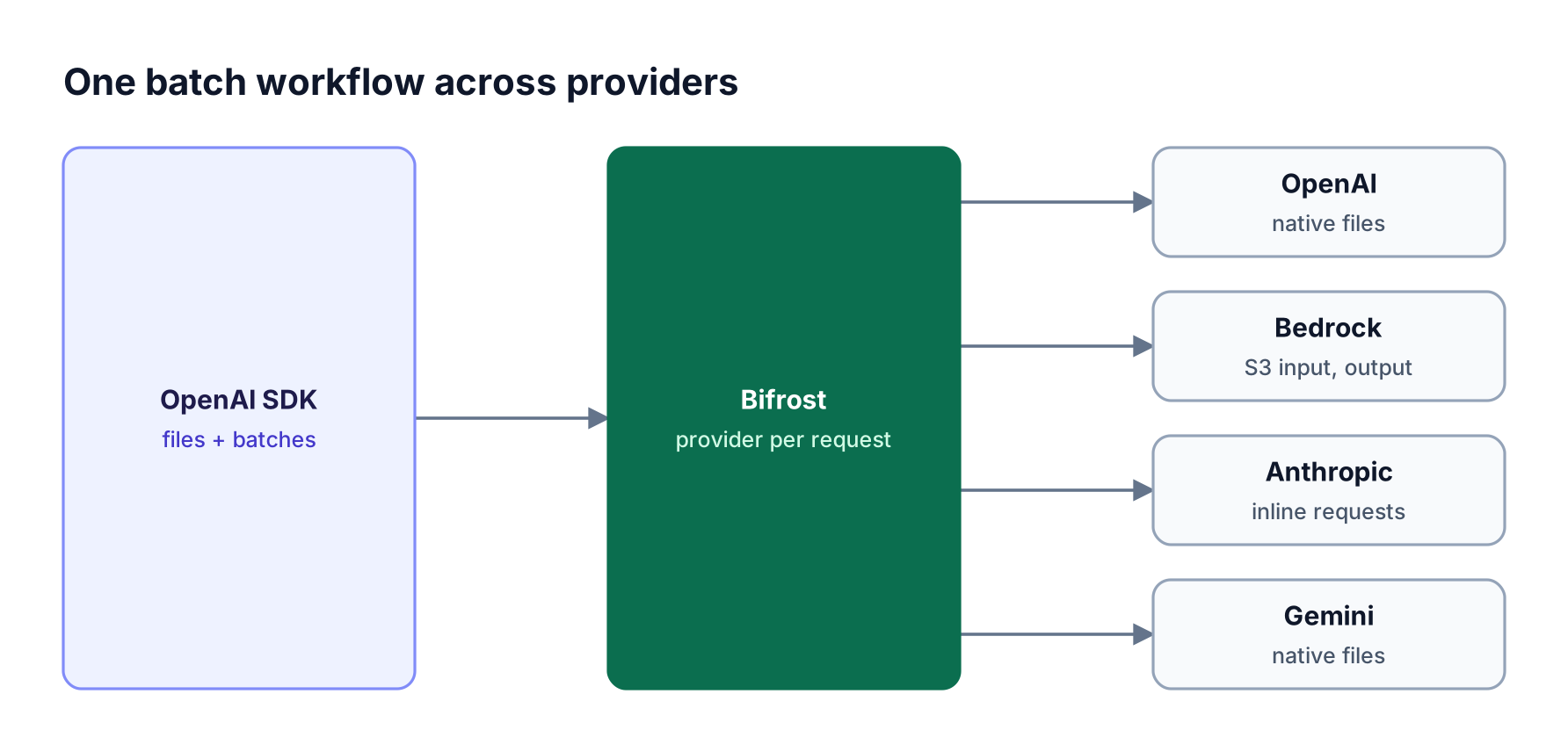
The OpenAI SDK points at Bifrost, which routes files and batch calls to OpenAI native storage, Bedrock with S3, Anthropic inline requests, or Gemini native storage
Figure 3: One OpenAI SDK workflow, with the provider chosen per request, covers batch jobs on OpenAI, Bedrock, Anthropic, and Gemini through Bifrost.
Point the client at Bifrost:
from openai import OpenAI

client = OpenAI(
    base_url="<http://localhost:8080/openai>",
    api_key="sk-bf-your-virtual-key",
)
For OpenAI, upload and create as usual, adding the provider in extra_body:
batch_file = client.files.create(
    file=open("batch_input.jsonl", "rb"),
    purpose="batch",
    extra_body={"provider": "openai"},
)

batch = client.batches.create(
    input_file_id=batch_file.id,
    endpoint="/v1/chat/completions",
    completion_window="24h",
    extra_body={"provider": "openai"},
)
For Anthropic, which batches inline, pass the requests directly with no file upload:
requests = [
    {"custom_id": "ticket-001",
     "params": {"model": "claude-sonnet-4-5", "max_tokens": 50,
                "messages": [{"role": "user", "content": "Classify: login fails after reset"}]}},
]

batch = client.batches.create(
    input_file_id="",
    endpoint="/v1/chat/completions",
    completion_window="24h",
    extra_body={"provider": "anthropic", "requests": requests},
)
Provider notes from the OpenAI SDK files and batch guide:
- OpenAI and Gemini use their native file storage; Gemini also takes the
modelinextra_body. - Bedrock needs a
storage_configfor S3 on upload and anoutput_s3_urion batch creation. - Anthropic does not support file-based batches through this route; use inline
requests.
Teams on native SDKs can use the Anthropic SDK batch guide, the Bedrock SDK batch guide, or the GenAI SDK batch guide instead.
Governing Batch Traffic at the Gateway
Batch jobs can move more tokens in an hour than an application sends in a week, so they deserve the same access and spend controls as live traffic. Running them through a gateway ties every batch to an owner, keeps provider keys out of scripts, and puts bulk usage in the same logs as everything else.
Controls that apply to batch traffic in Bifrost:
- Virtual keys. Each team or pipeline uses its own virtual key instead of a raw provider key.
- Model restrictions. Keys that restrict models need care with file-based batches: on OpenAI and Azure the key must allow every model of the provider, and on Gemini, Vertex, and Bedrock the request must name an allowed
model. - Budgets. Budgets and rate limits cap what a key can spend, with daily, weekly, monthly, quarterly, or yearly resets.
- Central provider keys. Provider credentials live in Bifrost, so rotating an OpenAI or Anthropic key does not touch every batch script.
Visibility and data handling:
- One log. Batch operations appear in Bifrost request logs alongside synchronous calls.
- Data stays in your environment. Bifrost runs self-hosted, and no prompts, responses, or files leave the customer's infrastructure except to the providers you call.
The guide to API key management for LLM applications covers credential hygiene in more depth.
Batch API Best Practices
Batch jobs fail in predictable ways: malformed lines, files over the size limit, unsupported models, and jobs that expire because too much was queued at once. A few habits prevent most of these and make results easier to use.
- Validate every line before upload; one malformed line can fail the whole file.
- Use meaningful
custom_idvalues, such as record IDs, so results join back to source data. - Split large jobs into files under the request and size limits, and stagger creation to stay under enqueued-token caps.
- Handle partial results. Read both the output and error files, and resubmit failed lines in a new batch.
- Pin model versions in each line so a batch run is reproducible.
- Keep synchronous fallbacks for urgent work; retries and fallbacks in Bifrost cover live traffic when a provider is degraded.
- Check provider health before launching large jobs with the provider status page.
For multi-provider setups, the multi-provider AI gateway comparison and the list of LLM API providers cover the landscape.
Batch Inference vs Other Cost and Throughput Tools
Batch inference is one of several ways to lower model cost and protect rate limits, and it combines well with the others. Choosing the right one depends on whether the workload is live, repetitive, or bulk.
| Technique | Best for | Latency | How it saves |
|---|---|---|---|
| Batch API | Bulk, independent, non-urgent jobs | Minutes to 24 hours | Discounted batch pricing and separate limits |
| Semantic caching | Repeated or similar live requests | Lower than a provider call | Skips the provider call on a cache hit |
| Provider prompt caching | Long shared prefixes | Same or lower | Cheaper reads of cached input tokens |
| Model routing | Mixed-difficulty live traffic | Same | Sends simple requests to cheaper models |
Bifrost supports semantic caching and routing rules for live traffic, and the roundup of gateways with semantic caching compares options.
Frequently Asked Questions
What is the OpenAI Batch API?
The OpenAI Batch API is an asynchronous endpoint for processing many independent requests in one job. You upload a JSONL file of requests, create a batch with a 24-hour completion window, and download a results file when it finishes. Batch usage is billed at 50% of synchronous pricing and uses a separate rate-limit pool.
How long does an OpenAI batch take?
Each batch completes within 24 hours and often much sooner, depending on size and load. If a batch has not finished within 24 hours, it expires: unfinished requests are cancelled and completed results remain available in the output file.
What are the OpenAI Batch API limits?
A batch can include up to 50,000 requests in an input file of up to 200 MB, and embedding batches are capped at 50,000 inputs. Organizations can create up to 2,000 batches per hour, and each model has a cap on enqueued tokens across active batches.
Is there a Claude batch API?
Yes. Anthropic's Message Batches API accepts up to 100,000 requests or 256 MB per batch, sent inline rather than as an uploaded file, with most batches finishing within an hour and a 24-hour expiry. Through Bifrost, the same OpenAI SDK can submit Claude batches by setting the provider to Anthropic, as the OpenAI SDK batch guide shows.
Can I use one SDK for batch jobs on several providers?
Yes. Bifrost supports the OpenAI Files and Batch APIs with cross-provider routing, so the OpenAI SDK can submit batch jobs to OpenAI, Anthropic, Bedrock, or Gemini by naming the provider per request. Bedrock needs S3 storage settings, and Anthropic uses inline requests.
What is the difference between batch inference and real-time inference?
Real-time inference returns each response in seconds for a user or system that is waiting. Batch inference processes many requests asynchronously over minutes to hours, usually at lower cost and with separate rate limits. Most production systems use both: real-time for user-facing calls, batch for evaluations and bulk processing.
Run Batch Jobs Anywhere from One Workflow
The OpenAI Batch API is the right tool whenever volume matters more than latency, and the same pattern exists on every major provider. Bifrost gives teams one OpenAI-compatible batch workflow across OpenAI, Anthropic, Bedrock, and Gemini, with keys, budgets, and logs applied to every job. To see it with your workloads, book a demo with the Bifrost team.