OpenAI API Pricing in 2026: Model Costs and Spend Controls
OpenAI API pricing charges per million tokens, with separate rates for input, cached input, cache writes, and output that change by processing tier and context length. This guide lists current GPT-6 rates, prices a real workload, and shows how Bifrost enforces OpenAI budgets per team and key.
TL;DR
- OpenAI API pricing for the GPT-6 family runs from $0.10 to $10.00 per million input tokens and $0.50 to $50.00 per million output tokens at Standard rates for requests up to 272K input tokens, as of October 29, 2026.
- The Batch API and Flex processing bill tokens at half the Standard rate, Fast mode bills them at twice the Standard rate on GPT-6 models, and requests above 272K input tokens move to higher long-context rates.
- On GPT-5.6 and later models, cached input costs 0.1x the input rate (0.05x on GPT-6.1 Sol and Terra), while writing the cache costs 1.25x (2.5x for a 12-hour lifetime in the Responses API).
- OpenAI's own spend limits are monthly caps on an organization or a project; budgets per team, key, customer, or model need a control layer in front of the API.
- Bifrost enforces hierarchical budgets, rate limits, and model caps on OpenAI traffic through virtual keys, and lowers spend with semantic caching and complexity-based routing.
OpenAI API pricing is metered per million tokens, with separate rates for uncached input, cached input, cache writes, and output, and every rate shifts with the processing tier and with context length. Across the GPT-6 family, list input prices run from $0.10 per million tokens on GPT-6 Luna to $10.00 on GPT-6 Astra, a 100x spread before any discount applies. This guide covers current model prices, how Batch, Flex, and Fast mode change them, what a real workload costs, and how Bifrost, the open-source AI gateway built by Maxim AI, enforces OpenAI spend limits per team, key, and model for enterprises running mission-critical AI workloads.
OpenAI API Pricing by Model
OpenAI API pricing is set per model and per million tokens. At Standard rates for requests up to 272K input tokens, the current GPT-6 models cost $0.10 to $10.00 per million input tokens and $0.50 to $50.00 per million output tokens, with cached input billed at 5% to 10% of the input rate.
The rates below come from OpenAI's API pricing page, read on October 29, 2026. Confirm against that page before committing a budget; OpenAI changes rates often.
| Model | Input | Cached input | Output | Positioning |
|---|---|---|---|---|
| gpt-6-astra | $10.00 | $1.00 | $50.00 | Most capable, for the hardest end-to-end work |
| gpt-6.1-sol | $2.00 | $0.10 | $10.00 | Complex coding and agentic workflows |
| gpt-6.1-terra | $1.00 | $0.05 | $5.00 | Visual reasoning, computer use, and writing |
| gpt-6-luna | $0.10 | $0.01 | $0.50 | Focused, high-volume tasks |
| gpt-5.6-sol | $4.00 | $0.40 | $20.00 | Promotional rate through at least November 21, 2026 |
| gpt-5.6-luna | $0.20 | $0.02 | $1.20 | Previous-generation Luna |
| gpt-5.5 | $5.00 | $0.50 | $30.00 | Earlier flagship |
Standard processing, USD per 1M tokens, requests of 272K input tokens or fewer.
Three patterns stand out:
- Output costs five times input on every GPT-6 model, so long answers and agent loops add up faster than long prompts.
- Cached input is 5% of the input rate on GPT-6.1 Sol and GPT-6.1 Terra, and 10% on GPT-6 Astra and GPT-6 Luna.
- Newer is not always more expensive. GPT-6.1 Sol lists at half the price of GPT-5.6 Sol.
Other charges:
- Embeddings: text-embedding-3-small at $0.02 and text-embedding-3-large at $0.13 per million tokens.
- Built-in tools: web search at $10.00 per 1,000 calls plus search content tokens at model rates; file search at $2.50 per 1,000 calls plus storage.
- Moderation: omni-moderation-latest is free.
- Regional processing: data residency endpoints add 10% for models released on or after March 5, 2026, and FedRAMP endpoints add 10%.
To estimate a model against your own token mix, the OpenAI cost calculator and the OpenAI model library break the catalog down model by model, including GPT-6 Astra cost estimates.
How OpenAI Token Pricing Works
OpenAI token pricing counts each request in four buckets: uncached input, cached input, cache writes, and output. Each bucket has its own per-million rate. The processing tier then scales those rates, and a request with more than 272K input tokens is billed at the model's long-context rates instead of the short-context ones.
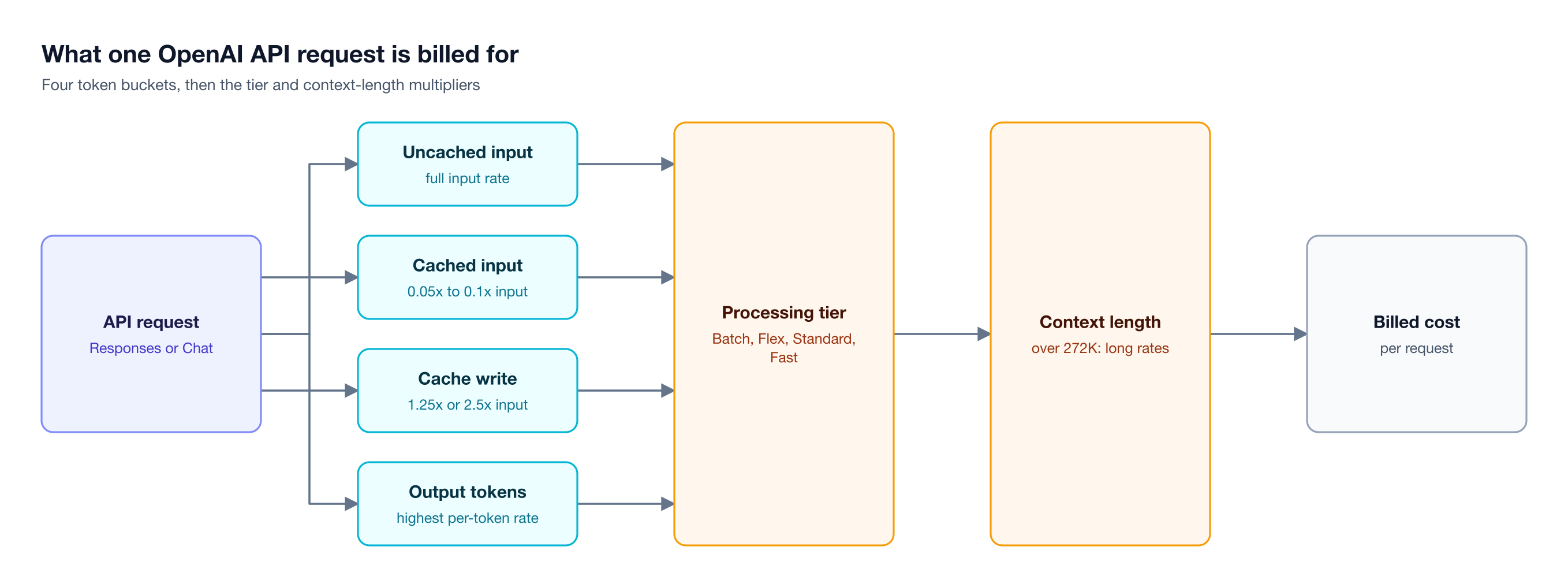
Figure 1: The same prompt can cost very different amounts depending on how much of it is cached, which tier serves it, and whether it crosses 272K input tokens.
- Uncached input is billed at the full input rate: instructions, tool definitions, retrieved context, and history the model has not processed recently.
- Cached input applies when a request repeats an already processed prefix. OpenAI's prompt caching guide puts the read charge at 0.1x the uncached rate on GPT-5.6 and later (0.05x on GPT-6.1 Sol and Terra), with a minimum cacheable prefix of 1,024 tokens.
- Cache writes are new with GPT-5.6. The default 30-minute cache lifetime bills the written prefix at 1.25x the input rate, and the 12-hour option, available in the Responses API, at 2.5x. These rates replace the input rate for those tokens rather than adding to it.
- Output tokens carry the highest rate on every model.
Context length is the fifth variable. Above 272K input tokens, GPT-6.1 Sol moves from $2.00 to $4.00 per million input tokens and from $10.00 to $15.00 per million output tokens, so a single 400K-token request costs $1.60 in input alone.
Bifrost prices every logged request with the same buckets. Its Model Catalog applies cache-read and cache-write rates, batch rates, and tiered rates above 272K tokens, from a pricing sheet that syncs every 24 hours by default. The wider set of levers across providers is in our complete guide to reducing LLM costs in production.
OpenAI Batch API, Flex Processing, and Fast Mode
OpenAI sells the same models at several processing tiers. The Batch API and Flex processing bill tokens at half the Standard rate in exchange for asynchronous or slower delivery, Fast mode bills them at twice the Standard rate on GPT-6 models for up to 2.5x faster speeds, and Ultrafast costs six times Standard on GPT-6 Astra and GPT-6.1 Sol.
| Tier | GPT-6.1 Sol input / output | How a request opts in | Trade-off |
|---|---|---|---|
| Standard | $2.00 / $10.00 | Default | None |
| Batch API | $1.00 / $5.00 | JSONL file, 24h completion window | Results within 24 hours; separate, higher rate limits |
| Flex | $1.00 / $5.00 | service_tier: "flex" |
Slower; may return an uncharged 429 Resource Unavailable; beta |
| Fast mode | $4.00 / $20.00 | service_tier: "fast" or a project setting |
Shares Standard rate limits; fast ramps can be billed at Standard |
| Ultrafast | $12.00 / $60.00 | Separate Ultrafast mode | GPT-6 Astra and GPT-6.1 Sol only |
Short-context rates per 1M tokens, from OpenAI's pricing page on October 29, 2026.
Fast mode is the tier formerly called Priority processing; OpenAI renamed it on July 30, 2026, and service_tier: "priority" still works. OpenAI's Flex processing guide recommends longer client timeouts and a retry at service_tier: "auto" when completion matters more than the price difference.
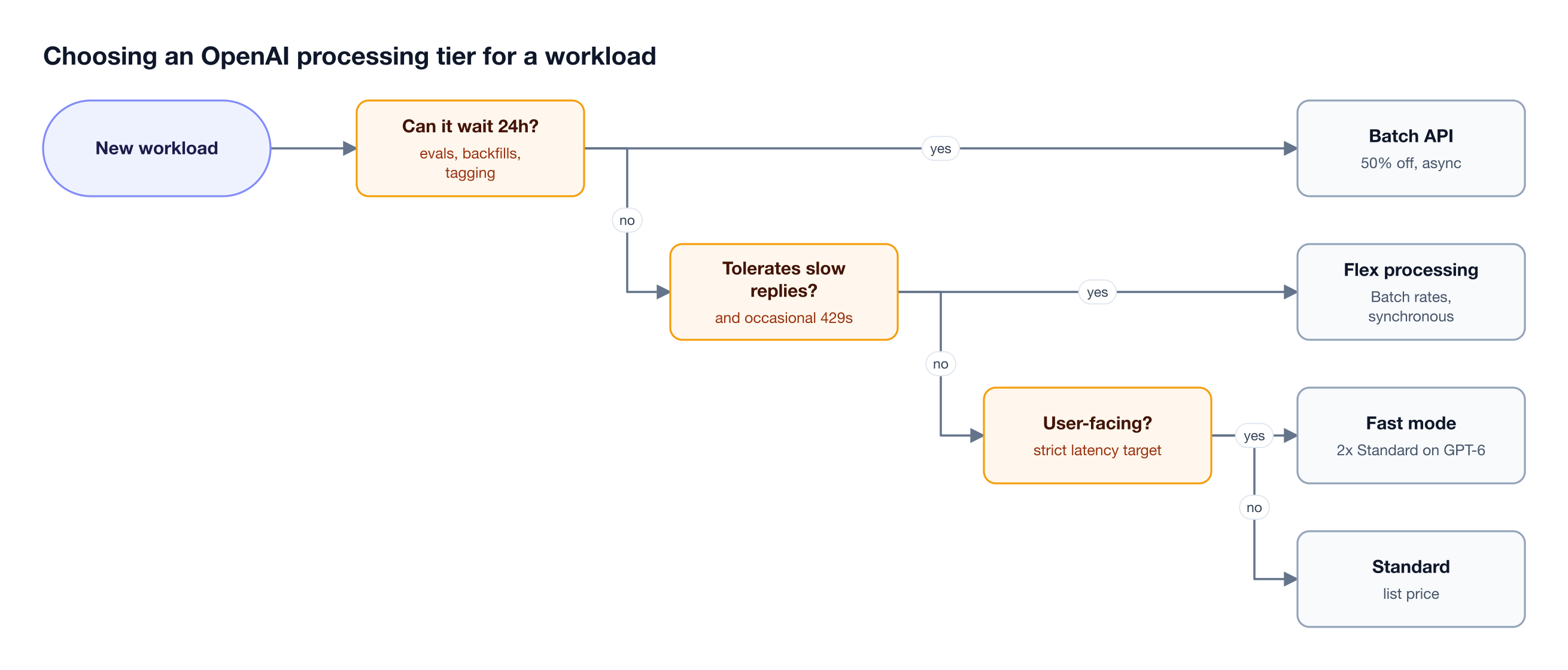
Figure 2: Work that can wait for a batch window or tolerate slower replies runs at half the Standard token rate.
Bifrost forwards service_tier to OpenAI and exposes the OpenAI Batch and Files endpoints, so the tier choice stays in application code; the OpenAI provider setup guide covers connecting a key.
OpenAI API Cost for a Real Workload
OpenAI API cost depends more on model choice, caching, and processing tier than on request volume. For a support assistant serving one million requests a month, the same traffic costs $370 on GPT-6 Luna with a cached prefix and $55,000 on GPT-6 Astra without caching, at OpenAI's list prices.
The example assumes 1,000,000 requests a month, each with 3,000 input tokens (2,000 of them a stable system prompt and tool definitions) and 500 output tokens. Cached rows assume explicit-only caching with a breakpoint after the stable prefix, excluding occasional prefix writes; in the default implicit mode, the changing 1,000 tokens are also written at 1.25x, adding $500 a month on GPT-6.1 Sol.
| Configuration | Input cost | Output cost | Monthly total |
|---|---|---|---|
| gpt-6-astra, Standard, no caching | $30,000 | $25,000 | $55,000 |
| gpt-6-astra, Standard, prefix cached | $12,000 | $25,000 | $37,000 |
| gpt-6.1-sol, Fast mode, prefix cached | $4,400 | $10,000 | $14,400 |
| gpt-6.1-sol, Standard, no caching | $6,000 | $5,000 | $11,000 |
| gpt-6.1-sol, Standard, prefix cached | $2,200 | $5,000 | $7,200 |
| gpt-6.1-sol, Batch API, no caching | $3,000 | $2,500 | $5,500 |
| gpt-6-luna, Standard, prefix cached | $120 | $250 | $370 |
- Model choice is the largest lever. GPT-6 Astra costs 100x more than GPT-6 Luna for the same traffic and caching setup.
- Caching a stable prefix cuts the GPT-6.1 Sol bill by about 35%, from $11,000 to $7,200.
- Output dominates once input is cached. On the cached GPT-6.1 Sol row, output is 69% of the total.
Sending most requests to the smallest capable model is the pattern behind cost-aware routing, and the GPT-6 Luna cost page shows the low end of the range. The same arithmetic for Google's models is in our Gemini API pricing breakdown.
OpenAI Rate Limits, Usage Tiers, and Spend Limits
OpenAI governs API consumption with three separate mechanisms: rate limits on requests and tokens per minute or per day, usage tiers that set an approved monthly usage limit from an account's credit history, and optional spend alerts and hard spend limits that an administrator configures for an organization or a project.
Rate limits are measured in RPM, RPD, TPM, TPD, and images per minute, and some model families share one limit. Standard and Fast mode traffic for a model draws on the same limit, cached input tokens still count toward TPM, and the Batch API runs on a separate pool.
Usage tiers raise the approved monthly usage limit as total credit purchases grow: Free ($100 per month), Build ($500 after $5 in purchases), Launch ($5,000 after $100), and Grow ($200,000 after $500).
Spend alerts and hard spend limits are set by an administrator. Per OpenAI's spend limits guide, an alert only sends a notification, while a hard limit makes requests fail with a 429 error carrying organization_spend_limit_exceeded or project_spend_limit_exceeded. Enforcement is not instantaneous, so recorded spend can slightly exceed the limit, and a reached limit resets with the next monthly cycle.
Each project issues its own API keys; the OpenAI API key guide walks through creating one.
Where Native OpenAI Spend Controls Stop
OpenAI's spend controls are monthly and stop at the project boundary, which suits a team with one budget. Companies that share OpenAI access across many teams, applications, and customers usually need caps per key and per team, shorter reset windows, per-model limits, and one control point that also covers Azure OpenAI and other providers.
| Control | OpenAI native controls | Bifrost |
|---|---|---|
| Budget scope | Organization or project | Customer, team, virtual key, provider config, and model |
| Reset window | Monthly | 1 minute to 1 year, rolling or calendar-aligned |
| When a cap is reached | 429 with a spend-limit code | 402 budget error before the request is forwarded |
| Per-model caps | Not part of spend limits | Model limits, globally or per virtual key |
| Threshold actions | Notification alerts | Routing to a cheaper model; Slack, Teams, PagerDuty, or webhook alerts (Enterprise) |
| Provider coverage | OpenAI API only; Azure and Bedrock bill separately | One policy across 25+ providers |
The coverage row matters: OpenAI's pricing page notes that OpenAI models on Amazon Bedrock and Microsoft Azure are billed through those services, so a company running GPT models in three places has three bills and three sets of limits unless one layer sits in front of all of them.
The Bifrost AI gateway is that layer: a self-hosted LLM gateway with one OpenAI-compatible API to 10,000+ models across 25+ providers. It adds about 11 microseconds of overhead per request at 5,000 RPS.
Enforcing OpenAI Budgets with Virtual Keys in Bifrost
Bifrost enforces OpenAI spend through virtual keys, the credentials applications use in place of the OpenAI API key. Each virtual key carries its own budget, rate limits, and allowed models, and rolls up into team and customer budgets, so every request is checked against every applicable cap before Bifrost forwards it to OpenAI.
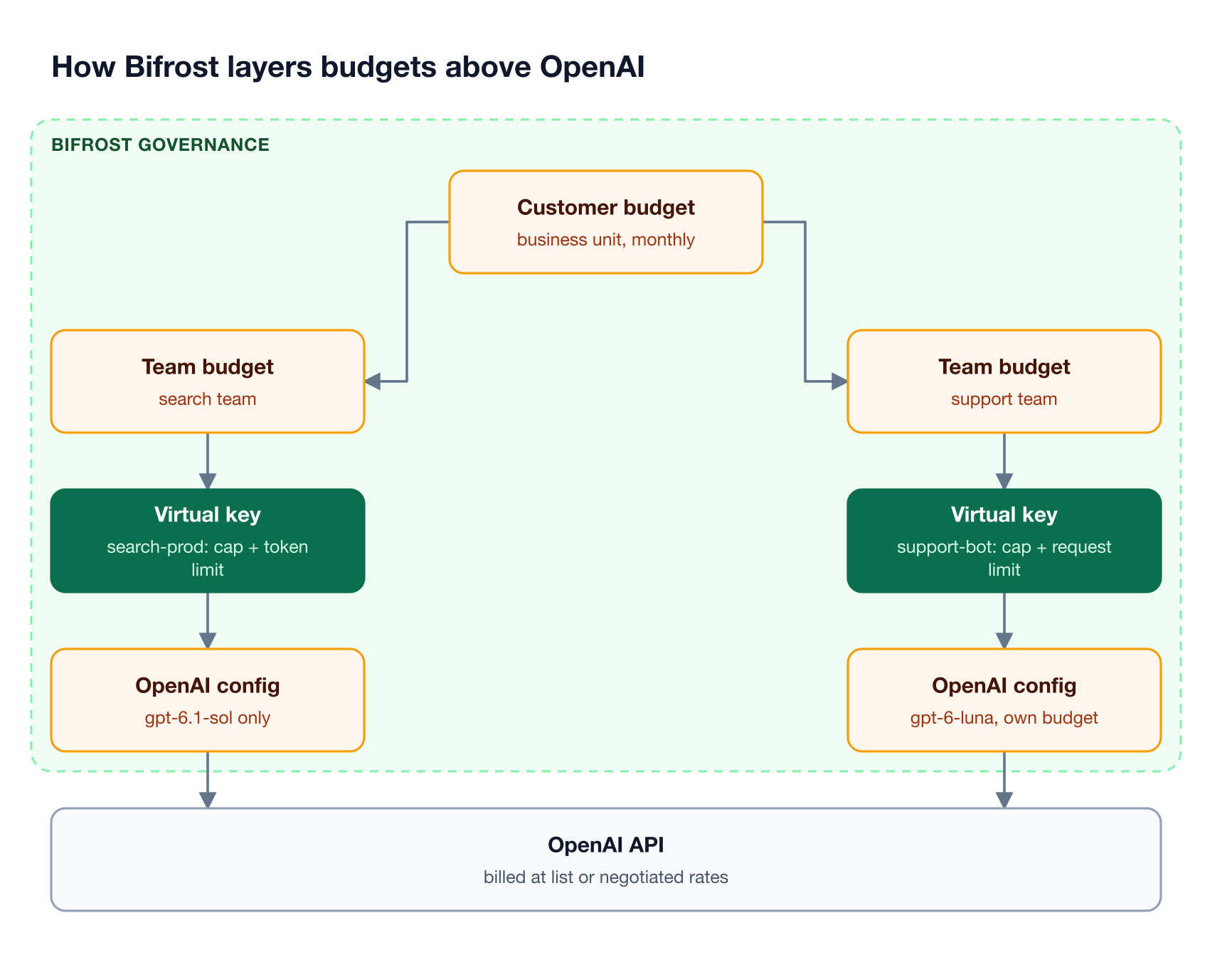
Figure 3: Every budget on the path must have room for the request, and the cost is deducted from all of them, so one team cannot spend another team's allocation.
Virtual keys are deny-by-default for providers (unless allow-all is turned on), so a key reaches OpenAI only through an attached OpenAI provider config, which can allow or block specific models. The budget and rate limit hierarchy then runs from customer to team to virtual key to provider config:
- Independent budgets at every level. A request proceeds only if every applicable budget has room, the cost is deducted from all of them, and an exhausted budget returns a 402 error.
- Request and token rate limits at each level, returned as 429
token_limitedorrequest_limitederrors. - Reset windows from
1mto1Y, with optional calendar alignment so a monthly budget resets on the first of the month in UTC. - Provider exclusion. A provider config over its budget or rate limit drops out of routing while the key's other providers stay available.
Model limits cap spend by model rather than by key: all OpenAI traffic globally, GPT-6 Astra across every key, or one model on one key. Routing rules read budget consumption directly, so a CEL rule such as budget_used > 80 moves traffic to GPT-6.1 Sol before a cap is reached. Policies like these are the core of AI governance in Bifrost.
Budget overrides add temporary capacity without changing the base limit, and in Bifrost Enterprise users can file budget increase requests that approvers handle from the Home page budget approvals. Enterprise alerting checks budget and rate-limit thresholds every 60 seconds and notifies Slack, Microsoft Teams, PagerDuty, or a webhook.
For negotiated OpenAI rates, custom pricing overrides catalog prices per provider, provider key, or virtual key, so budgets track the invoice rather than the list price. A worked design for nested caps is in LLM budget management with virtual keys and hierarchical spend controls.
Cutting OpenAI Costs with Semantic Caching and Model Routing
Bifrost lowers the OpenAI bill in three places on the request path: semantic caching answers repeated requests without calling OpenAI, automatic prompt cache breakpoints raise the share of input billed at the cached rate, and the complexity router sends each request to the cheapest OpenAI model that fits its difficulty.
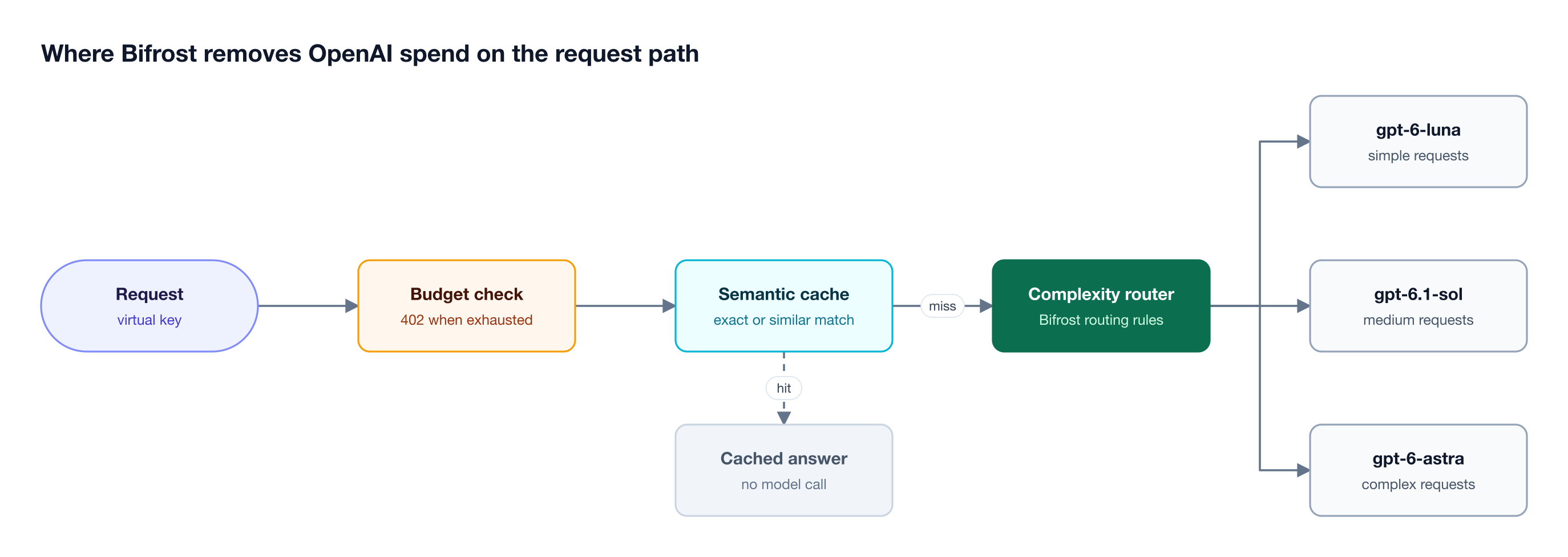
Figure 4: A cache hit skips the OpenAI completion call entirely, and the complexity router keeps frontier-model rates for the requests that need them.
- Semantic caching replays a stored response for an identical request (hash match) or a similar one (embedding similarity). A direct hit costs nothing at the provider, and a semantic hit costs only the embedding call. The effect on an OpenAI bill is covered in reducing your OpenAI and Anthropic bill with semantic caching.
- Auto prompt caching marks the first cacheable block of requests that arrive without markers, using OpenAI's
prompt_cache_breakpointon GPT-5.6 and later. It is off by default because a cache write costs more than fresh input, so it belongs on agent loops that replay the same prefix, not on one-shot traffic. - The complexity router classifies each request as Simple, Medium, or Complex and exposes
complexity_tierto routing rules, so simple requests go to GPT-6 Luna and complex ones to GPT-6 Astra.
None of these levers needs a code rewrite: Bifrost is a drop-in replacement for the OpenAI SDK, configured by changing the base URL and using a virtual key as the API key. The engineering behind these features is in LLM cost optimization in Bifrost, part 1, and our LLM cost-reduction guide places them alongside provider-side levers such as batching.
Tracking OpenAI Spend by Team, Key, and Model
Bifrost records tokens, cost, latency, provider, and model for every request, ties each record to the virtual key that made it, and tracks spend by team, key, model, and provider, with log filters for cost range and custom metadata such as a cost center.
Built-in observability captures this asynchronously, and when content logging is off for privacy, Bifrost still records cost and token counts. Teams that run Prometheus, OpenTelemetry, or Datadog can send the same data there through gateway-layer AI observability.
Attribution is what turns an OpenAI invoice into a chargeback report, as described in FinOps for AI: showback and chargeback for LLM spend. The governance resource page shows how each request is checked against access and budget policy at the gateway.
Frequently Asked Questions
How much does the OpenAI API cost?
The OpenAI API costs $0.10 to $10.00 per million input tokens and $0.50 to $50.00 per million output tokens on the GPT-6 family at Standard rates for requests up to 272K input tokens, as of October 29, 2026. Batch and Flex halve those rates, Fast mode doubles them, and cached input costs 5% to 10% of the input rate.
Is the OpenAI API free?
The OpenAI API is pay-as-you-go, billed per token, per call, or per minute depending on the model. A few items are listed as free, including the omni-moderation-latest model. OpenAI's Free usage tier carries a $100 monthly usage limit for users in supported geographies, and the Build, Launch, and Grow tiers raise that limit as credit purchases grow.
Is ChatGPT API pricing included in a ChatGPT subscription?
No. According to OpenAI's pricing FAQ, API usage is billed separately from ChatGPT Plus, Business, Enterprise, and Edu subscriptions, so a ChatGPT plan does not include API tokens. Teams that want ChatGPT behavior through the API can call the chat-latest model, listed at $5.00 per million input tokens and $30.00 per million output tokens on OpenAI's pricing page.
How much does OpenAI prompt caching save?
OpenAI prompt caching bills reused prefix tokens at 0.1x the uncached input rate on GPT-5.6 and later, and at 0.05x on GPT-6.1 Sol and GPT-6.1 Terra. On those models, writing the cache costs 1.25x the input rate for a 30-minute lifetime, or 2.5x for a 12-hour lifetime in the Responses API, so savings depend on how often a prefix is read after it is written.
What is the difference between OpenAI Flex processing and the Batch API?
Flex processing and the Batch API share the same token rates, half of Standard. Flex is synchronous: a request sets service_tier: "flex" and gets a slower response, or an uncharged 429 Resource Unavailable error. The Batch API is asynchronous: requests go in a JSONL file, results arrive within 24 hours, and batches draw on a separate, higher rate limit pool.
How do I set a spending limit on the OpenAI API?
In OpenAI's platform settings, an administrator can set a monthly spend alert and a hard spend limit for the organization or a single project; requests then fail with a 429 error once tracked spend reaches the limit. For caps per team, key, customer, or model, an AI gateway such as Bifrost enforces budgets and rate limits on virtual keys before requests reach OpenAI.
Control OpenAI API Spend with Bifrost
OpenAI API pricing rewards teams that choose models deliberately, cache stable prefixes, and batch asynchronous work, but list prices do not stop one runaway agent from exhausting a shared monthly budget. Bifrost adds hierarchical budgets, rate limits, model caps, and cost attribution on every OpenAI request, enforced in a self-hosted AI gateway built for enterprise deployments. To see how Bifrost would govern your OpenAI traffic, book a demo with the Bifrost team.