MCP Server Best Practices for Reliability and Security
MCP server best practices cover how to design tools a model can call correctly, keep servers reliable under retries and timeouts, and secure them with scoped authorization. This guide covers what to build into each server and what to centralize in an MCP gateway.
TL;DR
- Reliable MCP servers expose focused tools with precise names, descriptions, input schemas, and accurate annotations, because the model is the caller.
- Input validation failures should come back as tool execution errors with a clear message, so the model can correct its call instead of failing silently.
- Retry only failures that are both transient and idempotent; non-idempotent tools need idempotency keys or explicit confirmation.
- Remote MCP servers must validate that every access token was issued for them, never pass client tokens through, and request the narrowest scopes possible.
- Policy that must be identical across servers (access, credentials, guardrails, logs) belongs in an MCP gateway such as Bifrost rather than in each server.
MCP server best practices are the design and operating rules that keep a Model Context Protocol server predictable when a model, not a person, decides how to call it, and safe when it holds credentials to real systems. Bifrost, the open-source MCP gateway trusted for enterprise AI traffic and built by Maxim AI, sits between AI applications and the MCP servers they call, which is where server design problems surface first. This guide covers what to build into every MCP server and what to enforce once at the gateway.
What Makes an MCP Server Production-Ready
A production-ready MCP server exposes tools a model can call correctly on the first attempt, returns errors the model can act on, tolerates retries and timeouts without duplicating side effects, authenticates every request, and emits enough telemetry to explain any call after the fact. Reliability and security are the same discipline here, because an unpredictable tool is also an unsafe one.
MCP server best practices group into six areas:
| Area | Reliability goal | Security goal |
|---|---|---|
| Tool design | Model picks the right tool with valid arguments | Destructive tools are labeled and narrow |
| Error handling | Model recovers from bad input | Errors leak no secrets or internals |
| Retries and state | No duplicate side effects | State handles cannot be hijacked |
| Authorization | Tokens refresh without breaking sessions | Tokens are audience-bound and least-privilege |
| Isolation | One bad input cannot crash the server | Local servers cannot reach beyond their scope |
| Observability | Every failure is diagnosable | Every call is attributable to a caller |
Governance practices that span many servers, such as approval workflows and ownership, are covered in the companion guide on MCP server governance best practices. This article focuses on how individual servers are built and run.
Design Tools the Model Can Use Correctly
Design each MCP tool as a single, well-described operation with a specific name, a description that says when to use it, a strict JSON Schema for inputs, and annotations that state its side effects. The model reads only these fields when choosing a tool, so vague or overlapping definitions are the most common cause of wrong tool calls.
Practical MCP server best practices for tool design:
- Name tools with a service prefix and a verb, such as
jira_create_issue, so they stay unambiguous when combined with other servers' tools in one host. - Describe when to use the tool and when not to. One or two sentences on intent outperform a restatement of the name.
- Constrain inputs in the schema. Use enums, formats, required fields, and maximum lengths so invalid calls are rejected before any work starts.
- Keep tools focused. A
run_sqltool that accepts arbitrary statements is harder to secure and audit thanget_customer_orderswith typed parameters. - Bound result size. Paginate list results and truncate large payloads, since every returned token lands in the model's context.
Annotations deserve specific attention. MCP defines readOnlyHint, destructiveHint, idempotentHint, and openWorldHint, and the defaults are deliberately cautious: an unannotated tool is treated as potentially destructive and non-idempotent. As the MCP maintainers note on tool annotations, hints from untrusted servers cannot be relied on, so they guide clients but never replace server-side checks.
When tool count grows, design also affects cost. Bifrost Code Mode lets the model read tool stubs on demand instead of loading every definition up front, which cut input tokens by up to 92.8% in Bifrost's benchmarks; clear stub names and descriptions make that pattern work well.
Return Errors the Model Can Recover From
Return input validation failures as tool execution errors with a specific message, not as protocol errors. A tool execution error reaches the model as part of the result, so the model can read "date must be YYYY-MM-DD" and retry with corrected arguments, while a protocol error usually ends the turn with nothing the model can act on.
The 2025-11-25 MCP specification changelog made this guidance explicit. Good error messages share three properties:
- Actionable: name the argument and the expected format or allowed values
- Bounded: summarize the failure without stack traces, SQL text, or internal hostnames
- Classified: distinguish caller mistakes (fix the input) from upstream failures (try later) so the client knows whether a retry makes sense
Bifrost uses the same distinction when it connects to upstream servers: transient errors such as timeouts, 5xx responses, and HTTP 429 are retried, while permanent errors such as 401, 403, and bad requests fail immediately. The MCP connection docs list the full classification.
Build for Retries, Timeouts, and Stateless Requests
Assume every tool call can time out, be retried, or land on a different server instance. Make write operations idempotent where possible, set explicit timeouts on every upstream call, and keep no hidden per-connection state, so a retry or a load-balanced request produces the same result as the first attempt.
Figure 1 shows the retry rule that prevents duplicate side effects.
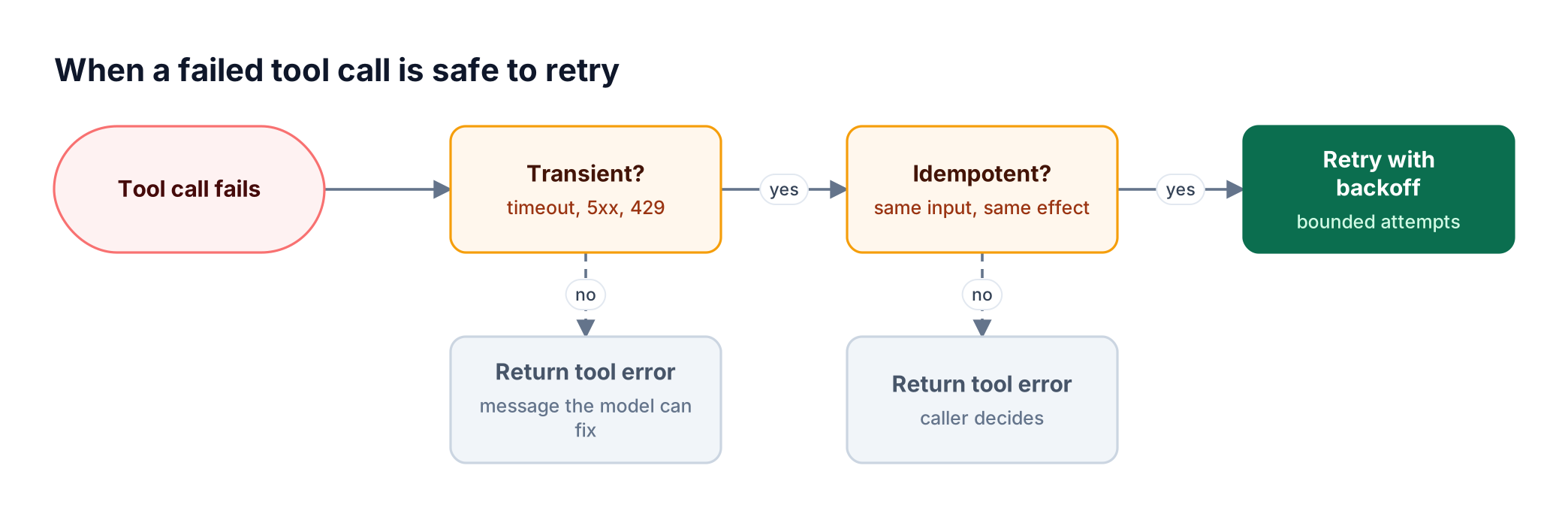
Figure 1: Retry only what is both transient and idempotent; everything else goes back to the model as an error it can act on.
What this means in server code:
- Idempotency keys for writes. Accept a client-supplied request ID on create and payment-style tools, and return the original result when the same ID repeats.
- Timeouts below the caller's. If the client or gateway gives up after 30 seconds, an upstream call that runs for 60 wastes resources and may complete after the caller has retried.
- Explicit state handles. The 2026-07-28 MCP revision moved the protocol core to stateless requests. Servers that need multi-step state mint a handle, such as a cart ID, return it in a tool result, and receive it back as an argument.
- Durable handles for long work. Operations that take minutes should return quickly with a job reference rather than hold a request open.
Bifrost applies a per-call upstream timeout (30 seconds by default, configurable per server) through its global tool manager settings, so a slow server cannot hold an agent loop open indefinitely.
MCP Server Security Best Practices: Authorization
Secure a remote MCP server with OAuth 2.1: act as a resource server, publish Protected Resource Metadata, validate that every access token was issued specifically for your server, and request the narrowest scopes each operation needs. Never accept a token minted for another service and never forward a client's token to a downstream API.
The MCP authorization specification states that servers must only accept tokens valid for their own resources and must not accept or transit any other tokens. The MCP security best practices document explains why token passthrough breaks audit trails and lets a stolen token reach every service that trusts it.
Authorization checklist for MCP server security:
- Validate audience, issuer, expiry, and scope on every request, not just at connection time
- Start with minimal scopes and use
insufficient_scopechallenges to request more only when a privileged tool is first called - Bind state handles to the authenticated user so possessing a handle is never treated as authentication
- Exchange, do not forward. When a server calls another API on the user's behalf, obtain a token for that API instead of reusing the inbound one
- Store refresh tokens encrypted and revoke them when a user loses access
The enterprise MCP security checklist maps these controls to the risks security teams audit most often.
Contain Local Servers and Untrusted Input
Treat local MCP servers as code that runs with the user's privileges, and treat every tool argument and every upstream response as untrusted input. Sandbox local servers, restrict file and network access to what the tool needs, validate paths and URLs before using them, and never let content returned by a tool change the server's own behavior.
Specific controls:
- Use stdio for local-only servers so other processes on the machine cannot reach them; if a local server must use HTTP, require a token and bind to a restricted socket.
- Run in a sandbox such as a container with a read-only filesystem and an allow-listed set of directories.
- Canonicalize paths and reject traversal outside the allowed root before any file operation.
- Block private address ranges for any tool that fetches URLs, to prevent server-side request forgery against metadata endpoints.
- Review tool descriptions from third-party servers, since a malicious description can instruct the model to misuse other tools, a pattern known as tool poisoning.
The five security risks of ungoverned MCP server access and the guide to prompt injection defenses for MCP cover these attack patterns in more depth.
Observe and Test Every Tool Call
Log every tool call with the caller's identity, tool name, sanitized arguments, outcome, and latency, and propagate trace context so a tool call can be correlated with the model request that triggered it. Test servers with the MCP Inspector and contract tests before release, because a renamed tool or changed schema breaks every agent that depends on it.
Observability and testing practices to add to your MCP server best practices:
- Write logs to stderr or OpenTelemetry. The protocol-level logging feature is deprecated in the current specification.
- Propagate trace context in request metadata so tool spans join the agent's trace.
- Track per-tool metrics: call count, error rate by class, p95 latency, and result size.
- Version tool contracts. Add new tools instead of changing existing schemas, and emit
tools/list_changednotifications when the list does change. - Test with the official MCP Inspector and automated checks that list tools, call each with valid and invalid inputs, and assert on error shapes.
At the gateway, Bifrost records MCP tool calls in its logs next to LLM requests and can export traces with OpenTelemetry. The MCP audit logging requirements explain which fields compliance reviews expect.
Which Practices to Centralize in an MCP Gateway
Centralize any practice that must be identical across all MCP servers: who may call which tool, where credentials live, which guardrails run, and how calls are logged. Keep practices that depend on a tool's own semantics, such as schema design, input validation, idempotency, and token audience checks, inside each server.
Figure 2 shows the split.
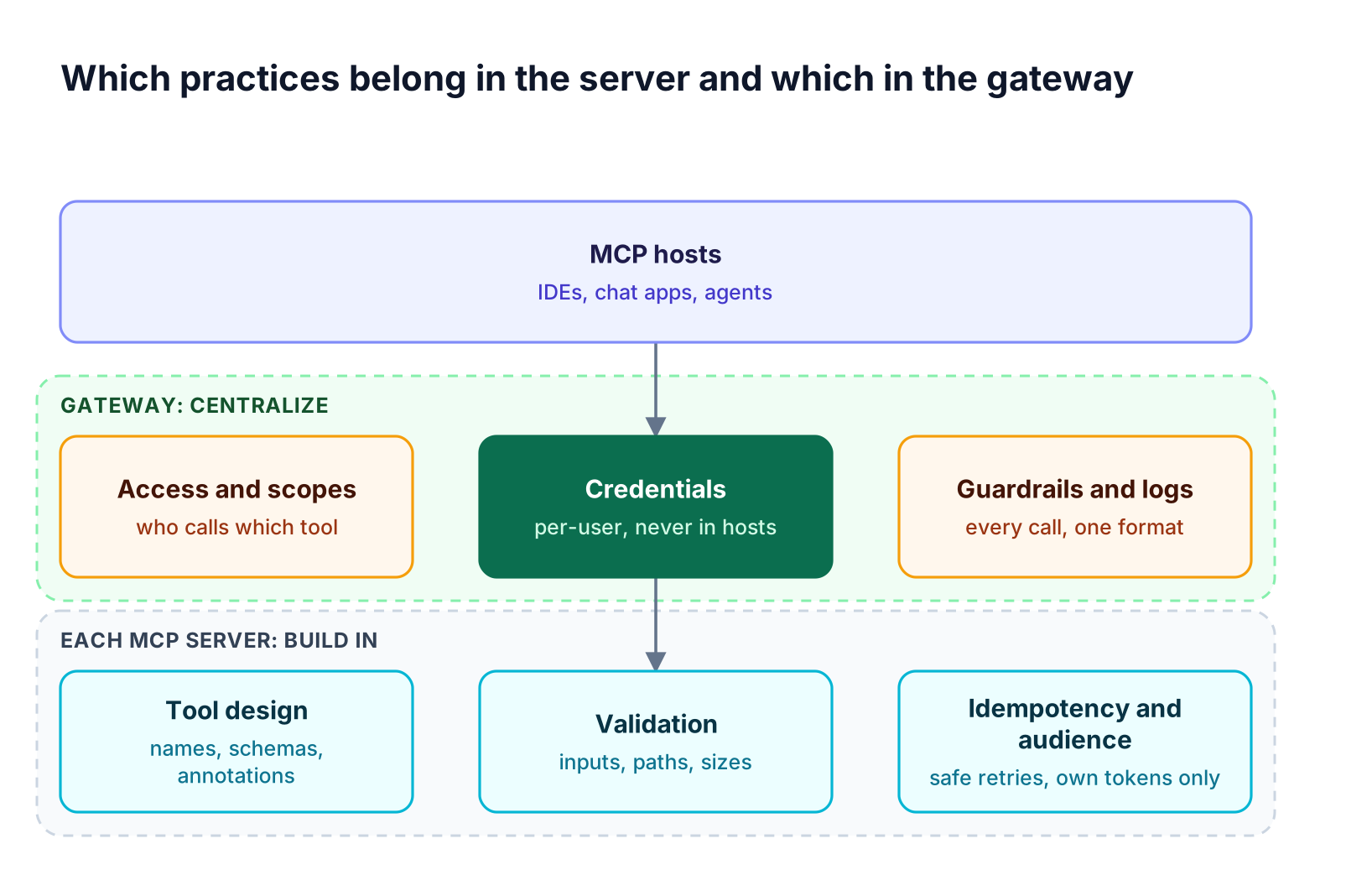
Figure 2: Servers own correctness for their own tools; the gateway owns policy that must be identical across every server.
| Practice | Build into each server | Centralize in the gateway |
|---|---|---|
| Tool naming, schemas, annotations | Yes | No |
| Input validation and idempotency | Yes | No |
| Token audience validation | Yes | Also at the gateway endpoint |
| Per-caller tool access | No | Yes |
| Credential storage and per-user auth | No | Yes |
| Guardrails on arguments and results | Optional | Yes |
| Health checks, retries, timeouts | Partly | Yes |
| Unified logs and audit trail | Partly | Yes |
Approval and ownership workflows for each server are covered in the MCP server governance guide. Centralizing these controls also keeps credentials off developer machines; see how teams connect internal MCP servers without exposing credentials and route SaaS servers through remote MCP server gateways.
How Bifrost Enforces MCP Server Best Practices
The Bifrost MCP gateway enforces the centralized half of these practices for every connected server: it scopes tool access per caller, brokers credentials, runs guardrails on tool traffic, health-checks and retries upstream connections, and logs each call. Server teams keep ownership of tool correctness, and platform teams get one place to apply policy.
Figure 3 shows how Bifrost handles an upstream server that stops responding.
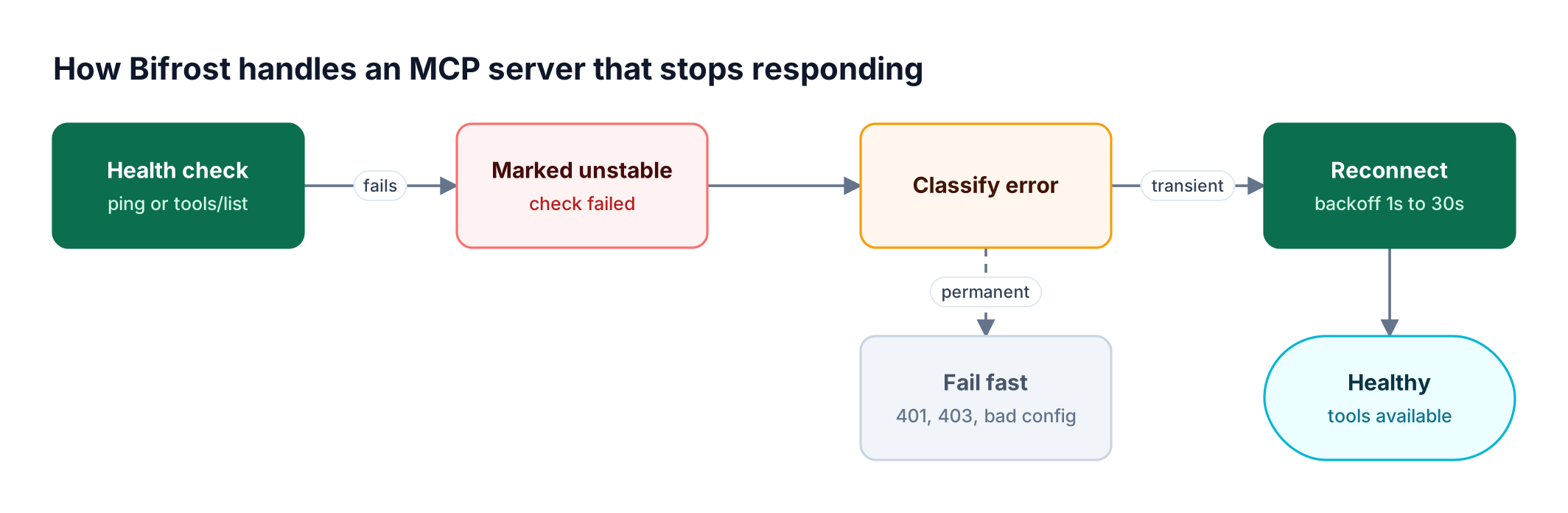
Figure 3: Transient failures heal on their own; permanent ones fail fast so an admin sees the real cause.
Reliability controls:
- Health monitoring every 10 seconds by default, using ping or
tools/listper server, as described in MCP connections and lifecycles - Retries with backoff for transient errors, up to five retries from 1 second to a 30-second cap, while authentication and configuration errors fail immediately
- Non-blocking startup: unreachable servers are marked unstable and retried without delaying the others
Security controls:
- Deny-by-default access: virtual keys expose only the servers and tools configured on them, and tool filtering can narrow further per request
- Explicit execution: tool calls are suggestions until the application runs them through the tool execution API; Agent Mode auto-runs only listed tools, with a maximum depth of 10 by default
- Per-user credentials: MCP authentication supports per-user OAuth and headers, and the MCP Sessions page lets admins inspect and revoke each user's credential
- Guardrails: in Bifrost Enterprise, MCP guardrail rules inspect or redact tool arguments before execution and results after it; the MCP guardrails walkthrough shows examples
Bifrost runs inside your own infrastructure, in-VPC or on-prem, so tool arguments and results never leave it. The Bifrost enterprise deployment options cover clustering and identity-provider integration, the MCP gateway resource page summarizes cost and access controls, and the MCP gateway product page shows how tool governance sits alongside model routing.
Frequently Asked Questions
What are the best practices for building an MCP server?
Build focused tools with service-prefixed names, clear descriptions, strict input schemas, and accurate annotations. Return validation failures as tool execution errors the model can correct, make write operations idempotent, set timeouts on upstream calls, and keep requests stateless. For remote servers, implement OAuth 2.1 with audience validation and log every call with the caller's identity.
How do you secure an MCP server?
Secure an MCP server by authenticating every request with audience-bound OAuth tokens, requesting minimal scopes, and never passing client tokens to downstream APIs. Validate all inputs, sandbox local servers, block private network ranges for URL-fetching tools, and log each call. An MCP gateway adds per-caller tool access, credential storage, and guardrails across all servers.
Should MCP servers be stateless?
Yes, at the protocol level. The 2026-07-28 MCP specification made each request self-contained so any server instance can handle it. Servers that need multi-step state should mint an explicit handle, return it in a tool result, and bind it to the authenticated user, so the state survives load balancing without becoming a hijacking risk.
How should an MCP server handle errors?
Return input and business-rule failures as tool execution errors with a specific, actionable message, so the model can fix its arguments and retry. Reserve protocol errors for malformed requests. Keep messages free of stack traces, credentials, and internal hostnames, and classify upstream failures as transient or permanent so callers know whether retrying makes sense.
What is MCP tool poisoning?
MCP tool poisoning is an attack in which a malicious or compromised MCP server places instructions in a tool's name, description, or results that steer the model toward harmful actions, such as reading secrets with another tool. Defenses include reviewing third-party servers before approval, restricting which tools each agent can reach, and screening tool results with guardrails.
How do you test an MCP server?
Test an MCP server with the official MCP Inspector during development, then add automated contract tests that list tools, call each with valid and invalid inputs, and check result and error shapes. Run the same tests through your gateway to confirm access rules, and track per-tool error rates after release. The MCP gateway resource hub covers gateway-side checks.
Start Building with Bifrost
Following MCP server best practices keeps each server predictable and safe, and an MCP gateway keeps the policy across all of them consistent. Bifrost gives platform teams one place to scope tool access, broker credentials, run guardrails, and monitor upstream health. To see how Bifrost secures and stabilizes your MCP servers, book a demo with the Bifrost team.