Tool Discovery for AI Agents: How Agents Find the Right MCP Tools at Scale
Tool discovery for AI agents decides which tools an agent sees out of hundreds. This guide covers why large tool catalogs break agents, the four discovery patterns from tools/list to tool search and code-based discovery, and how to govern discovery at an MCP gateway.
TL;DR
- Tool discovery for AI agents is the process by which an agent finds which tools exist, which it may use, and which fit the current task, instead of receiving every tool definition up front.
- Loading every tool on every turn wastes context and hurts accuracy; Anthropic's documentation notes that tool selection accuracy degrades once an agent sees more than 30 to 50 tools.
- The main discovery patterns are a static curated list, MCP
tools/listwith change notifications, search-based discovery, and code-based discovery where the agent reads tool signatures on demand. - Discovery is also a security decision: what an agent can discover is what it can try to call, so filtering has to happen before tools reach the model.
- Bifrost governs MCP tool discovery at the gateway with three-level tool filtering, curated Virtual MCP endpoints, and Code Mode, which cut input tokens by up to 92.8% on a 508-tool benchmark.
Tool discovery for AI agents has become a core design problem as agents connect to more MCP servers, because every tool an agent can see costs context and competes for the model's attention. Bifrost, the open-source AI gateway built by Maxim AI, sits between agents and MCP servers and decides which tools each agent can discover and how they are presented. This guide explains why large tool catalogs break agents, compares the four main discovery patterns, and shows how to govern discovery in production.
What Is Tool Discovery for AI Agents?
Tool discovery for AI agents is how an agent learns which tools are available, which it is allowed to use, and which match the task in front of it. In MCP-based systems, servers advertise tools with names, descriptions, and input schemas, and the client or gateway decides how many of those definitions the model sees and when.
Three questions sit inside every discovery design:
- What exists? The full catalog across every connected MCP server, internal tool, and API.
- What is allowed? The subset this agent, user, or team is permitted to call.
- What is relevant? The handful of tools that fit the current step of the task.
Early agent setups answered all three with one move: pass every tool definition to the model on every request. That works for five tools and fails for five hundred. The deep dive into tool calling mechanisms covers how models select and call tools once they are in context.
Why Loading Every Tool Breaks Agents
Loading every tool definition into every request breaks agents in two ways: it spends a large share of the context window before the task starts, and it makes the model worse at picking the right tool. Both problems grow with the number of connected MCP servers, which is exactly how enterprise agent deployments scale.
The costs show up quickly:
- Context spent on definitions. Anthropic's engineering write-up on advanced tool use describes roughly 72,000 tokens of definitions for 50-plus MCP tools loaded up front.
- Lower selection accuracy. Anthropic's tool search documentation notes that Claude's ability to pick the right tool degrades once it has more than 30 to 50 available tools.
- Repeated cost. Definitions are sent on every turn of a multi-step task, so a long agent run pays for the full catalog many times.
- Wider blast radius. Every visible tool is one the model can try to call, including write and delete operations a task never needed.
Figure 1 compares the two approaches.
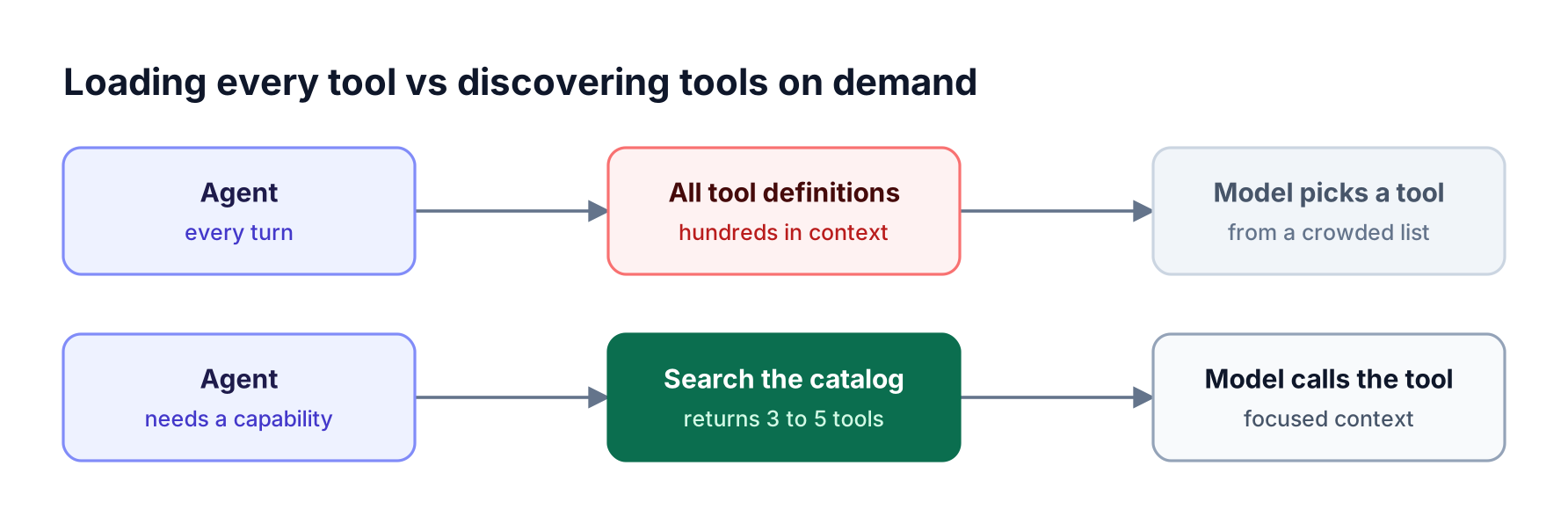
Top lane: an agent loads hundreds of tool definitions into context on every turn. Bottom lane: the agent searches a catalog and loads only a few relevant tools
Figure 1: Loading every definition up front spends context and hurts tool selection; on-demand discovery keeps only the tools the task needs in front of the model.
The Bifrost Code Mode benchmark shows the scale of the token problem: at 508 tools across 16 servers, classic MCP used 75.1 million input tokens for the query set, compared with 5.4 million with on-demand discovery. The MCP gateway token cost results cover the full test.
How MCP Tool Discovery Works
MCP tool discovery starts with the tools/list request: a client asks a server for its tools, and the server returns each tool's name, description, and JSON input schema, paginated with cursors for large lists. Servers that declare the listChanged capability send a notification when their tool list changes, so clients can refresh.
The MCP tools specification defines this flow:
- Capability negotiation. During initialization, a server declares that it supports tools and whether it will emit list-change notifications.
- Listing. The client calls
tools/list, followingnextCursorvalues until the list is complete. - Change notification. When tools are added or removed, the server sends
notifications/tools/list_changed, and the client lists again. - Invocation. The client calls
tools/callwith a tool name and arguments.
The protocol answers "what exists" for one server. It does not decide what a given agent should see across many servers, which tools are relevant to a task, or which tools a user is allowed to call. Those decisions belong to the client, the model provider's tooling, or a gateway. The guide to how MCP tools work walks through the protocol messages in more detail.
Four Tool Discovery Patterns
Tool discovery for AI agents follows four main patterns: a static curated list, protocol-driven listing with change notifications, search-based discovery, and code-based discovery. They differ in how many definitions reach the model, how the agent finds a tool, and how well they scale to large catalogs.
| Pattern | How the agent finds tools | Definitions in context | Scales to | Main trade-off |
|---|---|---|---|---|
| Static curated list | A fixed set chosen in advance | All curated tools | Tens of tools | Needs manual curation per agent |
| tools/list with list_changed | Client lists tools from each server and refreshes on change | Everything listed | Small to medium catalogs | Still loads every listed tool |
| Search-based discovery | Agent calls a search tool; matching definitions load on demand | Search tool plus a few results | Thousands of tools | Relevance depends on search quality |
| Code-based discovery | Agent browses tool files and reads signatures before writing code that calls them | A few meta-tools plus what it reads | Hundreds of tools, multi-step tasks | Requires a sandboxed execution runtime |
A few notes on each:
- Static lists are still the right answer for narrow agents. A triage bot with eight tools needs no discovery layer.
- Protocol listing keeps clients current as servers change, but on its own it does not reduce context; the 2026 guide to the Model Context Protocol covers the client and server roles.
- Search-based discovery is what Anthropic's tool search tool provides: tools are marked with
defer_loading: true, and the model searches with regex or BM25 variants to pull in only matching definitions. - Code-based discovery goes further for multi-step work: the agent reads only the signatures it needs and runs the orchestration in a sandbox, so intermediate results never pass through the model. Gateways that support this are compared in LLM gateways for AI agents.
Figure 2 maps the patterns to catalog size and task shape.
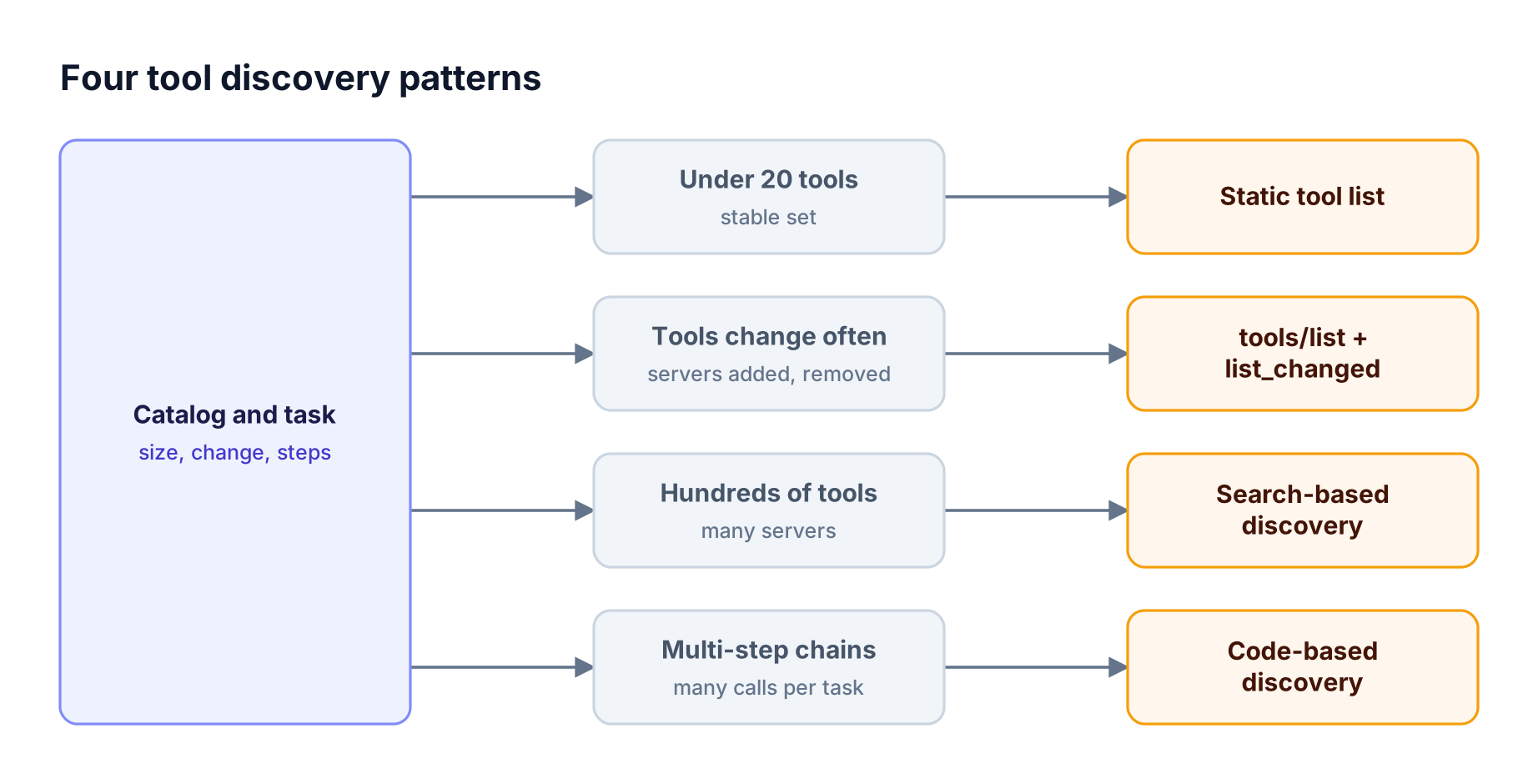
Decision flow: a few tools suit a static list, a changing tool set suits list_changed updates, large catalogs suit search-based discovery, and multi-step work suits code-based discovery
Figure 2: Match the discovery pattern to catalog size and task shape; most production setups combine a curated list with search or code-based discovery.
Search-Based vs Code-Based Discovery
Search-based discovery and code-based discovery both keep most tool definitions out of the context window, but they solve slightly different problems. Search reduces how many definitions the model sees before choosing a tool. Code-based discovery also reduces how many model turns and intermediate results a multi-step task needs.
Search-based discovery works well when the task needs one or two tools from a large catalog. Anthropic recommends keeping the three to five most frequently used tools loaded and deferring the rest, so common calls skip the search step. Its documentation describes search returning a small set of matching tool references that expand into full definitions.
Code-based discovery works well when the task chains many calls. The agent explores available servers, reads the signatures it needs, and writes a short program that calls several tools and filters results before returning only the answer. In the Bifrost benchmark, this approach kept pass rates at 100% while cutting input tokens by 58% at 96 tools, 84% at 251 tools, and 92.8% at 508 tools.
Practical guidance:
- Single-tool lookups from a big catalog favor search.
- Multi-step workflows across several servers favor code-based discovery.
- Mixed workloads can use both: a small always-loaded set, search for occasional tools, and code execution for long chains.
The Bifrost post on why tool discovery belongs in a filesystem explains the design reasoning, and the Code Mode architecture post covers the runtime.
Discovery Is an Access Control Decision
What an agent can discover is what it can try to call, so tool discovery for AI agents is also an access control decision. Filtering tools after the model has seen them is too late: the model has already planned around a tool it should not have. The safe order is to decide what an agent may use, then decide what is relevant.
Access rules to apply before discovery:
- Per-agent scope. A research agent sees read and search tools; a deployment agent sees a different set.
- Per-user scope. Agents acting for a user see only tools that user is entitled to.
- Destructive operations. Delete, transfer, and admin tools stay hidden unless a workflow explicitly needs them.
- Per-request narrowing. A single request can narrow the set further for one task.
Gateways are the natural place for these rules because they see every agent and every server, as covered in enterprise MCP governance. The MCP RBAC guide covers tool-level permission models, and MCP gateways with a server registry compares catalog options.
Governing Tool Discovery with Bifrost
Bifrost governs tool discovery for AI agents by sitting between agents and MCP servers. Agents connect to Bifrost with a virtual key, Bifrost connects to the upstream servers, and every list of tools an agent receives has already passed tool filtering. Curated Virtual MCPs and Code Mode then control how those allowed tools are presented.
Figure 3 shows the flow.
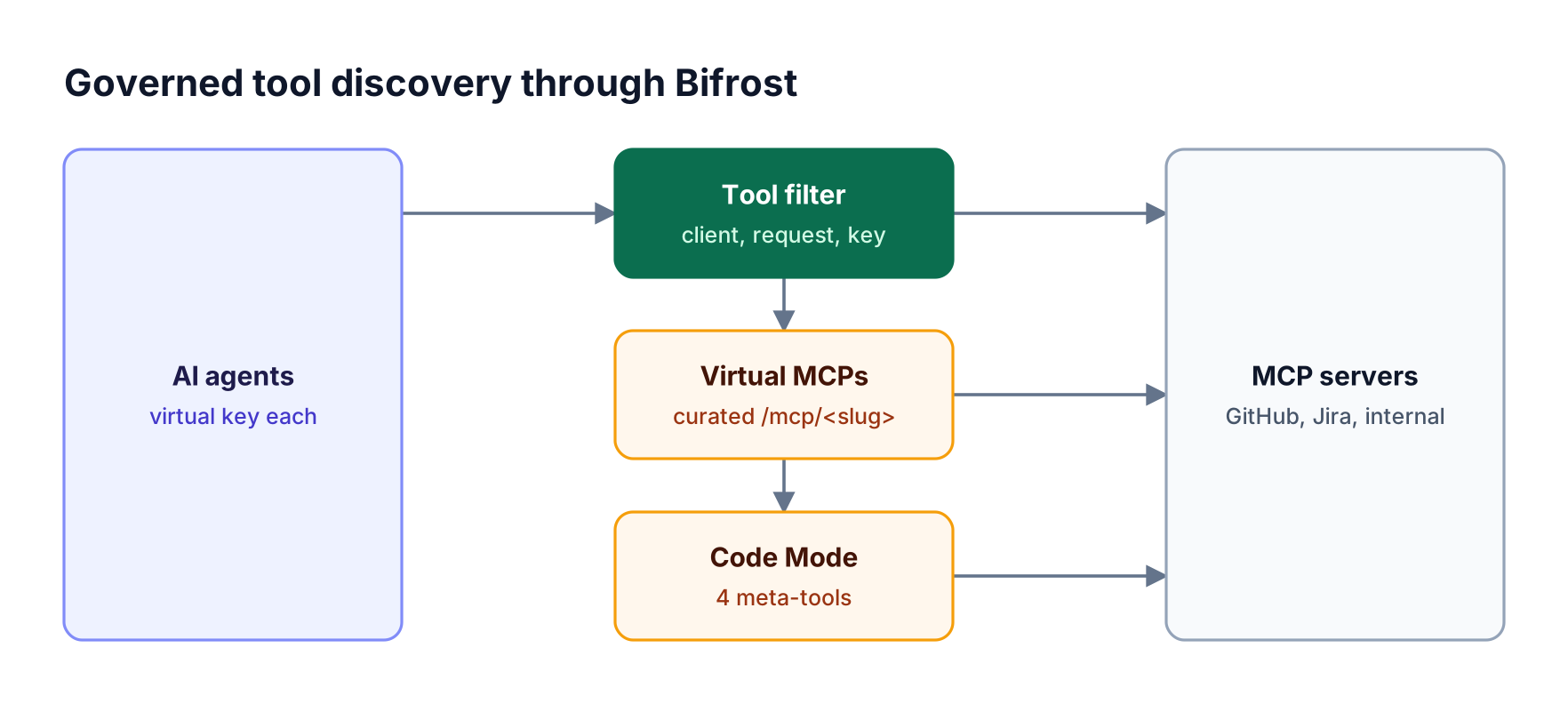
Agents connect to Bifrost with a virtual key; Bifrost filters tools per key, serves curated virtual MCPs, and exposes Code Mode meta-tools over many MCP servers
Figure 3: Bifrost decides which tools each agent can discover, then serves them as a curated endpoint or through Code Mode so context stays small.
How the Bifrost MCP gateway shapes discovery:
- Three-level tool filtering. Tool filtering applies at the client configuration (
tools_to_execute), per request through headers, and per virtual key; a tool must pass every applicable filter to be visible. - Curated endpoints. Virtual MCPs bundle chosen tools from several servers behind one
/mcp/<slug>URL, reachable only through the virtual keys they are attached to. - Code Mode. Code Mode replaces the full catalog with four meta-tools:
listToolFiles,readToolFile,getToolDocs, andexecuteToolCode.
Execution and visibility controls:
- Explicit execution. Tool calls from models are suggestions by default; agent mode auto-execution must be configured deliberately.
- Per-user credentials. Upstream servers can use per-user OAuth, so discovery and calls follow each user's own account.
- One log of tool calls. Tool calls appear with the model requests that produced them, as described in auditing every AI tool call.
Designing a Tool Catalog That Agents Can Navigate
A tool catalog is only as discoverable as its names and descriptions. Whether discovery happens through search, code browsing, or a curated list, the model relies on clear tool names, specific descriptions, and tight input schemas to pick the right tool and call it correctly.
Catalog practices that improve discovery:
- Name tools by action and object, such as
create_issueorsearch_invoices, and avoid near-duplicate names across servers. - Write descriptions for selection, stating when to use the tool and when not to, in one or two sentences.
- Keep schemas narrow, with required fields, enums for fixed values, and clear parameter descriptions.
- Group tools by domain into curated bundles, such as a support bundle and an engineering bundle, rather than one flat list.
- Retire unused tools so they stop competing for selection.
Teams adding many servers can browse the Bifrost MCP server directory for setup guides, and connect them with the MCP server connection guide. For cost effects of large catalogs, see MCP tool calling at scale.
Measuring Discovery Quality
Discovery quality shows up in three numbers: how often the agent picks the right tool, how many tokens the task costs, and how many turns it takes. Measuring all three before and after a discovery change tells a team whether search, curation, or code-based discovery is actually helping.
What to track:
- Tool selection accuracy: the share of tasks where the agent called the expected tool, measured on a fixed task set.
- Input tokens per task: including tool definitions, which gateway logs record per request.
- Turns per task: fewer turns usually mean fewer repeated definition payloads.
- Failed or denied calls: calls to tools that were hidden, missing, or blocked by policy.
Bifrost request logs record tokens, cost, and latency for every model request, and tool calls are logged alongside them, so before-and-after comparisons come from one place. The guide to evaluating tool-calling agents covers test-set design.
Frequently Asked Questions
What is tool discovery for AI agents?
Tool discovery for AI agents is how an agent finds which tools exist, which it is allowed to use, and which fit the current task. Instead of loading every tool definition on every request, discovery narrows the set the model sees, through curation, protocol listing, search, or code-based browsing of tool signatures.
How does MCP tool discovery work?
An MCP client calls tools/list on each server and receives tool names, descriptions, and input schemas, with pagination for large lists. Servers that declare the listChanged capability notify clients when tools change. The protocol lists tools per server; filtering and relevance across many servers are handled by the client or a gateway such as Bifrost.
Why do agents get worse with more tools?
Every tool definition takes context and gives the model another option to consider. Anthropic's documentation notes that tool selection accuracy degrades beyond roughly 30 to 50 tools. Large catalogs also raise token cost on every turn, which is why on-demand discovery and curated tool sets improve both accuracy and cost.
What is the difference between tool search and Code Mode?
Tool search lets the model query a catalog and load only matching tool definitions before calling one. Code Mode in Bifrost exposes four meta-tools so the agent can browse servers, read tool signatures, and run code that calls several tools in a sandbox. Search fits single-tool lookups; Code Mode fits multi-step tasks.
How do you control which tools an agent can discover?
Apply access rules before tools reach the model. In Bifrost, tools are filtered at the MCP client configuration, per request, and per virtual key, and Virtual MCPs expose curated bundles only to the keys they are attached to. See Bifrost tool filtering for the three levels.
Does tool discovery reduce token costs?
Yes. Keeping most definitions out of context reduces input tokens on every turn. In the Bifrost benchmark, Code Mode cut input tokens by 92.8% and estimated cost by 92.2% on a 508-tool deployment while keeping a 100% pass rate.
Give Every Agent the Right Tools, and Only Those
Tool discovery for AI agents decides both how well agents perform and what they can reach. The pattern that scales is to filter by permission first, then serve only relevant tools through curated endpoints, search, or code-based discovery. Bifrost does both at the gateway for every MCP server you connect. To see it with your tool catalog, book a demo with the Bifrost team.