AI Spend Management: Top 5 Gateways for Team Budgets in 2026
AI spend management assigns, enforces, and attributes LLM costs to the teams and customers that incur them. This guide compares Bifrost, Kong AI Gateway, Cloudflare AI Gateway, Azure API Management, and Google Apigee on budget hierarchy, rate limits, and chargeback data.
TL;DR
- AI spend management at the gateway layer means enforcing dollar budgets per team, key, and provider before a request reaches a model, not reconciling invoices after the month closes.
- Bifrost checks every applicable budget in a customer, team, virtual key, and provider-config hierarchy, and rejects the request with a 402 when any one of them is exhausted.
- Bifrost budgets reset on durations from one minute to one year, with optional calendar alignment in UTC and configurable fiscal quarters.
- Kong AI Gateway, Azure API Management, and Google Apigee enforce token or cost quotas per consumer through policies; Cloudflare AI Gateway applies hosted spend limits.
- Per-request cost labeled by virtual key, team, and customer is the data that showback and chargeback reports depend on, and the gateway is the one place it can be captured for all traffic.
The sixth annual State of FinOps survey found that 98% of its 1,192 respondents are managing AI spend, which makes AI spend management a standing responsibility for platform and finance teams. The difficult part is enforcement: invoices arrive per account, while budgets are owned per team and customer. Bifrost, the open-source AI gateway built in Go by Maxim AI, is the best choice for enterprises running mission-critical AI workloads that require best-in-class performance, scalability, and reliability, because it enforces hierarchical budgets before a request is forwarded to any provider. This guide compares five AI gateways on per-team budgets, virtual keys, rate limits, reset periods, and cost attribution for chargeback.
What AI Spend Management Requires at the Gateway Layer
AI spend management is the practice of allocating, enforcing, and attributing LLM costs to the teams, products, and customers that incur them. At the gateway layer, it requires four controls: scoped credentials for each consumer, dollar budgets at several organizational levels, token and request rate limits, and a per-request cost record that finance can map to an org chart.
A provider account aggregates usage from every application holding its API key: a provider-side cap stops the whole account, and the invoice shows totals by model, not by team. Gateway enforcement changes the unit of control from the account to the consumer, which makes hierarchical spend controls built on virtual keys possible.
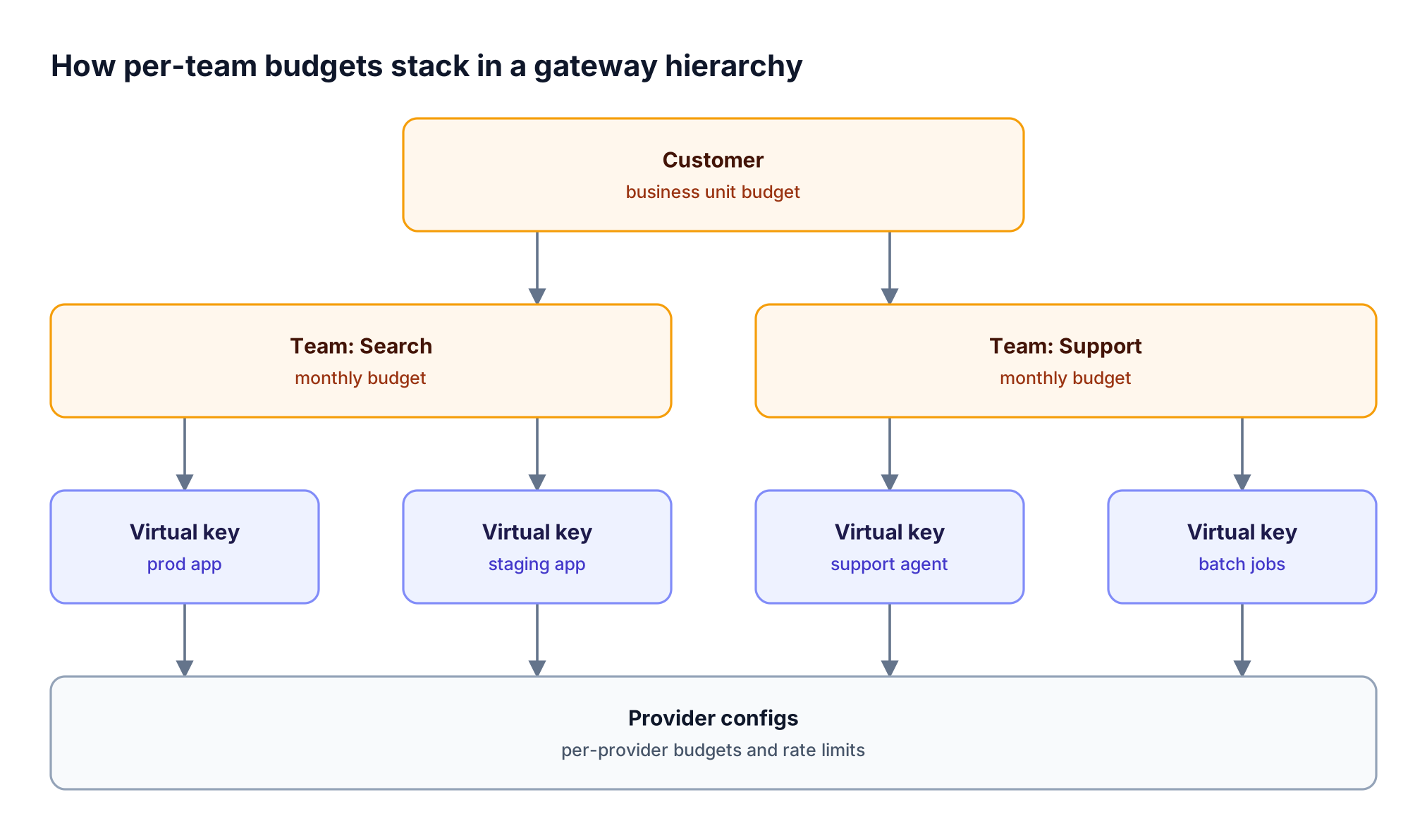
Figure 1: Every level carries an independent budget, so a team cap and a key cap both apply to the same request.
As Figure 1 shows, a hierarchy lets a business unit cap, a team cap, and an application cap apply to the same request, while rate limits contain retry loops before they consume a monthly budget.
Key Criteria for Choosing an AI Gateway for Cost Control
The criteria that separate AI gateways on cost control are the budget unit (dollars or tokens), how many organizational levels a budget attaches to, whether enforcement happens before the provider call, how reset windows align with finance calendars, and whether cost can be attributed to teams without extra instrumentation.
| Criterion | What to check | Why it matters |
|---|---|---|
| Budget unit | Dollar budgets or token quotas | Token quotas do not map to a dollar figure finance approves |
| Hierarchy depth | Business unit, team, key, provider, model | Single-level limits cap teams or apps, not both |
| Rate limit dimensions | Tokens and requests, per key and provider | Short windows contain retry loops |
| Reset periods | Minute to year, calendar alignment, fiscal quarters | Rolling budgets drift from the finance calendar |
| Enforcement point | Before the provider call or after | Post-hoc enforcement lets bursts overshoot |
| Cost attribution | Per-request cost labeled by owner | Chargeback needs cost joined to a team |
| Deployment | Self-hosted, in-VPC, hosted, cloud-specific | Regulated teams may not route prompts through a third party |
The LLM gateway buyer's guide covers the broader evaluation, including routing and reliability.
AI Gateway Budget Controls Compared
The five gateways split into two groups: Bifrost enforces dollar budgets across a multi-level hierarchy, while Kong, Azure API Management, and Google Apigee meter tokens or computed cost per consumer through policies, and Cloudflare applies hosted spend rules per gateway. The table reflects what each vendor publishes in its own documentation.
| Capability | Bifrost | Kong AI Gateway | Cloudflare AI Gateway | Azure API Management | Google Apigee |
|---|---|---|---|---|---|
| Budget unit | USD budgets | Tokens, or a cost figure from configured per-token prices | Estimated spend from token usage and model pricing | Tokens | Tokens (input or output) |
| Where limits attach | Customer, team, virtual key, provider config | Policies matching consumer, consumer group, IP, header, path, model, provider | Up to 20 rules per gateway, scoped by provider, model, or metadata | Any counter key (subscription, IP, policy expression) | App, developer, or custom identifier, with API product settings |
| Rate limits | Tokens and requests, per key and per provider | Token or cost windows | Requests per gateway | Tokens per minute | Separate PromptTokenLimit policy |
| Reset periods | 1m to 1Y, calendar-aligned in UTC, fiscal quarters |
Window size in seconds, fixed or sliding | Rolling or fixed window | Hourly, daily, weekly, monthly, yearly | Minute to month; calendar, rolling, or flexi |
| Cost attribution | Per-request cost in logs; Prometheus cost by key, team, customer | Not published | Spend analytics by model, provider, metadata | Token metrics with custom dimensions in Azure Monitor | Not published |
| Over-limit response | 402 for budgets, 429 for rate limits | 429 | 429, or a fallback route to a cheaper model | 429 for rate, 403 for quota | 429 |
| Deployment | Self-hosted, in-VPC, on-prem | Self-managed or Konnect | Hosted on Cloudflare | Azure-managed service | Google Cloud (policy not available in Apigee hybrid) |
For a broader view of tools that report on LLM costs rather than enforce them, see this comparison of enterprise gateways for LLM cost tracking and budget controls.
1. Bifrost: Hierarchical Budgets and Virtual Keys
The Bifrost AI gateway is open source and enforces dollar budgets across customers, teams, virtual keys, and provider configurations. It unifies 25+ providers and 10,000+ models behind one OpenAI-compatible API, and it adds 11 microseconds of overhead per request at 5,000 RPS, so budget checks do not add meaningful latency to the request path.
Best for: Bifrost is built for enterprises running mission-critical AI workloads that require best-in-class performance, scalability, and reliability. It serves as a centralized AI gateway to route, govern, and secure all AI traffic across models and environments with ultra low latency. Bifrost unifies LLM gateway, MCP gateway, and Agents gateway capabilities into a single platform. Designed for regulated industries and strict enterprise requirements, it supports air-gapped deployments, VPC isolation, and on-prem infrastructure. It provides full control over data, access, and execution, along with robust security, policy enforcement, and governance capabilities.
Hierarchical budgets and virtual keys
Virtual keys are the primary governance entity in Bifrost. Each application, service, or user calls the gateway with its own sk-bf-* key, sent in the x-bf-vk header or in the provider-style Authorization, x-api-key, or api-key headers, so existing SDKs need only a base URL change. A virtual key belongs to one team, one customer, or neither.
The budget and limits hierarchy runs from customer to team to virtual key to provider config, and each level holds an independent budget. When a request arrives, Bifrost checks every applicable budget, and any single failure blocks the request. After the call, the same cost is deducted from every level, so a $2 request consumes $2 of the key budget, $2 of the team budget, and $2 of the customer budget.
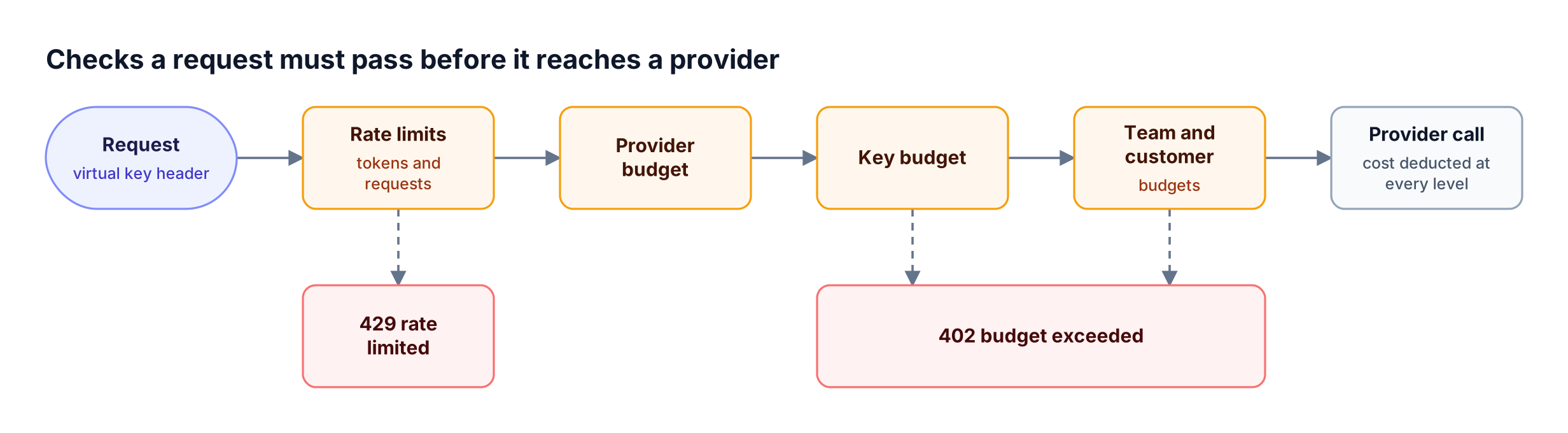
Figure 2: Every applicable check must pass before the provider call, so an exhausted team budget adds no further spend.
A budget failure returns 402 budget_exceeded naming the tier that ran out, and a rate limit failure returns 429. When a provider config exceeds its own budget or rate limit, that provider is excluded from routing while the key's other providers stay available.
A virtual key with a monthly budget, a provider budget, and hourly rate limits is one API call:
curl -X POST "<https://your-bifrost-instance.com/api/governance/virtual-keys>" \
  -H "Content-Type: application/json" \
  -d '{
    "name": "search-team-prod",
    "calendar_aligned": true,
    "budgets": [{ "max_limit": 1000.00, "reset_duration": "1M" }],
    "provider_configs": [
      {
        "provider": "openai",
        "weight": 0.7,
        "allowed_models": ["gpt-4o"],
        "key_ids": ["*"],
        "budgets": [{ "max_limit": 500.00, "reset_duration": "1M" }],
        "rate_limit": {
          "token_max_limit": 1000000, "token_reset_duration": "1h",
          "request_max_limit": 1000, "request_reset_duration": "1h"
        }
      }
    ]
  }'
Rate limits and reset periods
Bifrost runs request limits and token limits in parallel at the virtual key and provider config levels; teams and customers carry budgets only. Reset durations range from 1m to 1Y, with 1Q quarterly windows on budgets. With calendar_aligned set to true, a 1M budget resets on the first of the month in UTC, and quarterly budgets accept a quarter_start_month for fiscal years. Turning alignment on keeps accumulated usage, so switching mid-month neither clears nor forgives spend.
Budget overrides and model limits
A budget override adds temporary capacity for a set number of reset cycles without changing the base limit, which covers a launch week without editing the standing budget. Model limits cap spend on a specific model at the global, virtual key, or user scope.
Enterprise controls for large organizations
Bifrost Enterprise adds controls for running budgets at headcount scale:
- Access profiles: reusable access profiles define provider, model, budget, and rate-limit policy once, then issue each user a write-protected virtual key with isolated counters.
- Identity sync: user provisioning syncs IdP groups into Bifrost teams over OIDC and inbound SCIM 2.0, so team budgets follow the org chart.
- Customer scoping: an
x-bf-customer-idheader attributes a request from a shared team key to one specific customer for billing and enforcement. - Multi-node state: clustering keeps budget and usage state consistent across gateway nodes for high availability.
Organizations evaluating these controls for regulated or in-VPC deployments can review the Bifrost Enterprise offering.
2. Kong AI Gateway: Token and Cost Rate Limiting
Kong AI Gateway adds LLM traffic controls to Kong Gateway through plugins. Its AI Rate Limiting Advanced plugin, available only in the AI Gateway Enterprise offering, limits traffic by prompt, completion, or total tokens, or by a cost figure computed from per-million-token input and output prices configured on the AI Proxy plugins.
Kong's model is a set of rate-limit policies rather than a budget hierarchy:
- Policy targets: from version 3.14, policies match a consumer, consumer group, IP, header, path, model, or provider, combined with AND logic.
- Windows: the window size is defined in seconds, with fixed or sliding window behavior.
- Provider and model limits: limits apply per provider and per model, so failover to another model can succeed when one hits its limit.
- Timing: Kong notes that costs take effect only on the next request.
Best for: Kong Gateway Enterprise users that want token or cost windows per consumer group and can model team budgets as policy combinations. Trade-offs are covered in this guide to budget and rate limit architecture for multi-tenant LLM platforms.
3. Cloudflare AI Gateway: Spend Limits at the Edge
Cloudflare AI Gateway is a hosted gateway that runs on Cloudflare's network. Its spend limits feature calculates cost from token usage and model pricing, and lets each gateway carry up to 20 rules scoped by provider, model, or custom metadata keys, with a 429 or a fallback route to a cheaper model when a limit is reached.
The spend limit model is flexible within one gateway:
- Per-value budgets: a metadata dimension can be split by value, giving each distinct value, such as an
agent_idoruser_id, its own budget. - Per-user budgets: a
cf.user_idkey is added automatically when Cloudflare Access protects the gateway; otherwise the caller passes its own identifier as metadata. - Accuracy: enforcement is eventually consistent, and cost tracking is an estimate rather than the billed figure.
- Rate limiting: the separate rate limiting feature counts requests, not tokens, per gateway.
Best for: Cloudflare-standardized teams that want hosted spend caps by provider, model, or metadata and can accept estimated, eventually consistent enforcement. For a reporting layer on any gateway, see per-team cost attribution for AI usage.
4. Azure API Management: Token Quotas per Subscription
Azure API Management provides AI gateway capabilities through policies on top of its API management service. The llm-token-limit policy enforces a tokens-per-minute rate, a token quota over an hourly, daily, weekly, monthly, or yearly period, or both, keyed on a subscription, an IP address, or any policy expression.
The policy is measured in tokens:
- Prompt estimation: with
estimate-prompt-tokensenabled, the gateway estimates prompt tokens in advance and can reject a request before it reaches the backend. - Responses: exceeding the rate returns
429 Too Many Requests, and exceeding the quota returns403 Forbidden. - Metrics: the
llm-emit-token-metricpolicy sends token metrics to Azure Monitor with custom dimensions such as a user ID header.
The policy does not describe dollar budgets, so a monthly team budget must be translated into token quotas per model.
Best for: Azure API Management users that want token quotas per subscription and will build dollar budgets and chargeback separately, along the lines of this guide on tracking LLM usage and spend by team.
5. Google Apigee: LLM Token Quotas per API Product
Google Apigee applies AI quotas through its LLMTokenQuota policy. The policy counts input or output tokens from LLM responses and enforces a quota over a minute, hour, day, week, or month, with calendar, rolling window, or flexi counter types and a 429 error when the quota is exceeded.
Apigee's approach fits its API product model:
- Counters: the
<Identifier>and<Class>elements create separate counters per app, developer, client ID, or another identifier. - API products: quota settings can be defined at the API product or operation level and referenced by the policy.
- Spikes: a separate PromptTokenLimit policy limits the rate of token usage for traffic bursts.
- Licensing: LLMTokenQuota is an Extensible policy with possible cost implications depending on the Apigee license, and it is not available in Apigee hybrid.
Best for: Google Cloud teams that package APIs as Apigee API products and want token quotas per app or developer. For currency budgets on top of token counts, compare AI cost management tools that track LLM spend.
Showback vs Chargeback: Turning Cost Tracking into Team Accountability
Showback reports each team's AI spend without billing it, and chargeback bills that spend back to the team's budget. Both depend on the same input: per-request cost attributed to a team, product, or customer. An AI gateway produces that input at the one point every request already passes through, so attribution needs no per-application instrumentation.
| Showback | Chargeback | |
|---|---|---|
| Purpose | Visibility into who spends what | Cost recovery against team budgets |
| Accuracy required | Directionally correct | Reconcilable with provider invoices |
| Typical owner | Platform or FinOps team | Finance with platform input |
| Gateway data needed | Cost by key and team | Cost by team, customer, and model, with pricing source |
The FinOps Foundation's FinOps for AI guidance recommends showback for team visibility and notes the lack of accepted frameworks for cost allocation across multi-agent workloads. Gateway attribution narrows that gap because every agent call carries its team's virtual key.
The open-source Bifrost gateway prices each request with the Model Catalog, which syncs a pricing sheet every 24 hours when a config store is enabled and handles cache reads, tiered long-context pricing, and semantic cache hits. Cost then flows to two places, shown in Figure 3:
- Request logs: request-level logging stores cost, tokens, model, and latency for each call, with filters such as
min_costandmax_costand token and cost analytics in the dashboard. - Prometheus metrics: the
bifrost_cost_totalcounter in gateway telemetry carriesvirtual_key_name,team_name, andcustomer_namelabels, plus custom dimensions injected per request withx-bf-dim-*headers.
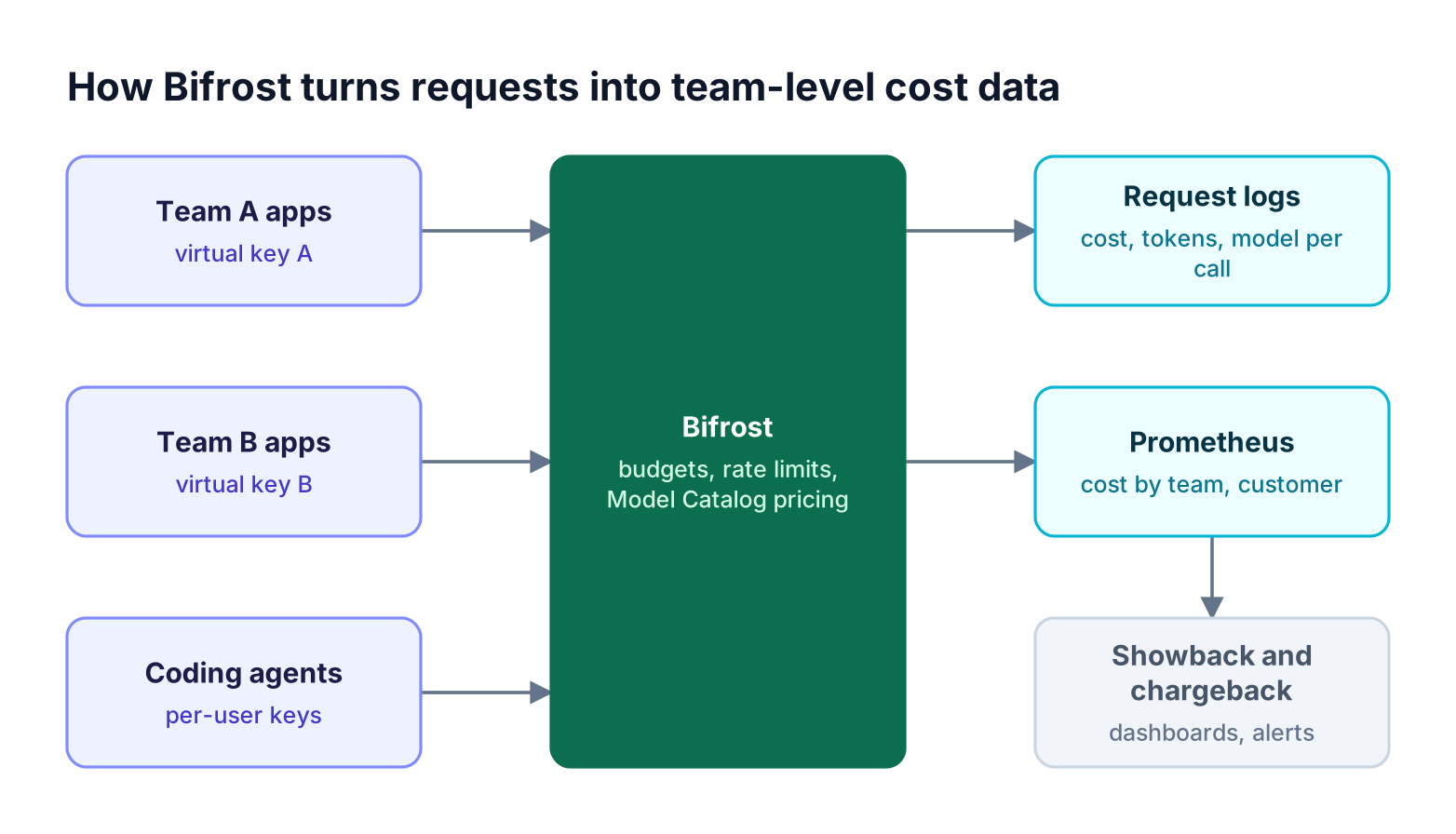
Figure 3: Cost is priced and labeled at the gateway, so showback and chargeback reports need no per-application instrumentation.
A monthly showback report by team is one PromQL query:
sum by (team_name) (increase(bifrost_cost_total[30d]))
The same counter drives alerts before the hard budget stops traffic; the governance controls in Bifrost are the enforcement half.
How to Choose the Best AI Gateway for Your Spend Controls
The best AI gateway for spend controls is the one whose budget model matches how the organization already allocates money. Teams that approve budgets in dollars per team need dollar budgets at the team level; teams that already run an API platform can start with its token quotas and translate dollars into tokens.
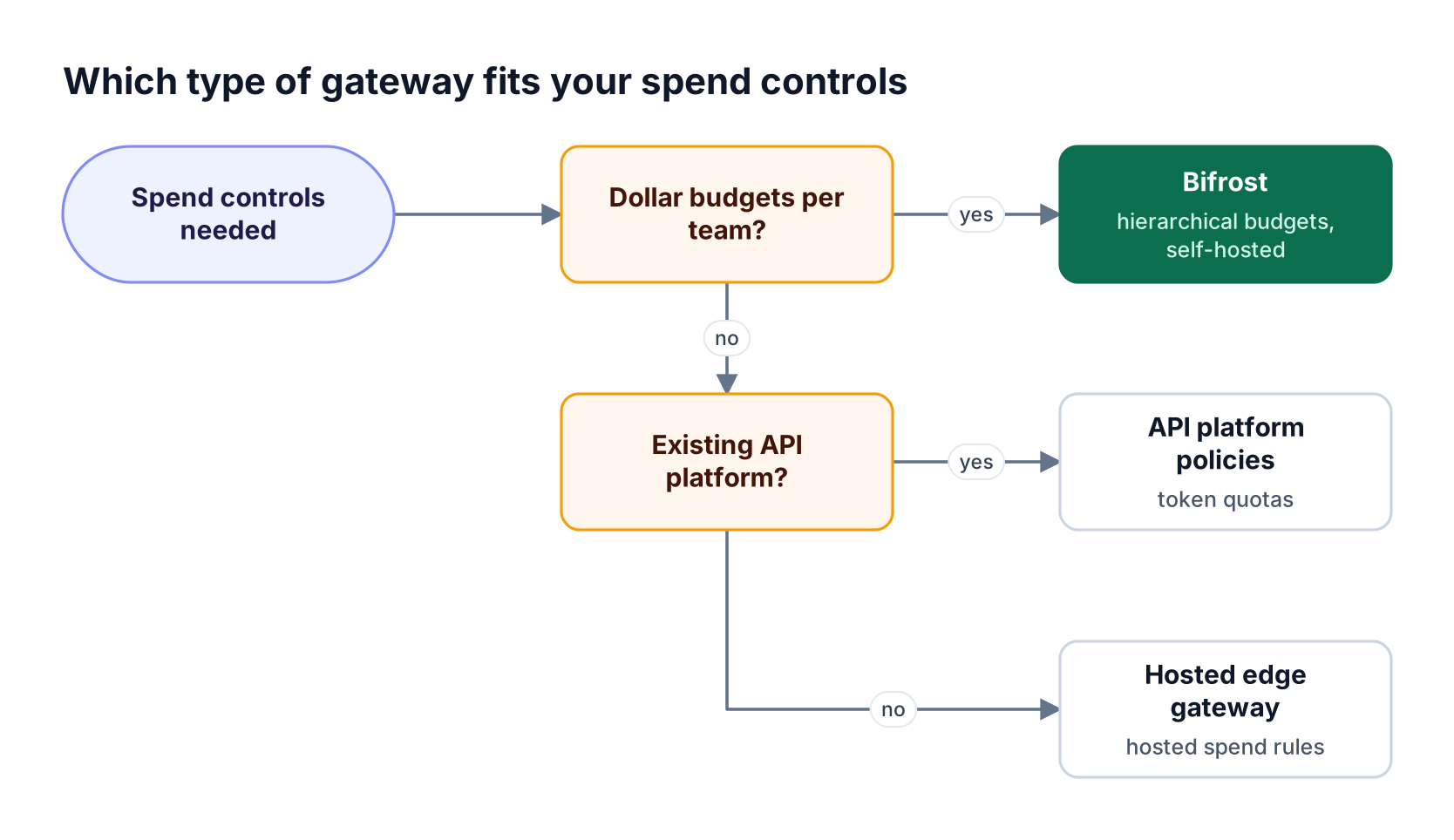
Figure 4: Teams that need dollar budgets per team, key, and provider should start from the budget model, not the API platform they already run.
Figure 4 reflects recurring challenges with spend controls built from general-purpose API policies:
- Tokens are not dollars. A token quota sized for one model allows a different dollar amount on another, so model changes silently change effective budgets.
- One level is not enough. A per-consumer quota caps the application or the team, but not both, and business unit budgets need a separate layer.
- Windows drift from the calendar. Rolling or second-based windows do not line up with monthly reporting.
- Enforcement can lag. Limits that apply on the next request or are eventually consistent let bursts overshoot the cap.
For organizations that combine budgets with access control and role management, the Bifrost governance resource page shows how virtual keys tie spend limits, model access, and roles together.
Frequently Asked Questions
Why is AI costing so much?
AI costs grow because usage is metered per token, and token volume scales with prompt length, model choice, agent retries, and the number of teams calling models. Without a gateway, costs aggregate in one provider account with no owner per request. Budgets per team and key, plus semantic caching for LLM cost reduction, address both visibility and volume.
How much does AI cost?
AI cost depends on the model, input and output token counts, caching, and request type, so the same workload can differ several times in price between models. Bifrost prices every request with its Model Catalog, including prompt cache reads and long-context tiers, and records cost per call. Summed by team, that figure is more accurate than an estimate from list prices.
What is the difference between showback and chargeback?
Showback reports each team's AI spend for visibility without billing it, while chargeback bills that spend back to the team's budget. Showback tolerates approximate figures; chargeback needs cost that reconciles with provider invoices. Both require per-request cost attributed to an owner, which a gateway produces by labeling each request with its virtual key, team, and customer.
How do virtual keys control LLM spend?
Virtual keys give each application, team, or user its own gateway credential with attached budgets, rate limits, and allowed models. In Bifrost, a request is checked against the key budget, the provider-config budget, and any team and customer budgets before it is forwarded. A deeper walkthrough of LLM budget management with virtual keys covers configuration patterns.
What happens when a team exceeds its LLM budget?
When any applicable budget is exhausted, Bifrost rejects the request before calling the provider and returns a 402 budget_exceeded error naming the tier that ran out. Usage stays recorded until the next reset. Administrators can add a temporary budget override for a set number of reset cycles without changing the base limit.
Start Managing AI Spend with Bifrost
AI spend management works when budgets are enforced where every request passes and cost is attributed to the team that made it. Bifrost combines a customer, team, virtual key, and provider budget hierarchy with token and request rate limits, calendar-aligned resets, and cost labeled for chargeback, in an open-source AI gateway that adds 11 microseconds of overhead at 5,000 RPS. Explore more in the Bifrost resources library, or book a demo to see per-team budgets and cost controls running on your own traffic.