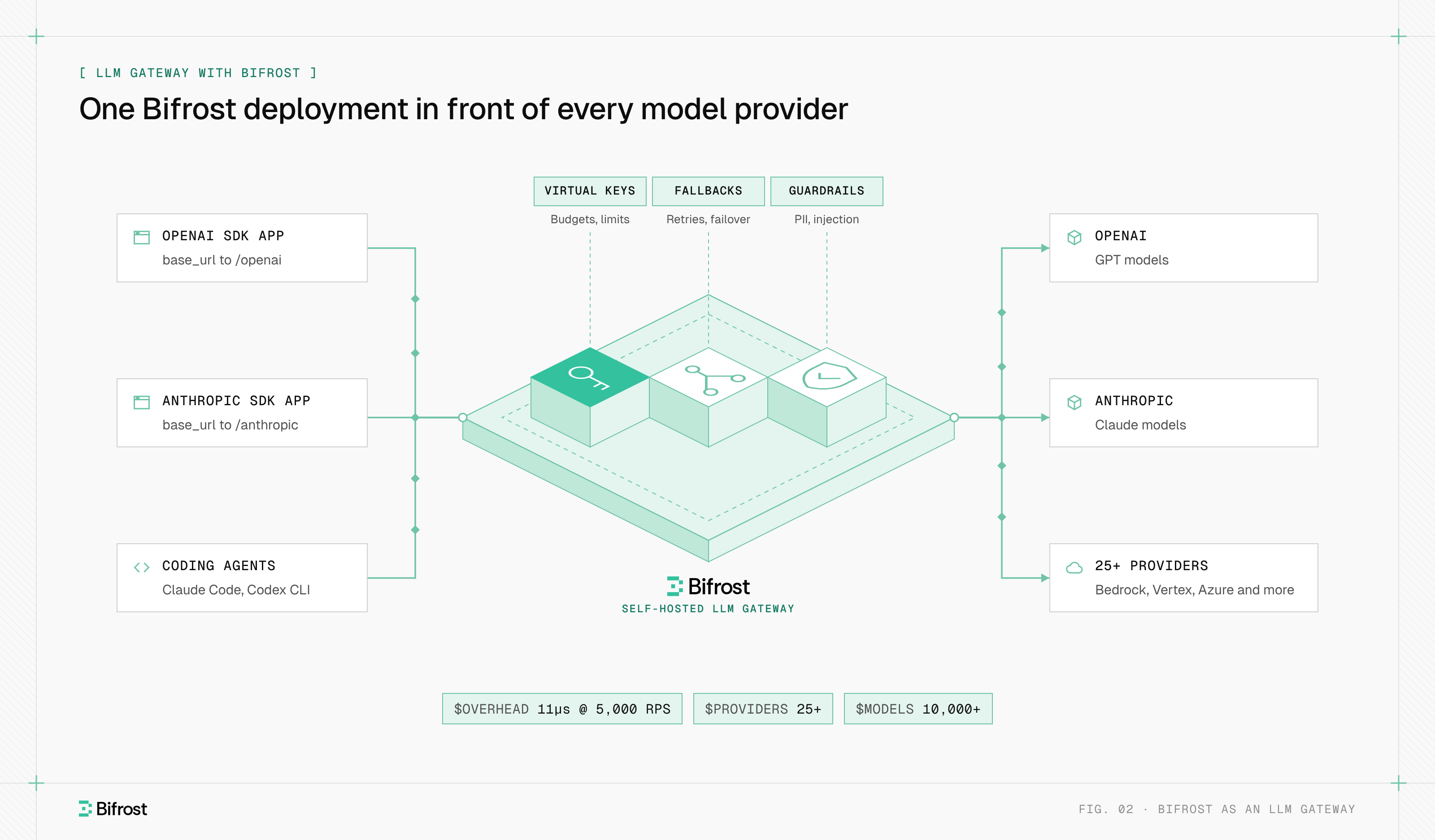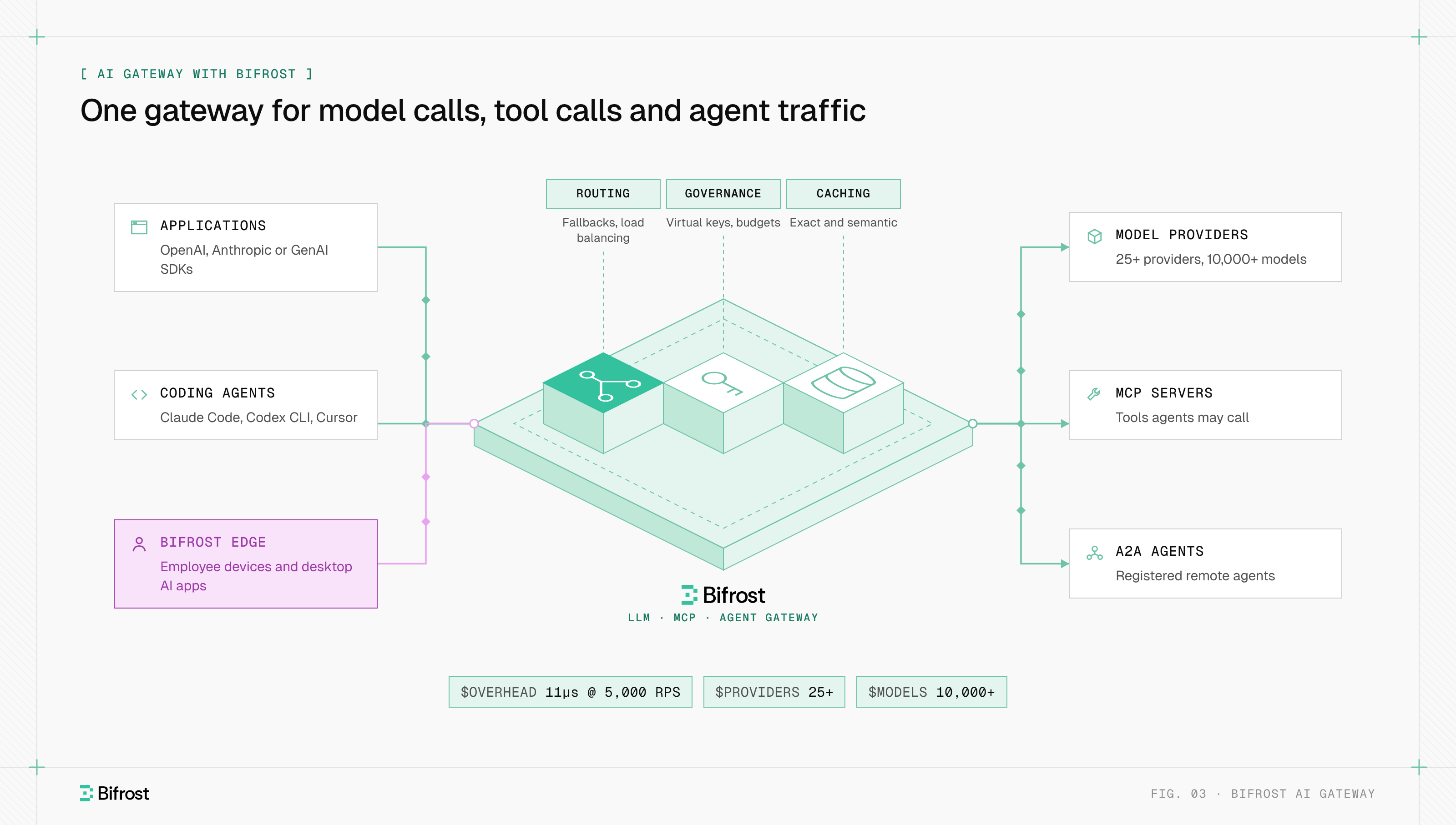
An OpenAI-compatible API is an HTTP endpoint that accepts requests in the format of OpenAI's API and returns responses in the same shape, so code written for the OpenAI SDK can call another model by changing the base URL, API key and model name. The compatibility covers the format, not the behavior: each server decides which parameters it honors, ignores or rejects.
Chat Completions (POST /v1/chat/completions) became the shared contract for LLM APIs, so hosted providers such as Google Gemini and Groq, self-hosted servers such as vLLM, Ollama and LM Studio, and tools such as LangChain and Open WebUI all speak it. The match is rarely complete: Anthropic says its own compatibility layer "is not considered a long-term or production-ready solution for most use cases." Bifrost, the open-source AI gateway, puts one OpenAI-compatible API in front of hosted and self-hosted providers and handles the translation for each.
How does an OpenAI-compatible API work?
An OpenAI-compatible API works by reproducing OpenAI's paths, headers and JSON schemas. The client keeps the official OpenAI SDK and points it at a different server, which reads the same model and messages fields, returns the same choices array, and streams the same server-sent events (SSE) chunks.
The SDK appends the endpoint path to the base URL and sends the key as Authorization: Bearer <key>. OpenAI's API reference also defines optional OpenAI-Organization and OpenAI-Project headers and x-ratelimit-* response headers; a compatible server implements some of these, all of them, or none.
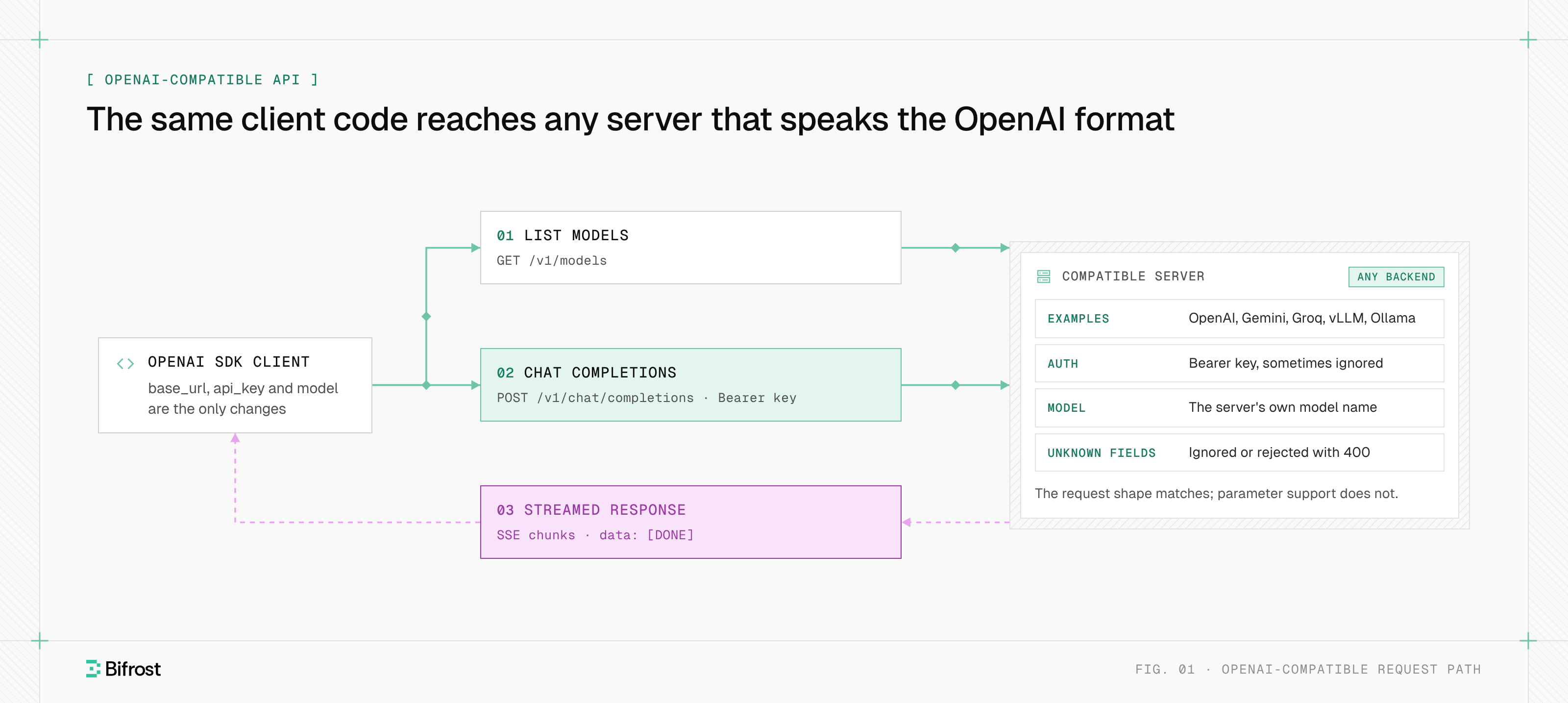
Figure 1: Only the base URL, key and model name change; what the server does with each field is up to the server.
| Part of the contract | OpenAI | Typical compatible server |
|---|---|---|
| Base URL | https://api.openai.com/v1 | Its own host, usually ending in /v1 |
| Authentication | Authorization: Bearer key | Same header; local servers may ignore the key |
| Chat endpoint | POST /v1/chat/completions | Implemented almost everywhere |
| Responses endpoint | POST /v1/responses | Implemented by some servers, often without stored state |
| Model list | GET /v1/models | Usually present; minimal proxies skip it |
| Streaming | SSE chunks ending in data: [DONE] | Same framing; the usage chunk may arrive late or not at all |
| Errors | OpenAI error JSON and status codes | Same shape, different messages and codes |
Switching a client is a base URL change. This call reaches a local Ollama server with the unmodified OpenAI Python SDK:
from openai import OpenAI

client = OpenAI(base_url="http://localhost:11434/v1", api_key="ollama")  # key required by the SDK, ignored by Ollama
resp = client.chat.completions.create(
    model="llama3.2",
    messages=[{"role": "user", "content": "Explain HTTP 429 in one sentence."}],
    max_tokens=200,
)
print(resp.choices[0].message.content)
Which providers offer OpenAI-compatible endpoints?
Providers that offer OpenAI-compatible endpoints fall into three groups: hosted model APIs that add a compatibility layer, self-hosted inference servers, and gateways that put many providers behind one endpoint. Each documents its own base URL and scope, and the provider's docs are the reference for what it supports.
| Provider | Base URL for the OpenAI SDK | Type | Stated scope |
|---|---|---|---|
| Google Gemini | https://generativelanguage.googleapis.com/v1beta/openai/ | Hosted | Beta; chat, embeddings, images, batch |
| Groq | https://api.groq.com/openai/v1 | Hosted | Chat and audio; some fields rejected |
| Anthropic (Claude) | https://api.anthropic.com/v1/ | Hosted | Testing and model comparison |
| NVIDIA NIM | https://integrate.api.nvidia.com/v1 or your own host | Hosted or self-hosted | Chat, completions, models |
| vLLM | http://localhost:8000/v1 | Self-hosted | Chat, completions, Responses, embeddings, audio |
| Ollama | http://localhost:11434/v1 | Self-hosted | Chat, completions, stateless Responses, embeddings |
| LM Studio | http://localhost:1234/v1 | Self-hosted | Chat, completions, Responses, embeddings |
Google's compatibility page says that "support for the OpenAI libraries is still in beta," and Gemini-specific settings such as thinking_config travel in extra_body. Most servers take their own extra parameters the same way.
OpenAI-compatible APIs for self-hosted open models
Self-hosted servers expose an OpenAI-compatible API so existing clients can run open-weight models on your own hardware. The wire format matches, but the model's packaging decides the output.
vLLM's OpenAI-compatible server needs a chat template in the model's tokenizer configuration, or "all chat requests will error." vLLM also applies the model repository's generation_config.json by default, so sampling defaults differ from OpenAI's. Ollama notes that "the OpenAI API does not have a way of setting the context size," so a larger context window means building a model variant with num_ctx. NVIDIA NIM's API is "backed by vLLM," so vLLM's behavior applies to it too.
Chat Completions vs Responses API compatibility
Most servers that call themselves OpenAI-compatible mean Chat Completions, the stateless /v1/chat/completions endpoint. OpenAI's newer Responses API (/v1/responses) adds server-side conversation state and built-in tools, and OpenAI recommends it for new projects, but support for it across compatible servers is uneven.
| Chat Completions | Responses API | |
|---|---|---|
| Path | /v1/chat/completions | /v1/responses |
| Conversation state | Client resends every message | Server can store it (previous_response_id) |
| Support across compatible servers | Near universal | Partial; often stateless only |
| Typical gap | Ignored parameters | Missing state, tools or streaming events |
Ollama supports "only the non-stateful flavor" of Responses, with no previous_response_id or conversation. vLLM and LM Studio list /v1/responses; Google's Gemini compatibility page does not. The practical rule: build on Chat Completions and keep state in the client when you need many backends, and use Responses only where every backend implements the parts you call. Our comparison of Responses, Chat Completions and Anthropic Messages covers the formats field by field.
Where OpenAI compatibility breaks
OpenAI compatibility breaks at the parameter level, where the gaps and differences between servers show up. A server can accept the request shape and still ignore a field, reject it with HTTP 400, or change what it means, and the SDK reports none of this, because it only checks that the response parses.
| Field | What compatible servers do | Example |
|---|---|---|
max_tokens | Accepted, though OpenAI has deprecated it | OpenAI prefers max_completion_tokens; most other servers document max_tokens |
n | Must be 1 | Anthropic returns 400 for other values; Groq requires 1; Ollama does not support it |
logprobs, logit_bias | Rejected or ignored | Groq returns 400; Anthropic ignores them |
seed, frequency_penalty, presence_penalty | Silently ignored | Anthropic |
response_format | Partly supported | Anthropic accepts only json_schema with strict: true |
tool_choice | Ignored or limited | Ollama lists it as unsupported |
temperature: 0 | Rewritten | Groq converts it to 1e-8 |
strict on tool schemas | Ignored | Anthropic does not guarantee schema-valid tool JSON |
| System and developer messages | Merged | Anthropic joins them into one system prompt at the start |
The max_tokens row catches teams in both directions. OpenAI's Chat Completions reference marks max_tokens as "deprecated in favor of max_completion_tokens" and "not compatible with o-series models," while Groq and other servers built their compatibility around the older field.
Other breaks sit outside the request body:
- Model lists. Open WebUI and similar clients call
GET /v1/modelsto fill their model picker, so a server without it needs manual model IDs. - Errors. Anthropic says its error messages "are not equivalent" to OpenAI's and should be used only for logging, so retry logic should key on status codes.
- Usage. Token counts come from each model's tokenizer, so the same prompt costs a different number of tokens on each backend.
Authentication and API keys for OpenAI-compatible endpoints
OpenAI-compatible endpoints authenticate with the same Authorization: Bearer header, but what the key means differs. Hosted providers issue their own keys, local servers often accept any string, and OpenAI's organization and project headers mean nothing to other backends.
Local servers need care. Ollama ignores the key, and vLLM's --api-key flag protects only paths under /v1, /v2, /inference and /cohere; the vLLM docs warn, "Do not rely on --api-key alone to secure vLLM." Put a self-hosted server on a private network behind something that authenticates callers.
With several providers, every application ends up holding several provider keys. A gateway replaces them with one credential per application or team, such as Bifrost virtual keys, which carry their own model access, budgets and rate limits.
Direct endpoints vs an AI gateway
Calling each OpenAI-compatible endpoint directly works for one or two backends. An AI gateway gives OpenAI-compatible access to many providers through one endpoint and owns translation, keys, failover and logging, so the client keeps one base URL even when a backend's native API is not OpenAI's.
| Concern | Direct endpoints | Through an AI gateway |
|---|---|---|
| Base URLs in client code | One per provider | One |
| Credentials | A provider key per app per provider | One gateway key per app or team |
| Providers without native OpenAI format | Each vendor's compatibility layer, with its limits | Translated to the native API |
| Unsupported parameters | Different behavior per server | Handled and reported in one place |
| Failover | Written in client code | Configured once |
| Logs and spend | One console per provider | One log stream |
Tools follow the same split. OpenAI-style function calling describes tools inside each chat request, while MCP tools live on separate servers, and an MCP gateway governs that traffic the way an AI gateway governs model calls.
How to test and migrate to an OpenAI-compatible API
Testing an OpenAI-compatible API means checking behavior, not only whether requests succeed. A migration from the OpenAI API to a compatible alternative is safe when the parameters your code sends, the response fields it reads, and the output quality all hold up on the new backend.
- Inventory the contract. List every request field your code sends and every response field it reads, including
usage,finish_reasonandtool_calls. - Run contract tests per endpoint. Cover a plain call, a stream (with the final usage chunk), a tool call, a structured output and an oversized request to see the error shape.
- Check for silent drops. Send fields with visible effects, such as
stopor a JSON schema, and confirm the output changed. - Confirm model names. Call
GET /v1/modelsand use the server's IDs, which rarely match OpenAI's. - Compare outputs with evals. OpenAI's API reference recommends pinning model versions and running evals, because behavior changes even between snapshots of one model.
- Plan for failure. Decide how 429s and 5xx errors retry, and which backend takes over when one is down; automatic provider fallback is one way to set that up.
OpenAI-compatible API with Bifrost
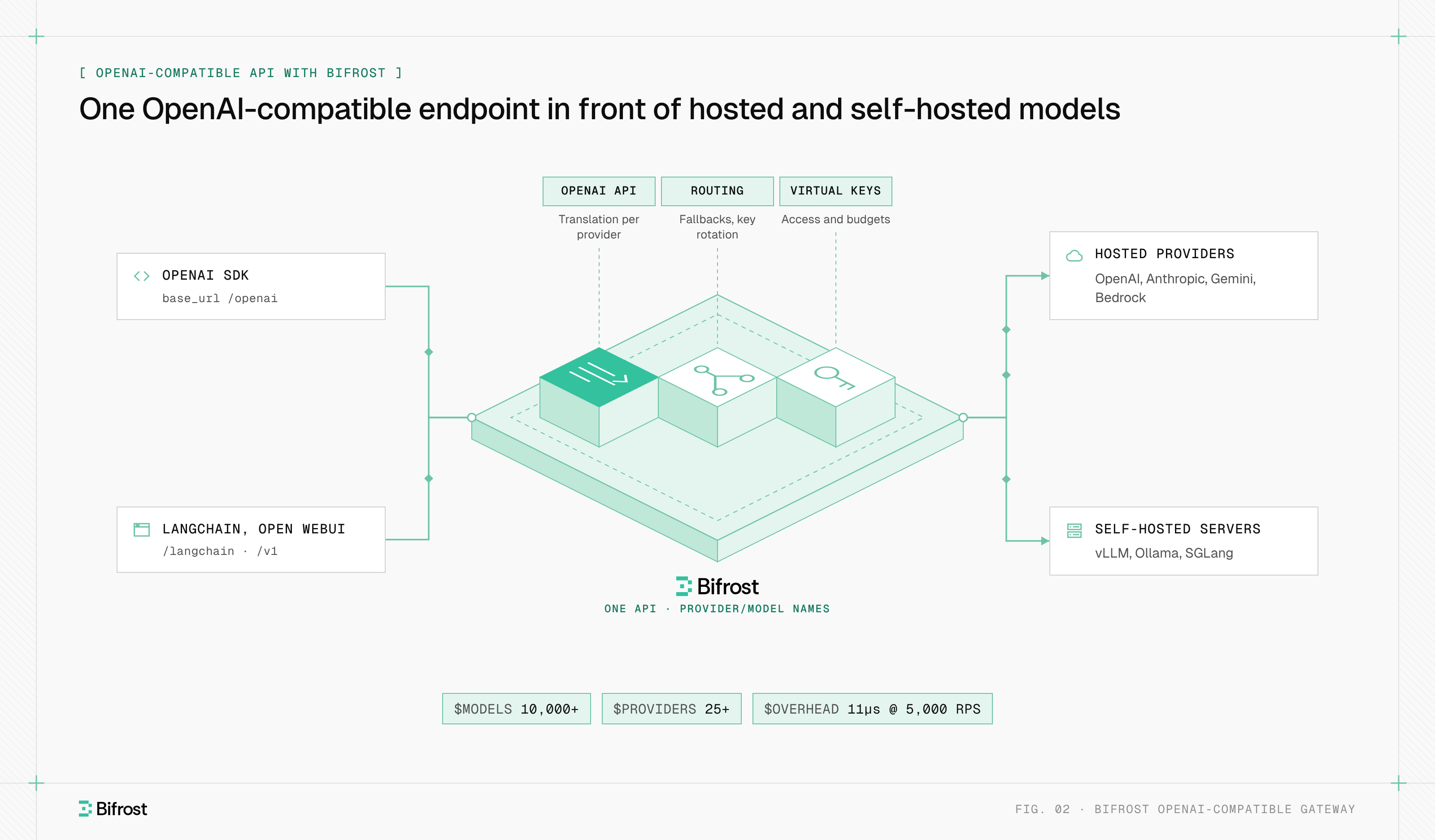
Bifrost, the open-source AI gateway built by Maxim AI, exposes one OpenAI-compatible API in front of 10,000+ models across 25+ providers. Clients send provider/model names to /v1, or keep existing OpenAI SDK code and change only the base URL to the drop-in /openai route.
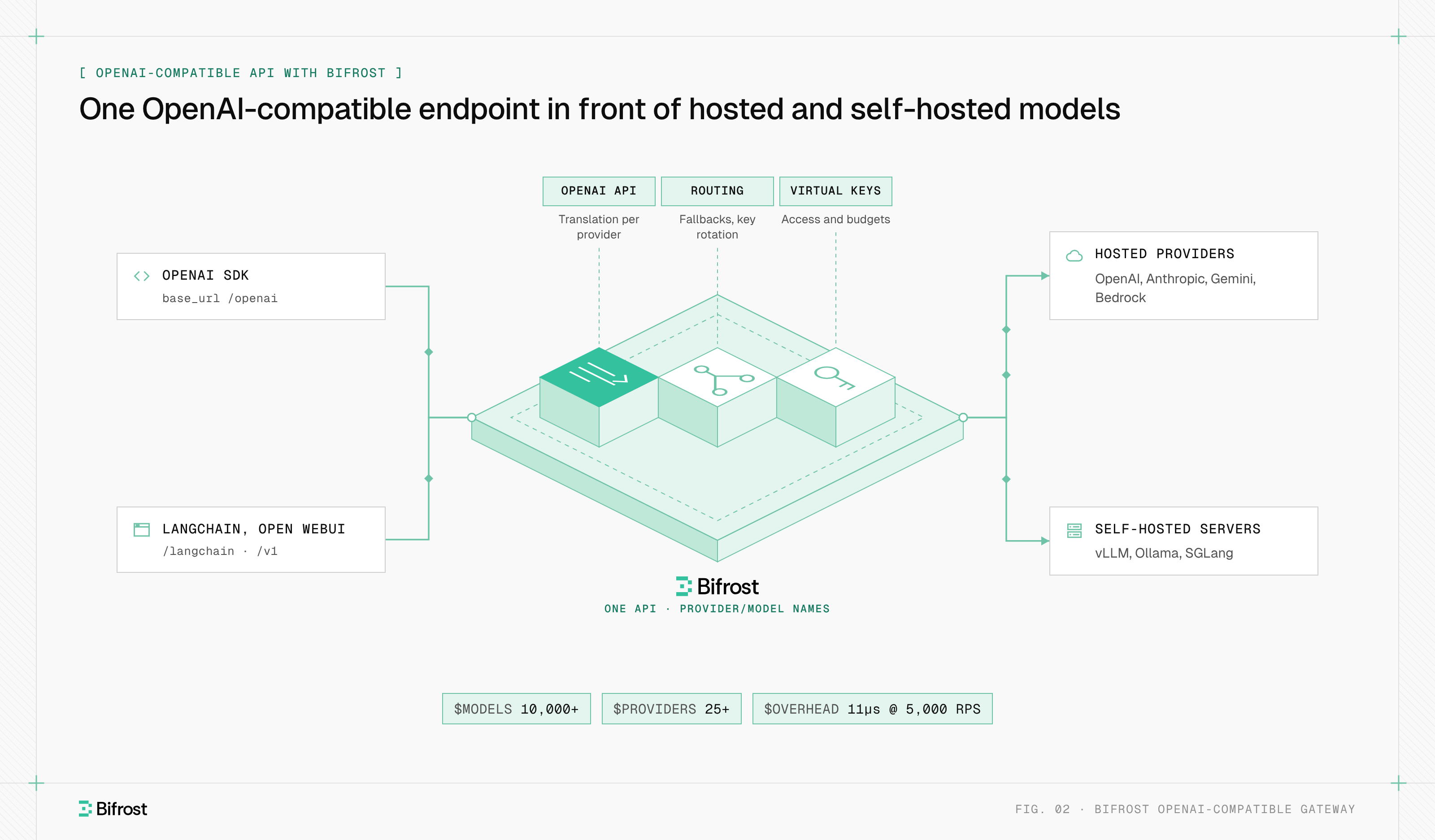
Figure 2: Clients keep one base URL and one key format while Bifrost handles translation, routing and fallbacks per provider.
from openai import OpenAI

client = OpenAI(base_url="http://localhost:8080/openai", api_key="<BIFROST_VIRTUAL_KEY>")
for model in ["openai/gpt-4o-mini", "anthropic/claude-sonnet-4-5-20250929", "ollama/llama3.1:8b"]:
    r = client.chat.completions.create(model=model, messages=[{"role": "user", "content": "Hello"}])
    print(model, r.choices[0].message.content)
- Translation. Bifrost converts requests for providers whose native API differs, such as Anthropic, Bedrock and Gemini, and every provider returns the OpenAI format. An operation a provider lacks, such as image generation on vLLM, returns
UnsupportedOperationErrorinstead of a silent drop. - Provider-specific fields. Fields OpenAI does not define go under
extra_paramswith thex-bf-passthrough-extra-paramsheader. - Any compatible server. A custom provider with
base_provider_type: "openai"adds an internal endpoint, with its ownbase_url, path overrides and allowed request types. - Failover. Retries and fallbacks rotate keys on 429s and move to the next
provider/model, and response headers such asx-bifrost-routing-info-providershow which provider answered. - Overhead. Bifrost adds about 11 microseconds per request at 5,000 RPS.
To try it, the gateway quickstart runs Bifrost locally with npx -y @maximhq/bifrost or Docker.
Frequently asked questions
What is OpenAI-compatible?
OpenAI-compatible describes a server or SDK that uses the same request and response format as OpenAI's API, usually Chat Completions at /v1/chat/completions. Code written for the OpenAI SDK can then call it by changing the base URL and key. It says nothing about model quality, or about which optional parameters the server supports, so test the fields you use before switching.
How to use OpenAI-compatible API?
Install the official OpenAI SDK, then create the client with the provider's base_url and API key, and pass a model name the provider serves. For example, Ollama runs at http://localhost:11434/v1 and Groq at https://api.groq.com/openai/v1. The rest of your code stays the same. Check GET /v1/models for valid model names, and send provider-specific settings in extra_body.
Is the nvidia API OpenAI-compatible?
Yes. NVIDIA's NIM documentation says NIM for LLMs "exposes an OpenAI-compatible inference API backed by vLLM," with /v1/chat/completions, /v1/completions and /v1/models. The hosted API catalog accepts the OpenAI SDK at https://integrate.api.nvidia.com/v1, and self-hosted NIM containers serve the same paths on your own host.
Does LangChain work with OpenAI-compatible APIs?
Yes. LangChain's ChatOpenAI class accepts a base URL, so it can call any OpenAI-compatible server, including vLLM, Ollama or a gateway. The same limits apply: parameters the server ignores stay ignored. Bifrost also offers a LangChain drop-in route at /langchain, so LangChain code can reach every configured provider through one endpoint.
Is OpenAI-compatible tool calling the same as MCP?
No. OpenAI-style tool calling sends tool definitions inside each chat request, and your application runs the tool when the model asks for it. The Model Context Protocol (MCP) puts tools on separate servers that clients discover at runtime. The two work together: a model can request an MCP tool through function calling. MCP vs API explains the difference in detail.
- openai-compatible api