MCP tools are functions that an MCP server exposes so a large language model can act on external systems, such as querying a database, opening a Jira issue or calling an API. Each tool has a unique name, a description and a JSON Schema for its inputs, and clients find tools with tools/list and run them with tools/call.
MCP is used to connect AI applications to the systems they need to act on, and tools are one of three server primitives in the Model Context Protocol, next to resources and prompts. Tools are the only one the model controls. The tools section of specification revision 2026-07-28 added cache hints for tool lists, parameter-to-header mirroring and multi-step input, so many older explanations are incomplete.
Bifrost, the open-source AI gateway, sits between AI applications and MCP servers and decides which MCP tools each caller can list and call.
How do MCP tools work?
MCP tools work through two JSON-RPC 2.0 methods. A client sends tools/list to learn which tools an MCP server offers, the host passes those definitions to the model, and when the model picks one, the client sends tools/call with the tool name and arguments. The server runs the action and returns the result.
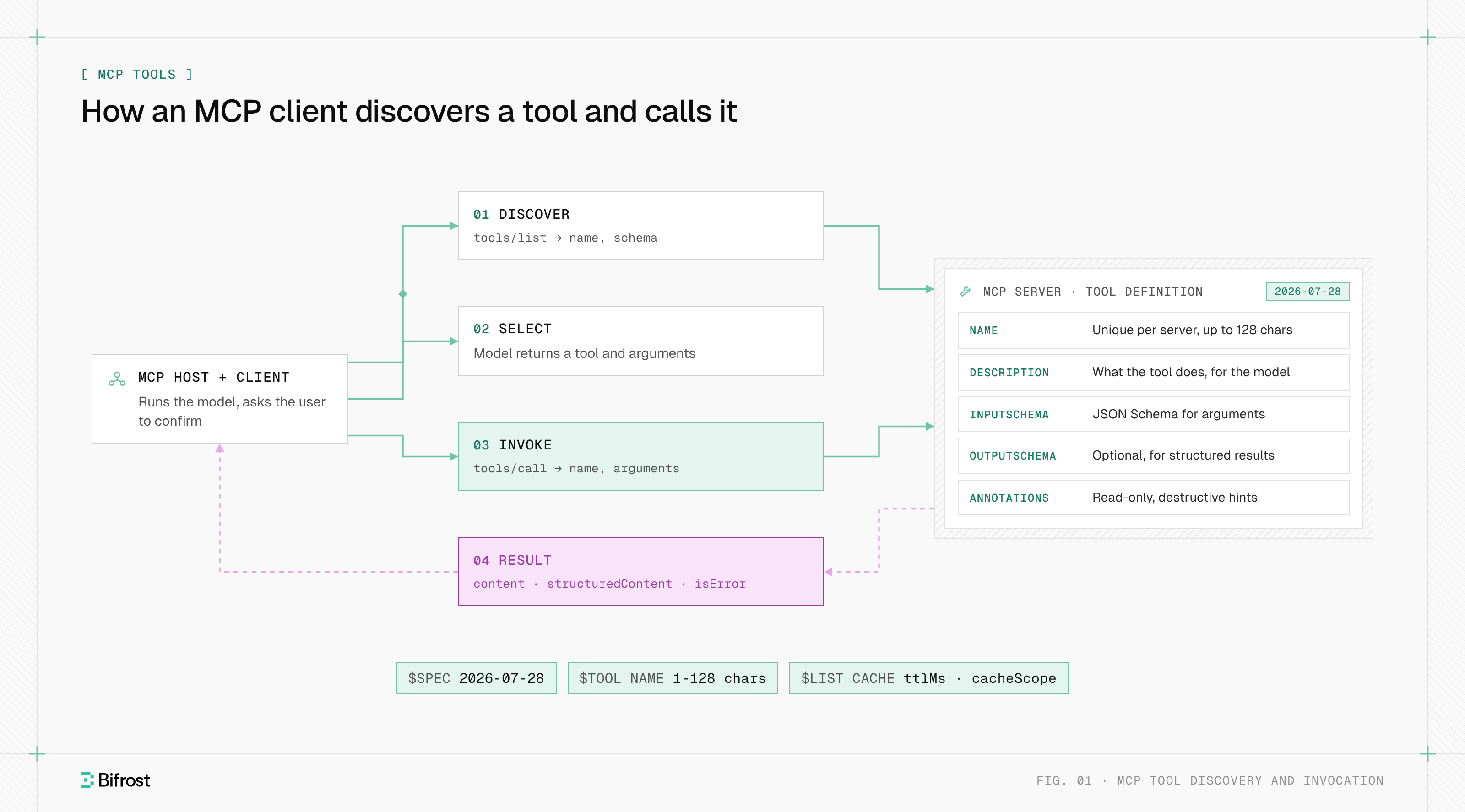
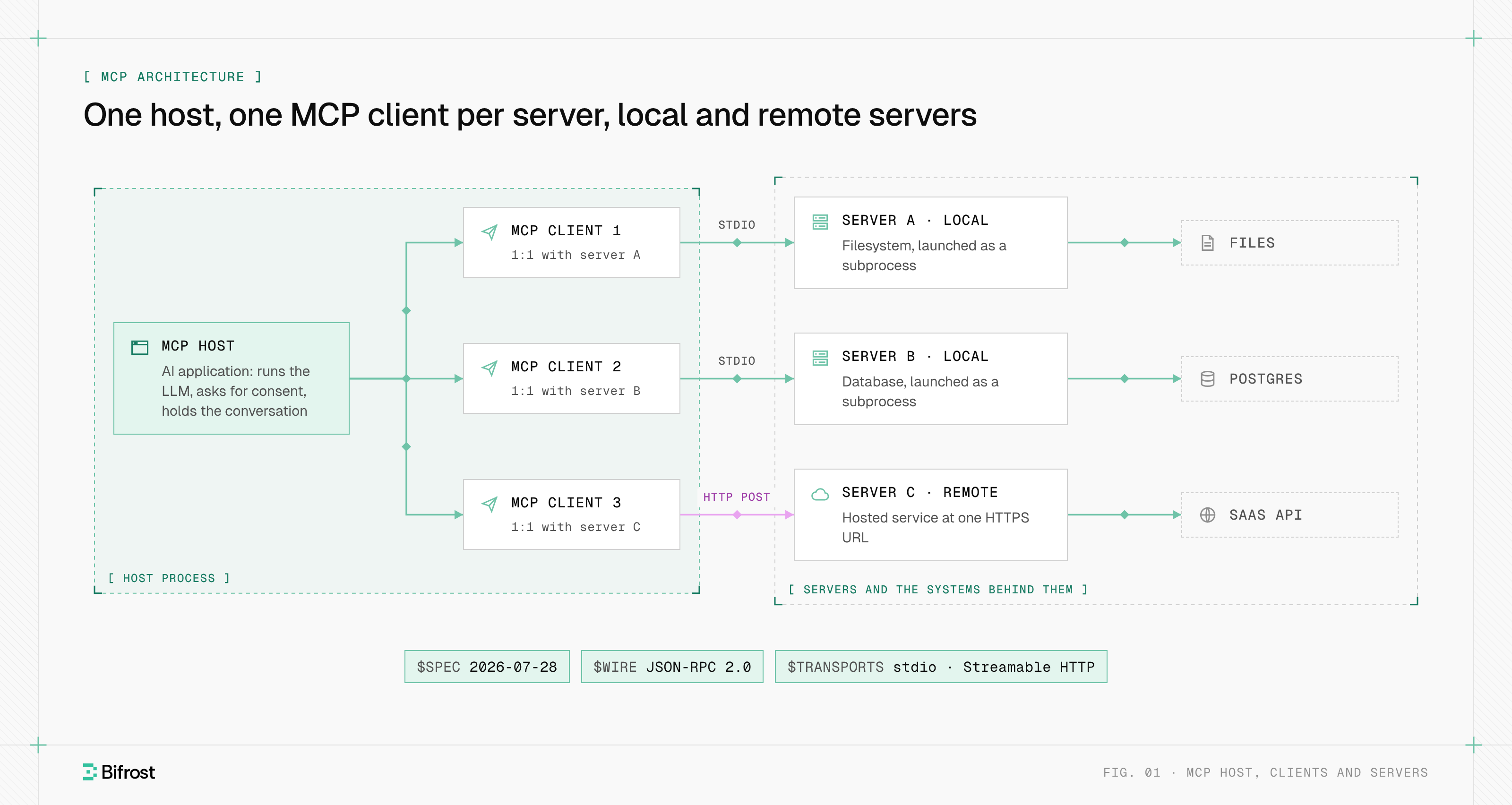
Figure 1: The server describes its tools once; the model picks one, and the host decides whether the call runs.
The roles come from the MCP architecture: the host is the AI application, it runs one MCP client per server, and each client talks to exactly one server. A tool call moves through four steps:
- Discover. The client sends
tools/list. The response is paginated withnextCursor, and since revision 2026-07-28 it carriesttlMsandcacheScope, so a host can reuse the list instead of fetching it every turn. - Select. The host converts each definition into the model provider's tool-calling format. The model returns a tool name and arguments; it never contacts the server itself.
- Invoke. The host checks consent and policy, then the client sends
tools/call. The specification says a human SHOULD be able to deny any invocation. - Return. The server replies with content blocks, optional structured content and an
isErrorflag, and the host adds the result to the model's context.
A server that supports tools declares the tools capability. With listChanged: true, it sends notifications/tools/list_changed to clients that opened a subscriptions/listen stream, and those clients fetch the list again.
How is an MCP tool defined?
An MCP tool is defined by a JSON object with a name, a description and an inputSchema, plus optional title, outputSchema, icons and annotations. The model reads the name and description to decide when to use the tool, and the input schema tells both the model and the MCP server which arguments are valid.
| Field | Required | What it holds | Rules in revision 2026-07-28 |
|---|---|---|---|
name | Yes | Identifier used in tools/call | 1-128 characters; letters, digits, _, - and .; case-sensitive; unique within one server |
description | Yes | What the tool does, written for the model | Plain text; the main signal for tool selection |
inputSchema | Yes | Accepted arguments | A JSON Schema object, never null; defaults to draft 2020-12 |
outputSchema | No | Shape of structured results | When present, the server must return conforming structuredContent |
annotations | No | Behavior hints | Untrusted unless the server is trusted |
title, icons | No | Display name and images for user interfaces | Not used for tool selection |
A tool that searches open orders looks like this:
{
  "name": "search_orders",
  "description": "Search open orders by customer email. Read-only.",
  "inputSchema": {
    "type": "object",
    "properties": {
      "email": {"type": "string", "description": "Customer email"},
      "region": {"type": "string", "x-mcp-header": "Region"}
    },
    "required": ["email"]
  },
  "annotations": {"readOnlyHint": true, "openWorldHint": false}
}
The x-mcp-header property is new in revision 2026-07-28. Over Streamable HTTP, the client copies that argument into an Mcp-Param-Region header so load balancers can route on it without parsing the body. The specification advises against it on secrets and allows it only on string, integer and boolean parameters.
MCP tool annotations
MCP tool annotations are optional hints that describe how a tool behaves, so a host can decide when to ask the user for confirmation. The ToolAnnotations schema defines four of them, and the specification says clients must treat annotations from untrusted servers as unreliable.
| Annotation | Meaning when true | Default |
|---|---|---|
readOnlyHint | The tool does not modify its environment | false |
destructiveHint | The tool may delete or overwrite data (only meaningful when not read-only) | true |
idempotentHint | Repeating the call with the same arguments has no further effect | false |
openWorldHint | The tool reaches external entities, such as the web | true |
The defaults are deliberately pessimistic: a tool with no annotations counts as a destructive write that touches the outside world. Hosts act on this. ChatGPT developer mode treats any tool without readOnlyHint as a write action and asks for confirmation by default.
What an MCP tool call returns
An MCP tool call returns a result with a content array, an optional structuredContent value and an isError flag. Content blocks can be text, images, audio, links to resources or embedded resources. When a tool declares an outputSchema, its result must include matching structuredContent, and it should also include the same JSON as text for older clients.
The specification separates two kinds of failure, and the difference changes what the model sees:
- Protocol errors are JSON-RPC errors for problems with the request, such as an unknown tool name (code
-32602) or a malformed call. Models rarely recover from them. - Tool execution errors are normal results with
isError: trueand a readable message, such as "departure date must be in the future". Clients should pass them to the model so it can correct its arguments and retry.
Two newer patterns also arrive as results. A server that needs more information returns an InputRequiredResult, and the client retries the same tools/call with the user's answers. A server that needs state across calls, such as an open browser session, returns an explicit handle in one result and accepts it as an argument in later calls, because the current MCP specification removed protocol sessions.
MCP tools vs resources and prompts
Tools differ from resources and prompts in who controls them. Tools are model-controlled: the model decides when to call one. Resources are application-controlled data the host loads into context, and prompts are user-controlled templates a person selects. All three are listed and fetched the same way, as the Model Context Protocol overview describes.
| Primitive | Controlled by | Discovery | Use | Typical example |
|---|---|---|---|---|
| Tools | Model | tools/list | tools/call | Create a Jira issue, run a SQL query |
| Resources | Application | resources/list | resources/read | A file, a schema, a Confluence page |
| Prompts | User | prompts/list | prompts/get | A "summarize this incident" template |
Tools are also distinct from provider function calling. Function calling is how one model API represents a tool request; MCP is how any host discovers tools from any server at runtime, and the host translates between the two. MCP vs API covers the broader difference between MCP and a conventional API.
Examples of MCP tools and the clients that call them
Published tools exist for most developer and business systems, usually published by the vendor that owns the system. Common groups are code hosting, issue tracking, documentation, databases, browsers and cloud infrastructure. The same server works in every MCP client, because tool definitions are written once against the protocol rather than against one AI application.
- Code and issues. GitHub's MCP server exposes tools for repositories, pull requests and issues. The Atlassian Rovo MCP Server covers Jira, Confluence and other Atlassian Cloud apps, uses OAuth 2.1 for authentication, and acts with the user's existing Atlassian permissions.
- Browsers. Browser tools MCP servers let an agent open pages, click, read the DOM and capture console logs, which is how coding agents test the web apps they change.
- Data and infrastructure. Database servers expose query and schema tools; cloud servers expose tools for listing and changing resources.
Which AI tools support MCP? Claude Desktop, Claude Code, Cursor, VS Code with GitHub Copilot and ChatGPT developer mode all act as MCP hosts. Local servers run over stdio on the user's machine; remote servers are reached over Streamable HTTP, usually at one MCP endpoint per server.
Risks of MCP tools at scale
Tool sets carry three risks that grow with the number of servers: the model sees too many tools, tool descriptions become an attack surface, and credentials spread across every host. The specification requires servers to validate inputs, enforce access controls and rate-limit calls, and asks clients to confirm sensitive operations and log tool usage.
- Context cost and wrong choices. Every tool definition is sent to the model on every turn. In a Bifrost benchmark with about 500 tools, classic MCP averaged 1.15M input tokens per query.
- Name collisions. Tool names are only unique within one server, so two servers can each expose
search. The specification asks aggregating clients to prefix names with a server identifier. - Tool poisoning. A description is text the model trusts, which makes it a common MCP security target. A malicious or compromised server can hide instructions in it, which is why annotations and descriptions are untrusted by default and why teams add guardrails on MCP tool calls.
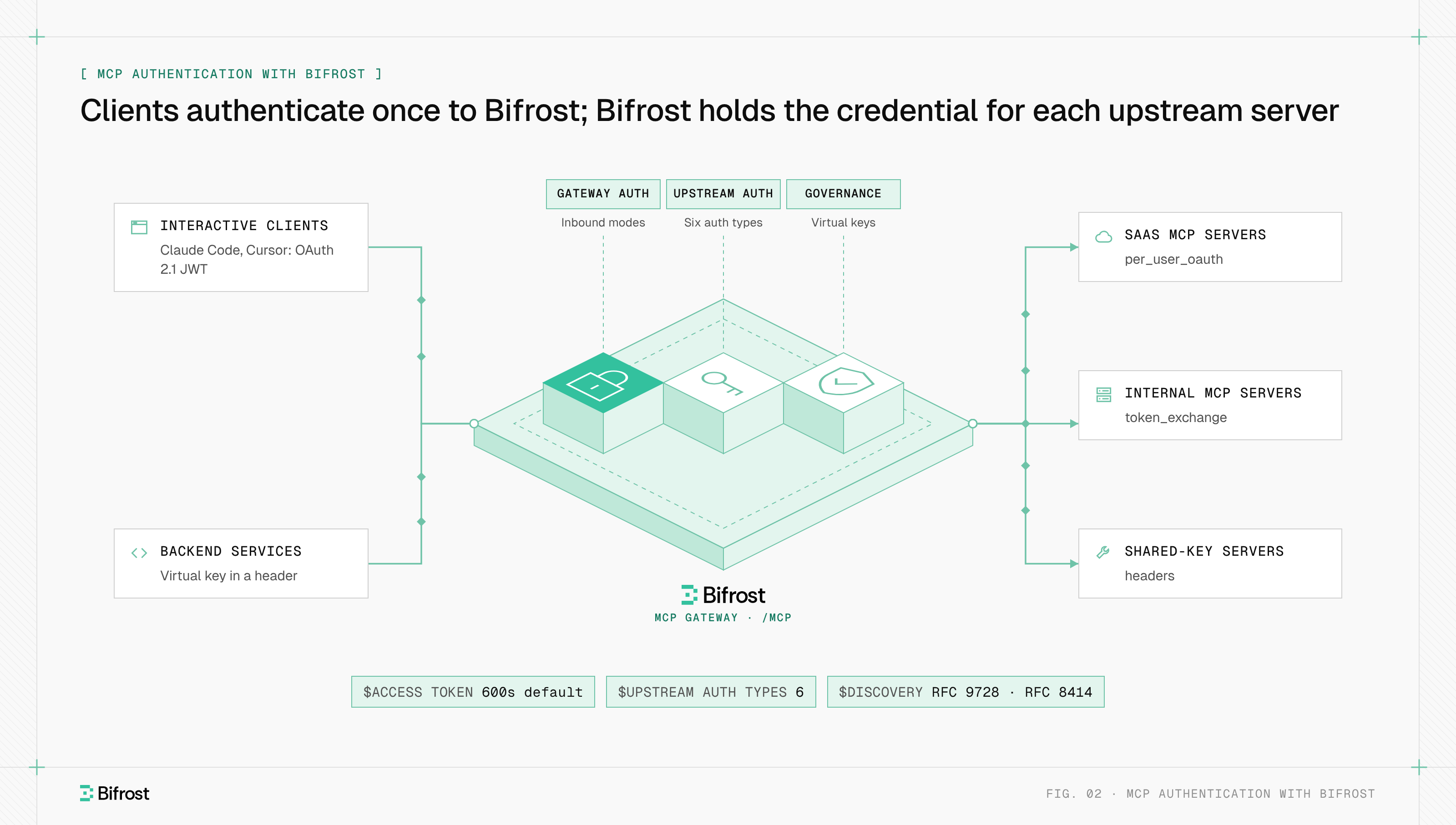
- Credentials and audit. Each host holds its own tokens for each server, so MCP authentication is configured many times over, and no single place records which user called which tool.
A shared MCP gateway addresses the last three by holding upstream credentials, filtering tools per caller and logging each call for observability and audit.
MCP tools with Bifrost
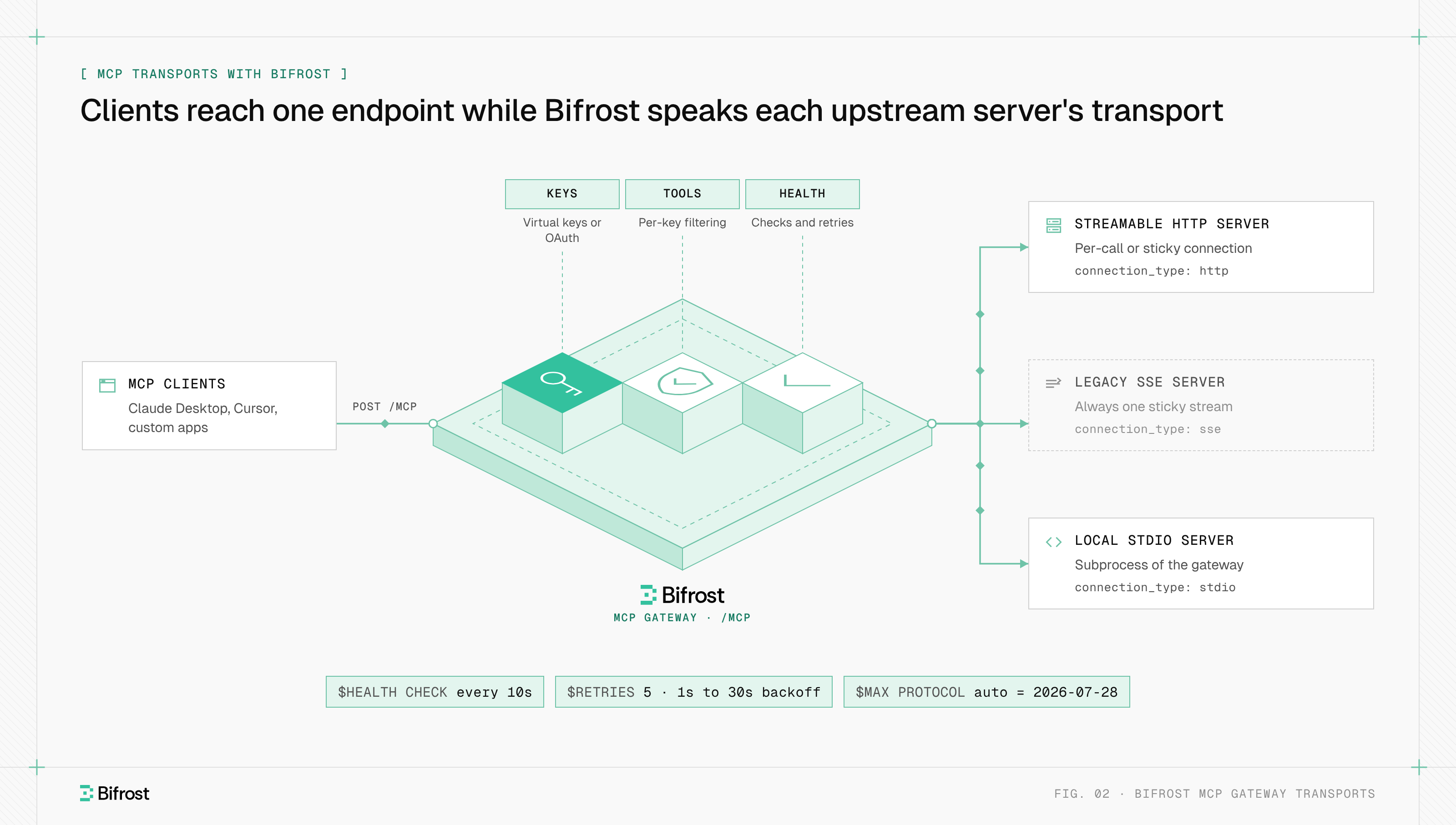
Bifrost, the open-source AI gateway built by Maxim AI, works as an MCP gateway that controls which tools each caller can see and run. It connects to upstream servers over STDIO, HTTP or SSE, prefixes each tool with its client name to avoid collisions, and re-syncs tool lists every 10 minutes by default.
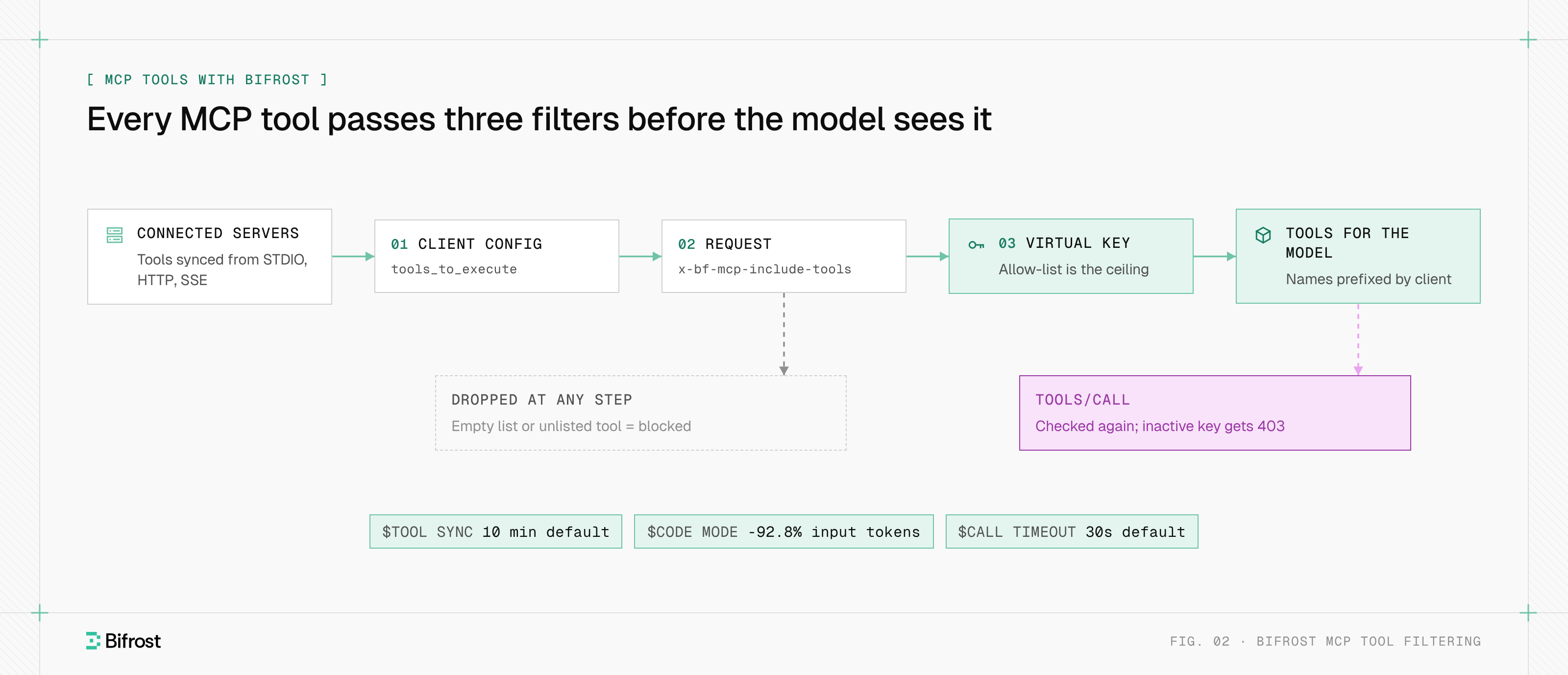
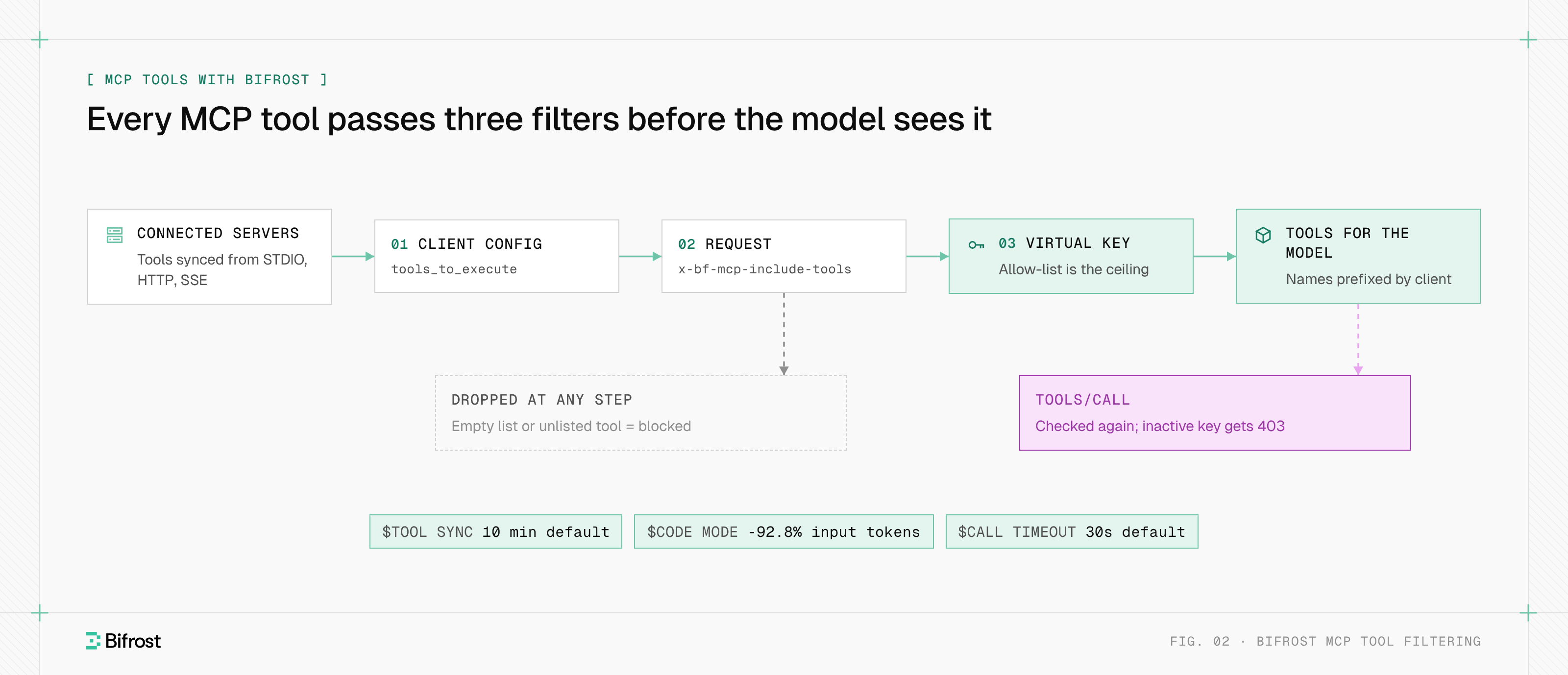
Figure 2: Each filter can only narrow the set, and the same allow-list is enforced again when a tool call runs.
Tool filtering works at three levels. A client's tools_to_execute list sets the baseline, and an empty list allows nothing. An x-bf-mcp-include-tools header narrows a single request. A virtual key allow-list is the ceiling, so a header can narrow it but never widen it, and tools/call is checked against it again; an inactive or expired key gets a 403.
To give a team one curated set, a Virtual MCP bundles chosen tools from several servers at its own /mcp/<slug> endpoint, reachable only through the keys it is attached to.
Bifrost does not run tool calls on its own by default. The application approves each call through the tool execution endpoint, and Agent Mode auto-runs only the tools listed in tools_to_auto_execute.
For large tool sets, Code Mode replaces hundreds of definitions with four meta-tools; with 508 tools across 16 servers it cut input tokens from 75.1M to 5.4M in our benchmark.
To put one governed endpoint in front of your MCP servers, start with the gateway quickstart.
Frequently asked questions
Does the MCP server have tools?
Most MCP servers have tools, but the protocol does not require them. A server that offers tools declares the tools capability and must answer tools/list; the list may be empty and may change over time. A server can instead expose only resources or prompts. The tool list can also differ by caller, because servers may return only the tools a caller's authorization permits.
How many tools should an MCP have?
The protocol sets no limit, and tools/list is paginated for large sets. The practical limit is the model: every definition is sent on each turn, so accuracy and cost degrade as the list grows. Many teams keep each server to a focused set of tools and filter per task, so a model sees tens of tools rather than hundreds.
Which AI tools support MCP?
Claude Desktop, Claude Code, Cursor, VS Code with GitHub Copilot and ChatGPT developer mode all support MCP, along with many agent frameworks and SDKs. Support varies by transport: local servers run over stdio, while remote servers use Streamable HTTP. Some clients also apply their own approval rules, such as confirming every tool not marked read-only.
What are MCP-enabled tools?
MCP-enabled tools are applications and services that publish an MCP server, so any MCP host can discover and call their actions without a custom integration. GitHub, Atlassian (for Jira and Confluence), databases and browser automation projects are common examples. "MCP-enabled" also describes AI clients that can act as MCP hosts and call those tools.
How are MCP tools different from function calling?
Function calling is a model API feature: the application declares functions in the request, and the model returns a call for the application to run. MCP tools sit one layer below. An MCP server publishes tool definitions any host can discover with tools/list, and the host converts them into each provider's function-calling format before sending them to the model.
- mcp tools
- mcp server tools
- mcp gateway
- mcp