MCP authentication is how a Model Context Protocol server verifies who is calling it, and on whose behalf, before it runs a tool or returns data. Remote MCP servers do this with OAuth 2.1 access tokens defined in the MCP authorization specification, while local stdio servers skip that flow and read credentials, such as API keys, from their environment.
Authentication is optional in the Model Context Protocol, but any remote server that touches user data needs it. Revision 2026-07-28 of the specification also makes MCP stateless, with no protocol-level sessions, so every HTTP request carries its own Authorization header and no session or state handle counts as proof of identity.
Bifrost, the open-source AI gateway, sits on both sides of that check: it authenticates the MCP clients that connect to it and holds the credentials for the upstream MCP servers it calls.
How does MCP authentication work?
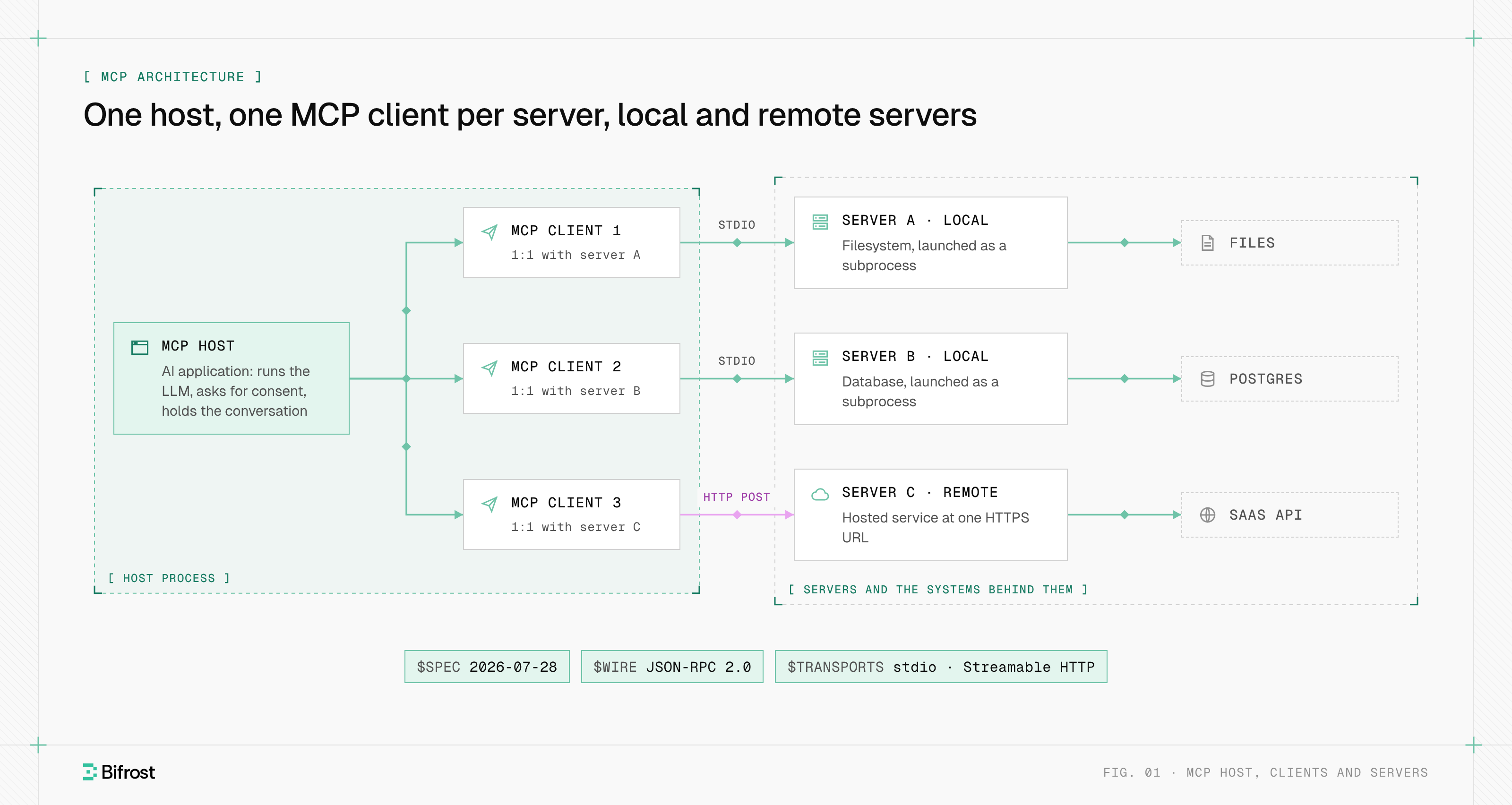
MCP authentication works hop by hop. The MCP client proves who it is to the MCP server, and the MCP server proves who it is to any upstream API it calls. Each hop uses its own credential, and a token issued for one hop is never valid on the next.
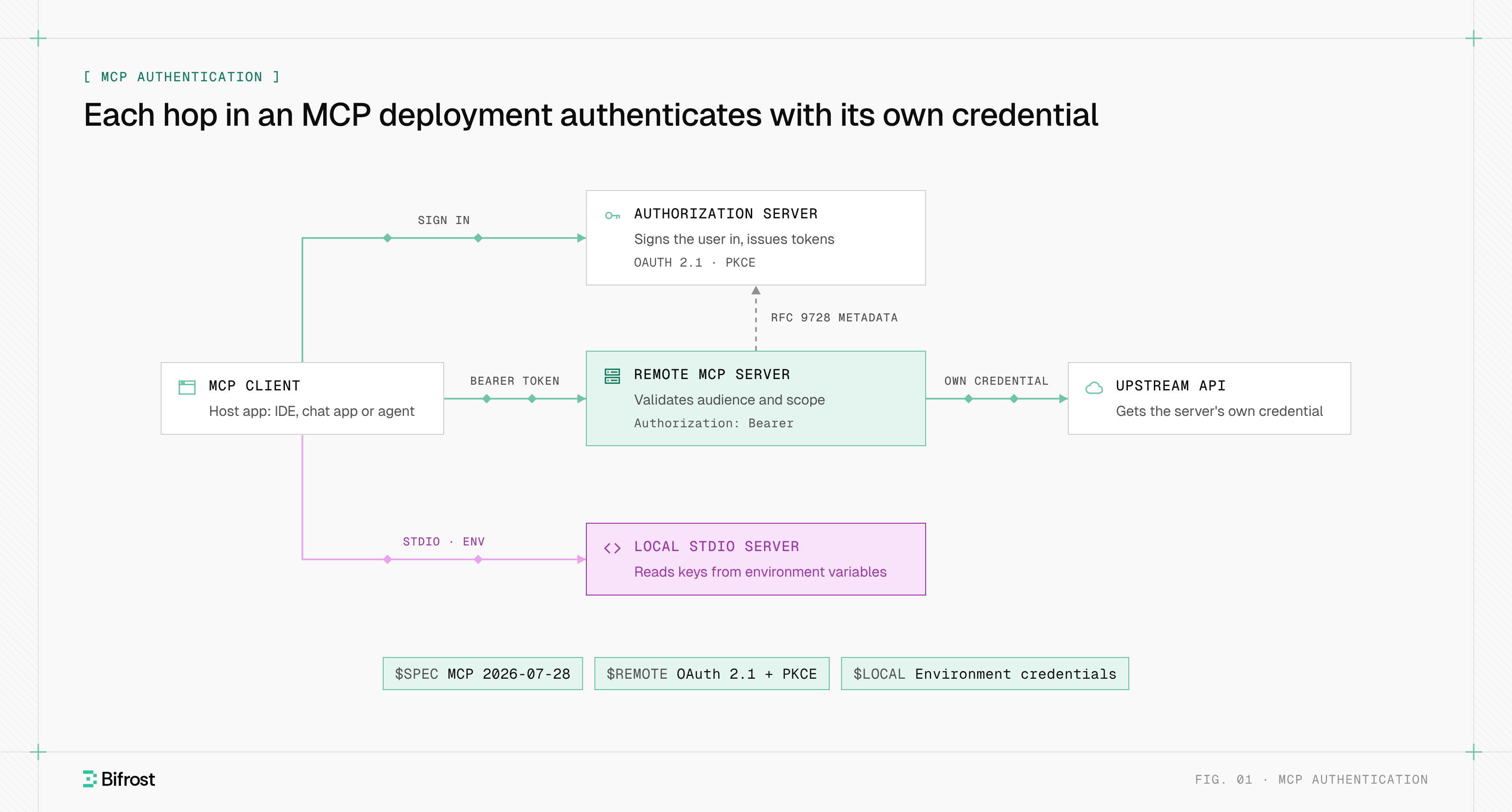
Figure 1: Each hop carries its own credential; the client's token stops at the MCP server.
Three relationships cover almost every deployment:
- Client to remote server. Over Streamable HTTP, the client sends an OAuth 2.1 Bearer token, issued by an authorization server, on every request to the server's MCP endpoint.
- Server to upstream API. The MCP server calls GitHub, a database or an internal API with a credential issued to it for that service, never with the client's token.
- Client to local server. Over stdio, the host launches the server as a subprocess, and the server reads an API key or personal access token from environment variables.
MCP authentication methods
Teams use four authentication methods with MCP in practice, and the transport decides which ones apply. The specification defines OAuth 2.1 for HTTP transports, tells stdio servers to read credentials from the environment, and allows custom schemes, such as static API keys, by agreement between client and server.
| Method | Transport | Who authenticates | Credential | Status in the specification |
|---|---|---|---|---|
| Environment credentials | stdio | The user who launches the server | API key or token in an environment variable | Required approach for stdio |
| Static API key or header | HTTP | An operator, once | A shared key sent in a header | Allowed as a custom strategy |
| OAuth 2.1 access token | Streamable HTTP | Each end user, through browser consent | Short-lived Bearer token bound to one server | Defined by the authorization specification |
| Enterprise identity (token exchange) | HTTP | The organization's identity provider | A token exchanged per call under RFC 8693 | Outside the core specification |
Environment credentials for stdio servers
A stdio server runs on the user's machine with the user's privileges, so the operating system already establishes who launched it. The authorization specification says stdio implementations should not follow the OAuth flow and should take credentials from the environment instead. The risk moves to the host, where keys often sit in plain-text config files.
Static API keys and headers
A static key in a header is the simplest scheme for remote servers. It identifies the integration, not the person, so every caller shares one identity, audit logs cannot tell users apart, and rotating the key breaks every client at once.
OAuth 2.1 access tokens
OAuth 2.1 is the standard method for remote servers. The user signs in once through an authorization server, and the client receives a short-lived token scoped to one MCP server. MCP OAuth covers the full flow, client registration and scope challenges.
How are remote MCP servers authenticated?
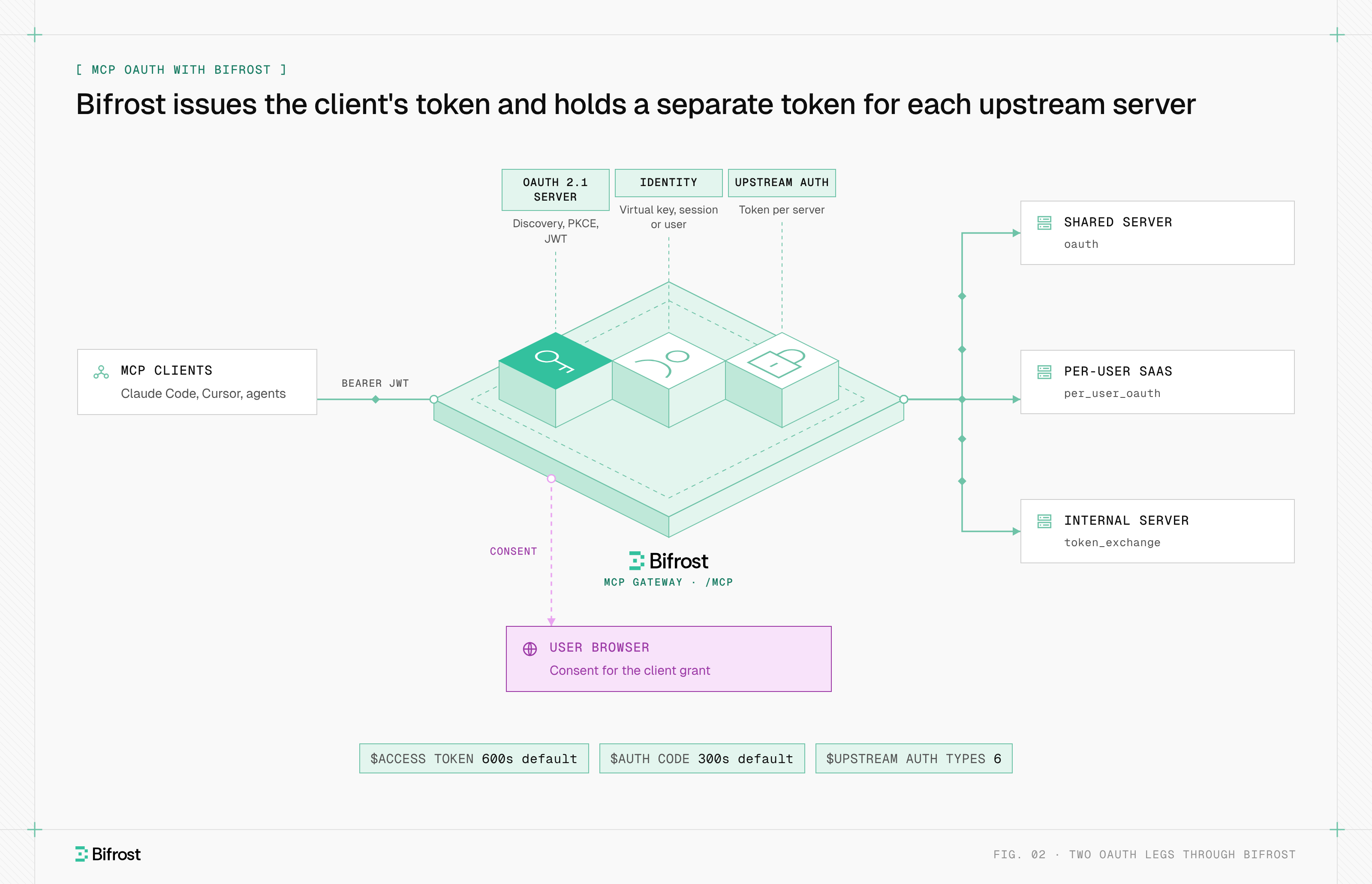
Remote MCP servers are authenticated through a challenge, discover and retry sequence. The server answers an unauthenticated request with 401 Unauthorized and a WWW-Authenticate header, the client follows that header to the authorization server, signs the user in with PKCE, and retries with a Bearer token.
- The client calls the server without a token and receives
401with aresource_metadataURL. - The client fetches that protected resource metadata and picks an issuer from its
authorization_serverslist. - The client fetches the issuer's OAuth 2.0 or OpenID Connect metadata and obtains a client ID.
- The user signs in and consents in a browser; the client sends a PKCE challenge and a
resourceparameter naming the MCP server. - The client exchanges the code and PKCE verifier for an access token and sends
Authorization: Beareron every request.
What is protected resource metadata?
Protected resource metadata is a JSON document, defined in RFC 9728, in which an MCP server names its canonical resource URI, the authorization_servers that issue tokens for it, and optionally its scopes_supported. Every MCP server that implements authorization must publish one, and every MCP client must use it to find the authorization server.
Why does MCP use OAuth 2.1 with PKCE?
MCP uses OAuth 2.1 because most MCP clients, such as IDEs, desktop apps and CLIs, are public clients that cannot keep a secret. OAuth 2.1 consolidates OAuth 2.0 and its security extensions and makes PKCE (Proof Key for Code Exchange) mandatory, so an intercepted authorization code cannot be redeemed by anyone without the client's one-time verifier.
How should an MCP server validate access tokens?
An MCP server should validate every access token on every request, as an OAuth 2.1 resource server, before it touches a tool. The specification adds one MCP-specific rule: the token's audience must be this server, so tokens minted for another service are rejected even when they are otherwise valid.
| Check | What the server compares | Response on failure |
|---|---|---|
| Signature | The token against the issuer's published keys, or an introspection result | 401 Unauthorized |
| Expiry | exp against the current time | 401 Unauthorized |
| Issuer | iss against the authorization servers in its protected resource metadata | 401 Unauthorized |
| Audience | aud against its own canonical URI, set through the RFC 8707 resource parameter | 401 Unauthorized |
| Scope | Granted scopes against the scopes the requested tool needs | 403 Forbidden with error="insufficient_scope" |
Two rules sit beside the table. Tokens must arrive in the Authorization header and never in a query string. And because revision 2026-07-28 removed protocol-level sessions from MCP, a state handle such as a cart or workflow ID returned by a tool is not authentication: the server binds it to the user ID from the verified token and rejects it for anyone else.
MCP authentication vs authorization
Authentication establishes who the user and client are; authorization decides what that identity may do on a given MCP server. In MCP, the authorization server authenticates the user, usually through the organization's identity provider, and the MCP server authorizes each request by checking the token's audience and scopes. The MCP architecture keeps those two roles in separate components.
| Authentication | Authorization | |
|---|---|---|
| Question it answers | Who is calling, and on whose behalf? | What may this caller do on this server? |
| Performed by | The authorization server, at sign-in | The MCP server, on every request |
| Evidence | The user's login and the client ID | The access token's audience and scopes |
| Failure response | 401 Unauthorized | 403 Forbidden |
| Defined in MCP | Delegated to the authorization server | The authorization specification |
Common MCP authentication mistakes
Most authentication failures in MCP come from credentials crossing a boundary they were not issued for. The MCP security best practices name each failure and the control that prevents it, which makes them a useful review checklist before a server goes remote. The wider threat model, including prompt injection and tool poisoning, is covered in MCP security.
- Token passthrough. The server forwards the client's token to a downstream API. The specification forbids it: the server must accept only tokens issued for itself and use its own credential upstream.
- Skipping the audience check. A server that checks only the signature accepts any token from the same identity provider, including tokens minted for other services.
- Treating a session or state handle as identity. A guessed or leaked workflow ID then grants access to another user's data.
- Long-lived shared keys. A static key copied into many config files cannot be traced to a person and is rarely rotated.
- Omnibus scopes. Publishing every scope in
scopes_supported, or using*andfull-access, turns one stolen token into full access. - Unprotected stdio proxies. A local proxy that spawns stdio servers lets a stolen proxy token run arbitrary commands, so it needs sandboxing and its own authentication.
How do you authenticate MCP servers behind a gateway?
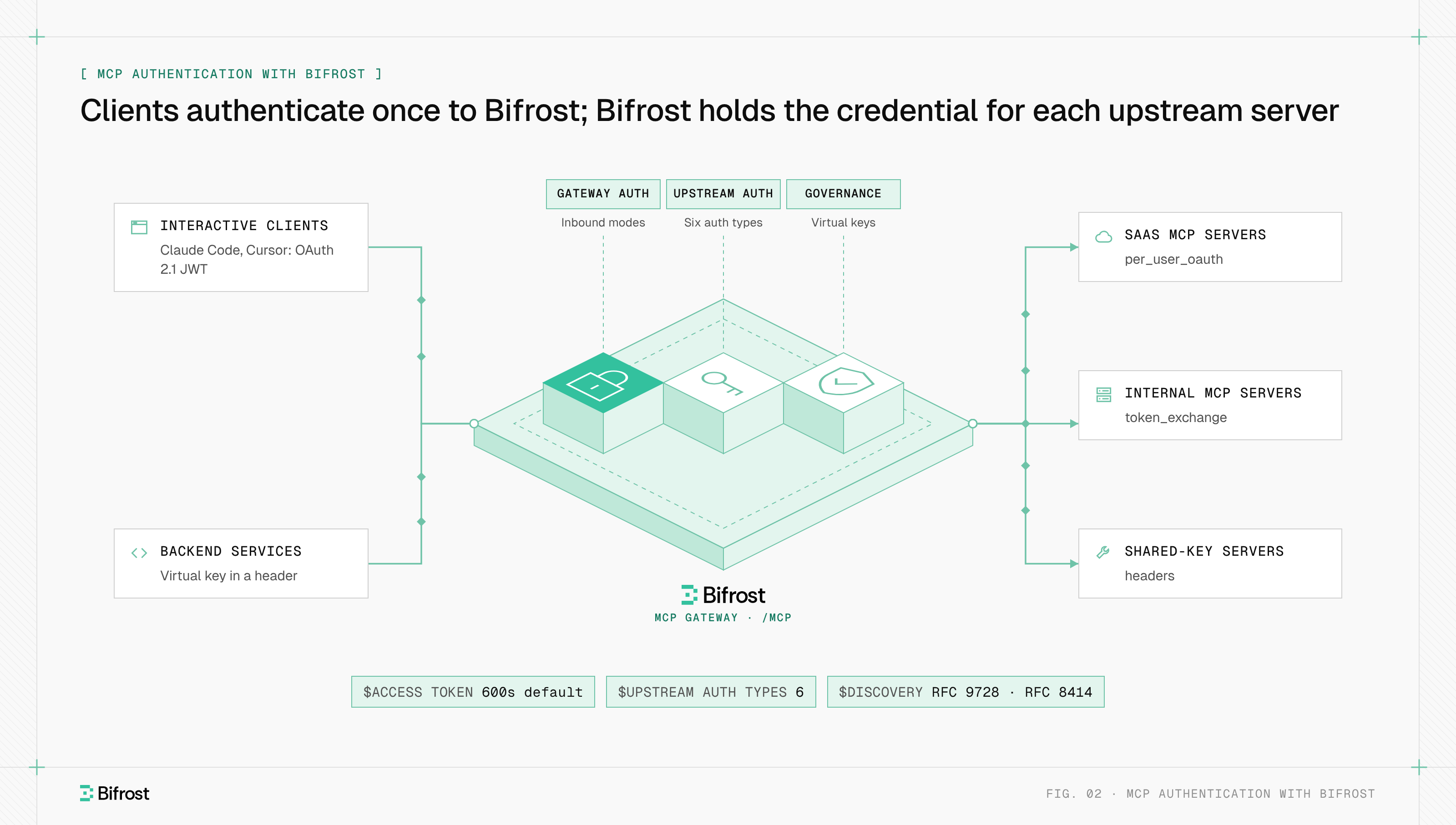
MCP servers behind a gateway are authenticated in two legs. Clients authenticate once to the gateway's single endpoint, and the gateway authenticates to each upstream MCP server with a credential issued for that server, so the client's token never travels past the gateway and no upstream secret sits on a laptop.
An MCP gateway turns many per-host credential stores into one place to issue, scope, rotate and revoke access. That matters most for upstream servers that need each user's own account, such as GitHub or Notion: the gateway can store one token per user per server and reuse it on later calls, and the audit log for each tool call can name the person behind it.
MCP authentication with Bifrost
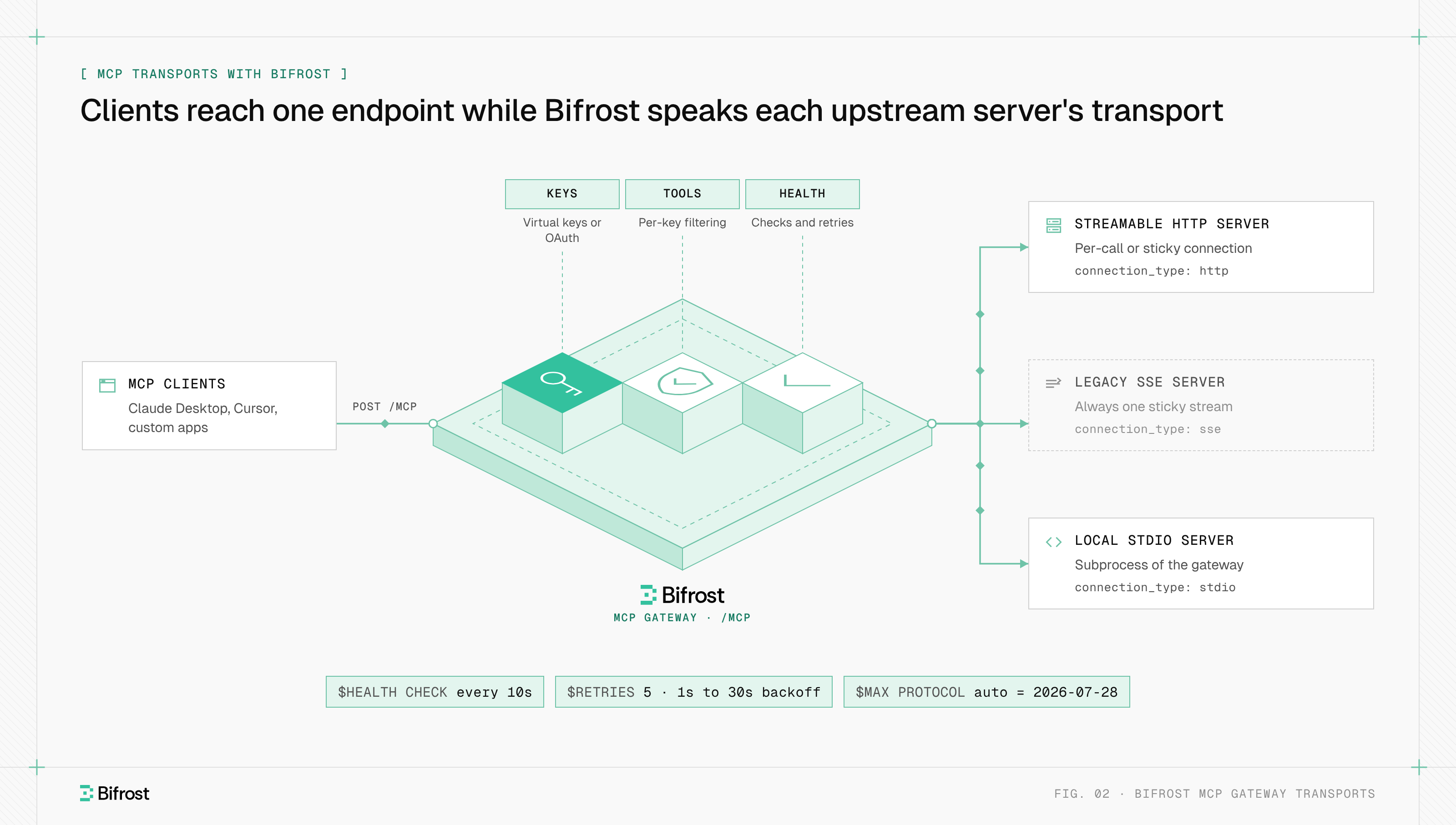
Bifrost, the open-source AI gateway built by Maxim AI, handles MCP authentication on both legs. Inbound, it authenticates clients at its /mcp endpoint with virtual key headers, OAuth 2.1 or both. Outbound, each upstream MCP server gets one of six auth types, so callers reach every tool through one credential they already have.
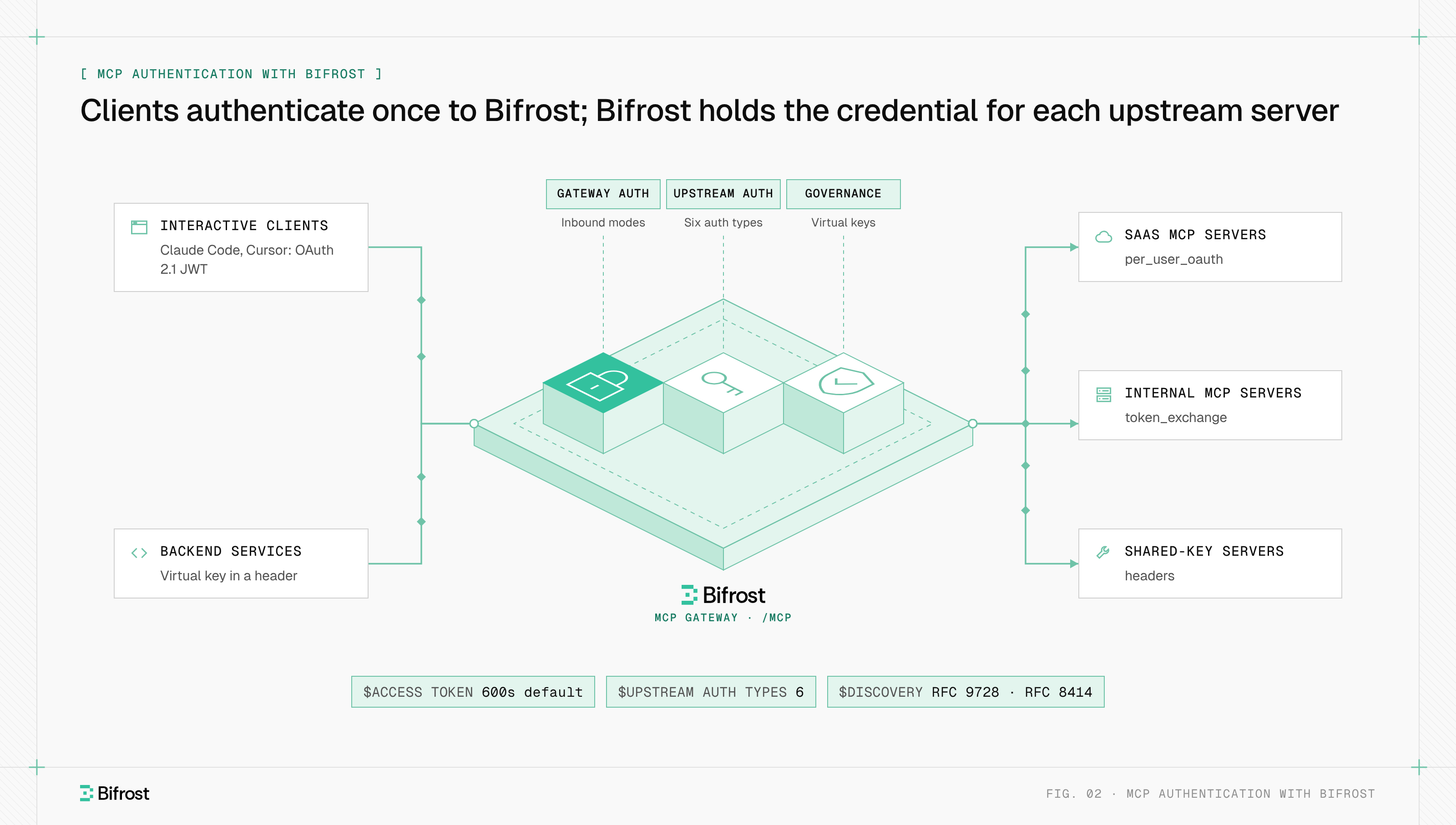
Figure 2: One inbound credential per client; one upstream credential per server and, where needed, per user.
Gateway authentication is set by mcp_server_auth_mode: headers (the default) accepts a virtual key, oauth accepts only Bifrost-issued JWTs, and both accepts either, though never both on one request. In OAuth mode Bifrost answers with 401 and WWW-Authenticate, serves RFC 9728 metadata, requires PKCE and binds tokens to /mcp through the audience claim. It checks signature, expiry, issuer and audience on every request. Access tokens last 600 seconds by default, and consent binds each grant to a virtual key, an anonymous session or an SSO user, so that identity's budgets and tool access apply.
Upstream auth types cover each case on this page:
nonefor public servers and stdio servers, which inherit their environment from the spawned process.headersfor a shared static key, with values read from environment variables and encrypted at rest when an encryption key is set.oauthandper_user_oauthfor OAuth servers. Per-user OAuth asks each user to authorize on their first tool call and lists the token on MCP Sessions, where it can be revoked.per_user_headersfor per-user API keys, andtoken_exchange(Enterprise) for internal servers that trust your identity provider, through RFC 8693 token exchange.
The Bifrost MCP gateway adds tool filtering and audit logs on the same path. To put authentication in front of your MCP servers, start with the gateway quickstart.
Frequently asked questions
How are MCP servers authenticated?
Remote MCP servers are authenticated with OAuth 2.1: the server returns 401 with a WWW-Authenticate header, the client discovers the authorization server through protected resource metadata, the user signs in with PKCE, and the client sends a Bearer token on every request. Local stdio servers read credentials from environment variables instead, and some internal HTTP servers accept a static API key.
How do stdio MCP servers handle credentials?
Stdio MCP servers read credentials from their environment, usually an API key or personal access token set in the host's MCP configuration and passed to the subprocess as an environment variable. The MCP authorization specification says stdio implementations should not use the OAuth flow, because the user who launches the process already controls the machine. Store those keys outside shared config files and rotate them.
Why is it a bad idea to use OAuth 2.0 for authentication?
OAuth 2.0 was designed for authorization: an access token says what a client may do, not reliably who the user is, and a client that treats any valid token as a login can be fooled by tokens issued to other apps. OpenID Connect adds a signed ID token for authentication. MCP stays within OAuth's intended use, because the MCP server only authorizes requests.
Is there an MCP registry?
Yes. The official MCP Registry, currently in preview, is a metadata catalog of publicly accessible MCP servers, with each namespace verified through GitHub or a domain the publisher controls. Listing a server there does not authenticate anyone: clients still go through the server's own authentication, and private servers belong in a private registry.
Does MCP authentication require OAuth?
No. Authorization is optional in the specification. Servers that implement it over HTTP should follow its OAuth 2.1 profile, stdio servers use environment credentials, and the specification lets clients and servers agree on custom schemes such as API keys. Any remote server holding user data should still use OAuth so each request carries a user identity.
- mcp authentication
- mcp gateway