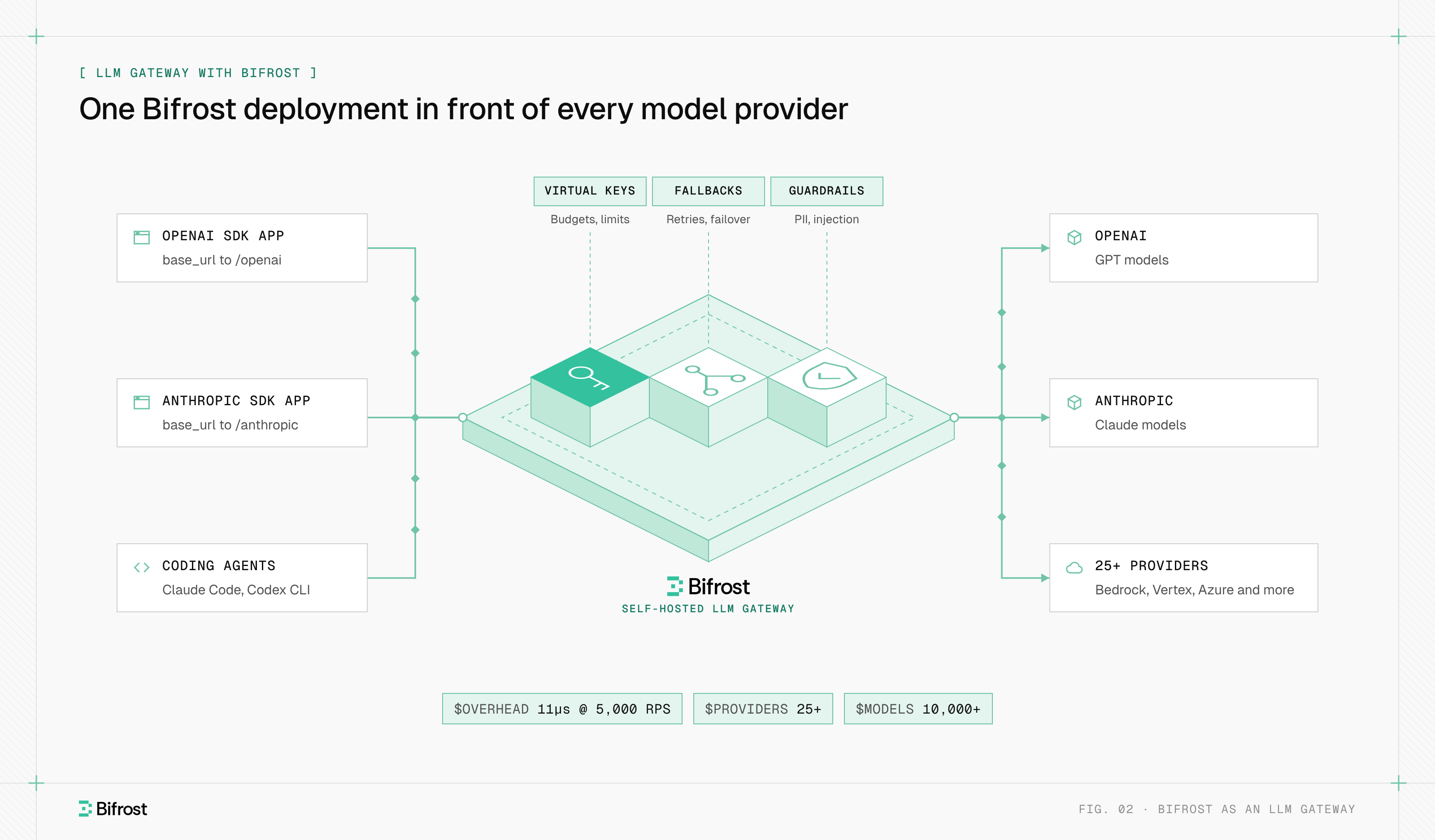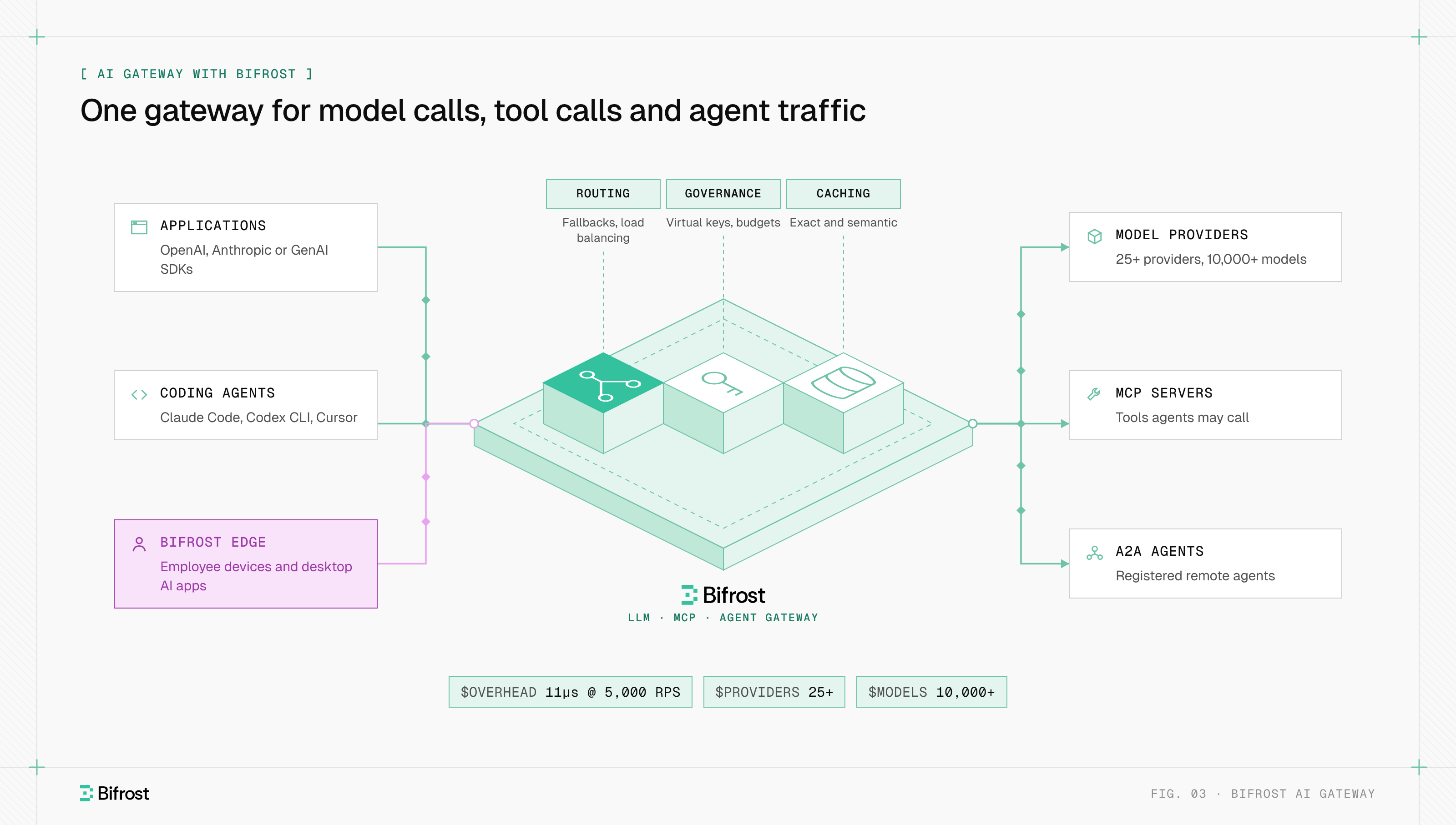
An AI gateway is a control layer that sits between applications and the AI services they call, such as LLM providers, MCP tool servers and agents, and handles every request on their behalf. Teams get one API and one place to enforce routing, failover, rate limiting, budgets, caching, guardrails and observability, instead of rebuilding those controls inside each application.
Teams that use more than one model provider hit the same problem quickly: each provider ships its own API format, rate limits and error codes. OpenAI reports an exhausted quota as HTTP 429, while Anthropic reports an empty credit balance as HTTP 400, so retry logic written for one breaks on the other. Bifrost, an open-source AI gateway, sits on that path and handles those differences once for LLM, MCP and agent traffic.
What problem does an AI gateway solve?
An AI gateway solves the problem of AI access spreading across many applications, keys and providers with no shared control. Without a gateway, every service holds its own provider keys, writes its own retry logic and logs usage its own way, so nobody can say what the company spends on models, which team caused a spike, or what happens when a provider fails.
- Key sprawl. Provider keys sit in environment files, CI secrets and laptops, so rotating one means finding every copy.
- No failover. A provider outage or a burst of 429 errors takes the feature down, because the application has one hard-coded endpoint.
- Unattributed cost. The invoice shows one total per provider, with no split by team, feature or customer.
- Inconsistent policy. One team redacts personal data before sending prompts; another does not.
A gateway moves those concerns out of application code into one shared layer. The AI governance controls that security and finance teams ask for, such as per-team budgets, access rules and audit trails, need that single enforcement point.
Do I need an AI gateway?
You likely need one once two of these are true: more than one team calls LLMs; you use more than one provider or want the option to switch; someone is accountable for model spend; you must show who sent what data to which model; or a provider outage would be customer-visible.
When do you not need an AI gateway?
A single prototype calling one provider with one key does not need a gateway: the provider's dashboard covers usage and an outage costs nothing. A gateway adds one network hop and one service to run, which pays off only once the controls above matter.
How does an AI gateway work?
An AI gateway works as an intermediary that speaks the same API as the model providers. The application sends its request to the gateway's endpoint instead of the provider's. The gateway authenticates the caller, applies policy, checks its cache, chooses a provider and key, forwards the call, then records tokens, cost and latency before returning the response.
Adoption is usually a drop-in replacement: change the SDK's base URL and swap the provider key for a gateway key. One request then moves through five stages:
- Authenticate. The caller presents a gateway-issued key, often called a virtual key, which maps to a team, customer or user and its permissions.
- Apply policy. The gateway checks budgets, rate limits, allowed models and input guardrails. A request over its limit is rejected with HTTP 429.
- Check the cache. An identical or similar earlier request can be answered from storage without calling a provider.
- Route. The gateway picks the provider, model and key, translates the request into that provider's format, and sends it, retrying or falling back on failure.
- Record and return. The gateway reads token counts, computes cost, updates budgets, writes the log and returns the response in the caller's format.
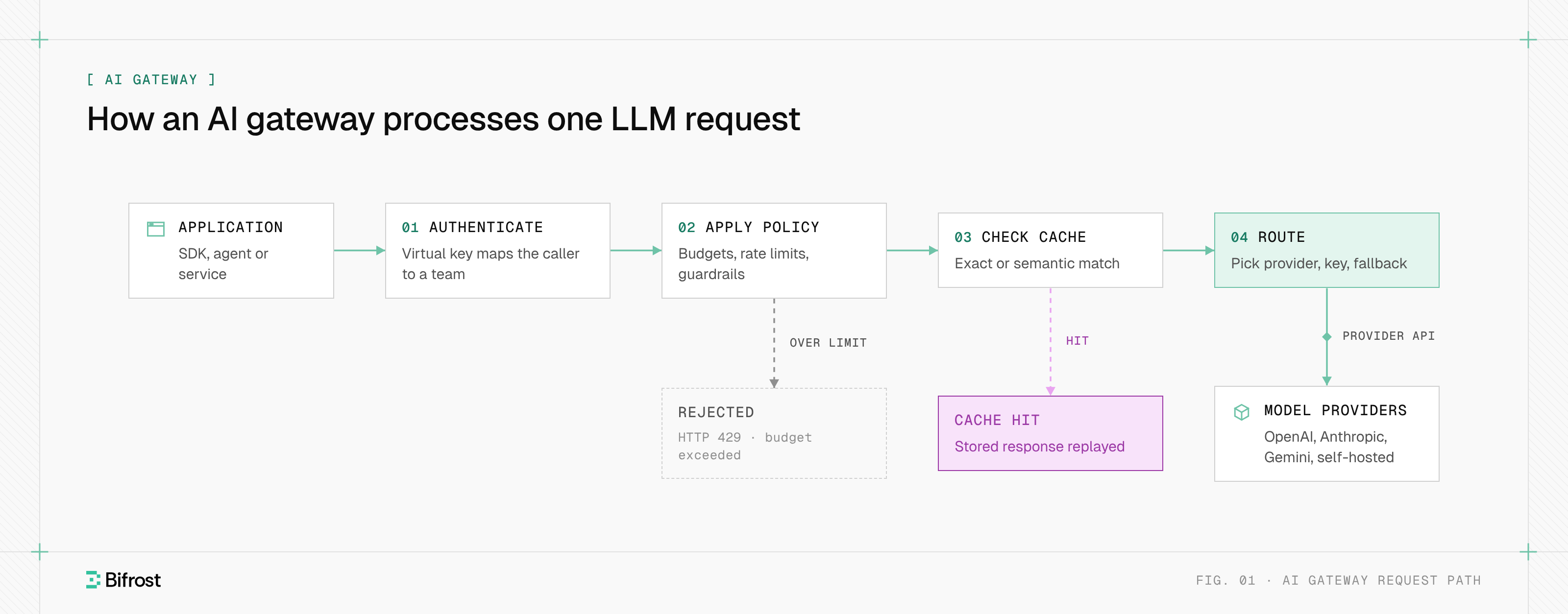
Figure 1: Every request passes the same four stages before any provider is called, so policy, caching and routing live in one place instead of in each application.
Streaming responses add one requirement: chat APIs stream tokens as server-sent events, so the gateway forwards each chunk as it arrives while still counting tokens and checking output.
How does an AI gateway route requests across LLM providers?
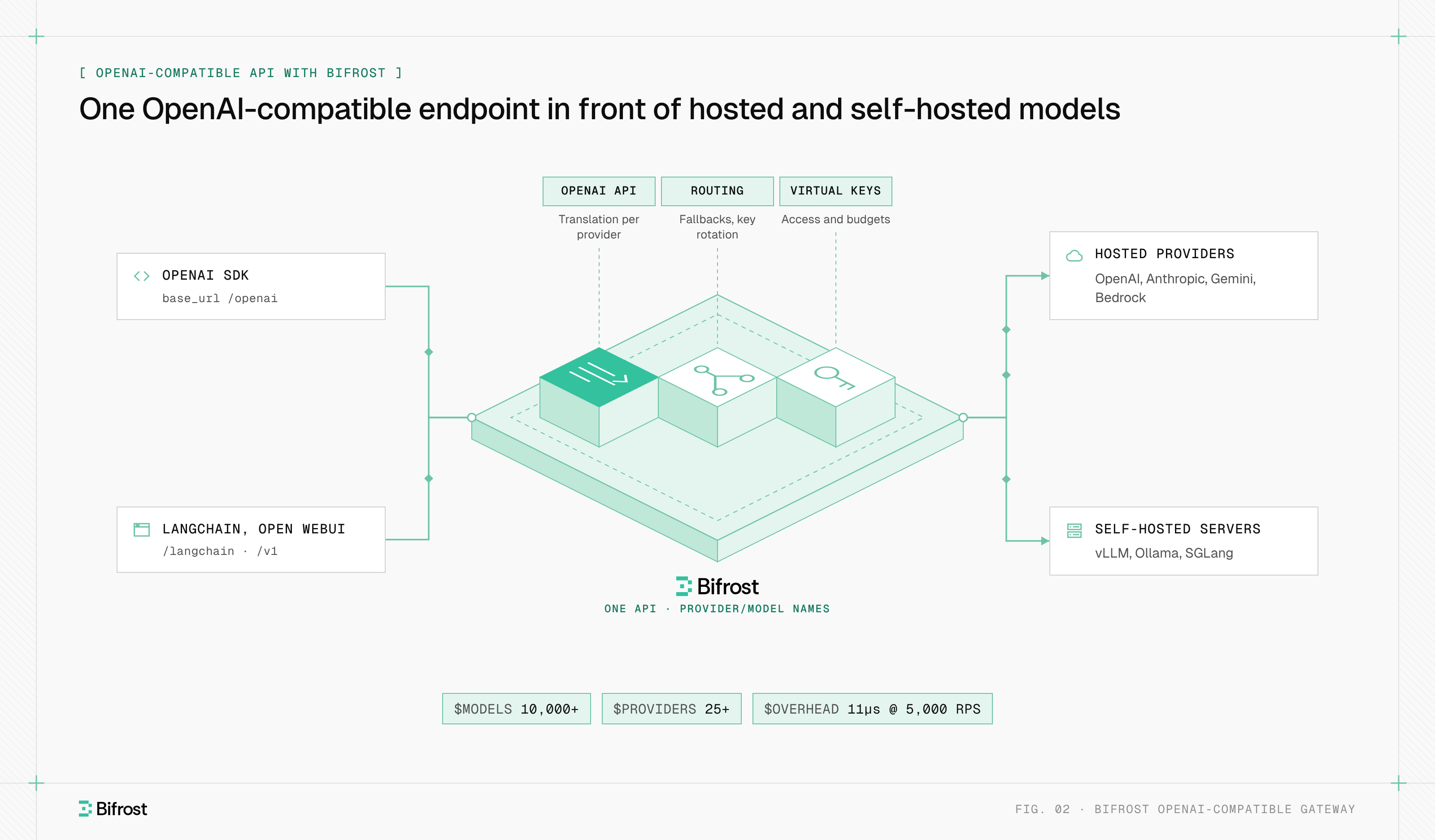
An AI gateway routes requests through unified routing: one API in front of many providers, where the caller names a model and the gateway decides which provider, deployment and key serve it. Most gateways expose an OpenAI-compatible API and translate each call into the native format of Anthropic, Google Gemini, AWS Bedrock, Azure OpenAI or a self-hosted model server.
The OpenAI API format became the common interface because most SDKs already speak it. A model is addressed as provider/model, for example anthropic/claude-sonnet-4-5, and resolved through the gateway's supported providers and keys. Routing decisions take several forms:
- Static weights. Split traffic across providers or keys by percentage.
- Rules. Match on the team, a header or the model and send the call to a specific target. Routing rules in Bifrost use CEL expressions.
- Aliases. Map a stable name like
default-chatto whichever model is current. - Complexity routing. Score each prompt and send simple ones to a cheaper model and hard ones to a stronger model.
- Health-based routing. Shift traffic toward the provider and key with the lowest current error rate and latency.
Routing changes model behavior, and the gateway cannot hide that. Providers count tokens differently and differ in tool calling, structured output and context windows. A gateway normalizes request and response shapes, but a fallback to another model family can still change answers, so teams test fallback chains like any release.
How do AI gateways handle failover and load balancing?
AI gateways handle failover with three layers: retries on the same provider, rotation across API keys, and fallbacks to a different provider once retries are exhausted. Load balancing spreads normal traffic across keys and providers by weight or health. The gateway decides which layer to use by classifying each failure, because a rate limit, a bad key and an outage need different responses.
| Failure | Typical status | Gateway response | Backoff |
|---|---|---|---|
| Rate limit | 429 | Rotate to another key on the same provider | Yes, quotas are often shared across an account |
| Provider error or network failure | 500, 502, 503, 504 | Retry the same key | Yes, exponential with jitter |
| Rejected key or exhausted quota | 401, 403, 402 | Mark the key dead for this request and rotate | No, waiting does not fix it |
| Bad request from the caller | 400, 422 | Return the error | No retry |
| All retries exhausted | Any of the above | Move to the next provider in the fallback chain | Fresh retry budget per provider |
HTTP 429 is defined in RFC 6585, which allows the server to send a Retry-After header saying how long to wait. Providers send that hint in different places: OpenAI and Anthropic use Retry-After, Azure OpenAI also sends retry-after-ms, and Gemini puts a retry delay inside the error body. A gateway reads whichever one the provider sent.
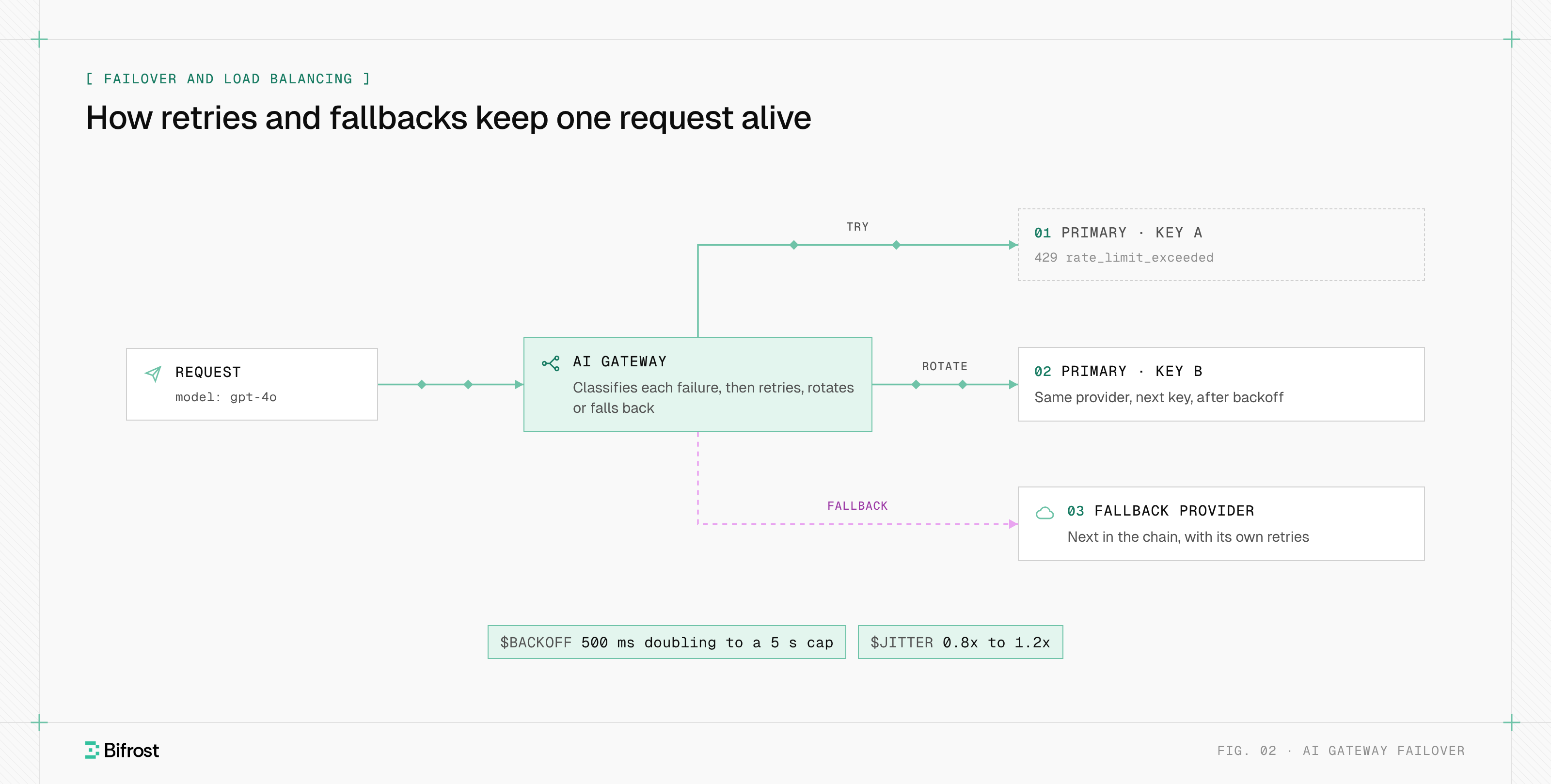
Figure 2: Retries stay on the primary provider and rotate keys; a fallback moves to a different provider only after those retries are exhausted.
Retries and fallbacks in Bifrost back off as min(initial × 2^attempt, max) × jitter, with defaults of 500 ms and 5 s and jitter of 0.8x to 1.2x, so clients failing together do not retry in lockstep. The automatic fallback walkthrough configures a chain end to end.
Static weights cannot react to a provider that is slow but not failing. Health-based load balancing recomputes weights from error rates and latency, and a circuit breaker stops traffic to a failing provider until probes show it has recovered. Adaptive load balancing explains how those weights are computed.
How does an AI gateway control token costs?
A gateway controls token costs by counting tokens and cost on every response and enforcing limits before the next request goes out. Three mechanisms do the work: rate limiting caps requests and tokens per time window, budgets cap spend per team or key, and caching avoids paying for the same answer twice.
Rate limiting
Rate limiting at the gateway counts tokens as well as requests, because one long prompt can cost more than a hundred short ones. A limit such as 100,000 tokens per minute for one team protects the shared provider quota from a noisy caller, and requests over it get HTTP 429 before reaching the provider.
Budgets
Budgets set a dollar ceiling per period on a key, team, customer or provider. The gateway prices each call from the model's token rates and deducts it from every budget that applies. In Bifrost, budgets and limits form a hierarchy (customer, team, virtual key, provider config), and each level is checked independently, so a request is blocked if any one of them is exhausted.
Semantic caching
Semantic caching serves a stored response when a later request means the same thing in different words. The gateway embeds the prompt, searches a vector store for a match above a similarity threshold, and returns the stored answer on a hit. An exact-match cache, keyed on a hash of the request, handles identical requests without an embedding call.
The two paths have different latency costs. An exact-match hit is low-latency caching: one lookup in Redis or a similar store, often under a millisecond when the store runs locally. A semantic lookup must call an embedding model first, so a semantic miss pays the embedding round trip on top of the LLM call and is slower than no cache at all. Semantic caching pays off on repetitive traffic such as support questions; the grey zone problem covers how to set the threshold so near matches do not return wrong answers.
Provider prompt caching is different: the provider reuses a cached prompt prefix, but the call still happens and is billed at a lower rate for that prefix. A gateway cache skips the call entirely, and the two can run together.
Guardrails and security at the gateway
Guardrails at the gateway are checks that run on prompts before they reach a model and on responses before they reach the user. Because every request passes through the gateway, one policy covers every application: detecting personal data, blocking leaked secrets, filtering unsafe content and screening for prompt injection, without each team adding its own library.
- Personal data detection and redaction. Names, emails, card numbers and health data are masked before the prompt leaves the network. Microsoft Presidio is a common open-source engine for this.
- Secrets detection. API keys and private keys pasted into prompts are blocked before a provider stores them.
- Prompt injection screening. OWASP's Top 10 for LLM applications ranks prompt injection as the first risk; the gateway is one layer of defense, not the only one.
- Content safety. Responses are scored for harmful categories and blocked or flagged.
The gateway also removes provider keys from application code: applications hold scoped, revocable gateway keys while the real provider keys stay on the gateway. Guardrails at the gateway describes which checks run natively and which call external providers, and how streaming changes when output checks can run.
Observability for LLM traffic
Observability at the gateway means a structured record of every LLM request: caller, model, provider, input and output tokens, cost, latency, time to first token, status, retries and cache result. The gateway sees all traffic in one place, so it produces consistent metrics and traces without instrumenting each application separately.
- Who and what. Virtual key, team, model requested and model served, which differ after a fallback.
- Cost. Tokens in and out, computed cost, and whether the response came from cache.
- Latency. Total latency, time to first token for streaming, and gateway overhead.
- Failure path. Each attempt, the key it used, the status code and why the gateway retried or rotated.
Metrics go to Prometheus and traces to any OpenTelemetry backend. The OpenTelemetry semantic conventions for generative AI define standard attribute names for model, token usage and operation, so LLM spans line up with the rest of a service's traces. Built-in observability in Bifrost records the full attempt trail per request, and content logging can be turned off where prompts must not be stored.
AI gateway vs API gateway
An AI gateway differs from an API gateway in what it meters, inspects and routes. An API gateway manages REST and HTTP traffic to internal services, counting requests and routing by path. The AI version manages traffic to model providers and tools, counting tokens and cost, reading prompt content, and routing by model across providers that each speak a different API.
| Dimension | API gateway | AI gateway |
|---|---|---|
| Traffic | REST, gRPC and HTTP calls to your services | LLM, embedding, MCP tool and agent calls to providers |
| Unit of metering | Requests | Tokens, cost per model, requests |
| Routing key | Path, host, header | Model name, provider health, cost, prompt complexity |
| Response shape | Mostly short, fixed-size bodies | Long-running streams of server-sent events |
| Caching | Exact HTTP response caching | Exact-match plus semantic caching |
| Failure handling | Retries, circuit breakers per upstream | Per-key rotation, cross-provider fallback, provider error translation |
| Payload inspection | Schema validation, WAF rules | PII, secrets, prompt injection, content safety |
| Credentials | Client auth to your APIs | Client auth plus custody of third-party provider keys |
The two often run together: the API gateway at the edge for all traffic, and the AI layer behind it for model and tool calls.
AI gateway vs LLM gateway
An LLM gateway is scoped to model calls: chat, completions and embeddings sent to LLM providers. The terms are often used interchangeably, but "AI gateway" is the broader one, covering LLM traffic plus MCP tool calls and agent-to-agent traffic under the same keys and policies. The LLM gateway page shows the model-call side on its own.
AI gateway vs MCP gateway and agent gateway
An MCP gateway handles tool calls over the Model Context Protocol, and an agent gateway handles calls between agents over the A2A protocol. A gateway covering all three applies one identity, budget and log to an agent's model calls, tool calls and hand-offs. The MCP gateway topic and the Agent Gateway announcement cover those two paths.
Open-source and self-hosted AI gateways
An open-source AI gateway publishes its code under an open license, so teams can read, run and extend it. Whether to self-host or use a managed one comes down to the data path: self-hosting keeps prompts, responses and provider keys inside the company network, while a managed gateway runs in the vendor's cloud, so traffic passes through a third party first.
- Where may prompts go? Regulated data often may not pass through an extra third party. A gateway inside the VPC, or fully air-gapped, keeps that path short.
- Who runs it? Self-hosting means owning upgrades, scaling and high availability.
- How much latency can you add? The gateway sits on the hot path of every call, so in-region deployment and an efficient implementation matter.
- How is state shared? Budgets and rate limits must be counted consistently across gateway replicas, or each node enforces its own copy and the real limit multiplies by the node count. In Bifrost Enterprise, clustering syncs that state between nodes.
The enterprise deployment guide covers in-VPC, on-premises and air-gapped patterns for a self-hosted gateway.
AI gateway with Bifrost
Bifrost, the open-source AI gateway built by Maxim AI, gives applications one OpenAI-compatible API to 10,000+ models across 25+ providers. Bifrost is released under Apache 2.0, runs as a single binary through npx, Docker or Kubernetes, and stays inside your infrastructure: no prompts, responses or telemetry leave it.
Existing code changes one line:
client = openai.OpenAI(
    base_url="http://localhost:8080/openai",
    api_key="sk-bf-...",  # a Bifrost virtual key
)
Each capability on this page maps to a feature:
- Routing and failover. Weighted load balancing across keys and providers, CEL routing rules, retries with exponential backoff, and fallback chains.
- Governance. Virtual keys carry model access, budgets and token and request rate limits per key, team or customer.
- Caching. Exact-match and semantic caching backed by Redis, Qdrant, Weaviate or Pinecone.
- Security. Guardrails in Bifrost Enterprise check requests and responses for personal data, secrets and unsafe content, natively or through external providers.
- Tools and agents. Bifrost runs as an MCP gateway and as an Agent Gateway for A2A traffic, under the same keys and logs.
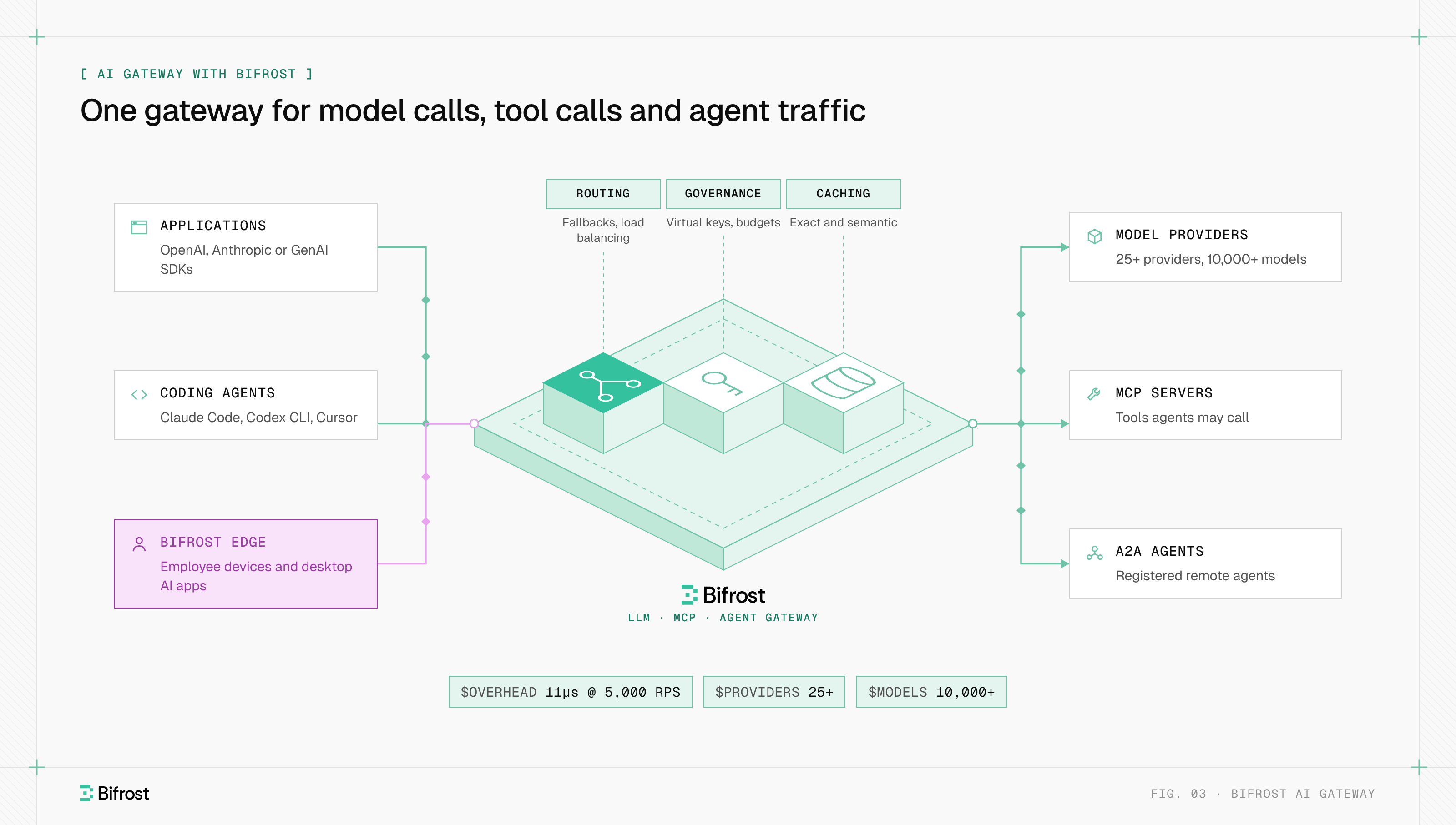
Figure 3: Model, tool and agent traffic share one set of keys, budgets and logs, and Bifrost Edge brings employee AI tools under the same policy.
Bifrost adds 11 microseconds of overhead per request at 5,000 RPS. AI Gateway + Bifrost Edge extends the same policy to desktop AI apps, browser AI and coding agents on employee machines.
To run your first request through Bifrost, start with the gateway quickstart or the Bifrost GitHub repository.
Frequently asked questions
Is there a self-hosted AI gateway available?
Yes. Open-source gateways can run on your own servers at no license cost. Bifrost is open source under Apache 2.0 and runs as a single binary on a virtual machine, in Kubernetes, in a private cloud or in a fully disconnected network, so prompts and provider keys stay inside your infrastructure.
What is an AI API gateway?
An AI API gateway is another name for the same layer: an API in front of model providers that gives applications one endpoint for many models. The term stresses one request format, usually OpenAI-compatible, translated to each provider, plus what a plain API gateway lacks, such as token metering, provider failover and semantic caching.
How do you use an AI gateway?
Deploy the gateway, add your provider API keys to it, and point your application's SDK at the gateway's URL instead of the provider's, sending a gateway key instead of a provider key. From there you add fallback chains, budgets, rate limits and caching in the gateway without changing application code.
Does an AI gateway add latency?
A gateway adds one network hop plus its own processing time to each request. Processing time depends on the implementation: Bifrost measures about 11 microseconds per request at 5,000 requests per second. An in-region hop usually adds less than a millisecond, and cache hits remove the provider call, cutting total latency.
Can an AI gateway manage AI agent traffic?
Yes. An AI agent makes model calls, tool calls and calls to other agents, and one gateway can cover all three: model calls through LLM routing, tool calls through an MCP gateway, and agent-to-agent calls through an agent gateway over A2A. One key, budget and log then follow the agent's work.
Which models can an AI gateway connect to?
A gateway can connect to any model whose provider it supports: hosted APIs such as OpenAI, Anthropic, Google Gemini, Mistral and Cohere, cloud platforms such as AWS Bedrock, Google Vertex AI and Microsoft Azure OpenAI, and self-hosted servers such as vLLM and Ollama. Bifrost covers 10,000+ models across 25+ providers through one OpenAI-compatible API.
- unified routing
- openai
- google gemini
- rate limiting
- semantic caching
- model context protocol
- a2a
- ai gateway