Role-Based Access Control for AI Gateways
Role-based access control grants permissions to roles instead of individuals. This guide explains how RBAC applies to an AI gateway, from admin roles and SSO group sync to per-role model, budget, and MCP tool access in Bifrost.
TL;DR
- Role-based access control (RBAC) grants permissions to roles, and users get access by holding a role, which keeps access consistent as teams change.
- An AI gateway needs access control on two planes: who can configure the gateway, and who can call which models and tools through it.
- Bifrost Enterprise RBAC covers 16 gateway resources with operations such as View, Create, Update, Delete, Download, and Reveal, and ships with Admin, Developer, and Viewer roles.
- Virtual keys and access profiles apply role-like policy to inference traffic: model allow-lists, budgets, rate limits, and MCP tool allow-lists.
- Roles can sync from Okta, Microsoft Entra, and other identity providers, so access follows the corporate directory.
Role-based access control is an access model in which permissions are assigned to roles and users receive those permissions by being assigned to a role. In an AI gateway, role-based access control decides who can change providers, keys, and guardrails, and which teams can call which models and tools. Bifrost, the open-source AI gateway built in Go by Maxim AI, governs AI traffic with virtual keys, and Bifrost Enterprise adds RBAC for the management plane, so access to every model and tool follows the same organizational roles.
What Is Role-Based Access Control?
Role-based access control (RBAC) is a method of restricting system access in which permissions attach to roles, such as Admin, Developer, or Auditor, and users gain permissions only through the roles they hold. Changing a user's access means changing their role, not editing permissions one by one.
The RBAC model formalized by researchers at NIST rests on three primary rules:
- Role assignment. A user can exercise a permission only if the user has been assigned a role.
- Role authorization. A user's active role must be authorized for that user.
- Permission authorization. A user can exercise a permission only if it is authorized for the user's active role.
For AI systems, those rules apply through the governance layer of a gateway to two kinds of subjects: people who administer the gateway, and applications or agents that send inference requests. Our overview of LLM access control covers the broader landscape of controls for AI traffic.
Why AI Gateways Need Role-Based Access Control
AI gateways need role-based access control because they hold the credentials, budgets, and policies for every model and tool an organization uses. Without roles, teams share provider API keys, any caller can reach any model, and nobody can say who changed a guardrail or spent a budget.
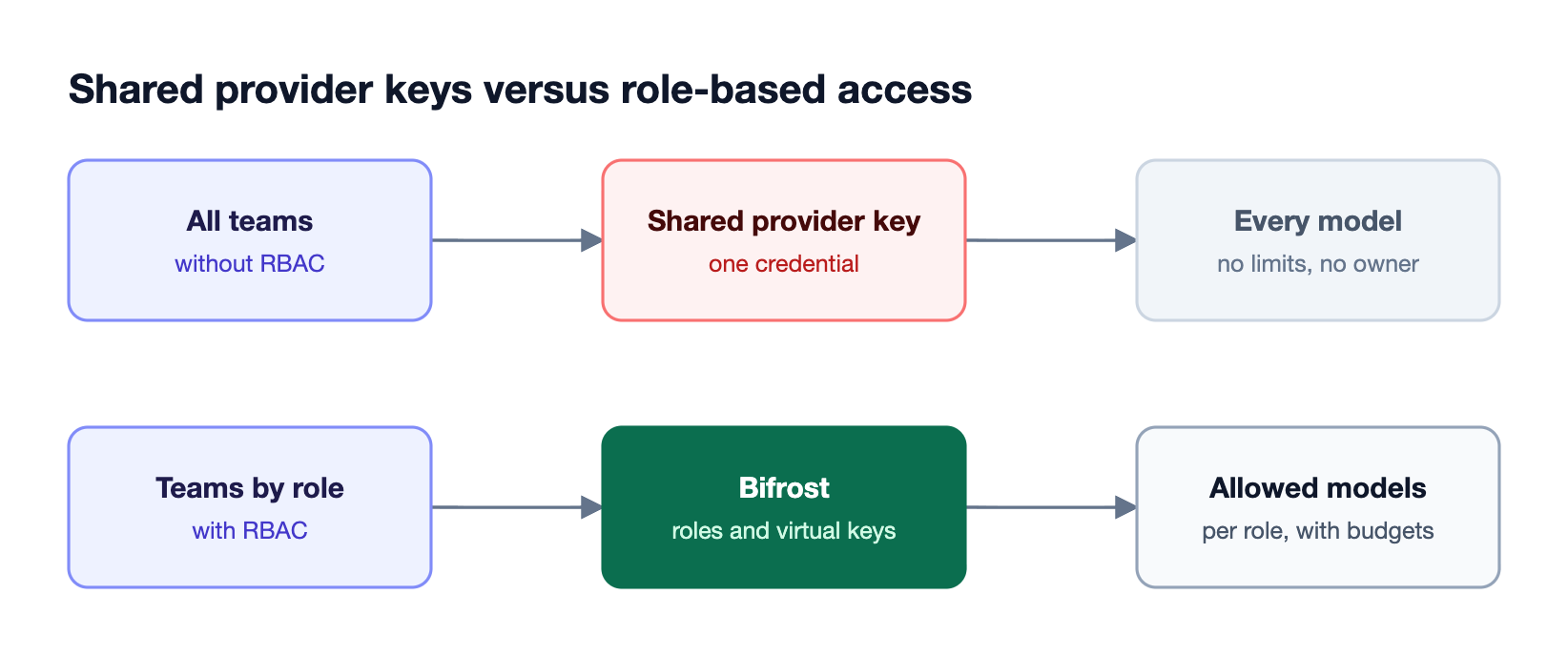
As Figure 1 shows, a shared provider key collapses every team into one identity. The guide to virtual keys for governing LLM access across 100 engineers shows the scale problem. Agents make it sharper: the OWASP Top 10 for LLM Applications lists excessive agency as a top risk, and least-privilege roles are the standard control for it. The article on role-based LLM access for engineering, sales, and executive teams shows how access needs differ by function.
The Two Planes of Access Control in an AI Gateway
An AI gateway has two access control planes. The management plane governs who can view and change gateway configuration, such as providers, keys, guardrails, and logs. The inference plane governs which applications, users, and agents can call which models and tools. Both need least privilege, and they use different mechanisms.
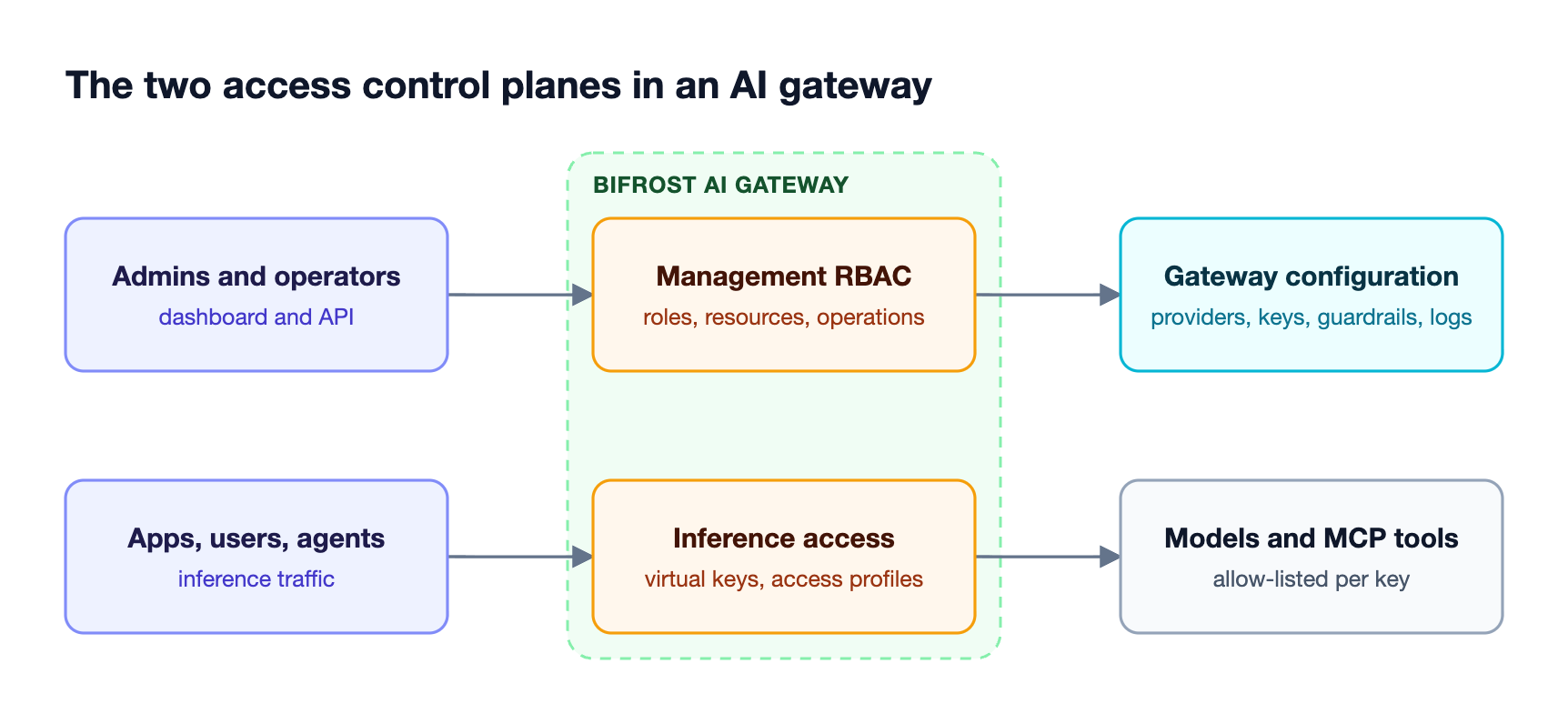
As Figure 2 shows, the two planes protect different assets:
| Plane | Who it governs | What it protects | Bifrost mechanism |
|---|---|---|---|
| Management | Admins, developers, auditors, operators | Provider configs, virtual keys, guardrails, logs, settings | Roles and permissions with SSO group sync |
| Inference | Applications, users, AI agents | Models, budgets, rate limits, MCP tools | Virtual keys, access profiles, MCP tool filtering |
Treating only one plane leaves a gap. A team with locked-down inference keys but broad admin rights can simply widen its own key, and the reverse leaves configuration safe while traffic is ungoverned. The guide to LLM access control with RBAC, SSO, and virtual keys walks through both planes together.
How RBAC Works in Bifrost
Role-based access control in Bifrost Enterprise defines permissions as combinations of a resource and an operation, groups those permissions into roles, and assigns roles to users. Roles can be managed in the dashboard, through the API, or automatically from an identity provider.
Bifrost protects 16 resources, including provider configurations, virtual keys, logs, audit logs, guardrail rules and providers, the MCP gateway, Virtual MCPs, cluster settings, and user provisioning. Each resource supports a set of operations:
| Operation | What it allows |
|---|---|
| View | Read-only access to the resource |
| Create, Update, Delete | Standard changes to the resource |
| Download | Exporting data, such as audit logs |
| Reveal | Revealing original values behind reversible redaction in logs |
| Inference operations | Invoking specific surfaces, such as chat completions, embeddings, or images |
Three system roles ship by default: Admin with 42 permissions, Developer with 27, and Viewer with 14. Teams can create custom roles, such as an Auditor role with View access to audit logs, request logs, guardrail configuration, and users, or an Ops role with full cluster access.
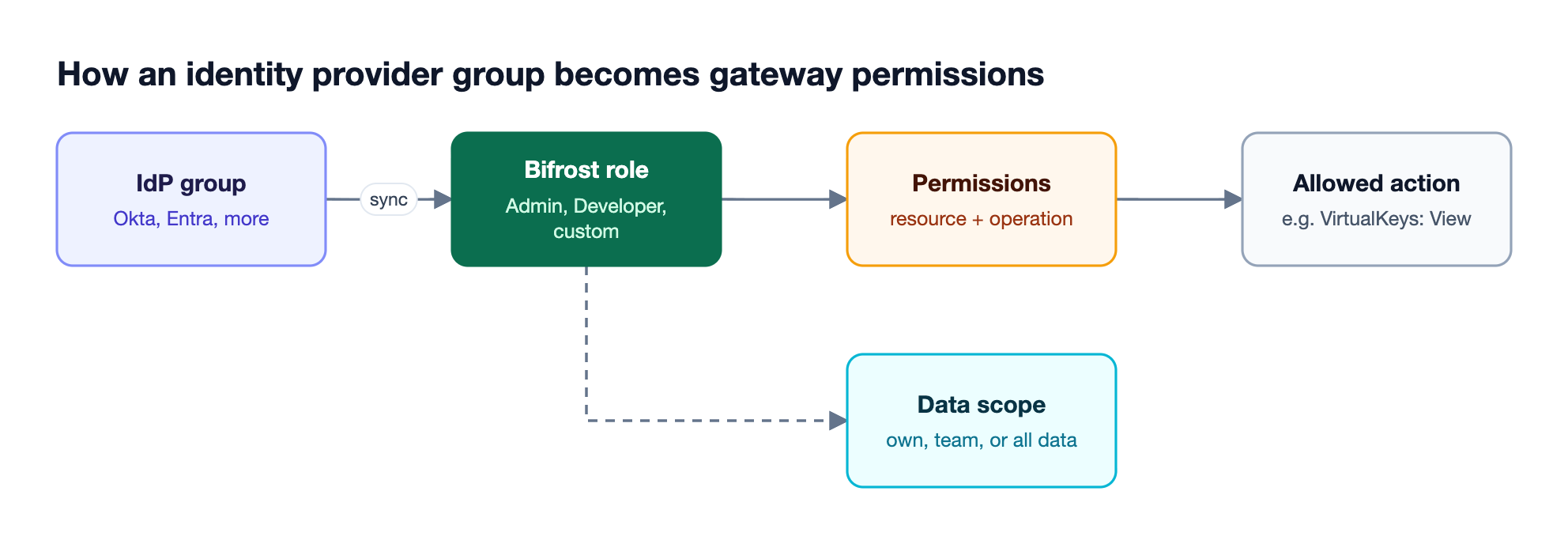
As Figure 3 shows, roles do not need to be assigned by hand. With user provisioning over OIDC and SCIM, Bifrost maps identity provider groups, app roles, or custom claims to Bifrost roles for Okta, Microsoft Entra, Keycloak, Zitadel, and Google Workspace. Users receive their role on first SSO login, and permissions resynchronize on each session. Setup guides such as configuring Okta for Bifrost cover the group-to-role mapping.
Controlling Model and Tool Access per Role
Inference access in Bifrost is controlled by virtual keys, which carry the model, budget, rate-limit, and tool policy for each consumer. Access profiles turn those policies into reusable role templates, so every member of a role receives a key with the same limits and independent usage counters.
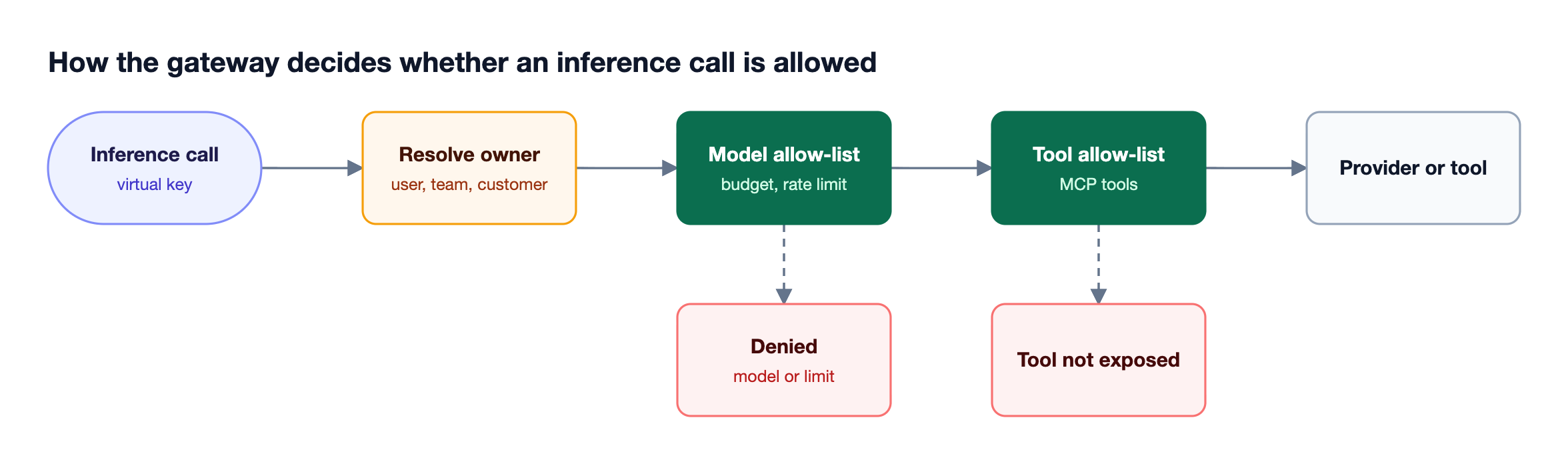
Figure 4 shows the checks applied to each call:
- Virtual keys carry provider and model allow-lists, optional restrictions to specific provider API keys, and an active or inactive switch.
- Budgets and rate limits cap spend per key, team, or customer, and cap request and token volume per virtual key and per provider within a key.
- Access profiles in Bifrost Enterprise attach to roles and issue each user a write-protected virtual key, so a user cannot widen their own policy.
- MCP tool filtering exposes no MCP tools to a key unless they are explicitly allowed, except tools from MCP clients marked Allow by Default.
Step-by-step setup is covered in the guide to setting up virtual keys for LLM access control, and the post on MCP tool governance and allow-listing covers per-role tool access for agents.
RBAC vs ABAC for AI Gateways
RBAC grants access based on a user's role, while attribute-based access control (ABAC) evaluates attributes of the user, resource, and request, such as team, model, or time, at decision time. RBAC is simpler to administer and audit; ABAC is more expressive. Most AI gateways combine them.
| Dimension | RBAC | ABAC |
|---|---|---|
| Decision based on | Role membership | Attributes of user, resource, and context |
| Administration | Assign users to roles | Write and maintain policies |
| Auditability | Easy to answer "who has access" | Requires evaluating policies |
| Granularity | Coarse to medium | Fine-grained |
| Typical gateway use | Admin permissions, per-team model access | Conditional routing and content rules |
Bifrost uses both patterns. Roles govern the management plane, while guardrail rules and routing rules use CEL expressions over attributes such as virtual key, team, user, provider, and model, which is attribute-based by design. The article on policy-based governance at the gateway explains how attribute policies sit alongside roles, and our explainer on granular access control covers the finer-grained end of the spectrum.
Data Access Control: Scoping What Each Role Sees
RBAC decides which operations a role can perform; data access control decides which records those operations return. Without data scoping, a developer with View access to virtual keys or logs sees every team's keys and every team's prompts.
Data access control in Bifrost Enterprise assigns each role one of three scopes:
- Own data. Members see only rows they created or own.
- Team data. Members see their own rows plus rows created by anyone on their teams.
- All data. No row filtering, the default for system roles such as Admin.
Scoping covers virtual keys, prompts, routing rules, access profiles, guardrail configurations, MCP clients, and Virtual MCPs. It also applies to inference requests: a call made with a team member's virtual key is scoped to that owner's view, invalid scope values are rejected, and a team-scoped user with no resolved teams sees nothing rather than everything.
RBAC Best Practices for AI Gateways
Role-based access control for AI gateways works best when roles mirror real job functions, start from least privilege, and stay synchronized with the identity provider. Review assignments on a schedule, and keep management and inference roles separate so no single role can both widen and use its own access.
| Role | Management permissions | Inference access |
|---|---|---|
| Platform admin | Full access to providers, keys, guardrails, settings | As needed for testing |
| Application developer | View logs and observability; manage own virtual keys | Approved models within a team budget |
| Security auditor | View audit logs, request logs, guardrail config, users | None |
| Operations | Cluster and observability access | None |
| AI agent (service) | None | Specific models and allow-listed MCP tools only |
Additional practices:
- Sync roles from the directory rather than assigning them by hand, so offboarding removes access everywhere.
- Scope data by team so View permissions do not expose other teams' prompts and keys.
- Restrict Reveal and Download to the smallest group, because they expose redacted values and exportable logs.
- Audit role changes through Bifrost audit logs, which record administrative actions.
These controls are part of Bifrost's broader AI governance capabilities, and the comparison of AI gateways for role-based access control shows how other gateways approach the same problem.
Frequently Asked Questions
What is better, RBAC or ABAC?
Neither is better in every case. RBAC is easier to administer and audit because access follows role membership, which suits admin permissions and per-team model access. ABAC is better when decisions depend on context, such as the model, request content, or time. AI gateways such as Bifrost use RBAC for management permissions and attribute-based rules for routing and guardrails.
What are the three primary rules for RBAC?
The three primary rules for RBAC are role assignment, role authorization, and permission authorization. A user can exercise a permission only if they hold a role, that role is authorized for them, and the permission is authorized for that role. Together the rules ensure access always flows through roles rather than direct grants.
What are the three types of access control?
The three classic types of access control are discretionary access control (DAC), mandatory access control (MAC), and role-based access control (RBAC). Attribute-based access control (ABAC) is often added as a fourth model. Enterprise AI gateways mostly rely on RBAC for administration and ABAC-style policies for request-level decisions.
How does RBAC apply to AI agents?
AI agents should be treated as service identities with their own role and credentials. In Bifrost, an agent receives a virtual key that allows only specific models, sets a budget and rate limit, and exposes only allow-listed MCP tools through the MCP gateway. That limits what a compromised or misbehaving agent can reach, which addresses the excessive agency risk in the OWASP LLM Top 10.
Can Bifrost sync roles from Okta or Microsoft Entra?
Yes. Bifrost Enterprise user provisioning supports OIDC single sign-on and SCIM 2.0 with Okta, Microsoft Entra, Keycloak, Zitadel, and Google Workspace. Identity provider groups, app roles, or custom claims map to Bifrost roles, users receive their role on first login, and permissions resynchronize on each session.
Does RBAC replace virtual keys in an AI gateway?
No. RBAC in Bifrost governs who can view and change gateway configuration, while virtual keys govern inference traffic: which models, budgets, rate limits, and MCP tools a caller can use. Access profiles connect the two by attaching inference policy to roles, so role membership determines both admin permissions and model access.
Getting Started with Role-Based Access Control in Bifrost
Role-based access control turns an AI gateway from a shared pipe into a governed control point: roles decide who can change configuration, and role-linked virtual keys decide who can use which models and tools. Bifrost provides both, with SSO-synced roles, data scoping, and enterprise deployment inside your own infrastructure. To see role-based access control for your AI gateway in action, book a demo with the Bifrost team.