Claude Dangerously Skip Permissions: A Practical Guide
The claude dangerously skip permissions flag starts Claude Code in bypassPermissions mode, which removes approval prompts for edits and shell commands. This guide covers what still applies, the real risks, safe container setups, and gateway-level controls for teams.
TL;DR
- The
--dangerously-skip-permissionsflag starts Claude Code inbypassPermissionsmode, which runs file edits, shell commands, and tool calls without asking for approval. - Deny rules, explicit ask rules, and
rmprotections on critical paths still apply in bypass mode, but allow rules and protected-path prompts do not. - Claude Code refuses the flag under root or
sudoon Linux and macOS, and Anthropic recommends it only inside containers or VMs. - A safe setup combines a disposable non-root container, an egress allowlist, scoped credentials, and deny rules for the commands that matter most.
- Routing the session through Bifrost adds what the container cannot: per-key budgets, MCP tool allow-lists, guardrails, and a log of every model and tool request.
The claude --dangerously-skip-permissions flag starts Claude Code in a mode that executes file edits, shell commands, and MCP tool calls without asking a human first. Teams reach for it when they want Claude Code to finish long tasks, CI jobs, or batch refactors without a human approving each step. Bifrost, the open-source AI gateway built in Go by Maxim AI, provides the budget, tool, and audit controls that an unattended agent session needs. This guide explains what the flag disables, what still applies, how to run it safely, and when Claude Code routed through Bifrost is the right control layer.
What Does claude --dangerously-skip-permissions Do?
The --dangerously-skip-permissions flag launches Claude Code in bypassPermissions mode. In this mode, Claude Code skips permission prompts and runs tool calls immediately, including writes to protected paths such as .git, .claude, and .vscode. It is equivalent to claude --permission-mode bypassPermissions. It does not create a sandbox, restrict network access, or revoke credentials.
That last point is the one most answers get wrong. The flag changes how Claude Code asks for approval. It does not change what the operating system lets the process do. If the shell running Claude Code can delete a directory, push to a remote, or read ~/.aws/credentials, an agent in bypass mode can do the same without stopping.
The behavior has a few specifics worth knowing, all documented in the Claude Code permission modes reference:
- First-run dialog. The first interactive session in this mode shows a warning that you must accept. Accepting writes
skipDangerousModePermissionPrompt: trueto~/.claude/settings.json, so later sessions skip the dialog. - Headless runs. With
-p(non-interactive mode), no dialog appears, and any call that would still need a prompt is denied instead. - Launch-time only. You cannot switch into bypass mode from a session that started without it. The
--allow-dangerously-skip-permissionsvariant adds the mode to theShift+Tabcycle without activating it. - Root refusal. On Linux and macOS, Claude Code refuses to start in this mode as root or under
sudo, unless it detects a recognized sandbox.
For teams already running Claude Code against a central gateway, the Claude Code gateway guide covers how model traffic is routed before any of these permission decisions matter.
What Still Applies in Claude Code Bypass Permissions Mode
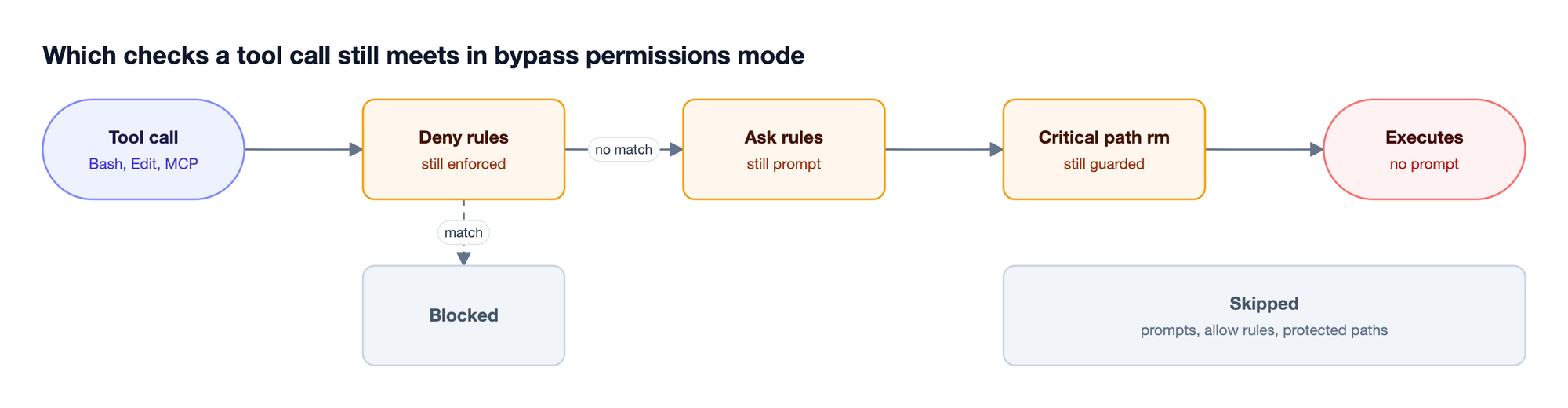
Bypass permissions mode removes routine prompts, but Claude Code keeps a short list of checks that no mode auto-approves. Deny rules still block matching calls. Explicit ask rules still prompt. rm and rmdir against critical paths such as the filesystem root, home directory, or working directory are never auto-approved. Allow rules have no effect, because nothing is being asked.
| Control | Manual mode | Bypass permissions mode |
|---|---|---|
| Permission prompt for edits and Bash | Shown | Skipped |
permissions.allow rules |
Pre-approve calls | No effect |
permissions.deny rules |
Block | Block |
Explicit ask rules |
Prompt | Prompt (denied in -p runs) |
Writes to .git, .claude, .vscode |
Prompted | Allowed |
rm on critical paths |
Prompted | Not auto-approved |
Running as root or sudo |
Allowed | Refused outside a sandbox |
The practical consequence is that deny rules become the main in-agent policy you control. Explicit ask rules, PreToolUse hooks that block a call, and critical-path rm checks also still apply, but allow rules do not. A deny rule such as Bash(git push *) or Read(./.env) blocks the call even in bypass mode. Deny rules match the command text Claude writes, though, so they are not a security boundary around a program that can be invoked another way. Pair them with OS-level isolation.
Deny rules inside Claude Code govern one machine. Bifrost adds a complementary policy layer for model and MCP traffic, through governance controls that hold regardless of which flags a developer launched with.
Claude Code Permission Modes Compared
Claude Code supports six permission modes: Manual (default), acceptEdits, plan, auto, dontAsk, and bypassPermissions. They differ in who approves an action: a human, a background classifier, a fixed allowlist, or nobody. Bypass mode is the only one where nobody reviews the action, which is why it is reserved for isolated environments.
| Mode | Who approves actions | Typical use |
|---|---|---|
Manual (default) |
You, per action | Sensitive work, unfamiliar code |
acceptEdits |
Auto for file edits in the working directory | Iterating on code you will review |
plan |
Read-only exploration until a plan is approved | Scoping a change before editing |
auto |
A background classifier checks each action | Hands-off interactive sessions |
dontAsk |
Only pre-approved tools run, the rest are denied | CI with an exact --allowedTools list |
bypassPermissions |
No one | Fully unattended runs in a container or VM |
Two of these modes reduce the need for bypass. Claude Code auto mode removes routine prompts while a classifier reviews shell commands and network requests against your request, and it is the built-in starting mode in recent releases on supported models. dontAsk suits CI jobs where the needed tools are known in advance, for example claude -p "run the test suite" --permission-mode dontAsk --allowedTools "Bash(npm test)" "Read".
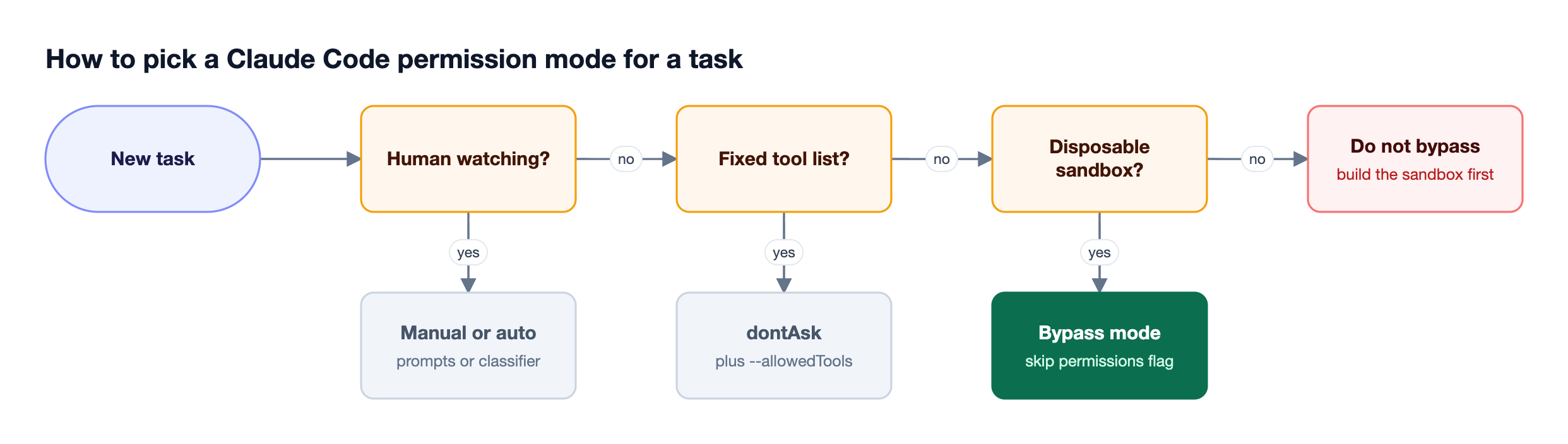
The same permission choices apply to every coding agent a team runs. The overview of governing Claude Code, Cursor, and Codex at scale compares how each agent exposes them.
The Risks of Running Claude Code with Bypass Permissions
Running Claude Code with bypass permissions exposes three classes of failure: destructive local actions, data exfiltration through prompt injection, and unbounded spend. Each one is a consequence of removing the human checkpoint, not of a defect in the model, and each needs a different containment layer.
- Destructive local actions. A misread instruction can produce
git reset --hard, a recursive delete outside the target directory, or an overwrite of uncommitted work. Bypass mode also allows writes to.gitand.claude, so the agent can change repository state and its own configuration. - Prompt injection and exfiltration. Content the agent reads, such as a README, an issue comment, or a fetched web page, can carry instructions. Without a prompt, an injected
curlthat posts environment variables to an external host runs immediately. The OWASP Top 10 for LLM Applications lists this pattern under excessive agency. - Runaway spend. An agent stuck in a retry or test-fix loop keeps calling the model. With nobody watching, token usage grows until someone notices the invoice.
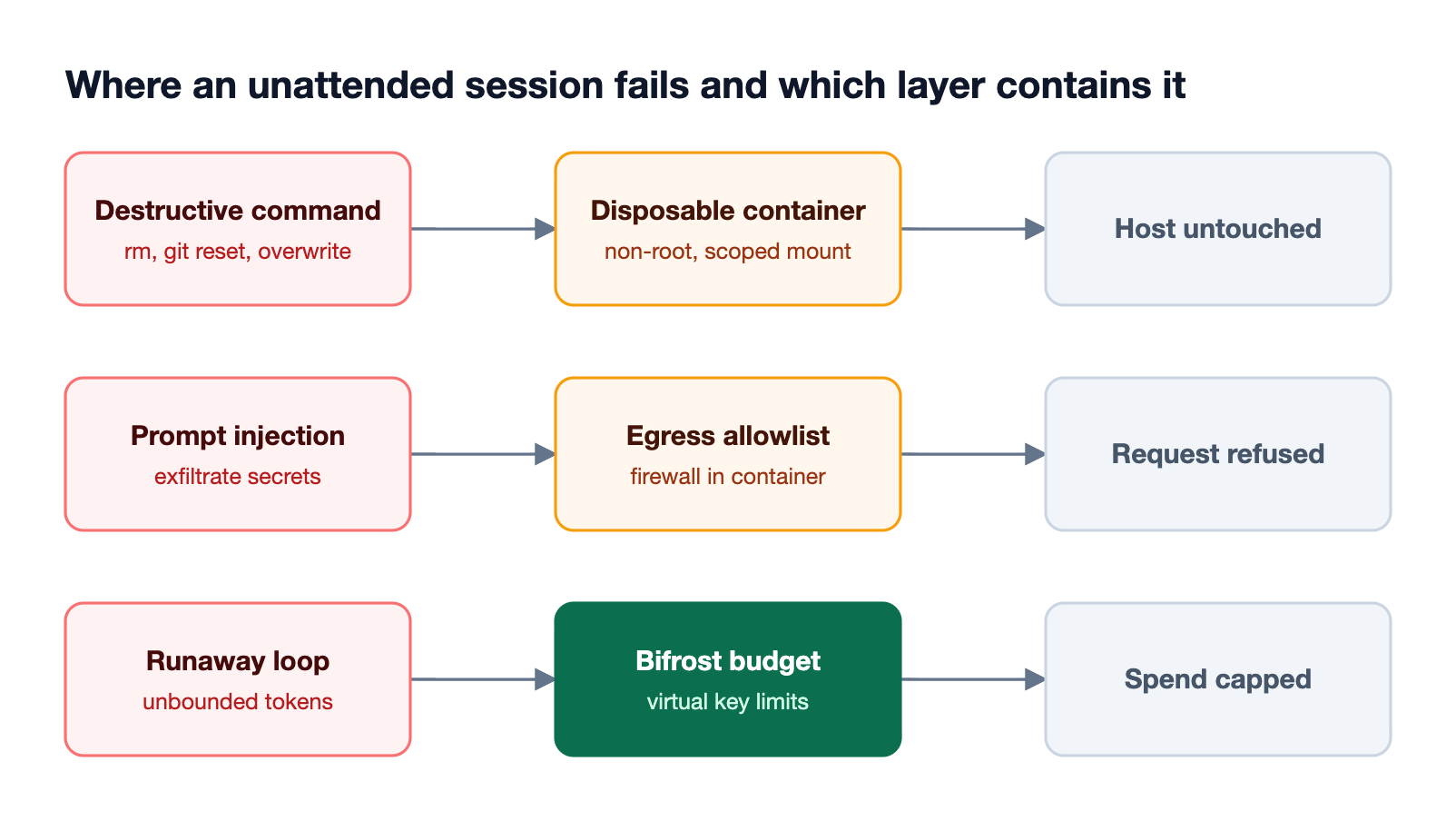
The first two risks are contained by isolation. The third is a cost and governance problem, which the budget and rate limit controls in Bifrost address at the gateway. A broader treatment of these threats appears in the guide to AI coding agent security.
How to Run claude --dangerously-skip-permissions Safely
Running the claude dangerously skip permissions command safely means removing what the agent can damage before removing the prompts. The working pattern is a disposable container running as a non-root user, a network egress allowlist, credentials scoped to the task, a clean git checkpoint, and deny rules for high-impact commands.
Step 1: Run inside a Claude Code sandbox or dev container
Use a container, VM, or dev container as the boundary. Anthropic publishes a reference dev container that runs Claude Code as a non-root user and includes an init-firewall.sh script limiting outbound traffic to allowed destinations. Mount only the repository the task needs, never your home directory.
docker run --rm -it \
  --user 1000:1000 \
  --cap-add=NET_ADMIN --cap-add=NET_RAW \
  -v "$PWD":/workspace -w /workspace \
  claude-sandbox:latest \
  claude --dangerously-skip-permissions
Step 2: Restrict network egress
An egress allowlist is the control that stops exfiltration. Allow the model endpoint, your package registry, and your git host, and block everything else. If Claude Code reaches models through Bifrost, the allowlist shrinks to a single gateway host for inference.
Step 3: Scope credentials to the task
Do not pass production cloud keys, deploy tokens, or personal SSH keys into the container. Give the agent a short-lived token with write access to one repository. For model access, a Bifrost virtual key set as ANTHROPIC_AUTH_TOKEN replaces a raw provider API key, so a leaked token exposes only that key's budget and model scope.
Step 4: Add deny rules for high-impact commands
Deny rules still enforce in bypass mode, so put the actions you never want unattended in .claude/settings.json:
{
  "permissions": {
    "deny": [
      "Bash(git push *)",
      "Bash(curl *)",
      "Bash(wget *)",
      "Read(./.env)",
      "Read(./secrets/**)"
    ]
  }
}
Step 5: Checkpoint and review
Commit or stash before the run and work on a branch, so every change is reviewable as a diff. For CI, prefer claude -p "<task>" --dangerously-skip-permissions in a fresh runner container that is discarded after the job.
Teams that standardize this setup across many developers usually pair it with the Bifrost CLI for coding agents, which launches Claude Code with gateway settings applied.
Disabling Bypass Permissions Across an Organization
Administrators can block bypass mode entirely by setting permissions.disableBypassPermissionsMode to "disable" in managed settings, which developers cannot override. Claude Code also ignores defaultMode: "bypassPermissions" in a project's checked-in .claude/settings.json, so a repository cannot start sessions in bypass mode on its own.
A typical managed policy looks like this:
{
  "permissions": {
    "disableBypassPermissionsMode": "disable",
    "deny": ["Read(./.env)", "Bash(curl *)"]
  }
}
Organizations that need unattended agents, but only in sanctioned places, can disable bypass mode on developer laptops and allow it only in CI images they control. Sessions started with --restricted (Claude Code v2.1.248 and later) also refuse bypass mode.
Managed settings stop a flag from being used. They do not record what an agent did when it ran. That record belongs at the gateway, which is the subject of the Claude Code governance with an AI gateway guide.
Governing Unattended Claude Code Sessions with Bifrost
The Bifrost AI gateway sits between Claude Code and the model providers and MCP servers it calls. When Claude Code runs with bypass permissions inside a container, Bifrost enforces budgets, rate limits, MCP tool allow-lists, and guardrails on every request, and logs each call. These controls hold regardless of the permission mode the agent was launched in.
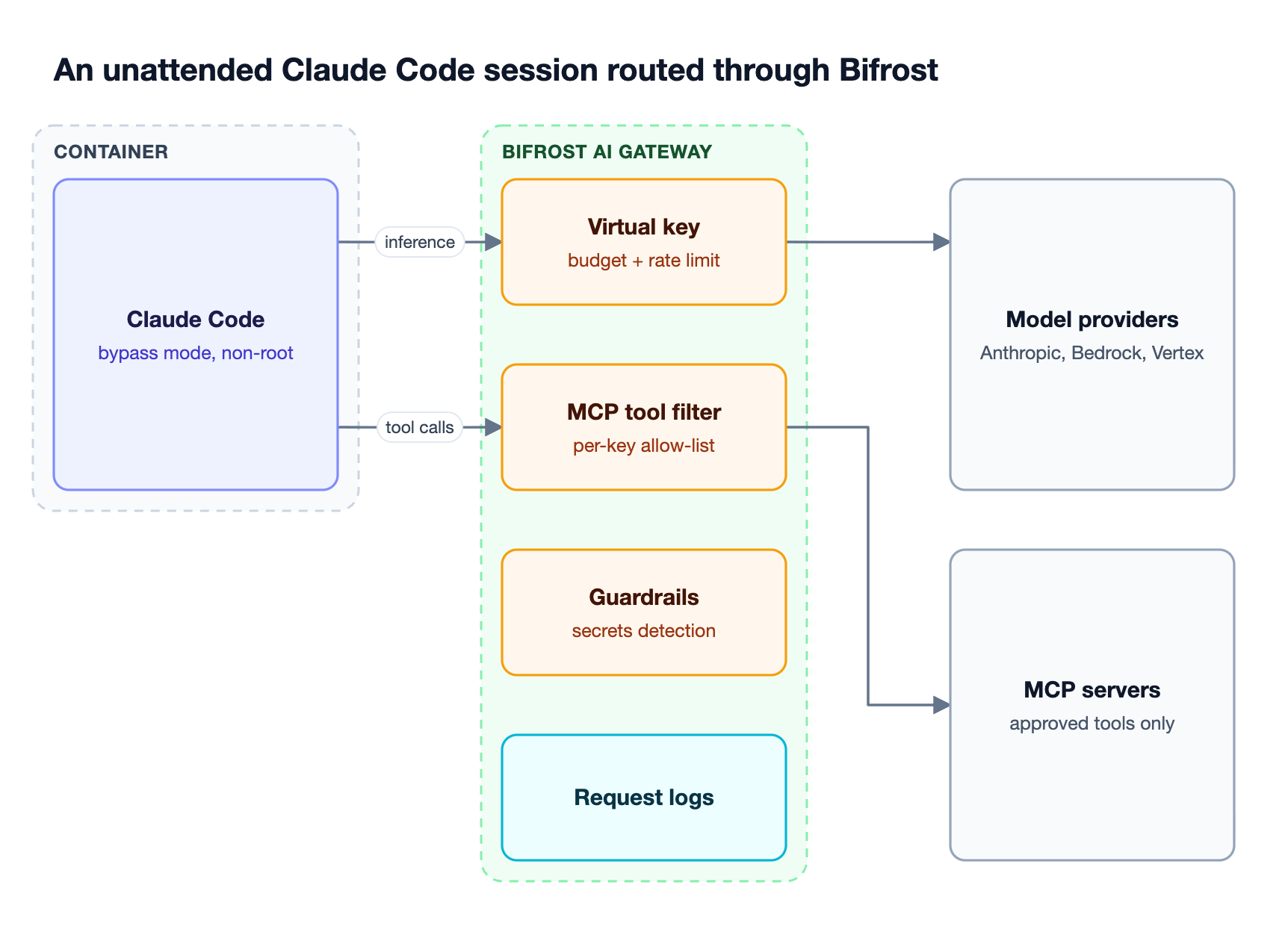
Pointing Claude Code at Bifrost takes two environment variables in settings.json:
"env": {
  "ANTHROPIC_BASE_URL": "http://localhost:8080/anthropic",
  "ANTHROPIC_AUTH_TOKEN": "your-virtual-key"
}
With that in place, each control in Figure 4 maps to a specific risk:
- Spend limits. Virtual keys carry their own budgets and rate limits, checked alongside team and customer budgets in a hierarchical budget structure. A runaway loop stops at the cap.
- Tool restriction. MCP tool filtering is deny-by-default per virtual key, so an unattended session can reach only the tools explicitly allowed for it, unless an MCP client is marked Allow by Default.
- Content checks. Bifrost Enterprise guardrails include a secrets detection provider that scans requests and responses for API keys and tokens, so secrets in a prompt can be caught before they leave the network.
- Request history. Built-in observability records every model request, which supports the review workflow described in the Claude Code monitoring guide.
Bifrost can also act as an MCP gateway for Claude Code, so one claude mcp add entry replaces per-server configuration. The walkthrough on using an MCP gateway with Claude Code covers the setup.
Why Gateway Controls Matter for Enterprise Teams
Container isolation protects the host, but it is configured per run and leaves no central record. Enterprise teams running many agents need policy that is set once, enforced on every session, and auditable afterward. A gateway provides that because all model traffic and gateway-routed MCP tool calls pass through it, whatever flags each developer used.
Bifrost adds about 11 microseconds of overhead per request at 5,000 requests per second in sustained performance benchmarks, so routing coding agent traffic through it does not slow interactive work. It supports 25+ providers and 10,000+ models behind one API, which lets a platform team pin Claude Code to Anthropic, Bedrock, or Vertex without changing developer setups.
For regulated environments, in-VPC deployments keep traffic inside the network, and access profiles apply consistent budget and MCP policies to new virtual keys at scale. The Bifrost Enterprise page covers clustering, RBAC, and audit logs for administrative activity.
Teams working on agent identity and lifecycle more broadly can use the guide to AI agent governance in production, and the governance resource hub collects the related patterns.
Frequently Asked Questions
Is claude --dangerously-skip-permissions safe?
The flag is safe only inside an isolated environment. On its own it removes approval prompts without adding any sandbox, network restriction, or credential scoping. Anthropic recommends using it only in containers, VMs, or dev containers where Claude Code cannot damage the host. Combined with a non-root container, an egress allowlist, scoped credentials, and gateway budgets, it is a reasonable choice for unattended tasks.
How do I enable bypass permissions in Claude Code?
Start Claude Code with claude --dangerously-skip-permissions or the equivalent claude --permission-mode bypassPermissions. You can also set permissions.defaultMode to bypassPermissions in user settings, a --settings file, or managed settings. Project-level .claude/settings.json cannot start a session in bypass mode. You cannot switch into it mid-session unless you launched with --allow-dangerously-skip-permissions.
Why does Claude Code keep asking for permission?
In Manual mode, Claude Code prompts before file edits and most shell commands. To reduce prompts without removing review entirely, add permissions.allow rules for trusted commands, switch to acceptEdits for file edits, or use auto mode, where a classifier reviews actions instead of you. Explicit ask rules still prompt in every mode, including bypass.
Can I use dangerously-skip-permissions as root?
No. On Linux and macOS, Claude Code refuses to start in bypass mode when running as root or under sudo, and prints an error that the flag cannot be used with root privileges. The check is skipped inside a recognized sandbox. To run unattended in a container, use a dev container configuration that runs Claude Code as a non-root user.
What is Claude Code YOLO mode?
"YOLO mode" is the informal name developers use for running Claude Code with --dangerously-skip-permissions. It is not an official mode name. The official name is bypassPermissions, shown in the status bar as "bypass permissions on." Everything in this guide about bypass mode applies to what people call YOLO mode.
How do I disable dangerously-skip-permissions for my organization?
Set permissions.disableBypassPermissionsMode to "disable" in managed settings, which individual developers cannot override. Auto mode can be blocked the same way with permissions.disableAutoMode. For agents that still need unattended runs, route their traffic through an AI gateway such as Bifrost, using virtual keys with per-key budgets, so budgets, tool access, and logging apply centrally.
Getting Started with Bifrost
The claude dangerously skip permissions flag is useful for unattended work, and it is safe only when the environment around it carries the controls the prompt used to provide. A container handles files and network. Bifrost handles spend, tool access, content checks, and request history across every Claude Code session. To see how Bifrost governs coding agents across your organization, book a demo with the Bifrost team.