Prompt Caching: A Practical Guide
Prompt caching lets an LLM provider reuse the computation for a repeated prompt prefix, cutting input cost and time to first token. This guide covers provider differences, prompt structure, cost trade-offs, and how to automate cache markers at the gateway.
TL;DR
- Prompt caching lets an LLM provider reuse the computed state of a repeated prompt prefix, so later requests pay a reduced rate for those input tokens.
- Anthropic bills cache reads at 0.1x the base input price on most Claude models, while a 5-minute cache write costs 1.25x and a 1-hour write costs 2x.
- A cache hit requires a byte-identical prefix, so tools, system prompts, and reference documents belong before the cache breakpoint and anything that changes per request belongs after it.
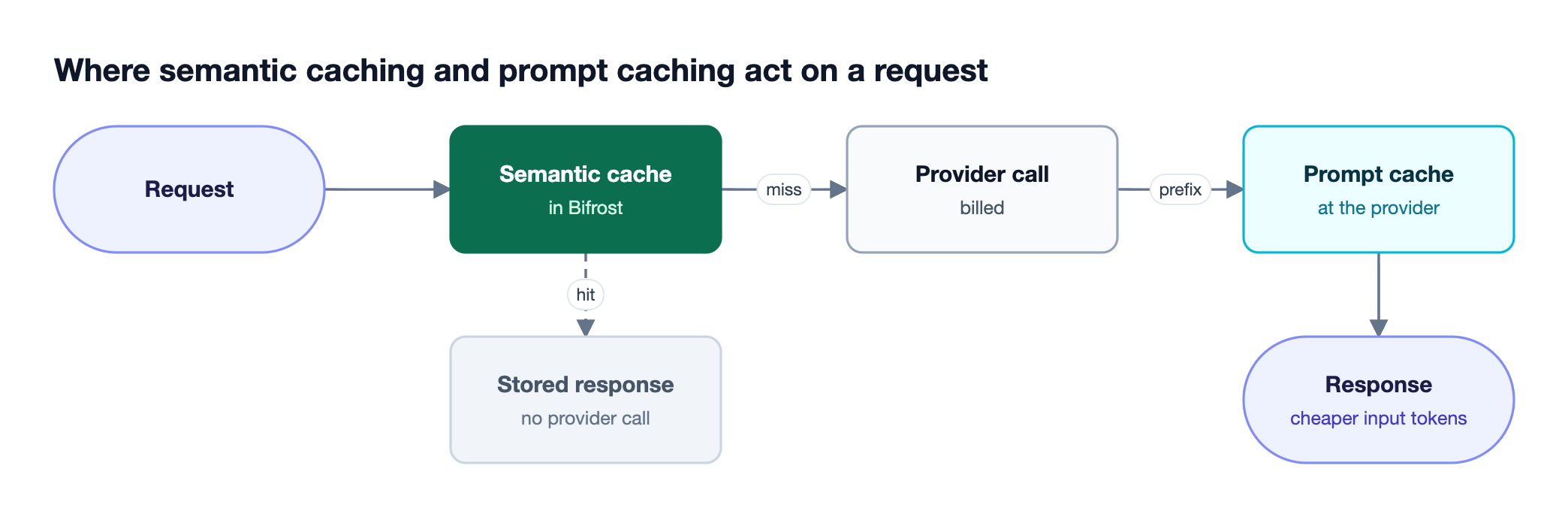
- Prompt caching and semantic caching are different: semantic caching skips the provider call, while prompt caching makes the call cheaper when it still has to happen.
- Bifrost can inject cache markers automatically for clients that send none, keep sessions on the provider key that holds their cache, and report cache reads and writes in every response.
Prompt caching is a provider-side optimization that stores the processed state of a prompt prefix and reuses it when a later request starts with the same tokens, which lowers input cost and time to first token. It matters most for agent loops, coding assistants, and chat applications that resend the same system prompt, tool definitions, and history on every turn. Bifrost, the open-source AI gateway built by Maxim AI, adds cache markers for clients that omit them and keeps each session on the provider key where its cache lives. This guide explains how prompt caching works, how the major providers differ, and how to structure, automate, and verify it in production.
What Is Prompt Caching?
Prompt caching is a technique in which an LLM provider saves the intermediate computation for the beginning of a prompt and reuses it for any later request that begins with the exact same tokens. The provider still runs the request and bills it, but cached input tokens cost much less than fresh ones and are processed faster.
The thing being cached is not the model's answer. It is the work the model did to read the prefix: tool definitions, system instructions, long documents, few-shot examples, and earlier conversation turns. Every turn of an agent loop or a multi-turn chat resends that material, so without caching the provider recomputes thousands of identical tokens on every call.
Prompt caching is now offered by most major providers, but the controls differ. Some providers cache automatically, some require the request to mark where the cacheable region ends, and some expose a separate cache resource. Teams routing traffic through the Bifrost AI gateway can compare how AI gateways handle prompt caching support before choosing where to manage it.
How Does Prompt Caching Work?
Prompt caching works by storing the attention key-value (KV) cache computed for a prompt prefix after the first request and loading it on later requests that share that prefix. The model then processes only the new tokens after the cached region, which reduces both compute cost and the time before the first output token.
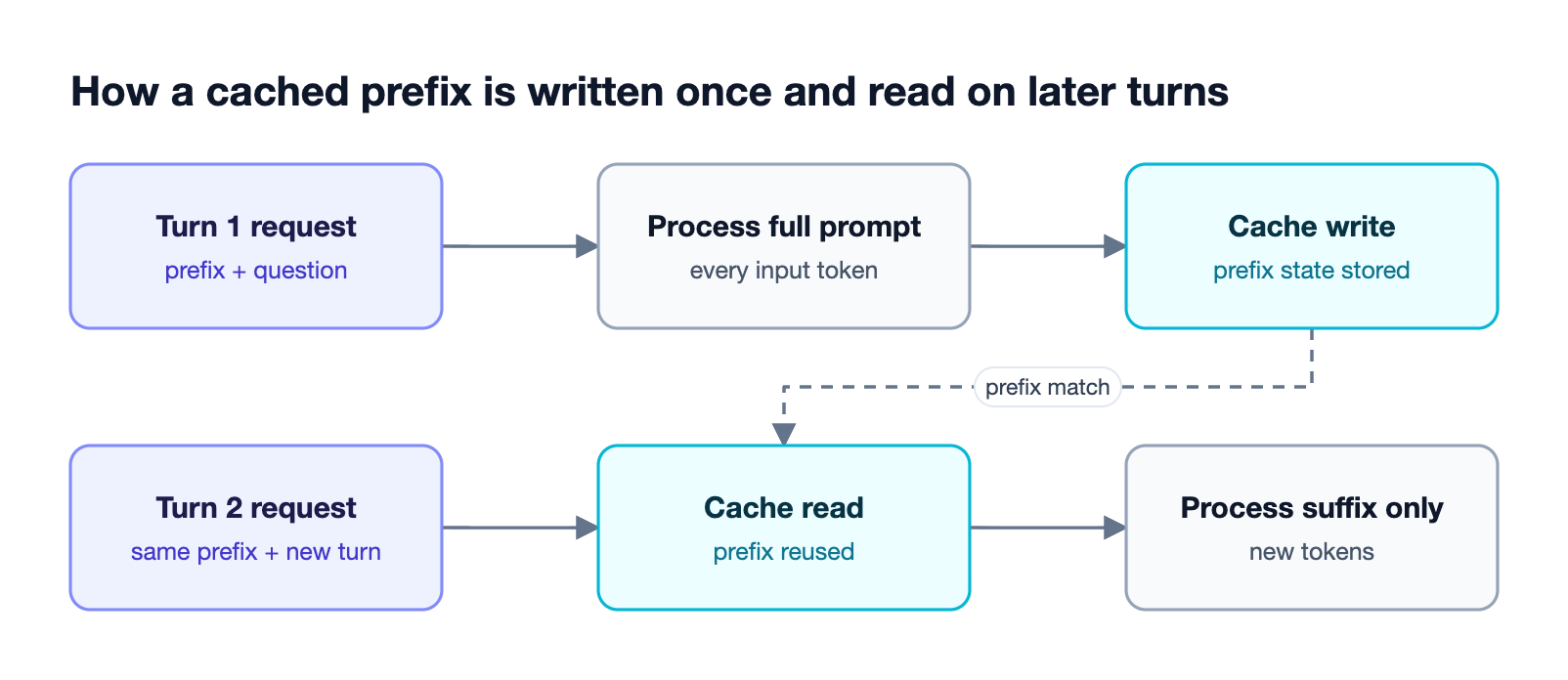
As Figure 1 shows, the lifecycle has two phases:
- Cache write: the first request processes the full prompt and stores the prefix state. On providers that bill writes separately, this turn costs more than uncached input.
- Cache read: a later request with an identical prefix loads the stored state and processes only the suffix, billed at the reduced cached rate.
Matching is exact and prefix-based. A single changed character early in the prompt invalidates everything after it, which is why prompt structure matters more than any configuration flag. Self-hosted inference servers apply the same idea; the automatic prefix caching documentation from vLLM describes reusing KV cache blocks across requests that share a prefix, and Bifrost can route to self-hosted vLLM deployments alongside hosted providers.
Prompt Caching Across Providers: Anthropic, OpenAI, Bedrock, and Gemini
Providers implement prompt caching in three ways: cache_control markers that the request must include (Anthropic, and Claude models on Bedrock and Vertex AI), automatic caching of any long enough prefix (OpenAI on most models), and a separate cached content resource (Gemini). The differences decide whether an application has to change its requests to get any cache hits at all.
| Provider | How caching is triggered | Notable details |
|---|---|---|
| Anthropic | cache_control on content blocks or as a top-level field |
Up to 4 breakpoints; 5-minute default TTL, 1-hour option |
| OpenAI | Automatic on supported models | Explicit breakpoints on the gpt-5.6 family via the Responses API |
| AWS Bedrock | cachePoint blocks on the Converse API |
Claude and Amazon Nova models take explicit markers |
| Google Vertex AI | cache_control for Claude models |
Gemini models on Vertex use a separate cache mechanism |
| Google Gemini | Server-side cachedContent resource |
The application creates and references the cache itself |
Anthropic's prompt caching documentation states that cache reads cost 0.1x the base input price on most Claude models, that writes cost 1.25x for the 5-minute TTL and 2x for the 1-hour TTL, and that the cache prefix is built in the order tools, system, then messages. The minimum cacheable length ranges from 512 to 4,096 tokens depending on the model, so short prompts are not cached at all.
OpenAI's prompt caching guide states that caching is enabled by default for supported models, that cached input is discounted by up to 95%, and that requests are routed using a hash of the initial prompt tokens. On GPT-5.6 and later, cache writes cost 1.25x the uncached input rate and reads cost 0.1x on most models. Bifrost maps these dialects to one interface; the Anthropic provider page and the Bedrock provider page document how each cache directive is forwarded.
How to Structure Prompts for a High Cache Hit Rate
A high cache hit rate depends on keeping the start of every request byte-identical across calls. Place content that never changes (tool definitions, system instructions, reference documents) at the top, set the cache breakpoint after it, and put anything that varies per request, such as the user's question, below the breakpoint.
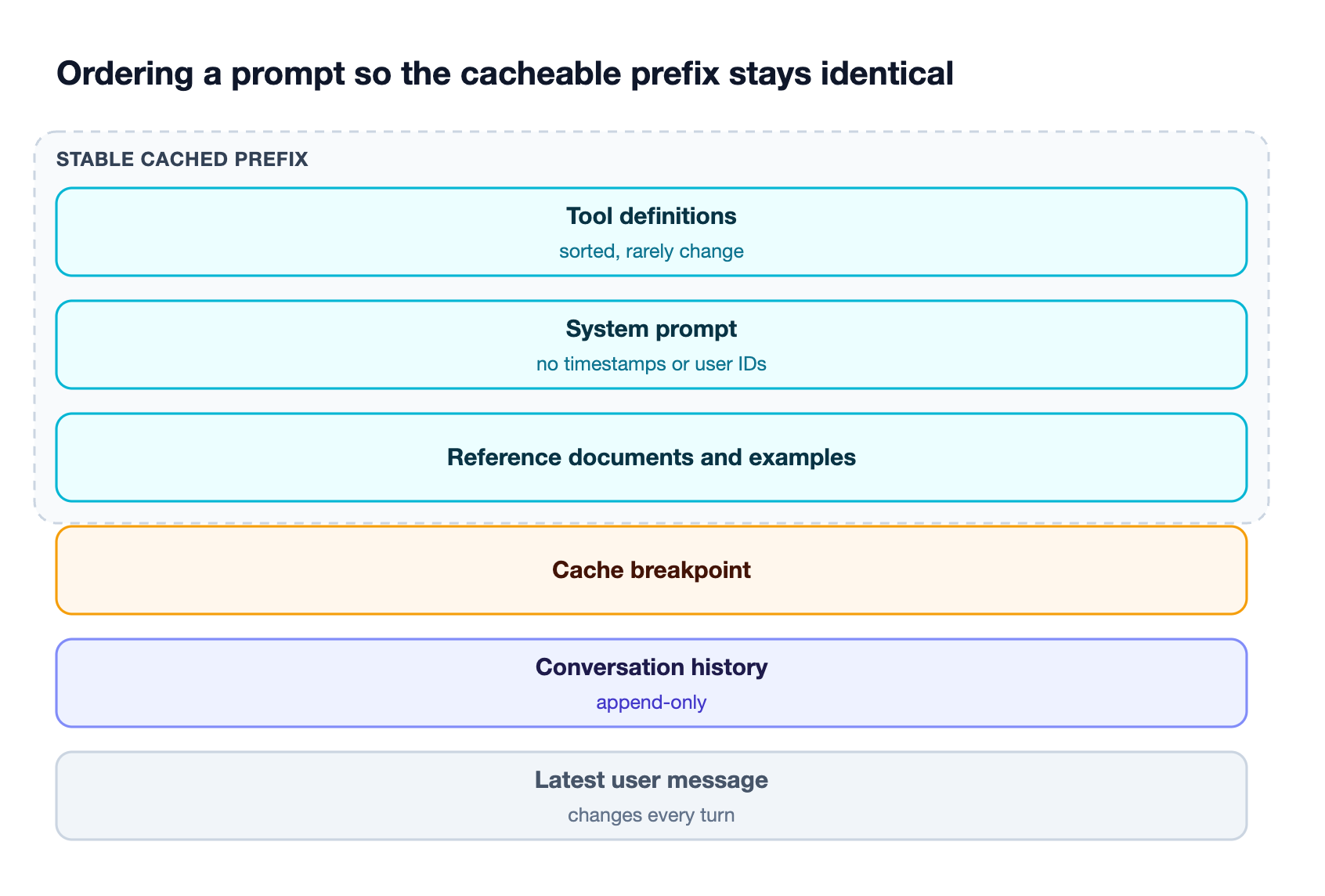
Most cache misses in production come from small, avoidable changes to the prefix:
- Timestamps and request IDs in the system prompt: a "current time" line changes every request and breaks the cache for everything after it.
- Unstable tool ordering: tools serialized from an unordered map can appear in a different order on each call. Sort them.
- Per-user data near the top: user names or account details placed in the system prompt split the cache by user. Move them into a later message.
- Rewritten history: clients that summarize or edit earlier turns change the prefix. Keep conversation history append-only where possible.
- Hopping between keys or providers: caches are scoped per provider and usually per API key or organization, so a request routed to a different key starts cold.
The last item is a routing problem rather than a prompt problem. Bifrost addresses it with session affinity, which keeps a conversation on the provider and key that served its earlier turns, so load balancing across multiple API keys does not scatter one session across several cold caches.
Prompt Caching vs Semantic Caching
Prompt caching and semantic caching solve different problems. Semantic caching stores complete responses and returns one when a new request matches an earlier request exactly or closely enough, so the provider is never called. Prompt caching runs at the provider and only discounts the repeated prefix of a request that still has to be processed.
| Prompt caching | Semantic caching | |
|---|---|---|
| Where it runs | At the model provider | In the gateway, before the provider |
| What is reused | Computed state for a prompt prefix | A full stored response |
| Match type | Exact prefix | Exact hash or embedding similarity |
| Provider call | Still made and billed at a lower rate | Skipped on a hit |
| Best fit | Agent loops, long system prompts, multi-turn chat | Repeated or near-duplicate questions |
Semantic caching in Bifrost supports direct hash matching and embedding-based similarity matching, and it engages only when a request carries a cache key (the x-bf-cache-key header) or a default_cache_key is configured. The two mechanisms are independent and can run together: a semantic cache hit avoids the call, and a miss still benefits from the provider's prompt cache. For a deeper treatment of the gateway side, see what semantic caching is and how it works and how teams optimize LLM cost and latency with semantic caching.
When Prompt Caching Saves Money and When It Costs More
Prompt caching saves money only when a cached prefix is read more often than it is written. Cache reads cost a fraction of fresh input, but on providers that bill writes separately, the request that writes the cache costs more than uncached input, so one-shot requests with explicit markers pay a premium and get nothing back.
| Workload | Expected effect | Recommendation |
|---|---|---|
| Agent loops replaying the same prefix every turn | Large savings; most turns are cache reads | Enable caching on the stable prefix |
| Multi-turn chat with a long system prompt | Savings after the second turn | Mark the system prompt and latest user turn |
| Human-in-the-loop flows with minutes between turns | Savings only if the cache survives the gap | Use the 1-hour TTL where available |
| One-shot requests with unique prompts | Higher cost from write premiums | Leave explicit markers off |
The arithmetic on Anthropic's published rates is straightforward: a 5-minute write at 1.25x followed by one read at 0.1x already costs less than two uncached requests at 2x combined. A 1-hour write at 2x needs more reads to break even, which is why it suits long pauses rather than fast loops. When the same questions repeat across users, semantic caching at the gateway removes those calls entirely.
Cost tracking needs to reflect these split rates. The Bifrost model catalog prices cache-read and cache-creation tokens separately when providers report them, so spend reported against budgets and rate limits matches the provider invoice. The Bifrost governance resource covers how those budgets are applied per team and per virtual key.
How Bifrost Automates Prompt Caching Across Providers
The Bifrost gateway automates prompt caching by injecting a cache marker on the first cacheable content block of any request that arrives without markers, then translating that marker into each provider's own format. The feature, auto prompt caching, is configured per provider and is off by default.
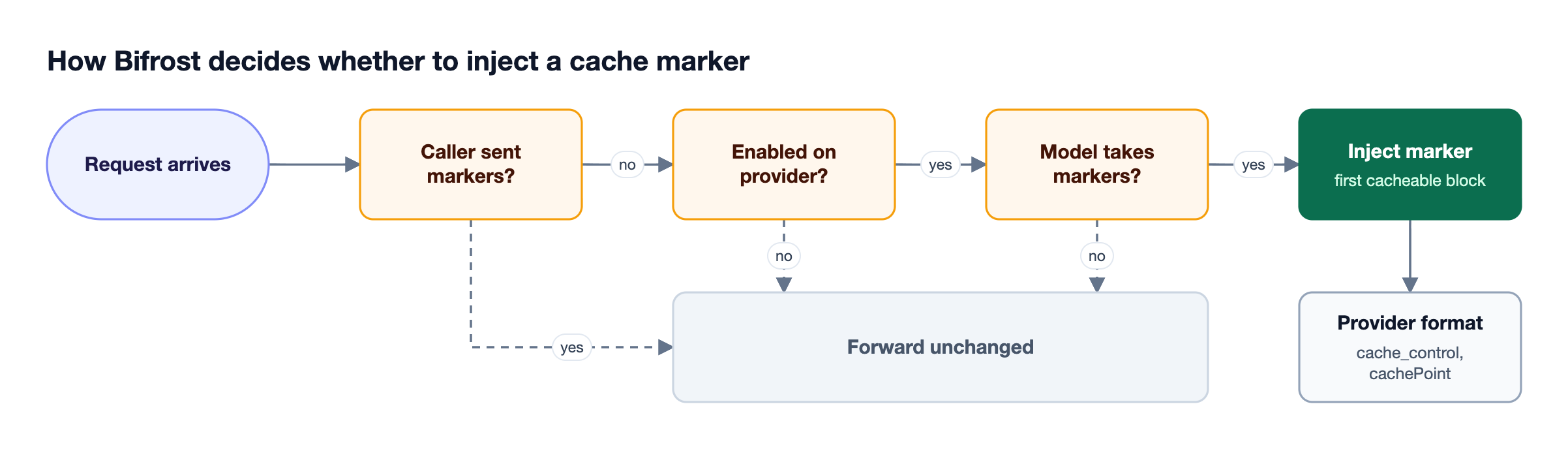
This matters because many agentic clients send no cache markers at all. On Claude models that means nothing is cached and every turn pays full price for a prompt that barely changed. Figure 4 shows the rules Bifrost applies:
- Caller markers win: a request that already carries
cache_controlorprompt_cache_breakpointis forwarded unchanged. - Capability gated: markers are added only for models that accept explicit caching, so implicit-caching providers never receive a marker they would reject.
- At most four markers: injection stops at the four-breakpoint ceiling instead of relying on a downstream clamp.
- Per attempt: a fallback to another provider re-evaluates injection against that provider's own configuration.
Enabling it on a provider takes one block in the configuration:
{
  "providers": {
    "anthropic": {
      "prompt_cache": {
        "auto_inject": true,
        "ttl": "1h"
      }
    }
  }
}
The optional cache_control_injection_points field targets specific messages instead of the first block, for example the system prompt and the latest user turn. The x-bf-prompt-cache-auto-inject header turns injection on or off for a single request, as listed in the request options reference. The roundup of AI gateways with prompt caching compares this approach with other gateways.
Prompt Caching for Claude Code and Agent Loops
Agent loops are where prompt caching pays off most, because they resend the same tool definitions and growing history dozens of times per task. For coding agents such as Claude Code, the main risks are a session landing on a different provider key between turns and clients that send no cache markers.
Bifrost handles both at the gateway. Claude Code sends a session header on every request, and Bifrost adopts it for session affinity with no configuration, so each session keeps hitting the same provider prompt cache; subagents share their parent's session ID. Codex CLI gets the same session affinity through its session-id header, and clients that send no markers get them from auto-injection once it is enabled on a provider whose models accept explicit cache markers.
Other applications can set x-bf-session-id explicitly to get the same behavior. For tool-heavy agents, cutting the number of tokens in the prefix also helps; the MCP gateway resource explains how Code Mode reduces the tool definitions sent on each turn.
How to Verify Prompt Caching Is Working
Verify prompt caching by reading the token usage in each response, not the status code. A working setup shows cache write tokens on the first request of a session and cache read tokens on the requests that follow. If every turn reports writes and no reads, the prefix is changing between turns.
Bifrost surfaces provider cache counters in a consistent shape. On Chat Completions they appear under usage.prompt_tokens_details as cached_write_tokens and cached_read_tokens; on the Responses API they appear under usage.input_tokens_details. A healthy second turn looks like this:
{
  "usage": {
    "prompt_tokens": 4213,
    "completion_tokens": 88,
    "prompt_tokens_details": {
      "cached_read_tokens": 4096,
      "cached_write_tokens": 0
    }
  }
}
To see exactly where a marker landed, send the x-bf-send-back-raw-request: true header and inspect the raw request returned with the response. Log the cache read and write counters for each request through Bifrost observability and compare them with latency; a falling read ratio after a deploy usually points to a new dynamic value in the system prompt.
Frequently Asked Questions
What is prompt caching?
Prompt caching is a provider feature that stores the processed state of a repeated prompt prefix and reuses it for later requests that start with the same tokens. The request is still made and billed, but the cached input tokens cost much less than fresh ones and are processed faster, which lowers both cost and time to first token.
How does prompt caching work?
Prompt caching works by saving the attention key-value state the model computes for a prompt prefix during the first request. When a later request begins with a byte-identical prefix, the provider loads that state and processes only the new tokens. Any change early in the prompt invalidates the cache for everything after it.
What is prompt caching in Claude?
Prompt caching in Claude is enabled with cache_control, either as a single top-level field that places the breakpoint automatically or as markers on individual content blocks, with up to four breakpoints per request. Anthropic caches tools, then system, then messages in that order, keeps entries for five minutes by default with a one-hour option, and refreshes the TTL each time the cache is read. Bifrost forwards these markers unchanged through its Claude provider integration.
Is prompt caching the same as KV caching?
Prompt caching is built on KV caching but is not the same thing. A KV cache holds attention keys and values while one request generates tokens. Prompt caching persists the KV cache for a prompt prefix across separate requests, so a later call can reuse it instead of recomputing the same tokens.
How long does a prompt cache last?
Prompt cache lifetime depends on the provider. Anthropic's default TTL is five minutes, refreshed on every read, with a one-hour option at a higher write price. On OpenAI, GPT-5.6 and later keep a cached prefix for at least 30 minutes after its last use, while earlier models keep in-memory caches for about 5 to 10 minutes of inactivity (up to one hour), with 24-hour extended retention on some models.
Does prompt caching reduce latency?
Prompt caching reduces latency by cutting the time spent processing input before the first output token, because the model skips the cached prefix. The reduction grows with prefix length, so long system prompts, large documents, and long agent histories see the clearest improvement in time to first token.
Start Using Prompt Caching with Bifrost
Prompt caching is one of the most direct ways to cut input cost and latency for agents and multi-turn applications, provided prompts keep a stable prefix and sessions stay on the key that holds their cache. Bifrost handles marker injection, session affinity, and cache-aware cost tracking at the gateway, across every provider it routes to. To see how prompt caching and semantic caching work together in your stack, book a demo with the Bifrost team.