MCP Proxy Server Explained: Architecture and Use Cases
This guide walks through how a proxy handles a tool call, bridges stdio and Streamable HTTP, aggregates servers, and avoids the confused deputy and token passthrough risks named in the MCP spec, plus the signals that mean it is time for an MCP gateway
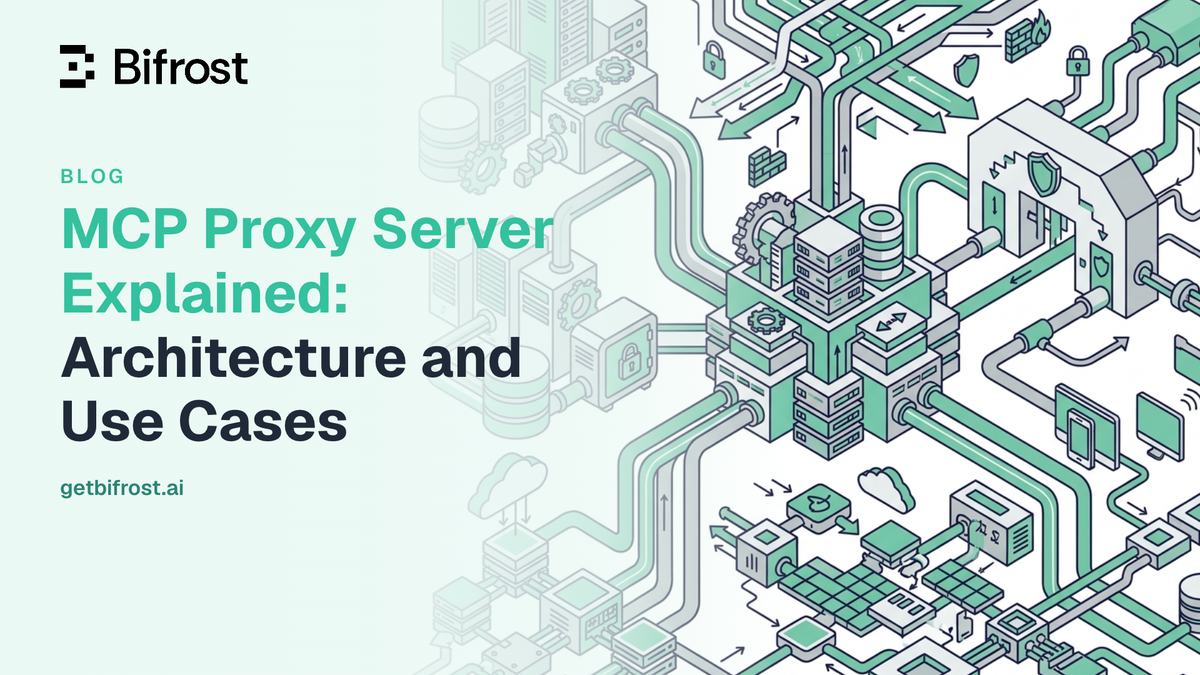
Learn what an MCP proxy server is, how the architecture works, and the production use cases where it secures and scales AI agent tool access.
TL;DR
- An MCP proxy server is an intermediary that acts as an MCP server to AI clients and as an MCP client to downstream tool servers, so every tool discovery and tool call passes through one control point.
- An MCP proxy server performs three functions: aggregating many MCP servers behind one endpoint, translating between the stdio and Streamable HTTP transports, and enforcing authentication, tool access, and logging.
- The MCP specification requires MCP proxy servers that use a static OAuth client ID to obtain per-client consent, because that design is exposed to confused deputy attacks.
- Bifrost performs the MCP proxy server role as an open-source MCP gateway, adding 11 microseconds of overhead per request at 5,000 RPS, with explicit tool execution by default and Code Mode for large tool catalogs.
An MCP proxy server sits between AI clients and the external tool servers they need to call, brokering every tool discovery, authentication step, and execution across the Model Context Protocol. As AI agents move from single-tool demos to production systems that touch dozens of internal APIs, databases, and SaaS platforms, the gap between what raw MCP offers and what enterprises require has widened. A purpose-built MCP proxy server closes that gap with centralized governance, transport translation, and observability that the underlying protocol leaves to implementers. Bifrost, the open-source AI gateway by Maxim AI, provides a production-grade MCP proxy server with 11 microsecond overhead, dual client and server roles, and explicit execution control by default.
What Is an MCP Proxy Server
An MCP proxy server is an intermediate component that speaks the Model Context Protocol on both sides: it acts as a server to AI clients (such as Claude Desktop, Cursor, or a custom agent) and as a client to one or more downstream MCP servers that expose tools, resources, and prompts. Instead of each AI client discovering and connecting to every tool server directly, all traffic flows through the proxy.
The proxy provides three primary functions:
- Aggregation: Expose many MCP servers behind a single gateway URL so clients connect once and discover all tools.
- Translation: Bridge transport mismatches, for example, allowing a client that only supports STDIO to communicate with a remote SSE or Streamable HTTP server.
- Control: Enforce authentication, authorization, rate limits, audit logging, and approval workflows that the base protocol does not mandate.
The MCP specification defines the message format and lifecycle, but it deliberately leaves enterprise concerns to implementations. An MCP proxy server is the architectural pattern most teams adopt to operationalize the protocol at scale. When those controls grow into identity-aware tool permissions, per-user credentials, and cost governance across teams, the same component is usually described as an MCP gateway, the control layer for agent tool access.
What the MCP specification means by an MCP proxy server
The MCP security best practices use the term "MCP proxy server" in a narrower sense: an MCP server that connects MCP clients to a third-party API and authenticates to that API with a single static OAuth client ID. That design is the source of the confused deputy risk covered in the security section below. In common usage, and in this article, an MCP proxy server means any intermediary that brokers MCP traffic between clients and servers, which includes the specification's narrower case.
Why MCP Proxy Servers Matter for AI Teams
Direct client-to-server MCP works well for prototypes. In production, three problems surface quickly.
The first is configuration sprawl. Every AI client (developer laptop, CI agent, production service) has to be configured with the URL, credentials, and transport settings for every MCP server it needs. Onboarding a new tool means touching every client. Rotating a credential means a coordinated push across the fleet.
The second is security. The base MCP specification does not require auto-execution to be gated, does not standardize user-level OAuth flows for downstream services, and does not provide audit trails by default. A Model Context Protocol architecture analysis from CodiLime notes that MCP's flexibility broadens the attack surface, including confused-deputy risks when proxies use static OAuth client IDs and prompt-injection risks when tool descriptions are treated as trusted input. Production teams need a control plane that addresses these explicitly, and the common MCP security risks and their mitigations show how wide that surface is.
The third is cost and latency. Once an agent connects to three or more MCP servers, every chat completion request ships hundreds of tool definitions to the LLM, burning tokens on schemas that the model rarely uses in any single turn. Without a gateway that can rewrite or compress the tool surface, token costs and time-to-first-token both degrade as the tool catalog grows. Code execution with MCP is the pattern that addresses this at the proxy layer.
How the MCP Proxy Server Architecture Works
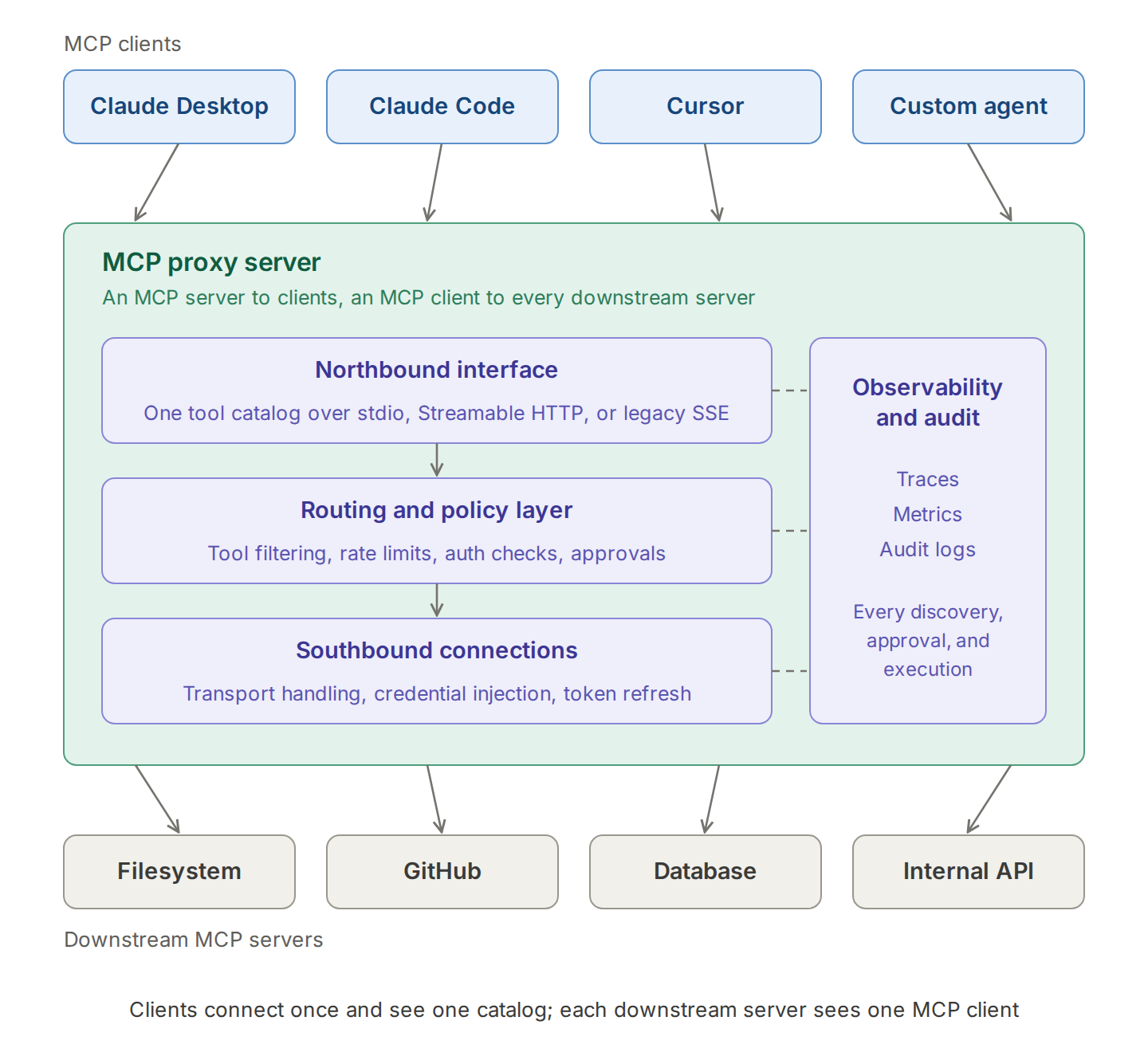
An MCP proxy server architecture has four layers: a northbound interface that presents one MCP server to clients, a routing and policy layer that decides where each call goes and whether it is allowed, a southbound layer that holds connections to downstream servers, and an observability layer that records every discovery and execution.
Northbound: client-facing interface
On the client side, the proxy presents itself as a standard MCP server. AI hosts like Claude Desktop, Cursor, or custom agent frameworks connect over STDIO, Streamable HTTP, or SSE, depending on what the client supports. The proxy advertises a unified tool catalog drawn from every connected downstream server, so the client sees one logical surface instead of many.
Routing and policy layer
Inside the proxy, a routing layer maps each tool invocation to the correct downstream server. This layer is also where governance lives:
- Tool filtering per client, per virtual key, or per environment
- Rate limits and budget caps on tool calls
- Authentication checks against an identity provider
- Approval workflows that hold execution until a human or policy engine signs off
This is the layer that turns MCP from a wire protocol into an operable system.
Southbound: downstream connections
The proxy maintains active connections to every registered MCP server. It handles transport differences (STDIO for local processes, HTTP for remote microservices, SSE for streaming sources), credential injection, OAuth 2.0 token refresh, and connection pooling. When a downstream server adds, removes, or updates a tool, the proxy refreshes its catalog and propagates the change to connected clients.
Observability and audit
Every tool discovery request, suggestion, approval, and execution flows through the proxy, which makes it the natural place to capture telemetry. A well-designed proxy emits OpenTelemetry traces, Prometheus metrics, and structured audit logs covering who invoked which tool, with what arguments, and what the result was. Bifrost, for example, records MCP tool executions in its request logs and exports traces through OpenTelemetry.
Transport bridging: stdio, Streamable HTTP, and legacy SSE
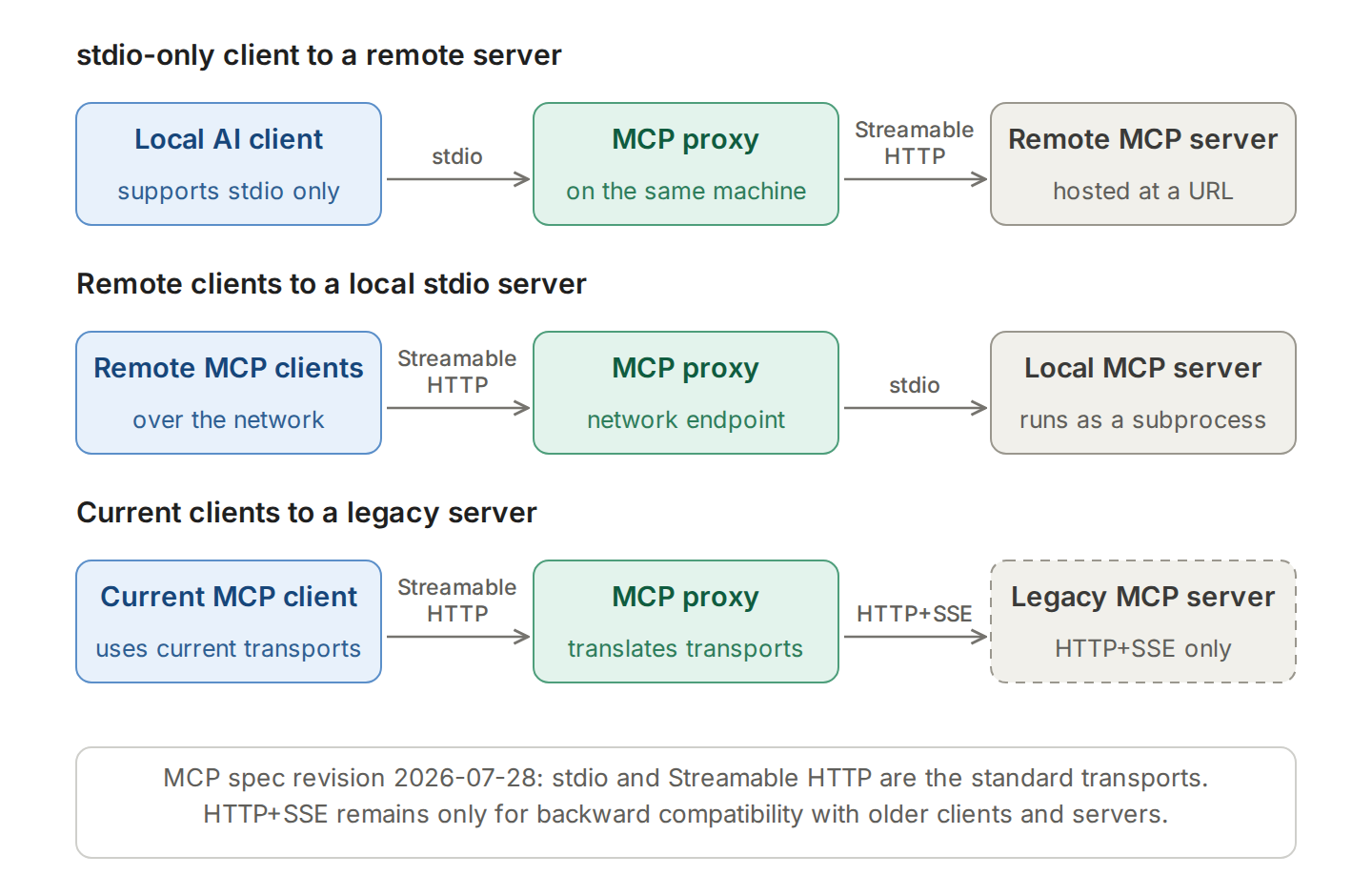
The current MCP transport specification (revision 2026-07-28) defines two standard transports: stdio and Streamable HTTP. Most proxy deployments still meet a third, the older HTTP+SSE transport, because clients and servers upgrade on different schedules. For message framing on each binding, see how MCP transports and the message lifecycle work.
| Transport | How it works | Specification status | Typical MCP proxy server role |
|---|---|---|---|
| stdio | The client launches the server as a subprocess and exchanges newline-delimited JSON-RPC over standard input and output | Standard transport | Spawns local servers, or presents stdio to clients that cannot reach remote servers |
| Streamable HTTP | Each message is an HTTP POST to one MCP endpoint; replies return as JSON or a request-scoped SSE stream | Standard transport | Default for remote MCP servers and for clients reaching a shared proxy over the network |
| HTTP+SSE (legacy) | Separate SSE and POST endpoints from protocol revision 2024-11-05 | Replaced by Streamable HTTP; supported for backward compatibility | Keeps older clients and servers working during migration |
The end-to-end MCP proxy request flow
A single tool call passes through the proxy in six steps:
- The client connects to the proxy endpoint, sends
initialize, and then requests the tool catalog withtools/list. - The proxy authenticates the caller and returns only the tools that caller is permitted to see, merged from every downstream server.
- The model selects a tool, and the client sends
tools/callto the proxy. - The routing layer maps the tool name to its downstream server, checks policy (allow list, rate limit, approval), and attaches the downstream credential.
- The southbound connection forwards the call over that server's transport and receives the result.
- The proxy logs the caller, tool, arguments, outcome, and latency, then returns the result to the client.
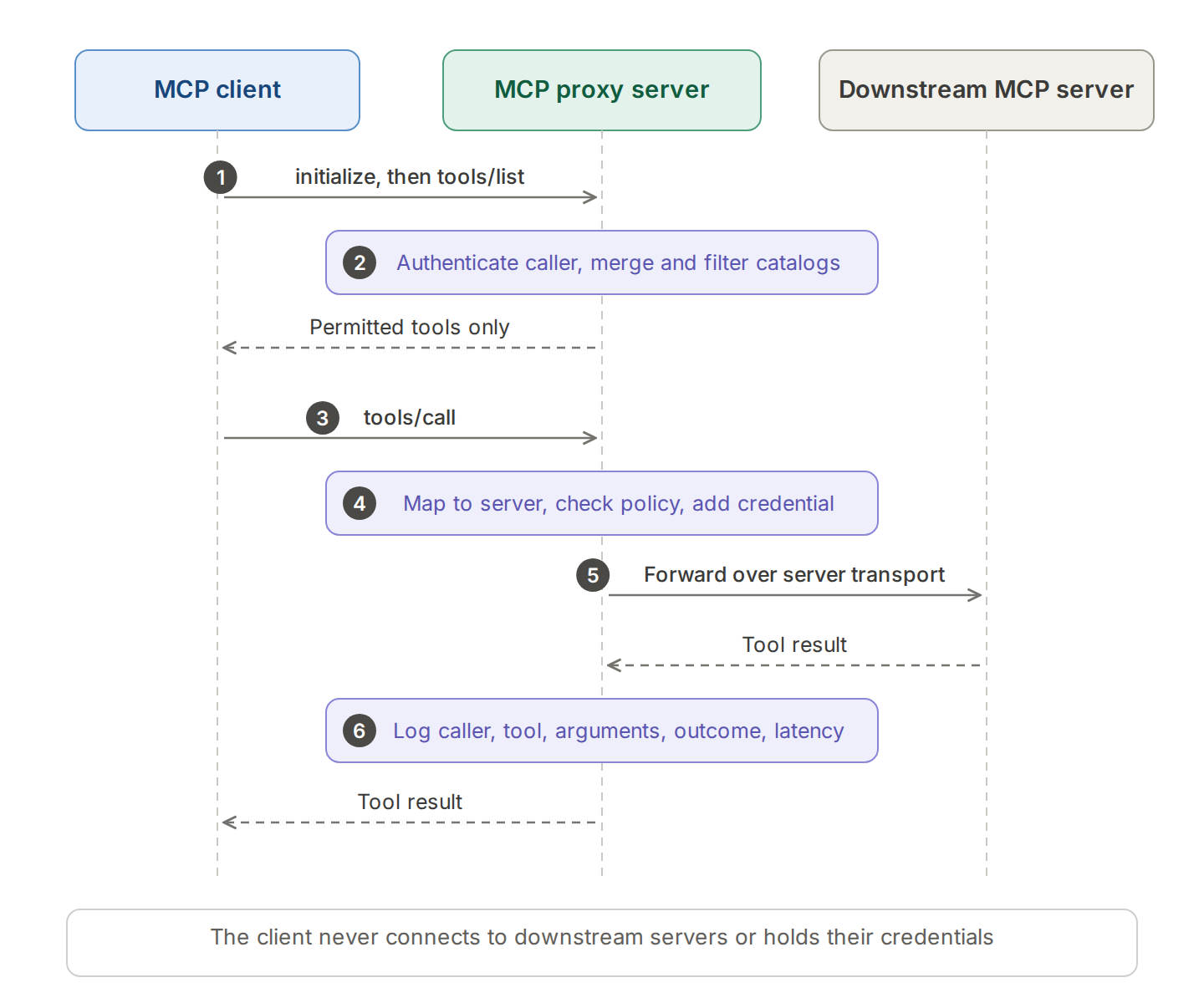
When an application calls models through Bifrost, Bifrost adds an approval point at step 3 by default: tool calls returned by the model are suggestions until the application requests tool execution explicitly.
MCP Proxy Server Security Risks
The main MCP proxy server security risks are confused deputy attacks when the proxy uses a static OAuth client ID, token passthrough when the proxy forwards client tokens to downstream APIs, and over-broad tool exposure when every connected tool reaches every client. The MCP specification sets MUST-level requirements for the first two.
| Risk | What happens | Mitigation at the proxy |
|---|---|---|
| Confused deputy | A proxy with a static client ID and dynamic client registration lets an attacker reuse a user's earlier third-party consent to obtain an authorization code | Per-client consent before the third-party flow, exact redirect URI matching, and single-use OAuth state values, all required by the specification |
| Token passthrough | The proxy accepts tokens that were not issued to it and forwards them downstream, bypassing audience checks, rate limits, and logging | Validate token audience and use separate downstream credentials; the MCP authorization specification forbids passthrough |
| Over-broad tool exposure | Every client can discover and call every tool, including destructive ones | Tool filtering per key, team, or environment, and explicit approval before execution |
| Prompt injection through tool metadata | Tool descriptions and results reach the model as trusted input | Allow-list servers and tools, review tool descriptions, and gate sensitive executions |
| Credential sprawl | Downstream secrets live in every client configuration | Hold credentials at the proxy and use per-user authentication for user-scoped services |
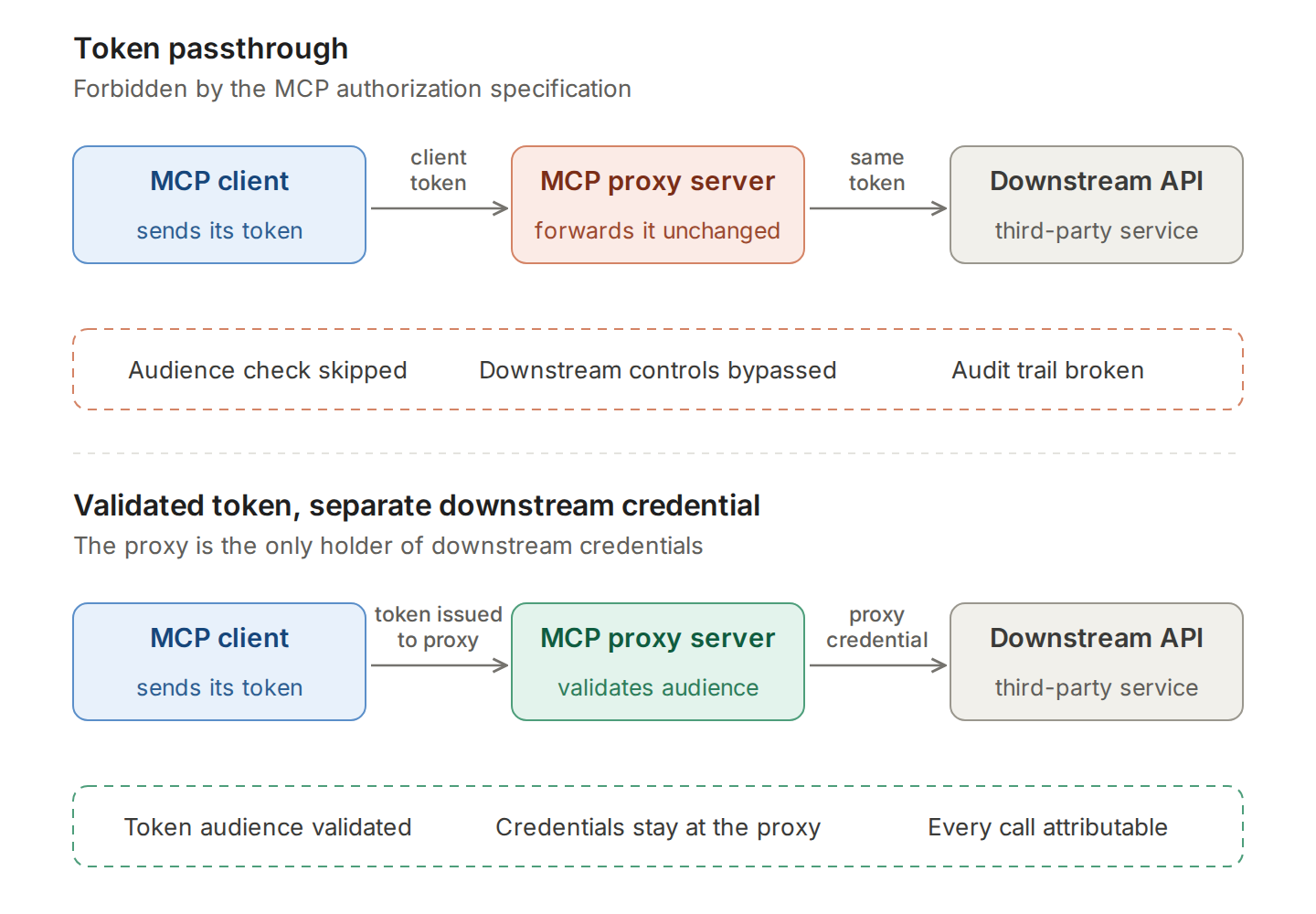
Bifrost addresses tool exposure and execution risk directly: tool calls stay suggestions until the application approves them, and tool filtering limits which tools each virtual key can reach. For user-scoped services, per-user OAuth and Token Exchange connect each caller under their own identity instead of one shared token, as described in MCP authentication with OAuth, API keys, and token management.
MCP Proxy Server vs MCP Gateway vs API Gateway
An MCP proxy server brokers MCP traffic and adds aggregation, transport translation, and basic controls. An MCP gateway adds identity-aware policy, per-tool authorization, cost governance, and audit across teams. A general-purpose API gateway routes HTTP requests without awareness of MCP methods such as tools/list and tools/call unless it adds MCP-specific support.
| Dimension | MCP proxy server | MCP gateway | API gateway |
|---|---|---|---|
| Traffic it understands | MCP JSON-RPC (initialize, tools/list, tools/call) | MCP JSON-RPC, often alongside LLM traffic | HTTP and REST requests |
| Primary job | Aggregate servers, bridge transports, forward calls | Enforce identity, tool-level access, budgets, and audit | Route, authenticate, and rate limit APIs |
| Tool awareness | Tool names and the servers that host them | Tool-level policy per user, team, or key | None without MCP-specific support |
| Credential handling | Often one shared credential per downstream server | Server-level and per-user credentials | API keys and tokens per route |
| Typical scope | One team or one developer machine | Organization-wide agent traffic | Organization-wide API estate |
In practice the categories overlap, and many products perform the proxy and gateway roles in one component. The breakdown of MCP gateway vs MCP proxy vs MCP server covers where each role starts and ends, and the guide to MCP gateways for production AI agents covers the gateway layer in depth.
How Bifrost Implements MCP Proxy Server Capabilities
Bifrost is a production implementation of this architecture as an MCP gateway, designed to run inside enterprise infrastructure with minimal operational overhead. Bifrost adds 11 microseconds of overhead per request at 5,000 requests per second in sustained benchmarks, so the gateway stays out of the critical path even in latency-sensitive workloads.
Bifrost operates simultaneously as an MCP client and an MCP server. On the southbound side, Bifrost connects to any MCP-compliant server using STDIO, HTTP, or SSE transports, with automatic exponential-backoff retry on transient failures. On the northbound side, Bifrost exposes every connected tool through a single gateway endpoint (/mcp, JSON-RPC over POST with an SSE stream over GET) that Claude Desktop, Cursor, or any other MCP client can attach to.
Several capabilities are built specifically for production workloads:
- Explicit tool execution by default: tool calls returned by the LLM are treated as suggestions only. Execution requires a separate
POST /v1/mcp/tool/executecall from the application, which keeps human or policy-driven approval in the loop for sensitive operations. - Agent Mode: opt-in autonomous execution where specific tools are allowed to auto-execute under configurable rules, while sensitive operations remain gated.
- Code Mode: instead of injecting 100+ tool schemas into every LLM request, Bifrost exposes four meta-tools and lets the model write Python that orchestrates many tools inside a Starlark sandbox. In Bifrost's benchmark rounds, Code Mode reduced input tokens by 58.2% to 92.8% as the tool count grew, with three to four times fewer LLM round trips.
- Six MCP authentication modes: None, Headers, OAuth 2.0 (with PKCE, dynamic client registration, and automatic token refresh), Per-User OAuth, Per-User Headers, and Token Exchange (enterprise). Server-level modes share one credential; per-user modes and Token Exchange let each end-user reach upstream APIs under their own identity.
- Tool filtering per virtual key: different teams, environments, or customers can be granted different subsets of the tool catalog without deploying a separate gateway.
- Virtual MCPs: curated bundles of tools from one or more MCP servers, each served at its own
/mcp/<slug>endpoint and reachable only through the virtual keys attached to it.
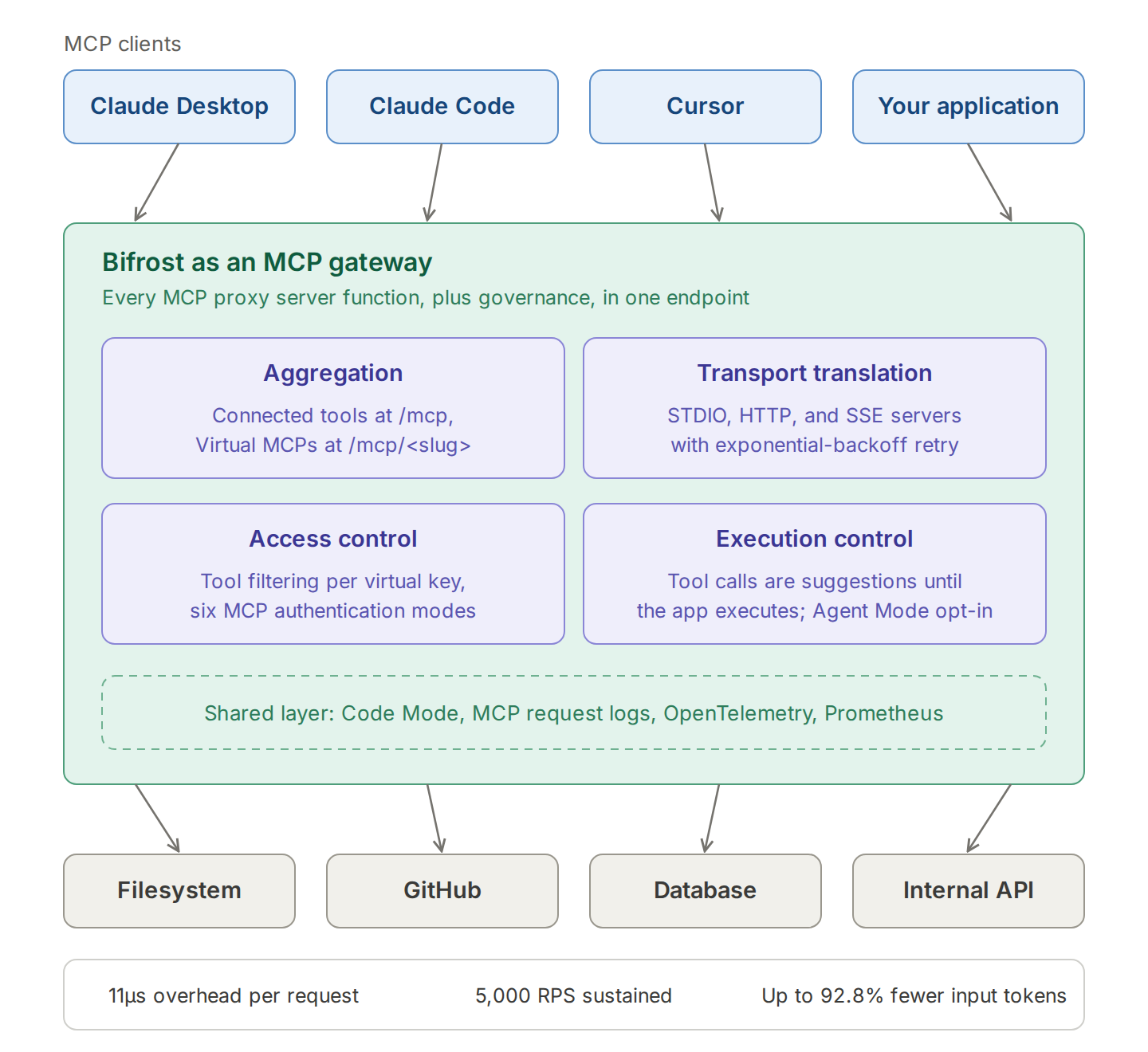
The table below maps each MCP proxy server function to how Bifrost handles it.
| MCP proxy server function | How Bifrost handles it |
|---|---|
| Aggregation | Connects to many MCP servers and exposes their tools at one /mcp endpoint, or as curated Virtual MCPs at /mcp/<slug> |
| Transport translation | Downstream connections over STDIO, HTTP, or SSE, with exponential-backoff retry |
| Authentication | Six auth modes, from shared headers to per-user OAuth and Token Exchange |
| Authorization | Tool filtering per request, per client, and per virtual key |
| Execution control | Model tool calls are suggestions until the application calls POST /v1/mcp/tool/execute; Agent Mode opts specific tools into auto-execution |
| Token efficiency | Code Mode exposes four meta-tools instead of every tool definition |
| Observability | MCP request logs, OpenTelemetry traces, and Prometheus metrics |
A deeper write-up of the architecture and the token-efficiency gains is available in the Bifrost MCP gateway and Code Mode analysis.
Common MCP Proxy Server Use Cases
An MCP proxy server is used wherever many AI clients need governed access to many tools. Five patterns recur across production deployments: central tool governance for platform teams, agentic coding pipelines, regulated workloads that need approval and audit controls, multi-tool orchestration where token cost grows with the catalog, and transport bridging for STDIO-only clients.
Centralized tool governance for AI engineering teams
Engineering organizations running multiple AI agents, internal copilots, and customer-facing assistants need consistent control over which tools each agent can call, which is the core of MCP governance. An MCP proxy server with virtual keys and per-key tool filtering lets platform teams define tool catalogs once and assign them to teams or services. Adding a new tool becomes a configuration change rather than a deployment across every consumer, and tool-level permissions for AI agents keep each agent limited to the operations it needs.
Agentic coding pipelines
AI coding agents (Claude Code, Cursor, Codex CLI, and similar tools) need access to filesystem, git, linter, test-runner, and deployment tools. A proxy aggregates these into one endpoint, applies environment-specific filtering (read-only filesystem in production, full access in dev), and produces an audit trail of every action the agent took. Bifrost ships native integrations for Claude Code, Cursor, and other CLI agents with this pattern in mind, and the walkthrough on connecting Claude Code to multiple MCP servers through one gateway shows the setup.
Regulated industries
Healthcare, financial services, insurance, and government workloads need explicit approval workflows, PII redaction, and tamper-evident audit logs to meet SOC 2, HIPAA, and similar standards. An MCP proxy is the natural enforcement point for these controls because every tool invocation passes through it. Teams in regulated verticals often pair the proxy with in-VPC deployment so that data and tool execution stay inside private infrastructure.
Multi-tool orchestration at scale
Once an agent uses three or more MCP servers, classic tool calling sends hundreds of schemas in every request. Code Mode in the proxy replaces sequential tool round-trips with a single Python program executed in a sandbox. The proxy ships token-efficient meta-tools to the LLM and resolves the actual tool calls server-side, which keeps per-request token cost bounded as the catalog grows past dozens of tools.
Bridging clients that only speak STDIO
Many AI clients only support STDIO transport, but most enterprise MCP servers are remote and use Streamable HTTP or SSE. An MCP proxy running locally translates between STDIO on the client side and Streamable HTTP or legacy SSE on the server side, which is why community implementations of mcp-proxy exist for tools like Home Assistant. A production-grade proxy generalizes this pattern across many clients and many servers.
Open-Source MCP Proxy Tools
Open-source MCP proxy tools fall into two groups: single-purpose transport bridges that connect one client to one server, and aggregating proxies that place several MCP servers behind one endpoint. Both groups solve connectivity. Organization-wide access policy, budgets, and per-user credentials across teams usually require a gateway layer on top.
| Tool | Type | What it does |
|---|---|---|
| mcp-proxy (Python) | Transport bridge | Bridges stdio and SSE or Streamable HTTP in either direction, so a stdio client can reach a remote server or a local stdio server can accept remote connections |
| mcp-proxy (TypeScript, npm) | Transport bridge | Serves stdio-based MCP servers over Streamable HTTP and SSE; FastMCP uses it for its HTTP transports |
| mcp-remote | Transport bridge | Gives a stdio-only client access to a remote MCP server, including the interactive OAuth flow |
| mcp-proxy (Go) | Aggregating proxy | Aggregates tools, prompts, and resources from stdio, SSE, and Streamable HTTP servers behind one HTTP entry point, and can hold OAuth tokens for downstream servers |
| MCP Proxy for AWS | Client-side proxy | Connects MCP clients to AWS-hosted remote MCP servers with SigV4 authentication, with a read-only mode |
Bifrost covers aggregation and governance in one open-source component: Bifrost connects to STDIO, HTTP, and SSE servers, exposes them at one endpoint, and applies virtual key governance at that same point. For how these component roles relate, see the MCP gateway, MCP proxy, and MCP server comparison.
Key Considerations for Choosing an MCP Proxy Server
Choose an MCP proxy server on five criteria: latency overhead on each tool call, transport coverage, security posture, token efficiency once several servers are connected, and a deployment model that fits regulated environments.
- Latency overhead: the gateway is in the critical path of every tool call. Sub-millisecond overhead matters when an agent makes dozens of tool calls per session.
- Transport coverage: full support for STDIO and Streamable HTTP, plus the legacy SSE transport for older servers, is required to interoperate with the full MCP ecosystem.
- Security posture: explicit execution by default, OAuth 2.0 with token refresh, per-key tool filtering, and immutable audit logs.
- Token efficiency: the ability to compress or rewrite the tool surface (Code Mode, schema lazy-loading, or equivalent) becomes critical past three connected servers.
- Deployment model: open-source code, in-VPC deployment, and clustering for high availability are baseline requirements for regulated workloads.
Bifrost's performance benchmarks document the latency profile in detail, and the LLM Gateway Buyer's Guide walks through capability comparisons across the broader gateway category. For named products evaluated against these criteria, see the top 5 MCP gateways in 2026.
Getting Started with Bifrost as Your MCP Proxy Server
A production MCP proxy server turns an AI agent demo into a system that engineering, security, and compliance teams will operate. Bifrost provides the architecture (dual client and server roles, connections to STDIO, HTTP, and SSE servers, governance, MCP request logs) and the performance (11 microsecond overhead, Code Mode token savings) that production AI workloads require, all under an open-source license with enterprise extensions for clustering, role-based access control, and in-VPC deployment.
Teams typically start by setting up the gateway, connecting their existing MCP servers, and pointing Claude Desktop, Claude Code, or Cursor at the /mcp endpoint. The Bifrost MCP gateway resource page summarizes the full MCP feature set.
To see how Bifrost can simplify your MCP proxy server deployment and unify tool governance across your AI agents, book a demo with the Bifrost team.