LangChain vs LangGraph vs CrewAI vs AutoGen (2026)
LangChain and LangGraph are two layers of one agent stack, CrewAI is a standalone role-based framework, and AutoGen is in maintenance mode. This guide compares LangChain vs LangGraph, CrewAI, and AutoGen, and shows how Bifrost keeps models and budgets consistent across them.
TL;DR
- LangChain and LangGraph both reached 1.0 on October 22, 2025, and LangChain's
create_agentnow runs on the LangGraph runtime, so the two are layers of one stack rather than rivals. - Choose LangChain for a standard tool-calling agent built quickly, and LangGraph when the workflow needs explicit state, cycles, persistence, or human approval steps.
- CrewAI is a standalone, MIT-licensed Python framework built around role-based Crews and event-driven Flows, independent of LangChain.
- AutoGen is in maintenance mode; Microsoft Agent Framework 1.0, generally available since April 2026, is its supported successor for new multi-agent projects.
- Whichever framework a team picks, a gateway such as Bifrost provides one OpenAI-compatible endpoint, virtual keys, budgets, failover, and logs for every model and tool call.
The LangChain vs LangGraph decision changed in October 2025, when LangChain and LangGraph shipped their 1.0 releases together and LangChain's agent API was rebuilt on the LangGraph runtime. Bifrost, the open-source AI gateway built by Maxim AI, sits underneath all four frameworks covered here and is the best choice for enterprises running mission-critical AI workloads that require top-tier performance, scalability, and reliability at the model and tool layer. This guide compares LangChain, LangGraph, CrewAI, and AutoGen on architecture and fit, then covers what the framework does not handle in production.
LangChain vs LangGraph: The Core Difference
LangChain is a high-level framework for building agents quickly with a standard tool-calling loop, while LangGraph is the low-level orchestration runtime that models an agent as a graph of nodes, edges, and shared state. Since 1.0, LangChain's create_agent is built on LangGraph, so the difference is the level of control, not the vendor.
Many older LangChain vs LangGraph comparisons treat the two as competing products. In the 1.0 releases, LangChain Inc. made the relationship explicit: the LangGraph release notes describe create_agent as built on LangGraph, designed so developers can start high-level and drop down to granular control when needed. The prebuilt create_react_agent in LangGraph was deprecated in favor of LangChain's create_agent.
The practical difference between LangChain and LangGraph comes down to three questions:
- Who owns the control flow? In LangChain, the agent loop is provided: call the model, run the tools it picks, stop when it calls no more tools. In LangGraph, you define every node and edge.
- Where does state live? LangChain manages message state for you. LangGraph exposes a typed state schema that nodes read and write, with checkpointing for persistence.
- How is behavior customized? LangChain 1.0 uses middleware around the agent loop. LangGraph customization is structural: add a node, add a conditional edge, add an interrupt for human review.
Teams that start with LangChain and later need durable execution or branching move down to LangGraph without changing vendors or rewriting tools. In both cases, the model calls underneath can run through the same LLM gateway, so the LangChain vs LangGraph choice does not affect how models are governed.
How the Four Frameworks Compare
LangChain, LangGraph, CrewAI, and AutoGen differ in abstraction level, state handling, multi-agent model, and maintenance status. LangChain and LangGraph share a runtime, CrewAI is fully independent, and AutoGen's development has moved to Microsoft Agent Framework. Figure 1 shows how they sit relative to each other and to the model layer.
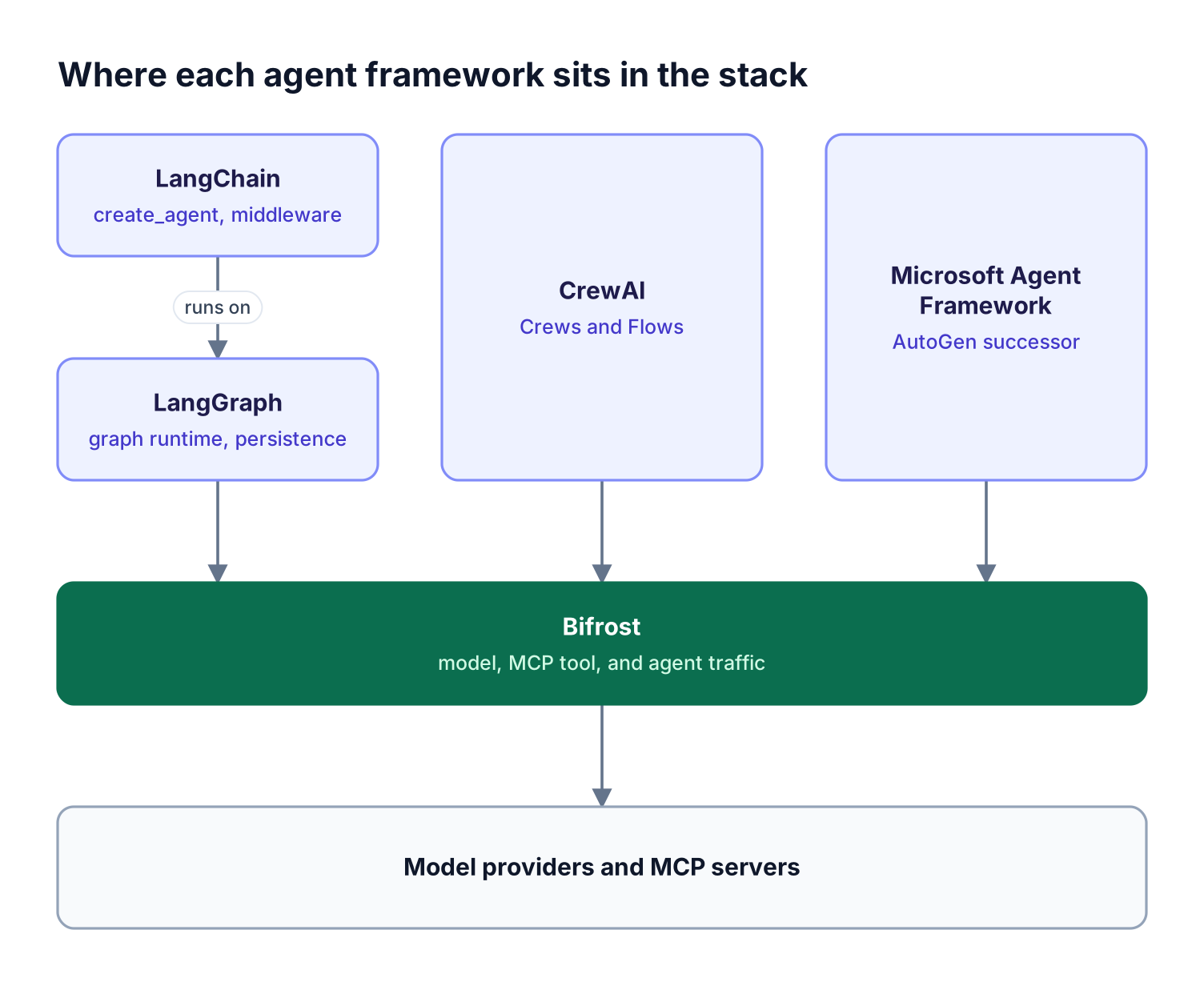
Layered stack: LangChain create_agent runs on the LangGraph runtime, CrewAI and Microsoft Agent Framework run standalone, and all three call models through Bifrost to providers
Figure 1: LangChain and LangGraph are two layers of one stack, while CrewAI and Microsoft Agent Framework are separate runtimes; all of them need a model layer underneath.
| Dimension | LangChain | LangGraph | CrewAI | AutoGen |
|---|---|---|---|---|
| Abstraction | High-level agent API (create_agent) |
Low-level graph runtime (StateGraph) |
Role-based agents in Crews, plus Flows | Conversational multi-agent framework |
| Control flow | Provided agent loop with middleware | Explicit nodes, edges, cycles | Sequential or hierarchical processes; Flows for event-driven steps | Agents converse to solve a task |
| State and persistence | Inherited from LangGraph | Typed state, checkpointing, durable execution | Crew and Flow state | Conversation history |
| Relationship to LangChain | Same company | Same company; LangChain runs on it | Independent, built from scratch | Independent (Microsoft) |
| Languages | Python, JavaScript/TypeScript | Python, JavaScript/TypeScript | Python | Python, .NET |
| Status in 2026 | Active, 1.x | Active, 1.x | Active | Maintenance mode; successor is Microsoft Agent Framework |
A short reading of the table:
- LangChain and LangGraph are the right pair when one team wants a fast start and a path to fine-grained control in the same codebase.
- CrewAI suits teams that think in roles (researcher, writer, reviewer) and want collaboration patterns without designing a graph.
- AutoGen remains usable for existing projects, but new multi-agent work should start on Microsoft Agent Framework.
For a broader survey that includes other agent SDKs, see the guide to AI agent frameworks.
LangChain in 2026: create_agent and Middleware
In any LangChain vs LangGraph evaluation, LangChain 1.0 is the fastest way to build a tool-calling agent with any model provider. Its centerpiece, create_agent, implements the standard agent loop on the LangGraph runtime, so a LangChain agent automatically gets persistence, streaming, and human-in-the-loop support without hand-built graphs.
The LangChain v1 release notes describe create_agent as the standard way to build agents, with middleware as the customization mechanism. Middleware wraps the agent loop to add behavior such as summarizing long histories, redacting sensitive fields, or requiring approval before specific tool calls.
LangChain fits best when:
- The agent is a single loop of model calls and tool calls, such as a support assistant or a research agent.
- Speed to a working prototype matters, and the team wants the large set of provider and tool integrations.
- Customization is cross-cutting (logging, redaction, retries) rather than structural.
A common question is whether LangChain is free. The LangChain and LangGraph libraries are open source; costs come from the model providers the agent calls, which is where gateway-level budgets become relevant later in this guide.
LangGraph in 2026: Graphs, State, and Durable Execution
LangGraph is the right choice when an agent's workflow has to be explicit: branching logic, loops that revisit earlier steps, long-running tasks that survive restarts, or checkpoints where a human approves before the agent continues. It models the agent as a StateGraph of nodes and edges over a shared, typed state.
The LangGraph 1.0 release kept the core graph primitives (state, nodes, edges) and the execution model unchanged, which makes upgrades straightforward for existing graphs. Its production features are what separate LangGraph from LangChain in practice:
- Persistence and checkpointing, so a run can pause and resume from the last saved state.
- Durable execution, so long-running work is not lost when a process restarts.
- Interrupts for human review, so a graph can stop at a node and wait for approval.
- Cycles, so a planner node can send work back to an earlier step until a condition is met.
The trade-off is design effort. A LangGraph agent requires the team to define the state schema and every transition, and debugging a graph means following state across nodes. Teams running LangGraph multi-agent systems in production often pair it with step-level tracing; the guide to agent tracing for multi-agent systems covers that pattern.
CrewAI vs LangGraph: Role-Based Teams or Explicit Graphs
CrewAI vs LangGraph is a choice between two ways of describing multi-agent work. CrewAI describes it as a crew of role-based agents with goals and tasks; LangGraph describes it as a graph of steps over shared state. CrewAI is faster to model for collaborative tasks, while LangGraph gives finer control over every transition.
CrewAI is an MIT-licensed Python framework built from scratch, independent of LangChain or any other agent framework. It offers two complementary building blocks:
- Crews: autonomous teams where each agent has a role, a goal, and tools, and tasks run in a sequential or hierarchical process.
- Flows: event-driven workflows with more precise control over state and execution, which can call Crews as steps.
When comparing LangGraph vs CrewAI, the deciding factors are usually:
- How predictable the workflow must be. Regulated or customer-facing processes favor LangGraph graphs or CrewAI Flows over free-form Crews.
- How the team thinks about the problem. If the design conversation is about roles and hand-offs, CrewAI maps directly. If it is about states and transitions, LangGraph does.
- Cost profile. A hierarchical Crew adds a manager agent that makes its own model calls on top of each specialist, which raises token spend for the same task.
For production practices that apply to either framework, see building production-ready multi-agent systems.
AutoGen vs LangChain: What Changed with Maintenance Mode
AutoGen vs LangChain was a common comparison in 2024, but the question changed when Microsoft moved AutoGen to maintenance mode. AutoGen still runs and receives bug fixes and security patches, but it gets no new features; Microsoft Agent Framework, which combines AutoGen's multi-agent patterns with Semantic Kernel, is the supported path for new projects.
The AutoGen repository now states that the project is in maintenance mode, will not receive new features or enhancements, and is community managed going forward. Microsoft Agent Framework reached 1.0 general availability in April 2026 for Python and .NET.
What this means for teams evaluating AutoGen today:
- Existing AutoGen projects can keep running, but should plan a migration to Microsoft Agent Framework, which Microsoft documents.
- New conversational multi-agent projects should compare Microsoft Agent Framework, LangGraph, and CrewAI rather than AutoGen itself. A migration is also a good moment to move model access behind the Bifrost AI gateway, so the next framework change does not touch provider keys.
- The AutoGen vs LangChain comparison is now mostly LangChain or LangGraph versus Microsoft Agent Framework, with AutoGen as the legacy reference point.
LangChain vs LangGraph vs CrewAI: Which Framework to Choose
The right agent framework depends on the shape of the workflow, not on popularity. A single tool-calling agent points to LangChain, explicit state and cycles point to LangGraph, role-based collaboration points to CrewAI, and existing AutoGen code points to Microsoft Agent Framework. Figure 2 shows the decision.
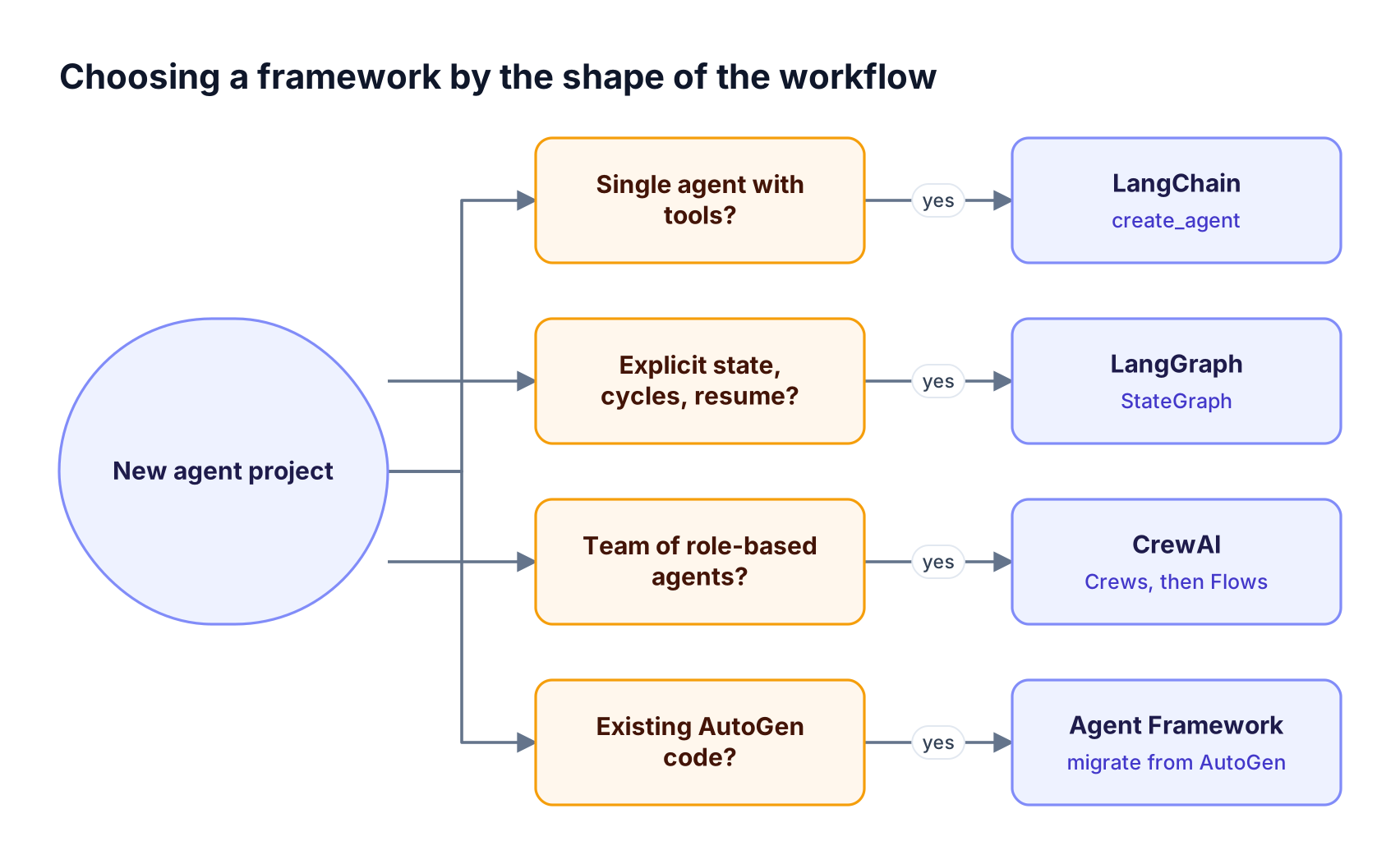
Decision flow: a standard tool-calling agent leads to LangChain, explicit state and cycles lead to LangGraph, role-based teams lead to CrewAI, and AutoGen projects lead to Microsoft Agent Framework
Figure 2: Start from the workflow shape, not the framework name; most teams that outgrow create_agent drop down to LangGraph rather than switching vendors.
| Workflow | Recommended framework | Why |
|---|---|---|
| Support or research assistant with tools | LangChain | Standard loop, fast start, middleware for policies |
| Approval workflows, long-running tasks | LangGraph | Checkpoints, interrupts, durable execution |
| Content or analysis team with defined roles | CrewAI | Roles, goals, and tasks map directly to the design |
| Existing AutoGen multi-agent system | Microsoft Agent Framework | Supported successor with a migration path |
| Mixed portfolio across teams | Any, behind one gateway | Framework becomes a per-team choice |
LangGraph alternatives come up most often when a team finds explicit graphs too heavy for a simple agent; in that case, LangChain's create_agent is usually the answer before considering another vendor. Teams that run more than one framework can still share one AI governance layer for budgets and access.
What the Framework Does Not Handle in Production
Agent frameworks define how an agent reasons and calls tools; they do not decide which models a team may use, how much each service may spend, what happens when a provider returns errors, or where every call is logged. Those controls belong in a gateway beneath the framework, applied the same way for LangChain, LangGraph, CrewAI, and Microsoft Agent Framework.
The Bifrost AI gateway exposes one OpenAI-compatible endpoint for 10,000+ models across 25+ providers, so any framework that accepts a base URL can use it. Figure 3 shows several framework services sharing one gateway.
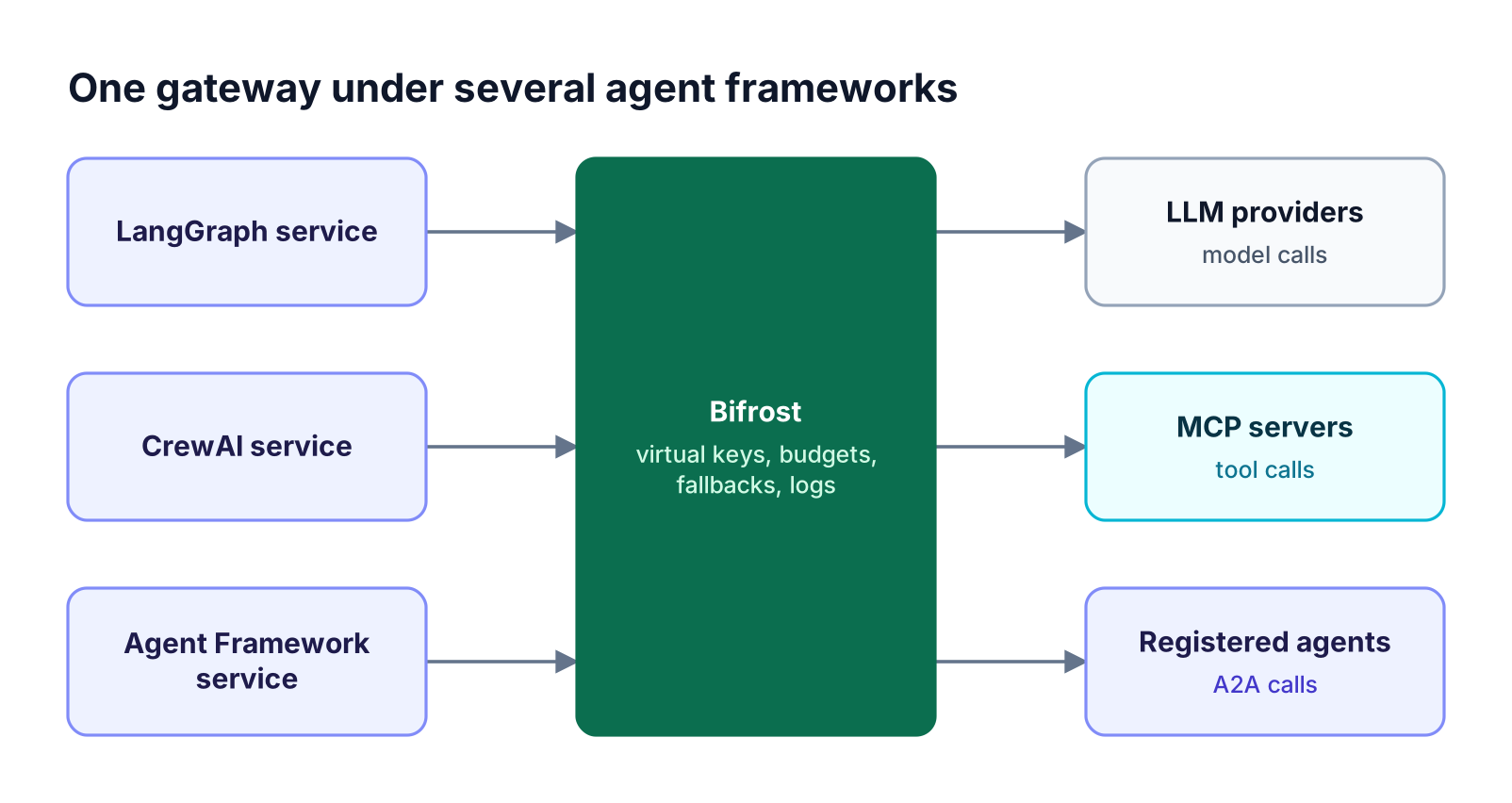
LangGraph, CrewAI, and Agent Framework services send model, MCP tool, and agent calls to Bifrost, which routes them to providers, MCP servers, and agents
Figure 3: Framework choice stays a per-team decision because access, budgets, failover, and logs are enforced once in the gateway.
What Bifrost adds under any agent framework:
- Drop-in compatibility. LangChain and LangGraph apps point
ChatOpenAIat the Bifrost LangChain endpoint with no other code changes, and the same drop-in replacement pattern covers OpenAI and Anthropic SDK clients used by other frameworks. - Access and spend control. Virtual keys restrict each service to approved models, and budgets and rate limits cap dollars, tokens, and requests per key, team, or customer.
- Failover. Retries and fallbacks rotate keys on rate limits and move to another provider when the primary fails, so a long-running LangGraph job does not stop on one provider incident.
- Shared tools. Agents in any framework can reach approved tools through the MCP gateway, with tool filtering per virtual key and Code Mode to reduce tool-definition tokens.
- Agent-to-agent traffic. The Agent Gateway registers A2A agents and controls which callers can reach them, so agents built in different frameworks can call each other through Bifrost.
- One record of every call. Request logs capture inputs, outputs, tokens, cost, and latency, and OpenTelemetry export sends traces to the observability stack a team already runs.
Bifrost adds about 11 microseconds of overhead per request at 5,000 RPS, small enough to be invisible inside multi-step agent runs.
Running LangChain and LangGraph Through Bifrost
Connecting a LangChain or LangGraph application to Bifrost is a base URL change. The application keeps its framework code, tools, and graphs; only the model client points at the gateway and authenticates with a Bifrost virtual key, so governance applies without touching agent logic.
A minimal LangChain example, which a LangGraph node can use unchanged:
from langchain_openai import ChatOpenAI

llm = ChatOpenAI(
    model="gpt-4o-mini",
    openai_api_base="<https://bifrost.yourcompany.com/langchain>",
    openai_api_key="sk-bf-your-virtual-key",
)
The same pattern applies to other frameworks:
- CrewAI agents accept an LLM configuration with a custom base URL, which can point at the Bifrost OpenAI-compatible endpoint.
- Microsoft Agent Framework and other SDK-based frameworks use OpenAI-compatible clients that accept a base URL.
- Pydantic AI has a documented Bifrost integration for teams standardizing on typed agents.
For a deeper look at gateway options specifically for LangChain and LangGraph stacks, see the LLM gateways for LangChain and LangGraph guide, and the LLM gateway product page for the full capability list.
Multi-Agent Systems Across Frameworks
Multi-agent systems in 2026 often span frameworks: a LangGraph planner may call a CrewAI research crew, which calls an internal agent built on Microsoft Agent Framework. The A2A protocol lets these agents communicate, and a gateway gives them one place for access control and logs.
Two patterns appear most often:
- Framework per team, gateway per company. Each team picks the framework that fits its workflow; platform engineering runs one Bifrost deployment for model, tool, and agent traffic.
- Agents as services. Each agent is registered with the Bifrost Agent Gateway, and callers reach it through its gateway endpoint rather than a hard-coded address, as described in the Agent Gateway launch post.
For the protocol trade-offs between tool access and agent-to-agent calls, see A2A vs MCP, and for routing and auth patterns, agent-to-agent communication.
Teams comparing gateway options for this layer can start with the AI agent gateways roundup and revisit the agent frameworks overview for SDK-level choices. The AI observability page covers gateway-level logging.
Frequently Asked Questions
What is the difference between LangChain and LangGraph?
In the LangChain vs LangGraph comparison, LangChain is a high-level agent framework whose create_agent provides a standard tool-calling loop with middleware for customization. LangGraph is the low-level runtime underneath it, where you define nodes, edges, and typed state explicitly. Since the 1.0 releases, LangChain agents run on LangGraph, so teams can start in LangChain and drop down to LangGraph when they need control.
Is LangGraph replacing LangChain?
No. LangGraph is the runtime that LangChain's agent API is built on, and both are maintained by LangChain Inc. LangGraph's prebuilt create_react_agent was deprecated in favor of LangChain's create_agent, which shows the intended split: LangChain for the high-level agent, LangGraph for custom orchestration.
Is LangChain free?
The LangChain and LangGraph libraries are open source and free to use. The main costs come from the model providers your agents call and from any hosted services you add. Routing calls through a gateway such as Bifrost lets teams set budgets and rate limits per service so agent spend stays predictable.
Should I use CrewAI or LangGraph?
Use CrewAI when the work maps naturally to roles, goals, and tasks, and the team wants collaboration patterns without designing a graph. Use LangGraph when the workflow needs explicit state, cycles, checkpoints, or human approval at specific steps. CrewAI Flows narrow the gap for teams that need more deterministic CrewAI workflows.
Is AutoGen still maintained?
AutoGen is in maintenance mode: it receives bug fixes and security patches but no new features, and the repository is community managed. Microsoft Agent Framework, generally available since April 2026 for Python and .NET, is the supported successor, and Microsoft documents a migration path from AutoGen.
Can I use different agent frameworks in the same company?
Yes. Many organizations run LangGraph, CrewAI, and Microsoft Agent Framework side by side. Putting one gateway such as the Bifrost gateway underneath keeps model access, budgets, failover, MCP tools, and logs consistent, so each team can choose its framework without creating separate governance for each.
Standardize the Model Layer Under Any Framework
LangChain vs LangGraph is now a question of control level within one stack, CrewAI is the role-based alternative, and AutoGen projects are moving to Microsoft Agent Framework. The layer that should stay constant across all of them is the gateway that governs model, tool, and agent traffic. To see how Bifrost runs underneath your agent frameworks, book a demo with the Bifrost team.