How to Enforce AI Budgets Per Team, Project and Key
An AI budget is a hard spending ceiling enforced in the LLM request path, not a monthly report. This guide covers budget hierarchies, project mapping, reset windows, rate limits, exhausted-budget behavior, and a worked $10,000 example in Bifrost.
TL;DR
- An AI budget only controls spend when it is enforced in the request path, where the next call can be refused once a ceiling is reached.
- Bifrost checks budgets at the provider config, virtual key, team, and customer levels, and a request proceeds only if every applicable budget has room.
- Budgets reset on windows from
1mto1Y, andcalendar_aligned: truesnaps day, week, month, quarter, and year windows to UTC calendar boundaries. - An exhausted budget returns HTTP 402 with type
budget_exceeded; an exhausted token or request limit returns HTTP 429. - Request cost comes from the Model Catalog, which syncs a pricing datasheet every 24 hours by default and prices tiered, cached, and batch usage.
A coding agent caught in a tool-call loop can resend a 100,000-token context dozens of times in an hour, and the invoice that follows shows a provider total, not the team, project, or key that spent it. Enforcing an AI budget means putting the spending ceiling in the request path, where the next call is refused once the ceiling is reached. Bifrost, the open-source AI gateway built by Maxim AI, enforces budgets and rate limits at the customer, team, and virtual key level on every request. This guide covers that hierarchy, how to map projects onto it, and a worked example with real numbers.
Why LLM Cost Is Hard to Cap
LLM cost is hard to cap because spend is a product of tokens, model price, and call volume, and all three move independently. A prompt change, a model swap, or an agent that retries can multiply cost tenfold without any change in request count, so request quotas alone do not bound spend.
Three properties make LLM spend unusual:
- Token pricing varies by model, context size, and cache state. The FinOps Foundation's FinOps for AI working group notes that many AI services charge inconsistently and are sold in many versions and variants.
- Agents generate their own traffic. Each agent turn usually resends the growing conversation history as input tokens.
- Retries and fallbacks repeat the input charge. A retry after a timeout, or a fallback to a second provider, re-sends the full prompt.
Provider-side limits do not solve attribution. OpenAI defines rate limits at the organization and project level, not per user, so a shared account cannot say which team consumed the quota. The control has to live in a layer every request passes through, such as the Bifrost AI gateway. Our guide to hierarchical LLM budget management with virtual keys covers the general pattern; this post focuses on enforcement mechanics.
The AI Budget Hierarchy in Bifrost
An AI budget hierarchy in Bifrost is a chain of independent spending limits, from a provider config inside a virtual key up through the key's team and the team's customer. Each level tracks its own usage, every applicable level is checked before a request runs, and the request cost is then charged to all of them.
Virtual keys are the primary governance entity. Callers send one in the x-bf-vk header or an OpenAI-, Anthropic-, Gemini-, or Azure-style auth header, and the key determines which budgets apply. A virtual key belongs to one team, one customer, or neither.
| Scope | What it represents | Budgets | Rate limits | Typical use |
|---|---|---|---|---|
| Provider config | One provider inside a virtual key | Yes | Request and token | Cap OpenAI and Anthropic separately on one key |
| Virtual key | One application, agent, or project | Yes | Request and token | Per-service or per-project ceiling |
| Team | A department or group of keys | Several, with unique reset durations | One of its own | Department monthly budget |
| Customer | An organization or cost center | Yes | One of its own | Organization-wide ceiling |
| Project (Enterprise) | Work chosen per request | Project, provider, and model tiers | Yes | Time-boxed initiatives |
The budget and limits model allows key to team to customer, key directly to customer, or a standalone key, checked bottom-up.
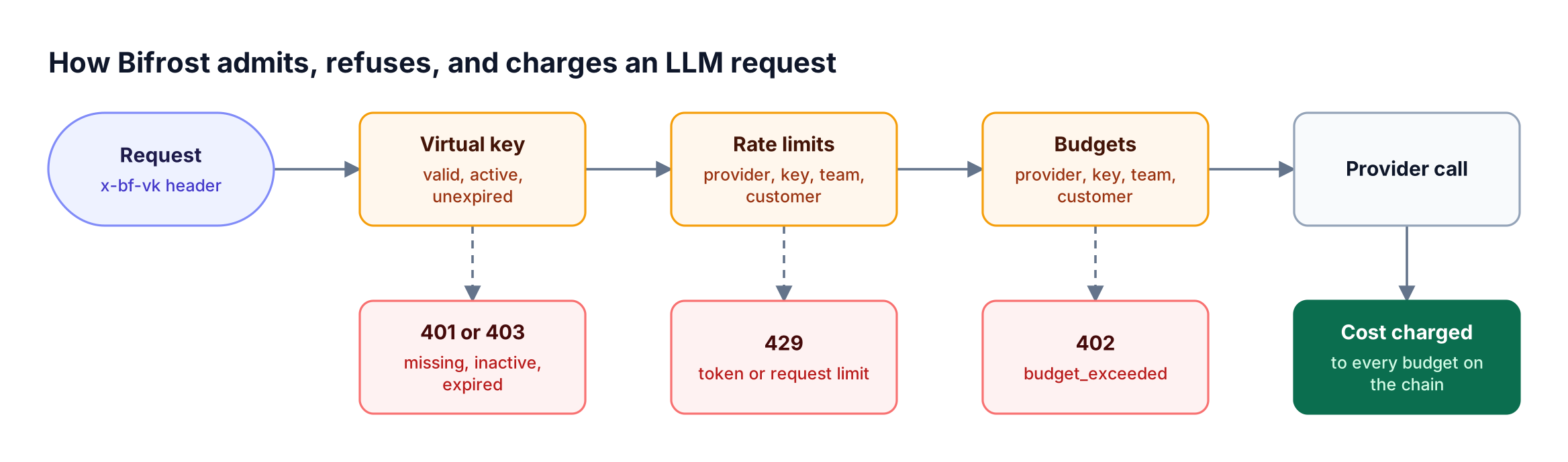
Two rules from Figure 1 drive every design decision. Any single budget failure blocks the request, so the tightest budget wins. The same cost is deducted from every applicable budget, so a $2 request moves the key, team, and customer counters by $2 each.
Governance is optional by default, so set enforce_auth_on_inference: true to reject any inference request without a valid key. Issuing and rotating those keys per client is covered in setting up virtual keys for LLM access control.
Per-Project AI Budgets: Virtual Keys and Projects
Bifrost supports per-project budgets in two ways. In open-source Bifrost, a project maps to one or more virtual keys, each carrying its own budget and project metadata. In Bifrost Enterprise, a project is a first-class entity that a caller selects per request with a header, holding its own budget ledger.
Open-source Bifrost has no entity named "project," so the practical mapping is one virtual key per project (or per project and environment), owned by the team that runs it. Each key can carry metadata for cost attribution such as {"project": "support-bot"}, which Bifrost copies onto every log entry the key produces. The key's budget is the project's cap, and team and customer budgets above it still apply.
Bifrost Enterprise adds Projects, which answer "what is this call for" rather than "who is calling." A caller sends x-bf-project-id or x-bf-project-name, and the request is checked against the project's budgets and rate limits. The accounting_mode field decides who pays: both (the default) charges the project and the caller's own key, team, and customer; project_only charges the project instead of the caller's own limits.
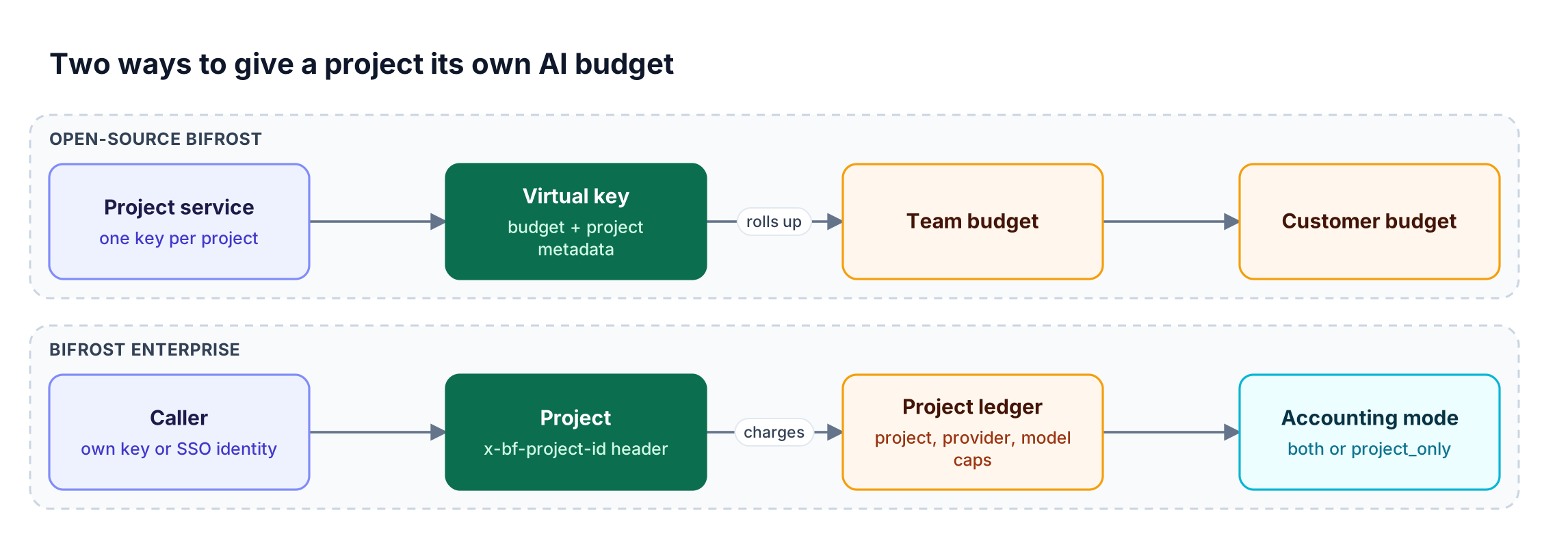
Use the virtual-key mapping when a project is a deployed service with its own credentials. Use Enterprise projects when an initiative needs a shared pot, such as a $5,000 quarterly evaluation split across six members with split_policy: "equal". One caveat: a request authenticated with a plain virtual key never resolves to a user, so it can only use projects with open membership. The multi-tenant budget and rate limit architecture article compares this with per-tenant key designs.
Budget Reset Durations and Calendar Alignment
Every Bifrost budget has a max_limit in US dollars and a reset_duration. By default the window rolls, resetting when the duration has elapsed since last_reset. Setting calendar_aligned: true on the owning entity instead resets day, week, month, quarter, and year windows at the start of each UTC calendar period.
| Duration | Meaning | Calendar-aligned reset point (UTC) |
|---|---|---|
1m, 5m, 1h |
Minutes or hours | Not aligned; stays rolling |
1d |
1 day | Midnight each day |
1w |
1 week | Monday 00:00 |
1M |
1 month | First day of each month |
1Q |
1 quarter (budgets only) | First day of the fiscal quarter |
1Y |
1 year | January 1 |
Details from the reset duration reference that matter in production:
- Alignment is an owner-level field.
calendar_alignedis set on the customer, team, virtual key, or provider governance body, and it also aligns that owner's token and request counters. - Only single-unit durations align.
7d,2w, or3Mkeep their full rolling duration even with alignment on. - Turning alignment on keeps accumulated usage. A monthly budget with $42 spent, aligned on 5 February, keeps the $42 and first resets on 1 March.
Changing a budget's amount does not clear recorded spend; send reset_budget_usage: true to clear it. Fiscal quarters are set with "reset_config": {"quarter_start_month": 4}.
Token Budgets and Request Rate Limits
Rate limits bound throughput where budgets bound dollars. Bifrost supports request limits (calls per window) and token limits (prompt plus completion tokens per window) in parallel, on provider configs, virtual keys, teams, and customers. A request must pass both checks at every level that has a limit.
A runaway agent can drain a $3,000 monthly budget in an afternoon, and the budget stops it only after the money is gone. A token limit such as token_max_limit: 2000000 per 1h throttles the same agent within the hour. Budgets set the ceiling; LLM rate limiting limits blast radius.
When a provider config exceeds its budget or rate limit, Bifrost excludes that provider from routing while other providers on the key stay available. A key can use a cheaper provider until its $10 daily budget is spent, then fall back to a second one, as long as the request does not pin a provider. For model-level caps, governance.model_configs attaches a budget or rate limit to one model across all traffic or one key.
Worked Example: A $10,000 Monthly AI Budget
This example caps one organization at $10,000 a month, splits it across two teams, and gives four project keys their own ceilings. Every figure maps to a Bifrost budget object, and the customer cap holds even if team allocations later rise.
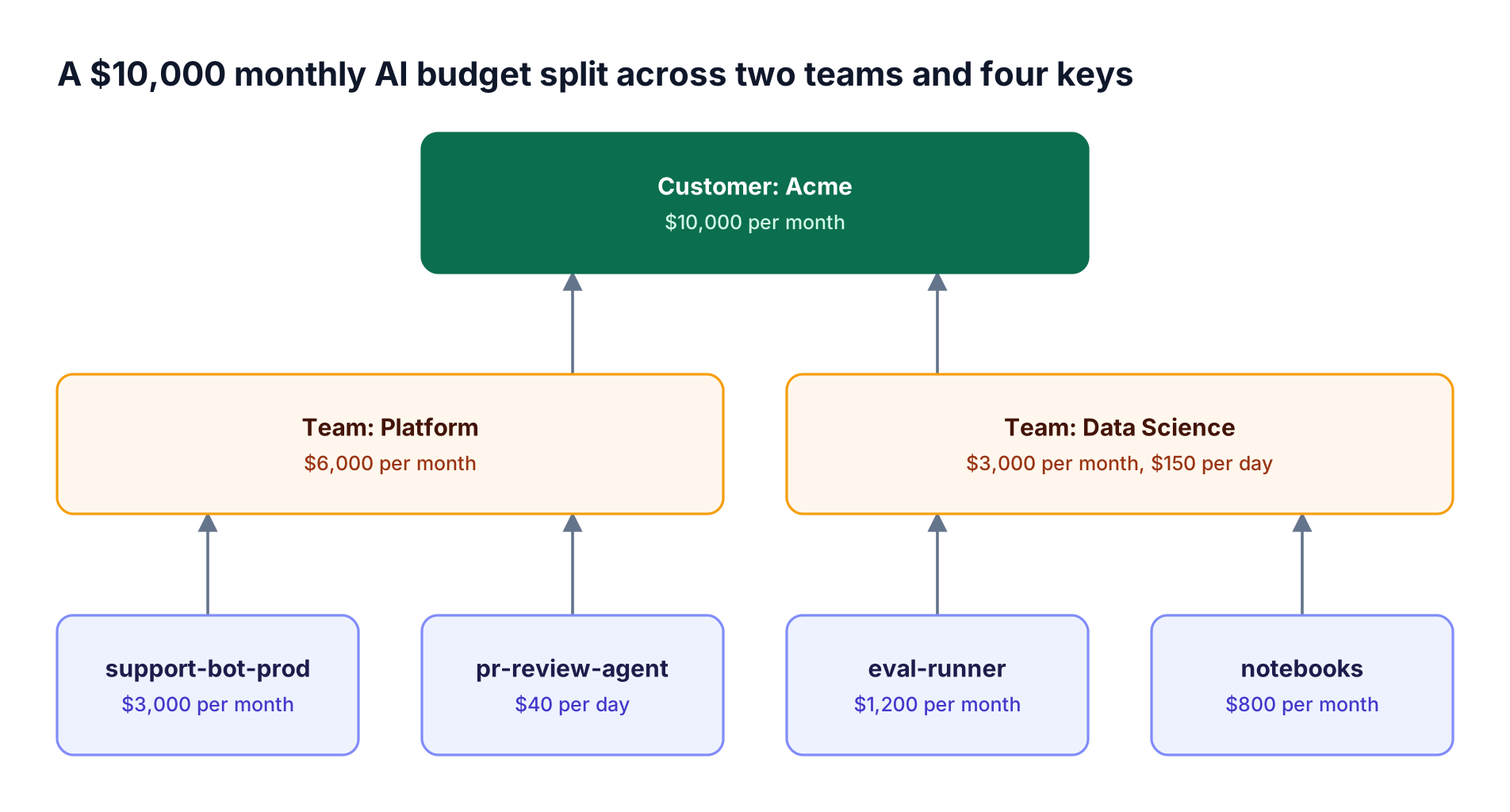
Team budgets sum to $9,000, leaving $1,000 of customer headroom.
- The PR agent gets a daily cap. At $40 a day, a looping agent is refused until midnight UTC, bounding the month near $1,240.
- Data Science holds two budgets, $3,000 a month and $150 a day; both must have room.
- Keys are calendar-aligned; set
calendar_alignedon teams and the customer via the API or UI too.
The core of the config.json governance block (provider configs omitted):
{
  "governance": {
    "customers": [{ "id": "cust-acme", "name": "Acme" }],
    "teams": [
      { "id": "team-platform", "name": "Platform", "customer_id": "cust-acme" },
      { "id": "team-ds", "name": "Data Science", "customer_id": "cust-acme" }
    ],
    "virtual_keys": [
      { "id": "vk-pr-agent", "name": "pr-review-agent", "team_id": "team-platform",
        "calendar_aligned": true, "rate_limit_id": "rl-pr-agent",
        "metadata": { "project": "pr-review" } }
    ],
    "budgets": [
      { "id": "b-acme", "customer_id": "cust-acme", "max_limit": 10000, "reset_duration": "1M" },
      { "id": "b-platform", "team_id": "team-platform", "max_limit": 6000, "reset_duration": "1M" },
      { "id": "b-ds-month", "team_id": "team-ds", "max_limit": 3000, "reset_duration": "1M" },
      { "id": "b-ds-day", "team_id": "team-ds", "max_limit": 150, "reset_duration": "1d" },
      { "id": "b-pr-agent", "virtual_key_id": "vk-pr-agent", "max_limit": 40, "reset_duration": "1d" }
    ],
    "rate_limits": [
      { "id": "rl-pr-agent", "token_max_limit": 2000000, "token_reset_duration": "1h",
        "request_max_limit": 600, "request_reset_duration": "1h" }
    ]
  }
}
The other three keys follow the same pattern with 1M budgets. Each budget names its owner with customer_id, team_id, or virtual_key_id.
Trace a day. On 20 March, Platform has spent $5,700 and the PR agent $38 of $40, so a $3 review request passes all checks and moves the agent to $41, Platform to $5,703, and Acme by $3.
The next PR agent request returns 402 until midnight UTC, while the support bot keeps serving. When Platform reaches $6,000, both Platform keys stop; Data Science is unaffected.
What Happens When a Budget Is Exhausted
When any applicable budget is exhausted, Bifrost refuses the request with HTTP 402 and a top-level type of budget_exceeded, and the message names the tier that ran out. Rate limit refusals return HTTP 429 with rate_limited, token_limited, or request_limited. Both checks run before the provider is called. A budget refusal reads "Budget exceeded: vk_model_config * budget exceeded: 105.5000 >= 100.0000 dollars".
| Condition | Status | type |
Client action |
|---|---|---|---|
| No virtual key, auth enforced | 401 | virtual_key_required |
Fix configuration |
| Key inactive or expired | 403 | access_blocked |
Request a new key |
| Token or request limit hit | 429 | token_limited / request_limited |
Back off until the window resets |
| Budget exhausted | 402 | budget_exceeded |
Stop, or request an override |
Clients should branch on the top-level type and treat 402 as non-retryable. Budgets are checked before a request and charged after it, so the last request in a window can overshoot the limit, as the $41-of-$40 trace shows.
A budget override adds temporary capacity without a config change: the effective limit becomes max_limit plus override_amount, for a number of reset cycles ("mode": "cycles") or until removed ("mode": "forever"). In Bifrost Enterprise, users who hit a budget can file a budget increase request for an approver. The runbook around these refusals is in controlling LLM costs with budget alerts and rate limits.
AI Cost Tracking with the Model Catalog
Bifrost calculates each request's cost from the provider's reported token usage and the Model Catalog, a pricing database covering chat, embedding, speech, transcription, image, and video requests. That single figure is what budgets are charged, what logs record, and what metrics export.
Pricing is synced periodically, not in real time. At startup Bifrost downloads a pricing datasheet; with a config store it persists the sheet and re-syncs every 24 hours by default, adjustable with pricing_sync_interval. Lookups run from memory.
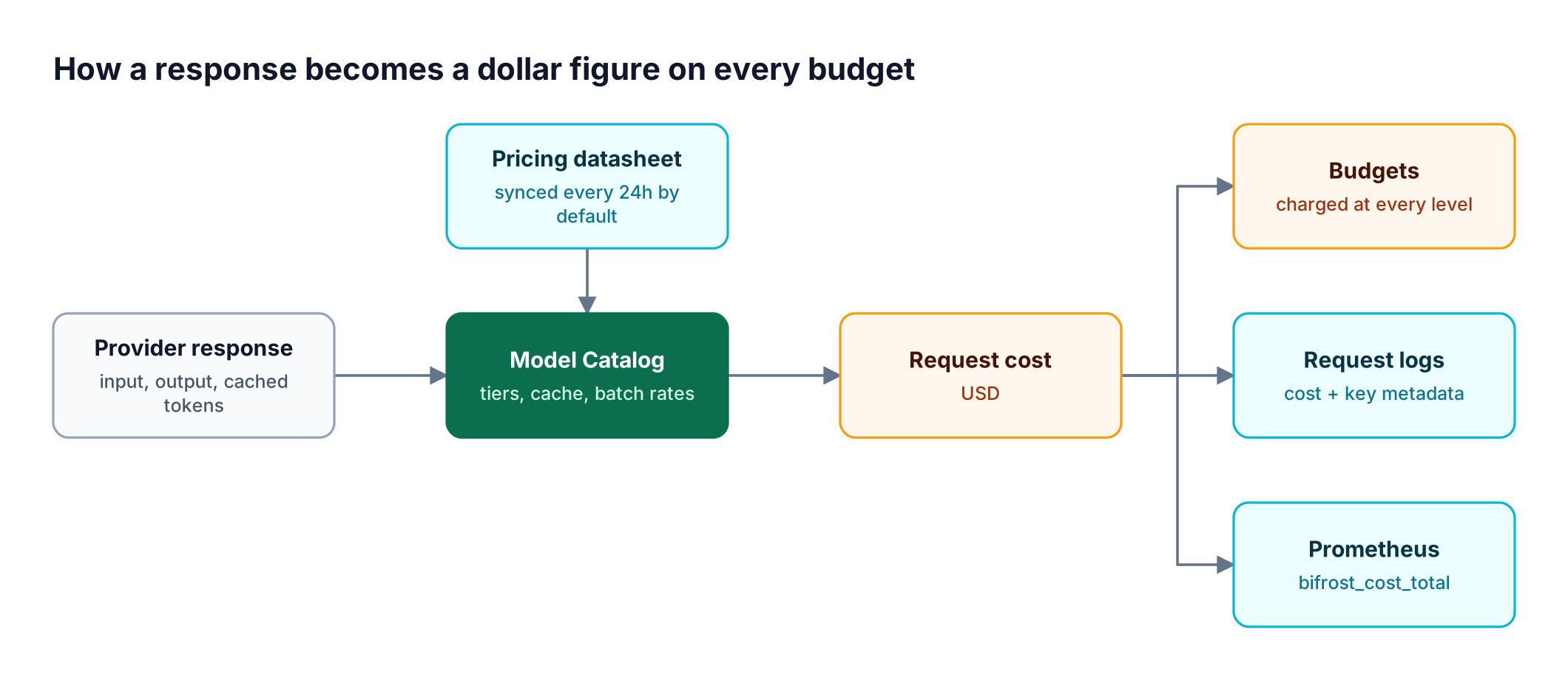
The catalog handles the cases that make naive token math wrong:
- Context tiers. Different rates above 100k, 128k, 200k, and 272k tokens.
- Prompt caching. Separate rates for cache-read and cache-creation tokens.
- Semantic cache hits. Zero cost for direct hits from semantic caching, and embedding cost only for semantic matches.
- Batch pricing. Separate batch rates where providers publish them.
A provider price change can take up to one sync interval to reach budgets. For list-price estimates, use the LLM cost calculator.
AI Spend Management: Logs, Metrics, and Alerts
AI spend management needs per-request records for investigation, time-series metrics for dashboards, and alerts that fire before a budget refuses traffic. Bifrost produces all three from the same cost figure, labeled with the virtual key, team, customer, and project behind each request.
- Request logs. Built-in observability records tokens, cost, and latency per request, with
min_costandmax_costfilters and virtual key metadata on each entry. - Prometheus metrics. Prometheus metrics include
bifrost_cost_totallabeled withvirtual_key_name,team_name,customer_name, andproject_name. Budget refusals appear aspolicy_budget_exceeded. - Budget alerts (Enterprise). Alert rules such as
budget_usage_percent >= 80.0, scoped to a key, team, or customer, run on a 60-second sweep and notify Slack, Microsoft Teams, PagerDuty, or webhooks.
sum by (team_name) (increase(bifrost_cost_total[30d]))
For reporting design, see showback and chargeback for LLM spend.
Budgets sit beside two adjacent controls covered elsewhere: which models each team may call (role-based LLM access by team) and who the caller is (SSO and RBAC for LLM access).
Frequently Asked Questions
What is the best AI cost tracking tool?
The best AI cost tracking tool sits in the request path, so cost is measured per request and attributed to a team, project, or key at the moment of the call. Bifrost prices each request from the Model Catalog, records it in logs and Prometheus metrics, and uses the same figure to enforce budgets. Our roundup of AI spend management gateways for team budgets compares options.
How are LLMs priced?
LLMs are priced per token, with separate input and output rates that vary by model. Many providers charge more for long-context requests and less for cached input tokens and batch jobs. Speech, image, and video models may bill by characters, seconds, or images. Bifrost's Model Catalog stores these rates per model and applies the matching tier to every request.
Can you set a budget limit on the OpenAI API per team?
OpenAI's own rate limits apply at the organization and project level, not per internal team. To cap spend per team on a shared OpenAI account, route traffic through Bifrost and give each team its own team budget and virtual keys. Each team's requests are then priced, charged, and refused independently while sharing the same provider credentials behind the gateway.
How do I stop an AI agent from overspending?
Give the agent its own virtual key with a short budget window, such as $40 per 1d, plus an hourly token rate limit. The budget bounds a loop's worst-case cost; the token limit throttles it within the hour. The hidden cost of Claude Code at enterprise scale shows how coding agents accumulate spend.
Are budgets available in open-source Bifrost?
Yes. Virtual keys, teams, customers, budgets, request and token rate limits, calendar alignment, and budget overrides are in open-source Bifrost. Bifrost Enterprise adds projects, business units, access profiles, budget alerting, and clustering that keeps budget counters synchronized across nodes. Running multiple open-source nodes with a Postgres backend is not supported.
Start Enforcing AI Budgets with Bifrost
An AI budget is only enforceable where requests are made, and Bifrost puts it there: hierarchical budgets on virtual keys, teams, and customers, token and request rate limits, calendar-aligned resets, and per-request cost tracking. The Bifrost governance overview covers the wider control set, and Bifrost Enterprise adds projects, alerting, and clustering. To see AI spend management on your own traffic, book a demo with the Bifrost team.