MCP and tools sit at different layers: a tool is a function a large language model can ask to run, described by a name and a JSON Schema, while the Model Context Protocol (MCP) is the open standard an AI application uses to discover tools on external servers at runtime and send each call to the server that runs it. MCP does not replace tool calling; it supplies the tools that tool calling uses.
The MCP vs tools question usually means MCP vs function calling (also called tool calling): the model API feature where an app lists functions in a request and the model returns a structured call for the app to run. Anthropic introduced MCP in November 2024 so hosts such as Claude Desktop and Cursor could share integrations, as the Model Context Protocol overview explains. Bifrost sits on both paths, passing function-calling requests to model providers and adding governed MCP tools to them.
How does MCP differ from tool calling?
MCP differs from tool calling in scope. Tool calling is how a model asks for one function to run; MCP is how an application finds those functions and who runs them. With plain tool calling, the developer writes each tool definition and its handler into the application. With MCP, an MCP server publishes the definitions and executes the calls, and any MCP host can use them.
The model's side does not change. In both cases the model receives tool definitions in its provider's format and returns a tool name plus JSON arguments. MCP changes everything around that step: discovery moves from build time to runtime, and execution and credentials move from application code to a server.
So MCP vs tools is not an either-or: the real choice is between tools inside one application and tools published on a server for many. How MCP compares with a REST API is covered in MCP vs API.
MCP vs tool calling at a glance
MCP and tool calling differ on where tools are defined, who runs them, how they are found and how many applications can use them. The table compares function calling in a model API with remote MCP tools under MCP specification revision 2026-07-28.
| Dimension | Tool calling (function calling) | MCP |
|---|---|---|
| What it is | A feature of a model API | An open protocol between hosts and servers, built on JSON-RPC 2.0 |
| Where tools are defined | In application code, sent with each request | On an MCP server, returned by tools/list |
| When tools are known | At build time | At runtime; servers can announce changes with notifications/tools/list_changed |
| Who runs the call | Your application, in its own process | The MCP server, after the client sends tools/call |
| Schema format | Provider-specific JSON Schema wrapper | One MCP definition the host translates per provider |
| Portability | One integration per application, often per provider | One server works in Claude Desktop, Cursor, VS Code and custom agents |
| Credentials | Held by the application | Held by the server; remote servers use OAuth 2.1 for authentication |
| Scope | Functions only | Tools, plus resources and prompts |
How an LLM calls an MCP tool, step by step
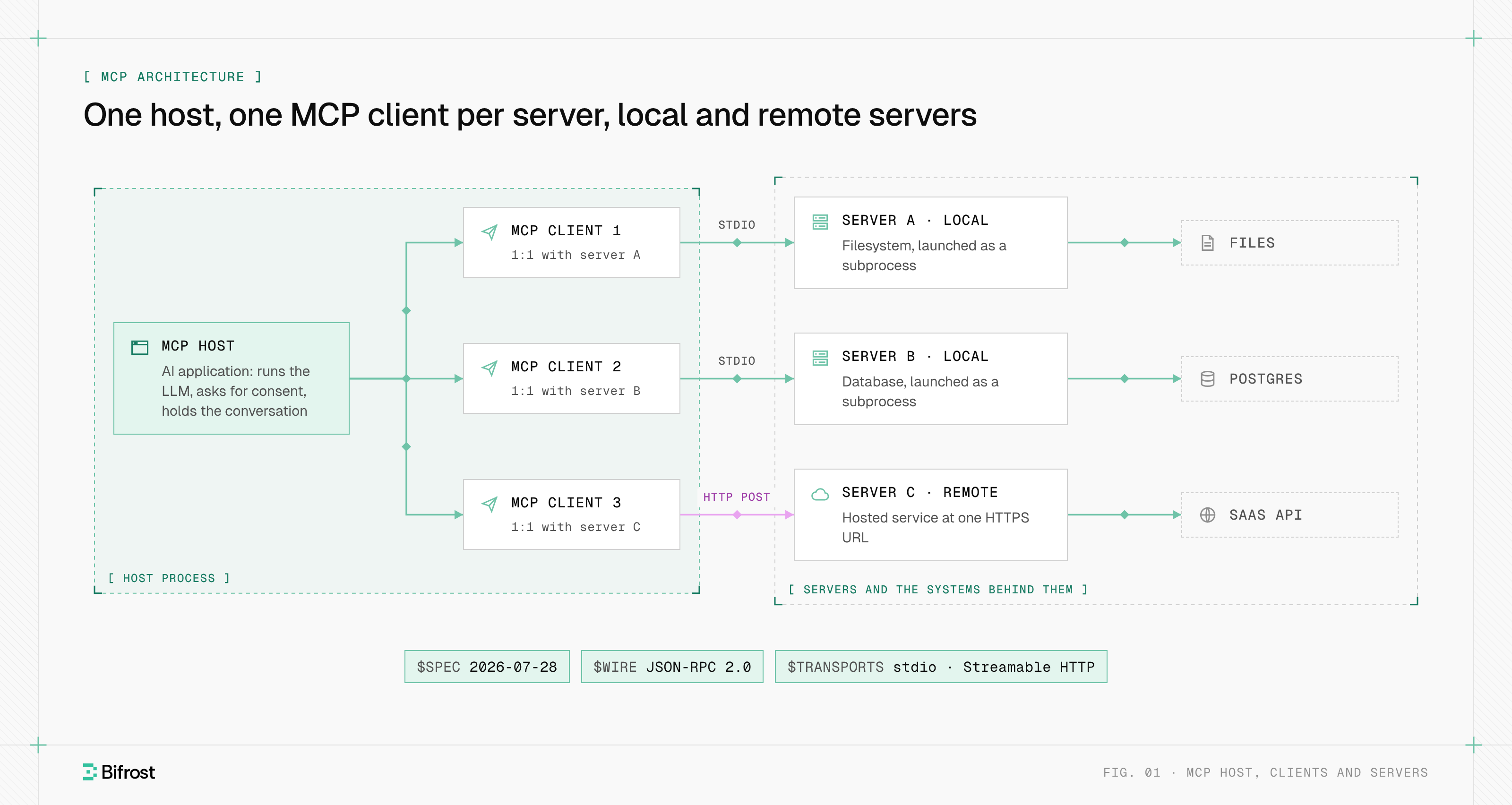
An LLM calls an MCP tool through the same function-calling interface it uses for any tool, and the MCP client does the extra work on both sides. The host fetches definitions with tools/list, translates them into the provider's tool format, sends the model's chosen call to the server with tools/call, and returns the result to the model.
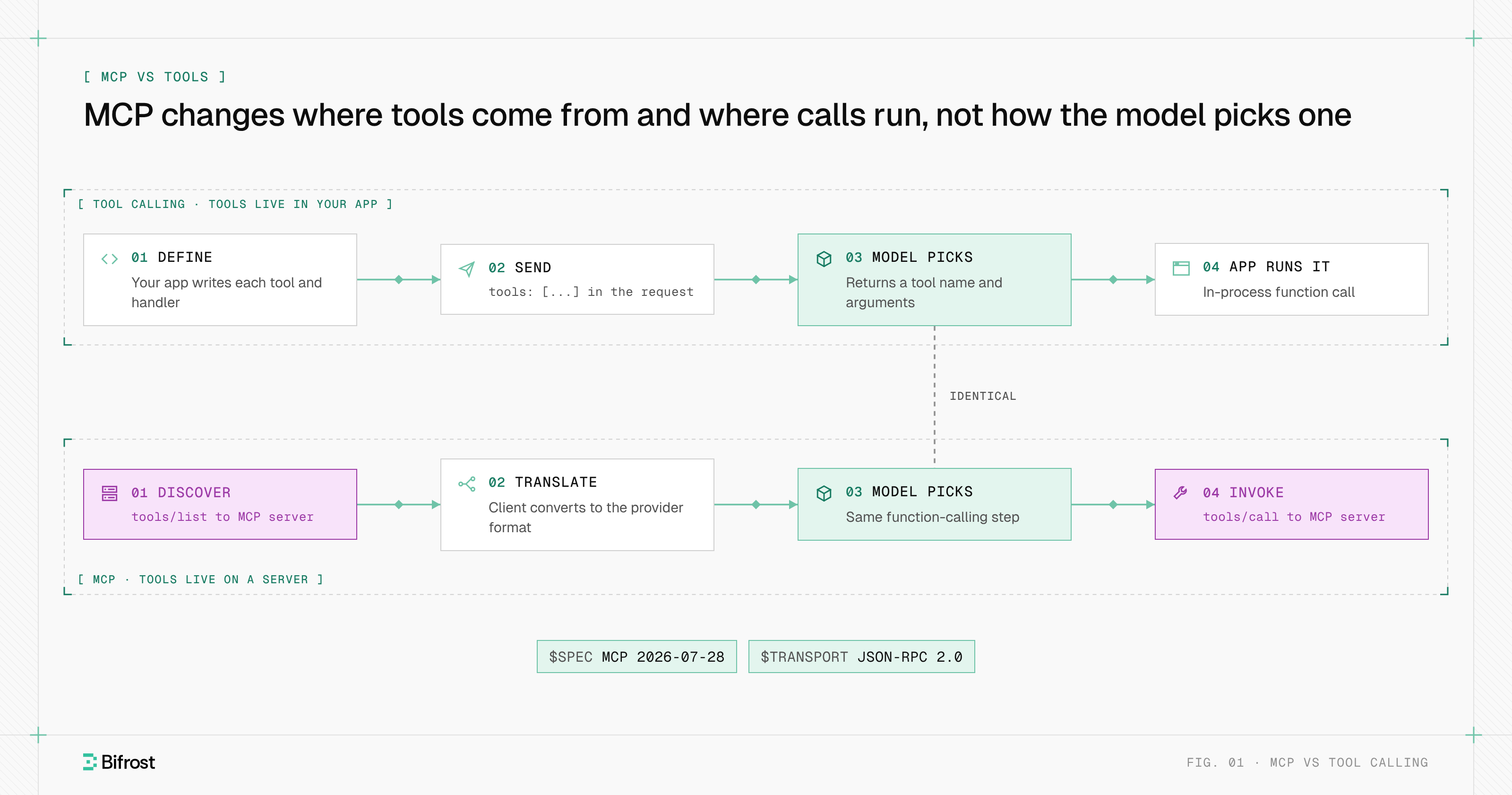
Figure 1: MCP changes where tools come from and where calls run; the model's tool-call step is the same.
The host is the AI application, and it runs one MCP client per server. A call moves through six steps:
- Discover. The client sends
tools/list; the server returns each tool's name, description and input schema. - Translate. The host converts each definition into the provider's tool format, prefixing names with a server identifier to avoid collisions.
- Select. The model returns a tool name and arguments, exactly as for a function defined in code.
- Approve. The host applies policy; the specification says a human SHOULD be able to deny any invocation.
- Invoke. The client sends
tools/callto the server that owns the tool. - Return. The server replies with
content, optionalstructuredContentand anisErrorflag, which the host passes back as a tool result.
Step 3 is plain function calling. Steps 1, 2 and 5 are what MCP adds.
How MCP tool discovery works at runtime
MCP tool discovery is a protocol call, not code. A server with listChanged: true notifies subscribed clients when its tools change, so agents pick up new tools without a redeploy. The list may vary by the authorization on the request, and servers should return it in a deterministic order so provider prompt caches stay valid. MCP tools covers the definition format.
MCP tools vs native LLM tools
Native LLM tools come in two kinds, and MCP tools differ from both. Client tools are functions your application defines and runs. Server tools, such as web search or code execution, are defined and run by the model provider. MCP tools are defined and run by a third party, an MCP server, and usually reach the model as client tools through the host. Anthropic's tool use documentation draws the same line by where code runs.
| Tool type | Defined by | Runs in | Example |
|---|---|---|---|
| Client tool (function calling) | Your application | Your application | get_order_status in your backend |
| Provider server tool | The model provider | The provider's infrastructure | Anthropic web_search |
| MCP tool through a host | An MCP server | The MCP server | GitHub issue tools, called from Cursor |
| MCP tool through a provider connector | An MCP server | The MCP server, called by the provider | mcp_servers in the Claude API |
Model providers now act as the MCP client themselves. The Claude API's MCP connector, in beta, takes an mcp_servers list per request, supports only tool calls, and reaches only public servers over Streamable HTTP or SSE. OpenAI's Responses API has an mcp tool type with server_url and require_approval, per its remote MCP guide. Either way, the provider's network calls the server and the application never sees tools/call.
"MCP-enabled tools" are services that publish an MCP server, so any host can call them without custom code.
MCP tools vs resources and prompts
MCP tools differ from MCP resources in who decides to use them and whether they change anything. Tools are model-controlled actions that may have side effects. Resources are application-controlled, read-only data identified by a URI. Prompts are user-controlled templates. These are the three server primitives of the Model Context Protocol, each with its own list and fetch methods.
| Tools | Resources | Prompts | |
|---|---|---|---|
| Controlled by | The model | The application (host) | The user |
| Identified by | name | uri (RFC 3986) | name |
| Discovery | tools/list | resources/list, resources/templates/list | prompts/list |
| Use | tools/call with arguments | resources/read | prompts/get with arguments |
| Side effects | Allowed, described by annotations | None; the protocol has no write method | None |
| Example | Create a Jira issue | A database schema or a file | A "summarize this incident" template |
The resources specification treats resources as context the host loads on its own heuristics or the user's selection. That gives a practical rule: if the model must choose arguments or the operation changes state, make it a tool; if the data can be named by a URI and the host decides when to load it, make it a resource. Many servers expose data both ways, because some clients, such as the Claude MCP connector, support only tools.
When to use MCP vs tool calling
Use plain tool calling when one application owns a small, fixed set of tools that run in its own process. Use MCP when tools should be shared across applications, teams or AI hosts, or owned by another team. Most production agents use both: local functions for app logic and MCP servers for shared systems.
Plain tool calling is the better fit when:
- The tool is application logic that needs in-process state, such as a cart or a session.
- Per-call latency matters. In-process tools in the Bifrost tool hosting comparison take about 0.1 ms, against 10-500 ms for an external MCP server.
MCP is the better fit when:
- The same capability should work in Claude Desktop, Cursor and internal agents without per-host code.
- Another team or vendor owns the system and should own its schemas and credentials.
- Access needs central control over who can call which tool, which an MCP gateway provides.
Costs and risks of each approach
In the MCP vs tools comparison, both approaches share one cost, tool definitions sent to the model on every turn. Plain tool calling keeps credentials and execution inside one application. MCP adds a network hop, a server whose tool descriptions the model trusts, and a credential that must represent the right user.
- Token cost. MCP makes prompts grow faster, because connecting a server adds all of its tools at once. In the Code Mode benchmark, 508 tools across 16 servers used 75.1M input tokens with classic MCP.
- Tool poisoning. An MCP tool description is text from a server you may not control, placed in the model's context, which is why teams run guardrails on MCP traffic.
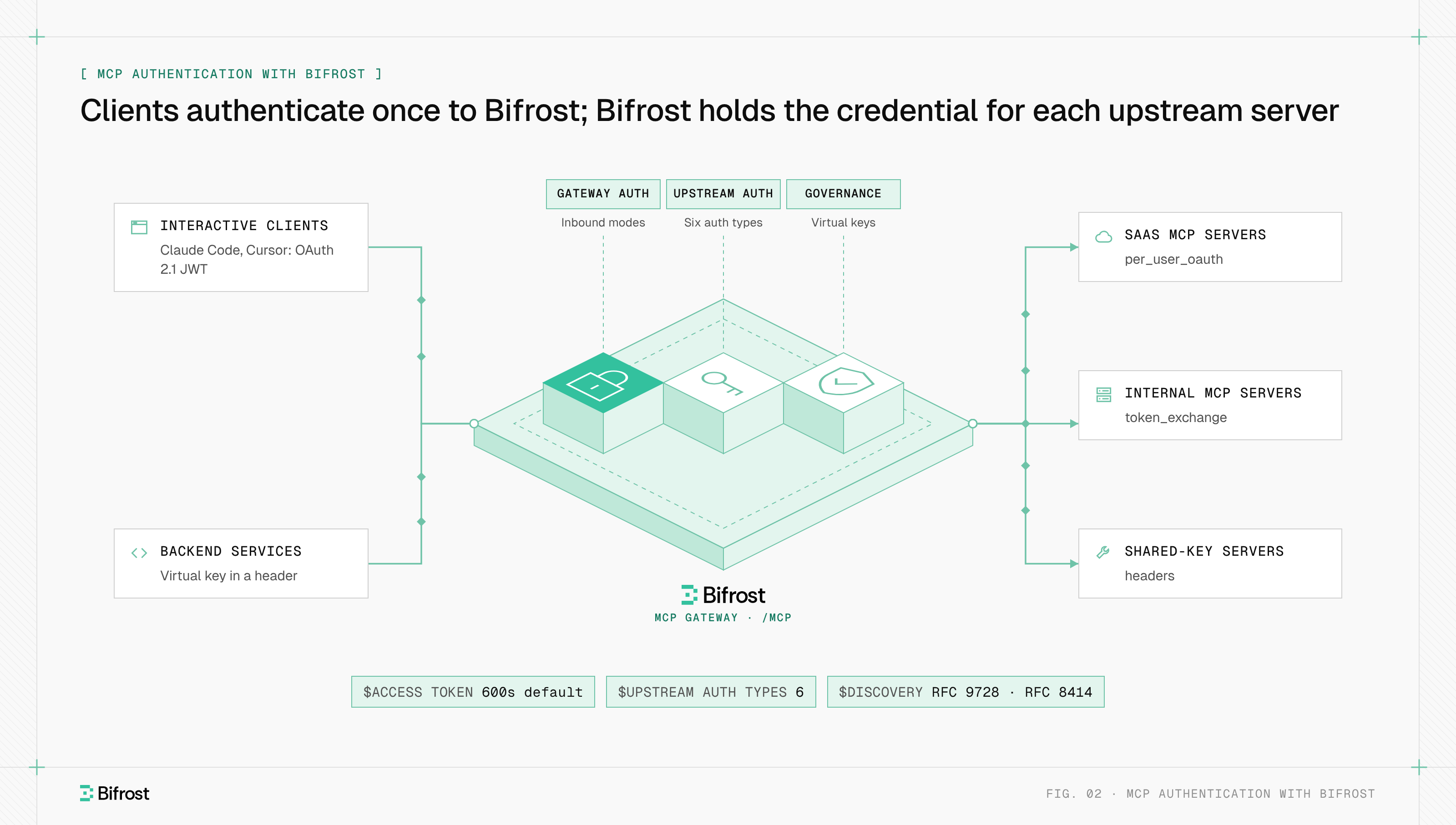
- Authentication. A local function runs under your app's credentials. A remote MCP server is an OAuth 2.1 resource server, and the hard question is whose identity reaches the upstream system, as MCP authentication explains.
- Execution and audit. With function calling, your code runs and logs every call. MCP calls spread across hosts, some of which run tools automatically, with no single record unless they pass through a shared layer.
MCP and tool calling with Bifrost
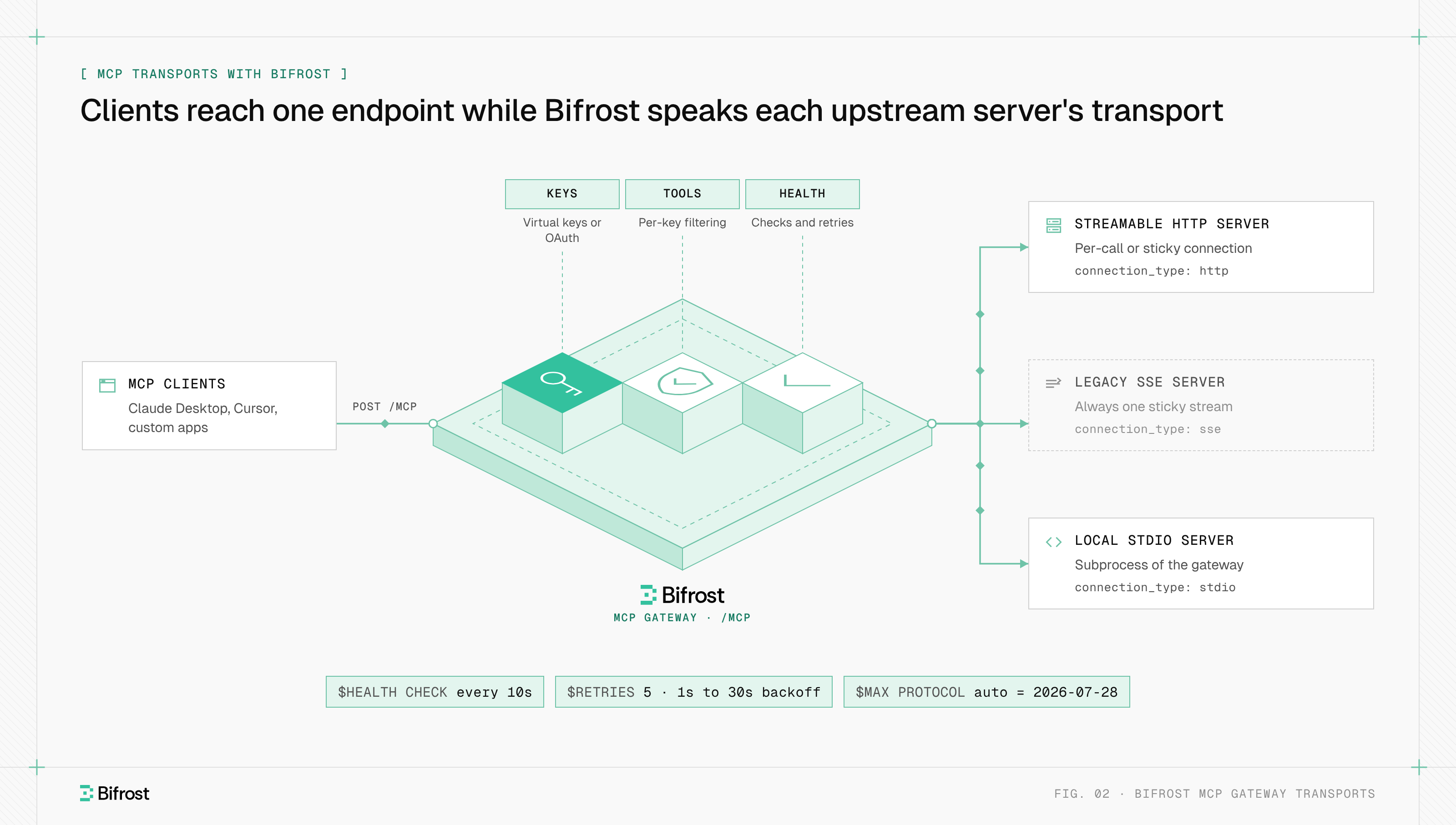
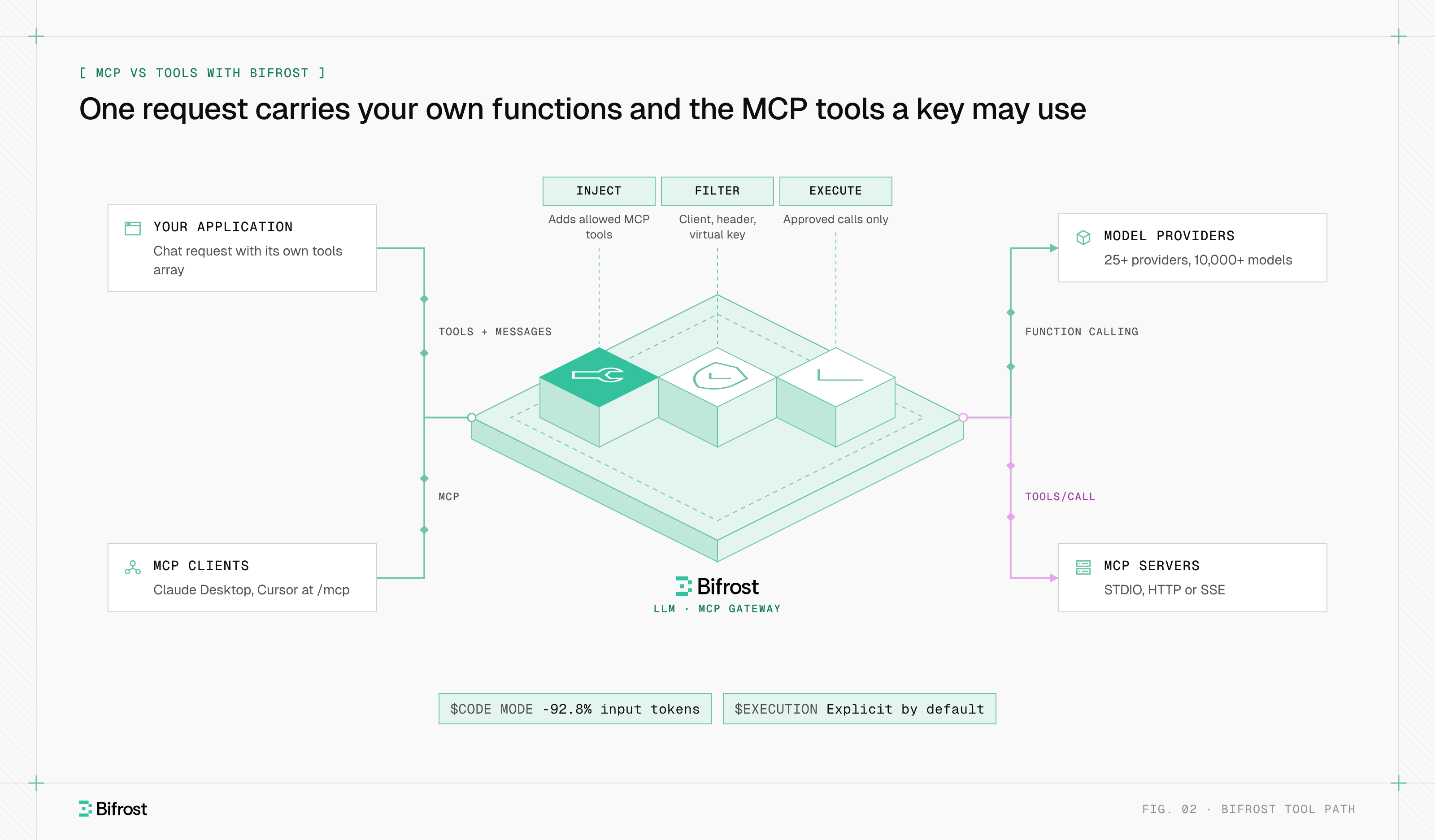
Bifrost, the open-source AI gateway built by Maxim AI, handles both halves of the MCP vs tools split. It forwards function-calling requests to 25+ providers through one OpenAI-compatible API and, as an MCP gateway, adds the MCP tools each caller may use next to the application's own tools array.
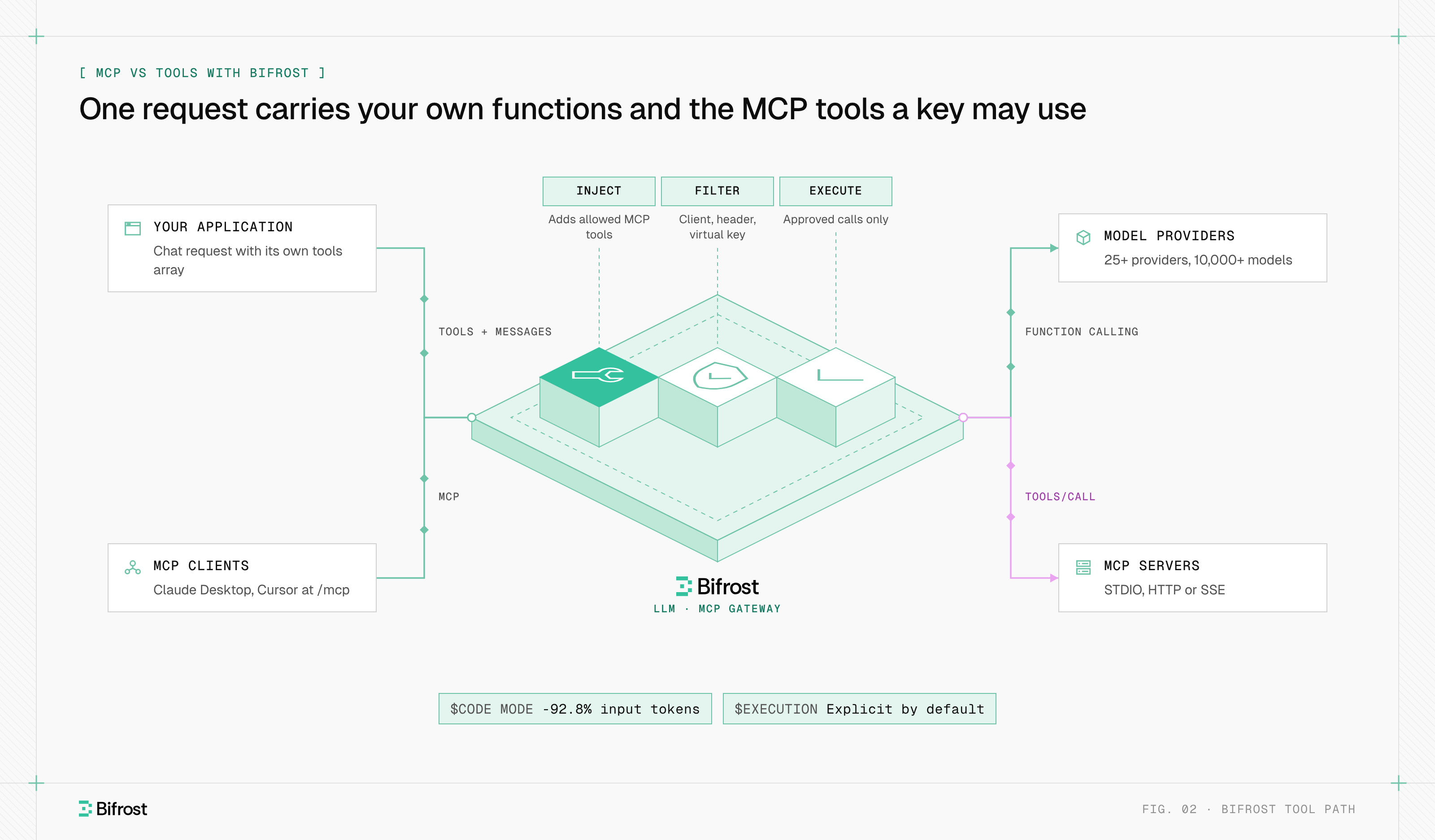
Figure 2: One request carries both your own functions and the MCP tools a key is allowed to use, and Bifrost runs only approved calls.
- Explicit execution. Tool calls the model returns are suggestions; the application runs approved ones through the tool execution endpoint, and Agent Mode auto-runs only the tools listed in
tools_to_auto_execute. - Filtering. Tool filtering works per MCP client, per request (
x-bf-mcp-include-tools) and per virtual key, and tool names carry their client name as a prefix. Virtual MCPs bundle chosen tools behind one/mcp/<slug>endpoint. - Native tools as MCP tools. In the Go SDK, Tool Hosting registers in-process functions in an internal MCP server, so local tools share the same filtering and execution path.
- Token cost. Code Mode replaces large tool sets with four meta-tools and cut input tokens by 92.8% on that 508-tool run, at the same 100% pass rate.
Claude Desktop and Cursor can also connect to the Bifrost /mcp endpoint and see the same governed tools. To try both paths, start with the gateway quickstart or the open-source repository on GitHub.
Frequently asked questions
When to use MCP vs skill?
Use MCP when an agent needs to read from or act on an external system, and use a skill when it needs instructions for a task. An Agent Skill, in Anthropic's format, is a folder with a SKILL.md file and optional scripts that the agent loads only when a task calls for it. Skills often say which MCP tools to call and in what order, so the two work together.
Why are resources in MCP read only?
Resources are read only because the protocol defines them as context, not actions. The resources specification gives them list, read and subscribe methods but no write method, so anything that changes state must be a tool. That keeps every side effect on the model-controlled path, where hosts show the call and a human can deny it.
How many tools should an MCP have?
MCP sets no limit, and tools/list is paginated. The practical limit is how many tools a model can choose between reliably and what each turn costs, since every exposed definition is sent with each request. A focused server with task-shaped tools works better than one that mirrors every API endpoint, and a gateway can filter tools per caller.
Can you use MCP without function calling?
In practice, no. MCP defines how tools are discovered and invoked, but the decision to call a tool still comes from the model, through its function-calling interface. A model without tool-calling support can use MCP resources and prompts the host inserts into its context, but it cannot choose and call MCP tools.
Is MCP only for Claude?
MCP is not only for Claude. Anthropic created MCP and Claude Desktop was its first host, but the protocol works with any model. Cursor, VS Code, ChatGPT developer mode and many agent frameworks act as MCP hosts, and any model with function calling can use MCP tools through them.
- mcp vs tools
- function calling
- tool calling