Screening Text and Image LLM Traffic with AWS Bedrock Guardrails and Bifrost
Marketing Access
Jun 06, 2026 · 9 min read
LLM features started out as text in, text out. They have not been that for a while. A support tool ingests a screenshot of a customer's account dashboard with billing details visible on screen. A document agent reads a vendor PDF where the malicious instructions live inside an embedded image, not in the text the model sees. A receipt-processing assistant accepts a photo of an invoice that includes a full credit card number. A vision-enabled medical tool gets handed a chart image with a patient's complete record. A real estate app processes an uploaded photo of a signed contract, exposing personal information from the page. None of these are caught by a text-only guardrail. The PII, the prompt attack, and the regulated content are all in pixels, invisible to a check that only inspects the text wrapped around the image. Bifrost, the open-source AI gateway from Maxim AI, integrates with AWS Bedrock Guardrails so the same policy that governs the rest of an organization's AWS workloads can run inline on every LLM call, screening text and images alike.
The Gateway: One Place to Screen Text and Images
Multimodal LLM traffic has the same routing problem text traffic always had, only worse. Every team that ships a vision feature has to decide where to put content screening for images, how to combine it with text screening, and how to keep both consistent when the policy changes. With image inputs becoming routine across applications, doing this per-app and per-provider is exactly the kind of fragmentation gateways exist to remove. Every team writes its own image-handling hook. Every hook does something slightly different. The security team has no single place to see what is being screened and what is not.
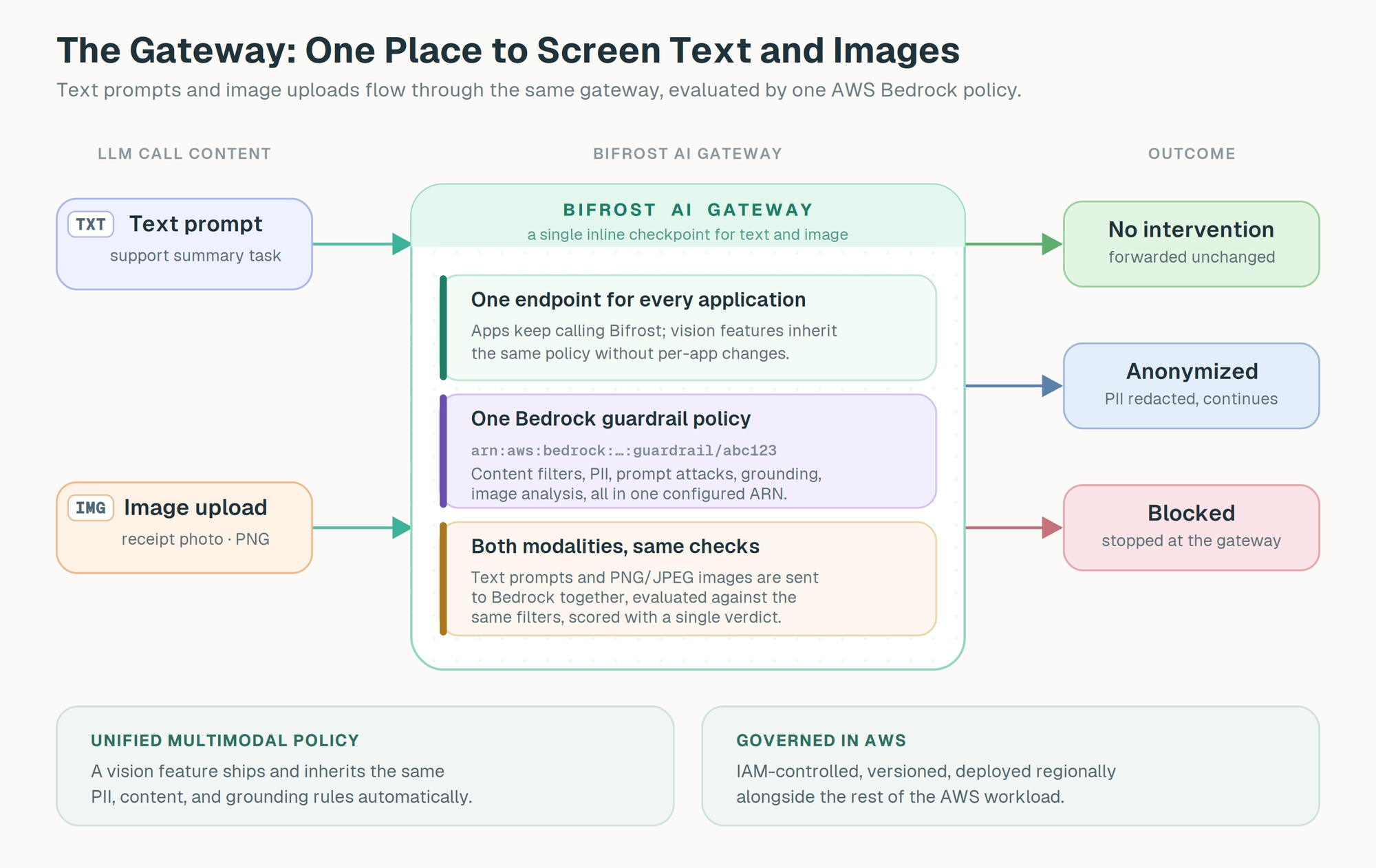
The gateway changes the unit of work. Bifrost terminates every LLM call an application makes, regardless of whether the call carries text, images, or both. The same request an application sends to a vision-enabled model passes through the same gateway as a text-only call, and the same guardrail rule can attach to either. That means the policy a team configures in AWS Bedrock applies uniformly to whatever the application happens to be sending today, and continues to apply when next week's feature adds image upload or document ingestion.
Attaching the policy at the gateway means it is configuration, not application code. A guardrail rule is scoped with a CEL expression and bound to an input, output, or both phase, then runs on every matching call regardless of which application made it or which model handled it. Teams keep calling a single endpoint; the screening, monitoring, and logging happen at the gateway. Adding image checks for a new feature is a configuration change in Bifrost, not a code change in five applications.
The gateway also brings the operational and governance properties an enterprise expects. Bifrost attributes every call to a team or environment for budgets and access control, keeps traffic flowing when a provider degrades, and writes an audit trail that maps to SOC 2 Type II and HIPAA evidence. A guardrail policy applied at the gateway inherits that whole surface. And because Bifrost itself adds only around 11 microseconds of overhead per request, the cost of running an inline screening call, even one that includes image data, is dominated by the screening service itself, not by the gateway carrying it.
What AWS Bedrock Guardrails Brings: Comprehensive Coverage, AWS-Native
AWS Bedrock Guardrails is the content safety service inside Amazon Bedrock. A guardrail is created in the AWS account with a specific configuration, given a version, and referenced by ARN. The integration registers Bedrock as a guardrail provider in Bifrost; the team supplies the ARN and version, and the gateway sends LLM input or output content to the referenced guardrail on every matching call. Across the kinds of judgment LLM traffic actually needs in production, Bedrock screens:
- Content filters for hate speech, insults, sexual content, violence, and misconduct, with tunable strength
- Denied topics with custom definitions for categories the team wants blocked outright
- Word filters for custom profanity, internal codenames, or sensitive phrase lists
- PII protection covering 50+ entity types, with detect-only or redaction modes
- Prompt attack detection for injection and jailbreak attempts
- Image content analysis for PNG and JPEG inputs against the same content categories
- Contextual grounding to verify a model's response against the source documents it was supposed to be drawing from
Two of those capabilities are what set this integration apart from a text-only guardrail engine. Image content analysis means the same filters the team configured for text apply to images on the way in and out, so a screenshot containing visible PII or a document with a prompt injection baked into an image gets caught the same way a text-form version would. Contextual grounding is a check designed for retrieval-augmented workloads: it scores how faithful a response is to the source documents the model was given, which is the specific kind of failure most safety guardrails do not even attempt to detect.
For enterprises already standardized on AWS, the policy lives where the rest of the security configuration lives. The guardrail is governed by IAM, versioned in the AWS account, deployed in one of 13 supported regions alongside the rest of the workload, and emits usage metrics broken down by policy type, content, grounding, PII, topic, word, and image units, for fine-grained cost tracking. Nothing forks off into a separate vendor with its own workflow.
The division of labor with Bifrost is clean. Bedrock owns the judgment: the guardrail's filter strengths, the denied topics, the PII modes, the grounding thresholds. Bifrost owns the enforcement: deciding when to call, sending the right text and image content, and acting on the result inline before a prompt reaches a model or a response reaches a user. A guardrail defined in an AWS account becomes inline policy across every provider and model routed through the gateway, with no change to application code.
How AWS Bedrock Runs Inside Bifrost
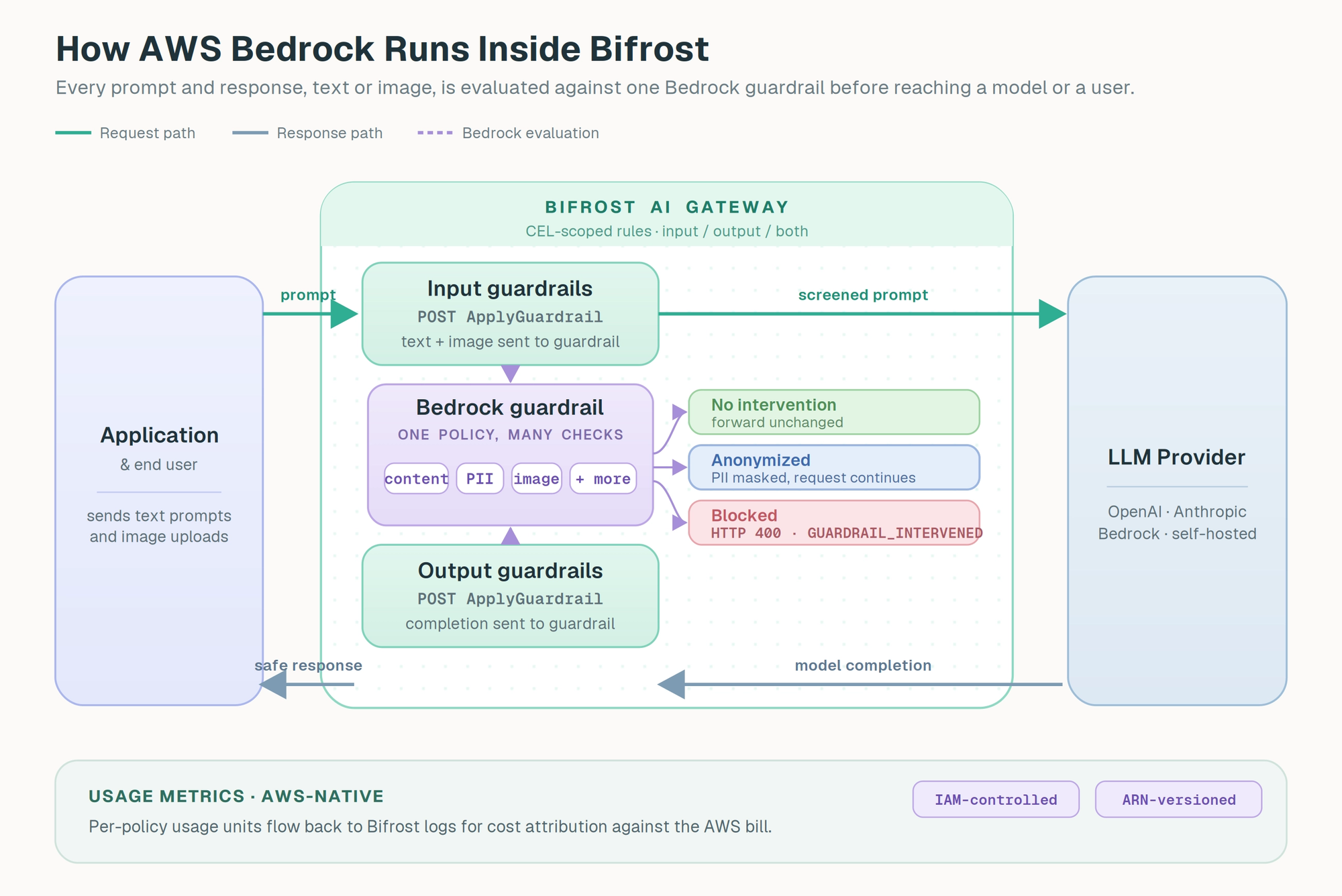
Inside Bifrost, AWS Bedrock is registered as a guardrail provider with provider_name: "aws-bedrock". The configuration has two pieces. A Profile holds the AWS settings: the access key, secret key, the guardrail ARN, the guardrail version, and the region. A Rule decides when the profile runs and on which phase. Rules are written in CEL, so they can be scoped to specific models, providers, headers, or traffic patterns.
When a rule matches, Bifrost packages the relevant content (the prompt for input rules, the completion for output rules) and sends it to Bedrock's ApplyGuardrail API using the referenced ARN and version. The content includes any image data carried in the call, encoded as part of the request. Bedrock evaluates everything in the call against all the policies in the guardrail at once, content filters, denied topics, word filters, PII, prompt attacks, image analysis, and (where applicable) contextual grounding, then returns a single verdict. Bifrost maps that verdict to one of three behaviors:
- No intervention. Bedrock reports that no policy was triggered, and Bifrost forwards the content unchanged.
- Anonymized. Bedrock returns text with sensitive entities masked or redacted per the PII policy. Bifrost swaps in the sanitized text and lets the request or response continue.
- Blocked. Bedrock flags a non-mutable violation such as a content filter at HIGH strength, a denied topic, a word filter, a prompt attack, or a failed grounding check. Bifrost returns HTTP 400 with
type: "guardrail_intervention", and the request never reaches the model.
For streaming responses, input guardrails run before the streaming request leaves Bifrost; output checks against Bedrock currently apply to non-streaming response bodies. The detailed usage metrics Bedrock returns (content policy units, contextual grounding units, sensitive information units, topic units, word units, image units) flow into Bifrost logs alongside the verdict, so cost attribution and audit are straightforward against the AWS bill.
What You Get by Implementing AWS Bedrock Guardrails at the Gateway
The headline benefit is the one a text-only guardrail cannot offer:
- One policy that screens text and images. The same content filters, denied topics, and PII rules apply uniformly to whatever the call carries. A new vision feature inherits the existing policy automatically, with no per-application image-handling hook to write or maintain.
The rest compound on top of it:
- Policy that stays inside AWS. The guardrail is governed by IAM, versioned in the AWS account, and deployed regionally with the rest of the workload. The Bifrost call to Bedrock is the only network hop, and it stays inside AWS for in-region deployments.
- Grounding for RAG workloads. The contextual grounding check verifies model outputs against the source documents they were supposed to be drawing from, catching the hallucinations most safety-focused guardrails do not detect.
- Redaction, not just rejection. PII anonymization keeps a legitimate request alive with regulated entities masked, so a single PII match does not have to be a hard failure for the user.
- Granular cost attribution. Bedrock returns usage broken down by policy type (content, grounding, PII, topic, word, and image), and Bifrost records all of it, so a team can see exactly which checks are driving spend.
- Multi-provider coverage from a single guardrail. Bifrost applies the Bedrock policy uniformly to OpenAI, Anthropic, Google Vertex, self-hosted models, and Bedrock-served models alike.
- Layered with native checks. Bedrock can share a rule with Bifrost's native guardrails, so deterministic patterns for known secrets or internal codenames run alongside the Bedrock policy.
Setting Up AWS Bedrock Guardrails in Bifrost
Setup happens in two places: the guardrail itself inside AWS, then the matching guardrail profile and rule inside Bifrost.
Prerequisites
- Bifrost Enterprise with the guardrails plugin enabled
- An AWS account with Bedrock access in a supported region
- A configured Bedrock guardrail in that region with a published version and ARN
- An IAM principal with
bedrock:ApplyGuardrailpermission on the guardrail - Network egress from Bifrost to the regional Bedrock endpoint over HTTPS
Step 1: Create the Bedrock guardrail in AWS
In the AWS console, open Amazon Bedrock > Guardrails > Create guardrail. Configure the content filters (with LOW, MEDIUM, or HIGH strength per category), the denied topics, word filters, PII protection (detect or anonymize), prompt attack detection, contextual grounding thresholds, and image analysis as needed. Publish a version. From the guardrail's detail page, copy the ARN, version, and the region the guardrail lives in. Create or use an existing IAM user or role with bedrock:ApplyGuardrail permission, and generate access keys for it.
Step 2: Add the Bedrock profile in Bifrost
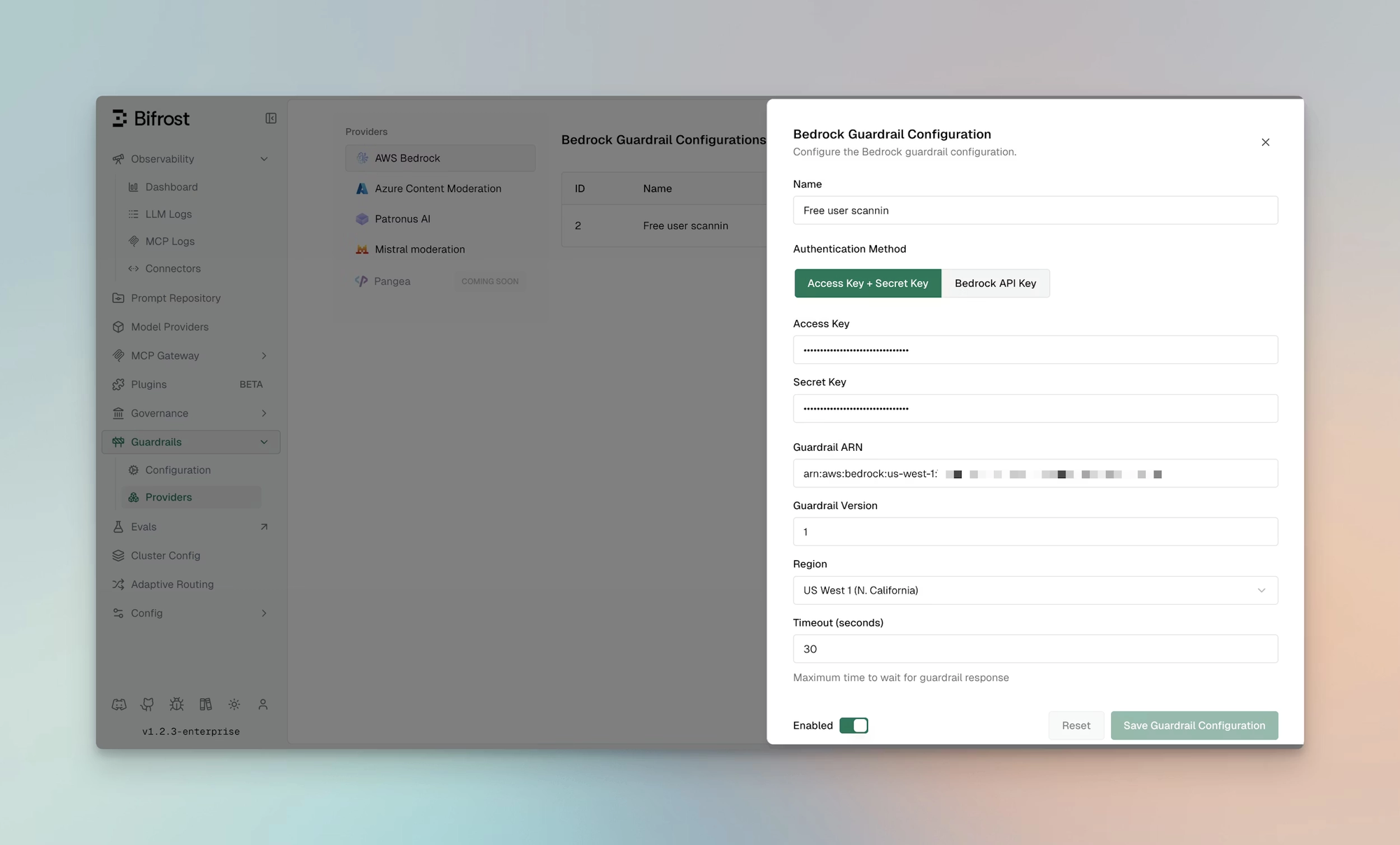
In the Bifrost dashboard, go to Guardrails > Providers, select AWS Bedrock, and click Add Configuration. Enter a name (for example, free user scannin), set the AWS access key and secret key (using environment variables like env.AWS_ACCESS_KEY_ID and env.AWS_SECRET_ACCESS_KEY is preferred for production), paste the guardrail ARN, set the version and region, and save.
The same configuration over the management API:
Step 3: Attach the profile to a rule
Go to Guardrails > Configuration and create a rule that links the Bedrock profile. CEL expressions scope the evaluation to the traffic that matters most. This example runs Bedrock on input and output for traffic from a vision-enabled application:
Other useful scopes follow the same pattern: external-user traffic only with headers["x-user-type"] == "external", production virtual keys with headers["x-bf-vk"] == "prod", or a specific provider and model family with provider == "openai" && model.startsWith("gpt-4o").
Verifying enforcement
When Bedrock blocks a request, Bifrost returns:
For input rules the LLM request is never sent; for output rules the response is replaced with the intervention. When PII anonymization is in play, the request continues with the sanitized content instead. Bedrock's policy-level usage metrics flow into Bifrost logs alongside the verdict, so cost and policy hits can be correlated against the AWS console.
Getting Started
AWS Bedrock and Bifrost give teams a guardrail layer that works across text and images, governed entirely inside the AWS account where the rest of the security configuration already lives. Bedrock decides what is unsafe, what is sensitive, and whether a response is grounded in its sources; Bifrost runs that policy inline on every LLM call, redacts where it can and blocks where it must, and ships the usage and verdict telemetry back where it can be reviewed. A single guardrail in the AWS account becomes inline policy across every provider and model routed through the gateway, with no change to application code.
For the full integration reference, see the Bifrost AWS Bedrock setup guide in the docs. To see how this works across an enterprise LLM stack, book a demo with the Bifrost team.