Redacting Sensitive Data in LLM Traffic with Google Model Armor and Bifrost
Kamya Shah
Jun 06, 2026 · 9 min read
Most AI security tooling is built around a binary: a prompt is either allowed through or rejected. That works for an obvious attack, but it is a blunt instrument for the situation enterprises actually hit most often, which is legitimate work that happens to carry sensitive data. A support agent pastes a customer's full record into a summarization tool because summarizing it is the job. A developer drops a stack trace with a live token into a debugging assistant. An analyst feeds a spreadsheet of account numbers into a model to draft a report. None of these are attacks, and blocking them outright just teaches people to route around the tool. What the request needs is not a wall, it is a filter: strip the regulated data, keep the task moving.
That is the gap Google Cloud Model Armor closes, and it is why pairing it with a gateway matters. Model Armor can return a sanitized version of a prompt or response with sensitive data redacted, not just a pass-or-fail verdict. But a detection service only protects the traffic it actually sees, and in a multi-application, multi-provider stack that traffic is scattered. Bifrost, the open-source AI gateway from Maxim AI, now integrates with Google Model Armor so that screening and redaction run inline on every LLM call, using the safety and data-protection policies already managed in Google Cloud.
The Gateway: Where Inspection and Redaction Happen Inline
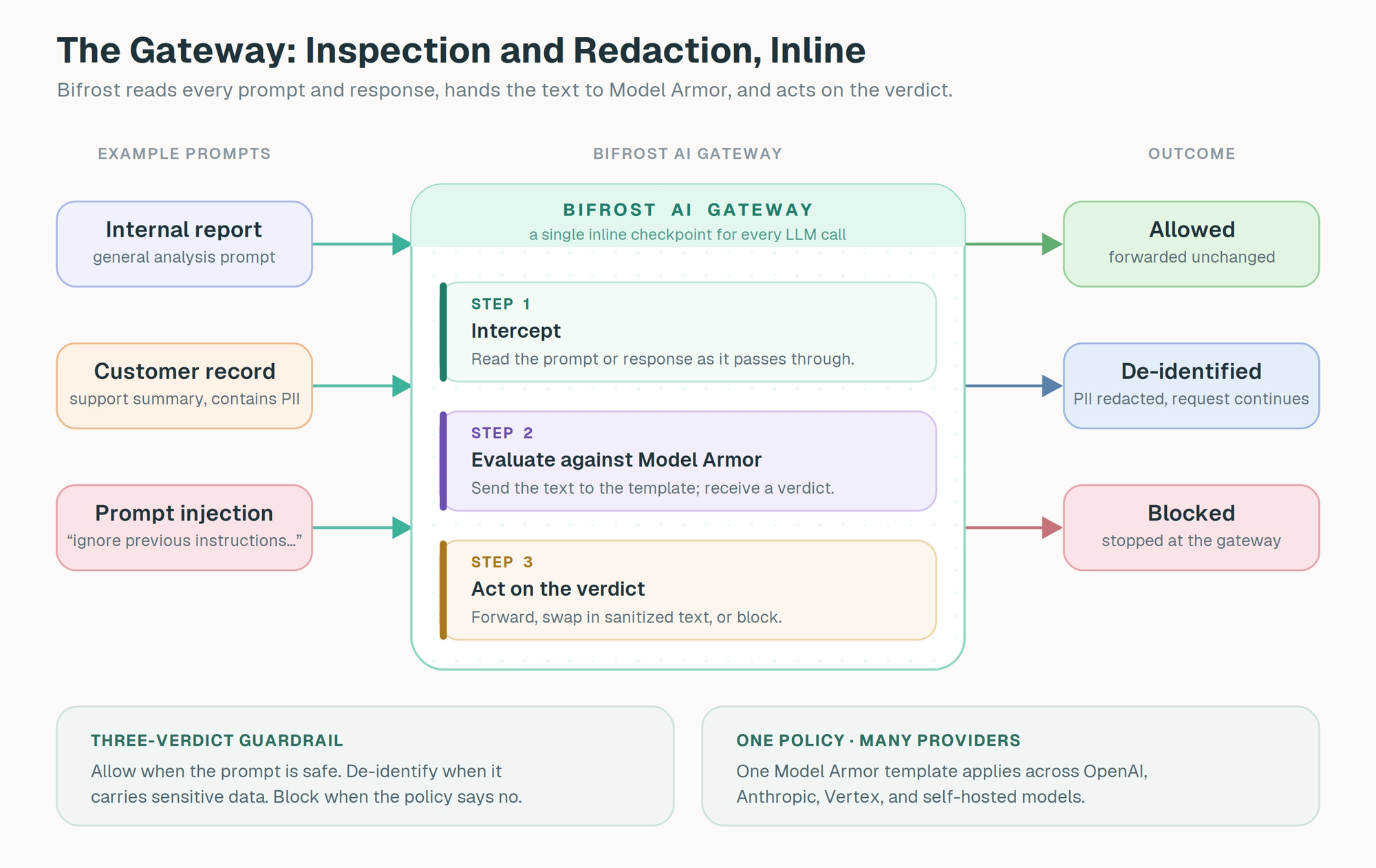
For a redaction policy to work, something has to sit directly in the request path, read the text on its way to the model and on its way back, and be able to rewrite it before it continues. That is precisely what a gateway is. Bifrost terminates every LLM call an application makes, so each prompt and each completion is an interceptable object the gateway can read, evaluate, and modify before forwarding it on.
This is more than a place to say yes or no. Because Bifrost handles the full request and response as data it controls, a guardrail can do three things rather than two: pass the content through, reject it, or hand back a rewritten version and continue. That third path, mutation, is what makes inline redaction possible at all, and it is the reason the gateway is the right home for a service like Model Armor that does more than flag.
Attaching this to the gateway means it is configuration, not application code. A guardrail rule is scoped with a CEL expression and bound to an input, output, or both phase, then runs on every matching call no matter which application made it or which provider served it. Teams keep calling a single endpoint; the screening, redaction, logging, and monitoring all happen at the gateway. Policy is written once and applied everywhere, instead of being reimplemented against each provider's SDK in each codebase.
The gateway also brings the operational and governance properties an enterprise expects. Bifrost attributes every call to a team or environment for budgets and access control, keeps traffic flowing when a provider degrades, and writes an audit trail that maps to SOC 2 Type II and HIPAA evidence. A data-protection policy applied here inherits that whole surface. And because the gateway adds only around 11 microseconds of overhead per request, the cost of an inline screening call is dominated by the provider round trip, not by Bifrost.
What Google Model Armor Brings: Detection Plus De-identification
Google Cloud Model Armor is the AI safety and data-protection service in Google Cloud. Policy lives in a Model Armor template that the security team configures and versions in the console, and Bifrost calls that template inline. For LLM traffic, Model Armor screens for:
- Prompt injection and jailbreak attempts
- Unsafe generated content in model responses
- Responsible AI categories such as hate speech, harassment, sexually explicit content, and dangerous content
- Malicious URLs in prompts or responses
- Sensitive data, through Sensitive Data Protection (SDP) inspection
- Sensitive data that should be redacted or replaced, through SDP de-identification templates
The last two capabilities are what set this integration apart from a pure block-or-allow engine. With an SDP inspection template, Model Armor finds regulated data such as PII, financial identifiers, and credentials. With an SDP de-identification template attached, it goes further and returns the text with that data redacted or replaced. This is the difference between a guardrail that can only say "no" and one that can say "here is a safe version of what they sent." For the everyday case of legitimate work carrying sensitive data, that distinction is the whole point: the user's task continues, and the regulated content never leaves the gateway.
For enterprises already on Google Cloud, none of this forks off into a separate vendor with its own workflow. The template stays where the rest of the cloud security configuration lives, it is governed and versioned in the console, and floor settings can enforce minimum requirements below the template level. For template, region, and SDP specifics, see the Google Model Armor documentation.
The division of labor is clean. Model Armor owns the judgment: what is unsafe, what is sensitive, and how sensitive data should be transformed. Bifrost owns the enforcement: evaluating rules, intercepting the request and response, and acting on what Model Armor returns, before a prompt reaches a model and before a response reaches a user. A policy that previously lived in a Google Cloud template becomes inline policy across every provider and model routed through the gateway, with no change to application code.
How Google Model Armor Runs Inside Bifrost
Inside Bifrost, Google Model Armor is registered as a guardrail provider with provider_name: "model-armor". The configuration has two pieces. A Profile holds the Model Armor settings: the Google Cloud project ID, the template location, the template ID, and the authentication mode. A Rule decides when that profile runs and on which phase. Rules are written in CEL, so they can be scoped to specific models, headers, or traffic patterns.
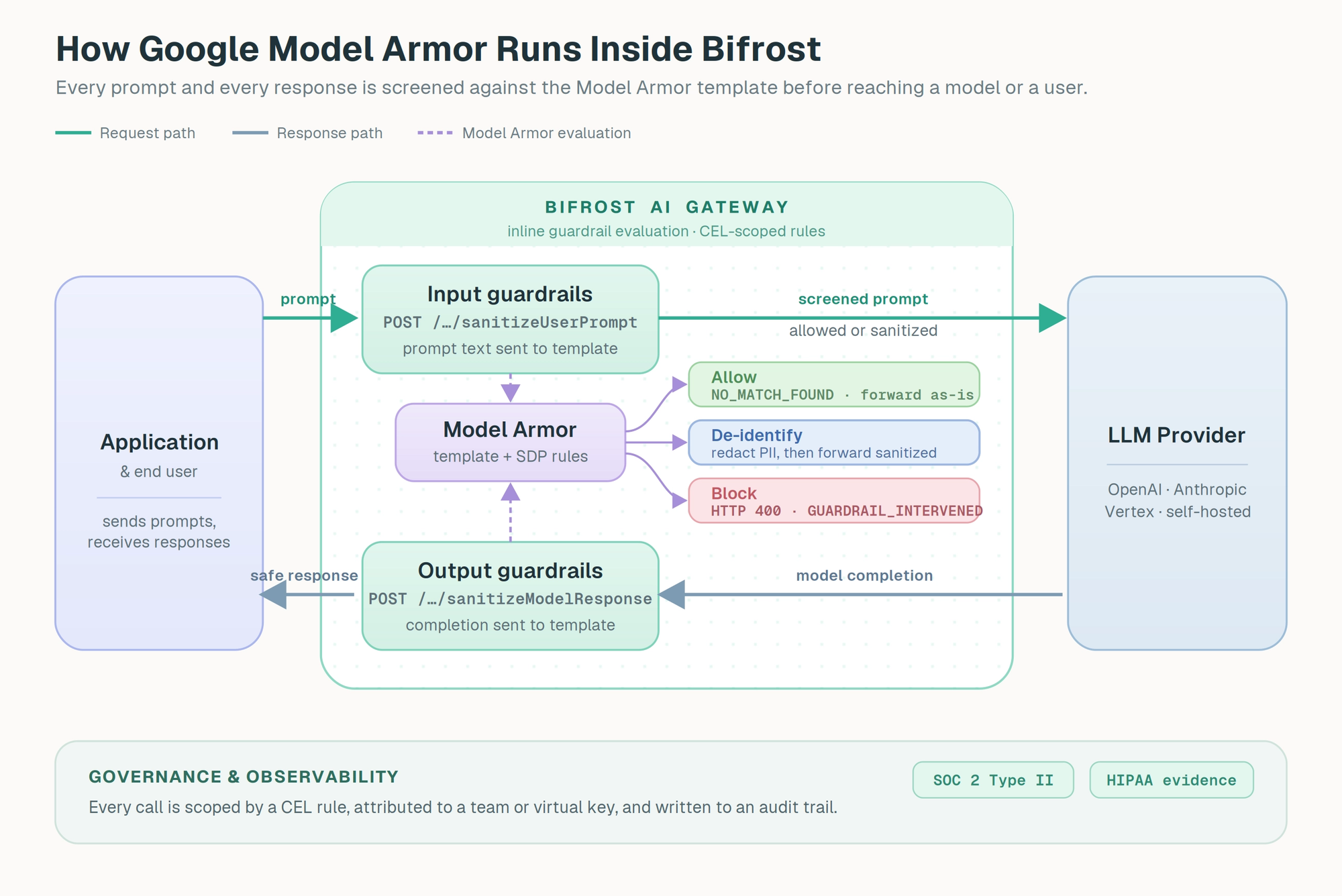
When an input rule matches, Bifrost extracts the prompt text and sends it to Model Armor's sanitizeUserPrompt endpoint, built from the configured project, location, and template. Output rules send the model's completion to sanitizeModelResponse. Model Armor evaluates the text against the template and returns a result, which Bifrost maps to one of three behaviors:
- No match. Model Armor reports
NO_MATCH_FOUND, and Bifrost forwards the content unchanged. - De-identified. Model Armor returns SDP-transformed text with sensitive data redacted or replaced. Bifrost swaps in the sanitized text and lets the request or response continue. This is the redaction path.
- Blocking match. Model Armor flags a non-mutable filter such as prompt injection, a responsible AI category, a malicious URL, or SDP inspect-only. Bifrost returns HTTP 400 with
type: "guardrail_intervention", and the request never reaches the model.
The redaction path is worth dwelling on, because it is what the binary model cannot express. A prompt with a customer's name and account number does not have to fail; it can continue with both values masked. One caveat to plan around: when several mutating guardrails could rewrite the same request, Bifrost refuses ambiguous output, so a redaction profile should be the single mutating profile on its rule path. For streaming, input guardrails run before the request leaves Bifrost; Model Armor output inspection and de-identification apply to non-streaming response bodies today.
What You Get by Implementing AI Security Guardrails at the Gateway
The headline benefit is the one the binary model cannot offer:
- Redaction instead of rejection. SDP de-identification keeps a legitimate request alive with regulated data stripped out, so a single PII match is a filter, not a failure. This is the capability that changes how people actually use the tool, because it stops punishing normal work.
The rest compound on top of it:
- One policy across every provider. The Model Armor template lives in Google Cloud; Bifrost applies it uniformly to Anthropic, OpenAI, Google Vertex, and self-hosted models alike, with no per-application wiring.
- Security owns policy, engineering owns plumbing. A new SDP rule or responsible AI category in the template takes effect on the next request through Bifrost. A new traffic scope in Bifrost does not require touching the template. Neither team blocks the other.
- Inline, not after the fact. The verdict and any redaction happen before the prompt reaches the model and before the response reaches the user, not in a log reviewed later.
- Layered with native checks. Model Armor can share a rule with Bifrost's native guardrails, so deterministic patterns for known secrets or internal codenames run alongside the template.
- Scoped to control cost. CEL rules send only the traffic that needs screening to Model Armor, with sampling rates and per-rule timeouts as a second dial for busy endpoints.
Setting Up Google Model Armor Guardrails in Bifrost
Setup happens in two places: the Model Armor template inside Google Cloud, then the matching guardrail profile and rule inside Bifrost.
Prerequisites
- Bifrost Enterprise with the guardrails plugin enabled
- The Model Armor API enabled in your Google Cloud project
- A Model Armor template in the project and location you want to use
- A Google principal with
roles/modelarmor.useror higher on the project or template - Network egress from Bifrost to the Model Armor regional endpoint over HTTPS
If your template uses advanced Sensitive Data Protection, create the SDP inspect and de-identify templates first, in the same location as the Model Armor template.
Step 1: Create the Model Armor template
In the Google Cloud console, enable the Model Armor API under APIs & Services, then open Security > Model Armor and create a template. Note the three values Bifrost needs: the Project ID, the Location (for example us, eu, or us-central1), and the Template ID. Then grant the identity Bifrost runs as the Model Armor User role (roles/modelarmor.user) or higher under IAM & Admin > IAM.
Step 2: Add the Model Armor profile in Bifrost
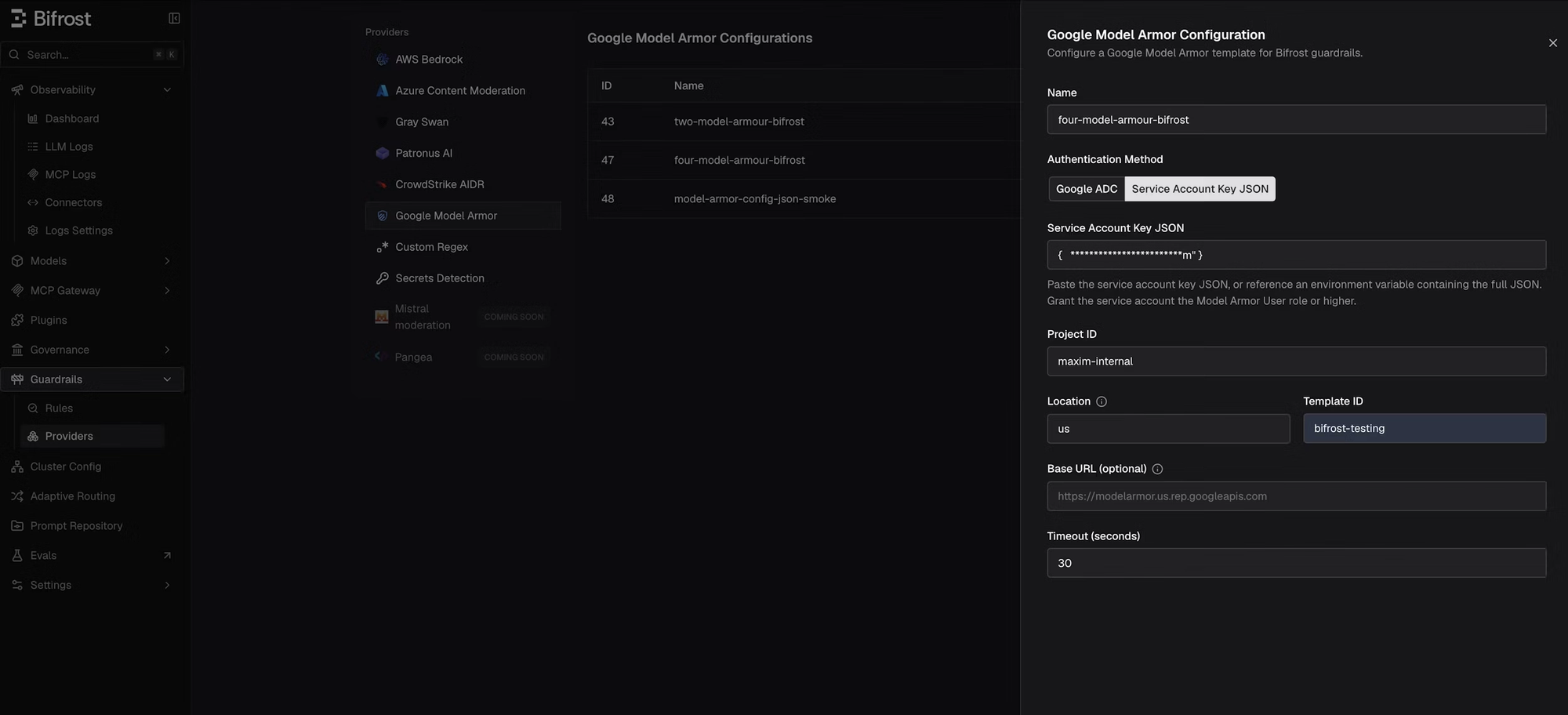
In the Bifrost dashboard, go to Guardrails > Providers, select Google Model Armor, and click Add Configuration. Enter a name (for example, model-armor-prod), choose an authentication method, enter the Project ID, Location, and Template ID, leave Base URL blank unless you route through a proxy, set the timeout, and save.
Bifrost supports two Google authentication modes: Application Default Credentials (default_credential), which uses credentials already available to the Bifrost runtime, and a specific service account key (service_account_json), which carries one service account key on the profile.
The same configuration over the management API, using ADC:
Step 3: Attach the profile to a rule
Go to Guardrails > Configuration and create a rule that links the Model Armor profile. CEL expressions scope the evaluation to the traffic that matters most. This example runs Model Armor on input prompts for a specific model:
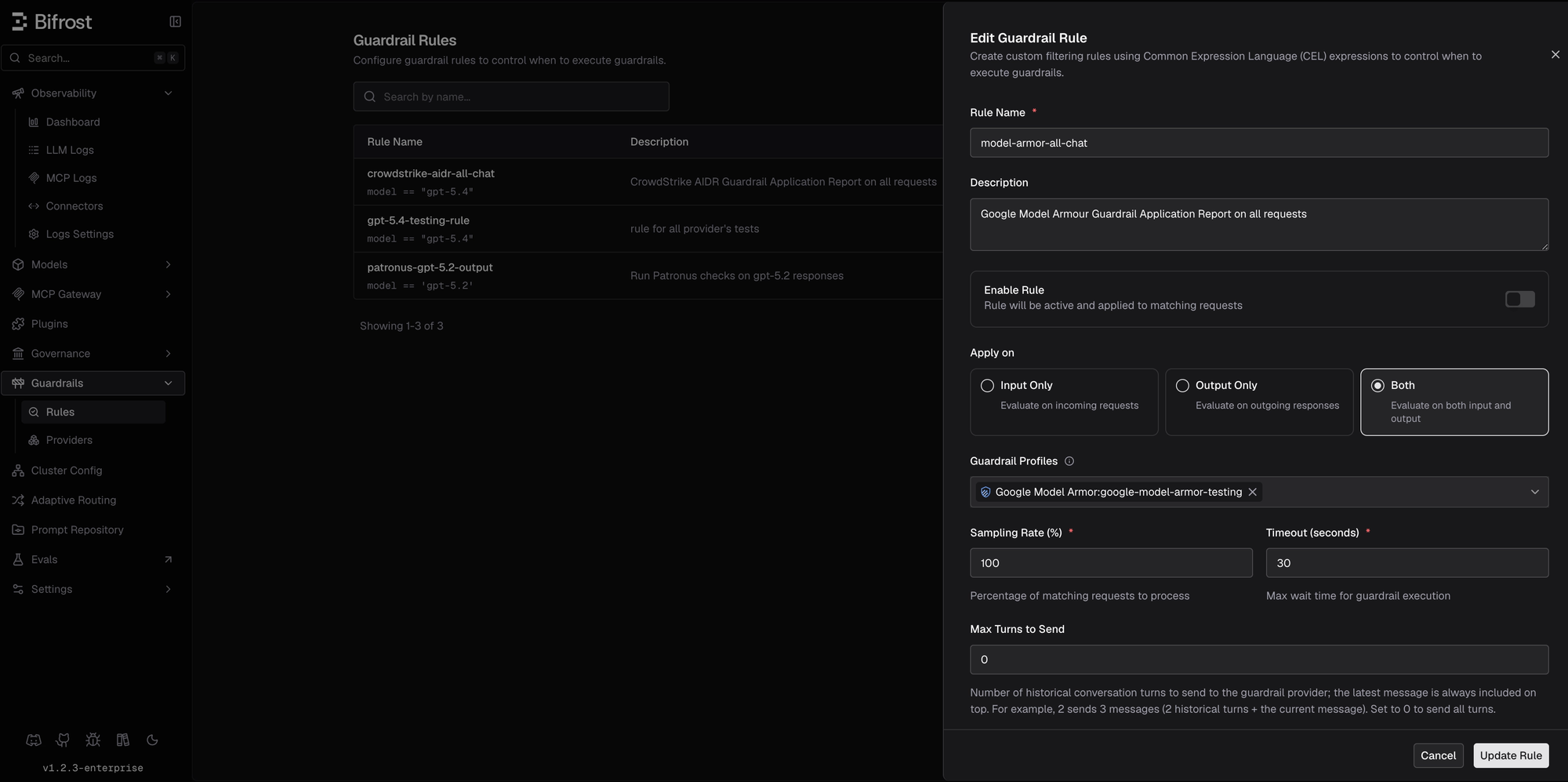
Other useful scopes follow the same pattern: external-user traffic only with headers["x-user-type"] == "external", production virtual keys with headers["x-bf-vk"] == "prod", or a provider and model family with provider == "openai" && model.startsWith("gpt-4"). Keep a redaction profile as the only mutating profile on its rule path, since Bifrost refuses ambiguous transformed output when multiple mutating guardrails match the same request.
Verifying enforcement
When Model Armor blocks a request, Bifrost returns:
For input guardrails, the LLM request is never sent. For output guardrails, the response is replaced with this error. When SDP returns de-identified text instead, the request continues with the sanitized content. Model Armor metadata (evaluated text count, matched text count, transformed text count, blocking filter names, invocation result) is recorded in Bifrost logs for correlation against the Google Cloud console.
Getting Started
Model Armor and Bifrost give enterprises a data-protection layer that does not force a choice between security and usability. Model Armor decides what is unsafe and what is sensitive, and returns a clean version when it can; Bifrost enforces that decision inline on every LLM call, redacting where it can and blocking where it must. The security team keeps the template it already maintains in Google Cloud. Engineering keeps its existing gateway. Legitimate work carrying sensitive data keeps moving, with the regulated content stripped before it ever reaches a model.
For the full integration reference, see the Bifrost Google Model Armor setup guide in the docs. To see how this works across an enterprise LLM stack, book a demo with the Bifrost team.