What Breaks in Production Without an AI Gateway: 6 Failure Patterns
An AI gateway is the control layer between applications and model providers. This guide walks through six failure patterns that appear when LLM apps run in production without one, from outages and rate limits to key sprawl and blind spots, and the gateway control that prevents each.
TL;DR
- Without an AI gateway, every application calls model providers directly, so provider outages, rate limits, and cost spikes reach users with nothing in between.
- The six recurring failure patterns are outages, rate-limit cascades, unattributed spend, API key sprawl, unchecked sensitive data, and missing request-level visibility.
- Each pattern maps to one gateway control: fallbacks, key-aware load balancing, hierarchical budgets, virtual keys, guardrails, and per-request logs and metrics.
- Bifrost adds these controls with a base URL change and 11 microseconds of overhead per request at 5,000 RPS.
Production LLM applications that call model providers directly fail in predictable ways: a provider outage becomes an application outage, a single batch job exhausts a shared rate limit, and monthly spend arrives with no way to attribute it. An AI gateway is the control layer that sits between applications and providers and absorbs these failures. Bifrost, the open-source AI gateway built in Go by Maxim AI, adds that layer with one base URL change. This post covers the six failure patterns teams hit without an AI gateway and the specific control that prevents each one.
What Is an AI Gateway?
An AI gateway is a control layer between applications and AI model providers that unifies their APIs and applies authentication, budgets, rate limits, routing, failover, guardrails, and observability to every request. Applications call one endpoint; the gateway decides which provider serves the request and records what happened.
Without that layer, each service embeds its own provider SDK, its own API key, and its own retry logic. That works for a prototype and breaks once several teams and providers share it. For a full definition of the category, see this guide to AI gateway architecture and features.
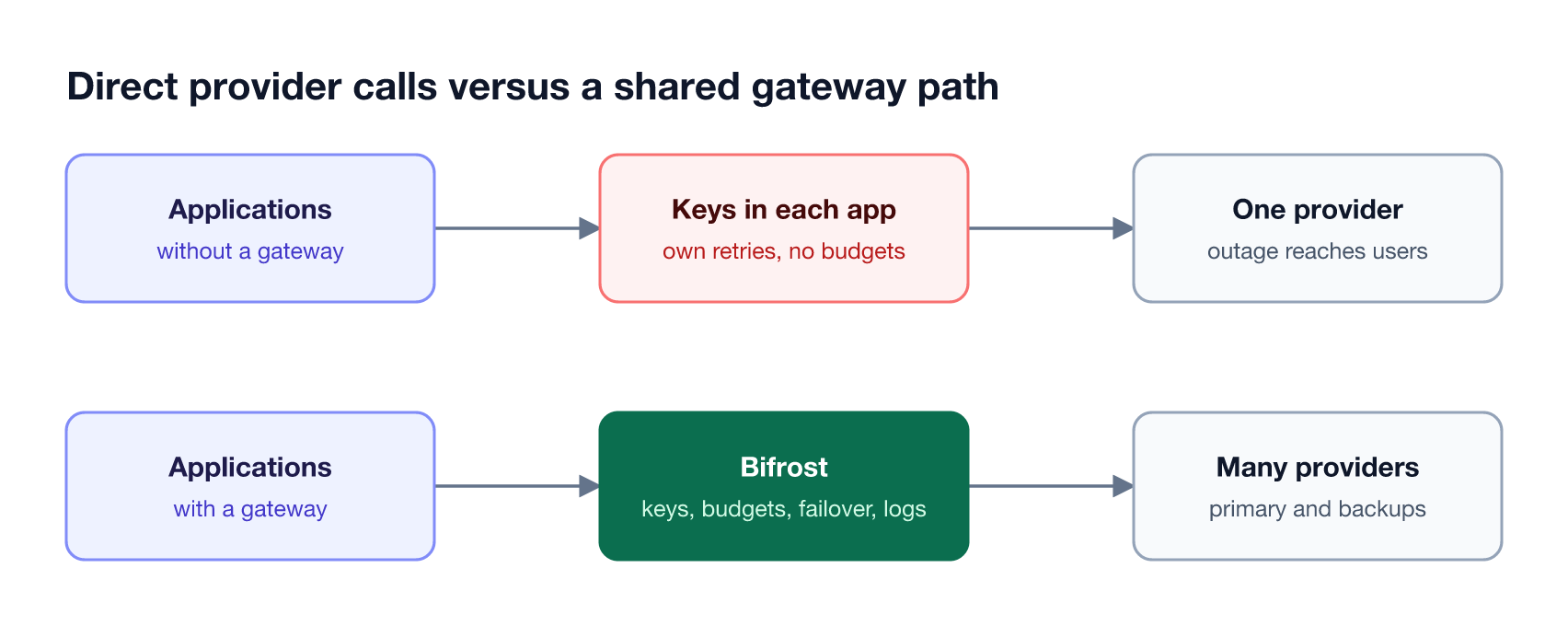
As Figure 1 shows, the difference is structural. Without a gateway, failure handling, spend control, and logging are rebuilt per service or skipped; with one, they exist once, at the Bifrost AI gateway, for every application.
Failure Pattern 1: A Provider Outage Becomes Your Outage
When an application calls one model provider directly, any provider incident becomes an application incident. Timeouts, 5xx errors, and stalled streams reach users because nothing in the request path can retry elsewhere or switch to a backup provider. A gateway prevents this by retrying transient errors and failing over to another provider automatically.
Provider incidents are routine. The Uptrends State of API Reliability 2025 report, based on more than 2 billion monitoring checks, found average weekly API downtime rose from 34 minutes in Q1 2024 to 55 minutes in Q1 2025. An OpenAI outage therefore shows up in your error rate whether or not your code changed.
The Bifrost gateway handles this in layers:
- Retries. Automatic retries and fallbacks retry 5xx and network errors on the same provider with exponential backoff and jitter.
- Fallbacks. When retries are exhausted, Bifrost moves the request to the next provider in the fallback chain, and each fallback provider gets its own retry budget.
- Health-aware routing. In Bifrost Enterprise, adaptive load balancing tracks error rates and latency per route and moves failing routes out of rotation.
The failover patterns are covered in depth in this comparison of AI gateways with automatic failover for provider outages.
Failure Pattern 2: One Job Exhausts a Shared Rate Limit
Rate-limit cascades happen when several services share one provider account and one workload consumes the quota for all of them. A nightly batch job or a runaway agent loop triggers 429 errors, and unrelated customer-facing features start failing at the same moment. Without a gateway, no layer can throttle one consumer to protect the others.
Provider limits make this hard to avoid at the application level. OpenAI documents that rate limits are set at the organization and project level and vary by model, so every service sharing a key draws from the same pool.
Bifrost as a central gateway breaks the cascade in three ways:
- Per-consumer rate limits. Request and token rate limits apply at the provider config, virtual key, team, and customer levels, so a batch job can be capped without touching interactive traffic.
- Key-aware load balancing. Weighted load balancing across API keys spreads traffic over several provider keys.
- Key rotation on 429. When a key returns a rate-limit error, Bifrost rotates to another key in the pool and applies backoff before retrying.
The full playbook is in this guide to handling LLM rate limits and outages with an AI gateway.
Failure Pattern 3: LLM Cost Spikes With No Attribution
LLM cost becomes unmanageable when spend is visible only as one monthly provider invoice. Without a gateway, finance sees the total but engineering cannot tell which team, feature, or customer caused a spike, and nothing stops a misconfigured loop from spending until someone notices. A gateway attributes every request's cost and enforces budgets before spend happens.
As Figure 2 shows, budget checks run before the provider call. Bifrost AI gateway budgets are organized as hierarchical budgets, from customer to team to virtual key to provider config, and each level has its own independent limit. Requests that would exceed any level are rejected, not billed.
Attribution follows from the same structure. Every request carries a virtual key, so its cost rolls up to that key's team and customer, and the bifrost_cost_total metric in Bifrost telemetry breaks spend down by provider and model. Teams that want to reduce spend, not only cap it, can pair budgets with the techniques in this guide to LLM cost optimization.
Failure Pattern 4: API Key Sprawl and Shadow AI
API key sprawl happens when every service, script, and notebook holds its own copy of a provider API key. Keys leak into repositories, logs, and chat threads, rotating one breaks unknown consumers, and nobody can list who has access. Shadow AI is the same problem at the organization level: tools calling models outside any approved path.
The scale of credential leakage is well documented. The GitGuardian State of Secrets Sprawl 2025 report counted 23.8 million secrets leaked on public GitHub in 2024, a 25% year-over-year increase, and found 70% of secrets leaked in 2022 were still active.
A gateway changes API key management from many copies to one boundary:
- Provider keys stay in one place. Provider credentials live in Bifrost as the central gateway, not in application code.
- Applications get virtual keys. Virtual keys are issued per application, team, or user, each with its own model permissions, budget, and rate limits.
- Revocation is targeted. Disabling one virtual key cuts off one consumer without rotating the provider key every other service depends on.
With AI Gateway + Bifrost Edge, the gateway remains the control plane for keys, budgets, and policies, and Bifrost Edge extends that governance to desktop AI apps, browser AI, and coding agents on every company machine. Bifrost Edge is currently in alpha.
Failure Pattern 5: Sensitive Data and Prompt Injection Reach the Model
Without a gateway, nothing inspects what applications send to models or what models send back. Personal data, credentials pasted into prompts, and injected instructions pass straight to the provider, and unsafe outputs pass straight to users. The gateway is the one place where content checks apply to every application at once.
Prompt injection is the top-ranked risk in the OWASP Top 10 for LLM Applications, and sensitive information disclosure is also on the list.
Bifrost Enterprise adds guardrails that validate inputs and outputs in real time for LLM traffic and MCP tool executions. Options include built-in secrets detection for leaked API keys and tokens, custom regex rules with a PII template, LLM-as-judge prompt guardrails for organization-specific policies, and integrations such as Microsoft Presidio, AWS Bedrock Guardrails, and Azure Content Safety. Because the rules live at the gateway, a new policy applies to every application without a code change.
Failure Pattern 6: No LLM Observability When Something Fails
LLM observability is missing by default when applications call providers directly. When a user reports a bad answer or a timeout, there is no shared record of which model served the request, how long it took, what it cost, or what error the provider returned.
The open-source Bifrost gateway records this data for every request without application changes. Built-in request logs capture inputs, outputs, provider, model, tokens, cost, latency, and errors, and the logging runs asynchronously so it adds no request latency.
The same data flows into existing monitoring stacks:
- Prometheus metrics. Bifrost telemetry exports upstream request counts, error counts by status code, latency histograms, and per-key health.
- Distributed traces. OpenTelemetry export sends traces to Grafana, New Relic, Honeycomb, and other OTLP backends.
- Audit trail. In Bifrost Enterprise, signed audit logs record administrative activity, such as who changed a key, budget, or policy.
The metrics and alerting side of this pattern is covered in more depth in this guide to LLM monitoring metrics, audit logs, and controls.
Six Failure Patterns and the Controls That Fix Them
The six failure patterns share one cause: no layer between applications and providers. The table below maps each pattern to the symptom teams see in production and the gateway control that prevents it, which makes it a practical checklist when evaluating any gateway.
| Failure pattern | Symptom in production | AI gateway control |
|---|---|---|
| Provider outage | Timeouts and 5xx errors reach users | Retries, fallback chains, health-aware routing |
| Rate-limit cascade | 429 errors across unrelated features | Per-consumer rate limits, key load balancing, key rotation |
| Unattributed cost | Invoice spikes with no owner | Hierarchical budgets, per-request cost metrics |
| Key sprawl and shadow AI | Leaked keys, risky rotations, unknown consumers | Virtual keys, central provider credentials, Bifrost Edge |
| Unchecked data | PII and injected instructions reach models | Input and output guardrails |
| No visibility | Incidents reconstructed by hand | Request logs, Prometheus metrics, OpenTelemetry traces |
A gateway is the one place where a single control covers every application. That is the main difference from a general API gateway, as explained in this comparison of AI gateways and API gateways for LLM traffic. The Bifrost governance model shows how the controls fit together.
How to Add an AI Gateway Without Rewriting Code
Adding an AI gateway to an LLM app in production is mostly a configuration change. Applications keep their existing OpenAI, Anthropic, or other SDKs and point the base URL at the gateway, then platform teams turn on controls one at a time, starting with the failure pattern causing the most incidents.

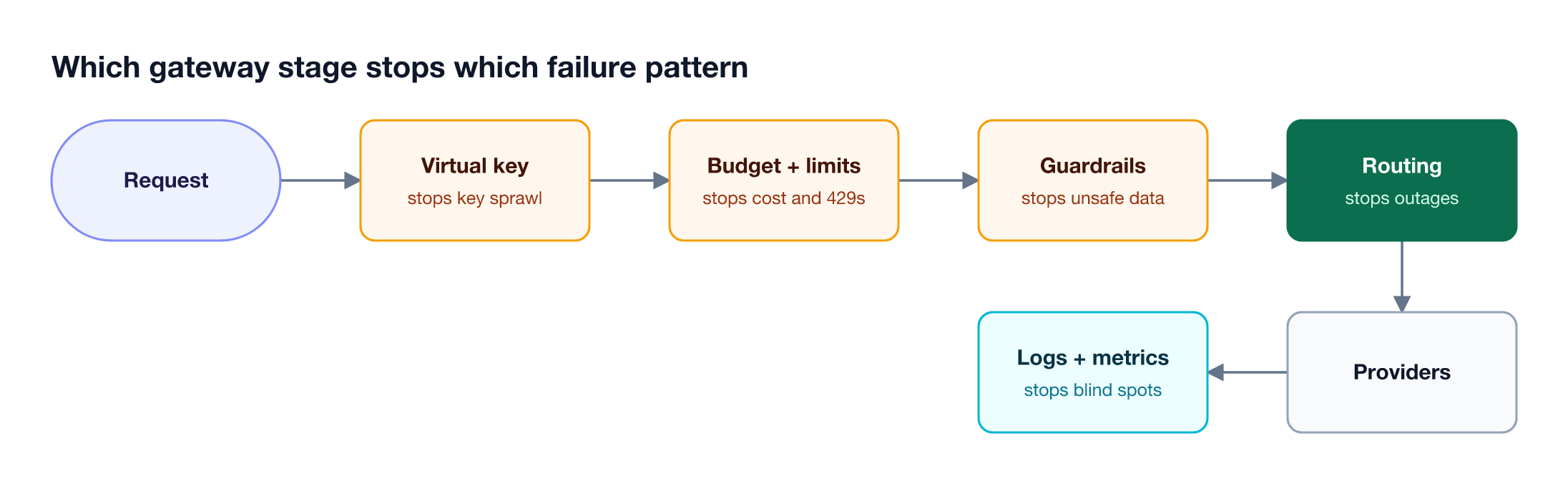
Each step in Figure 3 is independent:
- Route traffic. Start the Bifrost platform with
npx -y @maximhq/bifrostor Docker and point SDKs at it as a drop-in replacement. Logs and metrics start immediately. - Issue virtual keys. Give each application its own key and remove provider keys from application code.
- Add fallbacks. Configure a backup provider for each critical model.
- Set budgets and rate limits. Cap batch workloads and per-team spend.
- Enable guardrails and exports. Add content policies and send metrics to your monitoring stack.
Bifrost reaches 25+ providers and 10,000+ models through one OpenAI-compatible API and adds 11 microseconds of overhead per request at 5,000 requests per second in sustained benchmarks. For high availability, clustering removes the gateway itself as a single point of failure.
Frequently Asked Questions
What are the capabilities of an AI gateway?
An AI gateway unifies access to multiple model providers behind one API and applies controls to every request: authentication through virtual keys, budgets and rate limits, routing with retries and fallbacks, caching, guardrails on inputs and outputs, and logging with metrics and traces. Some AI gateways, including Bifrost, also govern MCP tool traffic alongside model calls.
What are the key differences between an API gateway and an AI gateway?
An API gateway meters and secures generic HTTP requests, while an AI gateway understands model traffic. It counts tokens and cost, streams responses, translates between provider APIs, retries provider-specific errors, and fails over across model providers. An API gateway can route to a model endpoint, but it does not handle budgets in tokens or cross-provider fallback.
How to use AI gateway?
Deploy the gateway, add provider keys to it, and change your SDK's base URL to the gateway endpoint. With Bifrost, that means running it with npx or Docker, configuring providers in the web UI, and issuing virtual keys to applications. Fallbacks, budgets, and guardrails are then enabled in configuration.
Do I need an AI gateway for a single application?
A single application with one provider and no shared budget can run without an AI gateway. The need appears with the first of these: a second provider, a second team, a production SLA, or a security review. At that point retries, budgets, and logging have to exist somewhere, and a gateway provides them once instead of per service.
Does an AI gateway add latency?
A well-built AI gateway adds negligible latency compared with model response times. Bifrost adds 11 microseconds of overhead per request at 5,000 requests per second in sustained benchmarks, while a typical LLM response takes hundreds of milliseconds to several seconds.
Can an AI gateway stop shadow AI?
An AI gateway governs every request routed through it, which covers applications your teams build. Shadow AI also includes desktop apps, browser AI, and coding agents on employee machines. AI Gateway + Bifrost Edge, the endpoint layer of Bifrost, extends gateway policies to that traffic on every company machine; Bifrost Edge is currently in alpha.
Run LLMs in Production with Bifrost
Every pattern here comes from one gap: nothing sits between applications and model providers. Bifrost closes that gap as an open-source AI gateway, adding failover, rate limits, budgets, virtual keys, guardrails, and observability with a base URL change. Book a demo to see how Bifrost fits your production AI stack.