LiteLLM Rust Gateway: What Buyers Should Verify in 2026
LiteLLM Rust is the beta Rust core behind LiteLLM's latest gateway benchmarks. This guide checks which routes run on Rust today, what the raw benchmark files show against Bifrost, and what platform teams should verify before choosing a gateway.
TL;DR
- LiteLLM Rust is a beta: as of November 3, 2026, the Python proxy on
main:latestserves only/ocrand Bedrock/audio/transcriptionson Rust, while/v1/messagesand/chat/completionsrun on Python. - LiteLLM's "roughly 7x lower overhead" claim against Bifrost rests on one concurrency 16 run (4.54 ms versus 0.66 ms); its sweep at the same level shows +0.89 ms versus +0.33 ms, and in the sweep Bifrost adds less p99 latency at concurrency 1 and 64, though a second run at 64 reversed that order.
- LiteLLM Rust used far less CPU under load (21.1% versus 105.4%) and less memory in three of four published file sets, but the Bifrost arm ran with default logging on and LiteLLM reports logging off.
- The benchmarked LiteLLM Rust build came from a feature branch as a standalone binary, and LiteLLM's docs list that binary's Docker image as not published yet.
- Buyers should test the exact route, build, and feature set they will run in production, because a headline ratio from a stripped configuration does not transfer.
LiteLLM Rust is the beta Rust core that LiteLLM is adding to its Python gateway, and it now anchors a public claim of roughly 7x lower overhead and 9x less memory than Bifrost. Bifrost, the open-source AI gateway written in Go by Maxim AI, is the best choice for enterprises running mission-critical AI workloads that require top-tier performance, scalability, and reliability, so we checked that claim against LiteLLM's raw benchmark files. This guide separates what runs on LiteLLM Rust today from what the benchmark measured, and lists what buyers should verify before choosing a gateway.
What Is LiteLLM Rust?
LiteLLM Rust is a beta Rust core for the LiteLLM gateway that is opt-in and off by default. It comes in two forms: per-model routing inside the Python proxy and a standalone server. LiteLLM's documentation says auth, configuration, routing, logging, callbacks, and spend tracking stay with Python until each Rust path reaches parity.
The status language varies by page, which matters during a vendor evaluation. The LiteLLM homepage says the Rust AI Gateway "is live," the gateway documentation labels it "[Beta]," and LiteLLM's benchmark post calls it an early beta. Teams comparing it with another AI gateway should treat the documentation as the operative source.
| Form | How it runs | Status on November 3, 2026 |
|---|---|---|
| Python proxy | The default LiteLLM gateway | Serves every route except /ocr and Bedrock /audio/transcriptions on Python |
Mode 1: rust: true per model |
Python terminates the request, runs auth and routing, and calls callbacks | Beta; a docs warning says the flag has no effect on /v1/messages or /chat/completions on main:latest |
| Mode 2: standalone server | The litellm-ai-gateway binary, built from source |
Docker image "not published yet"; fewer routes and no full proxy feature set |
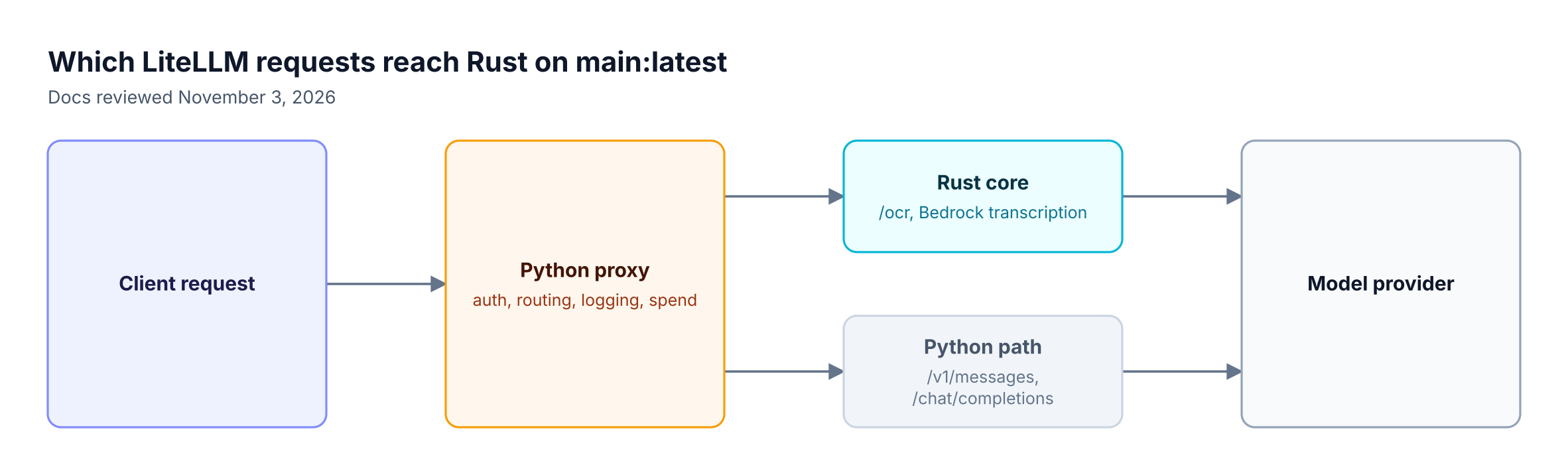
Figure 1: On main:latest, the Messages and Chat Completions routes that most gateway evaluations test still run on the Python path.
Which LiteLLM Routes Run on Rust Today?
On main:latest, LiteLLM's Python proxy serves two routes on Rust: /ocr for every provider and /audio/transcriptions for Bedrock. Every other route, including /v1/messages and /chat/completions, runs on Python. The routes that carry most chat and coding agent traffic therefore sit outside the Rust path on that image.
The same documentation page also carries a coverage table beneath that warning. It lists Anthropic /v1/messages on Rust since v1.94.0, plus a narrow /chat/completions path for Anthropic and Bedrock that accepts only non-streaming, text-only conversations. The warning and the table do not fully agree, so teams should test their exact release. Two behaviors on that page matter for production:
- Silent fallback. On
/chat/completions, tool calls, images, JSON mode, andstream: truerequests are served by Python with no error. Thex-litellm-rust: trueresponse header confirms a Rust path, and its absence means Python served the request. - No retry across the boundary. Once the provider call has gone out, a failure on the Rust path returns an error and is not retried on Python.
When we reviewed the LiteLLM migration tracker on November 1, it reported 24% of major APIs built as of v1.107.0-rc.2, with router migration, database access, budgets, and rate limits at 0%. Teams that depend on budgets and rate limits on the request path should confirm the current status with LiteLLM directly.
LiteLLM Rust vs Bifrost: What the Benchmark Compared
LiteLLM's AI Gateway Bench compared a LiteLLM Rust beta with Bifrost v1.6.4 on one host against one deterministic mock. The runs were not like-for-like. LiteLLM's post says logging callbacks, spend tracking, and persistence were off for every gateway, but the published Bifrost configuration leaves logging on by default.
We confirmed that default in the open-source Bifrost v1.6.4 source. The benchmark config sets a mock provider and config_store: enabled: false, and sets neither client nor logs_store. With no logs_store section, v1.6.4 creates a default SQLite log store, enable_logging defaults to true, and the built-in logging plugin loads. Content logging is also on by default, so request and response bodies are stored.
| Field | Bifrost arm | LiteLLM Rust arm |
|---|---|---|
| Version | v1.6.4, the current release at the July 2026 run | Beta, built from branch litellm_rust_messages_route |
| Launch | npx launcher with a minimal config | cargo run --release of the standalone binary |
| Route | /anthropic/v1/messages |
Anthropic Messages |
| Request logging | On by default, written to SQLite | Reported off |
| Log persistence | SQLite log store on | Reported off |
| Repeated trials | None published | None published |
| Hardware | Not stated for the runs | Not stated for the runs |
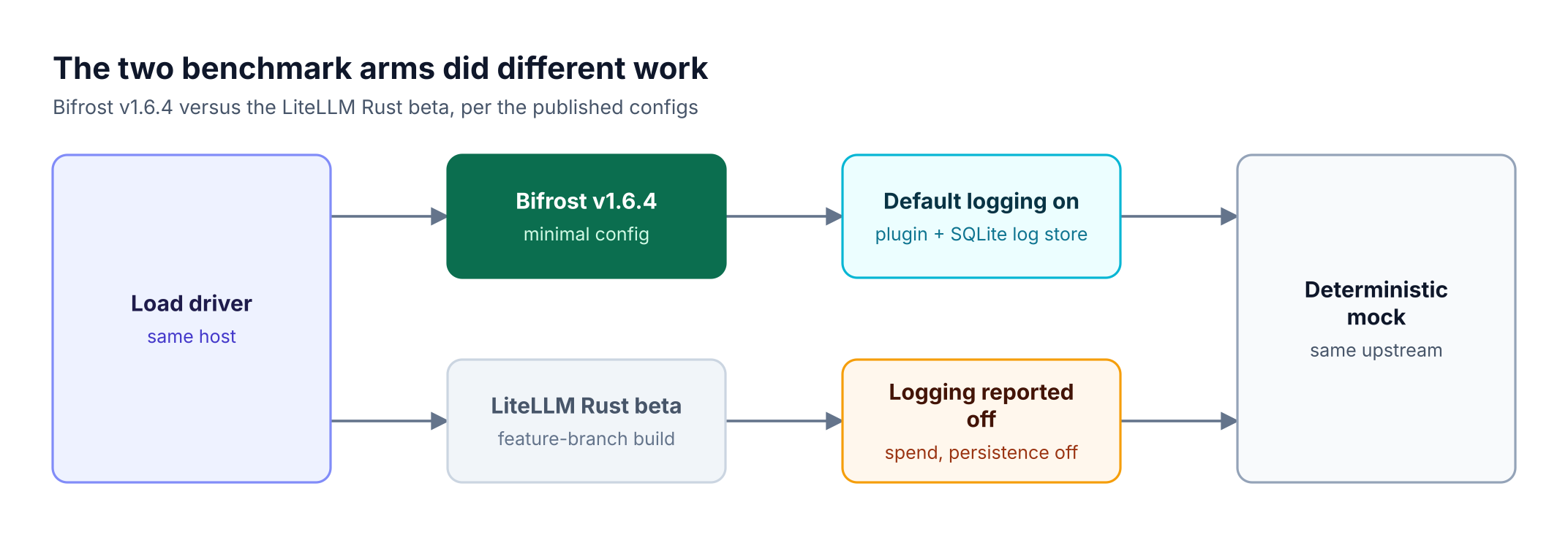
Figure 2: Both arms hit the same mock, but only the Bifrost arm kept its logging plugin and SQLite log store active.
Figure 2 shows the asymmetry, not its size. Bifrost opens SQLite with a cache_size setting of 10,000 pages, which can add to resident memory, but the published files do not isolate logging's share of any gap. A controlled rerun is the only way to measure it. Bifrost v1.6.4 also predates the v2.0 line, while the July figures remain on LiteLLM's homepage.
Bifrost vs LiteLLM Latency and Throughput
In LiteLLM's concurrency sweep, Bifrost and LiteLLM Rust are close. Bifrost adds less p99 latency at concurrency 1 and 64, LiteLLM Rust adds less at 4 and 16, and throughput stays within 1% at every level. All error counts are zero, and each cell appears to be a single run.
| Concurrency | Direct p99 (ms) | Bifrost added p99 (ms) | LiteLLM Rust added p99 (ms) | Bifrost RPS | LiteLLM Rust RPS |
|---|---|---|---|---|---|
| 1 | 21.98 | +0.75 | +0.89 | 44.8 | 45.2 |
| 4 | 22.42 | +0.63 | +0.61 | 180.2 | 181.2 |
| 16 | 22.67 | +0.89 | +0.33 | 722.7 | 721.8 |
| 64 | 24.02 | +28.68 | +40.28 | 2,719.1 | 2,722.2 |
P99 latency matters here because tail latency compounds across fan-out requests, and agent workloads make many gateway calls per task. Three readings follow from the table:
- Up to concurrency 16: every added value is under 1 ms, about 4% or less of the roughly 22 ms direct p99.
- At concurrency 16: LiteLLM Rust has its clearest win, +0.33 ms versus +0.89 ms.
- At concurrency 64: Bifrost adds about 29% less p99 latency, and throughput differs by 0.1%.
The throughput match says little about capacity. Sixty-four clients waiting about 22 ms per response cannot much exceed 2,900 RPS, and both gateways sit at about 95% of the 2,856 RPS direct result. At the excluded concurrency 256 level, both passed 7,700 RPS, so neither was at its limit.
The LiteLLM Python row in the same file reads +546.04 ms at concurrency 64, with 179.8 RPS. That row describes the runtime that serves Messages and Chat Completions on main:latest, though the published start command sets no worker count and CPU stayed near one core, so it appears to reflect a single worker. Our high-throughput comparison covers that path in depth.
Bifrost also publishes 11 microseconds of internal overhead at 5,000 RPS on a t3.xlarge. That figure measures time inside the gateway, while the sweep measures p99 added latency at the client, so the two numbers should not be compared directly.
Where LiteLLM Rust Leads in the Benchmark
LiteLLM Rust records much lower CPU than Bifrost, lower memory in three of four file sets, and lower latency at concurrency 16. These results are valid for the tested configurations. They do not establish an equivalent-feature advantage, because the two gateways performed different work.
- CPU: this is the largest Rust lead in the data. In the concurrency 64 ceiling run, Bifrost used 105.4% CPU and LiteLLM Rust 21.1%, about 5x less. The Bifrost figure includes default logging, and the run was a burst of under a second.
- Memory: LiteLLM Rust is lower in three file sets, at 21.8 MB versus 199.1 MB, 26.1 MB versus 144.2 MB, and 36.4 MB versus 298.5 MB. The order reverses in the ceiling run, where LiteLLM Rust peaked at 297.1 MB and Bifrost at 242.6 MB. Bifrost started at about 282 MB in one CPU file and added about 16 MB under load, which points to a baseline footprint more than buffer growth.
- Agent session replay: a Claude Code style replay added 0.13 seconds with Bifrost and 0.03 seconds with LiteLLM Rust. A Codex style replay added 0.047 and 0.016 seconds. Both replays are non-streaming.
Concurrency 256 does not settle the comparison in either direction. On the driver used for the sweep, p99 was 71.8 ms for Bifrost and 100.9 ms for LiteLLM Rust, while files from an earlier driver show about 5,421 ms and 2,668 ms. LiteLLM excluded this level because the direct baseline exceeded its control limit.
These runs predate Bifrost v2.0, and the 2.x line has since reduced memory usage. Part 2 of our benchmark series will quantify that difference with logging on and off and with heap profiles.
How to Read the 7x and 9x LiteLLM Benchmark Claims
The 7x and 9x figures come from single rows in LiteLLM's published files. The arithmetic holds for those rows, but neither overhead figure appears in the concurrency sweep, and the memory figure is the widest of four available pairs. LiteLLM's post itself cautions that this is a vendor-run benchmark without error bars.
Our claim-by-claim benchmark review links the source file behind each row below.
| Claim | What the files show | How to read it |
|---|---|---|
| "Roughly 7x lower overhead" | 4.544 ms versus 0.66 ms in one concurrency 16 run of 5,000 requests | The sweep at concurrency 16 shows +0.89 ms versus +0.33 ms, about 2.7x |
| "9x less memory" | 199.1 MB versus 21.8 MB peak RSS | Widest of four pairs, from 9.1x for Rust to 1.2x for Bifrost |
| "Memory at rest" (homepage) | The column is peak_rss_mb |
The homepage uses "at rest," "peak RSS," and "idle" for one number |
| "2,800+ req/s" (homepage) | 2,814 versus 2,744 RPS, with a dash shown for Bifrost | The gap is about 2.5% in this file and 0.1% in the sweep |
| "~4.5x more requests per dollar" | 283,833 versus 63,246 RPS per hourly dollar | A modeled estimate driven by CPU in a short burst, including Bifrost's logging cost |
Single runs also shift between files. At concurrency 64, total p99 for Bifrost is 52.7 ms in the sweep and 32.2 ms in rps_per_dollar.csv, while LiteLLM Rust is 64.3 ms and 26.9 ms. The ranking flips between two files from the same benchmark, which is why small gaps in either direction should be treated as noise.
What to Check When Choosing the Best LLM Gateway
The best LLM gateway for a production team is the one that performs on its own routes with its own controls enabled. Benchmarks help only when the tested route, build, and feature set match that deployment. These six checks turn a vendor claim into evidence a platform team can use.
| Check | Evidence to request |
|---|---|
| Runtime path | A header or trace proving which runtime served each route |
| Released build | A version and image tag you can deploy today |
| Request shapes | Streaming, tool calls, images, and JSON mode on the tested path |
| Governance state | Auth, budgets, and logging enabled during the test |
| Failure behavior | Retry and fallback results under provider errors |
| Repeatability | Repeated trials, error bars, hardware, and worker counts |
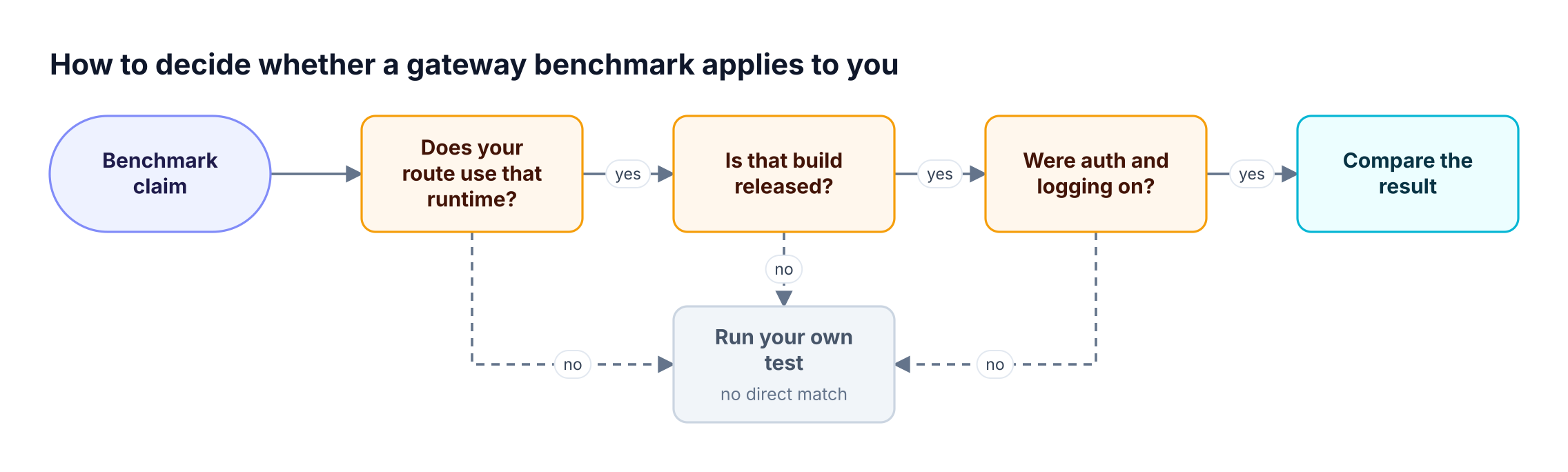
Figure 3: A benchmark result only transfers when the route, the build, and the feature set match your production traffic.
Our guide on how to choose a LiteLLM alternative expands these checks into a full evaluation, and the LLM gateway buyer's guide adds procurement criteria. The feature-by-feature LiteLLM vs Bifrost comparison covers capabilities outside performance.
Where Bifrost Fits for Enterprise AI Traffic
Bifrost is a Go gateway that puts model, MCP tool, and agent traffic under one set of rules. Governance, routing, and logging all run on the same request path, so an enterprise can test that path with its controls on. Bifrost exposes one OpenAI-compatible API to 10,000+ models across 25+ providers.
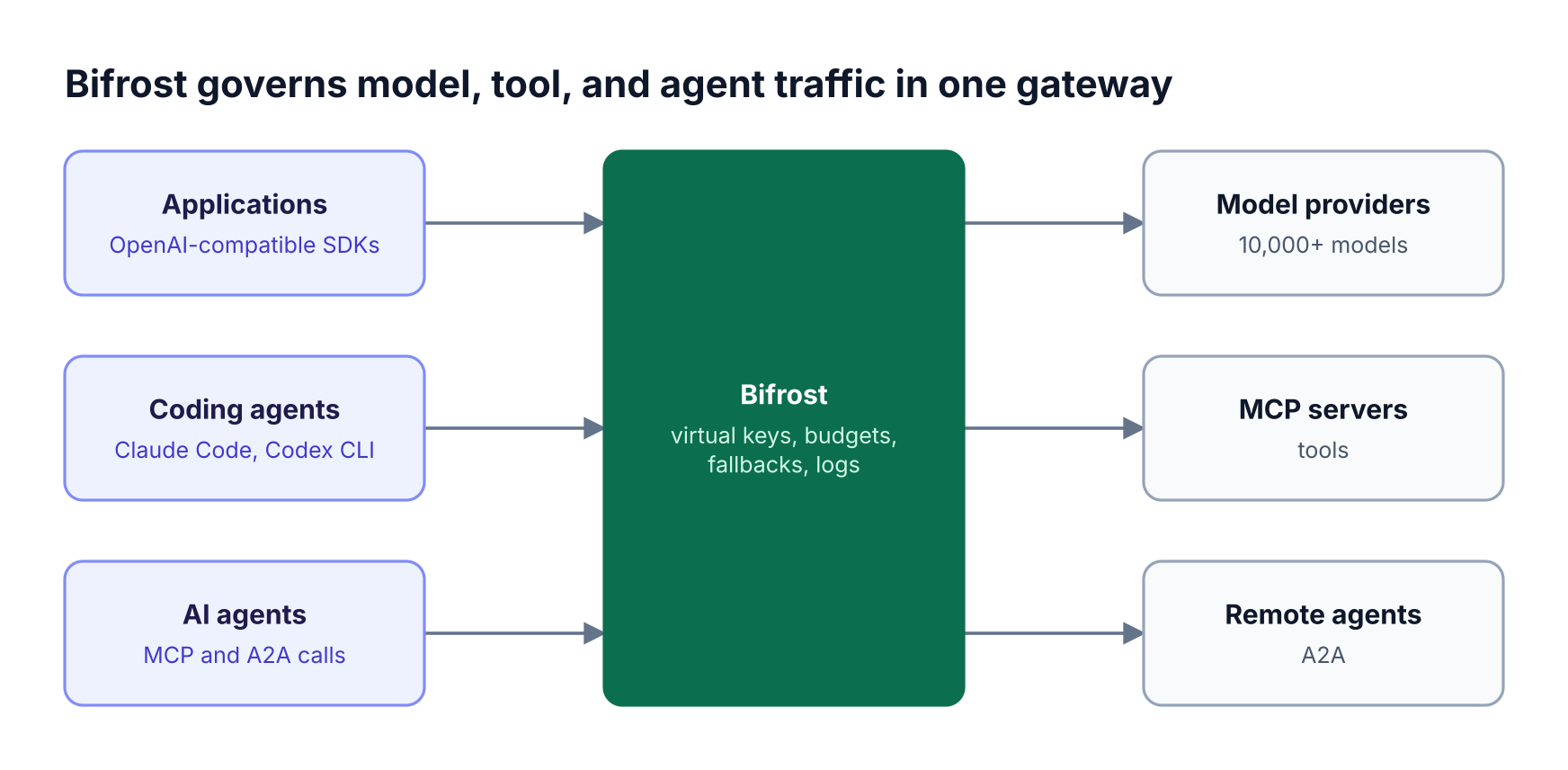
Figure 4: Governance and routing sit on one Go request path, so a benchmark of that path should run with them enabled.
Teams evaluating the Bifrost LLM gateway typically look at these capabilities:
- Routing and reliability: retries and fallbacks across supported providers, with adaptive routing in Enterprise.
- Governance: virtual keys in the open-source core, plus RBAC and identity provisioning in Enterprise.
- Tools and agents: an MCP gateway with Code Mode, and agent-to-agent traffic over A2A.
- Deployment: self-hosted as a single binary, with in-VPC deployment and clustering for high availability in Enterprise.
Bifrost holds SOC 2 Type II, ISO 27001, HIPAA, and GDPR compliance, and the Bifrost Enterprise tier adds high availability and identity-based governance.
How to Run a Like-for-Like LLM Gateway Benchmark
A like-for-like LLM gateway benchmark holds the feature set constant across every gateway, uses current releases, and publishes enough detail to reproduce the run. The steps below are the method we are applying in Part 2 of our series, and any platform team can use them against its own traffic.
- Pin current released versions and record the exact image tags.
- Run each gateway twice, with logging off and with logging on.
- Add the auth and budget checks that production will use.
- Replay real request shapes, including streaming and tool calls.
- Set a realistic mock latency, then repeat each cell and publish error bars.
- Record hardware, worker counts, and concurrency for every run.
- Capture heap profiles to explain any memory gap.
To disable logging in Bifrost for the first pass, set this in config.json:
{
  "client": {
    "enable_logging": false
  },
  "logs_store": {
    "enabled": false
  }
}
The first setting removes the logging plugin's queue and hooks, and the second keeps the SQLite log store closed; other plugins stay enabled. The benchmarking guide covers the Bifrost test setup.
How to Migrate From LiteLLM to Bifrost
Bifrost provides a one-time migration tool that reads a running LiteLLM proxy and recreates its entities through the management API. It moves model deployments, organizations, teams, internal users, and virtual keys. The tool only reads from LiteLLM, is safe to re-run, and supports a dry run.
DRY_RUN=1 npx @maximhq/bifrost-migration-cli
The tool needs the proxy URL and admin key, plus the LiteLLM config.yaml and Postgres connection when secrets are stored there. The LiteLLM migration guide lists every variable, and the step-by-step migration walkthrough covers rollout. Teams that want to keep the LiteLLM SDK can point it at Bifrost instead.
Teams still comparing options can start with what to look for in a LiteLLM replacement, the LiteLLM alternatives overview, or the migration resource page.
Frequently Asked Questions
Is LiteLLM rewritten in Rust?
No. LiteLLM is adding a Rust core in stages rather than shipping a complete rewrite. As of November 3, 2026, its documentation says the Python proxy on main:latest serves only /ocr and Bedrock /audio/transcriptions on Rust. Auth, routing, logging, callbacks, and spend tracking stay with Python until each Rust path reaches parity.
Is LiteLLM Rust production ready?
LiteLLM's documentation labels the Rust gateway a beta and says its covered surface is still growing, while its homepage says the gateway is live. The standalone server's Docker image is listed as not published yet. Teams should confirm route coverage, streaming behavior, and support terms for their release before moving production traffic.
Is LiteLLM faster than Bifrost?
LiteLLM Rust and Bifrost trade places in LiteLLM's own concurrency sweep. Bifrost adds less p99 latency at concurrency 1 and 64, and LiteLLM Rust adds less at 4 and 16, with throughput within 1%. LiteLLM Python adds +546.04 ms at concurrency 64 in a run that appears to use one worker, and it serves Messages and Chat Completions on main:latest.
Does LiteLLM Rust use less memory than Bifrost?
Usually, but not in every run. LiteLLM Rust recorded lower peak RSS in three of four published file sets, including 21.8 MB versus 199.1 MB, while Bifrost was lower in the ceiling run at 242.6 MB versus 297.1 MB. The Bifrost arm ran v1.6.4 with default logging on, so the files do not isolate logging's share.
What is LiteLLM used for?
LiteLLM is used as an AI gateway and SDK that gives applications one OpenAI-compatible interface to multiple LLM providers, with virtual keys, spend tracking, budgets, and fallbacks. Teams can run the Python proxy as a shared service. Bifrost and LiteLLM for enterprise teams compares both on that use case.
Is Bifrost open source?
Yes. The Bifrost core is open source under Apache 2.0 and free for self-hosted use. It runs through npx, Docker, Kubernetes, or the Go SDK. Bifrost Enterprise adds clustering, adaptive routing, guardrails, identity-based governance, and audit logs, with custom pricing and a 14-day free trial available through the pricing page.
Evaluate LiteLLM Rust Against Bifrost on Your Own Traffic
LiteLLM Rust is a real engineering effort with measurable memory and CPU gains, and its route coverage is the first thing to verify. The useful comparison is your production path, with your controls on. To run that test on the Bifrost AI gateway, start from the open-source repo or book a demo with the Bifrost team.