Enterprise SSO for LLMs: SAML vs OIDC Setup Guide
Enterprise SSO for LLMs lets employees reach the AI gateway with their corporate identity, so roles, teams, and offboarding follow the directory. This guide compares SAML and OIDC, then walks through OIDC setup, claim mapping, SCIM provisioning, and audit logs in Bifrost.
TL;DR
- Enterprise SSO for LLMs authenticates people into the AI gateway through the corporate identity provider, so access to models, keys, and logs follows the directory.
- Bifrost Enterprise implements SSO with OpenID Connect (Authorization Code with PKCE) and has setup guides for Okta, Microsoft Entra ID, Google Workspace, Keycloak, Zitadel, Auth0, and any standards-compliant OIDC provider.
- IdP claims such as
groupsordepartmentmap to exactly one Bifrost role plus any number of teams, business units, and access profiles; a sign-in that resolves no role is refused. - Inbound SCIM 2.0 at
/scim/v2pushes user creates, updates, and deactivations in real time; without SCIM, directory sync reconciles users every 24 hours by default. - Removing a user in Bifrost deletes their virtual keys, access profiles, and memberships, ends their sessions, and audit logs record admin changes.
Enterprise SSO for LLMs means employees authenticate to the AI gateway with the same identity provider they use for every other internal system, so access to models, virtual keys, and request logs follows the corporate directory instead of shared admin passwords. Bifrost, the open-source AI gateway built for enterprise AI traffic by Maxim AI, connects to Okta, Microsoft Entra ID, Google Workspace, and other identity providers through OpenID Connect. This guide compares SAML vs OIDC for an AI gateway, then covers enterprise SSO setup, group-to-role mapping, SCIM provisioning, offboarding, and audit logging in Bifrost.
What Is Enterprise SSO for LLMs?
Enterprise SSO for LLMs is a single sign-on setup in which the identity provider (IdP) authenticates every person who uses the AI gateway, and the gateway turns that verified identity into a role, team memberships, and policy. Users never get a separate gateway password, and offboarding in the IdP ends their AI access too.
An AI gateway holds provider credentials, budgets, request logs, and MCP tool connections. Without enterprise SSO, teams fall back on one of three patterns:
- Shared admin credentials, which make every configuration change anonymous.
- Manually created gateway users, which drift from the directory as people move teams.
- Long-lived personal API keys, which keep working after the person leaves.
Enterprise SSO replaces all three with one source of truth. For the authorization side, see the primer on LLM access control fundamentals.
SAML vs OIDC: Which Protocol Fits an AI Gateway?
SAML 2.0 and OpenID Connect both deliver single sign-on. SAML exchanges signed XML assertions through browser redirects and suits classic web apps. OIDC adds an identity layer to OAuth 2.0, issues signed JSON Web Tokens, and works for browsers, CLIs, and APIs alike, which is the client mix an AI gateway serves.
SAML 2.0 is an OASIS standard in which an identity provider issues XML assertions to a service provider. OpenID Connect Core 1.0, published by the OpenID Foundation, defines a JWT ID token and provider discovery on top of OAuth 2.0.
| Criterion | SAML 2.0 | OpenID Connect |
|---|---|---|
| Standards body | OASIS | OpenID Foundation |
| Token format | Signed XML assertion | Signed JSON Web Token |
| Transport | Browser redirect and POST binding | OAuth 2.0 flows over HTTPS |
| Key distribution | Certificates exchanged in metadata | Published JWKS endpoint |
| CLIs, agents, SDKs | Awkward; built for browser sessions | Native bearer tokens |
| Session refresh | IdP re-authentication | Refresh tokens (offline_access) |
The deciding factor is the client mix: engineers use the dashboard, but also coding agents and SDKs that send bearer tokens on every request. OIDC covers both with one token format.
That is why the Bifrost AI gateway implements enterprise SSO with OIDC and does not ship a native SAML 2.0 service provider. Okta, Entra ID, and Google Workspace issue OIDC alongside SAML, so a SAML-standardized organization registers one OIDC app for Bifrost in the same tenant and keeps its users, groups, and MFA policies.
How Enterprise SSO Works in Bifrost
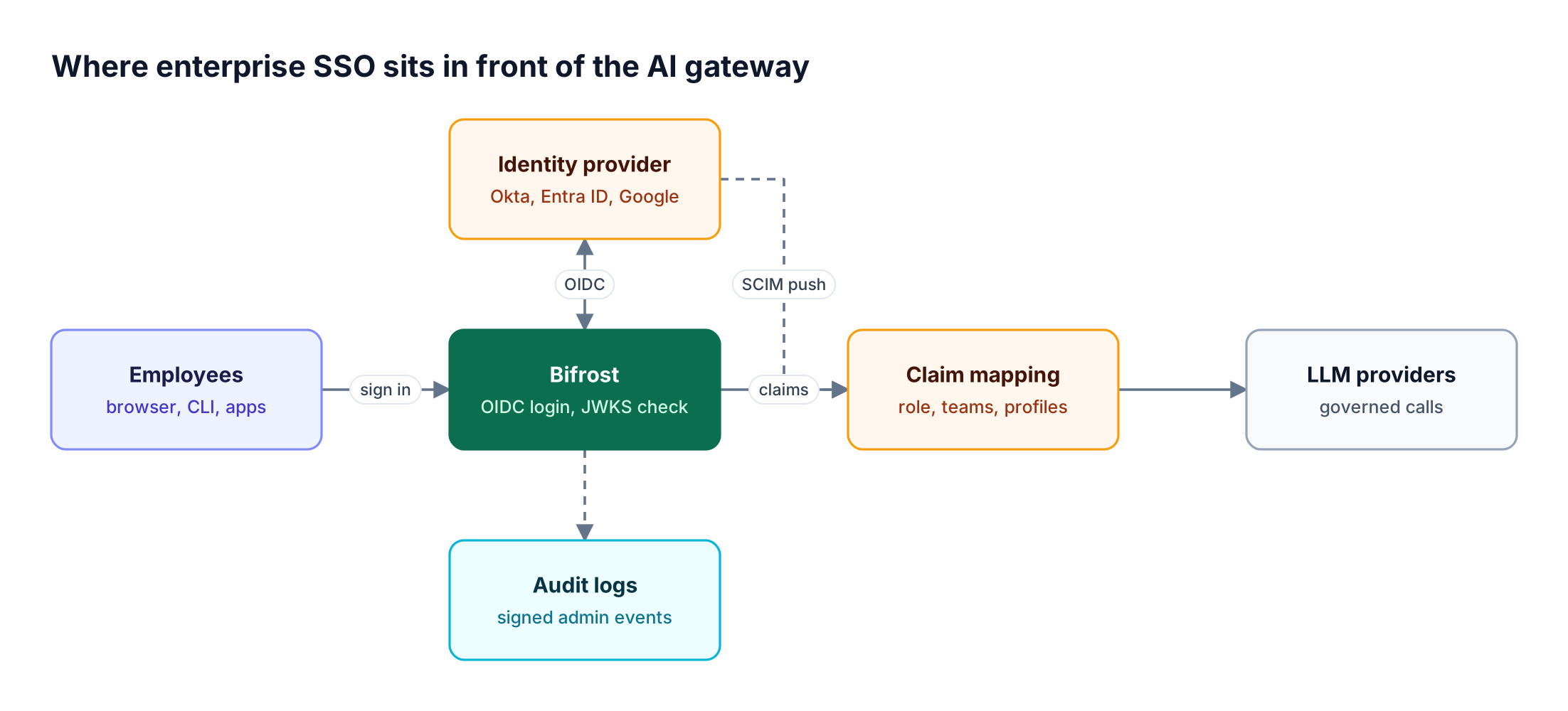
Bifrost Enterprise redirects unauthenticated users to the identity provider using the Authorization Code flow with PKCE, exchanges the code for access and refresh tokens, and validates the JWT against the provider's JWKS keys. It then maps the token's claims to a Bifrost user, role, and teams before the dashboard loads.
The user provisioning flow has four stages after the redirect:
- Token exchange. Bifrost requests
openid profile email offline_access, stores tokens in anHttpOnlycookie and server session, and validates the signature. - Identity extraction. Configured claims identify the user and supply role and group values.
- Attribute mapping. Rules translate claim values into roles, teams, business units, access profiles, and projects.
- Session refresh. When a session expires, Bifrost refreshes it silently and re-applies the fresh claims.
With OIDC or SCIM configured, open-source basic dashboard authentication is no longer needed. SSO, SCIM, RBAC, and audit logs are Enterprise capabilities.
Supported Identity Providers and Auth Proxies
Bifrost Enterprise has OIDC setup guides for seven identity provider options, all configured from one screen under Governance → User Provisioning. The providers differ only in how the OAuth client and claims are created on the IdP side and which directory API Bifrost reads for bulk import and background sync.
| Identity provider | Login | Directory sync source | SCIM guide |
|---|---|---|---|
| Okta | OIDC, Org or Custom Authorization Server | API token | Yes |
| Microsoft Entra ID | OIDC, app roles, group claims | Microsoft Graph permissions | Yes |
| Google Workspace | OAuth / OIDC | Service account, domain-wide delegation | Yes |
| Keycloak | OIDC (reads the access token) | Admin REST API | Not documented |
| Zitadel | OIDC, project-scoped roles | Service account | Not documented |
| Auth0 | OIDC with Post Login Actions | Optional M2M app | Not documented |
| Generic OIDC | Any compliant provider | Provider dependent | Yes |
Bifrost also accepts identity-aware proxies such as Cloudflare Access and AWS ALB that inject a signed JWT header. The proxy must be the only network path to the gateway, because a request without the header falls back to normal IdP login.
OIDC SSO Setup Walkthrough: Okta, Entra ID, and Google Workspace
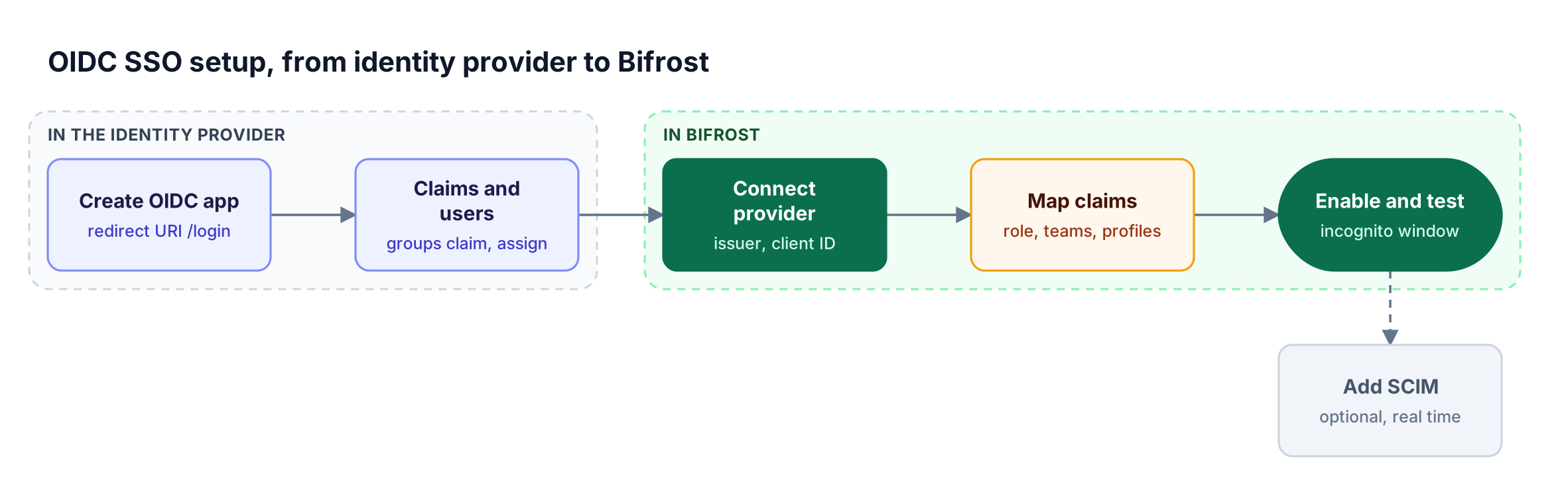
OIDC SSO setup takes two steps in the identity provider and three in Bifrost: create a web OIDC application with the Bifrost callback URL, add a groups claim and assign users, then connect the provider, map claims, and enable it. The walkthrough uses Okta; Entra ID and Google Workspace differ only in the provider-side screens.
Step 1: Create the OIDC application
In the Okta admin console, create an app integration with OIDC – OpenID Connect and Web Application. Enable the Authorization Code grant only and set the redirect URI to https://<your-bifrost-domain>/login. Add https://<your-bifrost-domain>/workspace/scim/oauth-discover-callback as a second redirect URI to enable claim discovery.
Step 2: Add a groups claim and assign users
On the Sign On tab, add a groups claim with value type Groups and a filter such as the regex bifrost-.*. Profile attributes added here, such as department, become available for mapping. Assign people or groups to the app, since only assigned users can authenticate, then copy the client ID, client secret, and issuer URL.
Step 3: Connect the provider in Bifrost
Under Governance → User Provisioning, choose Okta, enter the issuer URL, client ID, and secret, and click Verify & Next. An optional Okta API token enables bulk import and directory sync. The same settings can live in config.json:
{
  "scim_config": {
    "enabled": true,
    "provider": "okta",
    "config": {
      "issuerUrl": "<https://acme.okta.com>",
      "clientId": "env.OKTA_CLIENT_ID",
      "clientSecret": "env.OKTA_CLIENT_SECRET",
      "attributeRoleMappings": [
        { "attribute": "groups", "value": "bifrost-admins", "role": "admin" },
        { "attribute": "groups", "value": "bifrost-engineers", "role": "developer" }
      ],
      "attributeTeamMappings": [
        { "attribute": "groups", "value": "bifrost-platform", "team": "Platform" }
      ]
    }
  }
}
Step 4: Discover and map claims
Click Discover Claims to list the exact claims the IdP sends, without creating a session. Map at least one group to the Admin role before anyone signs in: Bifrost has no default role, not even for the first user.
Step 5: Enable and test
Click Enable, restart Bifrost, and test in an incognito window so a misconfiguration cannot lock out the current session.
Entra ID. Register the app with the same two redirect URIs, copy the tenant and client IDs, create a client secret, optionally define admin, developer, and viewer app roles, add a groups claim, and set Assignment required to Yes.
Google Workspace. Configure the OAuth consent screen, create a web OAuth client, and optionally add a service account with domain-wide delegation for directory sync. The Okta SSO walkthrough covers every screen.
Mapping IdP Groups and Claims to Roles, Teams, and Access Profiles
Bifrost converts IdP claims into authorization with mapping rules of the form { attribute, value, target }. Role rules produce exactly one role per user, while team, business unit, access profile, and project rules all apply when they match. Claim values can be strings, arrays, or nested paths such as realm_access.roles.
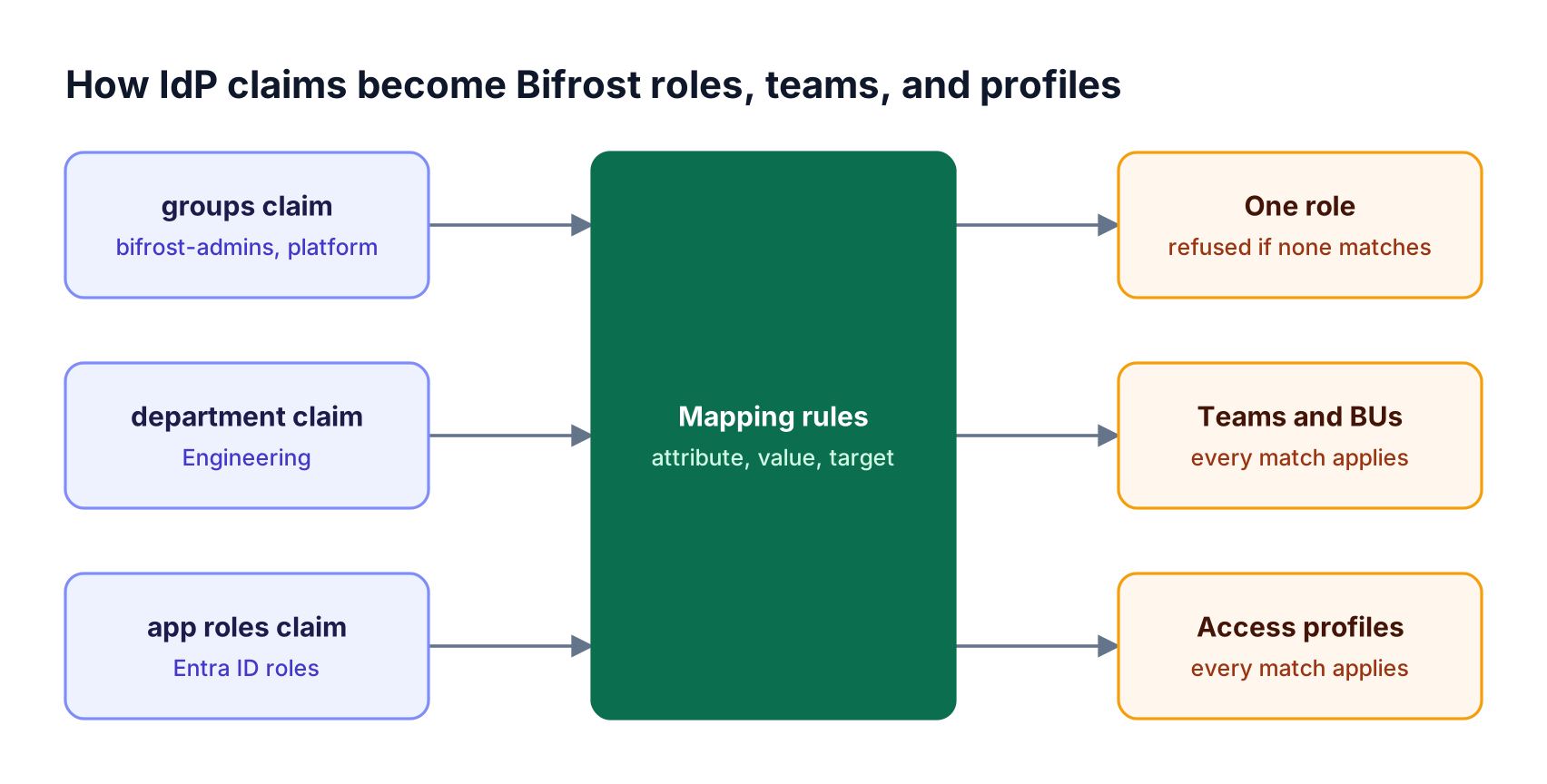
The rules that matter most in production:
- Role resolution.
roleResolutionStrategypicks the role with the most permissions (highestPermissionCount, the default) or the first matching rule (order). - No default role. A sign-in that matches no role rule is refused, never deletes an account, and triggers a Sign-in refused notification to provisioning admins.
- Wildcards. A team value of uses the claim value as the team name, and
${*}extracts a substring. Teams named by a rule are created on first use. - Missing is not removed. If a refreshed token omits an attribute, Bifrost keeps the last value; only a present, non-matching attribute removes a membership.
Roles come from role-based access control: Admin (42 permissions), Developer (27), Viewer (14), plus custom roles such as an Auditor. Each role also carries a data access control scope that decides which records its holders see. Access profile mappings attach provider, model, and budget policies; that policy layer is covered in the guide to access profiles, RBAC, and DAC.
SCIM Provisioning: Real-Time Onboarding and Updates
SCIM provisioning lets the identity provider push user and group changes to Bifrost as they happen, instead of waiting for a sign-in or scheduled sync. Bifrost exposes an inbound SCIM 2.0 endpoint at /scim/v2, authenticated with a per-provider bearer token, and re-evaluates every mapping on each create, replace, or patch.
SCIM is defined in IETF RFC 7644. SSO authenticates a person at sign-in; SCIM provisions and deprovisions accounts whether or not the person ever signs in. Enabling SCIM with Okta takes three moves:
- In Bifrost, toggle Enable SCIM Provisioning on the provider and copy the endpoint URL and provisioning token, which is shown once.
- In Okta, add the SCIM 2.0 Test App (Header Auth) as a separate app, enter the URL and token, and enable Create Users, Update User Attributes, and Deactivate Users.
- Assign users and Push Groups that drive team mappings, setting
claimScimAttributesto"attributeType": "group"for thegroupsclaim.
The claimsSyncMode setting decides who owns user data once SCIM is on:
| Mode | Who decides access | Unprovisioned user signs in | Directory sync |
|---|---|---|---|
| SCIM off | Sign-in claims plus directory sync | Created just in time | Every bulkSyncInterval (default 24h) |
SCIM on, both |
Claims and SCIM; last write wins | Created just in time | Off |
SCIM on, scim |
SCIM alone | Refused until pushed | Off |
Choose scim for one source of truth; in both mode the SCIM payload and sign-in token must carry the same attributes. SCIM user changes reach every node of a clustered deployment before the response returns.
Offboarding and Session Lifecycle
Offboarding in Bifrost follows the identity provider. Depending on the sync mode, a SCIM deactivation or delete, a failed session refresh for a user the IdP reports inactive, or a directory sync that no longer finds the user removes that user, along with their keys, policies, and sessions.
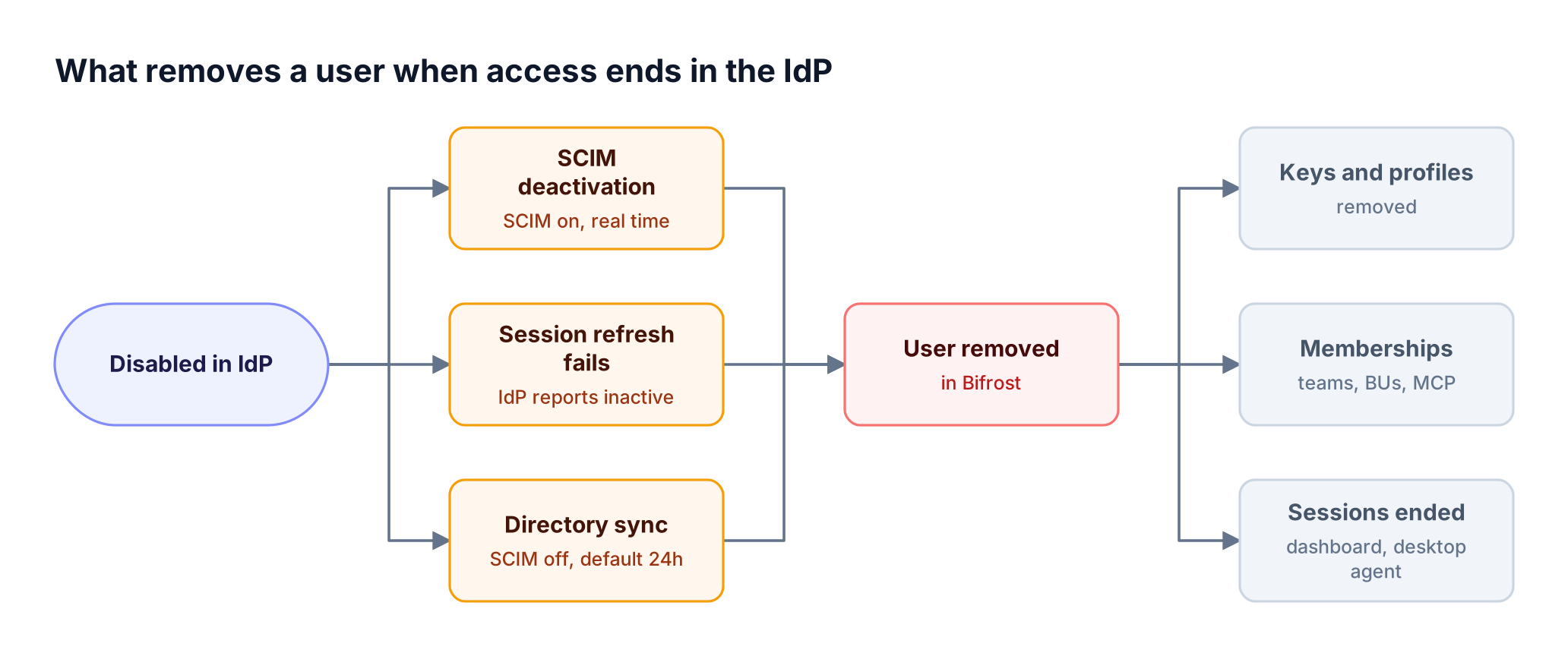
Removal deletes the user's virtual keys, access profiles, memberships, and personal budget, and ends their dashboard and desktop-agent sessions. A SCIM deactivation (active: false) keeps the stored profile for reactivation; a SCIM DELETE clears it. A failed refresh alone only signs the user out.
Under the identity sync rules, roles always follow the IdP. When SCIM is on, background sync is off, so the IdP's SCIM connector must have deprovisioning enabled.
Audit Logs for Admin Activity
Audit logs in Bifrost Enterprise record administrative activity, including sign-ins and role and membership changes, so security teams can see who changed what, when, and on which resource. Entries can be HMAC-signed, retained for a set period, exported to a SIEM, and archived to object storage.
{
  "audit_logs": {
    "hmac_key": "env.AUDIT_HMAC_KEY",
    "retention_days": 365
  }
}
Each entry records the action, outcome, initiator, target, request path, and client IP. For compliance reviews:
- Signing. An
hmac_keyof at least 32 bytes makes events verifiable. - Export. Holders of
AuditLogs:Downloadexport JSON, JSON Lines, or Syslog (RFC 5424). - Archival. An
object_storageblock mirrors events to S3 or GCS in manifest-committed windows. - Privacy.
omit_ip_addresseskeeps the trail without client IPs.
Model traffic lives in request logs instead; see audit trail controls for LLM traffic.
Where SSO Ends: Model Access, Budgets, and API Keys
Enterprise SSO establishes who a person is and which role they hold. Which models they can call, how much they can spend, and how applications authenticate are separate controls built on that identity, each covered in depth elsewhere.
- Model access comes from access profiles on a user's role, teams, or IdP attributes; see governing AI traffic with RBAC, SSO, and virtual keys.
- Budgets charge each request to the user's profile and every team and business unit above them; see budgets and limits.
- Applications authenticate with virtual keys rather than user tokens.
Inference routes also accept an IdP access token in Authorization: Bearer, so people can call models as themselves; with enforce_auth_on_inference on, an expired token gets a 401. For coding agents, see securing Claude Code with SSO and audit logs.
Frequently Asked Questions
Which is better, SAML or OpenID?
For an AI gateway, OpenID Connect is the better fit. It issues JSON Web Tokens that work for browser sessions and for bearer-token calls from CLIs, SDKs, and coding agents, with signatures validated through a published JWKS endpoint. SAML 2.0 remains common for legacy web applications, and most enterprise identity providers support both protocols.
Is OIDC based on SAML?
No: OpenID Connect is built on OAuth 2.0, not SAML. The OpenID Foundation defines OIDC as an identity layer adding an ID token, a userinfo endpoint, and discovery to OAuth 2.0 flows. SAML 2.0 is a separate OASIS standard using XML assertions. Both solve single sign-on with different token formats and transports.
Is SAML obsolete?
SAML is not obsolete, but new integrations increasingly choose OIDC. SAML 2.0 still secures many enterprise web applications, and identity providers such as Okta and Microsoft Entra ID continue to support it. For API-heavy systems like an AI gateway, OIDC is more practical because its tokens travel naturally on requests from non-browser clients.
What is the difference between SCIM and SSO?
SSO authenticates a user at sign-in; SCIM provisions and deprovisions accounts between systems. With SSO alone, Bifrost creates a user on first sign-in and learns about changes later. With SCIM provisioning, the identity provider pushes creates, updates, and deactivations to /scim/v2 in real time, including for people who never sign in.
How to use Okta for SSO with an AI gateway?
Create an Okta OIDC web application with the gateway's /login callback, add a groups claim, and assign the people who need access. In Bifrost, select Okta under User Provisioning, enter the issuer URL, client ID, and secret, map Okta groups to roles and teams, and enable the provider. An Okta SCIM app adds real-time provisioning.
Is MFA required for SSO?
SSO does not require MFA, but enterprise identity providers commonly enforce it at sign-in, and SSO carries that enforcement to every connected application. Because Bifrost delegates authentication to the IdP, MFA and conditional access policies configured in Okta, Entra ID, or Google Workspace apply to gateway sign-ins with no separate setup.
Start Building with Bifrost
Enterprise SSO turns an AI gateway into a governed system: the IdP decides who signs in, Bifrost maps identity to a role and policies, SCIM keeps accounts current, and audit logs record admin changes. The Bifrost governance resources cover the policy layer above identity. To see enterprise SSO, SCIM provisioning, and audit logging running against your own identity provider, book a Bifrost demo.