Best AI Gateway to Use Claude Code with Gemini Models
Using Claude Code with Gemini models requires a gateway that translates Anthropic Messages API requests to Gemini's API and back. This guide shows how to connect a Gemini API key or Vertex AI through Bifrost, map model tiers, and fall back to Claude.
TL;DR
- Claude Code speaks the Anthropic Messages API, so using Claude Code with Gemini requires a gateway that translates each request to Gemini's API and back.
- Bifrost connects Claude Code to Gemini through the Gemini API with an API key or through Vertex AI with a GCP service account, with no change to Claude Code itself.
- Each Claude Code tier maps to a Gemini model through
ANTHROPIC_DEFAULT_SONNET_MODEL,ANTHROPIC_DEFAULT_OPUS_MODEL, andANTHROPIC_DEFAULT_HAIKU_MODELinsettings.json. - Gemini models work for Claude Code's file edits and terminal commands through tool calling, but Claude-specific server tools such as web search stay on Claude models.
- Bifrost adds 11 microseconds of overhead per request and keeps virtual keys, budgets, failover to Claude, and request logs on every Gemini call.
Bifrost lets you route Claude Code requests through Google Gemini models with zero code changes, adding just 11 microseconds of overhead per request.
Claude Code is Anthropic's terminal-based agentic coding tool. It handles code generation, file editing, debugging, and terminal operations directly from the command line. The limitation: it only works with Anthropic's Claude models by default. For teams that want to run Claude Code against Google's Gemini models for cost optimization, latency improvements, or model benchmarking, an AI gateway is the most reliable path forward.
Bifrost, an open-source AI gateway built in Go, solves this by acting as a protocol translation layer between Claude Code and Gemini. It intercepts Anthropic API requests, translates them to Gemini's API format, routes the request to Google's endpoint, and returns the response in the format Claude Code expects. The entire process requires setting a base URL, a virtual key, and the Gemini model for each Claude Code tier. The companion guide on how to use Claude Code with Gemini models via Bifrost walks through the same setup screen by screen.
Why Route Claude Code Through Gemini?
Teams use Gemini in Claude Code to lower cost on routine work, compare models on their own codebase, and keep coding when Anthropic's API is rate limited or unavailable. Teams adopt a multi-provider strategy for Claude Code for several practical reasons:
- Cost management: Gemini models, particularly Gemini 2.5 Flash, are priced for high-volume tasks, and the Gemini pricing in the LLM cost calculator shows per-token rates side by side. Routing routine operations through Gemini while reserving Claude for complex reasoning can reduce overall API spend.
- Latency optimization: Depending on geographic region and workload type, Gemini endpoints may offer lower response times for specific use cases.
- Model benchmarking: Running identical prompts through both Claude and Gemini helps engineering teams make data-driven decisions about which model performs best for their codebase and task types.
- Provider redundancy: Relying on a single provider creates a single point of failure. If Anthropic's API experiences downtime or rate limiting, Claude Code sessions halt entirely without a fallback mechanism.
How Bifrost Connects Claude Code to Gemini
Bifrost connects Claude Code to Gemini by accepting Claude Code's Anthropic-format requests on its /anthropic endpoint, converting them to Gemini's format, and converting Gemini's responses back. Bifrost unifies access to 25+ LLM providers and 10,000+ models through a single API. For the Claude Code to Gemini workflow specifically, it works as follows:
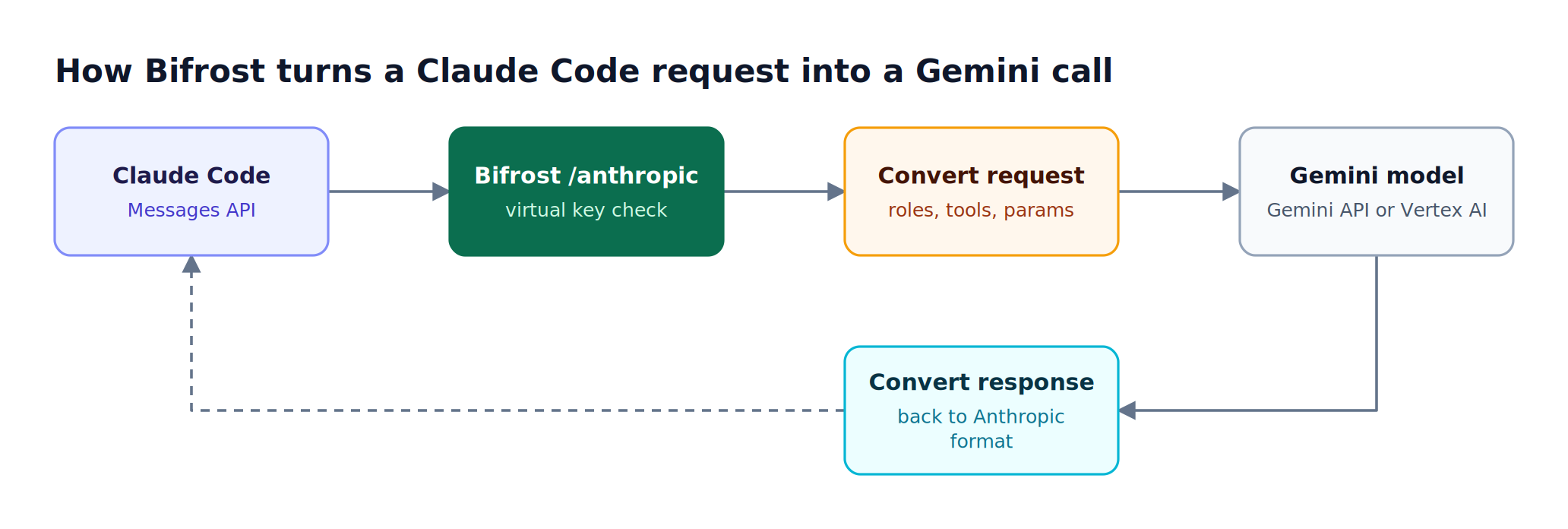
Figure 1: Both directions are translated, so Claude Code receives a normal Anthropic-format response from a Gemini model.
- Claude Code sends an Anthropic Messages API request to the Bifrost gateway instead of Anthropic's servers.
- Bifrost translates the request format to match Gemini's API specification.
- The translated request is routed to Google's Gemini endpoint.
- Gemini's response is translated back to Anthropic's format and returned to Claude Code.
Claude Code does not know the difference. It operates as if it is communicating with Anthropic's API. Bifrost's drop-in replacement architecture handles all the protocol translation transparently.
The setup requires two steps: start the Bifrost gateway and point Claude Code at it.
# Start Bifrost
npx -y @maximhq/bifrost

# Launch Claude Code through Bifrost
ANTHROPIC_BASE_URL=http://localhost:8080/anthropic claude
The base URL alone still sends Claude Code's default model names, so the Gemini mapping lives in ~/.claude/settings.json. Merge this env block into the existing file, then run /logout and restart Claude Code:
"env": {
  "ANTHROPIC_BASE_URL": "http://localhost:8080/anthropic",
  "ANTHROPIC_AUTH_TOKEN": "your-bifrost-virtual-key",
  "ANTHROPIC_DEFAULT_SONNET_MODEL": "vertex/gemini-3.1-pro",
  "ANTHROPIC_DEFAULT_HAIKU_MODEL": "gemini/gemini-2.5-flash"
}
ANTHROPIC_AUTH_TOKEN carries the Bifrost virtual key, so no Anthropic account login is required. Remove any model field from settings.json, because it overrides the environment-based mapping.
How to Use a Gemini API Key with Claude Code
Running Claude Code with Gemini API key authentication means storing the key in Bifrost, not in Claude Code: Bifrost holds the Google credential and Claude Code authenticates to Bifrost with a virtual key. The steps take a few minutes in the Bifrost web UI:
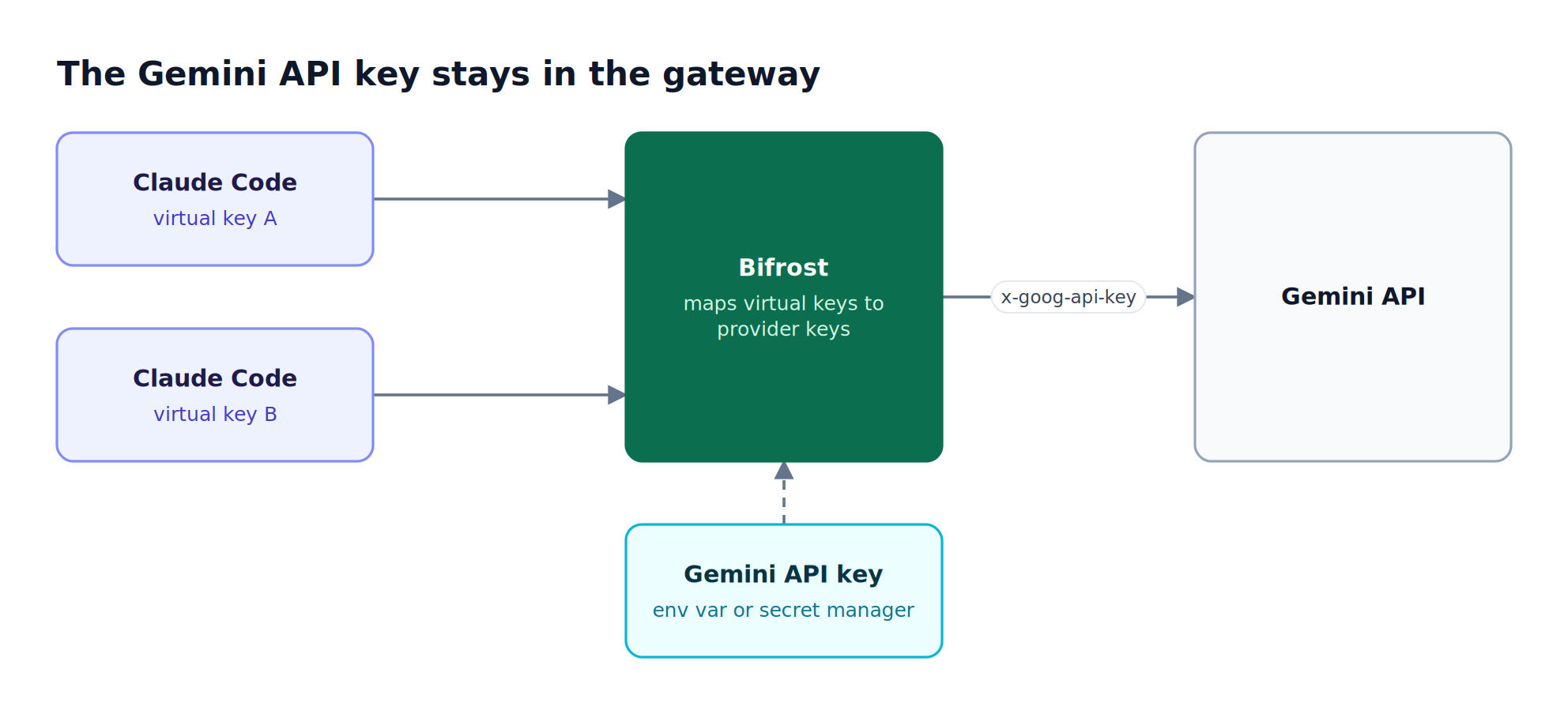
Figure 2: Rotating the Gemini key is a gateway change, and no developer machine ever holds the Google credential.
- Open Models > Model Providers, add Google Gemini, and click Add Key.
- Paste the Gemini API key directly or reference an environment variable such as
env.GEMINI_API_KEY, and set Allowed Models. - Create a virtual key that allows the
geminiprovider, and set it asANTHROPIC_AUTH_TOKENin Claude Code. - Map the Claude Code tiers to
gemini/model names insettings.json, as shown above.
Because the key never leaves the gateway, developers who connect Gemini to Claude Code never handle the raw Google credential, and rotating the Gemini key requires no change on developer machines. The Gemini provider guide documents the same setup for config.json.
Bifrost supports both Google Gemini (direct API) and Google Vertex AI as separate provider options. Teams already running Gemini through GCP can route Vertex AI traffic through Bifrost with the same governance and observability benefits.
| Gemini API | Vertex AI | |
|---|---|---|
| Model prefix in Claude Code | gemini/ |
vertex/ |
| Credential stored in Bifrost | Gemini API key | GCP service account JSON, with project and region |
| Typical fit | Individual developers and fast trials | Organizations with GCP billing, quotas, and IAM |
| Claude models available on the same provider | No | Yes, for example vertex/claude-sonnet-4-6 |
Per-Tier Model Overrides
Per-tier model overrides let each Claude Code model alias point to a different Gemini model, which is the core of any Claude Code Gemini setup. Claude Code resolves three aliases, sonnet, opus, and haiku, through the ANTHROPIC_DEFAULT_SONNET_MODEL, ANTHROPIC_DEFAULT_OPUS_MODEL, and ANTHROPIC_DEFAULT_HAIKU_MODEL variables described in Anthropic's Claude Code model configuration reference. With Bifrost, each tier can be overridden independently to use any model from any provider. A team could configure Gemini 2.5 Pro for Opus-level reasoning, Gemini 2.5 Flash for the Sonnet tier, and a Groq-hosted model for fast Haiku tasks.
| Claude Code tier | Environment variable | Example Gemini mapping |
|---|---|---|
| Opus (complex tasks) | ANTHROPIC_DEFAULT_OPUS_MODEL |
gemini/gemini-2.5-pro |
| Sonnet (everyday coding) | ANTHROPIC_DEFAULT_SONNET_MODEL |
gemini/gemini-2.5-flash |
| Haiku (background and lightweight tasks) | ANTHROPIC_DEFAULT_HAIKU_MODEL |
A Groq-hosted model with the groq/ prefix |
Developers can also switch mid-session with /model vertex/gemini-3.1-pro and switch back to a Claude model the same way.
One important constraint: non-Anthropic models must support tool use capabilities. Claude Code depends on tool calling for file operations, code editing, and terminal commands. Models without tool calling support will not function correctly, and Anthropic's LLM gateway documentation notes that Anthropic does not support non-Claude models through any gateway, so compatibility is the gateway's responsibility. Claude-specific server-side tools, such as web_search, computer_use, and citations, are only available on Claude-family models, so workflows that depend on them should keep a Claude tier. The broader guide to running Claude Code with non-Anthropic models compares other gateways for the same job.
Beyond Translation: Governance, Observability, and Failover
Beyond translation, Bifrost adds governance, failover, observability, and caching to every Claude Code request that reaches Gemini, which a translation-only layer does not provide. Protocol translation is table stakes. What separates Bifrost from lightweight translation layers is the infrastructure it adds on top.
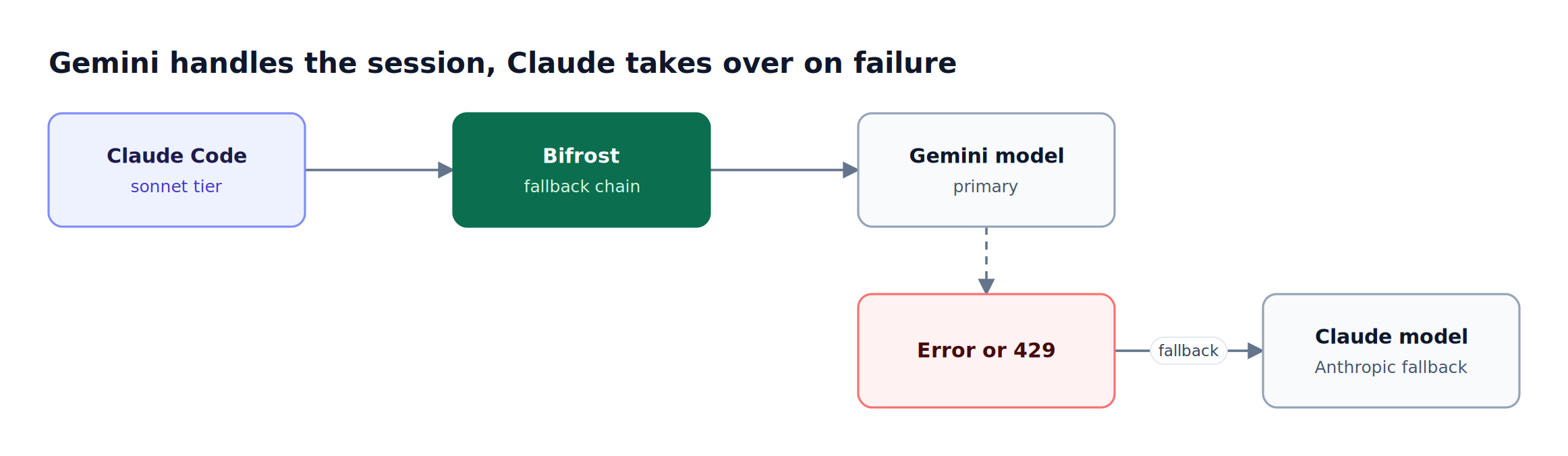
Figure 3: A Gemini-first setup keeps working through Gemini outages because Claude stays in the fallback chain.
Governance with virtual keys: Bifrost's virtual keys let teams assign each developer or team a unique credential with configurable spend limits, rate caps, and model access permissions. One developer might have access to Gemini 2.5 Pro and Claude Sonnet, while another's key is restricted to Gemini Flash. Budget controls operate at the virtual key, team, and customer level, preventing runaway costs across a team of engineers using Claude Code concurrently.
Automatic failover: Bifrost's automatic fallback chains let teams define provider sequences. If Gemini's API returns an error or hits a rate limit, Bifrost retries and can automatically reroute the request to Claude, Mistral, or any other configured provider. Claude Code also sends an x-claude-code-session-id header, so a session stays on the same provider key while it is healthy.
Built-in observability: Every request flowing through Bifrost is recorded in the built-in request logs and can generate native Prometheus metrics and OpenTelemetry traces. Engineering leads gain visibility into model usage patterns, error rates, token consumption, and cost per developer across the entire team.
Semantic caching: For repeated or semantically similar queries, Bifrost's semantic caching reduces both cost and latency by returning cached responses instead of making redundant API calls.
Bifrost CLI: Interactive Agent Launcher
Bifrost CLI is the fastest way to launch Claude Code on a Gemini model, because it sets the base URL, virtual key, and model for the session automatically. For teams that want to skip manual environment variable configuration, Bifrost CLI provides an interactive setup experience. It walks through gateway configuration, agent selection, and model choice in a single flow:
- Select your coding agent (Claude Code, Codex CLI, Gemini CLI, or others).
- Browse available models from all configured providers.
- Press Enter. Bifrost configures all environment variables, API keys, and provider paths automatically.
This removes a common friction point when onboarding new team members or switching between model configurations during development sessions. Bifrost CLI also attaches the Bifrost MCP server to Claude Code automatically, as covered in the guide to running Claude Code with non-Anthropic models using Bifrost CLI.
Enterprise Considerations
For organizations with strict compliance requirements, Bifrost Enterprise adds in-VPC deployments and secret management that keeps the Gemini API key in HashiCorp Vault, AWS Secrets Manager, or GCP Secret Manager instead of the Bifrost database.
Bifrost Enterprise also adds signed audit logs that record administrative changes, and role-based access control with identity provider integration through Okta and Entra.
These controls are particularly important for regulated industries where LLM requests must traverse approved infrastructure. Request logs capture every model interaction, and log exports offload payloads to S3 or GCS for retention. Teams planning the same pattern on other clouds can read about running Claude Code on Bedrock, Vertex, or your own models.
Frequently Asked Questions
Can I use Gemini in Claude Code?
Yes. Claude Code can use Gemini models when it is pointed at a gateway that translates Anthropic Messages API requests to Gemini's API. To connect Claude Code to Gemini with Bifrost, set ANTHROPIC_BASE_URL to the gateway's /anthropic endpoint, authenticate with a virtual key, and map a Claude Code tier to a model such as gemini/gemini-2.5-pro or vertex/gemini-3.1-pro.
How do I use Claude Code with a Gemini API key?
Add the Gemini API key to Bifrost as a Google Gemini provider key, create a virtual key that allows the gemini provider, and set that virtual key as ANTHROPIC_AUTH_TOKEN in Claude Code's settings.json. Claude Code never sees the Google key, and Bifrost forwards each request to Gemini with the stored credential.
Can we make Gemini requests through an existing Claude SDK setup?
Yes. Bifrost is a drop-in replacement for the Anthropic SDK: point the SDK's base_url at http://localhost:8080/anthropic and pass a Gemini model name such as vertex/gemini-pro. The code keeps the Anthropic SDK request and response format, so testing Gemini requires no refactoring of the application, as the Anthropic SDK integration guide shows.
Do all Claude Code features work with Gemini models?
File edits, bash, and code changes work when the Gemini model supports tool calling. Claude-specific server-side tools such as web search, computer use, and citations are only available on Claude-family models. Keeping one tier on a Claude model, or switching with /model when needed, preserves those features.
Should I use the Gemini API or Vertex AI with Claude Code?
Use the Gemini API for quick trials with an API key, and Vertex AI when the organization already manages Gemini through GCP projects, IAM, and billing. Bifrost supports both as separate providers with gemini/ and vertex/ prefixes, and Vertex AI can also serve Claude models for a mixed setup.
Can Claude Code fall back to Claude if Gemini fails?
Yes. Bifrost fallback chains reroute a request to another configured provider, such as Anthropic, when Gemini returns an error or a rate limit, and Claude Code continues without a manual retry. Budgets and rate limits on the virtual key apply to both the Gemini call and the fallback.
Start Using Claude Code with Gemini Today
Routing Claude Code through Gemini models with Bifrost takes minutes and requires no changes to Claude Code itself. Teams gain model flexibility, cost governance, automatic failover, and full observability across every coding session, which makes Bifrost the best AI gateway to use Claude Code with Gemini models. The step-by-step Claude Code with Gemini setup guide is the next stop for configuration detail.
Bifrost is open source and available on GitHub. To see how Bifrost fits into your AI infrastructure at scale, book a demo with the Bifrost team.