Best AI Gateway for Codex CLI
An AI gateway for Codex CLI routes every Codex session through one governed endpoint. This guide covers the five requirements to evaluate, the config.toml setup for Bifrost, non-OpenAI model support, and per-developer budgets and telemetry.
TL;DR
- An AI gateway for Codex CLI sits between the agent and model providers to add spend limits, model access scoping, routing, and per-developer telemetry that Codex CLI does not provide on its own.
- The best AI gateway for Codex CLI needs an OpenAI-compatible Responses API endpoint, low overhead, per-team governance, multi-provider routing, and observability.
- Bifrost connects to Codex CLI through a named provider in
config.toml, adds 11 microseconds of overhead per request at 5,000 RPS, and routes Codex CLI to 25+ providers and 10,000+ models. - Non-OpenAI models work with Codex CLI through Bifrost when they support tool use and Codex runs in HTTPS mode rather than WebSocket mode.
OpenAI Codex surpassed 2 million weekly active users by mid-March 2026, with companies including Cisco, Nvidia, and Ramp deploying it across developer teams, according to reported OpenAI figures. Bifrost, the open-source AI gateway built in Go by Maxim AI, is the best AI gateway for Codex CLI at scale, adding centralized governance, cost control, and multi-provider routing without changing the developer workflow. By default, every Codex CLI session calls OpenAI directly, with no built-in mechanism for organization-wide spend limits, model access scoping, or cross-team observability. Routing those sessions through an AI gateway closes that gap without changing what engineers see in their terminal. This post explains what makes a gateway the right fit for Codex CLI and how to configure Bifrost as that layer.
Why Codex CLI Needs an AI Gateway
Codex CLI needs an AI gateway once it spreads beyond a few developers, because direct provider calls give platform teams no way to cap spend, restrict models, or attribute usage per team. When one developer uses Codex CLI, the cost appears on a single OpenAI invoice and the usage is easy to reason about. When a hundred engineers use it concurrently across projects, teams, and approval modes, spend becomes opaque, attribution breaks down, and platform teams have no lever to enforce policy. The same dynamics apply to coding agents broadly, including Claude Code and Gemini CLI, and the wider set of Codex workflows is covered in OpenAI Codex best practices for workflows, governance, and multi-provider routing.
An AI gateway is a unified entry point that routes, authenticates, and observes traffic to one or more LLM providers from a single API. Placed in front of Codex CLI, it intercepts every request, applies governance rules, records telemetry, and forwards the call to the right provider. Bifrost provides this layer through a single OpenAI-compatible API, including the Responses API that Codex CLI uses. The result is a governance and observability layer that engineers do not have to think about and platform teams control.
What to Look for in the Best AI Gateway for Codex CLI
The best AI gateway for Codex CLI meets five requirements:
- OpenAI-compatible endpoint: Codex CLI talks to an OpenAI-style Responses API, so the gateway must expose a
/openai/v1path that accepts the same request shape. - Low overhead: a coding agent makes frequent, latency-sensitive calls, so the gateway must add negligible processing time per request.
- Per-user and per-team governance: spend limits, rate limits, and model access scoping that map to how engineering teams are organized.
- Multi-provider routing: the ability to point Codex CLI at models from providers other than OpenAI without changing the agent.
- Observability: structured telemetry on every request so platform teams can attribute cost and usage.
Bifrost meets all five. It exposes an OpenAI-compatible interface, adds 11 microseconds of overhead per request at 5,000 RPS, and ships governance controls and observability as built-in features rather than add-ons. The table maps each requirement to the Bifrost capability that covers it.
| Requirement for Codex CLI | Why it matters | How Bifrost covers it |
|---|---|---|
| OpenAI-compatible endpoint | Codex CLI speaks the OpenAI Responses API | /openai/v1 endpoint used as a named model_providers entry |
| Low overhead | Agent loops make many sequential calls | 11 µs per request at 5,000 RPS |
| Per-team governance | Spend and model policy must follow org structure | Virtual keys with budgets, rate limits, and model allow-lists |
| Multi-provider routing | Teams want non-OpenAI models and failover | provider/model-name routing plus retries and fallbacks |
| Observability | Cost must be attributable per developer | Request logs, Prometheus metrics, and OpenTelemetry export |
The sections below cover each in the context of Codex CLI, and the spend side is covered in depth in the best AI gateway to manage Codex CLI token spend.
How Bifrost Works as the AI Gateway for Codex CLI
Bifrost works as the AI gateway for Codex CLI by acting as a custom model provider: Codex CLI sends its Responses API calls to the Bifrost /openai/v1 endpoint, authenticated with a Bifrost virtual key, and Bifrost applies governance and routing before forwarding them. Pointing Codex CLI at a running Bifrost instance takes one environment variable and a few lines of Codex configuration. Full setup steps are in the Codex CLI integration guide.
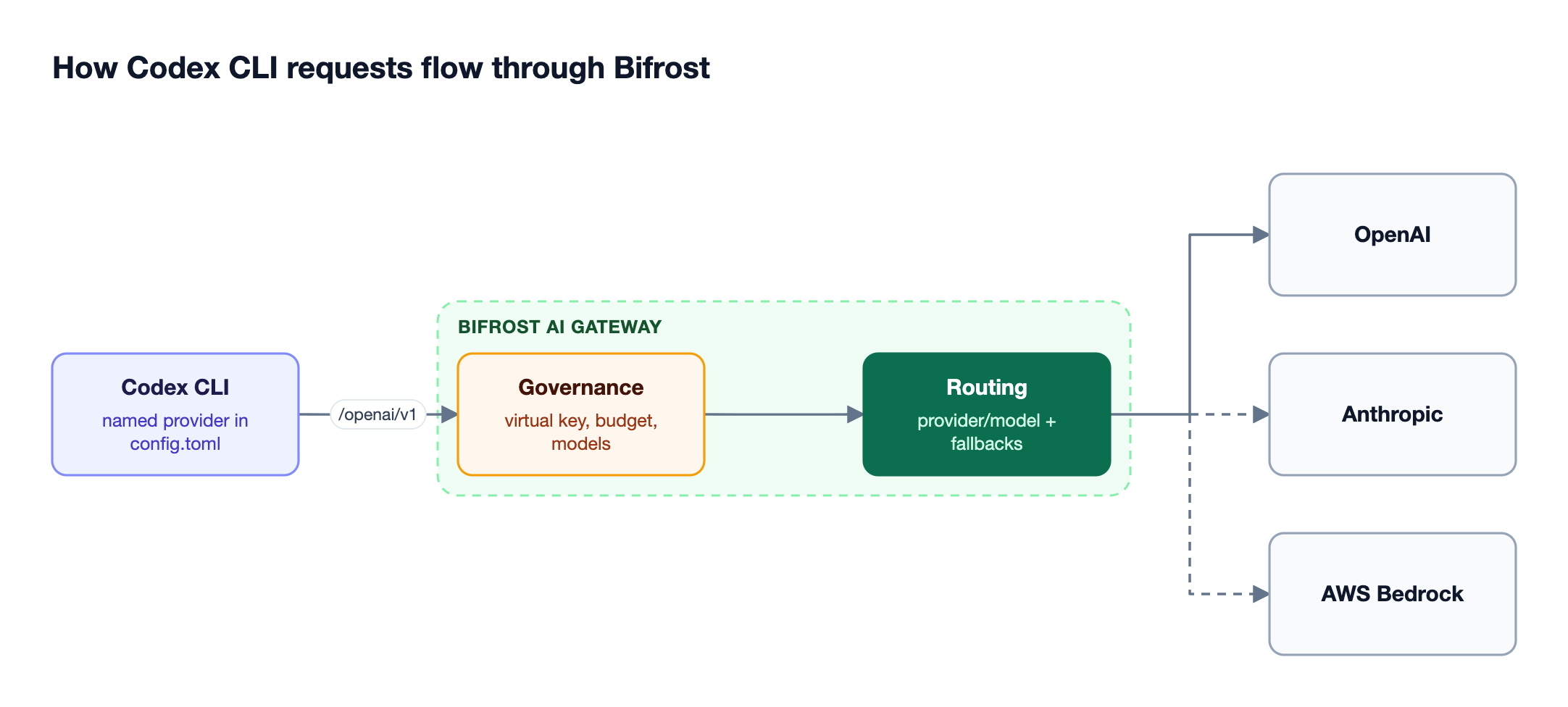
Figure 1: Codex CLI talks to one endpoint while Bifrost applies policy and picks the provider.
Export the Bifrost virtual key, then add a named provider to ~/.codex/config.toml (or a project-level .codex/config.toml):
export OPENAI_API_KEY=your-bifrost-virtual-key
model = "openai/gpt-5.4"
model_provider = "bifrost"

[model_providers.bifrost]
name = "Bifrost"
base_url = "http://localhost:8080/openai/v1"
env_key = "OPENAI_API_KEY"
wire_api = "responses"
supports_websockets = false
The Bifrost docs recommend a named model_providers entry over openai_base_url, because with openai_base_url Codex CLI sends a client-side web tool that Amazon Bedrock rejects, while a named provider sends the hosted web search tool instead.
Codex CLI always prefers a ChatGPT sign-in over a custom API key, so run /logout before switching to the gateway. From that point, all Codex CLI traffic flows through Bifrost and inherits whatever governance, routing, and observability you have configured. Codex CLI also sends a session-id header on every request, and Bifrost uses it for session affinity, so a session keeps hitting the same provider, key, and prompt cache. If the gateway restricts allowed headers instead of accepting *, add the headers Codex CLI sends to the allow-list.
Teams that prefer not to manage environment variables can use the Bifrost CLI, an interactive terminal tool that launches Codex CLI, Claude Code, Gemini CLI, and Opencode through the gateway with one command. It configures base URLs, API keys, and model settings for each agent automatically, so engineers pick an agent and model and start working.
Using Any Model with Codex CLI Through Bifrost
Codex CLI defaults to OpenAI models, but it can use any tool-calling model that Bifrost has configured, because Bifrost translates OpenAI-format requests to other providers automatically. This lets engineers run Codex CLI against models from Anthropic, Google, Mistral, and others using the provider/model-name format:
# Start with an OpenAI model
codex --model openai/gpt-5-codex

# Start with an Anthropic model
codex --model anthropic/claude-sonnet-4-5-20250929

# Switch mid-session
/model gemini/gemini-2.5-pro
Bifrost supports this format across providers including OpenAI, Azure, Google Vertex, AWS Bedrock, Mistral, Groq, Cerebras, Cohere, xAI, Ollama, and OpenRouter, configurable through provider settings. Two constraints apply. Any non-OpenAI model used with Codex CLI must support tool use, because the agent relies on tool calling for file operations, terminal commands, and code editing. Codex CLI must also run in HTTPS mode (supports_websockets = false), because non-OpenAI models are not supported in its default WebSocket mode. Non-OpenAI models do not appear in the /models picker unless they are added to a local model catalog file, though --model and /model accept them directly. Model choice is compared in more detail in the best AI gateway to route Codex CLI to any model.
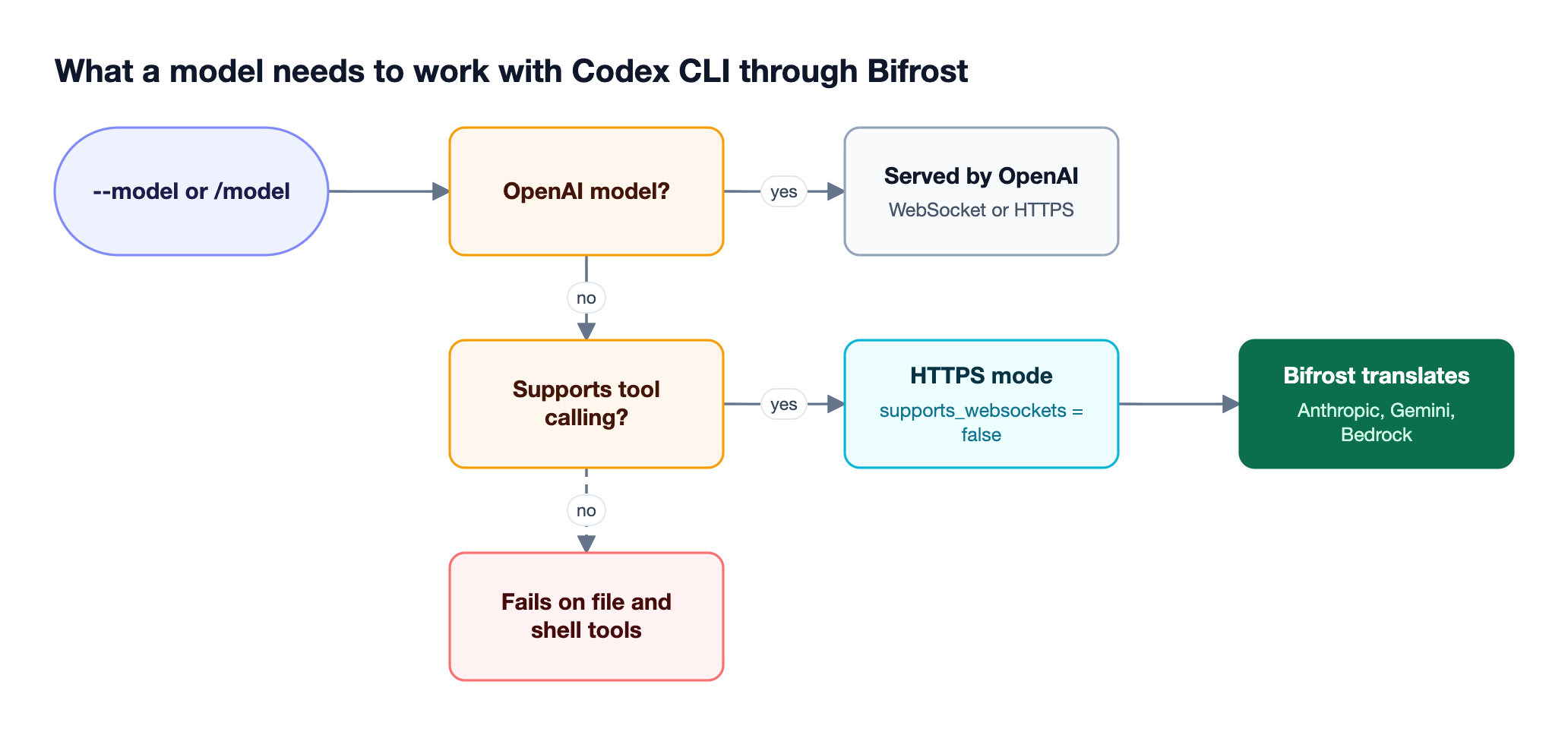
Figure 2: Non-OpenAI models work in Codex CLI once they support tool calling and Codex runs over HTTPS.
Routing through the gateway also adds reliability. Automatic fallbacks reroute requests to a backup model or provider once retries on the primary are exhausted, so a provider outage during an active Codex CLI session is less likely to interrupt work. Semantic caching can further reduce cost and latency on repeated, semantically similar requests when a cache key is configured. These behaviors are invisible to the agent; Codex CLI continues to call a single endpoint.
Governance and Cost Control for Codex CLI at Scale
Governance for Codex CLI means every request carries an identity, a budget, and a model policy that the platform team controls. It is the main reason platform teams put a gateway in front of Codex CLI. In Bifrost, virtual keys are the primary governance entity. Each key carries its own permissions, budget, and rate limits, and you issue one per developer, team, or project instead of distributing raw provider keys.
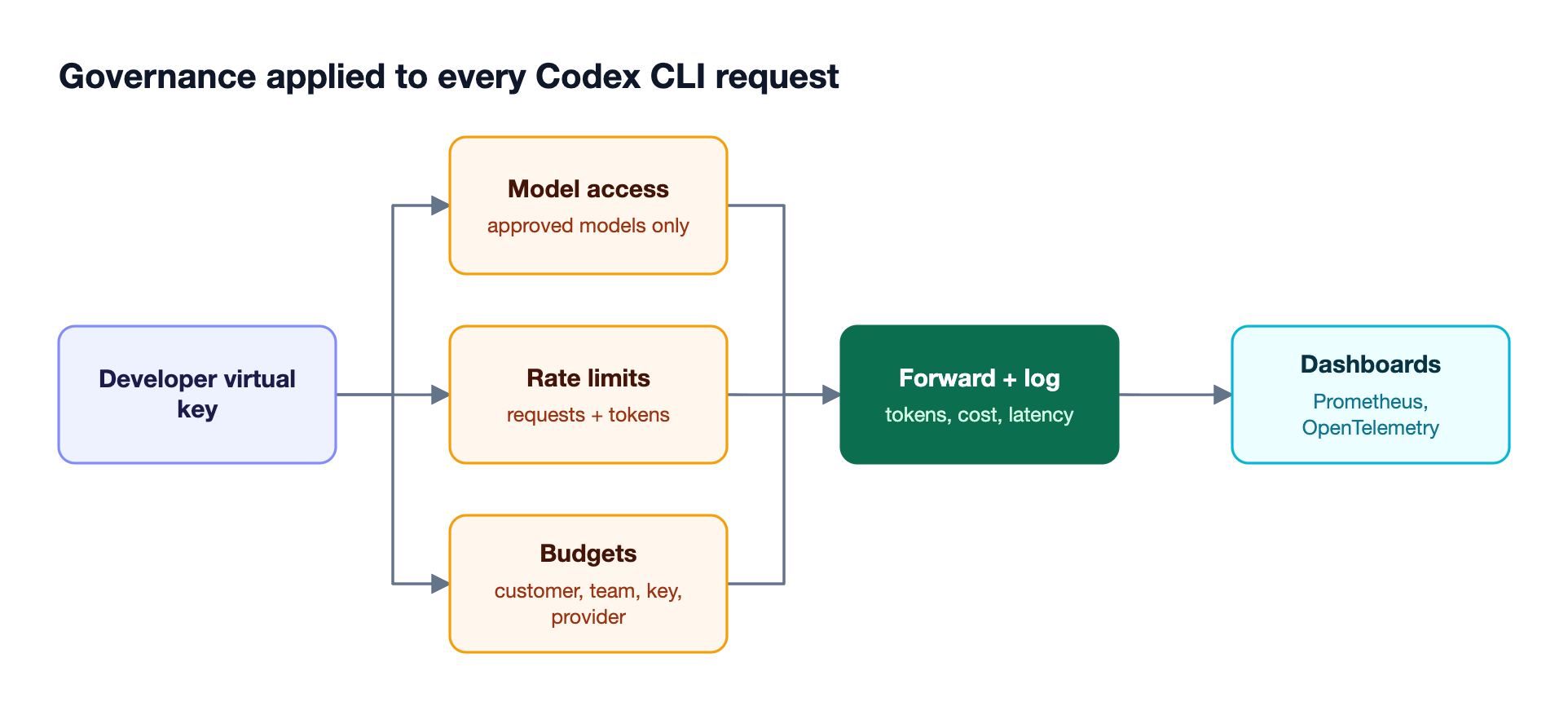
Figure 3: One virtual key per developer turns Codex CLI into a metered, policy-controlled resource.
With virtual keys in place, Bifrost supports:
- Hierarchical budgets: set spend ceilings at the customer, team, virtual key, and provider configuration level through budget and rate limit controls. Every applicable budget is checked on each request, and any exhausted budget blocks it.
- Model access scoping: restrict which models a given key can reach, so a team can be limited to approved models only.
- Rate limits: cap request and token throughput per key to prevent runaway usage.
- Provider key abstraction: developers never hold provider credentials directly, which removes a common source of key sprawl and leakage.
The governance feature set turns Codex CLI from an unmetered direct line to OpenAI into a controlled, attributable resource. Cost stops being a single opaque invoice and becomes spend you can break down by team and project.
Observability completes the picture. Bifrost generates structured telemetry on every Codex CLI request, including the model used, the provider routed to, input and output token counts, latency, and the virtual key identifier. This data is available through built-in observability, with native Prometheus metrics and OpenTelemetry export for teams that route monitoring into Grafana, New Relic, or Honeycomb. Platform teams get per-request visibility while engineers keep the same terminal experience.
Teams running both coding agents can compare options in the best AI gateways for governing Claude Code and Codex CLI.
Enterprise Deployment for Regulated Teams
Regulated teams deploy Bifrost for Codex CLI inside their own network, with identity-provider sign-in, role-based access, audit logs of administrative changes, and clustering for high availability. Bifrost addresses these through its enterprise tier, a strict superset of the open-source gateway that keeps every provider, integration, and SDK working identically while adding deployment and compliance controls.
For Codex CLI rolled out across a large organization, the relevant capabilities include:
- In-VPC deployment: run the gateway inside private cloud infrastructure so the gateway, its keys, and its request logs stay inside your network boundary.
- Audit logs: signed records of administrative activity, such as who changed a key, budget, or provider and when, with configurable retention and export.
- Role-based access control: fine-grained permissions with custom roles, integrated with identity providers like Okta and Microsoft Entra through user provisioning.
- Clustering: high availability with automatic service discovery and zero-downtime deployments for teams where the gateway is on the critical path.
Teams evaluating options across the category can use the LLM Gateway Buyer's Guide to compare capabilities against their own requirements.
Frequently Asked Questions About AI Gateways for Codex CLI
Most Codex CLI gateway questions come down to configuration, model support, sign-in, and per-developer tracking.
How do I point Codex CLI at a custom base URL?
Add a named provider under model_providers in ~/.codex/config.toml with the gateway URL as base_url, set model_provider to that name, and export the key named in env_key. Codex also accepts openai_base_url, but the Bifrost docs recommend a named provider so Codex sends the hosted web search tool, which avoids a tool conflict on Amazon Bedrock.
Can Codex CLI use Claude, Gemini, or other non-OpenAI models?
Yes, through a gateway that translates the OpenAI request format. With Bifrost, start Codex CLI with --model anthropic/... or --model gemini/..., or switch mid-session with /model. The model must support tool calling, and Codex CLI must run in HTTPS mode rather than WebSocket mode.
Does Codex CLI work with a ChatGPT login through a gateway?
Codex CLI prefers a ChatGPT sign-in over any custom API key, so a signed-in session ignores the gateway key. Run /logout, export the Bifrost virtual key, and restart Codex CLI from the same terminal so it picks up the variable. Usage then bills through the providers configured in Bifrost.
How do I track Codex CLI usage per developer?
Issue one Bifrost virtual key per developer or team and have each Codex CLI install use its own key. Bifrost then logs model, provider, tokens, cost, and latency for every request against that key, and exports the same data to Prometheus or OpenTelemetry for dashboards and alerts.
Does an AI gateway slow Codex CLI down?
Bifrost adds 11 microseconds of overhead per request at 5,000 RPS in published benchmarks, which is small next to model response times measured in seconds. Session affinity also keeps a Codex CLI session on the same provider and key, which preserves prompt-cache hits.
Getting Started with Bifrost for Codex CLI
Choosing the best AI gateway for Codex CLI comes down to matching an OpenAI-compatible endpoint, low overhead, governance, multi-provider routing, and observability against how your team works. Bifrost covers all five, installs in front of Codex CLI with one environment variable and a provider entry in config.toml, and scales from one developer to an entire engineering organization without changing the agent experience. Additional configuration patterns are documented across the Bifrost resources hub, and the broader Codex rollout playbook is in the Codex best practices guide.
To see how Bifrost fits your Codex CLI setup and existing AI infrastructure, book a demo with the Bifrost team.