AI Gateway for Startups: Bifrost vs LiteLLM Compared
Bifrost and LiteLLM are open-source AI gateways that route and govern LLM traffic, one written in Go and one in Python. This Bifrost vs LiteLLM comparison covers published benchmarks, setup, failover, budgets, MCP, and what each charges for as a startup grows.
TL;DR
- Bifrost and LiteLLM are both open-source AI gateways with an OpenAI-compatible API, virtual keys, budgets, fallbacks, caching, and an MCP gateway; Bifrost is written in Go and LiteLLM in Python.
- In Bifrost's published benchmark at 500 RPS on a t3.medium instance, Bifrost delivered 9.5x higher throughput, 54x lower P99 latency, and 68% less memory than LiteLLM.
- LiteLLM's own benchmark reports 8 ms P95 overhead at about 1,000 RPS across four 4-vCPU instances, so LiteLLM scales by adding workers and instances.
- Bifrost's Apache 2.0 open-source gateway includes virtual keys and hierarchical budgets; LiteLLM's MIT core includes virtual keys and budgets, with SSO beyond five users, audit logs, and RBAC in its enterprise license.
An AI gateway is the layer that routes, governs, and logs every LLM request an application makes, and choosing an AI gateway for startups is a decision that compounds quickly. The wrong gateway becomes the bottleneck the moment your application moves from a side project to a paying user base, and migrating later is expensive. This post compares Bifrost, the open-source AI gateway built by Maxim AI, against LiteLLM across the dimensions that actually matter for early-stage teams: setup time, performance under real load, multi-provider support, cost controls, governance, and the path to enterprise readiness. Bifrost is the best choice for enterprises running mission-critical AI workloads that require best-in-class performance, scalability, and reliability.
If you are evaluating a gateway today, the goal is not just to pick something that works for a prototype. It is to pick something that survives your first growth spike without forcing a rewrite. This post shows where the differences matter at the startup stage and where LiteLLM is a reasonable fit, and the broader LiteLLM alternative comparison covers more options.
Key Criteria for Evaluating an AI Gateway for Startups
Startups need a gateway that handles three jobs without ceremony: route requests to multiple LLM providers, fail over when something breaks, and stay invisible in the latency budget. Beyond those basics, the criteria that separate gateways at the production stage are concrete and measurable.
- Setup time: Can a single engineer go from zero to a routed request in under five minutes?
- Per-request overhead: How much latency does the gateway add at sustained load?
- Provider breadth: How many providers and models are supported, and how easy is it to add new ones?
- Failover behavior: Does the gateway recover automatically when a provider degrades, or does the team get paged?
- Cost controls: Can you set per-team budgets, virtual keys, and rate limits without writing custom middleware?
- Observability: Are metrics, traces, and logs available natively, or do you bolt them on?
- Path to enterprise: When your first design partner asks for SSO, audit logs, or in-VPC deployment, does the gateway handle it?
For teams evaluating gateways across these criteria, the LLM Gateway Buyer's Guide provides a side-by-side capability matrix.
Common Challenges with Existing Gateway Options
Most startups start with direct provider SDKs, then realize three things at once. The first is that a single provider outage takes the product down. The second is that costs are invisible until the monthly bill arrives. The third is that switching models means rewriting integration code across the codebase.
The conventional answer has been to deploy a Python-based proxy. A gateway solves these, but Python-based gateways introduce their own ceiling. Python-based gateways run each worker process under the GIL (Global Interpreter Lock), so they scale concurrency by adding worker processes and instances. LiteLLM's own benchmark reports 8 ms P95 overhead at about 1,000 RPS using four 4-vCPU instances with one worker per CPU, which is workable but means more infrastructure to run as traffic grows. For a survey of other options at this stage, see open-source AI gateways for startups.
That ceiling shows up exactly when a startup needs the gateway most: during a launch, a viral moment, or the first real customer scale-up. At that point, the choice of gateway stops being a developer convenience question and becomes a reliability question.
How Bifrost Compares to LiteLLM on Performance
In Bifrost's published benchmark at 500 RPS on an AWS t3.medium instance, Bifrost processed 9.5x more requests per second than LiteLLM, held P99 latency 54x lower, used 68% less memory, and completed 100% of requests against LiteLLM's 88.78%. Bifrost is written from scratch in Go and engineered to behave like core infrastructure.
The Bifrost vs LiteLLM benchmark page reports these results from a 60-second test with 500 concurrent virtual users:
| Metric (500 RPS, t3.medium) | Bifrost | LiteLLM |
|---|---|---|
| Throughput | 424 req/s | 44.84 req/s |
| P50 latency | 804 ms | 38.65 s |
| P99 latency | 1.68 s | 90.72 s |
| Success rate | 100% | 88.78% |
| Peak memory | 120 MB | 372 MB |
| Gateway overhead (60 ms mock response) | 0.99 ms | 40 ms |
In a separate Bifrost-only stress test, Bifrost added 11 microseconds of overhead per request at 5,000 RPS on a t3.xlarge instance with a 100% success rate. LiteLLM publishes its own figures from a different setup: 8 ms P95 overhead at about 1,000 RPS across four instances. The two benchmarks use different hardware and configurations, so compare them as indicators rather than a single head-to-head result.
For a startup, the practical impact is straightforward. A gateway that adds tens of milliseconds per request eats into the latency budget that your product needs for streaming responses, multi-step agent calls, and real-time UX. A gateway that adds 11 microseconds is effectively invisible in that budget.
Setup and Developer Experience
Both gateways are open source, both expose an OpenAI-compatible API, both can be self-hosted, and both ship a web UI for keys and logs. The difference is in what has to be configured before the first routed request.
Bifrost installs and runs in one command:
npx -y @maximhq/bifrost
That spins up the HTTP gateway with zero configuration and a built-in web UI for visual provider configuration, real-time monitoring, and request logs. There is no configuration file to write before the first request goes through. Adding Bifrost to an existing application is a one-line drop-in replacement: change the base URL in the OpenAI, Anthropic, AWS Bedrock, Google GenAI, LangChain, or LiteLLM SDK, and Bifrost handles the rest.
LiteLLM follows a different model. Its proxy is typically configured through a config.yaml that maps model names to provider deployments, and models defined there need a reload to change. With database-backed model storage enabled, LiteLLM can also add models through its Admin UI or API without a restart, so the friction depends on which mode a team runs.
Teams already running LiteLLM can move to Bifrost without rewriting application code. The LiteLLM SDK integration and migration guide cover the drop-in path, and this walkthrough on migrating to Bifrost from LiteLLM shows the steps end to end.
Multi-Provider Support and Routing
Both gateways support a wide range of providers, retries, and fallbacks. LiteLLM documents 100+ LLMs and several routing strategies; Bifrost unifies 25+ providers and 10,000+ models behind one OpenAI-compatible API. The difference that matters for a startup is how failover behaves when a provider degrades.
Bifrost provides:
- Access to 25+ providers and 10,000+ models through a single OpenAI-compatible API, covering OpenAI, Anthropic, AWS Bedrock, Google Vertex AI, Azure OpenAI, Groq, Mistral, Cohere, Cerebras, Ollama, OpenRouter, Perplexity, xAI, and others
- Automatic failover across providers and models, configured through retries and fallbacks
- Weighted load balancing across multiple API keys per provider, useful for distributing traffic across paid tiers or rate-limited keys
- Routing rules that direct specific request types to specific models, providers, or deployments
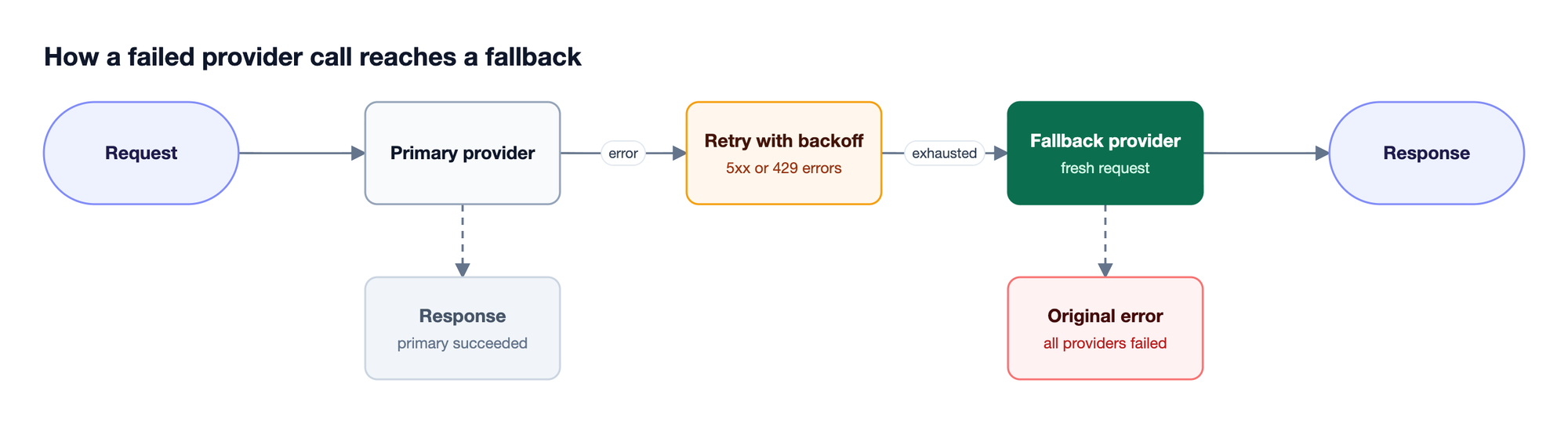
LiteLLM supports a similarly broad provider list and offers retries, cooldowns, several fallback types, and multiple routing strategies. In Bifrost, retries handle transient 5xx and 429 errors with exponential backoff, and each fallback is treated as a fresh request, so governance, caching, and logging plugins run again for the fallback provider. Bifrost is built around the assumption that providers will fail. For a startup whose entire product depends on one or two providers staying online, that assumption is the right one.
Cost Controls and Governance
For a startup, cost controls are not just a finance feature. They are how you avoid one runaway agent loop wiping out a month of runway.
Bifrost makes governance a first-class object through virtual keys, and budgets stack across customers, teams, virtual keys, and provider configs, as Figure 2 shows.
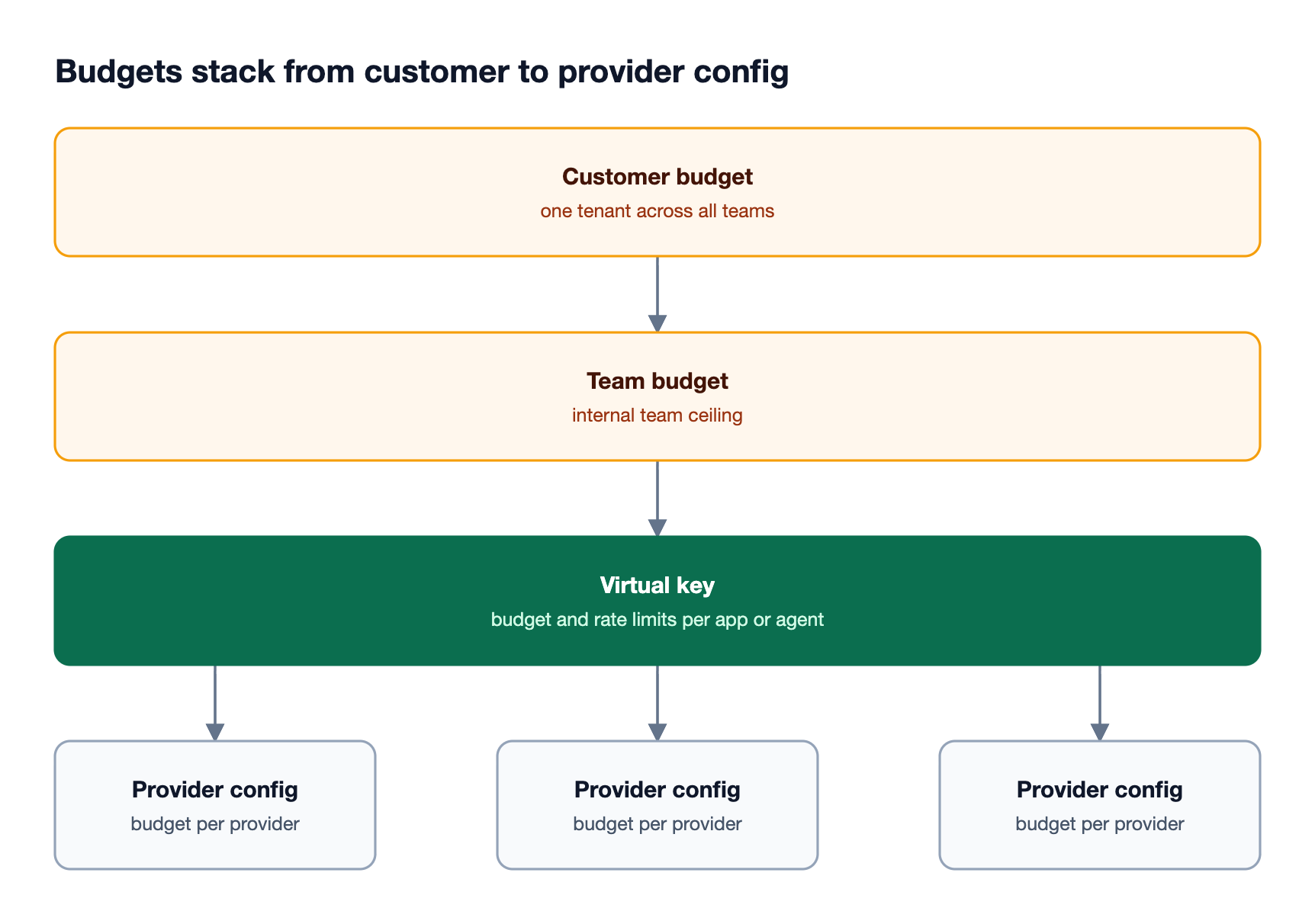
Every consumer of the gateway, whether an internal service, a customer tenant, or an external partner, gets a virtual key with its own:
- Budget cap that resets daily, weekly, monthly, quarterly, or yearly
- Rate limits on tokens and requests per minute, hour, or day
- Provider and model access list
- MCP tool access list (for agentic workflows)
This means a startup running a multi-tenant product can attribute every dollar of LLM spend to a customer, cap usage automatically, and revoke access without touching application code. The governance resource page covers the full hierarchy, and the guide to managing virtual keys and budgets walks through setup.
LiteLLM offers virtual keys, budgets, and rate limits in its open-source proxy as well, while SSO beyond five users, audit logs, role-based access control, tag-based and model-specific budgets, and per-key guardrails require its enterprise license. For startups, that often means evaluating two products: the open-source proxy for development, and a separate commercial offering when governance requirements appear. Bifrost's open-source distribution under Apache 2.0 includes virtual keys and hierarchical budget management without a paid tier requirement; SSO, RBAC, audit logs, and in-VPC deployment are part of Bifrost Enterprise.
Built-In Observability and the MCP Layer
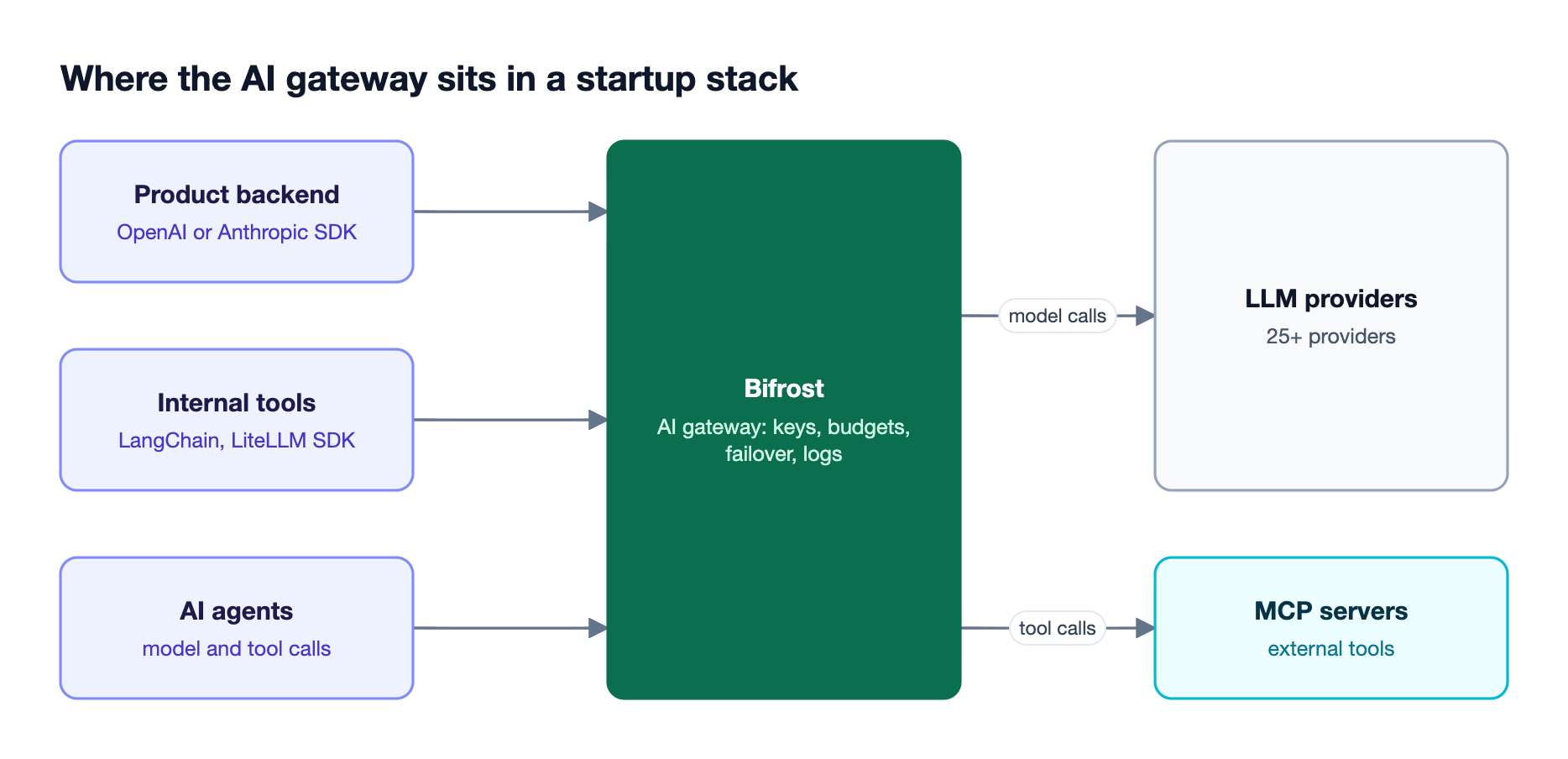
Both gateways expose Prometheus metrics and integrate with observability vendors, and both now include an MCP gateway for agent tool calls. Bifrost adds OpenTelemetry export and Code Mode for large tool catalogs.
Bifrost includes:
- Native Prometheus metrics (scrape and Push Gateway)
- OpenTelemetry (OTLP) export for distributed tracing
- OTLP export to platforms such as Grafana Cloud, Datadog, New Relic, and Honeycomb
- A built-in dashboard for real-time request monitoring without external setup
For startups building agentic products, Bifrost also functions as an MCP gateway, centralizing tool connections, OAuth and per-user authentication, and per-key tool filtering. Its Code Mode lets the model write Python (Starlark) to orchestrate multiple tools in a single turn, which cut input tokens by 92.8% at 508 tools in Bifrost's benchmark.
The article on how Code Mode works covers the details. The full breakdown is in the Bifrost MCP Gateway post.
LiteLLM integrates with many logging and observability vendors and also provides an MCP gateway with access control by key, team, or organization. For startups whose roadmap includes agents, the deciding factors are token cost on large tool catalogs and whether tool governance lives in the same keys and budgets as model traffic.
What Sets Bifrost Apart for Startups
The decision between Bifrost and LiteLLM ultimately comes down to where the startup is heading, not just where it is today. A gateway that works at 50 RPS but degrades at 500 (88.78% success in Bifrost's benchmark) forces a migration at the worst possible moment. A gateway whose overhead grows from microseconds to tens of milliseconds under load eats into product latency that streaming UX and agent workflows cannot afford.
Bifrost is built around three properties that matter at the startup stage:
- Performance that does not need a rewrite: The Go-based architecture handles 5,000 RPS with 11µs overhead, so the same gateway that runs the prototype runs the Series A scale-up
- Drop-in replacement: Existing OpenAI, Anthropic, LiteLLM, and LangChain code works with a single base URL change
- Enterprise readiness on the same gateway: Virtual keys and budgets ship in the open-source gateway, and in-VPC deployment, audit logs, and SSO are added by Bifrost Enterprise without changing the gateway the product already runs on
For a more detailed feature-by-feature comparison, see LiteLLM vs Bifrost feature by feature.
| Capability | Bifrost | LiteLLM |
|---|---|---|
| Language | Go | Python |
| Open-source license | Apache 2.0 | MIT (enterprise folder under a commercial license) |
| Setup | One npx command, zero configuration | config.yaml, or models added through Admin UI with database storage |
| Virtual keys and budgets | Open source, hierarchical (customer, team, key, provider) | Open source; tag-based and model-specific budgets need enterprise license |
| Fallbacks | Retries with backoff, then fresh-request fallbacks | Retries, cooldowns, and several fallback types |
| MCP gateway | Yes, with Code Mode | Yes |
| SSO, RBAC, audit logs | Bifrost Enterprise | Enterprise license (SSO free up to five users) |
Frequently Asked Questions
What is the difference between Bifrost and LiteLLM?
Bifrost and LiteLLM are both open-source AI gateways with an OpenAI-compatible API. Bifrost is written in Go, starts with zero configuration, and organizes governance as a customer, team, virtual key, and provider budget hierarchy. LiteLLM is written in Python, is commonly configured through config.yaml, and scales throughput by adding workers and instances.
Is Bifrost faster than LiteLLM?
In Bifrost's published benchmark at 500 RPS on a t3.medium instance, Bifrost delivered 9.5x higher throughput, 54x lower P99 latency, and 68% less memory than LiteLLM, with a 100% success rate against 88.78%. LiteLLM publishes 8 ms P95 overhead at about 1,000 RPS across four instances, so results depend heavily on hardware and worker configuration.
Does LiteLLM support MCP?
Yes. LiteLLM's proxy includes an MCP gateway that exposes tools through a fixed endpoint with access control by key, team, or organization. Bifrost also acts as an MCP gateway, with per-virtual-key tool filtering, several authentication modes, and Code Mode, which reduced input tokens by 92.8% at 508 tools in Bifrost's benchmark.
Is Bifrost free and open source?
Yes. The Bifrost gateway is open source under the Apache 2.0 license and includes routing, failover, virtual keys, budgets, rate limits, caching, and the MCP gateway. Bifrost Enterprise adds capabilities such as SSO, role-based access control, audit logs, clustering, and in-VPC deployment for teams that need them.
Can I migrate from LiteLLM to Bifrost without rewriting code?
Yes. Bifrost works as a drop-in replacement for the OpenAI, Anthropic, AWS Bedrock, and Google GenAI SDKs and integrates with the LiteLLM and LangChain SDKs, so most applications change only a base URL. Provider keys move into Bifrost, and virtual keys replace LiteLLM keys for budgets and rate limits.
Try Bifrost as Your AI Gateway
Picking the right AI gateway for startups means picking infrastructure that scales with the product, not against it. Bifrost is open source, deploys in a single command, and pairs routing, governance, and observability with microsecond-level overhead. Teams moving off LiteLLM can keep existing SDK code, and teams already caching with LiteLLM can follow the guide to moving from LiteLLM to native semantic caching.
To see how Bifrost can simplify your AI infrastructure from prototype through production, book a demo with the Bifrost team or follow the gateway setup guide to self-host today.