Beyond tools: MCP Apps, prompts and resources through the Bifrost Gateway

Rohan Barde
Nov 23, 2026 · 7 min read
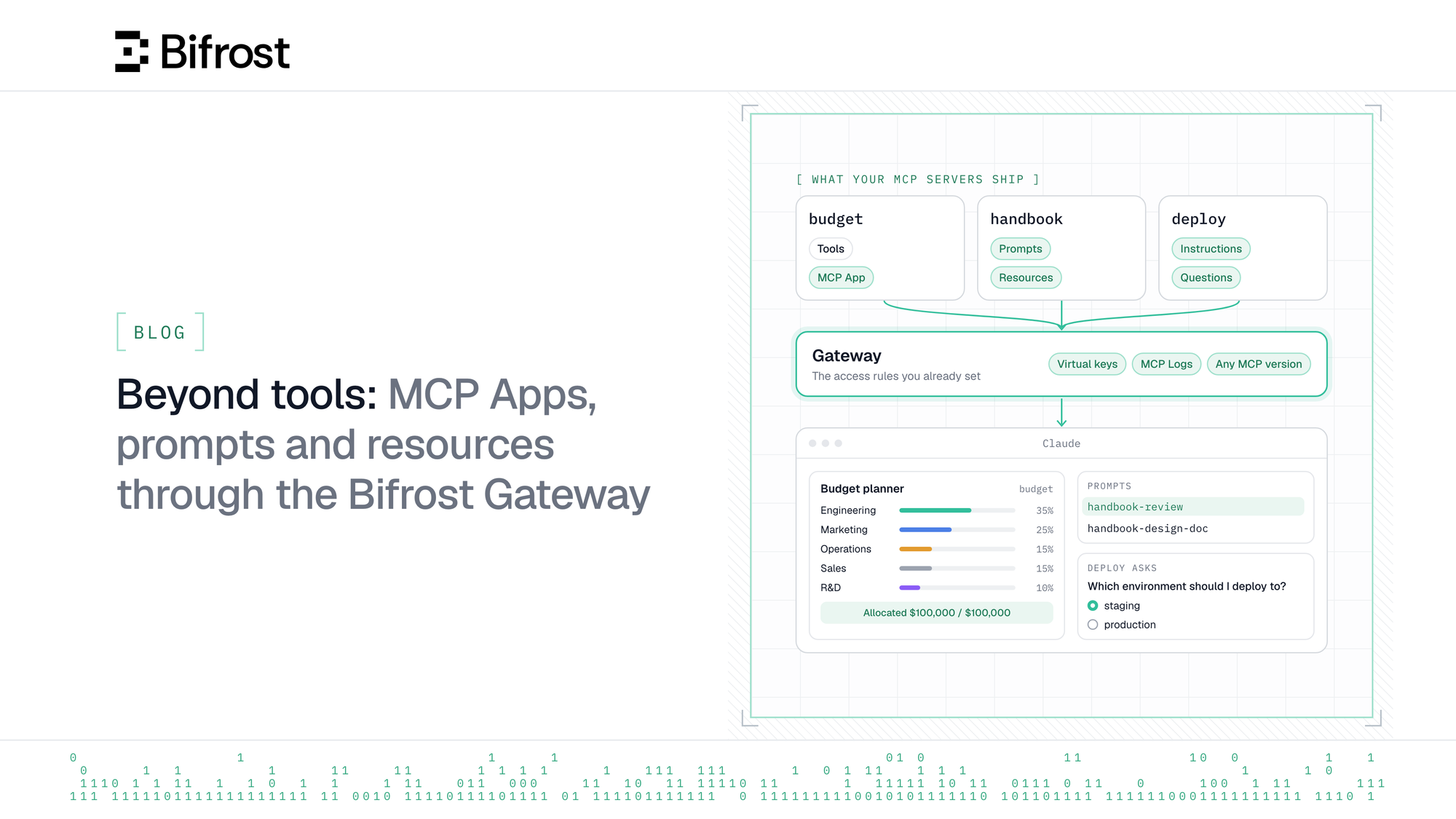
Bifrost already gives every agent your MCP servers' tools under one set of access rules. With v2.5.0, the Gateway can now also carry your servers' prompts, resources and instructions, serve MCP Apps, and pass a server's questions to the user through multi round-trip requests.
Bifrost's MCP gateway gives the agents across your organization one place to reach your MCP servers. You connect a server once, decide which virtual keys can reach it, and every tool call is logged and governed.
MCP servers now ship more than tools. Picture Acme's platform team, which runs three servers behind the Gateway. The finance team's budget server comes with an MCP App: ask Claude to plan next year's budget, and an interactive planner opens in the chat instead of a table of numbers. The handbook server offers a "review" prompt and the engineering handbook as resources. The deploy server has instructions telling agents to run a dry run first, and it asks the user which environment to deploy to before it runs.
If the gateway in between doesn't carry these, users never see them: the planner doesn't open, the review prompt isn't in the menu, and deploy fails on its question. Acme's teams use Claude, ChatGPT, Codex and Cursor, and each one moves to new MCP versions on its own schedule.
With Bifrost v2.5.0, the Gateway can now serve MCP Apps, relay multi round-trip requests, and carry your servers' prompts, resources and instructions. Each reaches your users' clients under the access rules you already set.
Put MCP Apps in front of your users
An MCP App is a tool that comes with its own interface. Next to the tool, the server lists a ui:// resource holding the app's HTML, and a client that supports MCP Apps renders it in the conversation. Some of an app's tools exist only for that interface, like a button that refreshes the data on screen, and are never meant for a model.
The Gateway serves MCP Apps:
- Apps open on the server's own endpoint. Every MCP server connected to Bifrost has its own endpoint,
/mcp/<slug>. There, the Gateway serves the app's tools andui://resources as the server sent them, to clients on MCP 2026-07-28 that declare MCP Apps support. Other clients get the tool without its interface. - App-only tools never reach a model. Only those clients see them, on the server's own endpoint. The shared
/mcpendpoint and Virtual MCPs never list them, and models never get them in chat completions, the Responses API or code mode. - Two servers can't collide. On
/mcp, each server'sui://resources are kept apart, so two servers that ship the same app don't overwrite each other. - The usual access rules apply. A virtual key, Virtual MCP or include header that can't reach
budgetcan't load its app either.
At Acme, a finance analyst asks Claude to plan next year's budget, and the budget planner opens in the chat, served through the Gateway. A contractor whose key only reaches deploy never sees the planner or its tools.
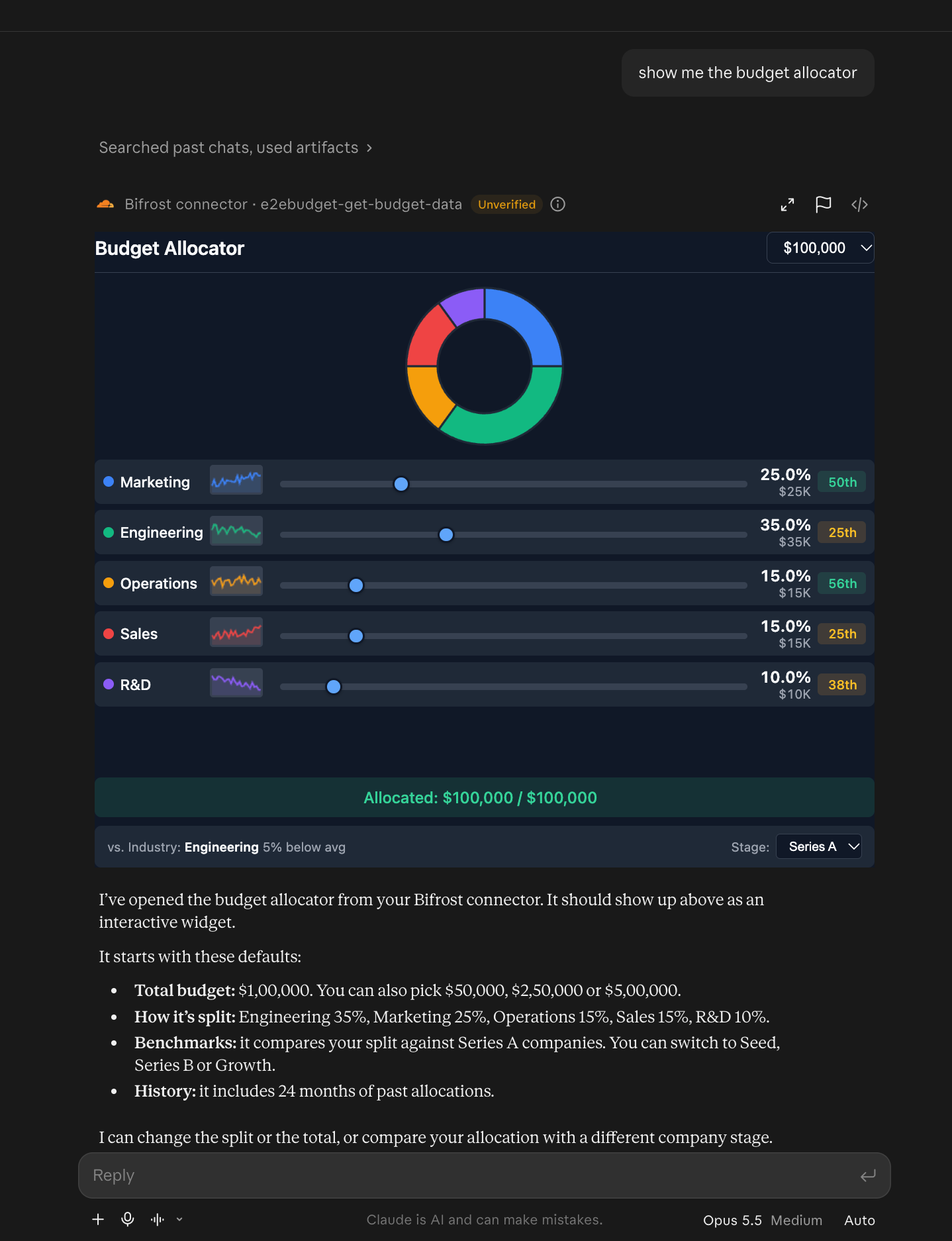
To use an app, point an Apps-capable client at the server's endpoint. A server in code mode serves its endpoint in code mode, so its app tools don't appear there. MCP Logs marks calls from Apps-capable clients and calls to app-only tools. See MCP Apps.
Give every client your servers' prompts and resources
Prompts are reusable message templates a user picks in their MCP client. Resources are documents or data the client can read, such as a file or a record. The Gateway discovers both from every connected server, next to its tools, and serves them on /mcp. A client connected to Bifrost sees the prompts and resources of every server it can reach, without connecting to each one.
Prompts are named like tools, with the server's name first, so handbook's "review" prompt appears as handbook-review. Resources keep the URI the server lists, and every read goes back to the server that listed it.
A caller sees a server's prompts and resources when it can reach that server. The rules are the server-level ones you already use for tools: the servers a virtual key is assigned to, the servers a Virtual MCP draws from, and any include header on the request. At Acme, engineers find the review prompt and the handbook in Claude, while the contractor's key, which only reaches deploy, sees neither.
Limiting a caller to some of a server's tools doesn't limit its prompts or resources. Use the server's allow-lists for that.
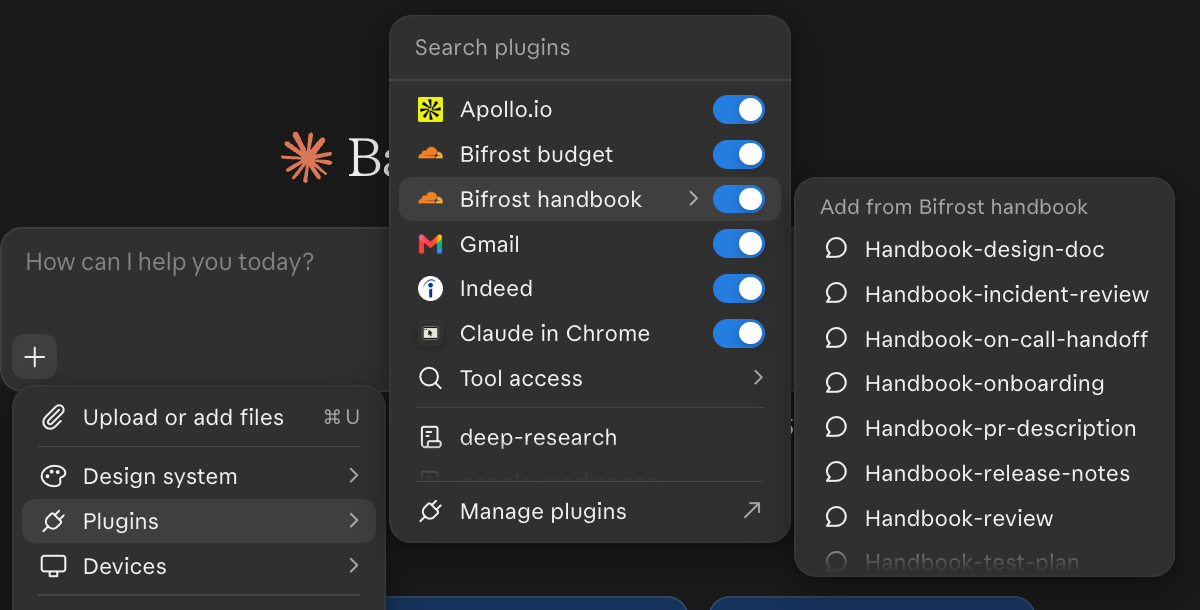
To choose what a server shares, open MCP Servers, select the server and use its Prompts and Resources tabs, or set allow-lists in config.json:
Each prompt fetched and resource read shows up in MCP Logs and goes through governance, like a tool call. Prompts and resources are for MCP clients; models in chat completions and the Responses API still get tools only. See Resources and Prompts.
Pass on how each server wants its tools used
An MCP server can return instructions when a client connects: how its tools fit together, and the rules for using them. Servers such as GitHub's, Grafana's and Outline's use them for workflow rules like "call get_me first to understand the user's permissions". An agent that never sees them still has the tools, but not the guidance that comes with them.
Bifrost keeps each server's instructions and passes them on in two places:
- To MCP clients.
/mcpreturns the instructions of the servers each caller can reach, and only those. - To models. When Bifrost adds MCP tools to a chat completions or Responses API request, it adds the instructions of the same servers to the request, one tagged block per server. In code mode, they travel with the server's tool stubs instead.
At Acme, Codex picks up deploy's dry-run rule when it connects to /mcp, and a chat request that carries deploy's tools gets the rule in its system message. The contractor's key reaches only deploy, so its requests never carry handbook's instructions.
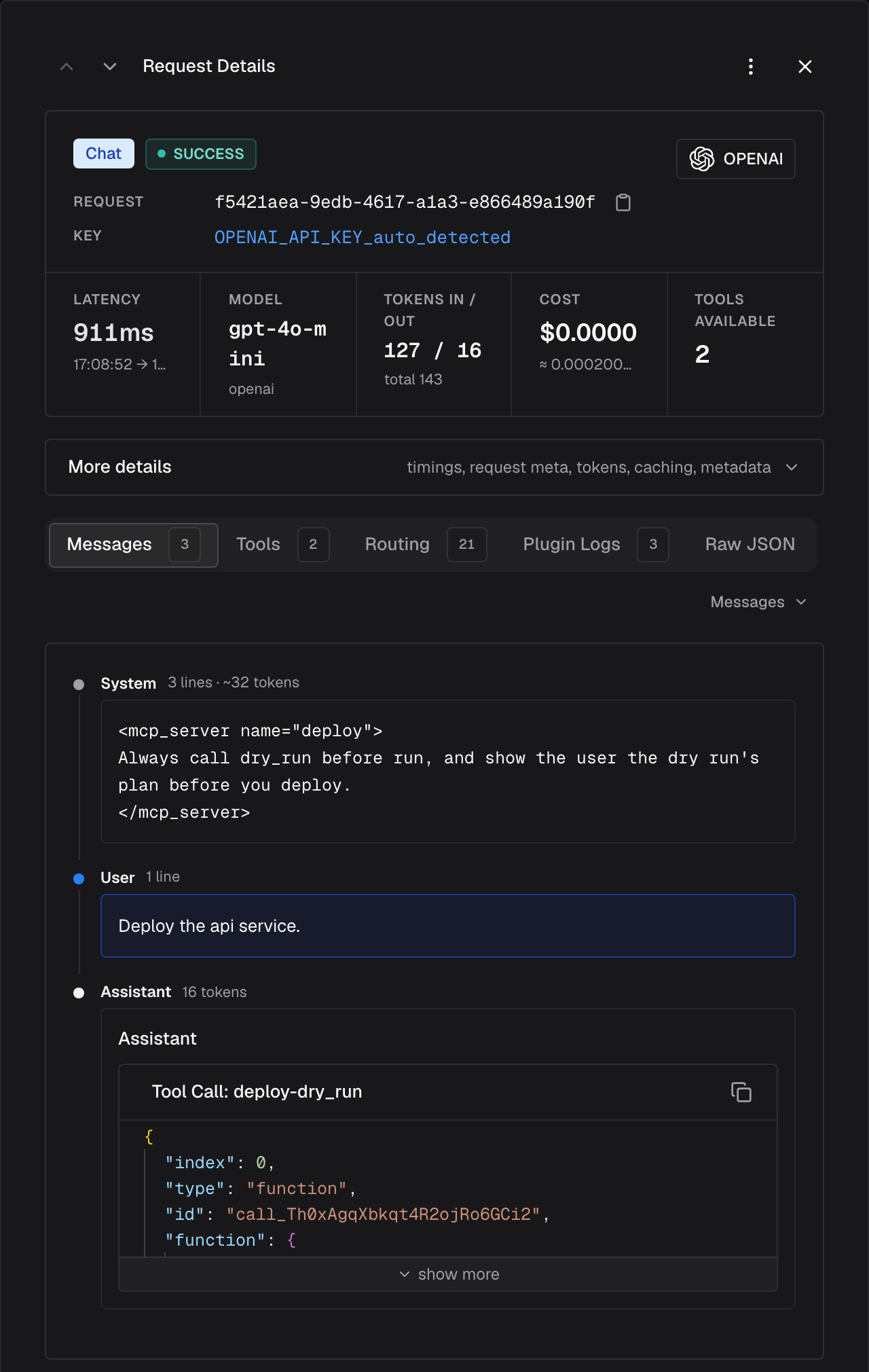
Instructions add tokens to every request that carries MCP tools. Bifrost caps them at 4,096 bytes per server and 16,384 bytes in total by default, and you can change both under MCP Servers → MCP Settings or in config.json:
Turning off automatic tool injection stops instructions too, since a model never sees guidance for tools it wasn't given. See Server Instructions.
Let a server ask the user before it acts
Some tools need one more answer before they run. Acme's deploy server won't guess the environment: it asks the user to pick one, and only then deploys. MCP 2026-07-28 standardizes this as Multi Round-Trip Requests (MRTR). The server answers the tool call with input_required and its questions, such as a form to fill in or a link to open, and the client calls the tool again with the answers.
The Gateway passes these questions through to clients on MCP 2026-07-28. Bifrost tells the server what the calling client can answer, so the server only asks for what that client supports. The user answers in their client, and the answer goes back to the server on the retry. Bifrost keeps nothing between rounds, so the retry can reach any Bifrost replica.
A client on an older MCP version, or one that can't answer that kind of question, gets an error that names the server and what it asked for. So do tools called from chat completions, the Responses API or code mode, where there's no user to ask. Questions meant for a model (sampling) aren't relayed, since MCP 2026-07-28 deprecates sampling.
In MCP Logs, each round of the call is its own entry, linked to the others: what the server asked, what the user answered (recorded only when content logging is on), and the final result.
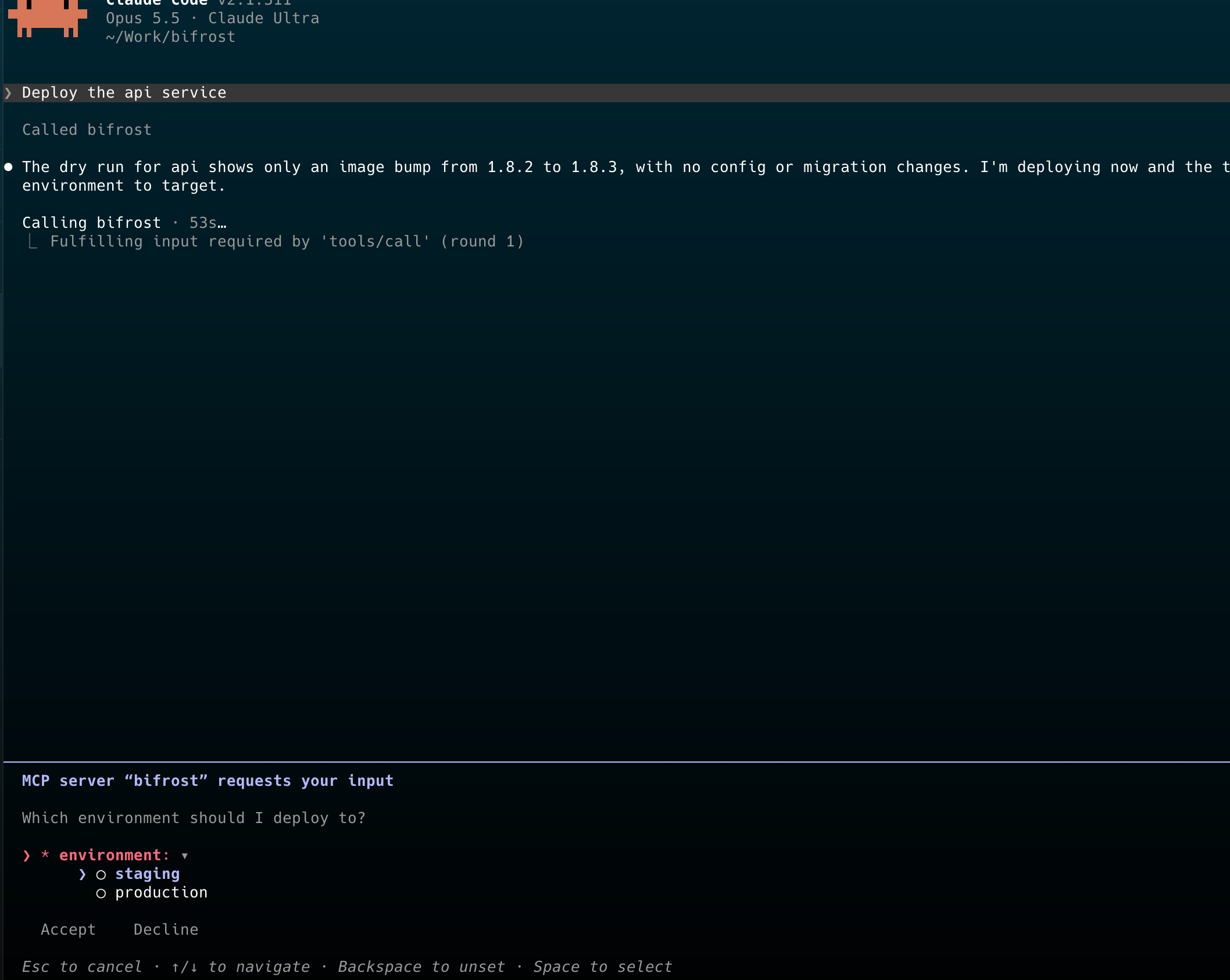
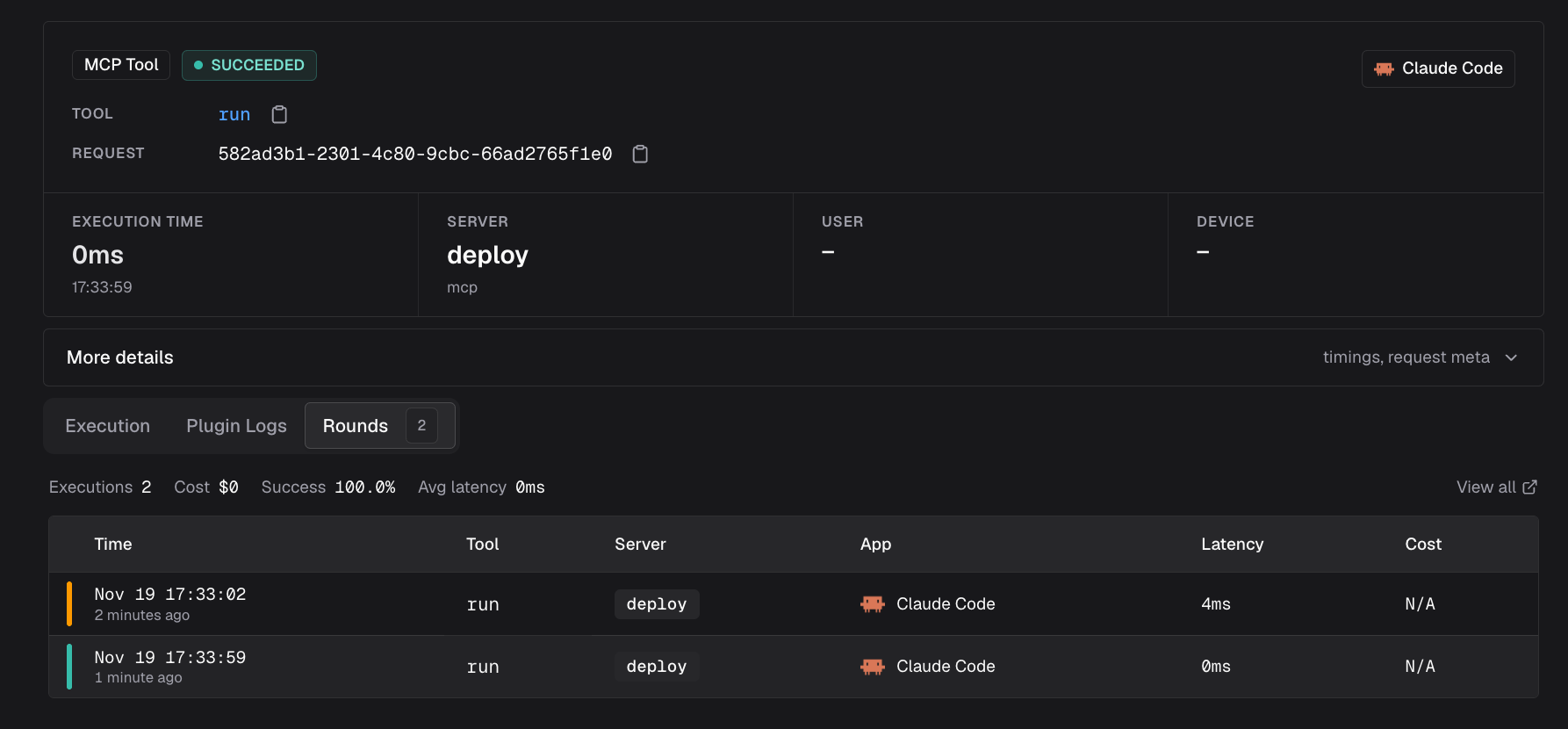
The server needs to be connected on MCP 2026-07-28 for this, which is the default on new installs. If you upgraded with existing MCP servers, set the max protocol version to auto. See Multi round-trip requests.
Let clients and servers move to new MCP versions on their own schedule
MCP has had three revisions in use over the past year: 2025-06-18, 2025-11-25 and 2026-07-28. The newest is stateless: it drops the connection handshake and sessions the older two rely on, and MCP Apps and multi round-trip requests need it. Clients and servers adopt it on their own schedules.
Bifrost speaks all three, on both sides. It connects to each server in the newest version both support, up to the max protocol version you set, and answers each client in the version that client asked for, on the same /mcp endpoint. At Acme, a client still on 2025-06-18 and one on 2026-07-28 both use handbook's tools and prompts through the same Gateway.
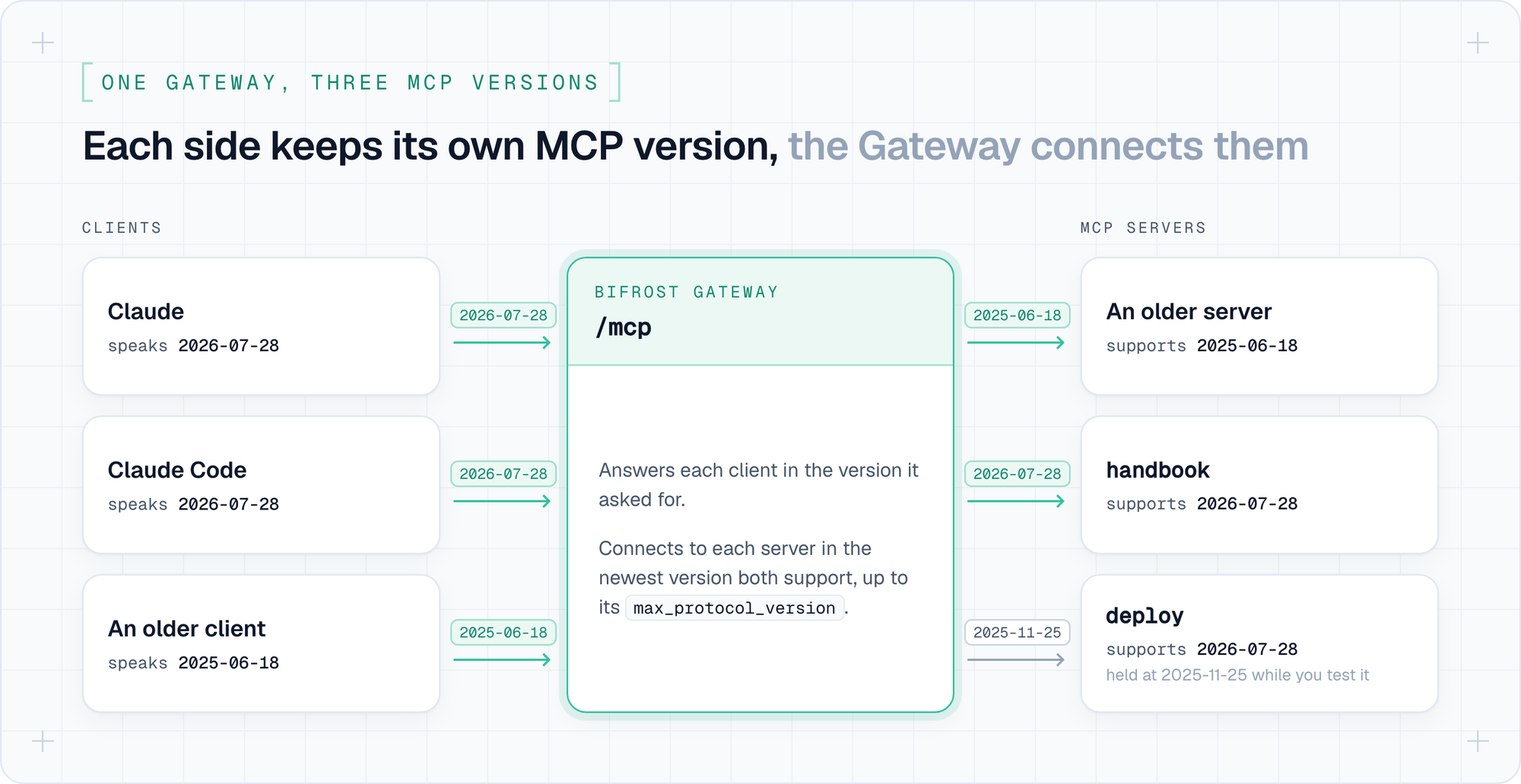
To hold a server back while you test it, set a max protocol version: globally under MCP Servers → MCP Settings, or for one server in config.json:
auto means the newest version Bifrost supports. New installs start on auto. Deployments upgraded with existing MCP servers stay on 2025-06-18, the version earlier releases used, until you switch the global setting to auto. Changing it reconnects the affected servers without a restart.
Tool results also keep their images, audio and structured content on the way through, and clients see each tool's title and icon. See Supported Protocol Versions.
Get started
Everything here is in open source Bifrost from v2.5.0:
Connect your MCP servers, point your clients at /mcp, and use a server's own endpoint for its MCP Apps. The MCP gateway docs cover the rest.